steering Lexus IS300h 2013 Owner's Guide
[x] Cancel search | Manufacturer: LEXUS, Model Year: 2013, Model line: IS300h, Model: Lexus IS300h 2013Pages: 628, PDF Size: 20.23 MB
Page 201 of 628

1994-1. Before driving
4
Driving
IS300h_EE(OM53B95E)
NOTICE
When driving the vehicle
Do not depress the accelerator and brake pedals at the same time during driv-
ing, as this may restrain driving torque.
Do not use the accelerator pedal or depress the accelerator and brake pedals at
the same time to hold the vehicle on a hill.
When parking the vehicle
Always shift the shift lever to P. Failure to do so may cause the vehicle to move
or the vehicle may accelerate suddenly if the accelerator pedal is accidentally
depressed.
Avoiding damage to vehicle parts
Do not turn the steering wheel fully in either direction and hold it there for an
extended period of time.
Doing so may damage the power steering motor.
When driving over bumps in the road, drive as slowly as possible to avoid
damaging the wheels, underside of the vehicle, etc.
If you get a flat tire while driving
A flat or damaged tire may cause the following situations. Hold the steering
wheel firmly and gradually depress the brake pedal to slow down the vehicle.
It may be difficult to control your vehicle.
The vehicle will make abnormal sounds or vibrations.
The vehicle will lean abnormally.
Information on what to do in case of a flat tire (P. 530, 544)
When encountering flooded roads
Do not drive on a road that has flooded after heavy rain etc. Doing so may
cause the following serious damage to the vehicle:
Engine stalling
Short in electrical components
Engine damage caused by water immersion
In the event that you drive on a flooded road and the vehicle is flooded, be sure
to have any authorized Lexus dealer or repairer, or another duly qualified and
equipped professional check the following:
Brake function
Changes in quantity and quality of oil and fluid used for the engine, hybrid
transmission, differential, etc.
Lubricant condition for the propeller shaft, bearings and suspension joints
(where possible), and the function of all joints, bearings, etc.
Page 202 of 628
2004-1. Before driving
IS300h_EE(OM53B95E)
Cargo and luggage
Take notice of the following information about storage precautions,
cargo capacity and load:
CAUTION
Things that must not be carried in the trunk
The following things may cause a fire if loaded in the trunk:
Receptacles containing gasoline
Aerosol cans
Storage precautions
Observe the following precautions.
Failure to do so may prevent the pedals from being depressed properly, may
block the driver’s vision, or may result in items hitting the driver or passengers,
possibly causing an accident.
Stow cargo and luggage in the trunk whenever possible.
To prevent cargo and luggage from sliding forward during braking, do not
stack anything in the enlarged trunk. Keep cargo and luggage low, as close to
the floor as possible.
When you fold down the rear seats, long items should not be placed directly
behind the front seats.
Never allow anyone to ride in the enlarged trunk. It is not designed for pas-
sengers. They should ride in their seats with their seat belts properly fastened.
Do not place cargo or luggage in or on the following locations.
• At the feet of the driver
• On the front passenger or rear seats (when stacking items)
• On the package tray
• On the instrument panel
• On the dashboard
• In front of the navigation system screen (if equipped) or Lexus Display
Audio screen (if equipped)
Secure all items in the occupant compartment.
Load and distribution
Do not overload your vehicle.
Do not apply loads unevenly.
Improper loading may cause deterioration of steering or braking control
which may cause death or serious injury.
Page 208 of 628

2064-1. Before driving
IS300h_EE(OM53B95E)
Your vehicle will handle differently when towing a trailer. In order to
avoid accident, death or serious injury, keep the following in mind when
towing:
Checking connections between trailer and lights
Stop the vehicle and check the operation of the connection between the
trailer and lights after driving for a brief period as well as before start-
ing off.
Practicing driving with a coupled trailer
Get the feel for turning, stopping and reversing with the trailer cou-
pled by practicing in an area with no or light traffic.
When reversing with a coupled trailer, hold the section of the steer-
ing wheel nearest to you and rotate clockwise to turn the trailer left
or counterclockwise to turn it right. Always rotate a little at a time to
prevent steering error. Have someone guide you when reversing to
lessen the risk of an accident.
Increasing vehicle-to-vehicle distance
At a speed of 10 km/h (6 mph), the distance to the vehicle running
ahead of you should be equivalent to or greater than the combined
length of your vehicle and trailer. Avoid sudden braking that may cause
skidding. Otherwise, the vehicle may spin out of control. This is espe-
cially true when driving on wet or slippery road surfaces.
Sudden acceleration/steering input/cornering
Executing sharp turns when towing may result in the trailer colliding
with your vehicle. Decelerate well in advance when approaching turns
and take them slowly and carefully to avoid sudden braking.
Important points regarding turning
The wheels of the trailer will travel closer to the inside of the curve
than the wheels of the vehicle. To make allowance for this, take the
turns wider than you would normally do.
Guidance
Page 214 of 628
2124-2. Driving procedures
IS300h_EE(OM53B95E)
Steering lock
After turning the power switch off and opening and closing the doors, the steer-
ing wheel will be locked due to the steering lock function. Operating the power
switch again automatically cancels the steering lock.
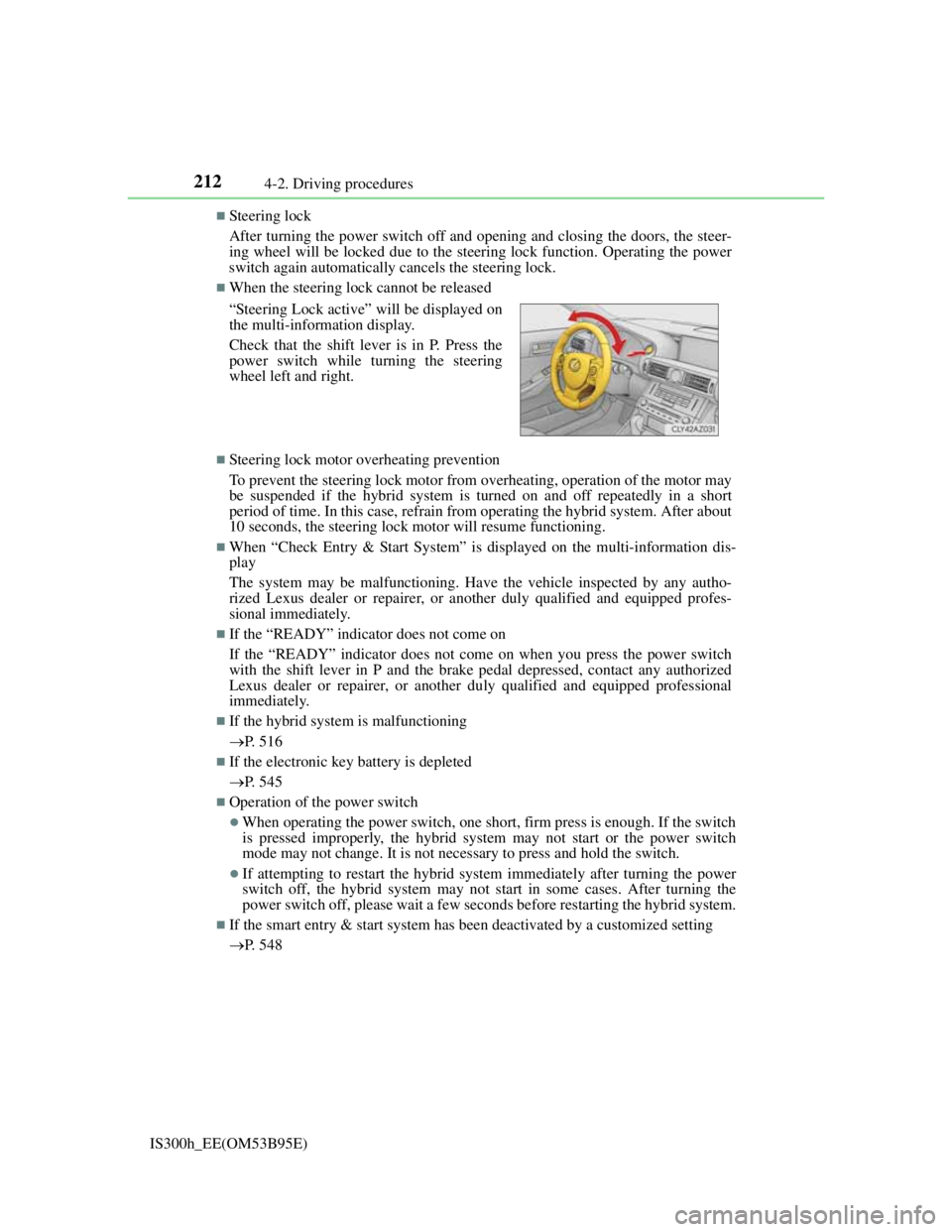
When the steering lock cannot be released
Steering lock motor overheating prevention
To prevent the steering lock motor from overheating, operation of the motor may
be suspended if the hybrid system is turned on and off repeatedly in a short
period of time. In this case, refrain from operating the hybrid system. After about
10 seconds, the steering lock motor will resume functioning.
When “Check Entry & Start System” is displayed on the multi-information dis-
play
The system may be malfunctioning. Have the vehicle inspected by any autho-
rized Lexus dealer or repairer, or another duly qualified and equipped profes-
sional immediately.
If the “READY” indicator does not come on
If the “READY” indicator does not come on when you press the power switch
with the shift lever in P and the brake pedal depressed, contact any authorized
Lexus dealer or repairer, or another duly qualified and equipped professional
immediately.
If the hybrid system is malfunctioning
P. 516
If the electronic key battery is depleted
P. 545
Operation of the power switch
When operating the power switch, one short, firm press is enough. If the switch
is pressed improperly, the hybrid system may not start or the power switch
mode may not change. It is not necessary to press and hold the switch.
If attempting to restart the hybrid system immediately after turning the power
switch off, the hybrid system may not start in some cases. After turning the
power switch off, please wait a few seconds before restarting the hybrid system.
If the smart entry & start system has been deactivated by a customized setting
P. 548 “Steering Lock active” will be displayed on
the multi-information display.
Check that the shift lever is in P. Press the
power switch while turning the steering
wheel left and right.
Page 215 of 628

2134-2. Driving procedures
4
Driving
IS300h_EE(OM53B95E)
CAUTION
When starting the hybrid system
Always start the hybrid system while sitting in the driver’s seat. Do not depress
the accelerator pedal while starting the hybrid system under any circumstances.
Doing so may cause an accident resulting in death or serious injury.
Caution while driving
If hybrid system failure occurs while the vehicle is moving, do not lock or open
the doors until the vehicle reaches a safe and complete stop. Activation of the
steering lock in this circumstance may lead to an accident, resulting in death or
serious injury.
Stopping the hybrid system in an emergency
If you want to stop the hybrid system in an emergency while driving the vehi-
cle, press and hold the power switch for more than 2 seconds, or press it briefly
3 times or more in succession. (P. 499)
However, do not touch the power switch while driving except in an emergency.
Turning the hybrid system off while driving will not cause loss of steering or
braking control, but the power assist to these systems will be lost. This will
make it more difficult to steer and brake, so you should pull over and stop the
vehicle as soon as it is safe to do so.
NOTICE
To prevent 12-volt battery discharge
Do not leave the power switch in ACCESSORY or ON mode for long periods
of time without the hybrid system on.
If “ACCESSORY” or “IGNITION ON” is displayed on the meters while the
hybrid system is not operating, the power switch is not off. Exit the vehicle
after turning the power switch off.
Do not stop the hybrid system when the shift lever is in a position other than
P. If the hybrid system is stopped in another shift lever position, the power
switch will not be turned off but instead be turned to ACCESSORY mode. If
the vehicle is left in ACCESSORY mode, 12-volt battery discharge may
occur.
When starting the hybrid system
Do not depress the accelerator pedal unnecessarily.
If the hybrid system becomes difficult to start, have your vehicle checked by
any authorized Lexus dealer or repairer, or another duly qualified and
equipped professional immediately.
Symptoms indicating a malfunction with the power switch
If the power switch seems to be operating somewhat differently than usual,
such as the switch sticking slightly, there may be a malfunction. Contact any
authorized Lexus dealer or repairer, or another duly qualified and equipped
professional immediately.
Page 265 of 628

2634-5. Using the driving support systems
4
Driving
IS300h_EE(OM53B95E)
CAUTION
When the sensor may not be correctly detecting the vehicle ahead
Apply the brakes as necessary when any of the following types of vehicles are
in front of you.
As the sensor may not be able to correctly detect these types of vehicles, the
approach warning (P. 254) will not be activated, and a fatal or serious acci-
dent may result.
Vehicles that cut in suddenly
Vehicles traveling at low speeds
Vehicles that are not moving
Vehicles with small rear ends (trailers with no load on board etc.)
Motorcycles traveling in the same lane
Conditions under which the vehicle-to-vehicle distance control may not func-
tion correctly
Apply the brakes as necessary in the following conditions as the radar sensor
may not be able to correctly detect vehicles ahead, and a fatal or serious acci-
dent may result:
When water or snow thrown up by a the surrounding vehicles hinders the
functioning of the sensor
When your vehicle is pointing upwards (caused by a heavy load in the trunk
etc.)
When the road curves or when the lanes are narrow
When steering wheel operation or your position in the lane is unstable
When the vehicle ahead of you decelerates suddenly
Handling the radar sensor
Observe the following to ensure the cruise control system can function effec-
tively.
Otherwise, the system may not function correctly and could result in an acci-
dent.
Keep the sensor and grille cover clean at all times.
Clean the sensor and grille cover with a soft cloth so you do not mark or dam-
age them.
Do not subject the sensor or surrounding area to a strong impact.
If the sensor moves even slightly off position, the system may malfunction. If
the sensor or surrounding area is subject to a strong impact, always have the
area inspected and adjusted by any authorized Lexus dealer or repairer, or
another duly qualified and equipped professional.
Do not disassemble the sensor.
Do not attach accessories or stickers to the sensor, grille cover or surrounding
area.
Do not modify or paint the sensor and grille cover.
Do not replace them with non-genuine parts.
Page 271 of 628

2694-5. Using the driving support systems
4
Driving
IS300h_EE(OM53B95E)
CAUTION
Before using the LDA system
Do not rely solely on the LDA system. The LDA system does not drive the
vehicle automatically, nor does it reduce the amount of care you need to take.
As such, the driver must always assume full responsibility for understanding
his/her surroundings, for operating the steering wheel to correct the driving
line, and for driving safely.
Inappropriate or negligent driving could lead to an accident.
To avoid operating the LDA by mistake
Switch the LDA system off using the LDA switch when not in use.
Situations unsuitable for LDA system
Do not use the LDA system in any of the following situations.
Otherwise, the system may not function correctly and could result in an acci-
dent.
When driving with tire chains, a spare tire, or similar equipment
When there are objects or structures along the roadside that might be misin-
terpreted as lane markers (such as guardrails, a curb, reflector posts, etc.)
When driving on snowy roads
When pavement lane markers are difficult to see due to rain, snow, fog, sand
dust, etc.
When there are visible lines on the pavement from road repairs, or if the
remains of old lane markers are still visible on the road
When driving on a road with lane closures due to maintenance, or when driv-
ing in a temporary lane
Page 290 of 628

2884-5. Using the driving support systems
IS300h_EE(OM53B95E)
CAUTION
When using the rear view monitor system
The rear view monitor system is a supplemental device intended to assist the
driver when backing up. When backing up, be sure to check visually behind
and all around the vehicle before proceeding.
Observe the following precautions to avoid an accident that could result in
death or serious injuries.
Never depend on the rear view monitor system entirely when backing up. The
image and the position of the guide lines displayed on the screen may differ
from the actual state.
Use caution, just as you would when backing up any vehicle.
Be sure to back up slowly, depressing the brake pedal to control vehicle
speed.
The instructions given are only guidelines.
When and how much to turn the steering wheel will vary according to traffic
conditions, road surface conditions, vehicle condition, etc. when parking. It is
necessary to be fully aware of this before using the rear view monitor system.
When parking, be sure to check that the parking space will accommodate your
vehicle before maneuvering into it.
Do not use the rear view monitor system in the following cases:
• On icy or slick road surfaces, or in snow
• When using tire chains
• When the trunk lid is not closed completely
• On roads that are not flat or straight, such as curves or slopes.
In low temperatures, the screen may darken or the image may become faint.
The image could distort when the vehicle is moving, or you may become
unable to see the image on the screen. Be sure to check direct visually and
with the mirrors all around the vehicle before proceeding.
If the tire sizes are changed, the position of the fixed guide lines displayed on
the screen may change.
The camera uses a special lens. The distances between objects and pedestrians
that appear in the image displayed on the screen will differ from the actual
distances.
(P. 281)
Page 292 of 628
2904-5. Using the driving support systems
IS300h_EE(OM53B95E)
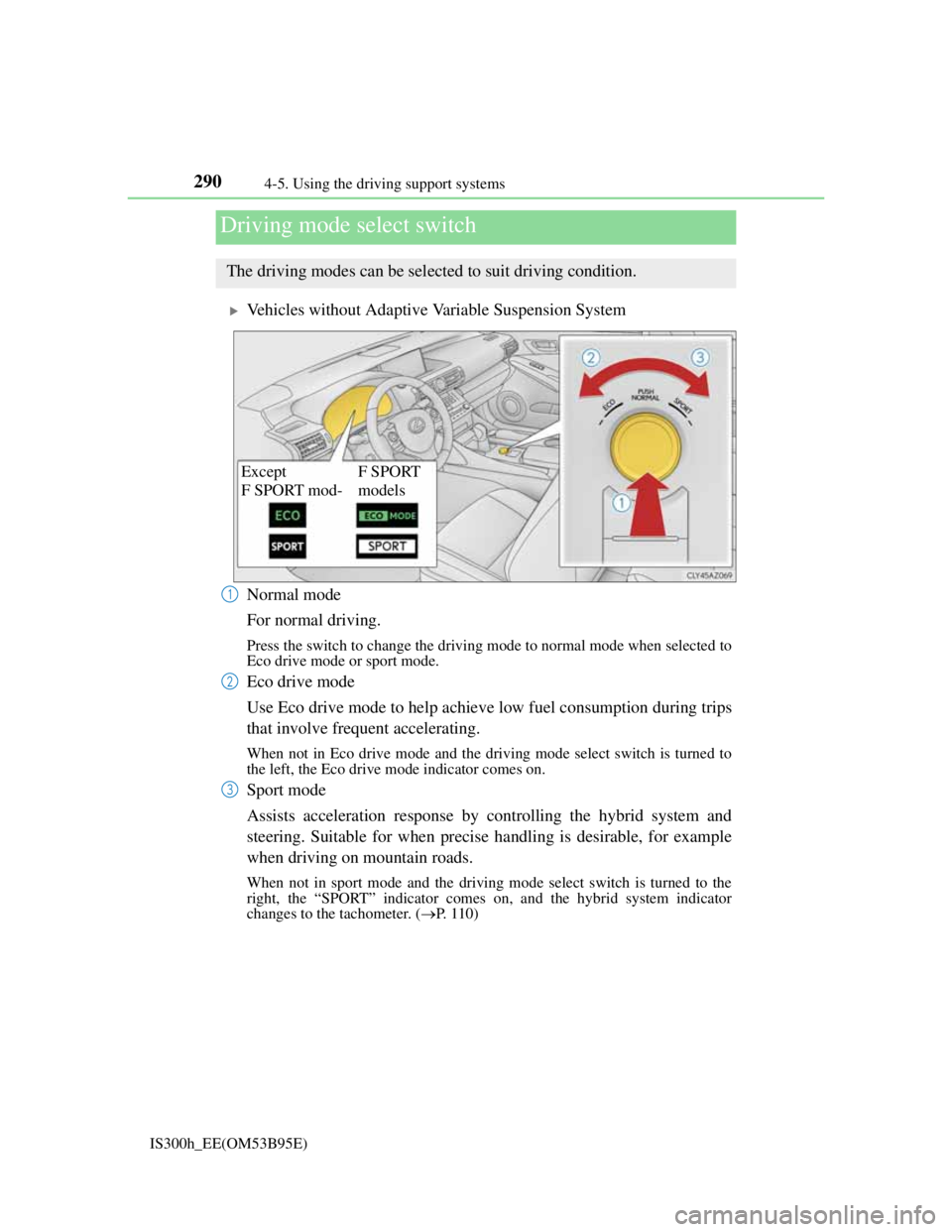
Vehicles without Adaptive Variable Suspension System
Normal mode
For normal driving.
Press the switch to change the driving mode to normal mode when selected to
Eco drive mode or sport mode.
Eco drive mode
Use Eco drive mode to help achieve low fuel consumption during trips
that involve frequent accelerating.
When not in Eco drive mode and the driving mode select switch is turned to
the left, the Eco drive mode indicator comes on.
Sport mode
Assists acceleration response by controlling the hybrid system and
steering. Suitable for when precise handling is desirable, for example
when driving on mountain roads.
When not in sport mode and the driving mode select switch is turned to the
right, the “SPORT” indicator comes on, and the hybrid system indicator
changes to the tachometer. (P. 110)
Driving mode select switch
The driving modes can be selected to suit driving condition.
Except
F SPORT mod-F SPORT
models
1
2
3
Page 294 of 628

2924-5. Using the driving support systems
IS300h_EE(OM53B95E)
Sport mode
• SPORT S mode
Assists acceleration response by controlling the hybrid system. Suit-
able for when powerful acceleration is desirable.
When not in SPORT S mode and the driving mode select switch is turned
to the right, the “SPORT S” indicator comes on, and the hybrid system
indicator changes to the tachometer. (P. 1 1 0 )
• SPORT S+ mode
Helps to ensure steering performance and driving stability by simul-
taneously controlling the steering and suspension in addition to the
hybrid system. Suitable for sporty driving.
When in SPORT S mode and the driving mode select switch is turned to the
right, the “SPORT S+” indicator comes on.
Operation of the air conditioning system in Eco drive mode
Eco drive mode controls the heating/cooling operations and fan speed of the air
conditioning system to enhance fuel efficiency (P. 398). To improve air condi-
tioning performance, adjust the fan speed or turn off Eco drive mode.
Sport mode automatic deactivation
Sport mode is automatically deactivated if the power switch is turned off after
driving in sport mode.
3