height Lexus IS300h 2013 Owner's Manual
[x] Cancel search | Manufacturer: LEXUS, Model Year: 2013, Model line: IS300h, Model: Lexus IS300h 2013Pages: 628, PDF Size: 20.23 MB
Page 39 of 628
391-1. For safe use
1
For safety and security
IS300h_EE(OM53B95E)
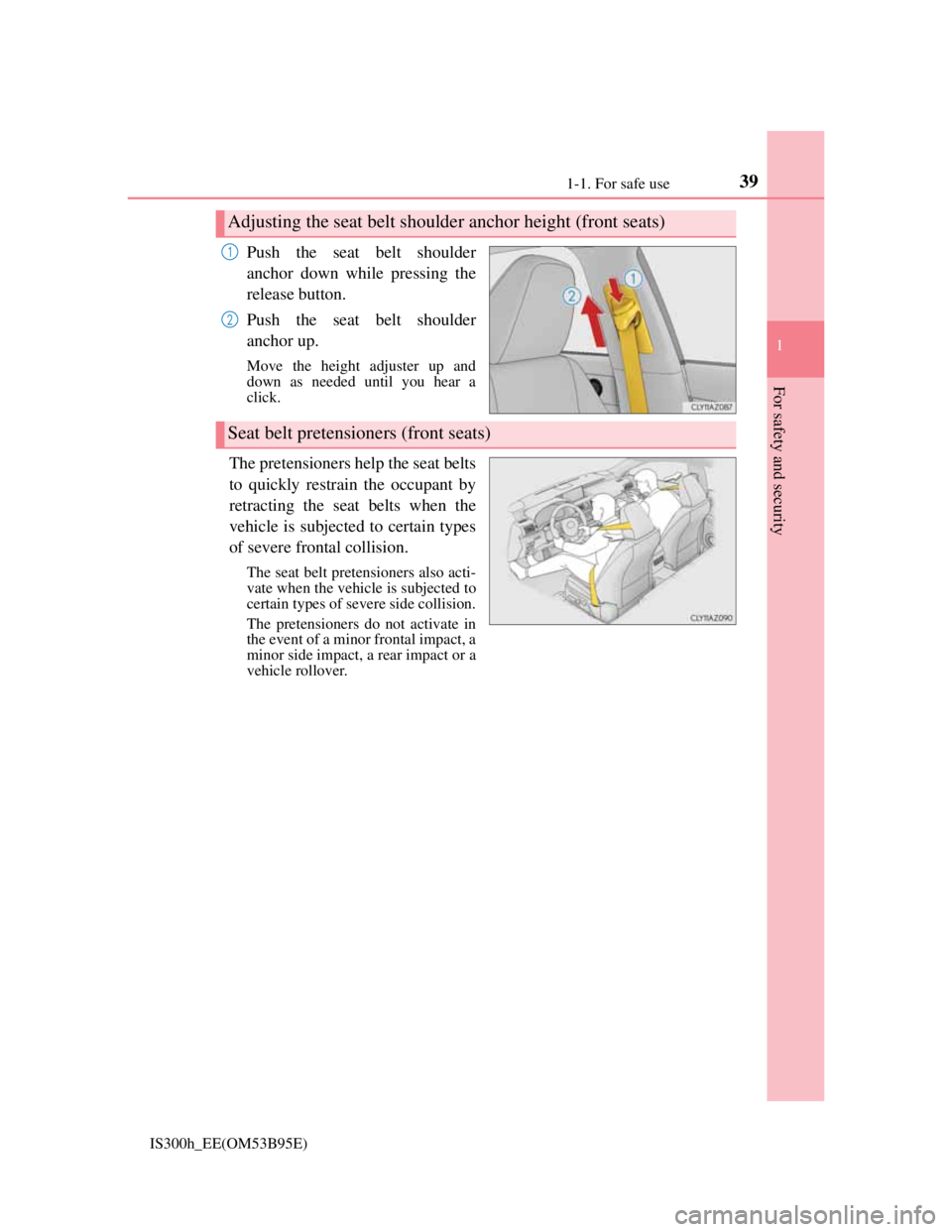
Push the seat belt shoulder
anchor down while pressing the
release button.
Push the seat belt shoulder
anchor up.
Move the height adjuster up and
down as needed until you hear a
click.
The pretensioners help the seat belts
to quickly restrain the occupant by
retracting the seat belts when the
vehicle is subjected to certain types
of severe frontal collision.
The seat belt pretensioners also acti-
vate when the vehicle is subjected to
certain types of severe side collision.
The pretensioners do not activate in
the event of a minor frontal impact, a
minor side impact, a rear impact or a
vehicle rollover.
Adjusting the seat belt shoulder anchor height (front seats)
1
2
Seat belt pretensioners (front seats)
Page 59 of 628
591-1. For safe use
1
For safety and security
IS300h_EE(OM53B95E)
NOTICE
Pop Up Hood precautions
Make sure to close the hood before driving, as the system may not operate
properly if the hood is not fully closed.
Make sure that all 4 tires are of the specified size and inflated to the specified
tire pressure (P. 570). If tires of a different size are used, the system may
not operate properly.
If something has hit the area around the front bumper, the sensors may be
damaged even if the Pop Up Hood has not operated. Have the vehicle
inspected by any authorized Lexus dealer or repairer, or another duly quali-
fied and equipped professional.
Do not remove or repair the parts or wiring of the Pop Up Hood, as doing so
may cause accidental operation or prevent the system from operating prop-
erly. If repair or replacement is necessary, contact any authorized Lexus
dealer or repairer, or another duly qualified and equipped professional.
Do not remove such components as the front bumper, hood or suspension, or
replace them with non-genuine parts, as doing so may prevent the system
from operating properly.
Do not install anything to the front bumper or hood, as doing so may prevent
the sensors from detecting an impact correctly and prevent the system from
operating properly.
Do not close the hood with force or apply load to the lifters, as doing so may
damage the lifters and prevent the system from operating properly.
Do not modify the suspension, as changes made to the vehicle height may
prevent the system from operating properly.
Page 166 of 628
164
IS300h_EE(OM53B95E)3-3. Adjusting the seats
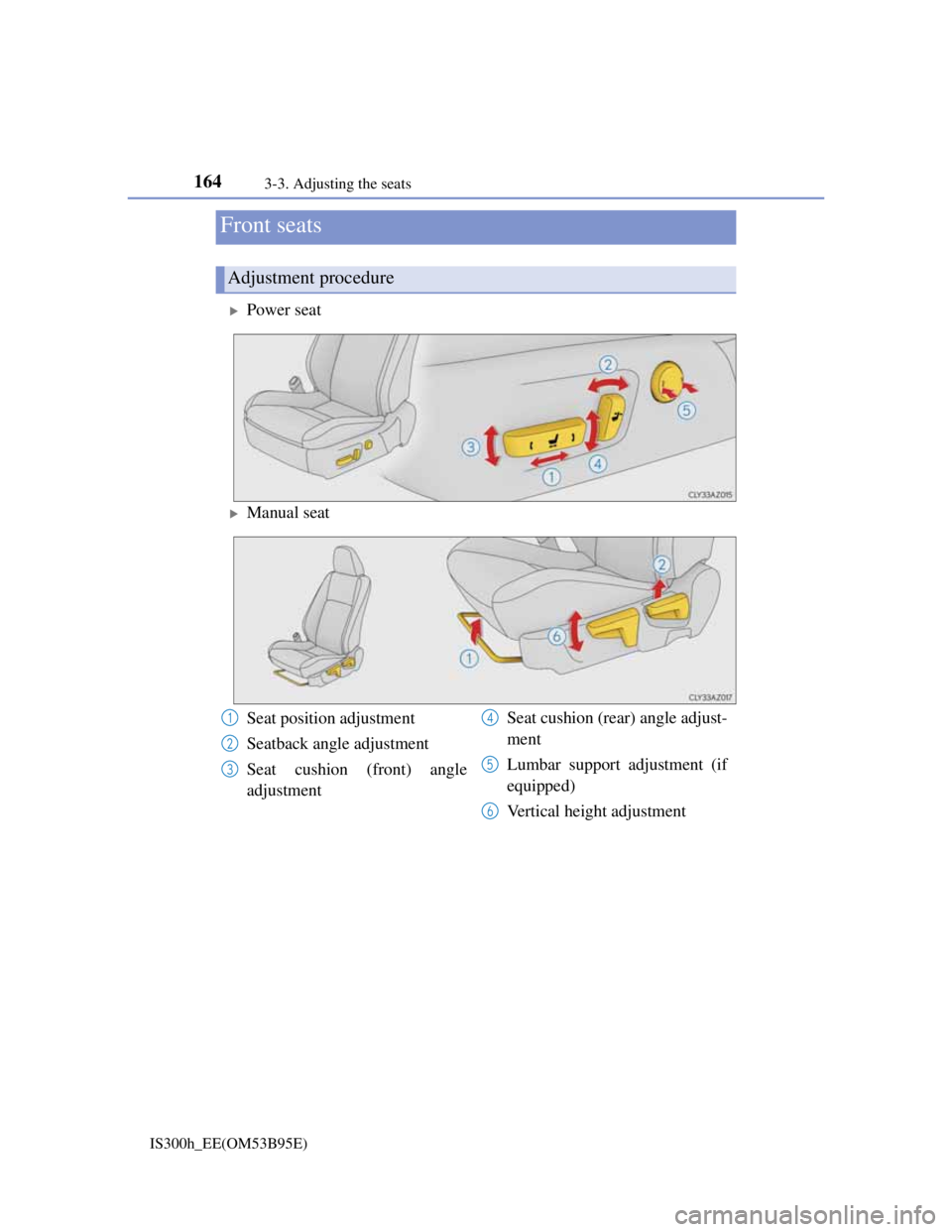
Power seat
Manual seat
Front seats
Adjustment procedure
Seat position adjustment
Seatback angle adjustment
Seat cushion (front) angle
adjustmentSeat cushion (rear) angle adjust-
ment
Lumbar support adjustment (if
equipped)
Vertical height adjustment1
2
3
4
5
6
Page 176 of 628
1743-3. Adjusting the seats
IS300h_EE(OM53B95E)
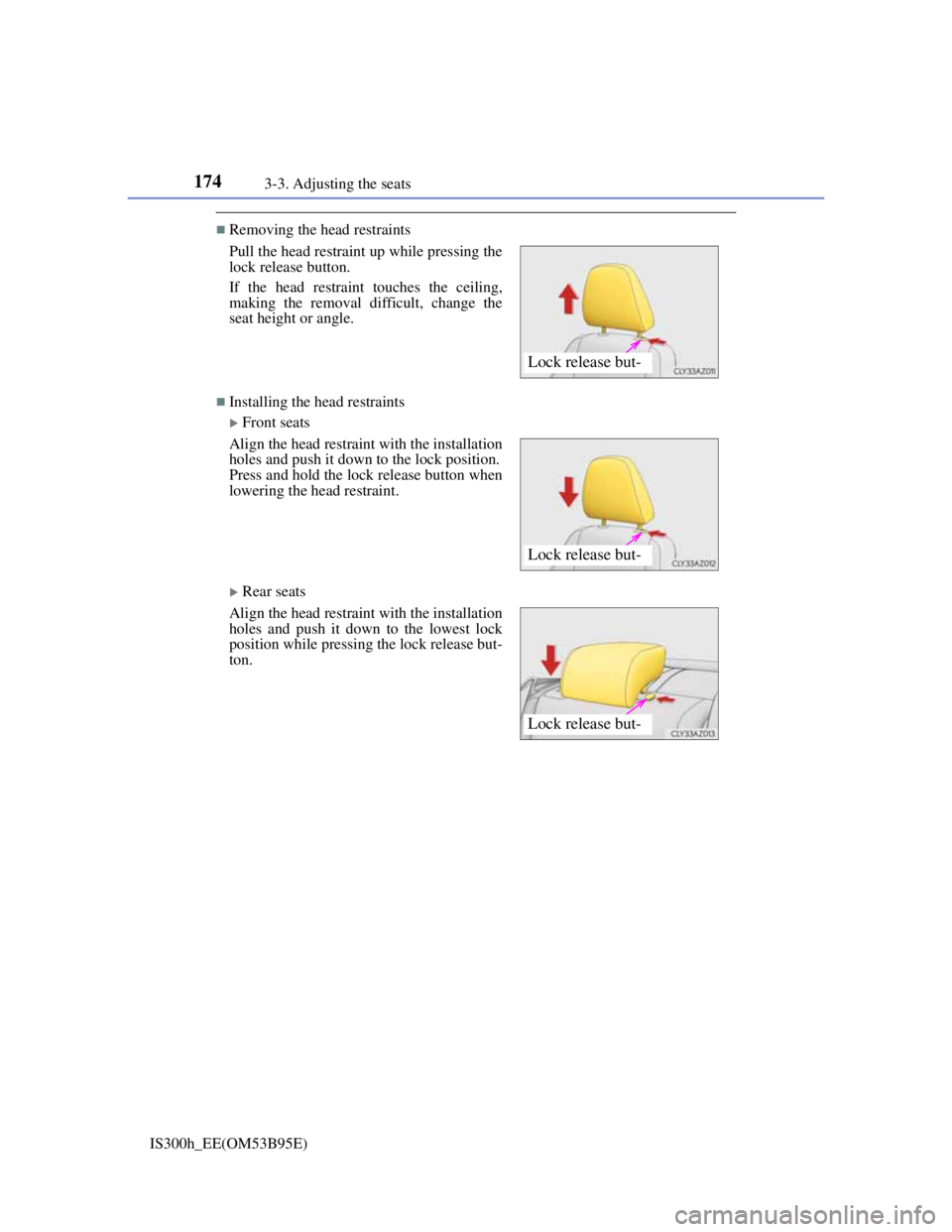
Removing the head restraints
Installing the head restraints
Front seats
Rear seats Pull the head restraint up while pressing the
lock release button.
If the head restraint touches the ceiling,
making the removal difficult, change the
seat height or angle.
Align the head restraint with the installation
holes and push it down to the lock position.
Press and hold the lock release button when
lowering the head restraint.
Align the head restraint with the installation
holes and push it down to the lowest lock
position while pressing the lock release but-
ton.
Lock release but-
Lock release but-
Lock release but-
Page 177 of 628
1753-3. Adjusting the seats
3
Operation of each component
IS300h_EE(OM53B95E)
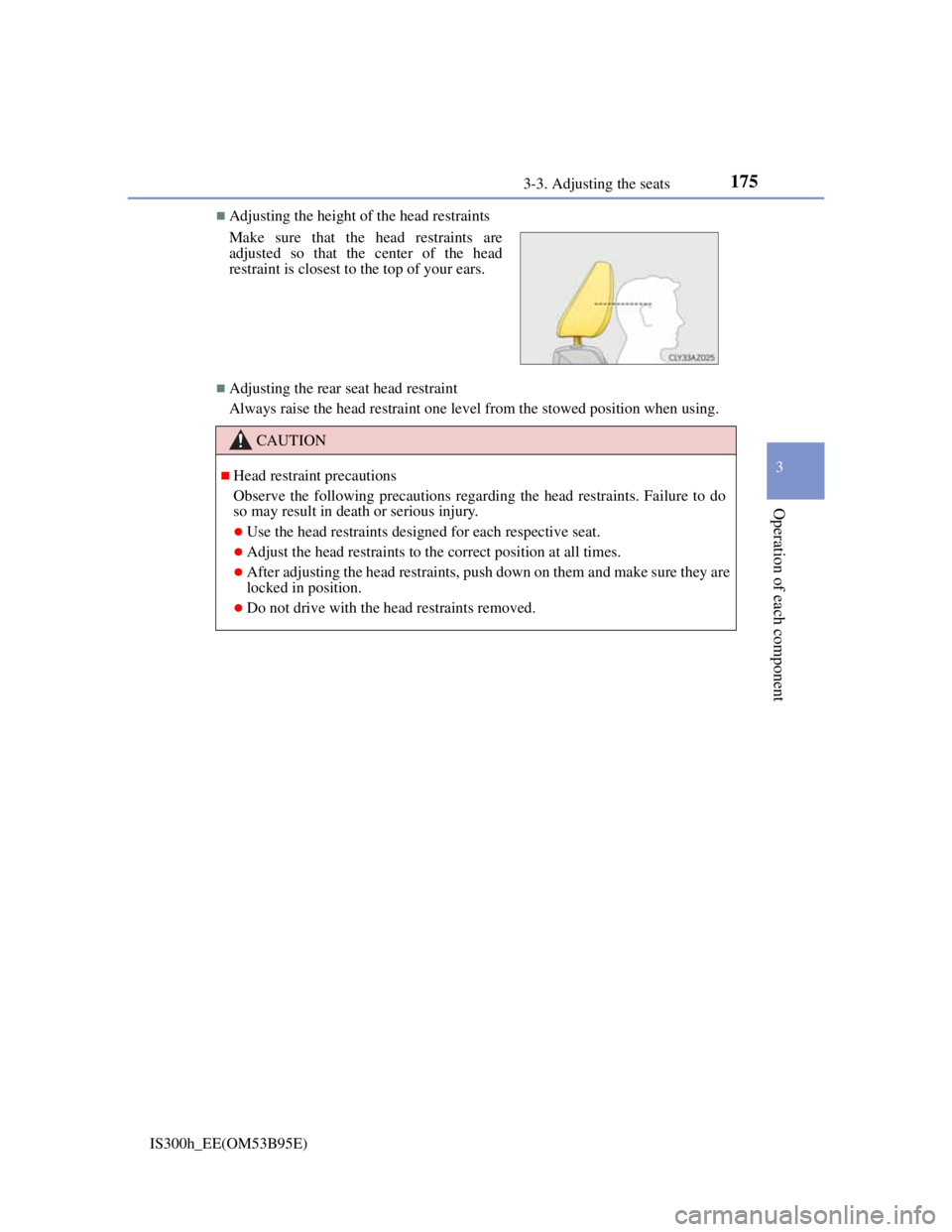
Adjusting the height of the head restraints
Adjusting the rear seat head restraint
Always raise the head restraint one level from the stowed position when using. Make sure that the head restraints are
adjusted so that the center of the head
restraint is closest to the top of your ears.
CAUTION
Head restraint precautions
Observe the following precautions regarding the head restraints. Failure to do
so may result in death or serious injury.
Use the head restraints designed for each respective seat.
Adjust the head restraints to the correct position at all times.
After adjusting the head restraints, push down on them and make sure they are
locked in position.
Do not drive with the head restraints removed.
Page 180 of 628
1783-4. Adjusting the steering wheel and mirrors
IS300h_EE(OM53B95E)
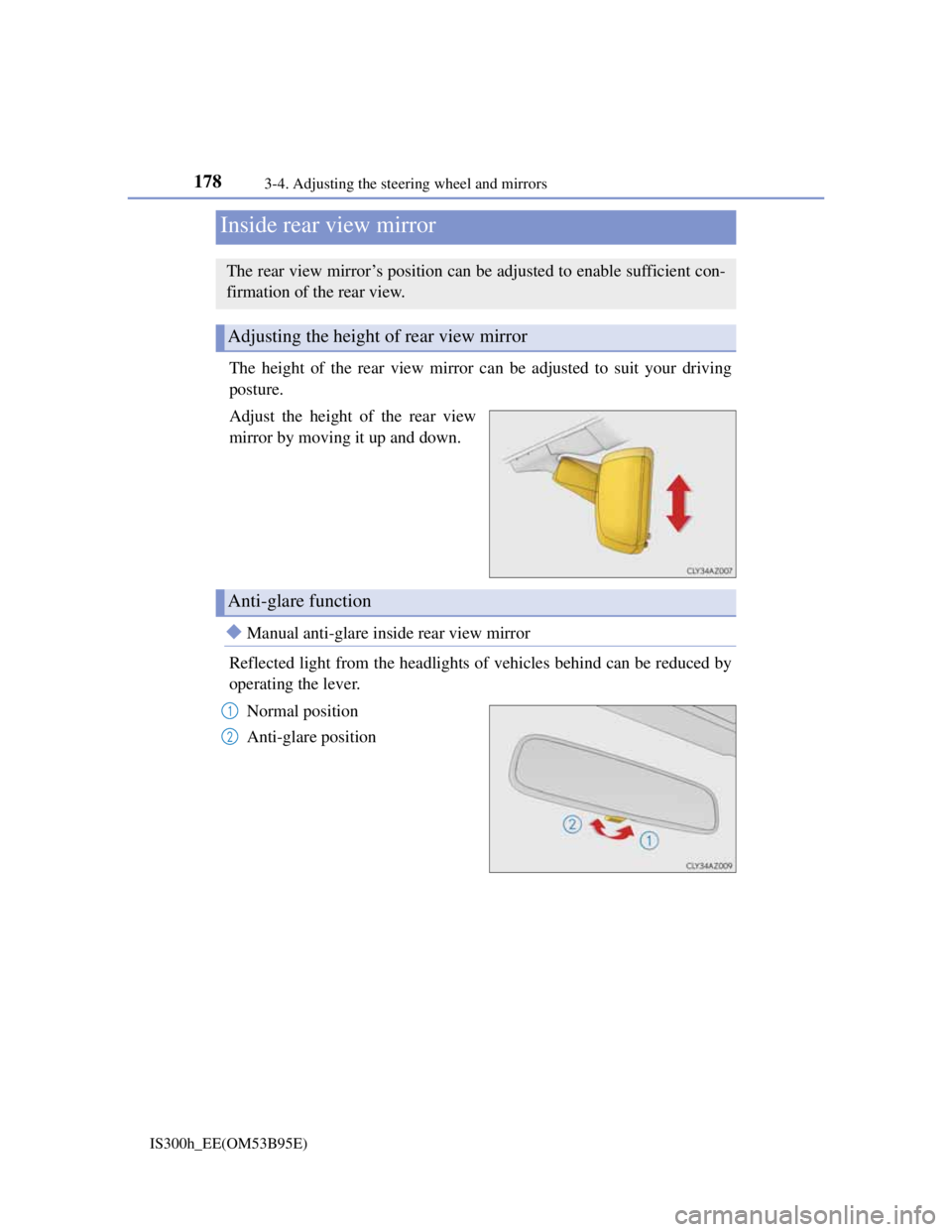
The height of the rear view mirror can be adjusted to suit your driving
posture.
Adjust the height of the rear view
mirror by moving it up and down.
Manual anti-glare inside rear view mirror
Reflected light from the headlights of vehicles behind can be reduced by
operating the lever.
Normal position
Anti-glare position
Inside rear view mirror
The rear view mirror’s position can be adjusted to enable sufficient con-
firmation of the rear view.
Adjusting the height of rear view mirror
Anti-glare function
1
2
Page 304 of 628

3024-5. Using the driving support systems
IS300h_EE(OM53B95E)
The pre-crash safety system is operational when
The PCS OFF switch is not pressed and the following conditions are met:
Pre-crash warning:
• Vehicle speed is greater than about 15 km/h (10 mph).
• The speed at which your vehicle is approaching the obstacle or the vehicle
running ahead of you is greater than about 15 km/h (10 mph).
Pre-crash brake assist:
• The VSC OFF switch is not pressed.
• Vehicle speed is greater than about 30 km/h (19 mph).
• The speed at which your vehicle is approaching the obstacle or the vehicle
running ahead of you is greater than about 30 km/h (19 mph).
• The brake pedal is depressed.
Pre-crash braking:
• The VSC OFF switch is not pressed.
• Vehicle speed is greater than about 15 km/h (10 mph).
• The speed at which your vehicle is approaching the obstacle or the vehicle
running ahead of you is greater than about 15 km/h (10 mph).
Suspension control (vehicles with Adaptive Variable Suspension System):
• Vehicle speed is greater than about 5 km/h (4 mph).
• The speed at which your vehicle is approaching the obstacle or the vehicle
running ahead of you is greater than about 30 km/h (19 mph).
Conditions that may trigger the system even if there is no danger of a collision
When there is an object by the roadside at the entrance to a curve
When passing an oncoming vehicle on a curve
When driving over a narrow iron bridge
When there is a metal object on the road surface
When driving on an uneven road surface
When passing an oncoming vehicle on a left-turn (left-hand drive vehicles) or
right-turn (right-hand drive vehicles)
When your vehicle rapidly closes on the vehicle in front
When a grade separation/interchange, sign, billboard, or other structure appears
to be directly in the vehicle’s line of travel
When there is a metal plate in the road in front of the vehicle on a downhill
slope
When climbing a steep hill causes an overhead billboard or other metallic struc-
ture to appear directly in the vehicle’s line of travel
When driving under an overpass
When an extreme change in vehicle height occurs
When passing through certain toll gates
When passing through a tunnel
When the radar sensor moves off position due to its surrounding area being sub-
jected to a strong impact
When the system is activated in the situations described above, there is also a
possibility that the brakes will be applied with a force greater than normal.
Page 305 of 628
3034-5. Using the driving support systems
4
Driving
IS300h_EE(OM53B95E)
Obstacles not detected
The sensor cannot detect plastic obstacles such as traffic cones. There may also
be occasions when the sensor cannot detect pedestrians, animals, bicycles,
motorcycles, trees, or snowdrifts.
Situations in which the pre-crash safety system does not function properly
The system may not function effectively in situations such as the following:
On roads with sharp bends or uneven surfaces
If a vehicle suddenly moves in front of your vehicle, such as at an intersection
If a vehicle suddenly cuts in front of your vehicle, such as when overtaking
In inclement weather such as heavy rain, fog, snow or sand storms
If the vehicle is skidding when VSC is not operating
When an extreme change in vehicle height occurs
When only part of your vehicle’s front end collides with, or contacts, a vehicle
or object in a frontal collision
When the radar sensor moves off position due to its surrounding area being sub-
jected to a strong impact
Automatic cancelation of the pre-crash safety system
When a malfunction occurs due to sensor contamination, etc. that results in the
sensors being unable to detect obstacles, the pre-crash safety system will be auto-
matically disabled. In this case, the system will not activate even if there is a col-
lision possibility.
When there is a malfunction in the system
The pre-crash safety system warning light will flash and warning messages will
be displayed. (P. 508, 519)
Page 317 of 628

3154-5. Using the driving support systems
4
Driving
IS300h_EE(OM53B95E)
The Blind Spot Monitor function is operational when
The BSM main switch is set to on
Vehicle speed is greater than approximately 16 km/h (10 mph).
The Blind Spot Monitor function will detect a vehicle when
A vehicle in an adjacent lane overtakes your vehicle.
Another vehicle enters the detection area when it changes lanes.
Conditions under which the Blind Spot Monitor function will not detect a vehicle
The Blind Spot Monitor function is not designed to detect the following types of
vehicles and/or objects:
Small motorcycles, bicycles, pedestrians etc.*
Vehicles traveling in the opposite direction
Guardrails, walls, signs, parked vehicles and similar stationary objects*
Following vehicles that are in the same lane*
Vehicles driving 2 lanes across from your vehicle*
*
: Depending on conditions, detection of a vehicle and/or object may occur.
Conditions under which the Blind Spot Monitor function may not function cor-
rectly
The Blind Spot Monitor function may not detect vehicles correctly in the fol-
lowing conditions:
• During bad weather such as heavy rain, fog, snow etc.
• When ice or mud etc. is attached to the rear bumper
• When driving on a road surface that is wet due to rain, standing water etc.
• When there is a significant difference in speed between your vehicle and the
vehicle that enters the detection area
• When a vehicle is in the detection area from a stop and remains in the detec-
tion area as your vehicle accelerates
• When driving up or down consecutive steep inclines, such as hills, a dip in
the road etc.
• When multiple vehicles approach with only a small gap between each vehi-
cle
• When vehicle lanes are wide, and the vehicle in the next lane is too far away
from your vehicle
• When the vehicle that enters the detection area is traveling at about the same
speed as your vehicle
• When there is a significant difference in height between your vehicle and the
vehicle that enters the detection area
• Directly after the BSM main switch is set to on
• When your vehicle is towing a trailer
Instances of the Blind Spot Monitor function unnecessarily detecting a vehicle
and/ or object may increase under the following conditions:
• When there is only a short distance between your vehicle and a guardrail,
wall etc.
• When there is only a short distance between your vehicle and a following
vehicle
• When vehicle lanes are narrow and a vehicle driving 2 lanes across from
your vehicle enters the detection area
Page 475 of 628
4617-3. Do-it-yourself maintenance
7
Maintenance and care
IS300h_EE(OM53B95E)
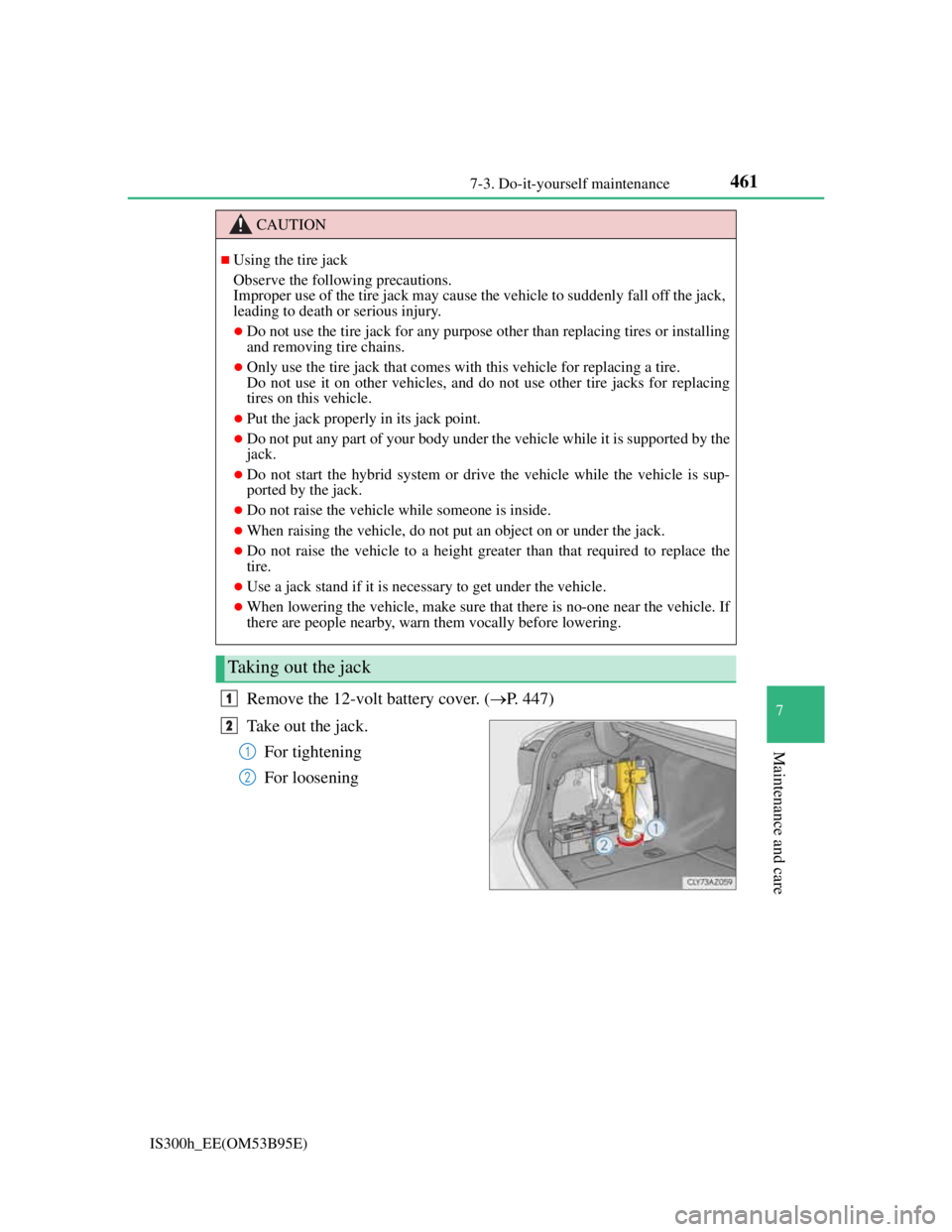
Remove the 12-volt battery cover. (P. 447)
Take out the jack.
For tightening
For loosening
CAUTION
Using the tire jack
Observe the following precautions.
Improper use of the tire jack may cause the vehicle to suddenly fall off the jack,
leading to death or serious injury.
Do not use the tire jack for any purpose other than replacing tires or installing
and removing tire chains.
Only use the tire jack that comes with this vehicle for replacing a tire.
Do not use it on other vehicles, and do not use other tire jacks for replacing
tires on this vehicle.
Put the jack properly in its jack point.
Do not put any part of your body under the vehicle while it is supported by the
jack.
Do not start the hybrid system or drive the vehicle while the vehicle is sup-
ported by the jack.
Do not raise the vehicle while someone is inside.
When raising the vehicle, do not put an object on or under the jack.
Do not raise the vehicle to a height greater than that required to replace the
tire.
Use a jack stand if it is necessary to get under the vehicle.
When lowering the vehicle, make sure that there is no-one near the vehicle. If
there are people nearby, warn them vocally before lowering.
Taking out the jack
1
2
1
2