trunk Lexus IS300h 2013 Service Manual
[x] Cancel search | Manufacturer: LEXUS, Model Year: 2013, Model line: IS300h, Model: Lexus IS300h 2013Pages: 628, PDF Size: 20.23 MB
Page 164 of 628

1623-2. Opening, closing and locking the doors and trunk
IS300h_EE(OM53B95E)
Page 165 of 628

1633-2. Opening, closing and locking the doors and trunk
3
Operation of each component
IS300h_EE(OM53B95E)
CAUTION
Caution regarding interference with electronic devices
People with implanted pacemakers or cardiac defibrillators should maintain a
reasonable distance between themselves and the smart entry & start system
antennas.
(P. 149)
The radio waves may affect the operation of such devices. If necessary, the
entry function can be disabled. Ask any authorized Lexus dealer or repairer,
or another duly qualified and equipped professional for details, such as the
frequency of radio waves and timing of emitting the radio waves. Then, con-
sult your doctor to see if you should disable the entry function.
Users of any electrical medical device other than implanted pacemakers and
implanted cardiac defibrillators should consult the manufacturer of the device
for information about its operation under the influence of radio waves.
Radio waves could have unexpected effects on the operation of such medical
devices.
Ask any authorized Lexus dealer or repairer, or another duly qualified and
equipped professional for details on disabling the entry function.
Page 168 of 628
1663-3. Adjusting the seats
IS300h_EE(OM53B95E)
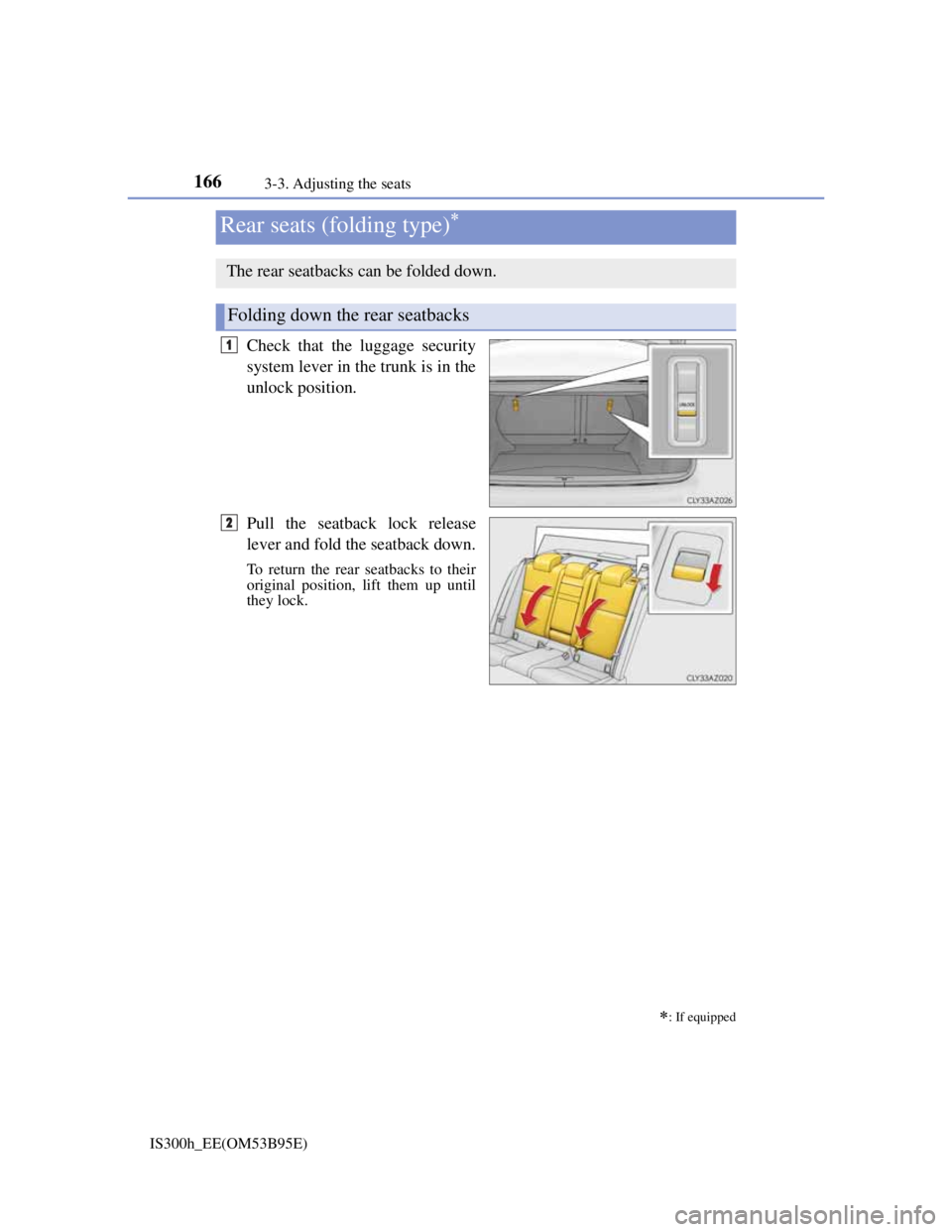
Check that the luggage security
system lever in the trunk is in the
unlock position.
Pull the seatback lock release
lever and fold the seatback down.
To return the rear seatbacks to their
original position, lift them up until
they lock.
Rear seats (folding type)
: If equipped
The rear seatbacks can be folded down.
Folding down the rear seatbacks
1
2
Page 169 of 628
1673-3. Adjusting the seats
3
Operation of each component
IS300h_EE(OM53B95E)
P. 1 4 5
Luggage security system
CAUTION
Observe the following precautions. Failure to do so may result in death or serious
injury.
When folding the rear seatbacks down
Do not fold the seatbacks down while driving.
Stop the vehicle on level ground, set the parking brake and shift the shift lever
to P.
Do not allow anyone to sit on a folded seatback or in the trunk while driving.
Do not allow children to enter the trunk.
After returning the rear seatback to the upright position
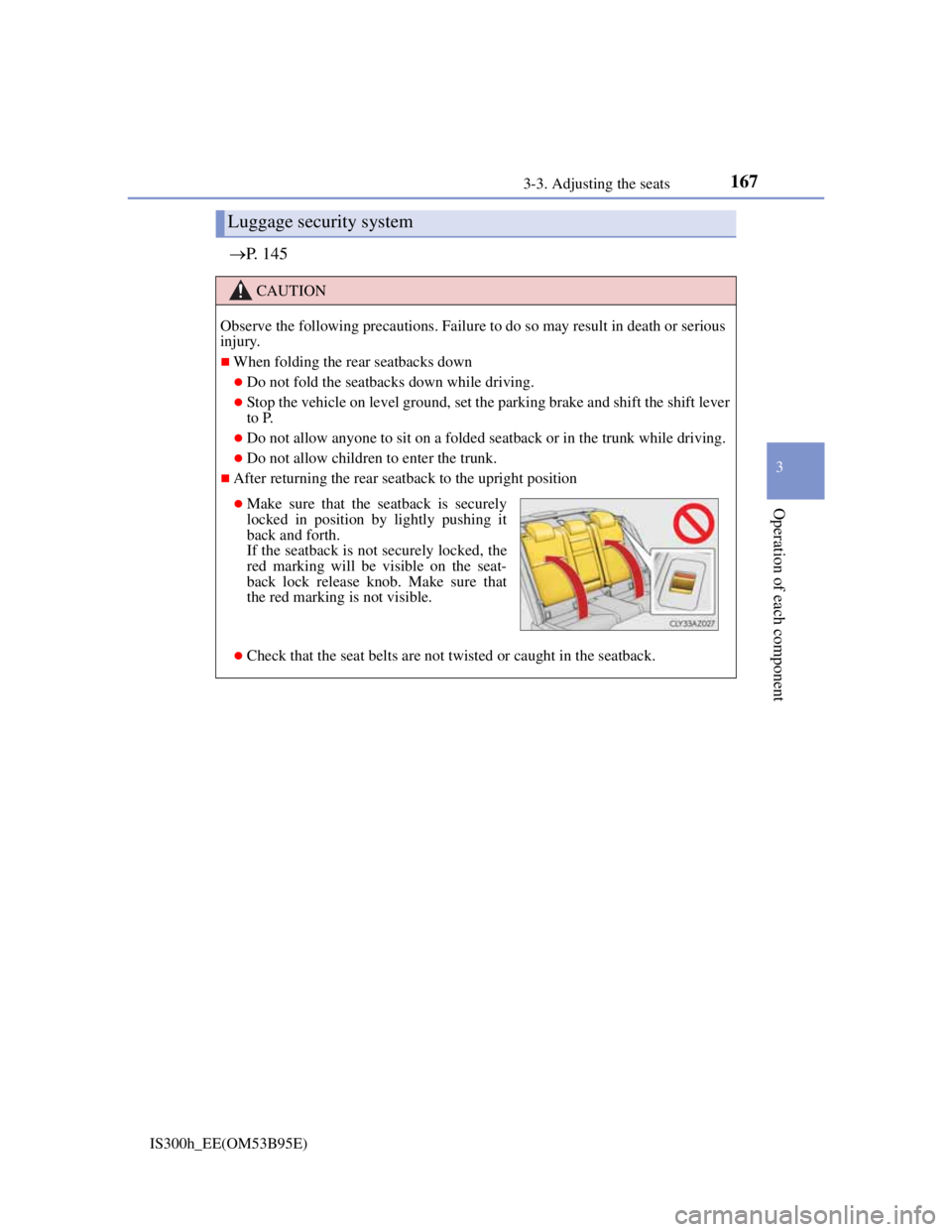
Check that the seat belts are not twisted or caught in the seatback.
Make sure that the seatback is securely
locked in position by lightly pushing it
back and forth.
If the seatback is not securely locked, the
red marking will be visible on the seat-
back lock release knob. Make sure that
the red marking is not visible.
Page 202 of 628
2004-1. Before driving
IS300h_EE(OM53B95E)
Cargo and luggage
Take notice of the following information about storage precautions,
cargo capacity and load:
CAUTION
Things that must not be carried in the trunk
The following things may cause a fire if loaded in the trunk:
Receptacles containing gasoline
Aerosol cans
Storage precautions
Observe the following precautions.
Failure to do so may prevent the pedals from being depressed properly, may
block the driver’s vision, or may result in items hitting the driver or passengers,
possibly causing an accident.
Stow cargo and luggage in the trunk whenever possible.
To prevent cargo and luggage from sliding forward during braking, do not
stack anything in the enlarged trunk. Keep cargo and luggage low, as close to
the floor as possible.
When you fold down the rear seats, long items should not be placed directly
behind the front seats.
Never allow anyone to ride in the enlarged trunk. It is not designed for pas-
sengers. They should ride in their seats with their seat belts properly fastened.
Do not place cargo or luggage in or on the following locations.
• At the feet of the driver
• On the front passenger or rear seats (when stacking items)
• On the package tray
• On the instrument panel
• On the dashboard
• In front of the navigation system screen (if equipped) or Lexus Display
Audio screen (if equipped)
Secure all items in the occupant compartment.
Load and distribution
Do not overload your vehicle.
Do not apply loads unevenly.
Improper loading may cause deterioration of steering or braking control
which may cause death or serious injury.
Page 229 of 628
2274-3. Operating the lights and wipers
4
Driving
IS300h_EE(OM53B95E)
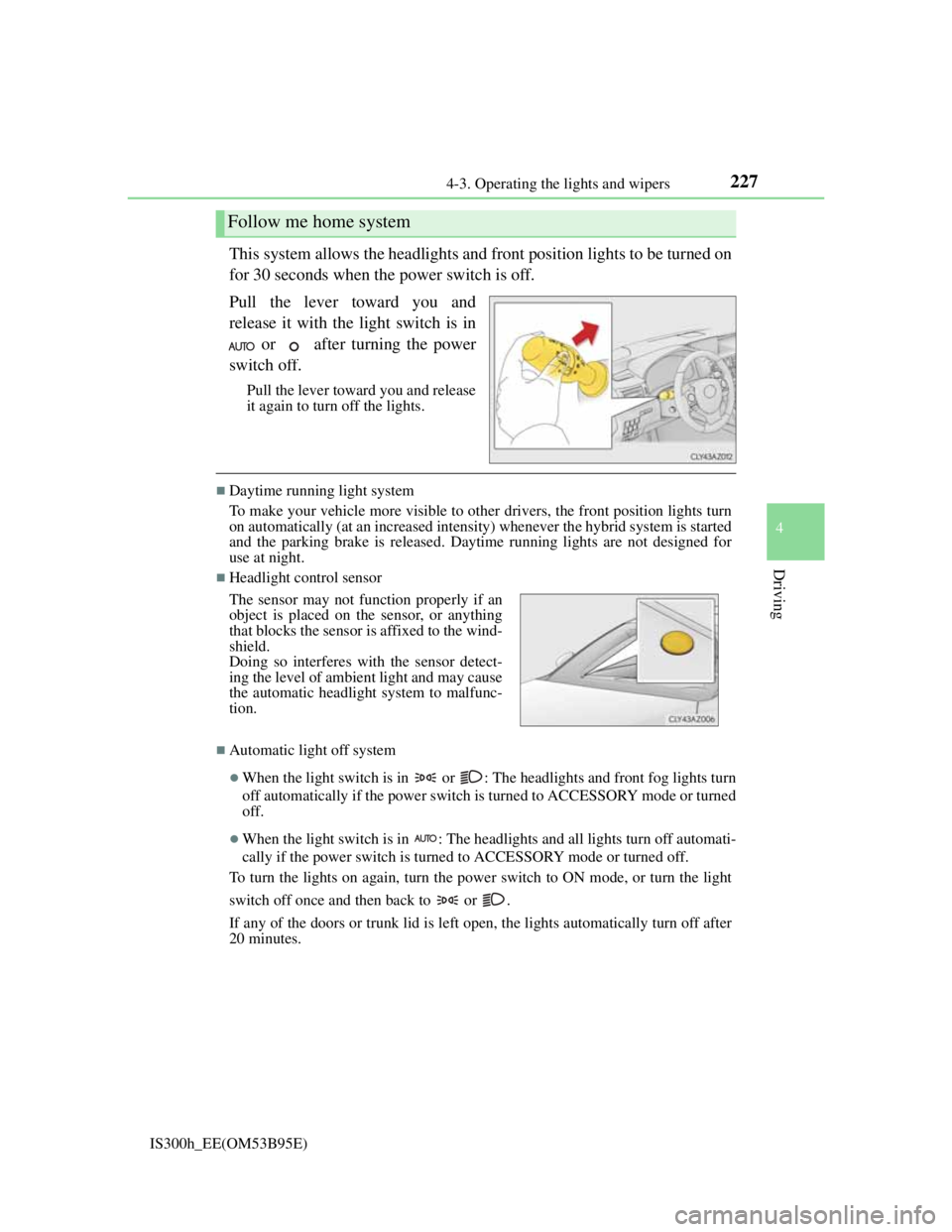
This system allows the headlights and front position lights to be turned on
for 30 seconds when the power switch is off.
Pull the lever toward you and
release it with the light switch is in
or after turning the power
switch off.
Pull the lever toward you and release
it again to turn off the lights.
Daytime running light system
To make your vehicle more visible to other drivers, the front position lights turn
on automatically (at an increased intensity) whenever the hybrid system is started
and the parking brake is released. Daytime running lights are not designed for
use at night.
Headlight control sensor
Automatic light off system
When the light switch is in or : The headlights and front fog lights turn
off automatically if the power switch is turned to ACCESSORY mode or turned
off.
When the light switch is in : The headlights and all lights turn off automati-
cally if the power switch is turned to ACCESSORY mode or turned off.
To turn the lights on again, turn the power switch to ON mode, or turn the light
switch off once and then back to or .
If any of the doors or trunk lid is left open, the lights automatically turn off after
20 minutes.
Follow me home system
The sensor may not function properly if an
object is placed on the sensor, or anything
that blocks the sensor is affixed to the wind-
shield.
Doing so interferes with the sensor detect-
ing the level of ambient light and may cause
the automatic headlight system to malfunc-
tion.
Page 245 of 628
2434-4. Refueling
4
Driving
IS300h_EE(OM53B95E)
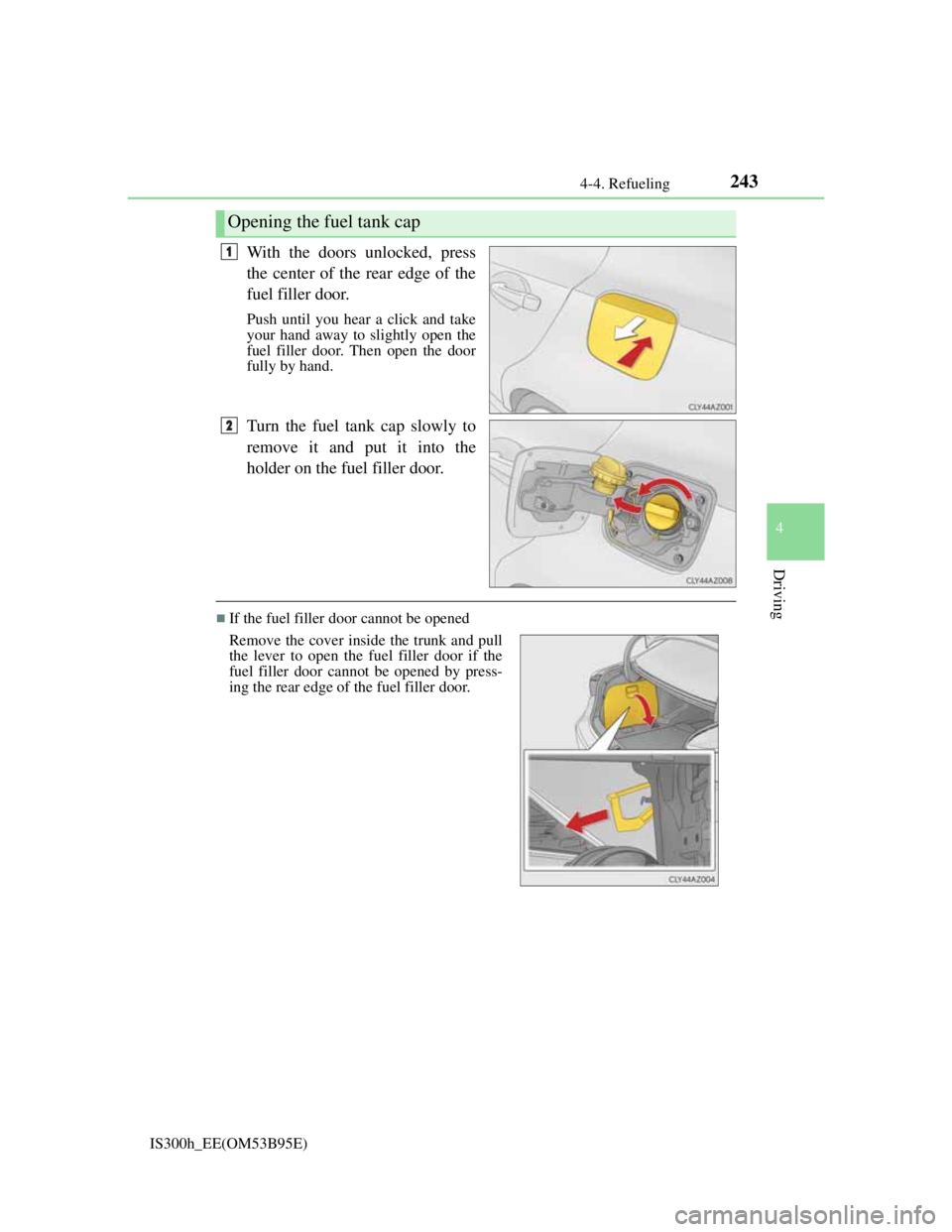
With the doors unlocked, press
the center of the rear edge of the
fuel filler door.
Push until you hear a click and take
your hand away to slightly open the
fuel filler door. Then open the door
fully by hand.
Turn the fuel tank cap slowly to
remove it and put it into the
holder on the fuel filler door.
If the fuel filler door cannot be opened
Opening the fuel tank cap
1
2
Remove the cover inside the trunk and pull
the lever to open the fuel filler door if the
fuel filler door cannot be opened by press-
ing the rear edge of the fuel filler door.
Page 265 of 628

2634-5. Using the driving support systems
4
Driving
IS300h_EE(OM53B95E)
CAUTION
When the sensor may not be correctly detecting the vehicle ahead
Apply the brakes as necessary when any of the following types of vehicles are
in front of you.
As the sensor may not be able to correctly detect these types of vehicles, the
approach warning (P. 254) will not be activated, and a fatal or serious acci-
dent may result.
Vehicles that cut in suddenly
Vehicles traveling at low speeds
Vehicles that are not moving
Vehicles with small rear ends (trailers with no load on board etc.)
Motorcycles traveling in the same lane
Conditions under which the vehicle-to-vehicle distance control may not func-
tion correctly
Apply the brakes as necessary in the following conditions as the radar sensor
may not be able to correctly detect vehicles ahead, and a fatal or serious acci-
dent may result:
When water or snow thrown up by a the surrounding vehicles hinders the
functioning of the sensor
When your vehicle is pointing upwards (caused by a heavy load in the trunk
etc.)
When the road curves or when the lanes are narrow
When steering wheel operation or your position in the lane is unstable
When the vehicle ahead of you decelerates suddenly
Handling the radar sensor
Observe the following to ensure the cruise control system can function effec-
tively.
Otherwise, the system may not function correctly and could result in an acci-
dent.
Keep the sensor and grille cover clean at all times.
Clean the sensor and grille cover with a soft cloth so you do not mark or dam-
age them.
Do not subject the sensor or surrounding area to a strong impact.
If the sensor moves even slightly off position, the system may malfunction. If
the sensor or surrounding area is subject to a strong impact, always have the
area inspected and adjusted by any authorized Lexus dealer or repairer, or
another duly qualified and equipped professional.
Do not disassemble the sensor.
Do not attach accessories or stickers to the sensor, grille cover or surrounding
area.
Do not modify or paint the sensor and grille cover.
Do not replace them with non-genuine parts.
Page 290 of 628

2884-5. Using the driving support systems
IS300h_EE(OM53B95E)
CAUTION
When using the rear view monitor system
The rear view monitor system is a supplemental device intended to assist the
driver when backing up. When backing up, be sure to check visually behind
and all around the vehicle before proceeding.
Observe the following precautions to avoid an accident that could result in
death or serious injuries.
Never depend on the rear view monitor system entirely when backing up. The
image and the position of the guide lines displayed on the screen may differ
from the actual state.
Use caution, just as you would when backing up any vehicle.
Be sure to back up slowly, depressing the brake pedal to control vehicle
speed.
The instructions given are only guidelines.
When and how much to turn the steering wheel will vary according to traffic
conditions, road surface conditions, vehicle condition, etc. when parking. It is
necessary to be fully aware of this before using the rear view monitor system.
When parking, be sure to check that the parking space will accommodate your
vehicle before maneuvering into it.
Do not use the rear view monitor system in the following cases:
• On icy or slick road surfaces, or in snow
• When using tire chains
• When the trunk lid is not closed completely
• On roads that are not flat or straight, such as curves or slopes.
In low temperatures, the screen may darken or the image may become faint.
The image could distort when the vehicle is moving, or you may become
unable to see the image on the screen. Be sure to check direct visually and
with the mirrors all around the vehicle before proceeding.
If the tire sizes are changed, the position of the fixed guide lines displayed on
the screen may change.
The camera uses a special lens. The distances between objects and pedestrians
that appear in the image displayed on the screen will differ from the actual
distances.
(P. 281)
Page 411 of 628
397
6Interior features
IS300h_EE(OM53B95E)
6-1. Using the air conditioning
system
Automatic air conditioning
system ............................. 398
Heated steering wheel/
seat heaters/
seat ventilators ................ 409
6-2. Using the interior lights
Interior lights list ............... 411
• Interior lights ................ 412
• Personal lights............... 412
6-3. Using the storage features
List of storage features ...... 413
• Glove box ..................... 414
• Console box .................. 414
•Cup holders/
Bottle holders................ 415
Trunk features ................... 4176-4. Using the other interior
features
Other interior features....... 420
• Sun visors ..................... 420
• Vanity mirrors............... 420
• Clock ............................ 420
• Power outlet.................. 421
• Armrest ......................... 422
• Rear sunshade............... 422
• Assist grips ................... 424
• Coat hooks .................... 424