ECU Lexus IS300h 2013 Repair Manual
[x] Cancel search | Manufacturer: LEXUS, Model Year: 2013, Model line: IS300h, Model: Lexus IS300h 2013Pages: 628, PDF Size: 20.23 MB
Page 208 of 628

2064-1. Before driving
IS300h_EE(OM53B95E)
Your vehicle will handle differently when towing a trailer. In order to
avoid accident, death or serious injury, keep the following in mind when
towing:
Checking connections between trailer and lights
Stop the vehicle and check the operation of the connection between the
trailer and lights after driving for a brief period as well as before start-
ing off.
Practicing driving with a coupled trailer
Get the feel for turning, stopping and reversing with the trailer cou-
pled by practicing in an area with no or light traffic.
When reversing with a coupled trailer, hold the section of the steer-
ing wheel nearest to you and rotate clockwise to turn the trailer left
or counterclockwise to turn it right. Always rotate a little at a time to
prevent steering error. Have someone guide you when reversing to
lessen the risk of an accident.
Increasing vehicle-to-vehicle distance
At a speed of 10 km/h (6 mph), the distance to the vehicle running
ahead of you should be equivalent to or greater than the combined
length of your vehicle and trailer. Avoid sudden braking that may cause
skidding. Otherwise, the vehicle may spin out of control. This is espe-
cially true when driving on wet or slippery road surfaces.
Sudden acceleration/steering input/cornering
Executing sharp turns when towing may result in the trailer colliding
with your vehicle. Decelerate well in advance when approaching turns
and take them slowly and carefully to avoid sudden braking.
Important points regarding turning
The wheels of the trailer will travel closer to the inside of the curve
than the wheels of the vehicle. To make allowance for this, take the
turns wider than you would normally do.
Guidance
Page 209 of 628

2074-1. Before driving
4
Driving
IS300h_EE(OM53B95E)
Important points regarding stability
Vehicle movement resulting from uneven road surfaces and strong
crosswinds will affect handling. The vehicle may also be rocked by
passing buses or large trucks. Frequently check behind when moving
alongside such vehicles. As soon as such vehicle movement occurs,
immediately start to decelerate smoothly by slowly applying the
brakes. Always steer the vehicle straight ahead while braking.
Passing other vehicles
Consider the total combined length of your vehicle and trailer and
ensure that the vehicle-to-vehicle distance is sufficient before execut-
ing lane changes.
Transmission information
To maintain engine braking efficiency, when using engine braking
when driving on a long steep downward grade, do not use the transmis-
sion in D. The vehicle must be driven in gear shift position “4” in S
mode. (P. 219)
If the engine overheats
Towing a loaded trailer up a long, steep incline in temperatures exceed-
ing 30C (85F) may result in the engine overheating. If the engine
coolant temperature gauge indicates that the engine is overheating, turn
the air conditioning off immediately, leave the road and stop the vehi-
cle in a safe place.
(P. 555)
When parking the vehicle
Always place wheel chocks under the wheels of both the vehicle and
trailer. Firmly set the parking brake and shift the shift lever to P.
Page 213 of 628

2114-2. Driving procedures
4
Driving
IS300h_EE(OM53B95E)
If the hybrid system is stopped with the shift lever in a position other than
P, the power switch will not be turned off but instead be turned to
ACCESSORY mode. Perform the following procedure to turn the switch
off:
Check that the parking brake is set.
Shift the shift lever to P.
Check that “Turn Power OFF” is displayed on the multi-information
display and then press the power switch once.
Check that “Turn Power OFF” on the multi-information display is off.
Auto power off function
If the vehicle is left in ACCESSORY mode for more than 20 minutes or ON
mode (the hybrid system is not operating) for more than an hour with the shift
lever in P, the power switch will automatically turn off. However, this function
cannot entirely prevent 12-volt battery discharge. Do not leave the vehicle with
the power switch in ACCESSORY or ON mode for long periods of time when
the hybrid system is not operating.
Sounds and vibrations specific to a hybrid vehicle
P. 8 2
Electronic key battery depletion
P. 133
When the ambient temperature is low, such as during winter driving conditions
It may take time before the “READY” indicator comes on.
Conditions affecting operation
P. 151
Notes for the entry function
P. 152
If the hybrid system does not start
Check that the shift lever is securely set in P. The hybrid system may not start if
the shift lever is displaced out of P.
The immobilizer system may not have been deactivated. (P. 90)
Contact any authorized Lexus dealer or repairer, or another duly qualified and
equipped professional.
When stopping the hybrid system with the shift lever in a position
other than P
1
2
3
4
Page 235 of 628
2334-3. Operating the lights and wipers
4
Driving
IS300h_EE(OM53B95E)
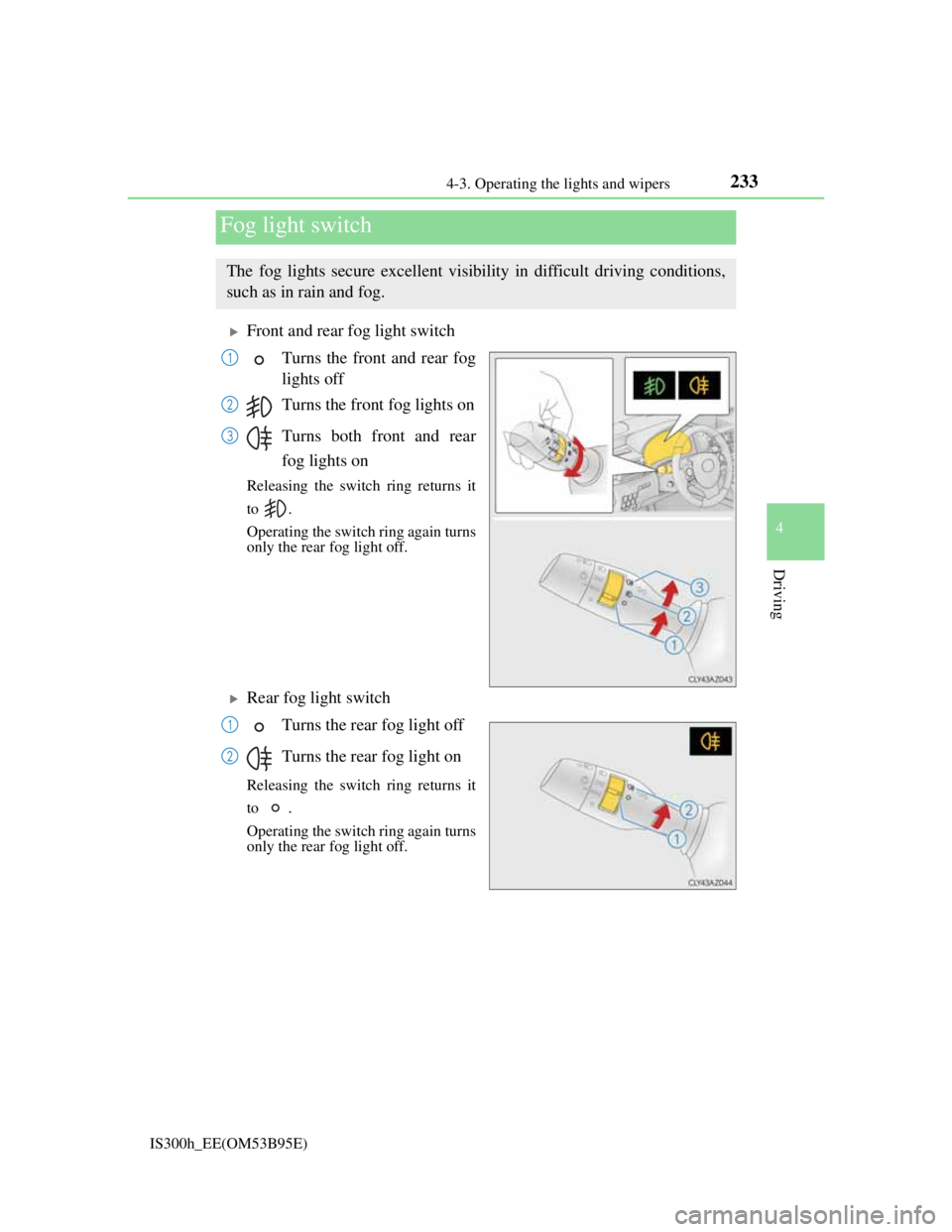
Front and rear fog light switch
Turns the front and rear fog
lights off
Turns the front fog lights on
Turns both front and rear
fog lights on
Releasing the switch ring returns it
to .
Operating the switch ring again turns
only the rear fog light off.
Rear fog light switch
Turns the rear fog light off
Turns the rear fog light on
Releasing the switch ring returns it
to .
Operating the switch ring again turns
only the rear fog light off.
Fog light switch
The fog lights secure excellent visibility in difficult driving conditions,
such as in rain and fog.
1
2
3
1
2
Page 244 of 628
2424-4. Refueling
IS300h_EE(OM53B95E)
CAUTION
When refueling the vehicle
Observe the following precautions while refueling the vehicle. Failure to do so
may result in death or serious injury.
After exiting the vehicle and before opening the fuel door, touch an unpainted
metal surface to discharge any static electricity. It is important to discharge
static electricity before refueling because sparks resulting from static electric-
ity can cause fuel vapors to ignite while refueling.
Always hold the grips on the fuel tank cap and turn it slowly to remove it.
A whooshing sound may be heard when the fuel tank cap is loosened. Wait
until the sound cannot be heard before fully removing the cap. In hot weather,
pressurized fuel may spray out the filler neck and cause injury.
Do not allow anyone that has not discharged static electricity from their body
to come close to an open fuel tank.
Do not inhale vaporized fuel.
Fuel contains substances that are harmful if inhaled.
Do not smoke while refueling the vehicle.
Doing so may cause the fuel to ignite and cause a fire.
Do not return to the vehicle or touch any person or object that is statically
charged.
This may cause static electricity to build up, resulting in a possible ignition
hazard.
When refueling
Observe the following precautions to prevent fuel overflowing from the fuel
tank:
Securely insert the fuel nozzle into the fuel filler neck.
Stop filling the tank after the fuel nozzle automatically clicks off.
Do not top off the fuel tank.
NOTICE
Refueling
Do not spill fuel during refueling.
Doing so may damage the vehicle, such as causing the emission control system
to operate abnormally or damaging fuel system components or the vehicle’s
painted surface.
Page 317 of 628

3154-5. Using the driving support systems
4
Driving
IS300h_EE(OM53B95E)
The Blind Spot Monitor function is operational when
The BSM main switch is set to on
Vehicle speed is greater than approximately 16 km/h (10 mph).
The Blind Spot Monitor function will detect a vehicle when
A vehicle in an adjacent lane overtakes your vehicle.
Another vehicle enters the detection area when it changes lanes.
Conditions under which the Blind Spot Monitor function will not detect a vehicle
The Blind Spot Monitor function is not designed to detect the following types of
vehicles and/or objects:
Small motorcycles, bicycles, pedestrians etc.*
Vehicles traveling in the opposite direction
Guardrails, walls, signs, parked vehicles and similar stationary objects*
Following vehicles that are in the same lane*
Vehicles driving 2 lanes across from your vehicle*
*
: Depending on conditions, detection of a vehicle and/or object may occur.
Conditions under which the Blind Spot Monitor function may not function cor-
rectly
The Blind Spot Monitor function may not detect vehicles correctly in the fol-
lowing conditions:
• During bad weather such as heavy rain, fog, snow etc.
• When ice or mud etc. is attached to the rear bumper
• When driving on a road surface that is wet due to rain, standing water etc.
• When there is a significant difference in speed between your vehicle and the
vehicle that enters the detection area
• When a vehicle is in the detection area from a stop and remains in the detec-
tion area as your vehicle accelerates
• When driving up or down consecutive steep inclines, such as hills, a dip in
the road etc.
• When multiple vehicles approach with only a small gap between each vehi-
cle
• When vehicle lanes are wide, and the vehicle in the next lane is too far away
from your vehicle
• When the vehicle that enters the detection area is traveling at about the same
speed as your vehicle
• When there is a significant difference in height between your vehicle and the
vehicle that enters the detection area
• Directly after the BSM main switch is set to on
• When your vehicle is towing a trailer
Instances of the Blind Spot Monitor function unnecessarily detecting a vehicle
and/ or object may increase under the following conditions:
• When there is only a short distance between your vehicle and a guardrail,
wall etc.
• When there is only a short distance between your vehicle and a following
vehicle
• When vehicle lanes are narrow and a vehicle driving 2 lanes across from
your vehicle enters the detection area
Page 373 of 628
3595-7. Connecting Bluetooth®
5
Lexus Display Audio system
IS300h_EE(OM53B95E)
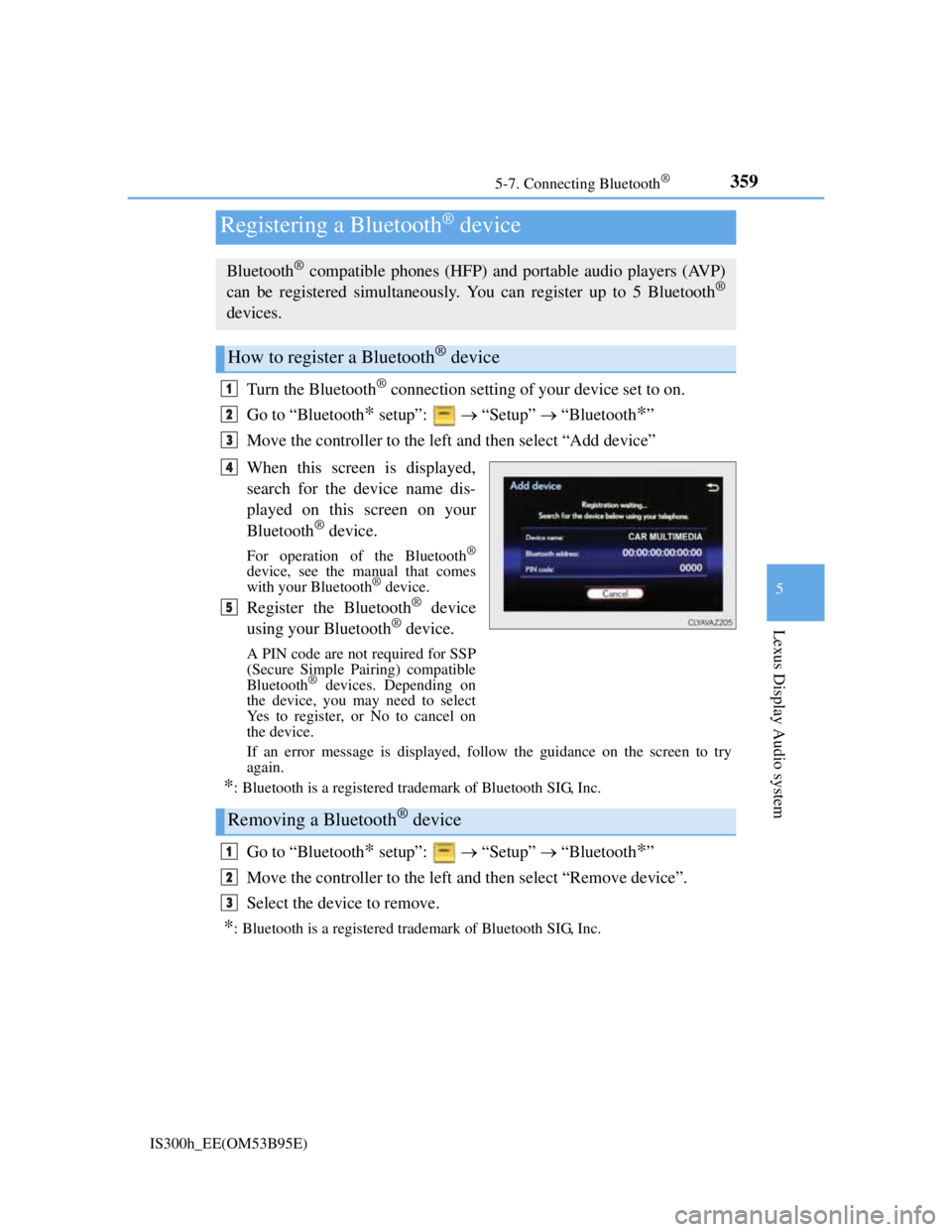
Turn the Bluetooth® connection setting of your device set to on.
Go to “Bluetooth
* setup”: “Setup” “Bluetooth*”
Move the controller to the left and then select “Add device”
When this screen is displayed,
search for the device name dis-
played on this screen on your
Bluetooth
® device.
For operation of the Bluetooth®
device, see the manual that comes
with your Bluetooth® device.
Register the Bluetooth® device
using your Bluetooth® device.
A PIN code are not required for SSP
(Secure Simple Pairing) compatible
Bluetooth
® devices. Depending on
the device, you may need to select
Yes to register, or No to cancel on
the device.
If an error message is displayed, follow the guidance on the screen to try
again.
*: Bluetooth is a registered trademark of Bluetooth SIG, Inc.
Go to “Bluetooth* setup”: “Setup” “Bluetooth*”
Move the controller to the left and then select “Remove device”.
Select the device to remove.
*: Bluetooth is a registered trademark of Bluetooth SIG, Inc.
Registering a Bluetooth® device
Bluetooth® compatible phones (HFP) and portable audio players (AVP)
can be registered simultaneously. You can register up to 5 Bluetooth®
devices.
How to register a Bluetooth® device
1
2
3
4
5
Removing a Bluetooth® device
1
2
3
Page 431 of 628
4176-3. Using the storage features
6
Interior features
IS300h_EE(OM53B95E)
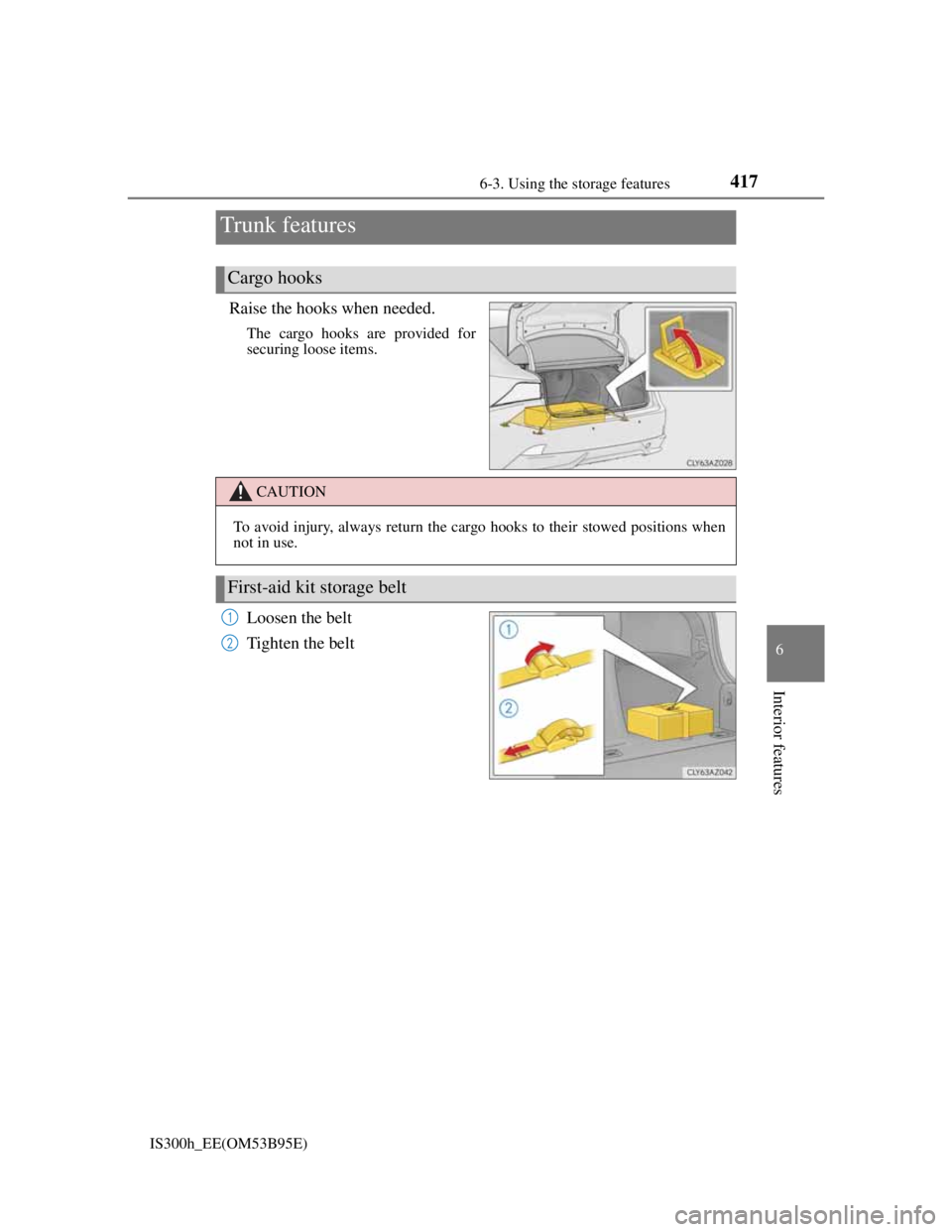
Raise the hooks when needed.
The cargo hooks are provided for
securing loose items.
Loosen the belt
Tighten the belt
Trunk features
Cargo hooks
CAUTION
To avoid injury, always return the cargo hooks to their stowed positions when
not in use.
First-aid kit storage belt
1
2
Page 432 of 628
4186-3. Using the storage features
IS300h_EE(OM53B95E)
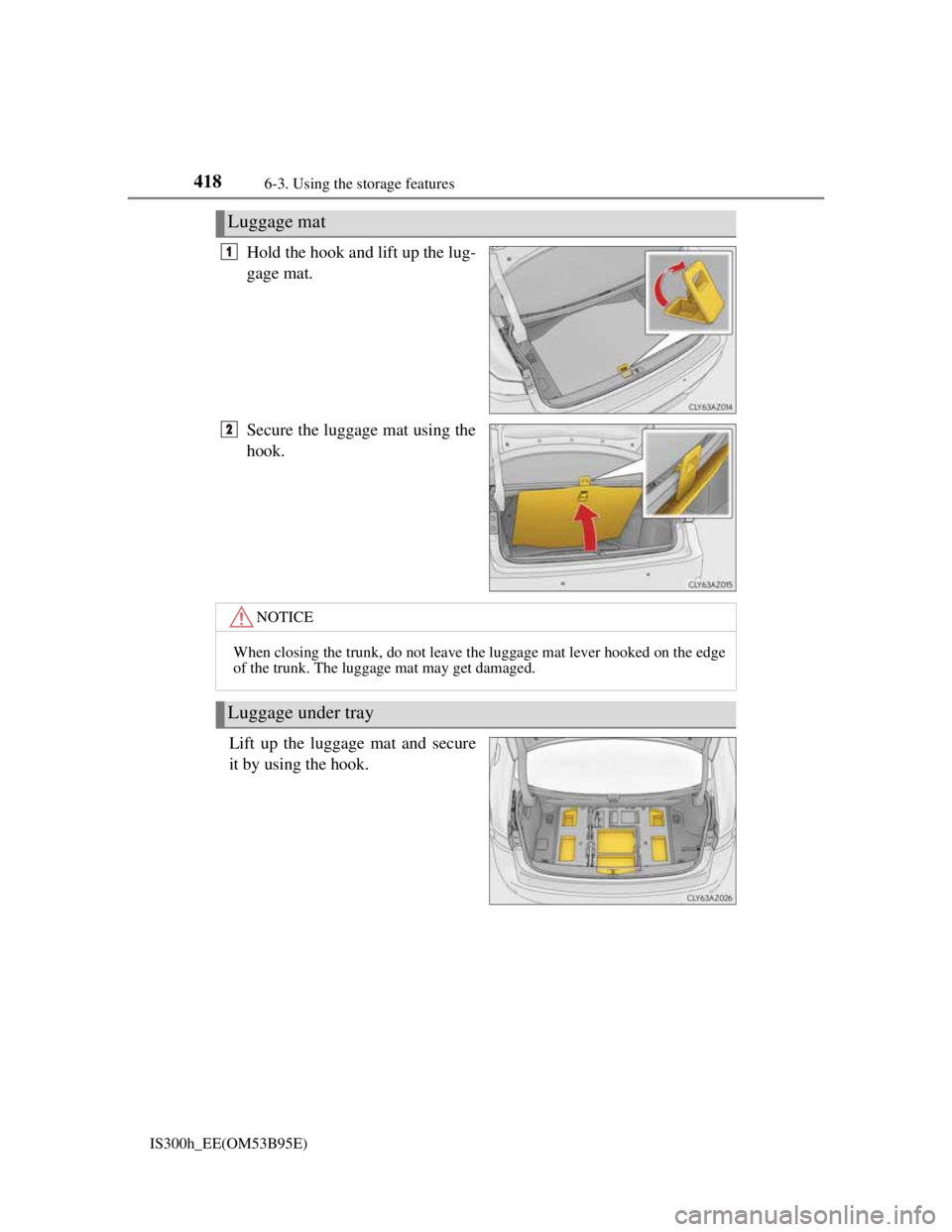
Hold the hook and lift up the lug-
gage mat.
Secure the luggage mat using the
hook.
Lift up the luggage mat and secure
it by using the hook.
Luggage mat
1
2
NOTICE
When closing the trunk, do not leave the luggage mat lever hooked on the edge
of the trunk. The luggage mat may get damaged.
Luggage under tray
Page 433 of 628
4196-3. Using the storage features
6
Interior features
IS300h_EE(OM53B95E)
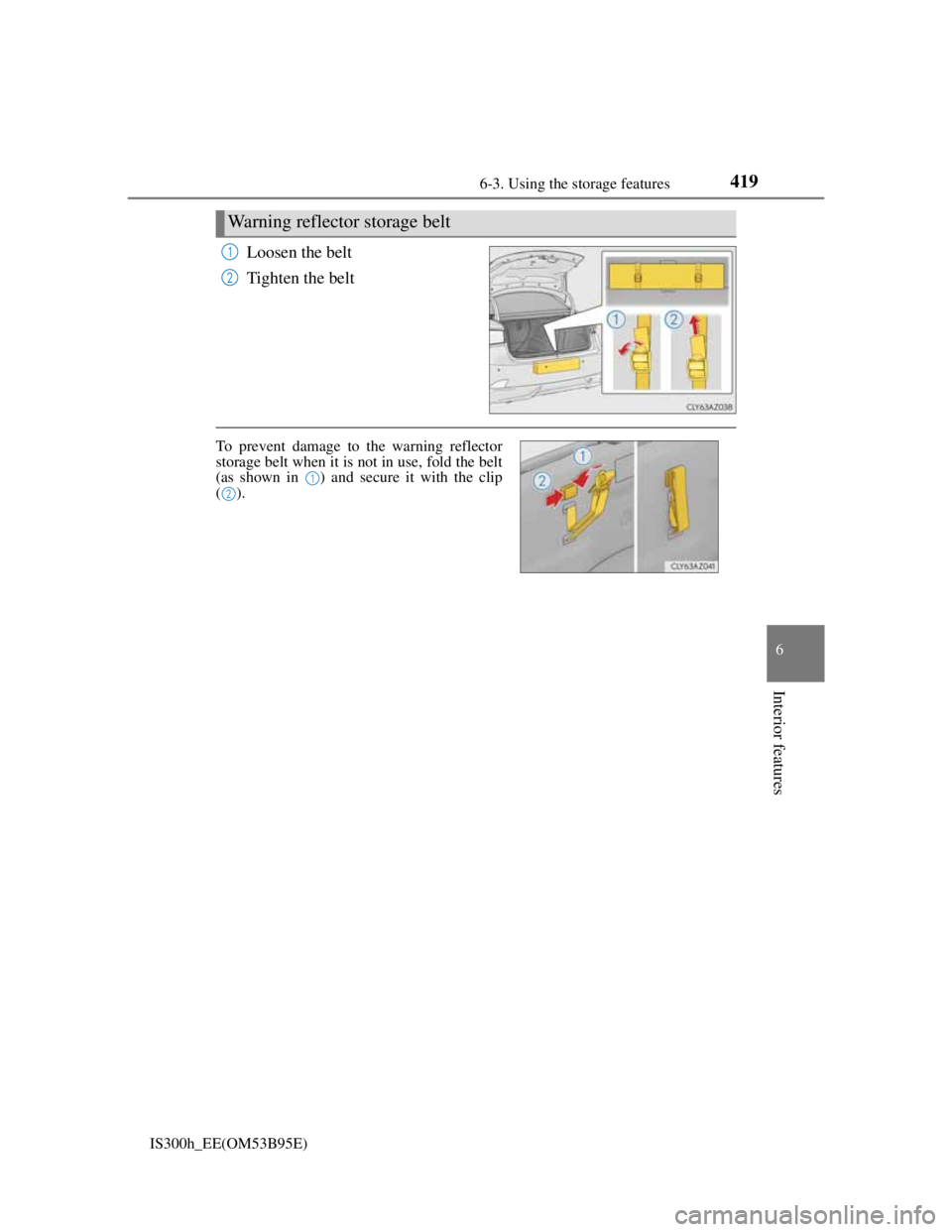
Loosen the belt
Tighten the belt
Warning reflector storage belt
1
2
To prevent damage to the warning reflector
storage belt when it is not in use, fold the belt
(as shown in ) and secure it with the clip
().
1
2