audio Lexus IS300h 2013 Manual Online
[x] Cancel search | Manufacturer: LEXUS, Model Year: 2013, Model line: IS300h, Model: Lexus IS300h 2013Pages: 628, PDF Size: 20.23 MB
Page 385 of 628
3715-9. Bluetooth® Phone
5
Lexus Display Audio system
IS300h_EE(OM53B95E)
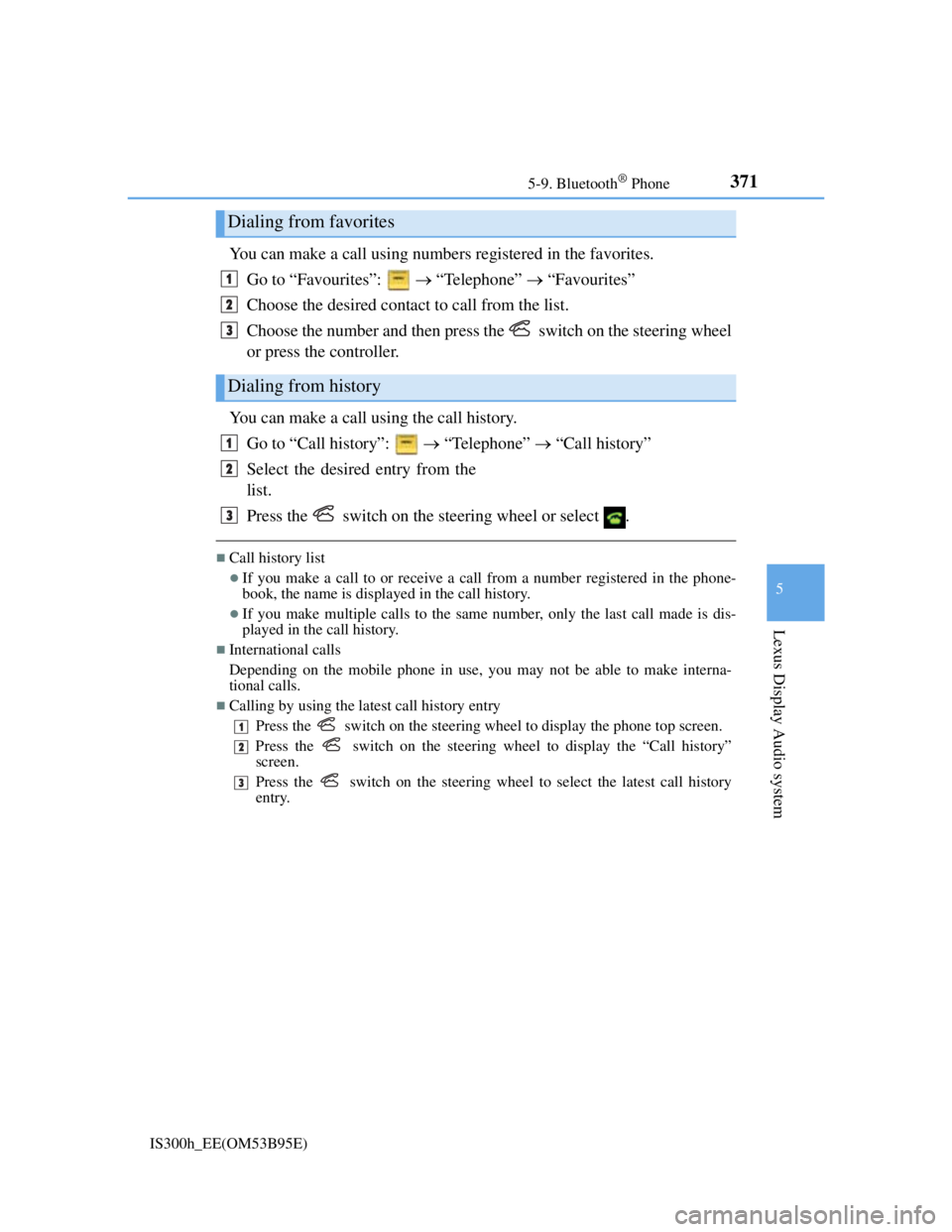
You can make a call using numbers registered in the favorites.
Go to “Favourites”: “Telephone” “Favourites”
Choose the desired contact to call from the list.
Choose the number and then press the switch on the steering wheel
or press the controller.
You can make a call using the call history.
Go to “Call history”: “Telephone” “Call history”
Select the desired entry from the
list.
Press the switch on the steering wheel or select .
Call history list
If you make a call to or receive a call from a number registered in the phone-
book, the name is displayed in the call history.
If you make multiple calls to the same number, only the last call made is dis-
played in the call history.
International calls
Depending on the mobile phone in use, you may not be able to make interna-
tional calls.
Calling by using the latest call history entry
Press the
switch on the steering wheel to display the phone top screen.
Press the
switch on the steering wheel to display the “Call history”
screen.
Press the
switch on the steering wheel to select the latest call history
entry.
Dialing from favorites
Dialing from history
1
2
3
1
2
3
1
2
3
Page 387 of 628
3735-9. Bluetooth® Phone
5
Lexus Display Audio system
IS300h_EE(OM53B95E)
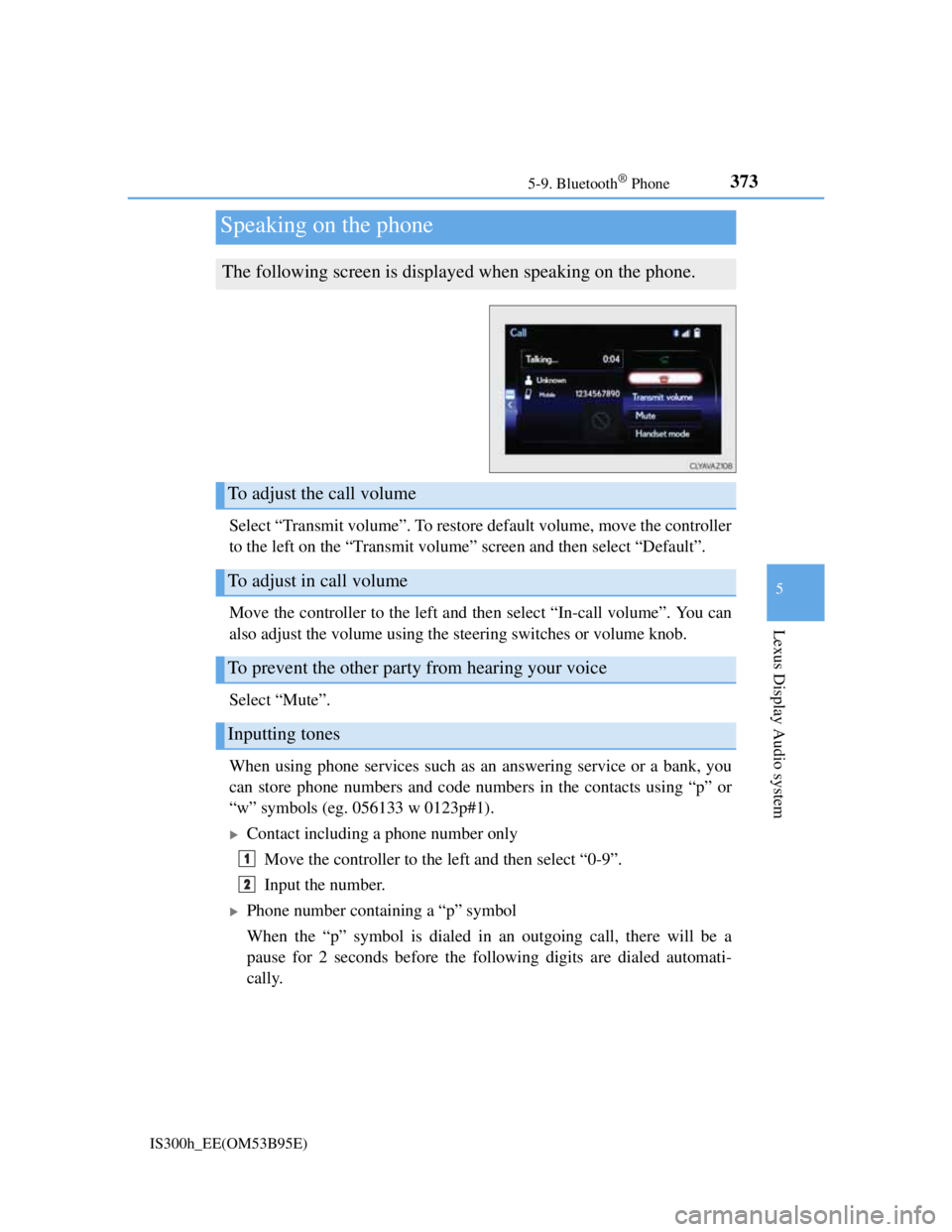
Select “Transmit volume”. To restore default volume, move the controller
to the left on the “Transmit volume” screen and then select “Default”.
Move the controller to the left and then select “In-call volume”. You can
also adjust the volume using the steering switches or volume knob.
Select “Mute”.
When using phone services such as an answering service or a bank, you
can store phone numbers and code numbers in the contacts using “p” or
“w” symbols (eg. 056133 w 0123p#1).
Contact including a phone number only
Move the controller to the left and then select “0-9”.
Input the number.
Phone number containing a “p” symbol
When the “p” symbol is dialed in an outgoing call, there will be a
pause for 2 seconds before the following digits are dialed automati-
cally.
Speaking on the phone
The following screen is displayed when speaking on the phone.
To adjust the call volume
To adjust in call volume
To prevent the other party from hearing your voice
Inputting tones
1
2
Page 389 of 628
3755-9. Bluetooth® Phone
5
Lexus Display Audio system
IS300h_EE(OM53B95E)
Go to “Message inbox”: “Telephone” “Message inbox”
Select a message.
Moving the controller to the left while on the “Message inbox” screen dis-
plays the setting screen. (P. 384)
Move the controller to the right while on the “Message inbox” screen and then
select an account to display a message list for the selected account.
Selecting “Next” or “Previous” displays the next or previous message.
If a message is too long, select “Read more” to display the full text.
Option menu
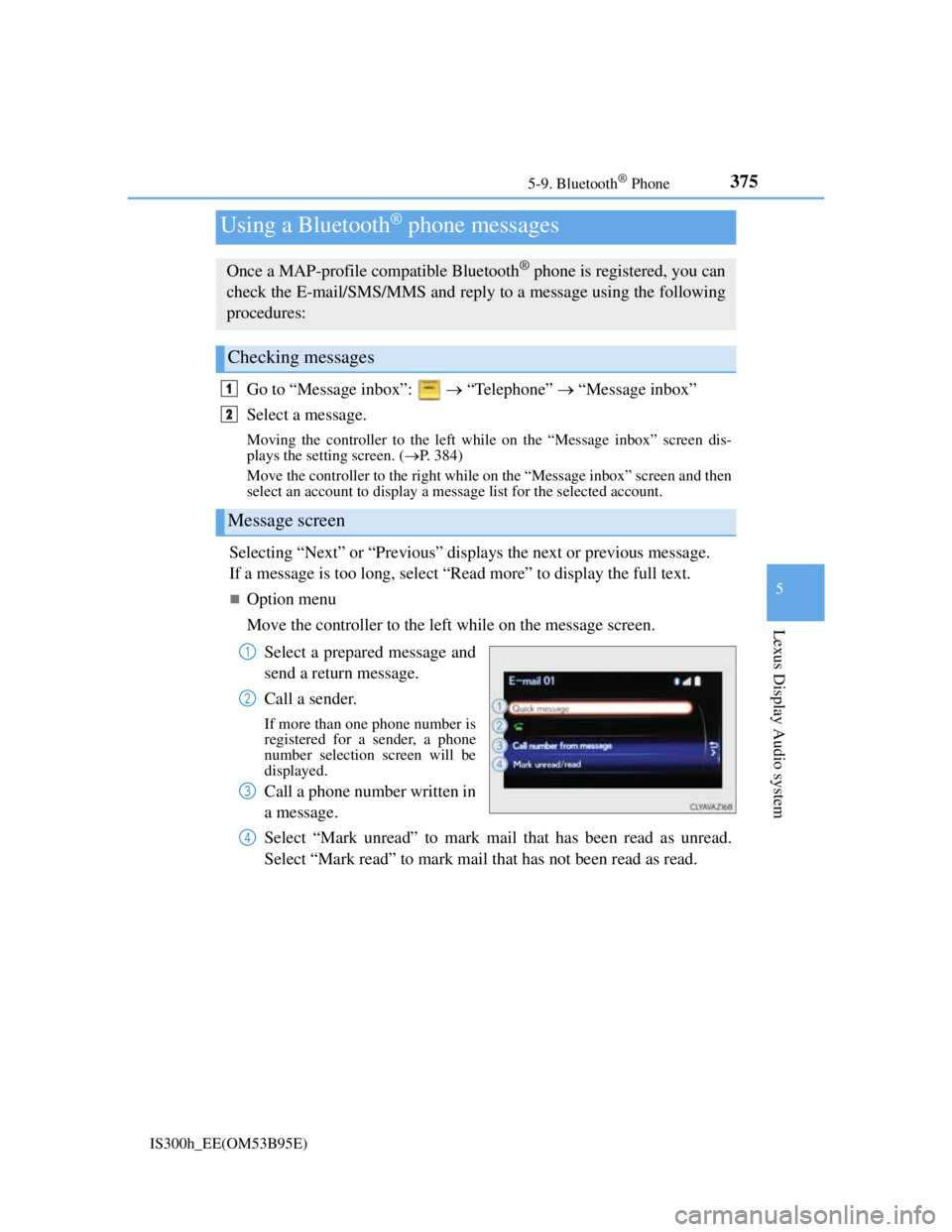
Move the controller to the left while on the message screen.
Select a prepared message and
send a return message.
Call a sender.
If more than one phone number is
registered for a sender, a phone
number selection screen will be
displayed.
Call a phone number written in
a message.
Select “Mark unread” to mark mail that has been read as unread.
Select “Mark read” to mark mail that has not been read as read.
Using a Bluetooth® phone messages
Once a MAP-profile compatible Bluetooth® phone is registered, you can
check the E-mail/SMS/MMS and reply to a message using the following
procedures:
Checking messages
Message screen
1
2
1
2
3
4
Page 391 of 628
3775-9. Bluetooth® Phone
5
Lexus Display Audio system
IS300h_EE(OM53B95E)
This function is available when the “E-mail notification popup” or “SMS/
MMS notification popup” are set to on. (P. 384)
“Incoming E-mail display” or “Incoming SMS/MMS display” are set
to “Drop-down”
When E-mail/SMS/MMS are received, the incoming message is dis-
played on the upper side of the screen with a sound.
“Incoming E-mail display” or “Incoming SMS/MMS display” are set
to “Full screen”
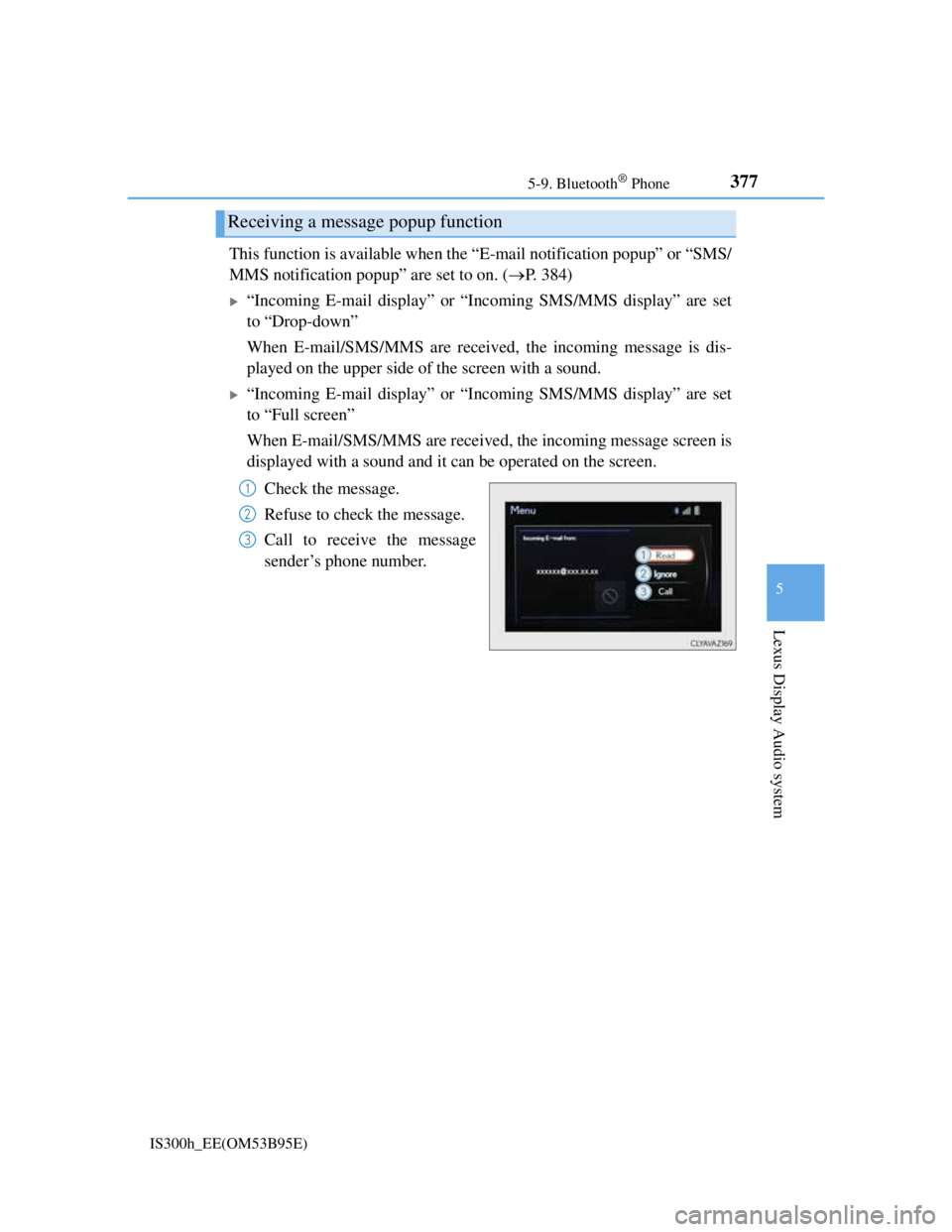
When E-mail/SMS/MMS are received, the incoming message screen is
displayed with a sound and it can be operated on the screen.
Check the message.
Refuse to check the message.
Call to receive the message
sender’s phone number.
Receiving a message popup function
1
2
3
Page 393 of 628
3795-9. Bluetooth® Phone
5
Lexus Display Audio system
IS300h_EE(OM53B95E)
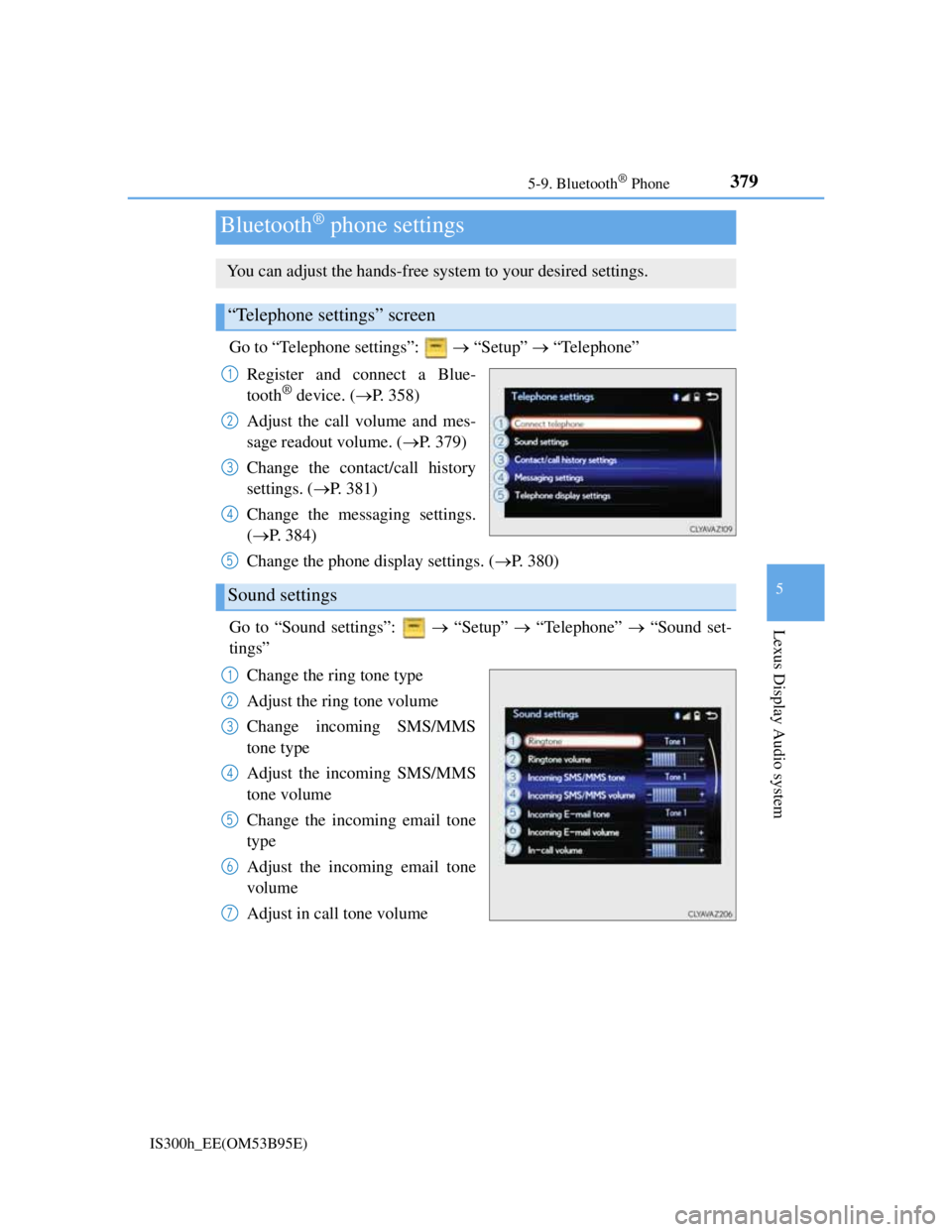
Go to “Telephone settings”: “Setup” “Telephone”
Register and connect a Blue-
tooth
® device. (P. 358)
Adjust the call volume and mes-
sage readout volume. (P. 379)
Change the contact/call history
settings. (P. 381)
Change the messaging settings.
(P. 384)
Change the phone display settings. (P. 380)
Go to “Sound settings”: “Setup” “Telephone” “Sound set-
tings”
Change the ring tone type
Adjust the ring tone volume
Change incoming SMS/MMS
tone type
Adjust the incoming SMS/MMS
tone volume
Change the incoming email tone
type
Adjust the incoming email tone
volume
Adjust in call tone volume
Bluetooth® phone settings
You can adjust the hands-free system to your desired settings.
“Telephone settings” screen
1
2
3
4
Sound settings
5
1
2
3
4
5
6
7
Page 395 of 628
381
5
Lexus Display Audio system
IS300h_EE(OM53B95E)5-10. Phonebook
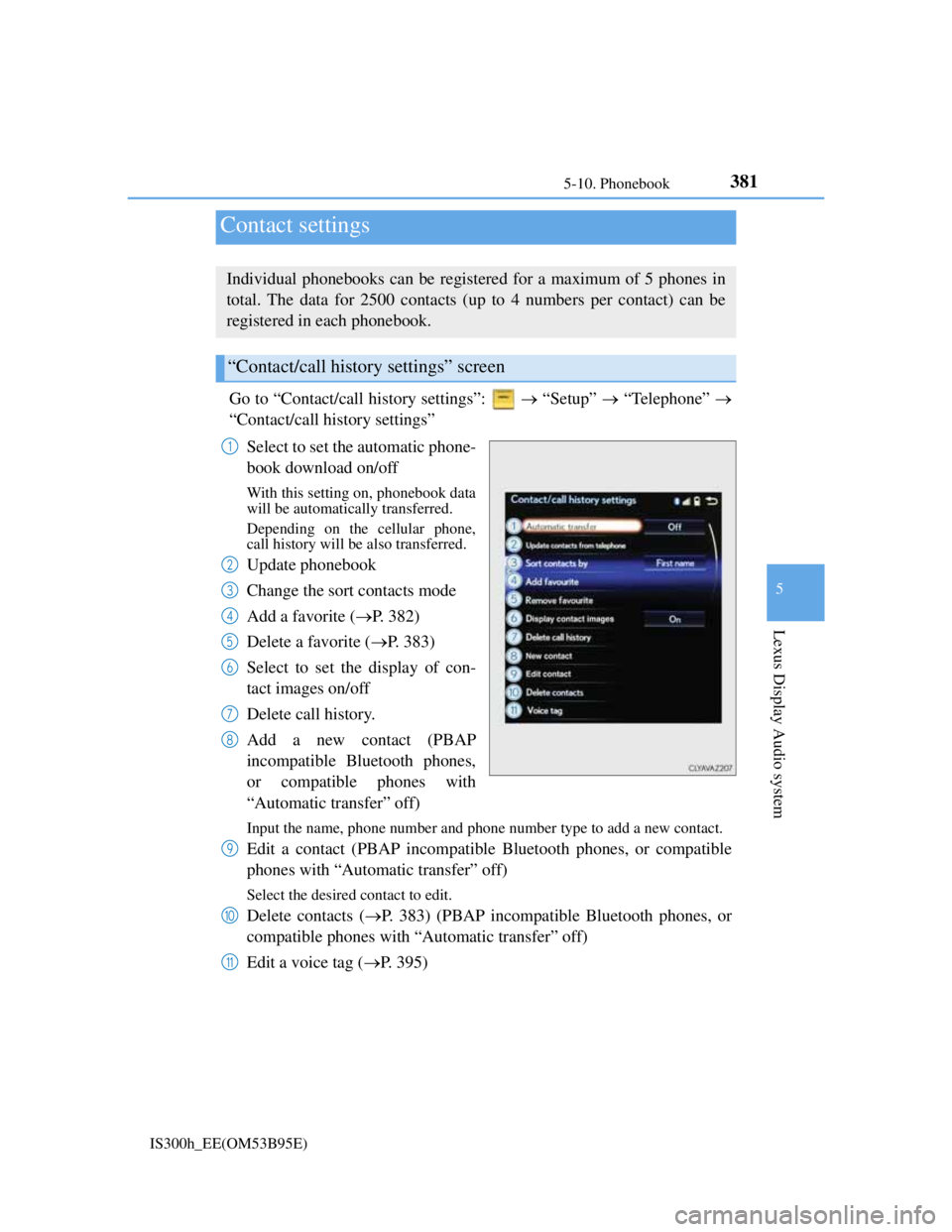
Go to “Contact/call history settings”: “Setup” “Telephone”
“Contact/call history settings”
Select to set the automatic phone-
book download on/off
With this setting on, phonebook data
will be automatically transferred.
Depending on the cellular phone,
call history will be also transferred.
Update phonebook
Change the sort contacts mode
Add a favorite (P. 382)
Delete a favorite (P. 383)
Select to set the display of con-
tact images on/off
Delete call history.
Add a new contact (PBAP
incompatible Bluetooth phones,
or compatible phones with
“Automatic transfer” off)
Input the name, phone number and phone number type to add a new contact.
Edit a contact (PBAP incompatible Bluetooth phones, or compatible
phones with “Automatic transfer” off)
Select the desired contact to edit.
Delete contacts (P. 383) (PBAP incompatible Bluetooth phones, or
compatible phones with “Automatic transfer” off)
Edit a voice tag (P. 395)
Contact settings
Individual phonebooks can be registered for a maximum of 5 phones in
total. The data for 2500 contacts (up to 4 numbers per contact) can be
registered in each phonebook.
“Contact/call history settings” screen
1
2
3
4
5
6
7
8
9
10
11
Page 396 of 628
3825-10. Phonebook
IS300h_EE(OM53B95E)
Return to the default settings
Move the controller to the left and select “Defaults”.
You can transfer the phone numbers in your Bluetooth® phone to display
audio system. Operation methods differ between PBAP compatible and
PBAP incompatible Bluetooth
® phones. If your cellular phone does not
support either PBAP or OPP services, you cannot transfer contacts.
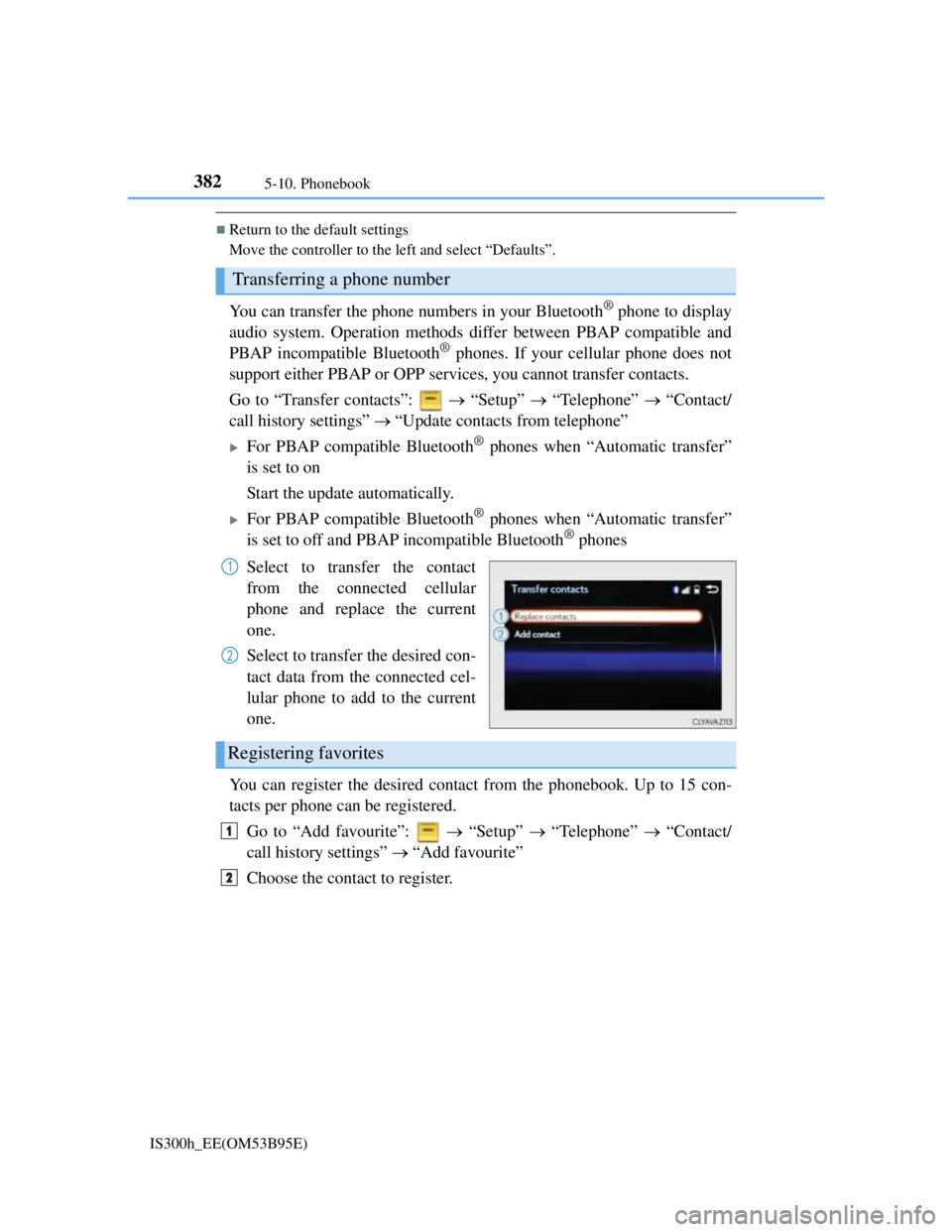
Go to “Transfer contacts”: “Setup” “Telephone” “Contact/
call history settings” “Update contacts from telephone”
For PBAP compatible Bluetooth® phones when “Automatic transfer”
is set to on
Start the update automatically.
For PBAP compatible Bluetooth® phones when “Automatic transfer”
is set to off and PBAP incompatible Bluetooth® phones
Select to transfer the contact
from the connected cellular
phone and replace the current
one.
Select to transfer the desired con-
tact data from the connected cel-
lular phone to add to the current
one.
You can register the desired contact from the phonebook. Up to 15 con-
tacts per phone can be registered.
Go to “Add favourite”: “Setup” “Telephone” “Contact/
call history settings” “Add favourite”
Choose the contact to register.
Transferring a phone number
1
2
Registering favorites
1
2
Page 397 of 628
3835-10. Phonebook
5
Lexus Display Audio system
IS300h_EE(OM53B95E)
Go to “Remove favourite”: “Setup” “Telephone” “Con-
tact/call history settings” “Remove favourite”
Select the desired contacts.
You can select all contacts by selecting “Select all”
Move the controller to the left and select “Remove”.
Go to “Delete contact”: “Setup” “Telephone” “Contact/
call history settings” “Delete contacts”
Select the desired contacts.
You can select all contacts by selecting “Select all”.
Move the controller to the left and select “Delete”.
Phonebook data
Phonebook data is managed separately for every registered phone. When another
phone is connected, you cannot read the registered data.
When transferring contacts
Transfer contacts while the hybrid system is running.
If the cellular phone is OPP or PBAP compatible, you may need to input “1234”
on the cellular phone for OBEX certification.
When you have selected “Replace contacts” or “Add contact” to transfer contacts
If the cellular phone does not support OPP service, you cannot use these func-
tions. You can transfer the phonebook data only by operating your phone.
Transferring contacts while Bluetooth® audio is playing
Bluetooth® audio will disconnect. It will reconnect automatically when data
transfer finishes. It may not reconnect depending on the phone which is con-
nected.
Removing favorites
Deleting the contacts data
1
2
3
1
2
3
Page 399 of 628
385
5
Lexus Display Audio system
IS300h_EE(OM53B95E)5-11. Bluetooth
®
When using the Bluetooth® audio system
In the following situations, the system may not function.
• If the portable audio player is turned off
• If the portable audio player is not connected
• If the portable audio player’s battery is low
There may be a delay if a cellular phone connection is made during Bluetooth®
audio play.
Depending on the type of portable audio player that is connected to the system,
operation may differ slightly and certain functions may not be available.
When using the hands-free system
The audio system is muted when making a call.
If both parties speak at the same time, it may be difficult to hear.
If the received call volume is overly loud, an echo may be heard.
If the Bluetooth® phone is too close to the system, quality of the sound may
deteriorate and connection status may deteriorate.
In the following situations, it may be difficult to hear the other party:
• When driving on unpaved roads
• When driving at high speeds
• If a window is open
• If the air conditioning is blowing directly on the microphone
• If there is interference from the network of the cellular phone
Conditions under which the system will not operate
If using a cellular phone that does not support Bluetooth®
If the cellular phone is turned off
If you are outside of cellular phone service coverage
If the cellular phone is not connected
If the cellular phone’s battery is low
When outgoing calls are controlled, due to heavy traffic on telephone lines, etc.
When the cellular phone itself cannot be used
When transferring phonebook data from the cellular phone
Bluetooth®
Page 400 of 628
3865-11. Bluetooth®
IS300h_EE(OM53B95E)
Bluetooth® antenna
The antenna is built into the display.
If the portable audio player is behind the seat or in the glove box or console box,
or is touching or covered by metal objects, the connection status may deteriorate.
If the cellular phone is behind the seat or in the console box, or touching or cov-
ered by metal objects, the connection status may deteriorate.
Battery charge/signal status
This display may not correspond exactly with the portable audio player or cel-
lular phone itself.
This system does not have a charging function.
The portable audio player or cellular phone battery will be depleted quickly
when the device is connected to Bluetooth®.
When using the Bluetooth® audio and hands-free system at the same time
The following problems may occur.
The Bluetooth® audio connection may be interrupted.
Noise may be heard during Bluetooth® audio playback.
About the contact in this system
The following data is stored for every registered cellular phone. When another
phone is connecting, you cannot read the registered data.
Contact data
Call history
Favorite
When removing a Bluetooth® phone from the system, the above-mentioned data
is also deleted.
About Bluetooth®
Bluetooth® is a registered trademark of
Bluetooth SIG, Inc.
The Bluetooth
® word mark and logos are
owned by the Bluetooth SIG, Inc. and any
use of such marks by FUJITSU TEN LIM-
ITED is under license. Other trademarks
and trade names are those of their respec-
tive owners.