audio Lexus IS300h 2013 Owners Manual
[x] Cancel search | Manufacturer: LEXUS, Model Year: 2013, Model line: IS300h, Model: Lexus IS300h 2013Pages: 628, PDF Size: 20.23 MB
Page 401 of 628

3875-11. Bluetooth®
5
Lexus Display Audio system
IS300h_EE(OM53B95E)
Compatible models
The Bluetooth® audio system supports portable audio players with the following
specifications
Bluetooth® specifications:
Ver. 2.0, or higher (Recommended: Ver. 3.0 +EDR or higher)
Profiles:
• A2DP (Advanced Audio Distribution Profile) Ver. 1.0, or higher
(Recommended: Ver. 1.2 or higher)
This is a profile to transmit stereo audio or high quality sound to the audio
system.
• AVRCP (Audio/Video Remote Control Profile) Ver. 1.0 or higher
(Recommended: Ver. 1.4 or higher)
This is a profile to allow remote control the A/V equipment.
However, please note that some functions may be limited depending on the type
of portable audio player connected.
The hands-free system supports cellular phones with the following specifica-
tions.
Bluetooth® specification:
Ver. 2.0 or higher (Recommended: Ver. 3.0 +EDR or higher)
Profiles:
• HFP (Hands Free Profile) Ver. 1.0 or higher (Recommended: Ver. 1.6 or
higher)
This is a profile to allow hands-free phone calls using a cellular phone or
head set. It has outgoing and incoming call functions.
• OPP (Object Push Profile) Ver. 1.1 or higher (Recommended: Ver. 1.1)
This is a profile to transfer phonebook data. When a Bluetooth
® compatible
cellular phone has both PBAP and OPP, OPP cannot be used.
• PBAP (Phone Book Access Profile) Ver. 1.0 or higher (Recommended: Ver.
1.1)
This is a profile to transfer phonebook data.
• MAP (Message Access Profile) Ver.1.0 or higher
This is a profile to using phone message.
If the cellular phone does not support HFP, you cannot register it with the hands-
free system. OPP, PBAP or MAP services must be selected individually.
Reconnecting the portable audio player
If the portable audio player is disconnected due to poor reception when the
power switch is in ACCESSORY or ON mode, the system automatically recon-
nects the portable audio player.
If you have switched off the portable audio player yourself, follow the instruc-
tions below to reconnect:
Select the portable audio player again
Enter the portable audio player
When you sell your car
Be sure to delete your personal data. (P. 327)
Page 403 of 628
3895-11. Bluetooth®
5
Lexus Display Audio system
IS300h_EE(OM53B95E)
CAUTION
While driving
Do not operate the portable audio player, cellular phone or connect a device to
the Bluetooth
® system.
Caution regarding interference with electronic devices
Your audio unit is fitted with Bluetooth® antennas. People with implanted
pacemakers or cardiac defibrillators should maintain a reasonable distance
between themselves and the Bluetooth
® antennas. The radio waves may
affect the operation of such devices.
Before using Bluetooth® devices, users of any electrical medical device other
than implanted pacemakers and implanted cardiac defibrillators should con-
sult the manufacturer of the device for information about its operation under
the influence of radio waves. Radio waves could have unexpected effects on
the operation of such medical devices.
NOTICE
When leaving the vehicle
Do not leave your portable audio player or cellular phone in the vehicle. The
inside of the vehicle may become hot, causing damage to the portable audio
player or cellular phone.
Page 405 of 628
3915-12. Other function
5
Lexus Display Audio system
IS300h_EE(OM53B95E)
P. 3 2 3
Go to “MirrorLink
*”: “Info” “MirrorLink*”
Select the desired application on the application list screen.
MirrorLink screen
Follow the specific operation procedures for the smartphone applica-
tion.
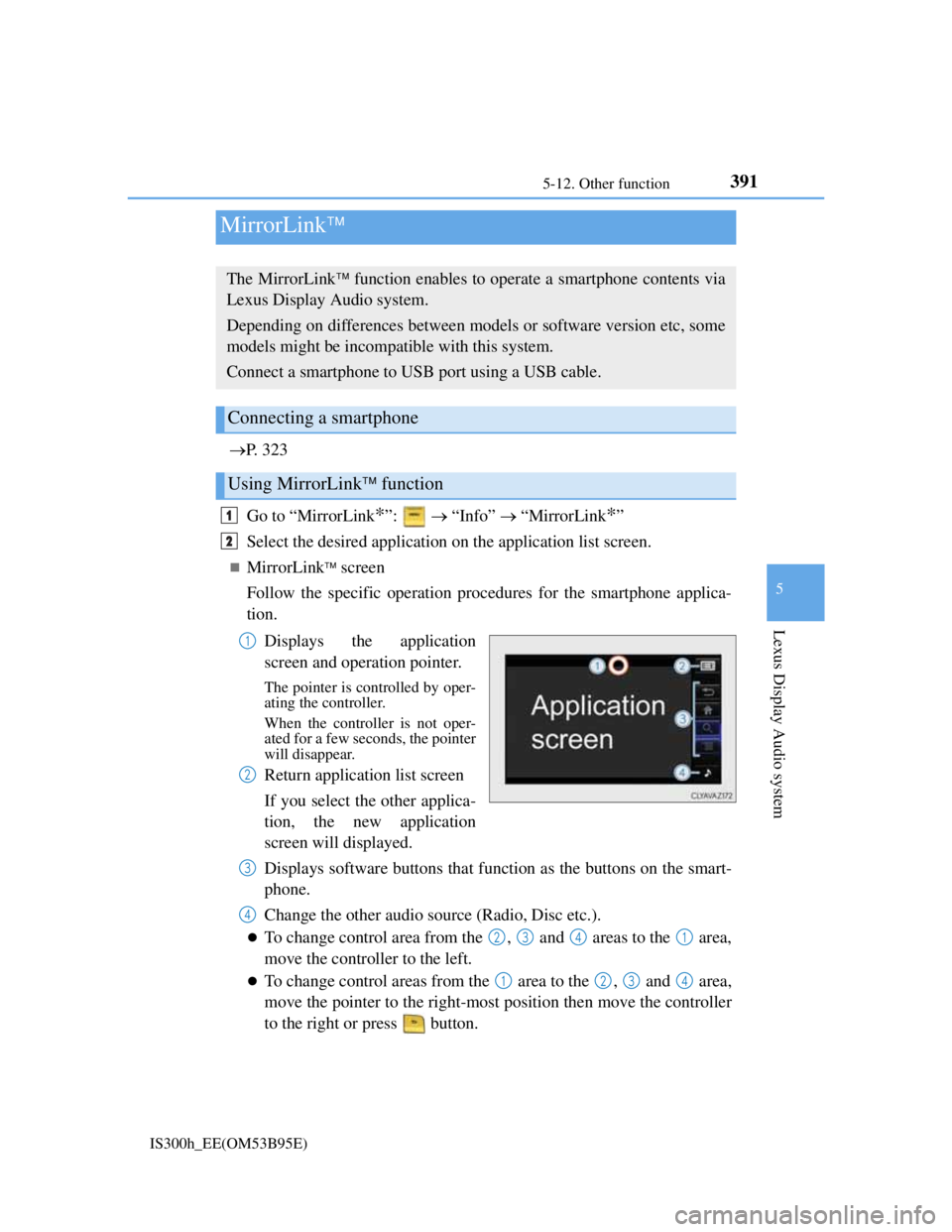
Displays the application
screen and operation pointer.
The pointer is controlled by oper-
ating the controller.
When the controller is not oper-
ated for a few seconds, the pointer
will disappear.
Return application list screen
If you select the other applica-
tion, the new application
screen will displayed.
Displays software buttons that function as the buttons on the smart-
phone.
Change the other audio source (Radio, Disc etc.).
To change control area from the , and areas to the area,
move the controller to the left.
To change control areas from the area to the , and area,
move the pointer to the right-most position then move the controller
to the right or press button.
MirrorLink
The MirrorLink function enables to operate a smartphone contents via
Lexus Display Audio system.
Depending on differences between models or software version etc, some
models might be incompatible with this system.
Connect a smartphone to USB port using a USB cable.
Connecting a smartphone
Using MirrorLink function
1
2
1
2
3
4
2341
1234
Page 407 of 628
3935-12. Other function
5
Lexus Display Audio system
IS300h_EE(OM53B95E)
Go to “USB photo”: “Info” “USB1 photo” or “USB2 photo”
P. 3 2 3
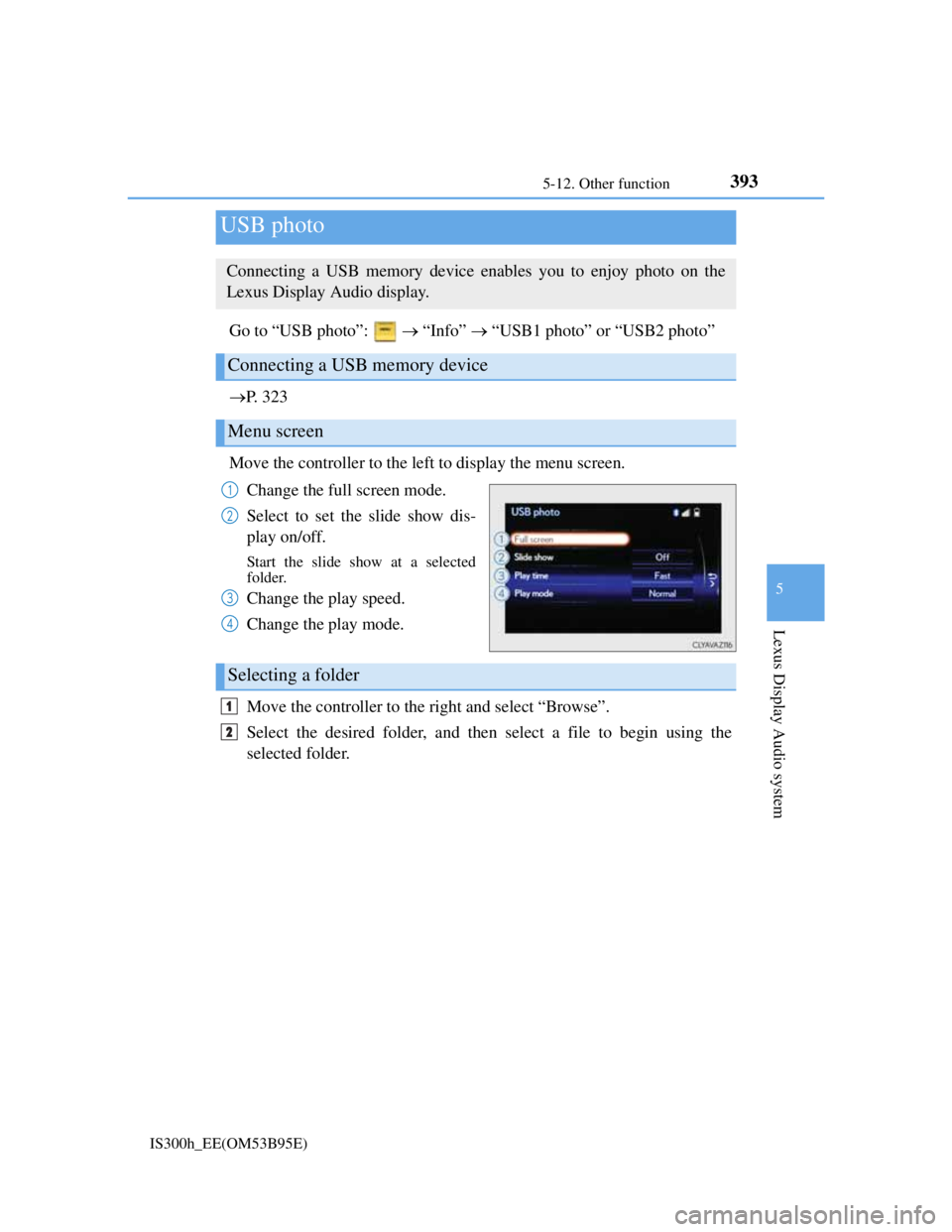
Move the controller to the left to display the menu screen.
Change the full screen mode.
Select to set the slide show dis-
play on/off.
Start the slide show at a selected
folder.
Change the play speed.
Change the play mode.
Move the controller to the right and select “Browse”.
Select the desired folder, and then select a file to begin using the
selected folder.
USB photo
Connecting a USB memory device enables you to enjoy photo on the
Lexus Display Audio display.
Connecting a USB memory device
Menu screen
1
2
3
4
Selecting a folder
1
2
Page 409 of 628
3955-12. Other function
5
Lexus Display Audio system
IS300h_EE(OM53B95E)
You can register desired contacts to enable the speech command system.
Up to 50 contacts per phone can be registered.
Go to “Voice tags”: “Setup” “Telephone” “Contact/call
history settings” “Voice tag” “New” or “Edit”
Select the desired contact.
Move the controller to the left and then select “REC”.
Say the registered voice.
To play the registered voice, select “Play”.
Deleting a voice tag
Display the “Voice tags” screen.
Select “Delete” and then the desired contact.
Move the controller to the left and then select “Delete”.
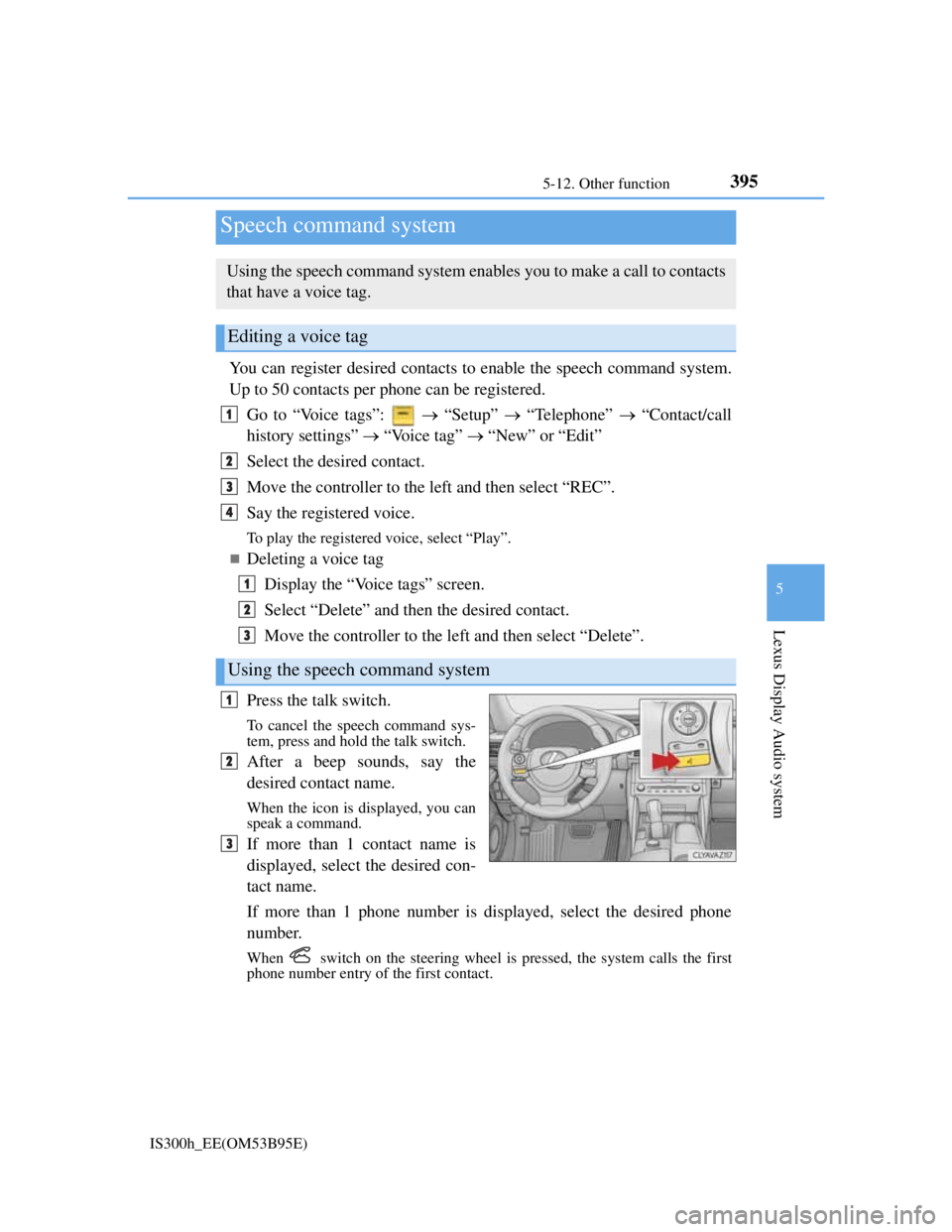
Press the talk switch.
To cancel the speech command sys-
tem, press and hold the talk switch.
After a beep sounds, say the
desired contact name.
When the icon is displayed, you can
speak a command.
If more than 1 contact name is
displayed, select the desired con-
tact name.
If more than 1 phone number is displayed, select the desired phone
number.
When switch on the steering wheel is pressed, the system calls the first
phone number entry of the first contact.
Speech command system
Using the speech command system enables you to make a call to contacts
that have a voice tag.
Editing a voice tag
Using the speech command system
1
2
3
4
1
2
3
1
2
3
Page 412 of 628
398
IS300h_EE(OM53B95E)6-1. Using the air conditioning system
Automatic air conditioning system
Air outlets and fan speed are automatically adjusted according to the
temperature setting.
Vehicles with a Lexus Display Audio system: Press the “MENU” button
on the Lexus Display Audio controller, then select “Climate” to display
the air conditioning operation screen.
For details on the Lexus Display Audio controller, refer to “Lexus Dis-
play Audio controller” on P. 318.
Vehicles with a navigation system: Press the “MENU” button on the
Remote Touch, then select “Climate” to display the air conditioning con-
trol screen.
For details on the Remote Touch, refer to the “Navigation System
Owner’s Manual”.
The illustrations below are for left-hand drive vehicles.
The button positions and shapes will differ for right-hand drive vehicles.
Also, the display and button positions will differ depending on the type
of the system.
Page 415 of 628
4016-1. Using the air conditioning system
6
Interior features
IS300h_EE(OM53B95E)
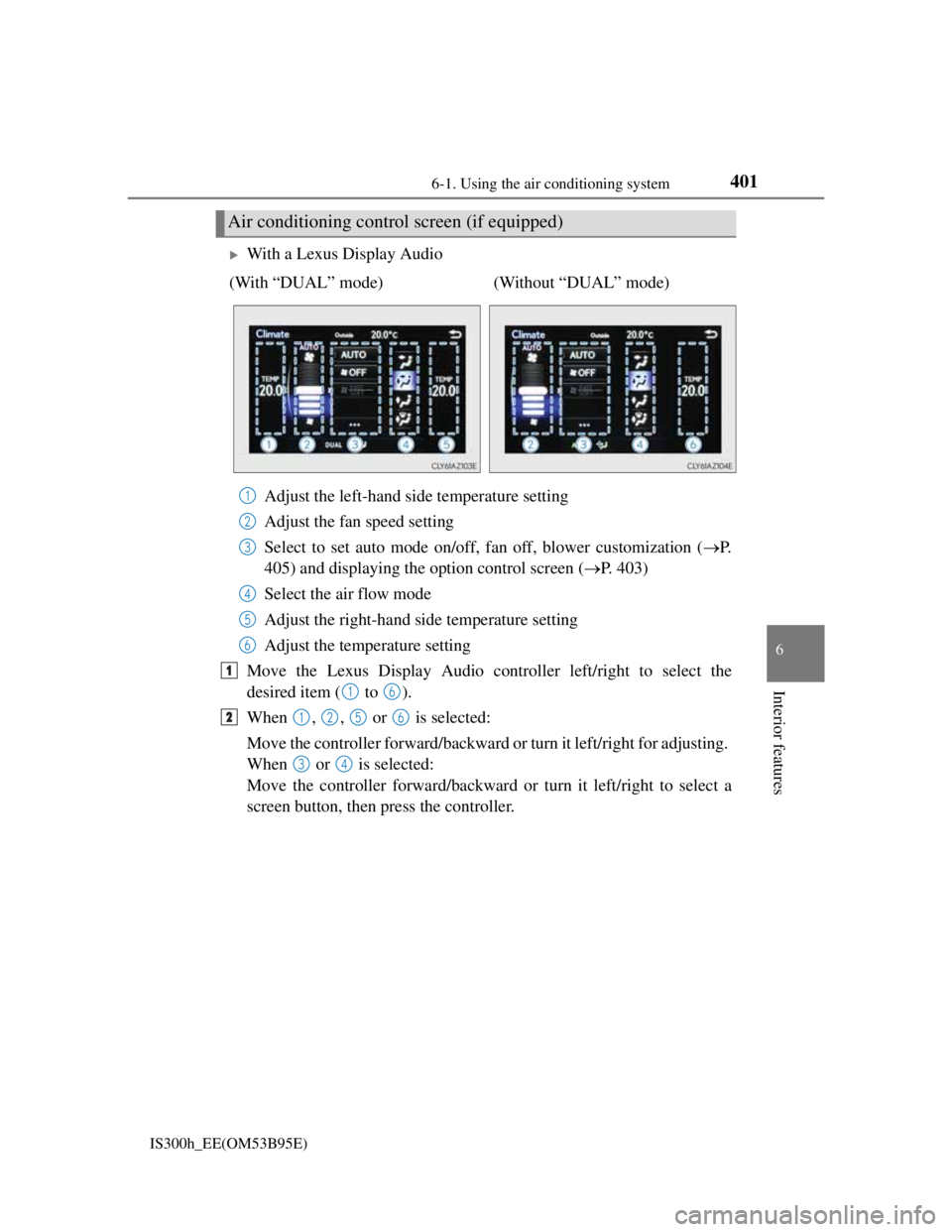
With a Lexus Display Audio
Adjust the left-hand side temperature setting
Adjust the fan speed setting
Select to set auto mode on/off, fan off, blower customization (P.
405) and displaying the option control screen (P. 403)
Select the air flow mode
Adjust the right-hand side temperature setting
Adjust the temperature setting
Move the Lexus Display Audio controller left/right to select the
desired item ( to ).
When , , or is selected:
Move the controller forward/backward or turn it left/right for adjusting.
When or is selected:
Move the controller forward/backward or turn it left/right to select a
screen button, then press the controller.
Air conditioning control screen (if equipped)
(With “DUAL” mode) (Without “DUAL” mode)
1
2
3
4
5
6
1
16
21256
34
Page 446 of 628
4327-1. Maintenance and care
IS300h_EE(OM53B95E)
NOTICE
Cleaning detergents
Do not use the following types of detergent, as they may discolor the vehicle
interior or cause streaks or damage to painted surfaces:
• Non-seat portions: Organic substances such as benzene or gasoline, alka-
line or acidic solutions, dye, and bleach
• Seats: Alkaline or acidic solutions, such as thinner, benzene, and alcohol
Do not use polish wax or polish cleaner. The instrument panel’s or other inte-
rior part’s painted surface may be damaged.
Preventing damage to leather surfaces
Observe the following precautions to avoid damage to and deterioration of
leather surfaces:
Remove any dust or dirt from leather surfaces immediately.
Do not expose the vehicle to direct sunlight for extended periods of time. Park
the vehicle in the shade, especially during summer.
Do not place items made of vinyl, plastic, or containing wax on the uphol-
stery, as they may stick to the leather surface if the vehicle interior heats up
significantly.
Water on the floor
Do not wash the vehicle floor with water.
Vehicle systems such as the audio system may be damaged if water comes into
contact with electrical components such as the audio system above or under the
floor of the vehicle. Water may also cause the body to rust.
When cleaning the inside of the windshield (vehicles with LDA [Lane Depar-
ture Alert])
Be careful not to touch the camera sensor (P. 264).
If the camera is accidentally scratched or hit, LDA may not operate properly or
may cause a malfunction.
Cleaning the inside of the rear window
Do not use glass cleaner to clean the rear window, as this may cause damage
to the rear window defogger heater wires or antenna. Use a cloth dampened
with lukewarm water to gently wipe the window clean. Wipe the window in
strokes running parallel to the heater wires or antenna.
Be careful not to scratch or damage the heater wires or antenna.
Page 526 of 628
5128-2. Steps to take in an emergency
IS300h_EE(OM53B95E)
If the tire pressure warning light frequently comes on after blinking for 1 minute
If the tire pressure warning light frequently comes on after blinking for 1 minute
when the power switch is turned to ON mode, have it checked by any authorized
Lexus dealer or repairer, or another duly qualified and equipped professional.
Warning buzzer
In some cases, the buzzer may not be heard due to being in a noisy location or
audio sound.
CAUTION
If both the ABS and the brake system warning lights remain on
Stop your vehicle in a safe place immediately and contact any authorized Lexus
dealer or repairer, or another duly qualified and equipped professional. The
vehicle will become extremely unstable during braking, and the ABS system
may fail, which could cause an accident resulting in death or serious injury.
When the electric power steering system warning light comes on
The steering wheel may become extremely heavy.
If the steering wheel becomes heavier than usual when operating, hold firmly
and operate using more force than usual.
If the tire pressure warning light comes on
Be sure to observe the following precautions. Failure to do so could cause a
loss of vehicle control and result in death or serious injury.
Vehicles with an emergency tire puncture repair kit
Stop your vehicle in a safe place as soon as possible. Adjust the tire inflation
pressure immediately.
If the tire pressure warning light comes on even after tire inflation pressure
adjustment, it is probable that you have a flat tire. Check the tires. If a tire is
flat, repair the flat tire by using emergency tire puncture repair kit.
Avoid abrupt maneuvering and braking. If the vehicle tires deteriorate, you
could lose control of the steering wheel or the brakes.
Vehicles with run-flat tires
Decelerate to the lowest appropriate speed as soon as possible. Do not drive
over 60 km/h (37 mph).
Check and adjust the tire inflation pressure immediately.
If the tire pressure warning light comes on even after tire inflation pressure
adjustment, it is probable that you have a flat tire. Have the tire replaced by
the nearest authorized Lexus dealer or repairer, or another duly qualified and
equipped professional.
Avoid abrupt maneuvering and braking. If the vehicle tires deteriorate, you
could lose control of the steering wheel or the brakes.
If a blowout or sudden air leakage should occur
The tire pressure warning system may not activate immediately.
Page 567 of 628
5538-2. Steps to take in an emergency
8
When trouble arises
IS300h_EE(OM53B95E)
Once the hybrid system has started, remove the jumper cables in the
exact reverse order from which they were connected.
Once the hybrid system starts, have the vehicle inspected at any autho-
rized Lexus dealer or repairer, or another duly qualified and equipped
professional as soon as possible.
Starting the hybrid system when the 12-volt battery is discharged
The hybrid system cannot be started by push-starting.
To prevent 12-volt battery discharge
Turn off the headlights and the audio system while the hybrid system is off.
Turn off any unnecessary electrical components when the vehicle is running at
a low speed for an extended period, such as in heavy traffic.
Charging the 12-volt battery
The electricity stored in the 12-volt battery will discharge gradually even when
the vehicle is not in use, due to natural discharge and the draining effects of cer-
tain electrical appliances. If the vehicle is left for a long time, the 12-volt battery
may discharge, and the hybrid system may be unable to start. (The 12-volt bat-
tery recharges automatically while the hybrid system is operating.)
When recharging or replacing the 12-volt battery
For vehicles with an alarm: Make sure that the key is not inside the vehicle
when recharging or replacing the 12-volt battery. The key may be locked in the
vehicle if the alarm is activated. (P. 98)
In some cases, it may not be possible to unlock the doors using the smart entry
& start system when the 12-volt battery is discharged. Use the wireless remote
control or the mechanical key to lock or unlock the doors.
The hybrid system may not start on the first attempt after the 12-volt battery has
recharged but will start normally after the second attempt. This is not a mal-
function.
The power switch mode is memorized by the vehicle. When the 12-volt battery
is reconnected, the system will return to the mode it was in before the 12-volt
battery was discharged. Before disconnecting the 12-volt battery, turn the
power switch off.
If you are unsure what mode the power switch was in before the 12-volt battery
discharged, be especially careful when reconnecting the 12-volt battery.
8