EPS Lexus IS300h 2013 Owner's Manual
[x] Cancel search | Manufacturer: LEXUS, Model Year: 2013, Model line: IS300h, Model: Lexus IS300h 2013Pages: 628, PDF Size: 20.23 MB
Page 4 of 628

TABLE OF CONTENTS4
IS300h_EE(OM53B95E)
5-1. Basic Operations
Lexus Display Audio
System ............................. 316
Steering wheel audio
switches ........................... 322
USB/AUX ports ................ 323
5-2. Setup
Setup menu........................ 324
General settings ................. 325
Voice settings .................... 328
Display settings ................. 329
5-3. Using the audio system
Selecting the audio
source .............................. 330
Optimal use of the audio
system ............................. 331
Audio settings................... 332
Audio menu screen
operation ......................... 336
5-4. Using the radio
Radio operation ................. 3395-5. Playing an audio CD and
MP3/WMA/AAC discs
CD player operation .......... 341
5-6. Using an external device
Listening to an iPod .......... 348
Using USB memory
device .............................. 351
Using the AUX port .......... 356
5-7. Connecting Bluetooth
®
Steps for using Bluetooth®
devices............................. 357
Registering a Bluetooth
®
device .............................. 359
Selecting a Bluetooth
®
device .............................. 360
Connecting a Bluetooth
®
audio player..................... 361
Connecting a Bluetooth
®
phone ............................... 362
Displaying a Bluetooth
®
device details................... 363
Detailed Bluetooth
®
settings ............................ 364
5Lexus Display Audio sys-
tem
Page 6 of 628

TABLE OF CONTENTS6
IS300h_EE(OM53B95E)
7-1. Maintenance and care
Cleaning and protecting
the vehicle exterior.......... 426
Cleaning and protecting
the vehicle interior .......... 430
7-2. Maintenance
Maintenance
requirements.................... 433
7-3. Do-it-yourself maintenance
Do-it-yourself service
precautions ...................... 435
Hood .................................. 437
Positioning a floor jack ..... 438
Engine compartment ......... 439
12-volt battery ................... 447
Tires................................... 450
Replacing the tire .............. 460
Tire inflation pressure ....... 466
Wheels............................... 468
Air conditioning filter ....... 470
Electronic key battery ....... 472
Checking and replacing
fuses ................................ 475
Light bulbs ........................ 4798-1. Essential information
Emergency flashers ........... 498
If your vehicle has to be
stopped in an
emergency ....................... 499
8-2. Steps to take in an
emergency
If your vehicle needs to
be towed .......................... 500
If you think something
is wrong........................... 506
If a warning light turns
on or a warning buzzer
sounds ............................. 507
If a warning message is
displayed ......................... 513
If you have a flat tire
(vehicles without
run-flat tires) ................... 530
If you have a flat tire
(vehicles with
run-flat tires) ................... 544
If the hybrid system will
not start............................ 545
If the shift lever cannot
be shifted from P ............. 547
7Maintenance and care8When trouble arises
Page 12 of 628
12
IS300h_EE(OM53B95E)
CAUTION:
Explains something that, if not obeyed, could cause death or serious
injury to people.
NOTICE:
Explains something that, if not obeyed, could cause damage to or a
malfunction in the vehicle or its equipment.
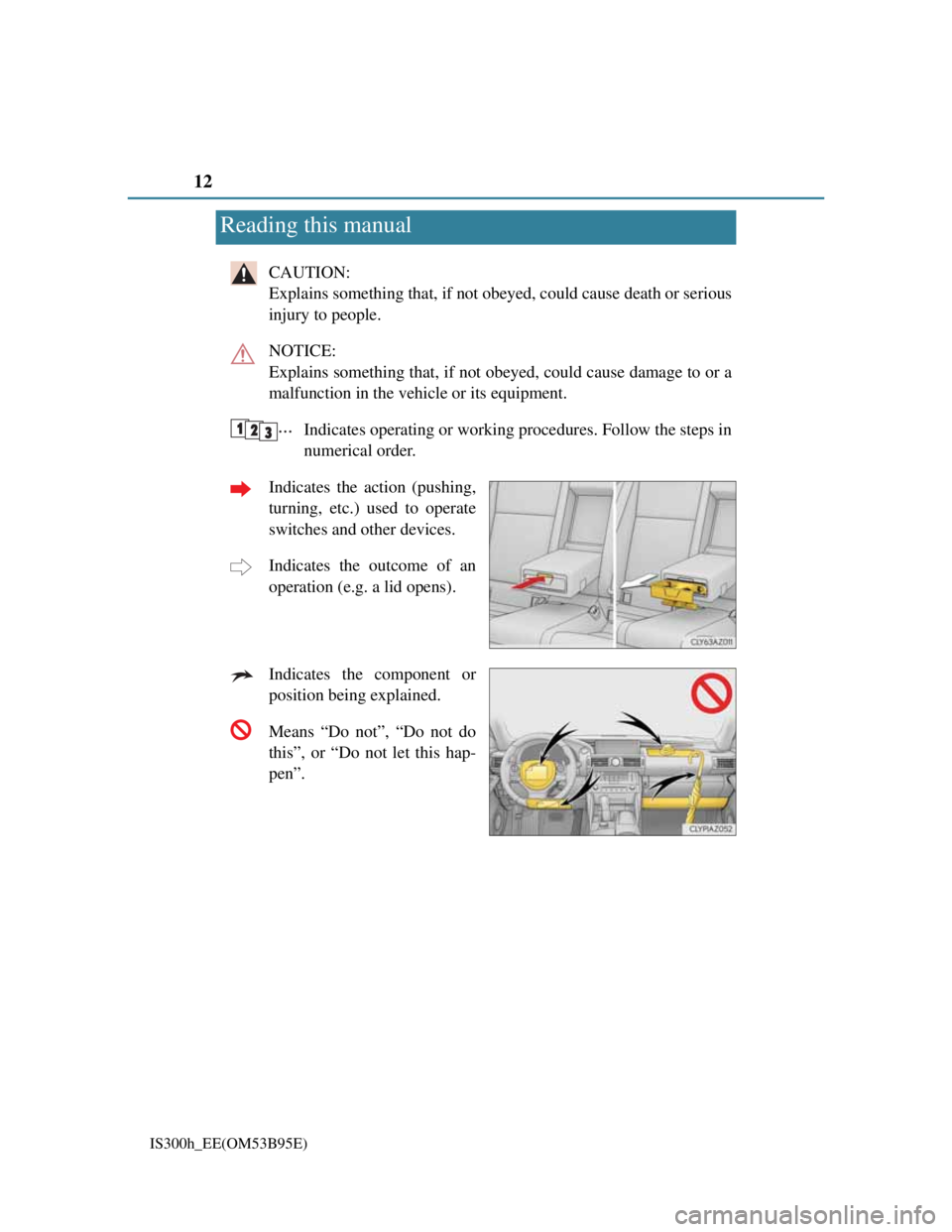
Indicates operating or working procedures. Follow the steps in
numerical order.
Indicates the action (pushing,
turning, etc.) used to operate
switches and other devices.
Indicates the outcome of an
operation (e.g. a lid opens).
Indicates the component or
position being explained.
Means “Do not”, “Do not do
this”, or “Do not let this hap-
pen”.
Reading this manual
Page 143 of 628
1413-2. Opening, closing and locking the doors and trunk
3
Operation of each component
IS300h_EE(OM53B95E)
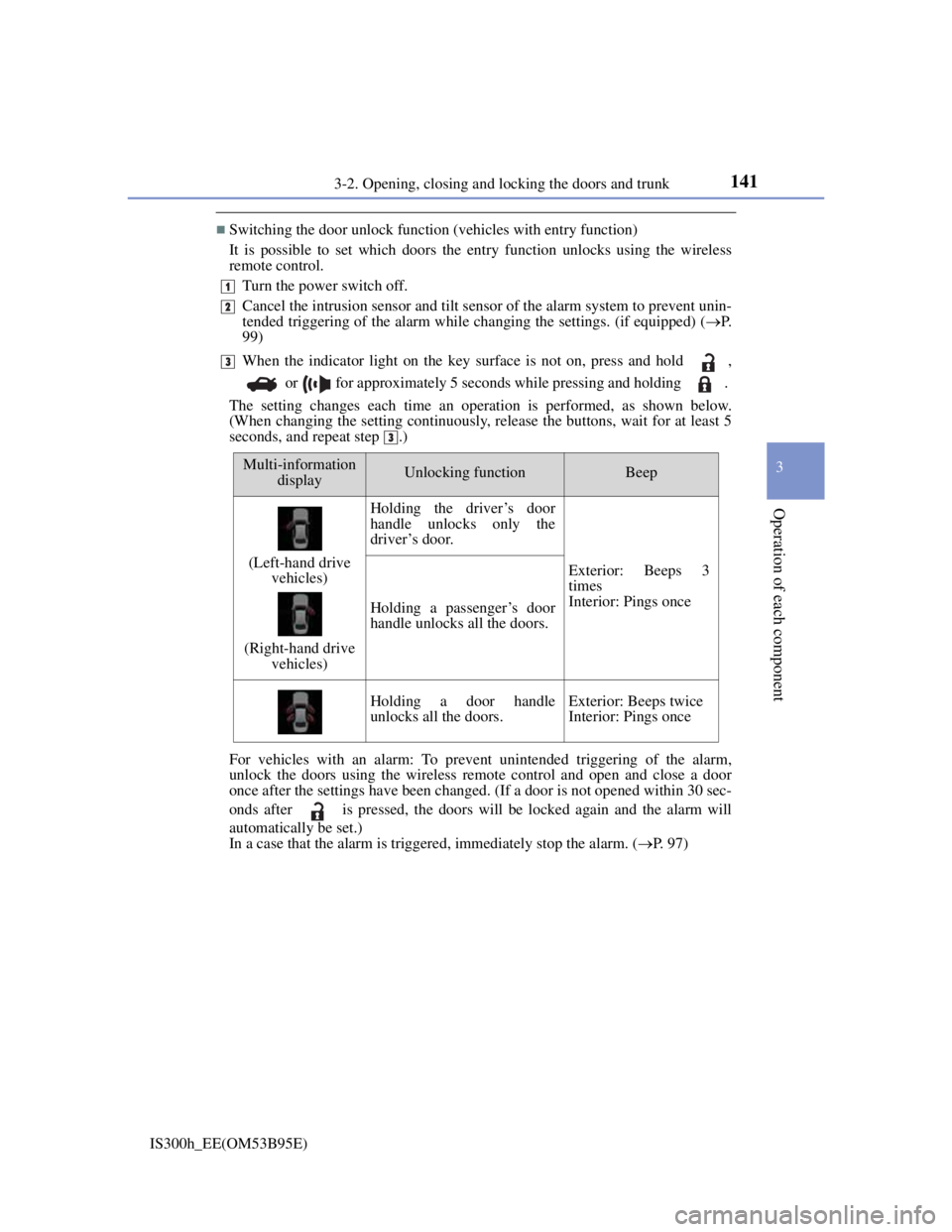
Switching the door unlock function (vehicles with entry function)
It is possible to set which doors the entry function unlocks using the wireless
remote control.
Turn the power switch off.
Cancel the intrusion sensor and tilt sensor of the alarm system to prevent unin-
tended triggering of the alarm while changing the settings. (if equipped) (P.
99)
When the indicator light on the key surface is not on, press and hold ,
or for approximately 5 seconds while pressing and holding .
The setting changes each time an operation is performed, as shown below.
(When changing the setting continuously, release the buttons, wait for at least 5
seconds, and repeat step .)
For vehicles with an alarm: To prevent unintended triggering of the alarm,
unlock the doors using the wireless remote control and open and close a door
once after the settings have been changed. (If a door is not opened within 30 sec-
onds after is pressed, the doors will be locked again and the alarm will
automatically be set.)
In a case that the alarm is triggered, immediately stop the alarm. (P. 97)
1
2
3
3
Multi-information
displayUnlocking functionBeep
(Left-hand drive
vehicles)
(Right-hand drive
vehicles)
Holding the driver’s door
handle unlocks only the
driver’s door.
Exterior: Beeps 3
times
Interior: Pings once
Holding a passenger’s door
handle unlocks all the doors.
Holding a door handle
unlocks all the doors.Exterior: Beeps twice
Interior: Pings once
Page 243 of 628

241
4
Driving
IS300h_EE(OM53B95E)4-4. Refueling
Close all the doors and windows, and turn the power switch off.
Confirm the type of fuel.
Fuel types
EU area:
Unleaded gasoline conforming to European standard EN228, Research Octane
Number of 95 or higher
Except EU area:
Unleaded gasoline, Research Octane Number of 95 or higher
Use of ethanol blended gasoline in a gasoline engine
Lexus allows the use of ethanol blended gasoline where the ethanol content is up
to 10%. Make sure that the ethanol blended gasoline to be used has a Research
Octane Number that follows the above.
Opening the fuel tank cap
Perform the following steps to open the fuel tank cap:
Before refueling the vehicle
Page 276 of 628
2744-5. Using the driving support systems
IS300h_EE(OM53B95E)
Buzzer operation and distance to an obstacle
A buzzer sounds when the sensors are operating.
The buzzer beeps faster as the vehicle approaches an obstacle. When
the vehicle comes within the following distance of the obstacle, the
buzzer sounds continuously:
• Front center sensors: Approximately 30 cm (1.0 ft.)
• Corner sensors: Approximately 30 cm (1.0 ft.)
• Rear center sensors: Approximately 35 cm (1.1 ft.)
When 2 or more obstacles are detected simultaneously, the buzzer
system responds to the nearest obstacle. If one or both come within
the above distances, the beep will repeat a long tone, followed by
fast beeps.
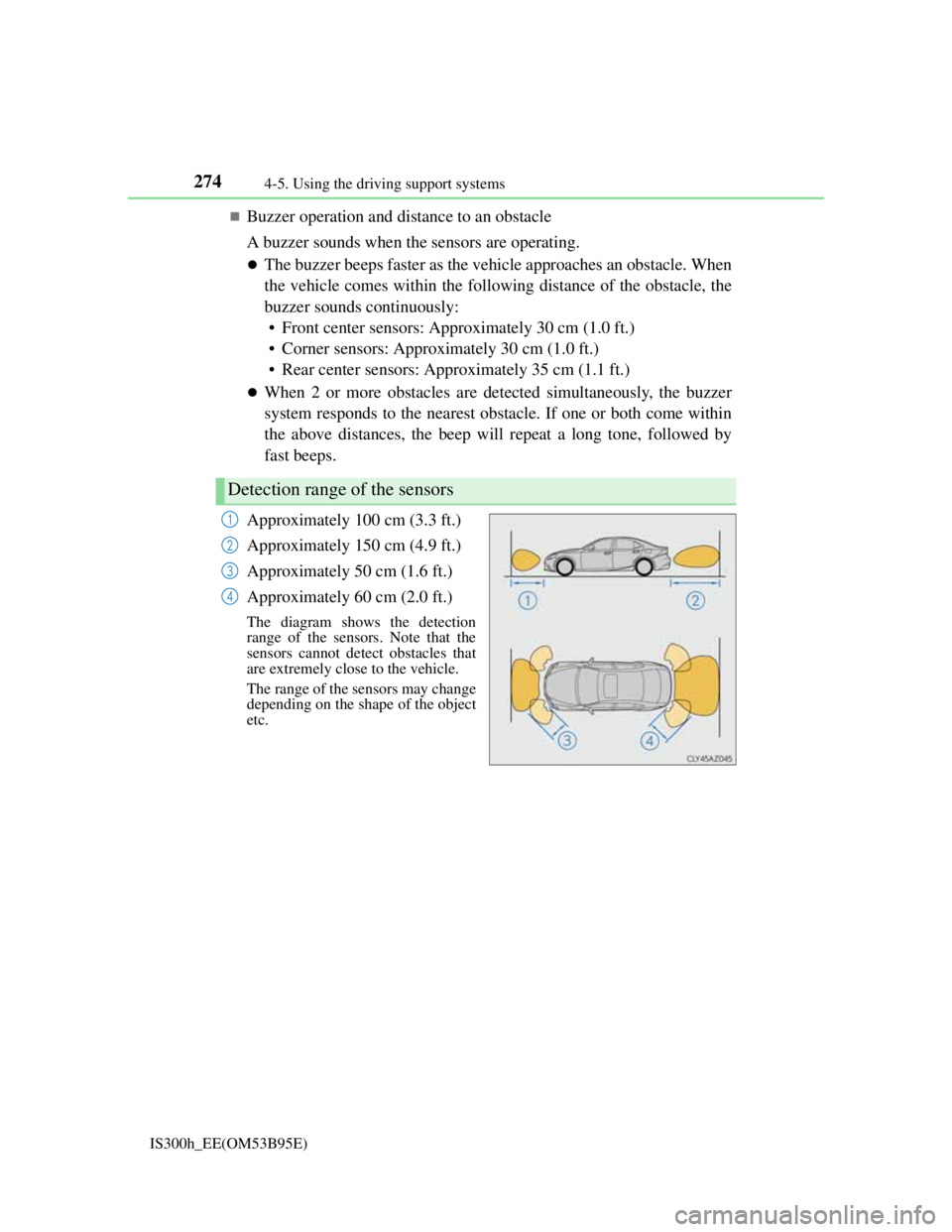
Approximately 100 cm (3.3 ft.)
Approximately 150 cm (4.9 ft.)
Approximately 50 cm (1.6 ft.)
Approximately 60 cm (2.0 ft.)
The diagram shows the detection
range of the sensors. Note that the
sensors cannot detect obstacles that
are extremely close to the vehicle.
The range of the sensors may change
depending on the shape of the object
etc.
Detection range of the sensors
1
2
3
4
Page 278 of 628

2764-5. Using the driving support systems
IS300h_EE(OM53B95E)
Sensor detection information
The sensor’s detection areas are limited to the areas around the vehicle’s front
corner and rear bumpers.
Certain vehicle conditions and the surrounding environment may affect the
ability of the sensor to correctly detect obstacles. Particular instances where this
may occur are listed below.
• There is dirt, snow or ice on the sensor. (Wiping the sensors will resolve this
problem.)
• The sensor is frozen. (Thawing the area will resolve this problem.)
In especially cold weather, if a sensor is frozen the screen may show an
abnormal display, or obstacles may not be detected.
• The sensor is covered in any way.
• The vehicle is leaning considerably to one side.
• On an extremely bumpy road, on an incline, on gravel, or on grass.
• The vicinity of the vehicle is noisy due to vehicle horns, motorcycle engines,
air brakes of large vehicles, or other loud noises producing ultrasonic waves.
• There is another vehicle equipped with parking assist sensors in the vicinity.
• The sensor is coated with a sheet of spray or heavy rain.
• The vehicle is equipped with a fender pole or wireless antenna.
• Towing eyelets are installed.
• The bumper or sensor receives a strong impact.
• The vehicle is approaching a tall or curved curb.
• In harsh sunlight or intense cold weather.
• The area directly under the bumpers is not detected.
• If obstacles draw too close to the sensor.
• A non-genuine Lexus suspension (lowered suspension etc.) is installed.
• People may not be detected if they are wearing certain types of clothing.
In addition to the examples above, there are instances in which, because of their
shape, signs and other objects may be judged by the sensor to be closer than they
are.
The shape of the obstacle may prevent the sensor from detecting it. Pay particu-
lar attention to the following obstacles:
• Wires, fences, ropes, etc.
• Cotton, snow and other materials that absorb sound waves
• Sharply-angled objects
• Low obstacles
• Tall obstacles with upper sections projecting outwards in the direction of
your vehicle
The following situations may occur during use.
• Depending on the shape of the obstacle and other factors, the detection dis-
tance may shorten, or detection may be impossible.
• Obstacles may not be detected if they are too close to the sensor.
• There will be a short delay between obstacle detection and display. Even at
slow speeds, there is a possibility that the obstacle will come within the sen-
sor’s detection areas before the display is shown and the warning beep
sounds.
• Thin posts or objects lower than the sensor may not be detected when
approached, even if they have been detected once.
• It might be difficult to hear beeps due to the volume of the audio system or
air flow noise of the air conditioning system.
Page 295 of 628

2934-5. Using the driving support systems
4
Driving
IS300h_EE(OM53B95E)
ABS (Anti-lock Brake System)
Helps to prevent wheel lock when the brakes are applied suddenly, or if
the brakes are applied while driving on a slippery road surface
Brake assist
Generates an increased level of braking force after the brake pedal is
depressed when the system detects a panic stop situation
VSC (Vehicle Stability Control)
Helps the driver to control skidding when swerving suddenly or turn-
ing on slippery road surfaces
VSC+ (Vehicle Stability Control+)
Provides cooperative control of the ABS, TRC, VSC and EPS.
Helps to maintain directional stability when swerving on slippery road
surfaces by controlling steering performance.
TRC (Traction Control)
Helps to maintain drive power and prevent the drive wheels from spin-
ning when starting the vehicle or accelerating on slippery roads
Hill-start assist control
Prevents the vehicle from rolling backward when starting on an incline
or slippery slope
EPS (Electric Power Steering)
Employs an electric motor to reduce the amount of effort needed to
turn the steering wheel
Driving assist systems
To help enhance driving safety and performance, the following systems
operate automatically in response to various driving situations. Be aware,
however, that these systems are supplementary and should not be relied
upon too heavily when operating the vehicle.
Page 296 of 628
2944-5. Using the driving support systems
IS300h_EE(OM53B95E)
Adaptive Variable Suspension System (if equipped)
By independently controlling the damping force of the shock absorbers
for each of the 4 wheels according to the road and driving conditions,
this system helps riding comfort with superior steering stability, and
helps good vehicle posture (P. 291)
VDIM (Vehicle Dynamics Integrated Management)
Provides integrated control of the ABS, brake assist, TRC, VSC, hill-
start assist control, and EPS systems
Helps to maintain vehicle stability when swerving on slippery road sur-
faces by controlling the brakes and hybrid system output
PCS (Pre-Crash Safety system) (if equipped)
P. 2 9 9
Emergency brake signal
When the brakes are applied suddenly, the stop lights automatically
flash to alert the vehicle behind
BSM (Blind Spot Monitor) (if equipped)
P. 3 0 9
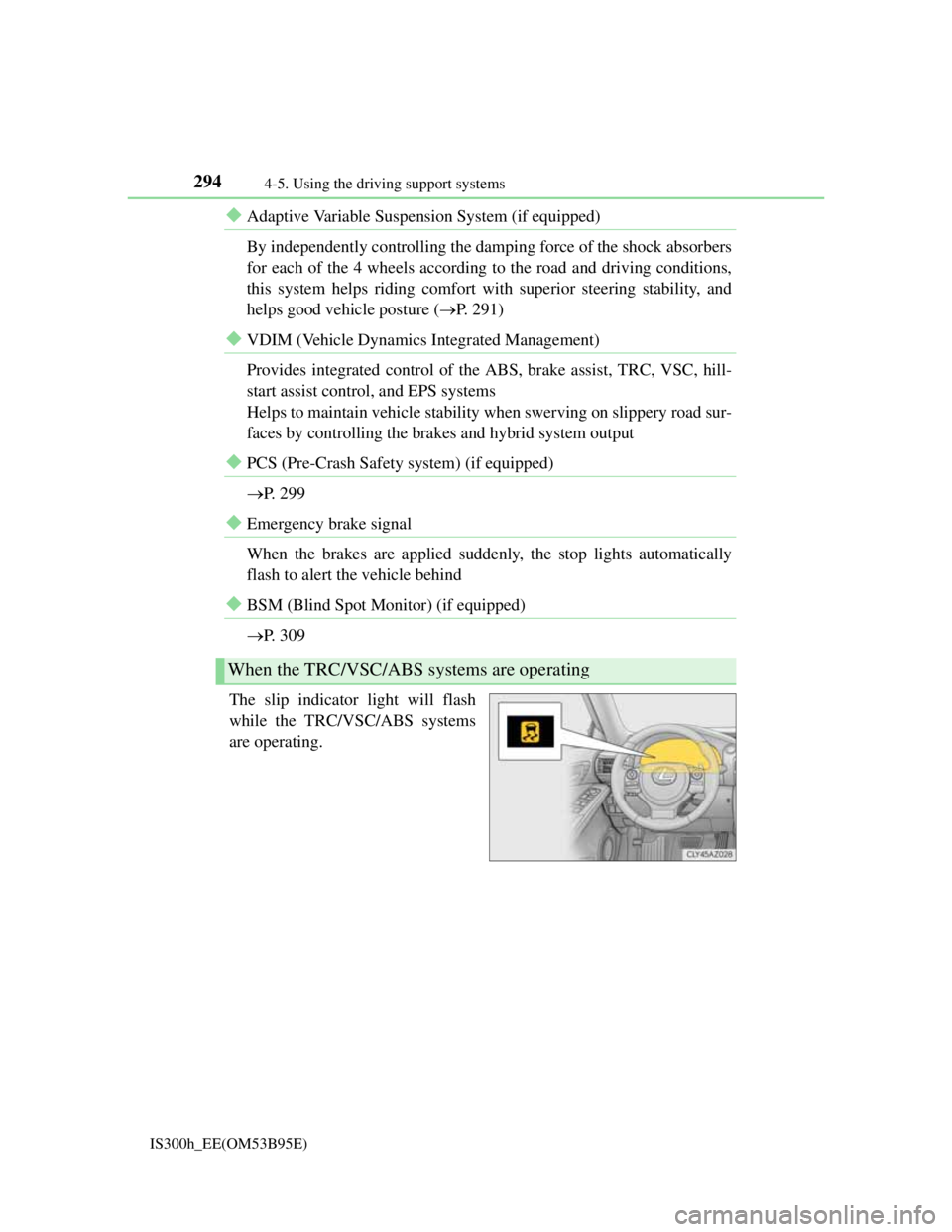
The slip indicator light will flash
while the TRC/VSC/ABS systems
are operating.
When the TRC/VSC/ABS systems are operating
Page 298 of 628

2964-5. Using the driving support systems
IS300h_EE(OM53B95E)
When the 12-volt battery is disconnected
The steering wheel may move from its straight forward position, but this will be
corrected automatically when driving.
Sounds and vibrations caused by the ABS, brake assist, TRC, VSC, hill-start
assist control systems
A sound may be heard from the engine compartment when the brake pedal is
depressed repeatedly, when the hybrid system is started or just after the vehicle
begins to move. This sound does not indicate that a malfunction has occurred in
any of these systems.
Any of the following conditions may occur when the above systems are operat-
ing. None of these indicates that a malfunction has occurred.
• Vibrations may be felt through the vehicle body and steering.
• A motor sound may be heard after the vehicle comes to a stop.
EPS operation sound
When the steering wheel is operated, a motor sound may be heard. This does not
indicate a malfunction.
Reactivation of the TRC/VSC systems
Even after the TRC/VSC systems have been turned off, turning the hybrid sys-
tem off and then on again will automatically reactivate the TRC/VSC systems.
Reactivation of the TRC system linked to vehicle speed
When only the TRC system is turned off, the TRC system will turn on when
vehicle speed increases. However, when both TRC and VSC systems are turned
off, the systems will not turn on even when vehicle speed increases.
Reduced effectiveness of the EPS system
The effectiveness of the EPS system is reduced to prevent the system from over-
heating when there is frequent steering input over an extended period of time.
The steering wheel may feel heavy as a result. Should this occur, refrain from
excessive steering input or stop the vehicle and turn the hybrid system off. The
EPS system should return to normal within 10 minutes.