audio Lexus IS300h 2014 User Guide
[x] Cancel search | Manufacturer: LEXUS, Model Year: 2014, Model line: IS300h, Model: Lexus IS300h 2014Pages: 612, PDF Size: 111.33 MB
Page 115 of 612
1152. Instrument cluster
2
Instrument cluster
IS300h_EE(OM53C61E)
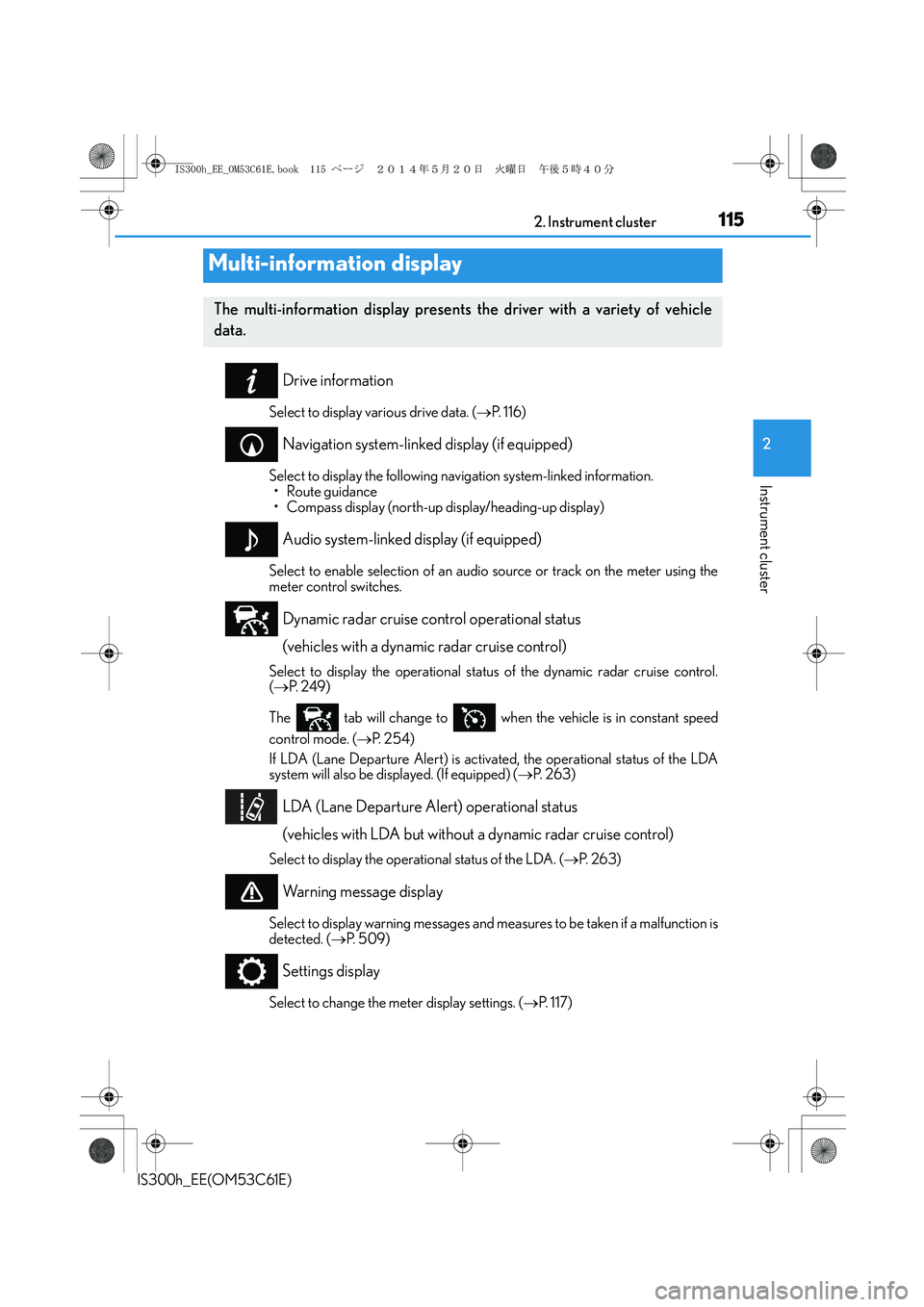
Drive information
Select to display various drive data. (→P. 116)
Navigation system-linked display (if equipped)
Select to display the following navigation system-linked information.
•Route guidance
• Compass display (north-up display/heading-up display)
Audio system-linked display (if equipped)
Select to enable selection of an audio source or track on the meter using the
meter control switches.
Dynamic radar cruise control operational status
(vehicles with a dynamic radar cruise control)
Select to display the operational status of the dynamic radar cruise control.
(→P. 2 4 9 )
The tab will change to when the vehicle is in constant speed
control mode. (→P. 2 5 4 )
If LDA (Lane Departure Alert) is activated, the operational status of the LDA
system will also be displayed. (If equipped) (→P. 2 6 3 )
LDA (Lane Departure Alert) operational status
(vehicles with LDA but without a dynamic radar cruise control)
Select to display the operational status of the LDA. (→P. 2 6 3 )
Warning message display
Select to display warning messages and measures to be taken if a malfunction is
detected. (→P. 5 0 9 )
Settings display
Select to change the meter display settings. (→P. 1 1 7 )
Multi-information display
The multi-information display presents the driver with a variety of vehicle
data.
IS300h_EE_OM53C61E.book 115 ページ 2014年5月20日 火曜日 午後5時40分
Page 121 of 612
1212. Instrument cluster
2
Instrument cluster
IS300h_EE(OM53C61E)
Energy monitor/consumption screen
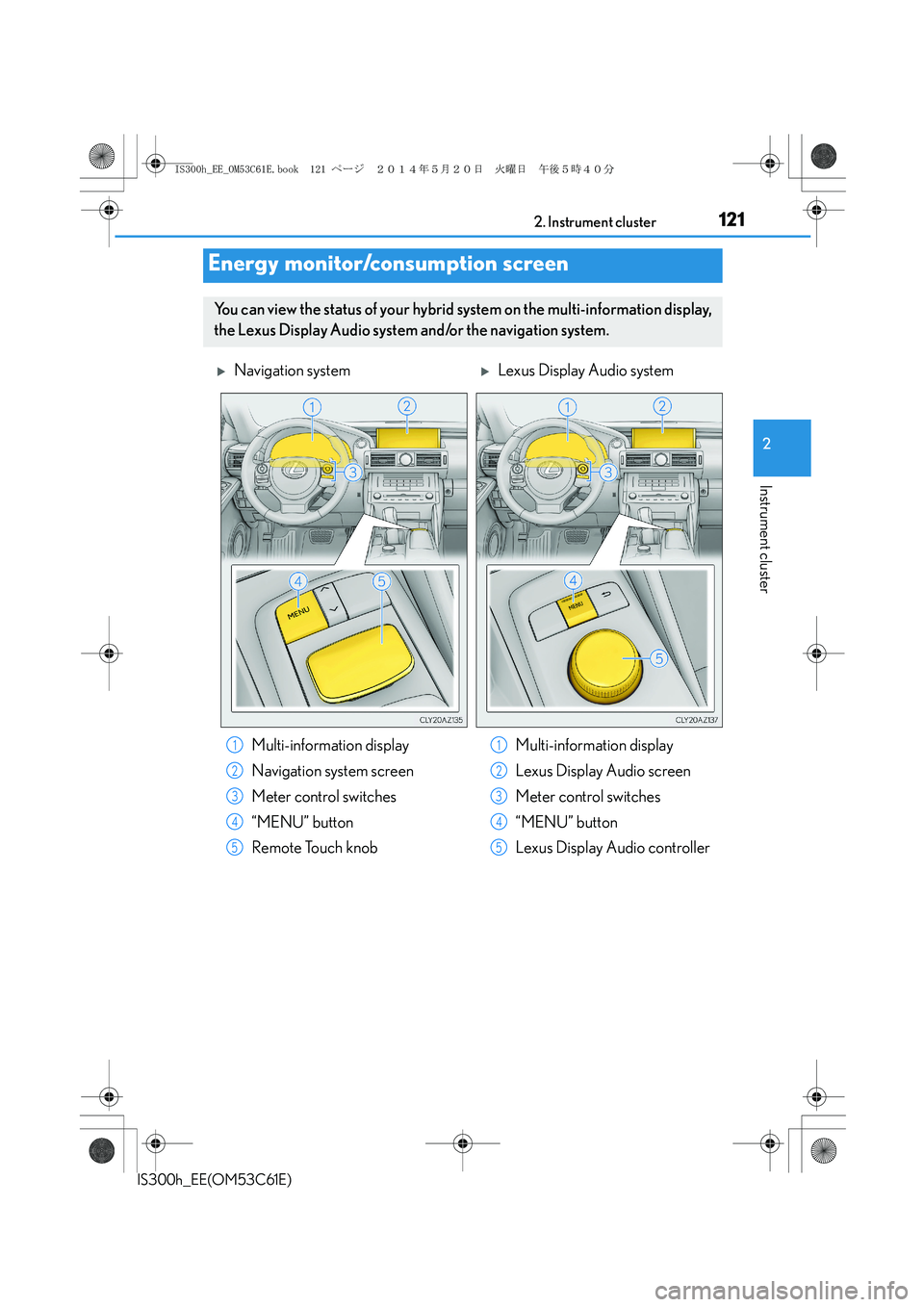
You can view the status of your hybrid system on the multi-information display,
the Lexus Display Audio system and/or the navigation system.
XNavigation systemXLexus Display Audio system
Multi-information display
Navigation system screen
Meter control switches
“MENU” button
Remote Touch knobMulti-information display
Lexus Display Audio screen
Meter control switches
“MENU” button
Lexus Display Audio controller
1
2
3
4
5
1
2
3
4
5
IS300h_EE_OM53C61E.book 121 ページ 2014年5月20日 火曜日 午後5時40分
Page 122 of 612

1222. Instrument cluster
IS300h_EE(OM53C61E)
XNavigation system
Press the “MENU” button on the
Remote Touch, and then select
“Car” on the “Menu” screen.
If the “Trip information” or “Past
record” screen is displayed, select
“Energy”.
XLexus Display Audio system
Press the “MENU” button on the
Lexus Display Audio controller, and
then select “Car” on the “MENU”
screen.
If the “Energy monitor” screen does
not appear, move the controller to
the right and select “Energy”.
XMulti-information display
Press the meter control switches several times to select the energy monitor
display.
Energy monitor
IS300h_EE_OM53C61E.book 122 ページ 2014年5月20日 火曜日 午後5時40分
Page 123 of 612
1232. Instrument cluster
2
Instrument cluster
IS300h_EE(OM53C61E)
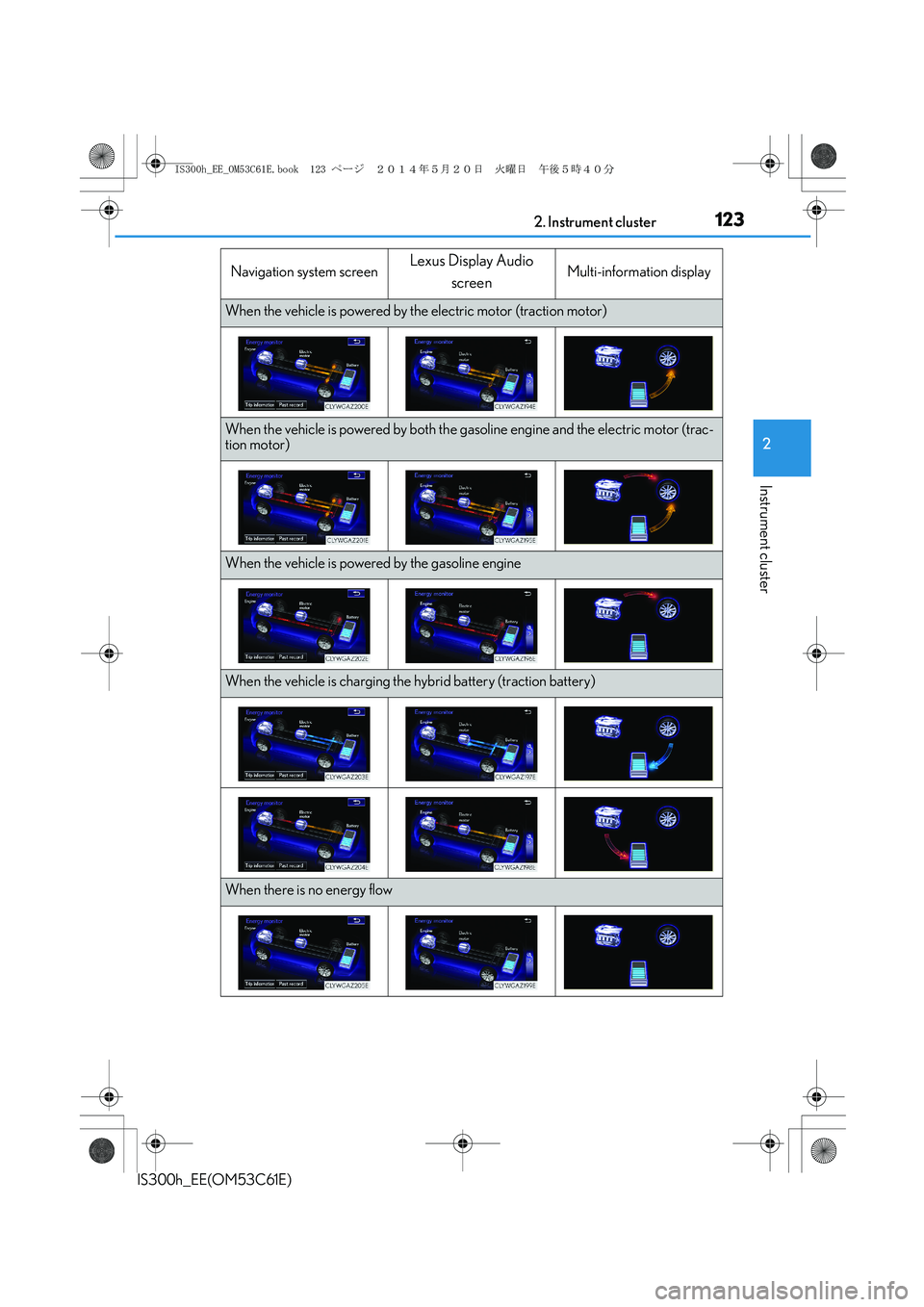
Navigation system screenLexus Display Audio
screenMulti-information display
When the vehicle is powered by the electric motor (traction motor)
When the vehicle is powered by both the gasoline engine and the electric motor (trac-
tion motor)
When the vehicle is powered by the gasoline engine
When the vehicle is charging the hybrid battery (traction battery)
When there is no energy flow
IS300h_EE_OM53C61E.book 123 ページ 2014年5月20日 火曜日 午後5時40分
Page 124 of 612
1242. Instrument cluster
IS300h_EE(OM53C61E)These images are examples only.
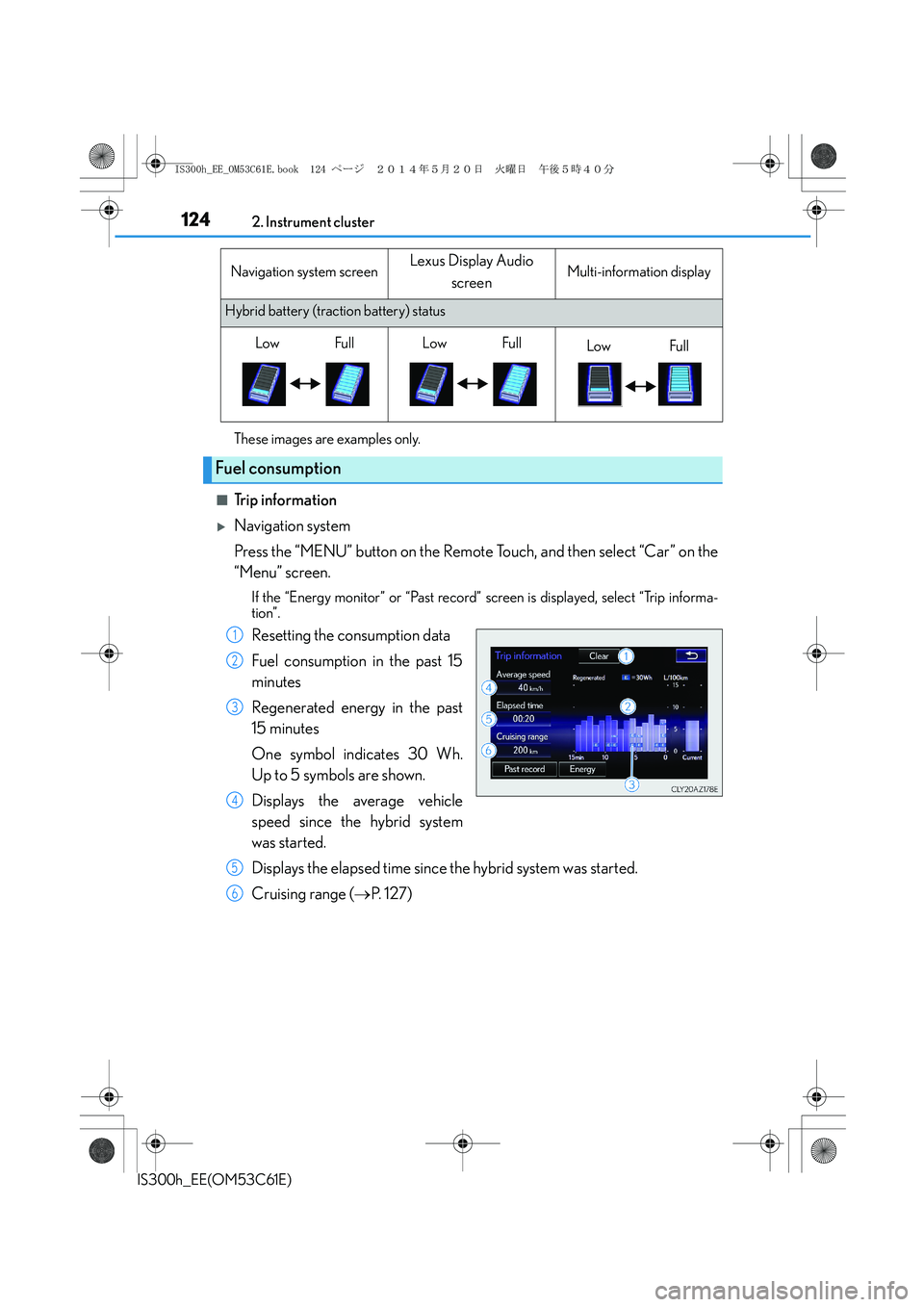
■Trip information
XNavigation system
Press the “MENU” button on the Remote Touch, and then select “Car” on the
“Menu” screen.
If the “Energy monitor” or “Past record” screen is displayed, select “Trip informa-
tion”.
Resetting the consumption data
Fuel consumption in the past 15
minutes
Regenerated energy in the past
15 minutes
One symbol indicates 30 Wh.
Up to 5 symbols are shown.
Displays the average vehicle
speed since the hybrid system
was started.
Displays the elapsed time since the hybrid system was started.
Cruising range (→P. 1 2 7 )
Hybrid battery (traction battery) status
Fuel consumption
Navigation system screenLexus Display Audio
screenMulti-information display
LowFull LowFullLowFull
1
2
3
4
5
6
IS300h_EE_OM53C61E.book 124 ページ 2014年5月20日 火曜日 午後5時40分
Page 125 of 612
1252. Instrument cluster
2
Instrument cluster
IS300h_EE(OM53C61E)
XLexus Display Audio system
Press the “MENU” button on the Lexus Display Audio controller, and then
select “Car” on the “MENU” screen.
If the “Trip information” screen does not appear, move the controller to the right
and select “Trip information”.
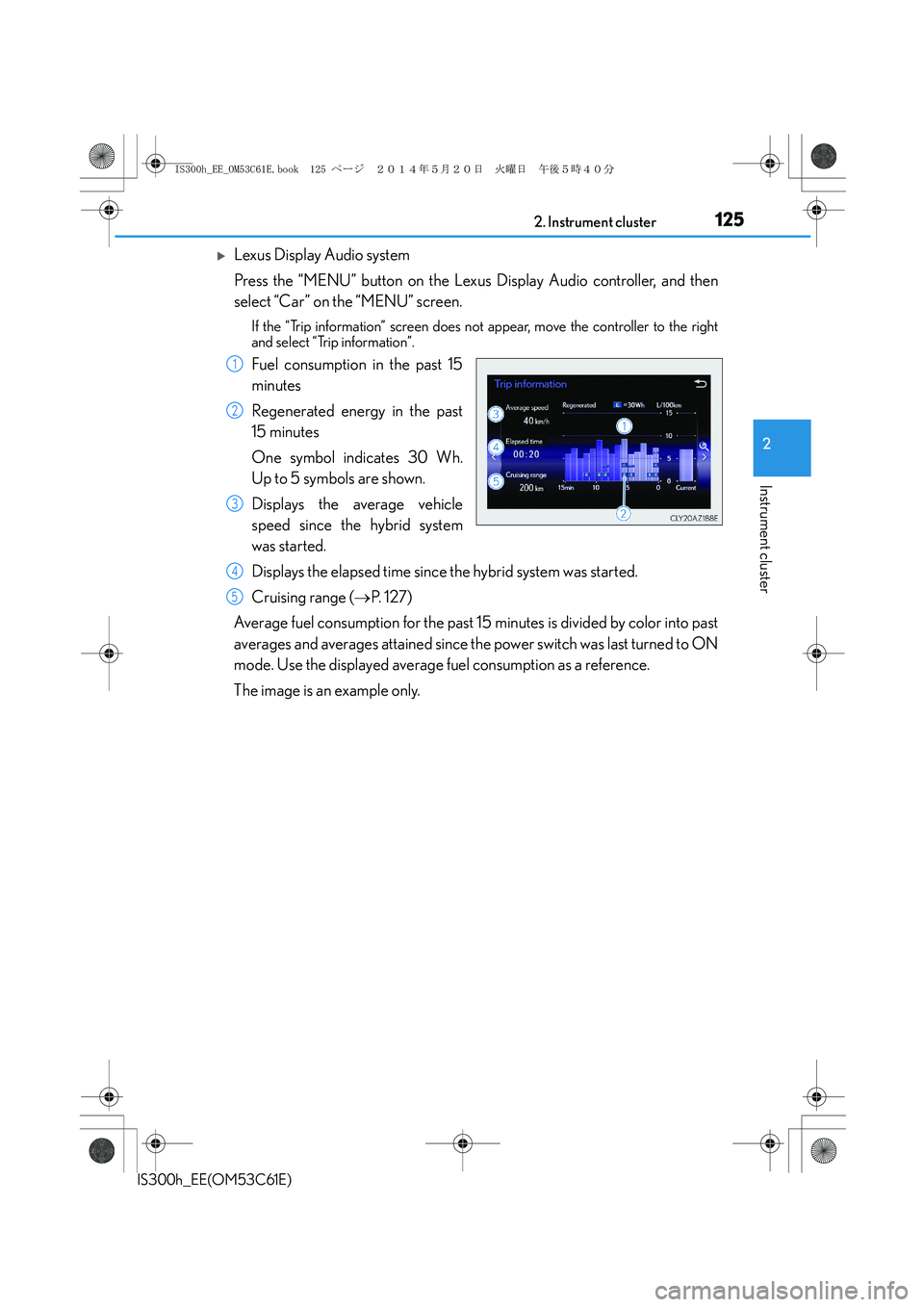
Fuel consumption in the past 15
minutes
Regenerated energy in the past
15 minutes
One symbol indicates 30 Wh.
Up to 5 symbols are shown.
Displays the average vehicle
speed since the hybrid system
was started.
Displays the elapsed time since the hybrid system was started.
Cruising range (→P. 1 2 7 )
Average fuel consumption for the past 15 minutes is divided by color into past
averages and averages attained since the power switch was last turned to ON
mode. Use the displayed average fuel consumption as a reference.
The image is an example only.1
2
3
4
5
IS300h_EE_OM53C61E.book 125 ページ 2014年5月20日 火曜日 午後5時40分
Page 126 of 612
1262. Instrument cluster
IS300h_EE(OM53C61E)
■Pa s t re c o r d
XNavigation system
Press the “MENU” button on the Remote Touch, and then select “Car” on the
“Menu” screen.
If the “Energy monitor” or “Trip information” screen is displayed, select “Past
record”.
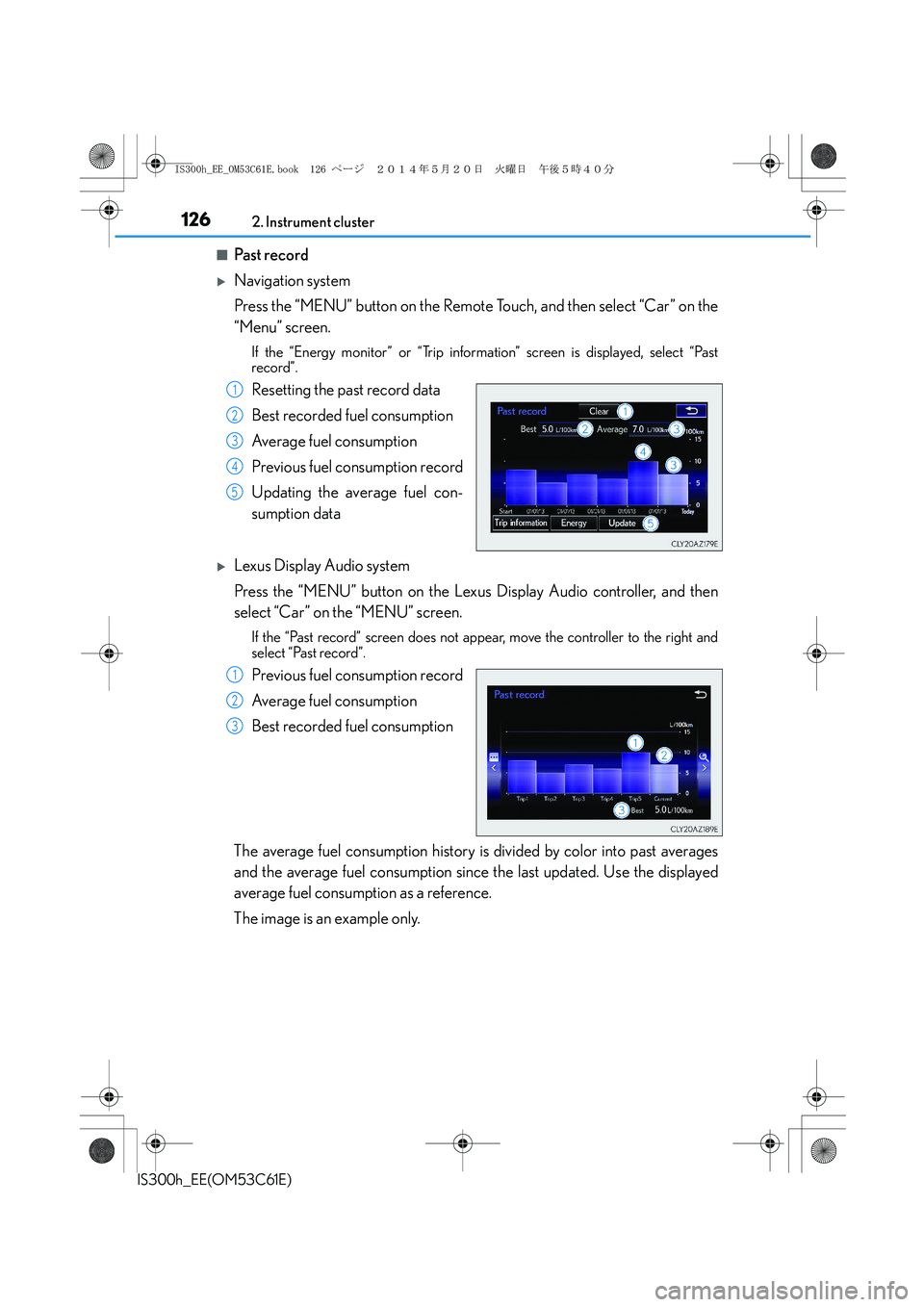
Resetting the past record data
Best recorded fuel consumption
Average fuel consumption
Previous fuel consumption record
Updating the average fuel con-
sumption data
XLexus Display Audio system
Press the “MENU” button on the Lexus Display Audio controller, and then
select “Car” on the “MENU” screen.
If the “Past record” screen does not appear, move the controller to the right and
select “Past record”.
Previous fuel consumption record
Average fuel consumption
Best recorded fuel consumption
The average fuel consumption history is divided by color into past averages
and the average fuel consumption since the last updated. Use the displayed
average fuel consumption as a reference.
The image is an example only.
1
2
3
4
5
1
2
3
IS300h_EE_OM53C61E.book 126 ページ 2014年5月20日 火曜日 午後5時40分
Page 127 of 612
1272. Instrument cluster
2
Instrument cluster
IS300h_EE(OM53C61E)
■Updating the past record data
XNavigation system
Update the average fuel consumption by selecting “Update” to measure the current fuel
consumption again.
XLexus Display Audio system
Update the average fuel consumption by moving the controller to the left and select
“Update” to measure the current fuel consumption again.
■Resetting the data
XNavigation system
The fuel consumption data can be deleted by selecting “Clear”.
XLexus Display Audio system
The fuel consumption data can be deleted by moving the controller to the left and select
“Clear ”.
■Cruising range
Displays the estimated maximum distance that can be driven with the quantity of fuel
remaining.
This distance is computed based on your average fuel consumption.
As a result, the actual distance that can be driven may differ from that displayed.
IS300h_EE_OM53C61E.book 127 ページ 2014年5月20日 火曜日 午後5時40分
Page 134 of 612
1343-1. Key information
IS300h_EE(OM53C61E)
NOTICE
■To prevent key damage
●Do not drop the keys, subject them to strong shocks or bend them.
●Do not expose the keys to high temperatures for long periods of time.
●Do not get the keys wet or wash them in an ultrasonic washer etc.
●Do not attach metallic or magnetic materials to the keys or place the keys close to
such materials.
●Do not disassemble the keys.
●Do not attach a sticker or anything else to the surface of the electronic key.
●Do not place the keys near objects that produce magnetic fields, such as TVs, audio
systems and induction cookers, or medical electrical equipment, such as low-fre-
quency therapy equipment.
■Carrying the electronic key on your person
Carry the electronic key 10 cm (3.9 in.) or more away from electric appliances that are
turned on. Radio waves emitted from electric appliances within 10 cm (3.9 in.) of the
electronic key may interfere with the key, causing the key to not function properly.
■In case of a smart entry & start system malfunction or other key-related problems
Take your vehicle with all the electronic keys provided with your vehicle, including the
card key, to any authorized Lexus dealer or repairer, or another duly qualified and
equipped professional.
IS300h_EE_OM53C61E.book 134 ページ 2014年5月20日 火曜日 午後5時40分
Page 151 of 612
1513-2. Opening, closing and locking the doors and trunk
3
Operation of each component
IS300h_EE(OM53C61E)
■Conditions affecting operation
The smart entry & start system uses weak radio waves. In the following situations, the
communication between the electronic key and the vehicle may be affected, preventing
the smart entry & start system, wireless remote control and immobilizer system from
operating properly. (Ways of coping: →P. 544)
●When the electronic key battery is depleted
●Near a TV tower, electric power plant, gas station, radio station, large display, airport or
other facility that generates strong radio waves or electrical noise
●When carrying a portable radio, cellular phone, cordless phone or other wireless com-
munication device
●When the electronic key is in contact with, or is covered by the following metallic
objects
• Cards to which aluminum foil is attached
• Cigarette boxes that have aluminum foil inside
• Metallic wallets or bags
•Coins
• Hand warmers made of metal
• Media such as CDs and DVDs
●When other wireless keys (that emit radio waves) are being used nearby
●When carrying the electronic key together with the following devices that emit radio
waves
• Another vehicle’s electronic key or a wireless key that emits radio waves
• Personal computers or personal digital assistants (PDAs)
• Digital audio players
• Portable game systems
●If window tint with a metallic content or metallic objects are attached to the rear win-
dow
IS300h_EE_OM53C61E.book 151 ページ 2014年5月20日 火曜日 午後5時40分