audio Lexus IS300h 2014 Owner's Guide
[x] Cancel search | Manufacturer: LEXUS, Model Year: 2014, Model line: IS300h, Model: Lexus IS300h 2014Pages: 612, PDF Size: 111.33 MB
Page 200 of 612
2004-1. Before driving
IS300h_EE(OM53C61E)
Cargo and luggage
Take notice of the following information about storage precautions, cargo
capacity and load:
CAUTION
■Things that must not be carried in the trunk
The following things may cause a fire if loaded in the trunk:
●Receptacles containing gasoline
●Aerosol cans
■Storage precautions
Observe the following precautions.
Failure to do so may prevent the pedals from being depressed properly, may block the
driver’s vision, or may result in items hitting the driver or passengers, possibly causing
an accident.
●Stow cargo and luggage in the trunk whenever possible.
●To prevent cargo and luggage from sliding forward during braking, do not stack any-
thing in the enlarged trunk. Keep cargo and luggage low, as close to the floor as pos-
sible.
●When you fold down the rear seats, long items should not be placed directly behind
the front seats.
●Never allow anyone to ride in the enlarged trunk. It is not designed for passengers.
They should ride in their seats with their seat belts properly fastened.
●Do not place cargo or luggage in or on the following locations.
• At the feet of the driver
• On the front passenger or rear seats (when stacking items)
• On the package tray
• On the instrument panel
• On the dashboard
• In front of the navigation system screen (if equipped) or Lexus Display Audio
screen (if equipped)
●Secure all items in the occupant compartment.
■Load and distribution
●Do not overload your vehicle.
●Do not apply loads unevenly.
Improper loading may cause deterioration of steering or braking control which may
cause death or serious injury.
IS300h_EE_OM53C61E.book 200 ページ 2014年5月20日 火曜日 午後5時40分
Page 210 of 612
2104-2. Driving procedures
IS300h_EE(OM53C61E)
Stop the vehicle.
Shift the shift lever to P.
Set the parking brake. (→P. 2 2 4 )
Press the power switch.
Release the brake pedal and check that the display on the meters is off.
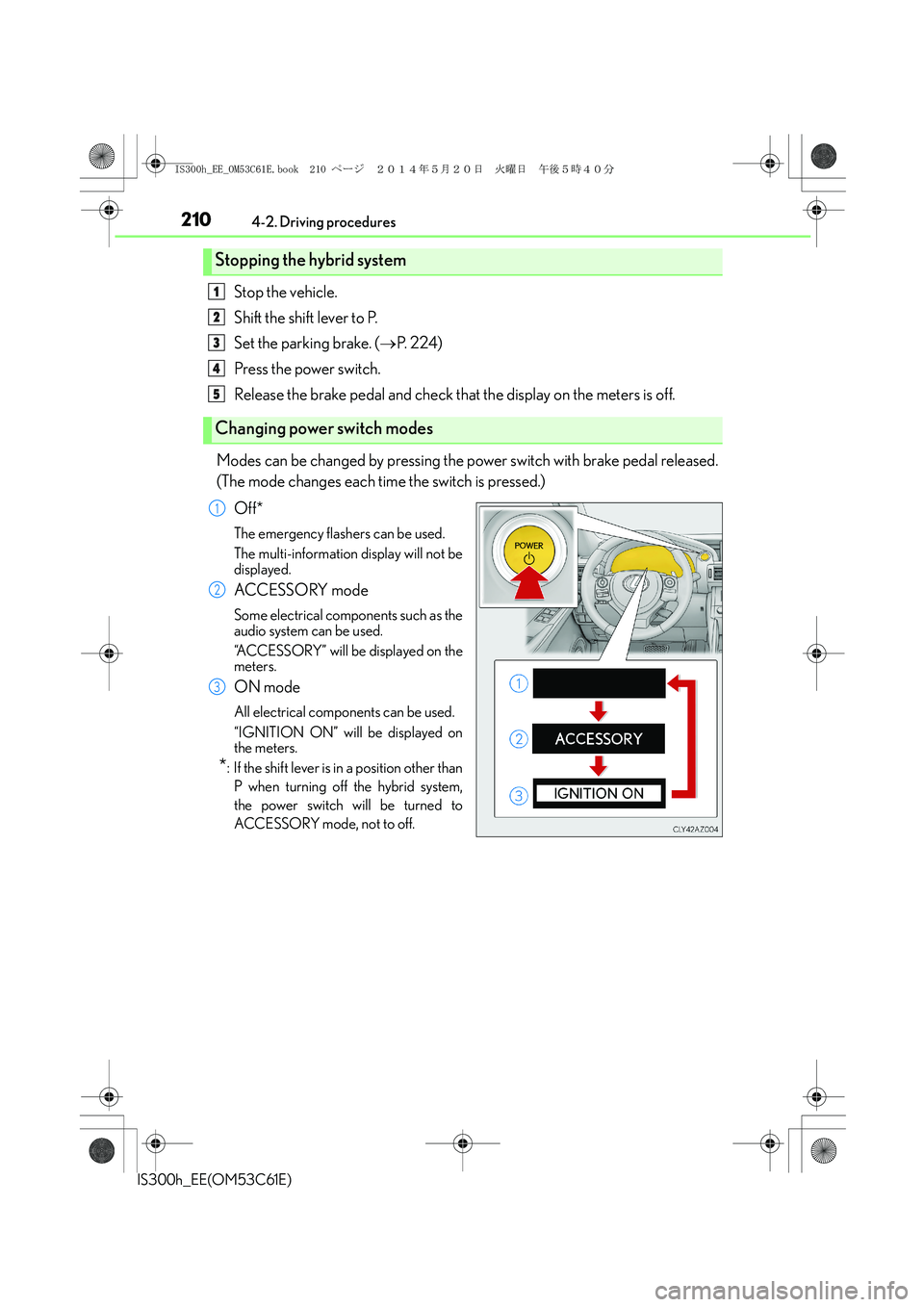
Modes can be changed by pressing the power switch with brake pedal released.
(The mode changes each time the switch is pressed.)
Off*
The emergency flashers can be used.
The multi-information display will not be
displayed.
ACCESSORY mode
Some electrical components such as the
audio system can be used.
“ACCESSORY” will be displayed on the
meters.
ON mode
All electrical components can be used.
“IGNITION ON” will be displayed on
the meters.
*: If the shift lever is in a position other than
P when turning off the hybrid system,
the power switch will be turned to
ACCESSORY mode, not to off.
Stopping the hybrid system
Changing power switch modes
1
2
3
4
5
1
2
3
IS300h_EE_OM53C61E.book 210 ページ 2014年5月20日 火曜日 午後5時40分
Page 264 of 612
2644-5. Using the driving support systems
IS300h_EE(OM53C61E)
■Temporary cancelation of the LDA system functions
If any of the following occurs, the LDA system functions will be temporarily canceled. The
functions will resume after the necessary operating conditions have returned.
●The turn signal lever is operated.
●The vehicle speed deviates from the operating range of the LDA system functions.
●When the lane lines cannot be recognized while driving.
●When the lane departure warning sounds.
The lane departure warning function will not operate again for a several seconds after it
has been activated, even if the vehicle leaves the lane again.
■The lane departure warning
Depending on the audio system sound level or air conditioning fan noise while the audio
system or air conditioning system is in use, it may be difficult to hear the warning sound.
■After the vehicle has been parked in the sun
The LDA system may not be available and a warning message (→P. 514) will be dis-
played for a while after driving has started. When the temperature in the cabin decreases
and the temperature around the camera sensor (→P. 261) becomes suitable for its oper-
ation, the functions will begin to operate.
■If there are lane markers on only one side of the vehicle
The lane departure warning will not operate for the side on which lane markers could not
be recognized.
■Conditions in which the function may not operate correctly
In the following situations, the camera sensor may be unable to recognize lane markers
causing the lane departure warning function to operate incorrectly. However, this does
not indicate a malfunction.
●When driving through an area with no lane markers, such as a tollbooth, a crossing or
before a ticket checkpoint
●When driving on a sharp curve
●When lane markers are extremely narrow or extremely wide
●When the vehicle leans to one side an unusual amount due to a heavy load or improper
tire inflation pressure
●When the following distance between your vehicle and the vehicle ahead is extremely
short
●When the lane markers are yellow (These may be more difficult for the system to rec-
ognize compared to white markers.)
●When the lane markers are broken, Botts’ dots (raised pavement markers) or stones
●When the lane markers are on a curb etc.
●When lane markers are obscured or partially obscured by sand, dirt, etc.
●When there are shadows on the road running parallel with lane markers, or if a shadow
covers the lane markers
●When driving on a particularly bright road surface, such as concrete
●When driving on a road surface that is bright due to reflected light
●When driving in a location where the light level changes rapidly, such as the entrance to
or exit from a tunnel
IS300h_EE_OM53C61E.book 264 ページ 2014年5月20日 火曜日 午後5時40分
Page 267 of 612
2674-5. Using the driving support systems
4
Driving
IS300h_EE(OM53C61E)
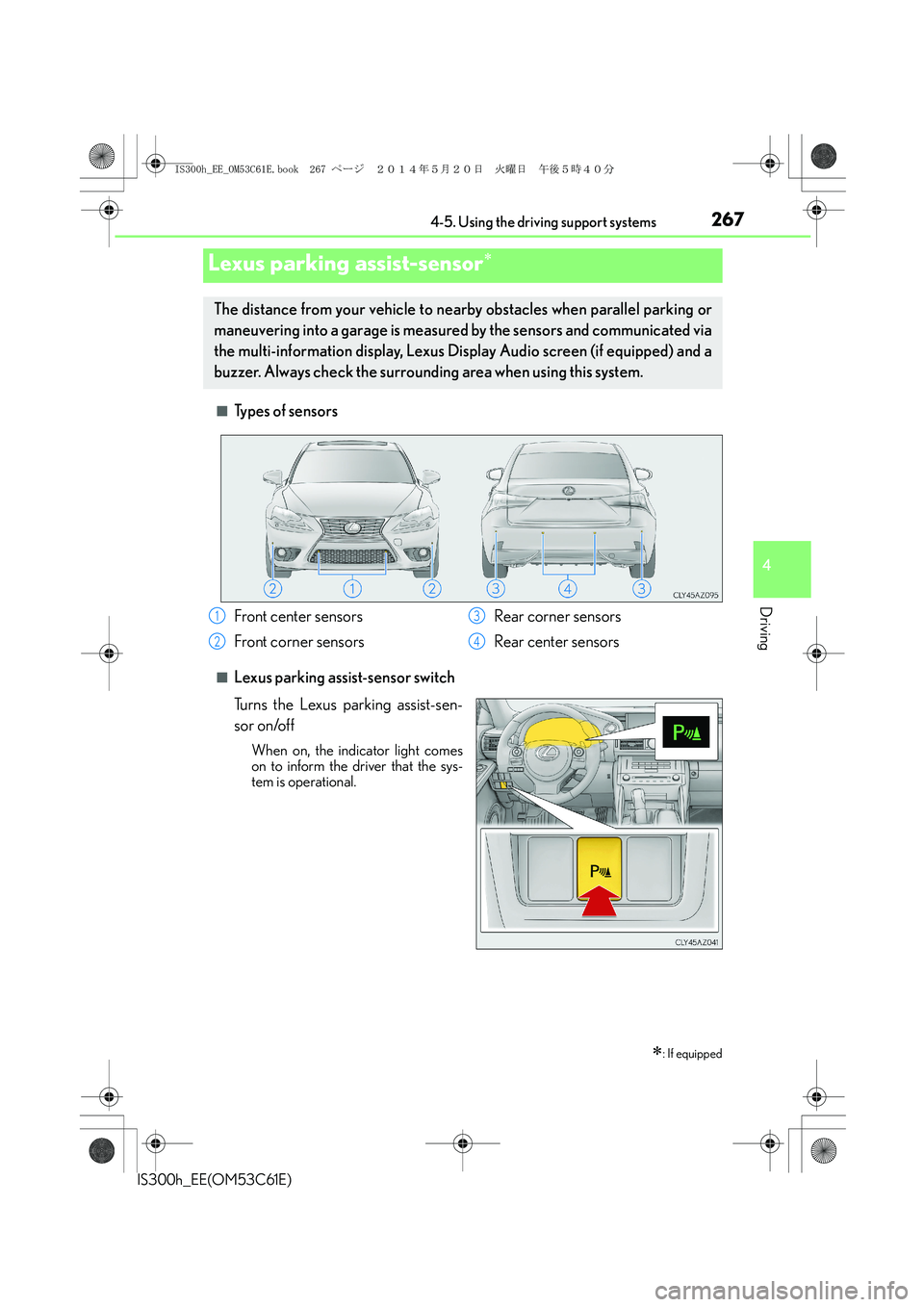
■Types of sensors
■Lexus parking assist-sensor switch
Turns the Lexus parking assist-sen-
sor on/off
When on, the indicator light comes
on to inform the driver that the sys-
tem is operational.
Lexus parking assist-sensor∗
∗: If equipped
The distance from your vehicle to nearby obstacles when parallel parking or
maneuvering into a garage is measured by the sensors and communicated via
the multi-information display, Lexus Display Audio screen (if equipped) and a
buzzer. Always check the surrounding area when using this system.
Front center sensors
Front corner sensorsRear corner sensors
Rear center sensors1
2
3
4
IS300h_EE_OM53C61E.book 267 ページ 2014年5月20日 火曜日 午後5時40分
Page 268 of 612
2684-5. Using the driving support systems
IS300h_EE(OM53C61E)
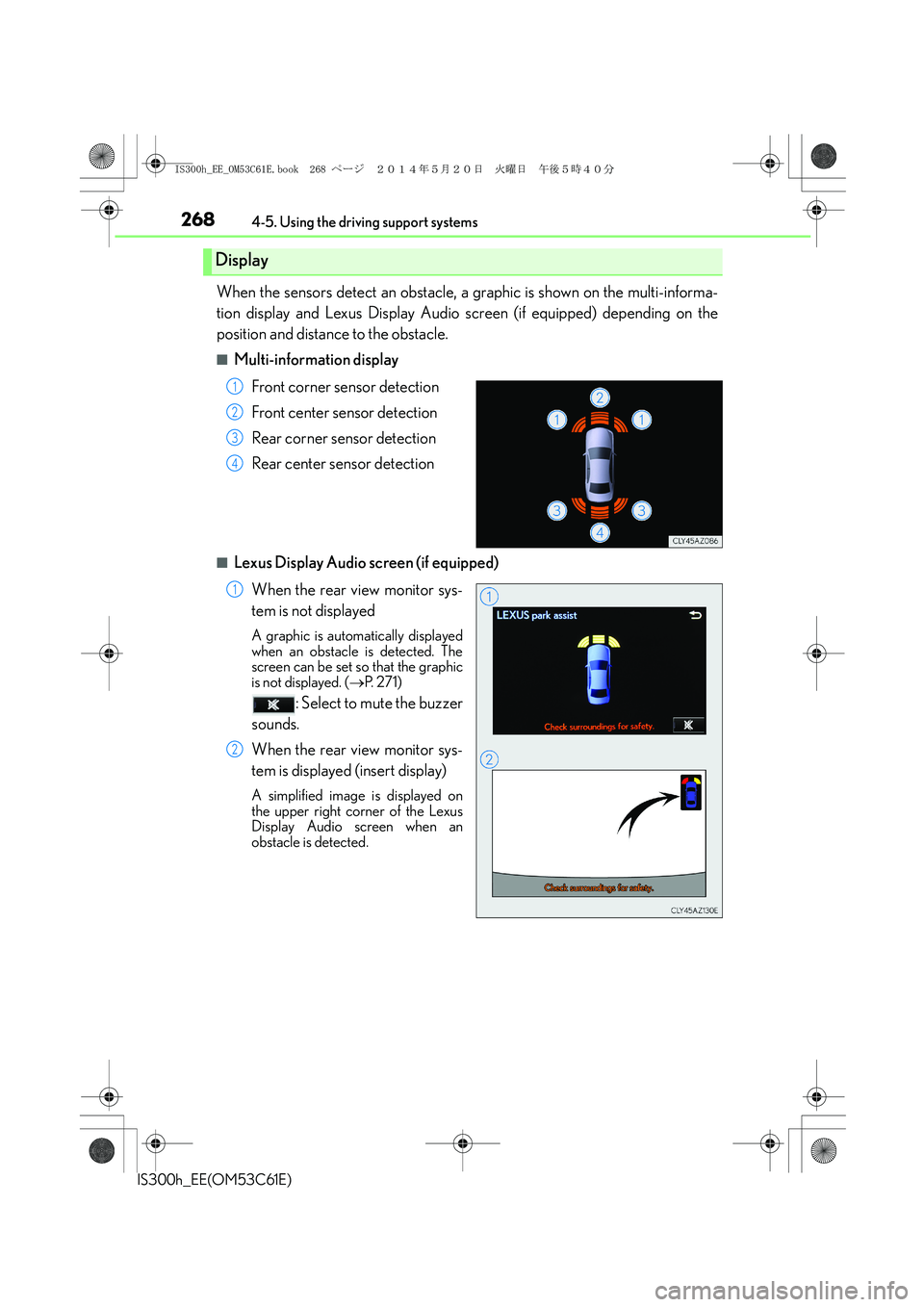
When the sensors detect an obstacle, a graphic is shown on the multi-informa-
tion display and Lexus Display Audio screen (if equipped) depending on the
position and distance to the obstacle.
■Multi-information display
Front corner sensor detection
Front center sensor detection
Rear corner sensor detection
Rear center sensor detection
■Lexus Display Audio screen (if equipped)
When the rear view monitor sys-
tem is not displayed
A graphic is automatically displayed
when an obstacle is detected. The
screen can be set so that the graphic
is not displayed. (→P. 2 7 1 )
: Select to mute the buzzer
sounds.
When the rear view monitor sys-
tem is displayed (insert display)
A simplified image is displayed on
the upper right corner of the Lexus
Display Audio screen when an
obstacle is detected.
Display
1
2
3
4
1
2
IS300h_EE_OM53C61E.book 268 ページ 2014年5月20日 火曜日 午後5時40分
Page 269 of 612
2694-5. Using the driving support systems
4
Driving
IS300h_EE(OM53C61E)
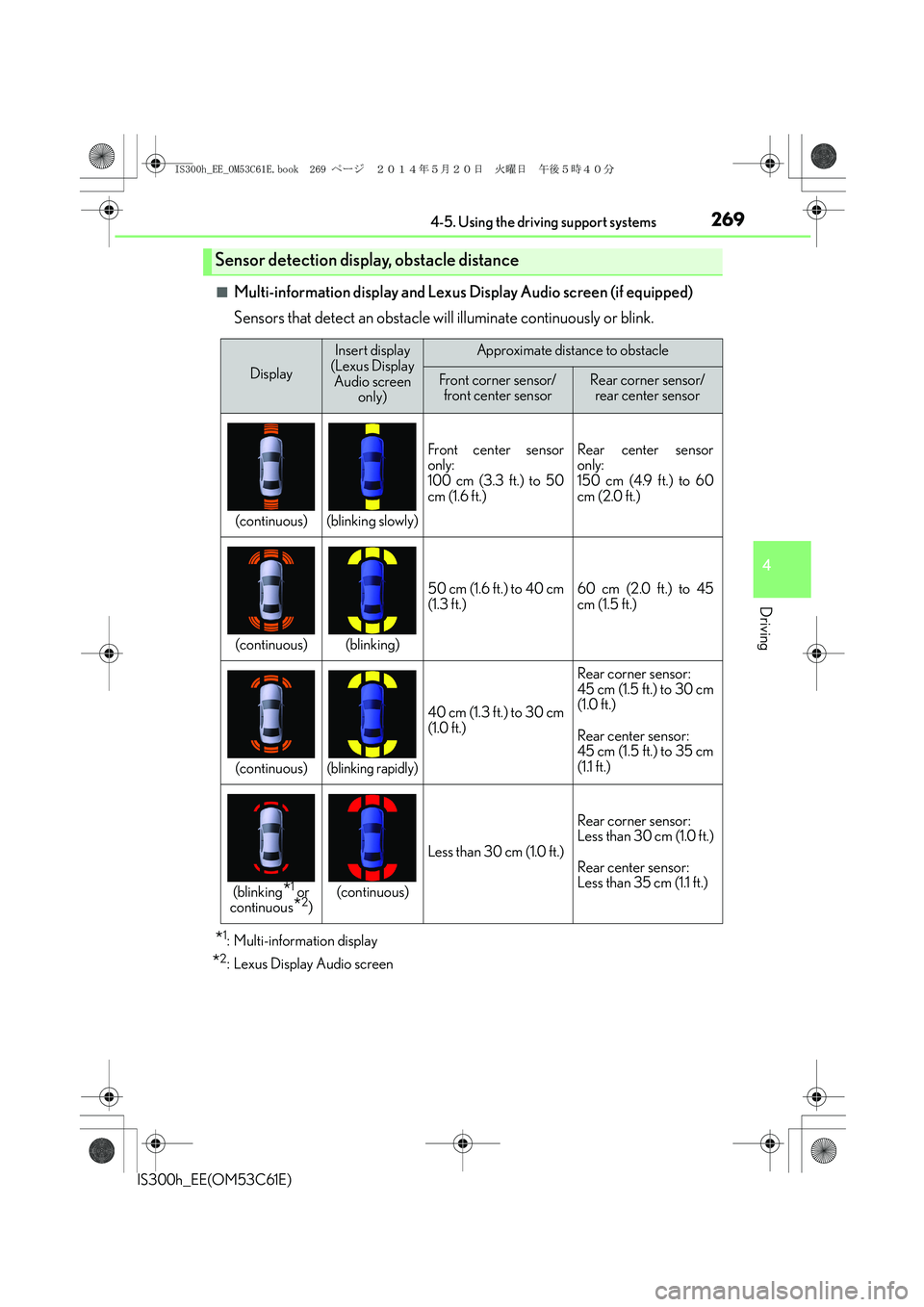
■Multi-information display and Lexus Display Audio screen (if equipped)
Sensors that detect an obstacle will illuminate continuously or blink.
*1: Multi-information display
*2: Lexus Display Audio screen
Sensor detection display, obstacle distance
Display
Insert display
(Lexus Display
Audio screen
only)Approximate distance to obstacle
Front corner sensor/
front center sensorRear corner sensor/
rear center sensor
(continuous)(blinking slowly)
Front center sensor
only:
100 cm (3.3 ft.) to 50
cm (1.6 ft.)Rear center sensor
only:
150 cm (4.9 ft.) to 60
cm (2.0 ft.)
(continuous)(blinking)
50 cm (1.6 ft.) to 40 cm
(1.3 ft.)60 cm (2.0 ft.) to 45
cm (1.5 ft.)
(continuous)(blinking rapidly)
40 cm (1.3 ft.) to 30 cm
(1.0 ft.)
Rear corner sensor:
45 cm (1.5 ft.) to 30 cm
(1.0 ft.)
Rear center sensor:
45 cm (1.5 ft.) to 35 cm
(1.1 ft.)
(blinking*1 or
continuous*2)(continuous)
Less than 30 cm (1.0 ft.)
Rear corner sensor:
Less than 30 cm (1.0 ft.)
Rear center sensor:
Less than 35 cm (1.1 ft.)
IS300h_EE_OM53C61E.book 269 ページ 2014年5月20日 火曜日 午後5時40分
Page 271 of 612
2714-5. Using the driving support systems
4
Driving
IS300h_EE(OM53C61E)
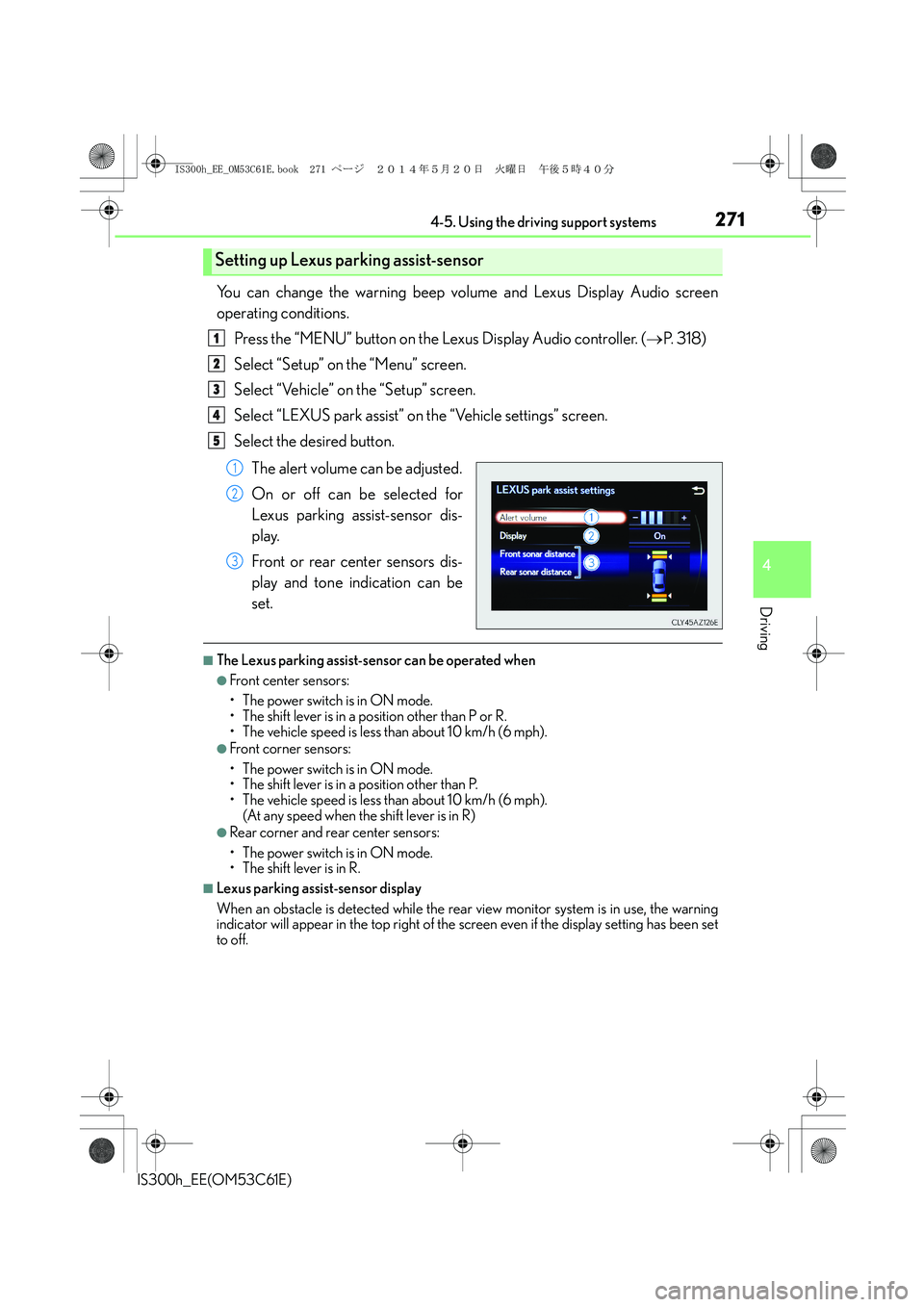
You can change the warning beep volume and Lexus Display Audio screen
operating conditions.
Press the “MENU” button on the Lexus Display Audio controller. (→P. 3 1 8 )
Select “Setup” on the “Menu” screen.
Select “Vehicle” on the “Setup” screen.
Select “LEXUS park assist” on the “Vehicle settings” screen.
Select the desired button.
The alert volume can be adjusted.
On or off can be selected for
Lexus parking assist-sensor dis-
play.
Front or rear center sensors dis-
play and tone indication can be
set.
■The Lexus parking assist-sensor can be operated when
●Front center sensors:
• The power switch is in ON mode.
• The shift lever is in a position other than P or R.
• The vehicle speed is less than about 10 km/h (6 mph).
●Front corner sensors:
• The power switch is in ON mode.
• The shift lever is in a position other than P.
• The vehicle speed is less than about 10 km/h (6 mph).
(At any speed when the shift lever is in R)
●Rear corner and rear center sensors:
• The power switch is in ON mode.
• The shift lever is in R.
■Lexus parking assist-sensor display
When an obstacle is detected while the rear view monitor system is in use, the warning
indicator will appear in the top right of the screen even if the display setting has been set
to off.
Setting up Lexus parking assist-sensor
1
2
3
4
5
1
2
3
IS300h_EE_OM53C61E.book 271 ページ 2014年5月20日 火曜日 午後5時40分
Page 272 of 612
2724-5. Using the driving support systems
IS300h_EE(OM53C61E)
■Sensor detection information
●The sensor’s detection areas are limited to the areas around the vehicle’s front corner
and rear bumpers.
●Certain vehicle conditions and the surrounding environment may affect the ability of
the sensor to correctly detect obstacles. Particular instances where this may occur are
listed below.
• There is dirt, snow or ice on the sensor. (Wiping the sensors will resolve this prob-
lem.)
• The sensor is frozen. (Thawing the area will resolve this problem.)
In especially cold weather, if a sensor is frozen the screen may show an abnormal
display, or obstacles may not be detected.
• The sensor is covered in any way.
• The vehicle is leaning considerably to one side.
• On an extremely bumpy road, on an incline, on gravel, or on grass.
• The vicinity of the vehicle is noisy due to vehicle horns, motorcycle engines, air
brakes of large vehicles, or other loud noises producing ultrasonic waves.
• There is another vehicle equipped with parking assist sensors in the vicinity.
• The sensor is coated with a sheet of spray or heavy rain.
• The vehicle is equipped with a fender pole or wireless antenna.
• Towing eyelets are installed.
• The bumper or sensor receives a strong impact.
• The vehicle is approaching a tall or curved curb.
• In harsh sunlight or intense cold weather.
• The area directly under the bumpers is not detected.
• If obstacles draw too close to the sensor.
• A non-genuine Lexus suspension (lowered suspension etc.) is installed.
• People may not be detected if they are wearing certain types of clothing.
In addition to the examples above, there are instances in which, because of their shape,
signs and other objects may be judged by the sensor to be closer than they are.
●The shape of the obstacle may prevent the sensor from detecting it. Pay particular
attention to the following obstacles:
• Wires, fences, ropes, etc.
• Cotton, snow and other materials that absorb sound waves
• Sharply-angled objects
• Low obstacles
• Tall obstacles with upper sections projecting outwards in the direction of your vehi-
cle
●The following situations may occur during use.
• Depending on the shape of the obstacle and other factors, the detection distance
may shorten, or detection may be impossible.
• Obstacles may not be detected if they are too close to the sensor.
• There will be a short delay between obstacle detection and display. Even at slow
speeds, there is a possibility that the obstacle will come within the sensor’s detection
areas before the display is shown and the warning beep sounds.
• Thin posts or objects lower than the sensor may not be detected when approached,
even if they have been detected once.
• It might be difficult to hear beeps due to the volume of the audio system or air flow
noise of the air conditioning system.
■If a message is displayed on the multi-information display
→P. 511, 512
IS300h_EE_OM53C61E.book 272 ページ 2014年5月20日 火曜日 午後5時40分
Page 300 of 612
3004-5. Using the driving support systems
IS300h_EE(OM53C61E)
■The outside rear view mirror indicators visibility
When under strong sunlight, the outside rear view mirror indicator may be difficult to
see.
■Rear Crossing Traffic Alert buzzer hearing
Rear Crossing Traffic Alert function may be difficult to hear over loud noises such as high
audio volume.
■When there is a malfunction in the Blind Spot Monitor
If a system malfunction is detected due to any of the following reasons, warning mes-
sages will be displayed: (→P. 514, 515)
●There is a malfunction with the sensors
●The sensors have become dirty
●The outside temperature is extremely high or low
●The sensor voltage has become abnormal
■Certification for the Blind Spot Monitor
XFor vehicles sold in Russia
type approval number : POCC DE.ML05.H01144
XFor vehicles sold in Ukraine
type approval number : UA1.155.0029691-12
IS300h_EE_OM53C61E.book 300 ページ 2014年5月20日 火曜日 午後5時40分
Page 314 of 612
314
IS300h_EE(OM53C61E)
5-1. Basic Operations
Lexus Display Audio
System .......................................... 316
Steering wheel audio
switches....................................... 322
USB/AUX ports ......................... 323
5-2. Setup
Setup menu .................................. 324
General settings......................... 325
Voice settings .............................. 328
Display settings ........................... 329
5-3. Using the audio system
Selecting the audio
source ..........................................330
Optimal use of the audio
system ........................................... 331
Audio settings ............................. 332
Audio menu screen
operation .................................... 336
5-4. Using the radio
Radio operation .......................... 339
5-5. Playing an audio CD and
MP3/WMA/AAC discs
CD player operation ................. 341
IS300h_EE_OM53C61E.book 314 ページ 2014年5月20日 火曜日 午後5時40分