charge battery Lexus IS300h 2014 User Guide
[x] Cancel search | Manufacturer: LEXUS, Model Year: 2014, Model line: IS300h, Model: Lexus IS300h 2014Pages: 612, PDF Size: 111.33 MB
Page 211 of 612

2114-2. Driving procedures
4
Driving
IS300h_EE(OM53C61E)
If the hybrid system is stopped with the shift lever in a position other than P, the
power switch will not be turned off but instead be turned to ACCESSORY
mode. Perform the following procedure to turn the switch off:
Check that the parking brake is set.
Shift the shift lever to P.
Check that “Turn Power OFF” is displayed on the multi-information display
and then press the power switch once.
Check that “Turn Power OFF” on the multi-information display is off.
■Auto power off function
If the vehicle is left in ACCESSORY mode for more than 20 minutes or ON mode (the
hybrid system is not operating) for more than an hour with the shift lever in P, the power
switch will automatically turn off. However, this function cannot entirely prevent 12-volt
battery discharge. Do not leave the vehicle with the power switch in ACCESSORY or
ON mode for long periods of time when the hybrid system is not operating.
■Sounds and vibrations specific to a hybrid vehicle
→P. 8 2
■Electronic key battery depletion
→P. 1 3 3
■When the ambient temperature is low, such as during winter driving conditions
It may take time before the “READY” indicator comes on.
■Conditions affecting operation
→P. 1 5 1
■Notes for the entry function
→P. 1 5 2
■If the hybrid system does not start
●Check that the shift lever is securely set in P. The hybrid system may not start if the shift
lever is displaced out of P.
●The immobilizer system may not have been deactivated. (→P. 9 0 )
Contact any authorized Lexus dealer or repairer, or another duly qualified and
equipped professional.
When stopping the hybrid system with the shift lever in a position other
than P
1
2
3
4
IS300h_EE_OM53C61E.book 211 ページ 2014年5月20日 火曜日 午後5時40分
Page 213 of 612

2134-2. Driving procedures
4
Driving
IS300h_EE(OM53C61E)
CAUTION
■When starting the hybrid system
Always start the hybrid system while sitting in the driver’s seat. Do not depress the
accelerator pedal while starting the hybrid system under any circumstances.
Doing so may cause an accident resulting in death or serious injury.
■Caution while driving
If hybrid system failure occurs while the vehicle is moving, do not lock or open the
doors until the vehicle reaches a safe and complete stop. Activation of the steering lock
in this circumstance may lead to an accident, resulting in death or serious injury.
■Stopping the hybrid system in an emergency
If you want to stop the hybrid system in an emergency while driving the vehicle, press
and hold the power switch for more than 2 seconds, or press it briefly 3 times or more
in succession. (→P. 4 9 5 )
However, do not touch the power switch while driving except in an emergency. Turning
the hybrid system off while driving will not cause loss of steering or braking control,
however, power assist to the steering will be lost. This will make it more difficult to steer
smoothly, so you should pull over and stop the vehicle as soon as it is safe to do so.
NOTICE
■To prevent 12-volt battery discharge
●Do not leave the power switch in ACCESSORY or ON mode for long periods of
time without the hybrid system on.
●If “ACCESSORY” or “IGNITION ON” is displayed on the meters while the hybrid
system is not operating, the power switch is not off. Exit the vehicle after turning the
power switch off.
●Do not stop the hybrid system when the shift lever is in a position other than P. If the
hybrid system is stopped in another shift lever position, the power switch will not be
turned off but instead be turned to ACCESSORY mode. If the vehicle is left in
ACCESSORY mode, 12-volt battery discharge may occur.
■When starting the hybrid system
●Do not depress the accelerator pedal unnecessarily.
●If the hybrid system becomes difficult to start, have your vehicle checked by any
authorized Lexus dealer or repairer, or another duly qualified and equipped profes-
sional immediately.
■Symptoms indicating a malfunction with the power switch
If the power switch seems to be operating somewhat differently than usual, such as the
switch sticking slightly, there may be a malfunction. Contact any authorized Lexus
dealer or repairer, or another duly qualified and equipped professional immediately.
IS300h_EE_OM53C61E.book 213 ページ 2014年5月20日 火曜日 午後5時40分
Page 221 of 612
2214-2. Driving procedures
4
Driving
IS300h_EE(OM53C61E)
CAUTION
■When driving on slippery road surfaces
Be careful of downshifting and sudden acceleration, as this could result in the vehicle
skidding to the side or spinning.
NOTICE
■Hybrid battery (traction battery) charge
If the shift lever is in N, the hybrid battery (traction battery) will not be charged even
when the engine is running. Therefore, if the vehicle is left with the shift lever in N for a
long period of time, the hybrid battery (traction battery) will discharge, and this may
result in the vehicle not being able to start.
IS300h_EE_OM53C61E.book 221 ページ 2014年5月20日 火曜日 午後5時40分
Page 228 of 612
2284-3. Operating the lights and wipers
IS300h_EE(OM53C61E)
■Light reminder buzzer
A buzzer sounds when the power switch is turned off or turned to ACCESSORY mode
and the driver’s door is opened while the lights are turned on.
■Automatic headlight leveling system
The level of the headlights is automatically adjusted according to the number of passen-
gers and the loading condition of the vehicle to ensure that the headlights do not inter-
fere with other road users.
■Operation guide display (vehicles with rain-sensing windshield wipers only)
When the headlight switch is operated to and from the “AUTO” position, the current sta-
tus is displayed on the meters for a few seconds to show that AUTO mode is activated/
deactivated. (→P. 1 1 8 )
■Customization
Settings (e.g. light sensor sensitivity) can be changed.
(Customizable features: →P. 5 7 9 )
NOTICE
■To prevent 12-volt battery discharge
Do not leave the lights on longer than necessary when the hybrid system is off.
IS300h_EE_OM53C61E.book 228 ページ 2014年5月20日 火曜日 午後5時40分
Page 321 of 612
3215-1. Basic Operations
5
Lexus Display Audio system
IS300h_EE(OM53C61E)
■When using the screen
●Under extremely cold conditions, the Lexus Display Audio controller may react slowly.
●If the screen is cold, the display may be dark, or the system may seem to be operating
slightly slower than normal.
●The screen may seem dark and hard to see when viewed through sunglasses. Change
your angle of viewing, adjust the display on the “Display” screen (→P. 329) or remove
your sunglasses.
■Using cellular phones
Interference may be heard through the audio system's speakers if a cellular phone is
being used inside or close to the vehicle while the audio system is operating.
CAUTION
■Using the Lexus Display Audio controller
Be careful when touching the Lexus Display Audio controller in extreme temperatures
as it may become very hot or cold due to the temperature inside the vehicle.
■Laser product
This product is a class 1 laser product.
Do not open the cover of the player or attempt to repair the unit yourself. Refer servic-
ing to qualified personnel.
NOTICE
■To prevent Lexus Display Audio controller malfunction
●Do not allow the Lexus Display Audio controller to come into contact with food, liq-
uid, stickers or lit cigarettes as doing so may cause it to change color, emit a strange
odor or stop functioning.
●Do not subject the Lexus Display Audio controller to excessive pressure or strong
impact as the controller may bend or break off.
■To prevent 12-volt battery discharge
Do not leave the audio system on longer than necessary when the hybrid system is off.
■To avoid damaging the audio system
Take care not to spill drinks or other fluids on the audio system.
IS300h_EE_OM53C61E.book 321 ページ 2014年5月20日 火曜日 午後5時40分
Page 349 of 612
3495-6. Using an external device
5
Lexus Display Audio system
IS300h_EE(OM53C61E)
●“Made for iPod” and “Made for iPhone” mean that an electronic accessory has been
designed to connect specifically to an iPod, or iPhone, respectively, and has been certi-
fied by the developer to meet Apple performance standards.
●Apple is not responsible for the operation of this device or its compliance with safety
and regulatory standards. Please note that the use of this accessory with iPod or iPhone
may affect wireless performance.
● iPhone, iPod, iPod classic, iPod nano and iPod touch are trademarks of Apple Inc., reg-
istered in the U.S. and other countries.
■iPod cover art
●Depending on the iPod and songs in the iPod, iPod cover art may be displayed.
●This function can be changed to on/off. (→P. 335)
●It may take time to display iPod cover art, and the iPod may not be operated while the
cover art display is in process.
■iPod functions
●When an iPod is connected and the audio source is changed to iPod mode, the iPod will
resume play from the same point in which it was last used.
●Depending on the iPod that is connected to the system, certain functions may not be
available. If a function is unavailable due to a malfunction (as opposed to a system spec-
ification), disconnecting the device and reconnecting it may resolve the problem.
●Depending on the iPod, while connected to the system, the iPod cannot be operated
with its own controls. It is necessary to use the controls of the vehicle's audio system
instead.
●When the battery level of an iPod is very low, the iPod may not operate. If so, charge the
iPod before use.
●Compatible models (→P. 3 5 0 )
■Error messages
MessageCause/Correction procedures
“Connection error.”This indicates a problem in the iPod or its connection.
“There are no songs available
for playback.”This indicates that there is no music data in the iPod.
“No items available.”This indicates that songs are not found in a selected
playlist.
“Check the iPod firmware ver-
sion.”This indicates that the software version is not com-
patible.
Please check the compatible models. (→P. 3 5 0 )
“iPod authorization failed.”This indicates that the display audio system failed to
authorize the iPod.
Please check your iPod.
IS300h_EE_OM53C61E.book 349 ページ 2014年5月20日 火曜日 午後5時40分
Page 365 of 612
365
5
Lexus Display Audio system
IS300h_EE(OM53C61E)5-8. Bluetooth
® Audio
When a Bluetooth® device cannot be connected, check the connection status
on the “Bluetooth
* audio” screen. If the device is not connected, either register
or reconnect the device. (→P. 3 6 0 , 3 6 1 )
*: Bluetooth is a registered trademark of Bluetooth SIG, Inc.
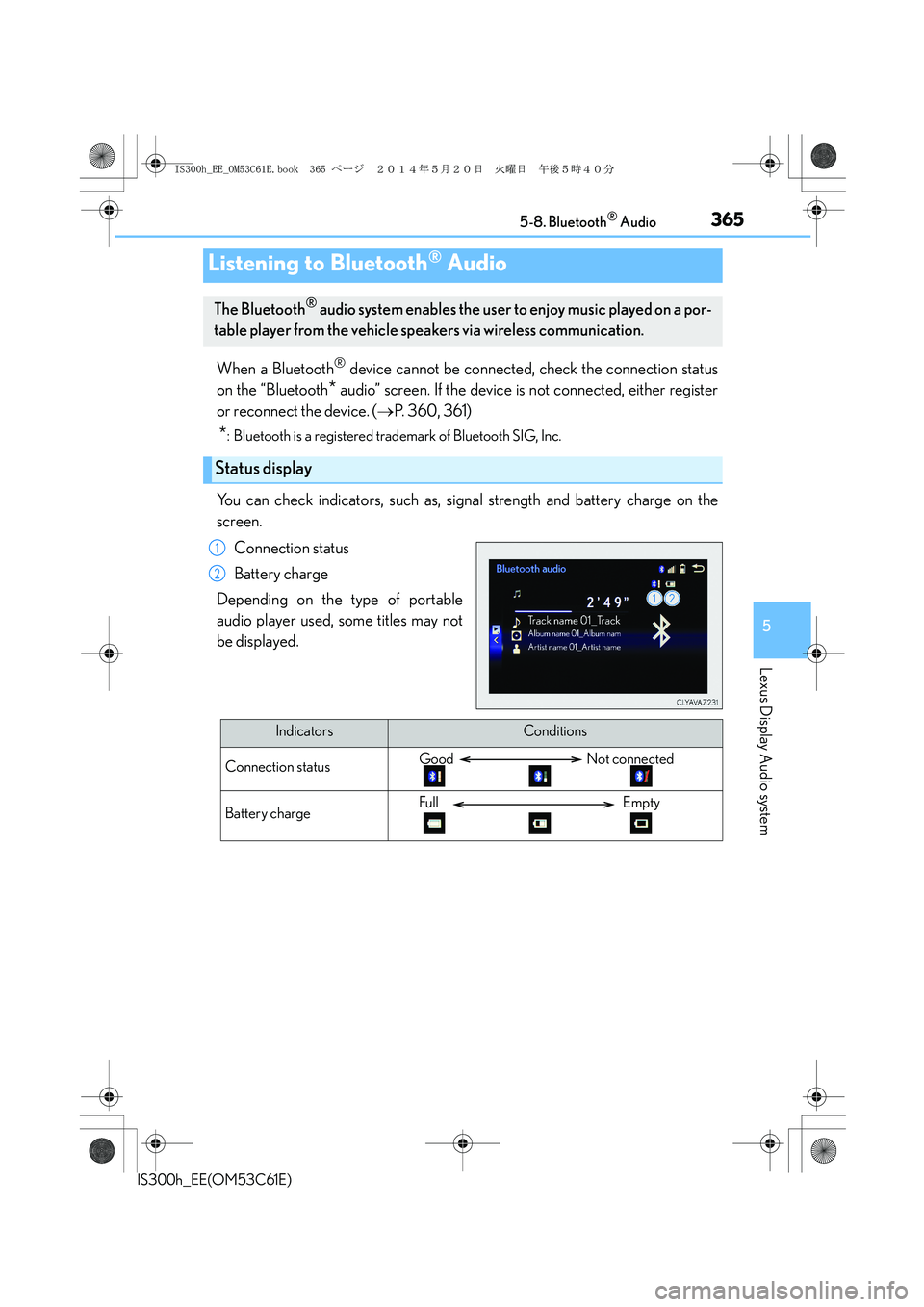
You can check indicators, such as, signal strength and battery charge on the
screen.
Connection status
Battery charge
Depending on the type of portable
audio player used, some titles may not
be displayed.
Listening to Bluetooth® Audio
The Bluetooth® audio system enables the user to enjoy music played on a por-
table player from the vehicle speakers via wireless communication.
Status display
1
2
IndicatorsConditions
Connection statusGood Not connected
Battery chargeFull Empty
IS300h_EE_OM53C61E.book 365 ページ 2014年5月20日 火曜日 午後5時40分
Page 367 of 612
367
5
Lexus Display Audio system
IS300h_EE(OM53C61E)5-9. Bluetooth
® Phone
Before making a phone call, check the connection status, battery charge, call
area and signal strength. (
→P. 368)
If a Bluetooth
® device cannot be connected, check the connection status. If the
device is not connected, either register or reconnect it. (
→P. 360, 362)
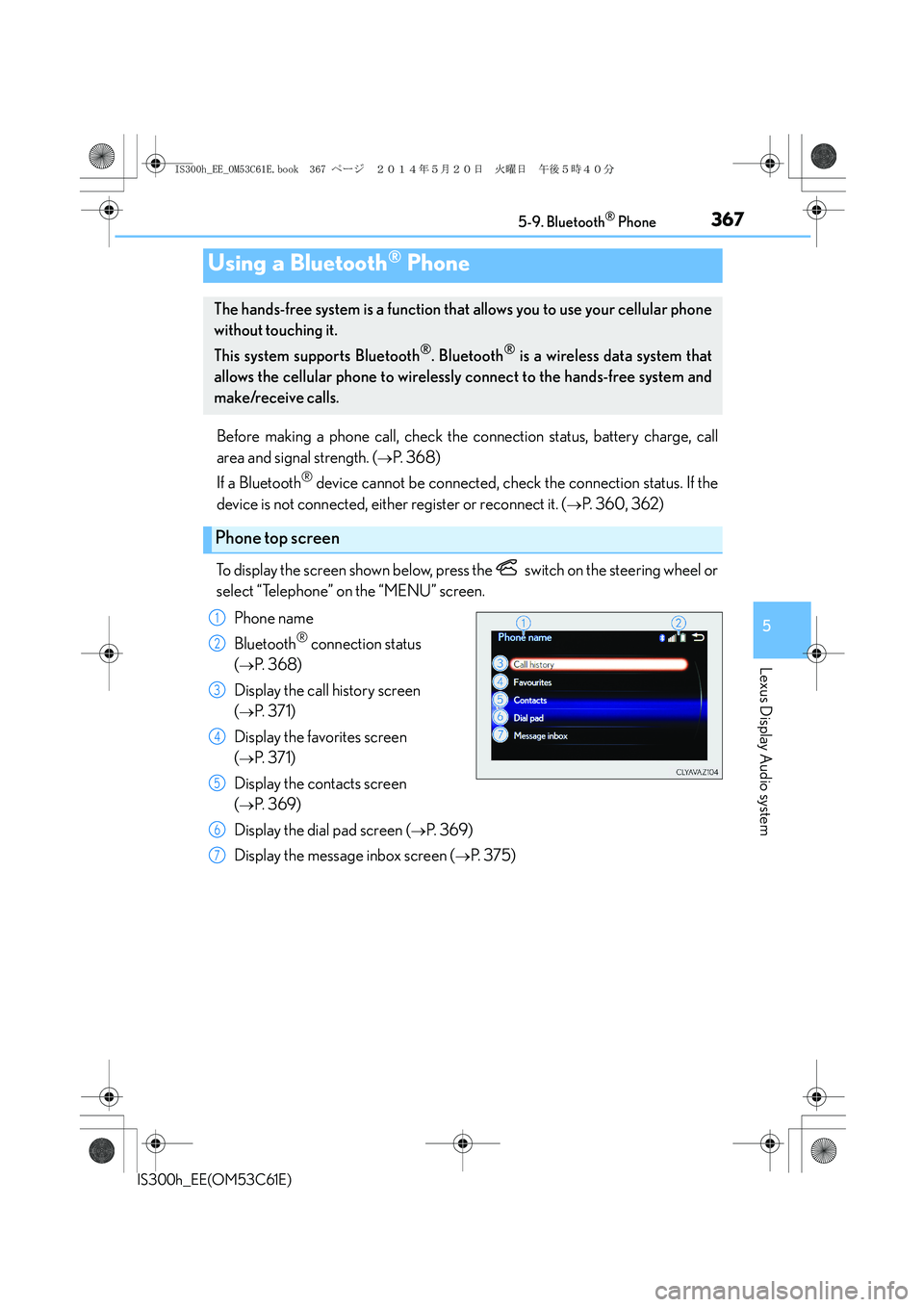
To display the screen shown below, press the switch on the steering wheel or
select “Telephone” on the “MENU” screen.
Phone name
Bluetooth
® connection status
(
→P. 3 6 8 )
Display the call history screen
(
→P. 3 7 1 )
Display the favorites screen
(
→P. 3 7 1 )
Display the contacts screen
(
→P. 3 6 9 )
Display the dial pad screen (
→P. 3 6 9 )
Display the message inbox screen (
→P. 3 7 5 )
Using a Bluetooth® Phone
The hands-free system is a function that allows you to use your cellular phone
without touching it.
This system supports Bluetooth
®. Bluetooth® is a wireless data system that
allows the cellular phone to wirelessly connect to the hands-free system and
make/receive calls.
Phone top screen
1
2
3
4
5
6
7
IS300h_EE_OM53C61E.book 367 ページ 2014年5月20日 火曜日 午後5時40分
Page 368 of 612
3685-9. Bluetooth® Phone
IS300h_EE(OM53C61E)
◆Te l e p h o n e s w i t c h (→P. 3 7 8 )
◆Microphone
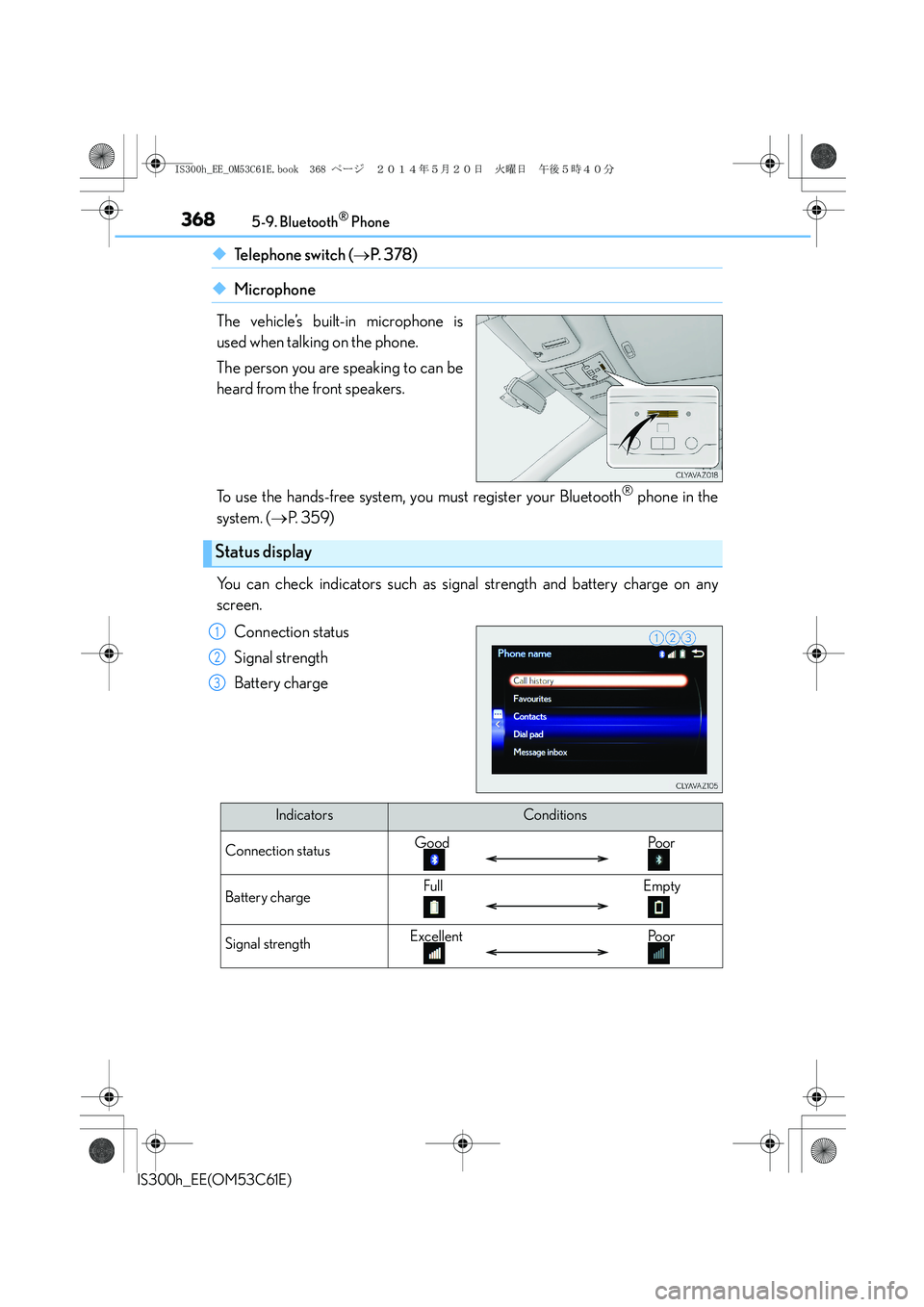
The vehicle’s built-in microphone is
used when talking on the phone.
The person you are speaking to can be
heard from the front speakers.
To use the hands-free system, you must register your Bluetooth
® phone in the
system. (→P. 3 5 9 )
You can check indicators such as signal strength and battery charge on any
screen.
Connection status
Signal strength
Battery charge
Status display
1
2
3
IndicatorsConditions
Connection statusGood Poor
Battery chargeFull Empty
Signal strengthExcellent Poor
IS300h_EE_OM53C61E.book 368 ページ 2014年5月20日 火曜日 午後5時40分
Page 386 of 612
3865-11. Bluetooth®
IS300h_EE(OM53C61E)
■Bluetooth® antenna
The antenna is built into the display.
If the portable audio player is behind the seat or in the glove box or console box, or is
touching or covered by metal objects, the connection status may deteriorate.
If the cellular phone is behind the seat or in the console box, or touching or covered by
metal objects, the connection status may deteriorate.
■Battery charge/signal status
●This display may not correspond exactly with the portable audio player or cellular
phone itself.
●This system does not have a charging function.
●The portable audio player or cellular phone battery will be depleted quickly when the
device is connected to Bluetooth®.
■When using the Bluetooth® audio and hands-free system at the same time
The following problems may occur.
●The Bluetooth® audio connection may be interrupted.
●Noise may be heard during Bluetooth® audio playback.
■About the contact in this system
The following data is stored for every registered cellular phone. When another phone is
connecting, you cannot read the registered data.
●Contact data
●Call history
●Favorite
When removing a Bluetooth® phone from the system, the above-mentioned data is also
deleted.
■About Bluetooth®
Bluetooth® is a registered trademark of Blue-
tooth SIG, Inc.
The Bluetooth
® word mark and logos are
owned by the Bluetooth SIG, Inc. and any use of
such marks by FUJITSU TEN LIMITED is under
license. Other trademarks and trade names are
those of their respective owners.
IS300h_EE_OM53C61E.book 386 ページ 2014年5月20日 火曜日 午後5時40分