Ev mode Lexus IS300h 2015 Owner's Manual
[x] Cancel search | Manufacturer: LEXUS, Model Year: 2015, Model line: IS300h, Model: Lexus IS300h 2015Pages: 628, PDF Size: 137.89 MB
Page 365 of 628
3655-6. Using an external device
5
Lexus Display Audio system
IS300h_EE(OM53D56E)
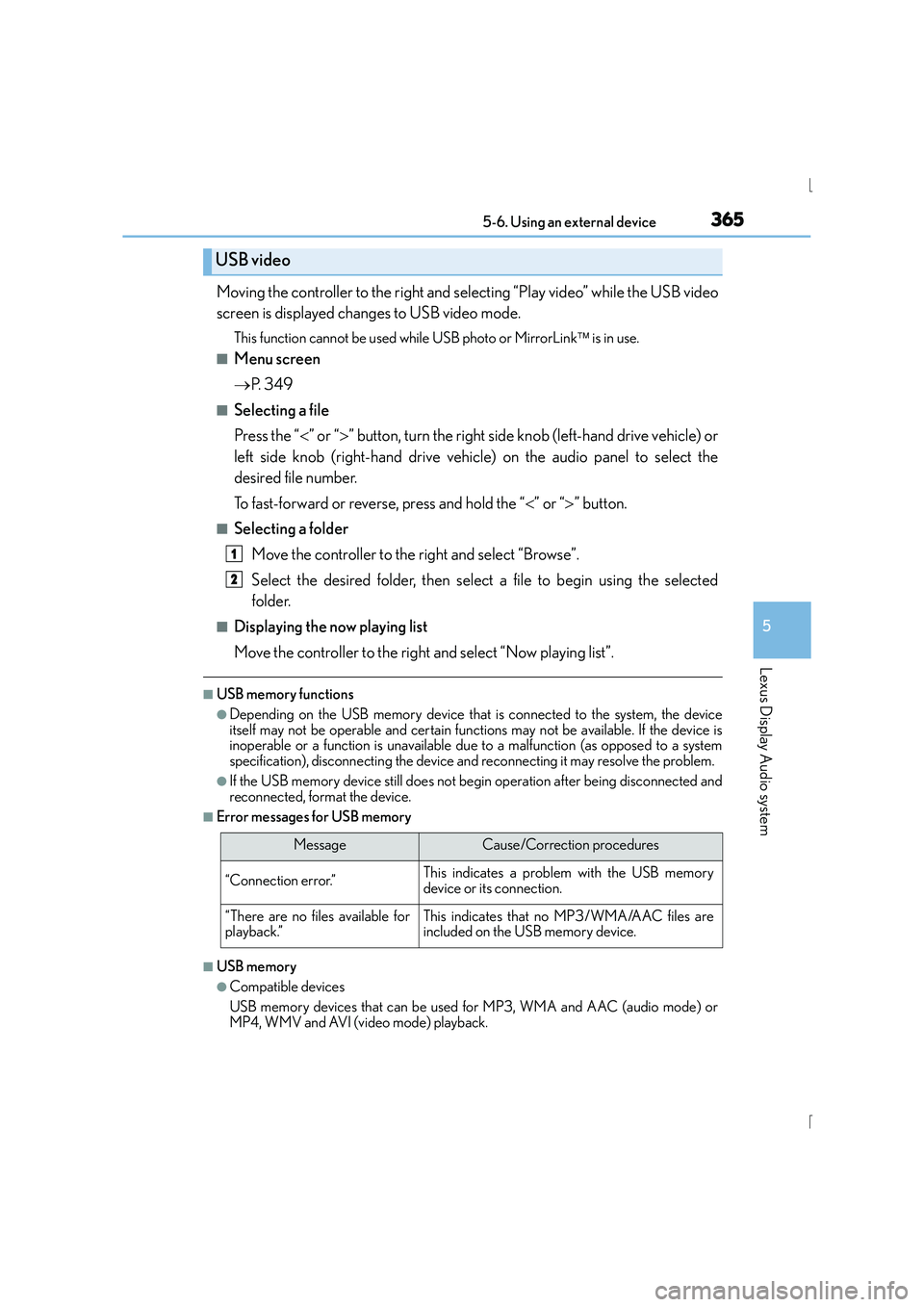
Moving the controller to the right and selecting “Play video” while the USB video
screen is displayed changes to USB video mode.
This function cannot be used while USB photo or MirrorLink is in use.
■Menu screen
→ P. 3 4 9
■Selecting a file
Press the “ <” or “ >” button, turn the right side knob (left-hand drive vehicle) or
left side knob (right-hand drive vehicle) on the audio panel to select the
desired file number.
To fast-forward or reverse, press and hold the “ <” or “ >” button.
■Selecting a folder
Move the controller to the right and select “Browse”.
Select the desired folder, then select a file to begin using the selected
folder.
■Displaying the now playing list
Move the controller to the right and select “Now playing list”.
■USB memory functions
●Depending on the USB memory device that is connected to the system, the device
itself may not be operable and certain functions may not be available. If the device is
inoperable or a function is unavailable du e to a malfunction (as opposed to a system
specification), disconnecting the device and reconnecting it may resolve the problem.
●If the USB memory device still does not begin operation after being disconnected and
reconnected, format the device.
■Error messages for USB memory
■USB memory
●Compatible devices
USB memory devices that can be used for MP3, WMA and AAC (audio mode) or
MP4, WMV and AVI (video mode) playback.
USB video
MessageCause/Correction procedures
“Connection error.”This indicates a problem with the USB memory
device or its connection.
“There are no files available for
playback.”This indicates that no MP3/WMA/AAC files are
included on the USB memory device.
1
2
Page 366 of 628

3665-6. Using an external device
IS300h_EE(OM53D56E)
●Compatible device formats
The following device format can be used:
• USB communication format: USB2.0 FS (480 Mbps)
• File system format: FAT16/32 (Windows)
• Correspondence class: Mass storage class MP3, WMA and AAC files written to a device with any format other than those
listed above may not play correctly, and their file names and folder names may not
be displayed correctly.
Items related to standards an d limitations are as follows:
• Maximum directory hierarchy: 8 levels
• Maximum number of folders in a device: 3000 (including the root)
• Maximum number of files in a device: 9999
• Maximum number of files per folder: 255
●MP3, WMA and AAC files
MP3 (MPEG Audio LAYER 3) is a standard audio compression format.
Files can be compressed to approximately 1 / 10 of their original size using MP3 com-
pression.
WMA (Windows Media Audio) is a Microsoft audio compression format. This format
compresses audio data to a size smaller than that of the MP3 format.
AAC is short for Advanced Audio Coding and refers to an audio compression technol-
ogy standard used with MPEG2 and MPEG4.
MP3, WMA and AAC file and media/ formats compatibility are limited.
●MP3 file compatibility
• Compatible standards
MP3 (MPEG1 AUDIO LAYERIII, MPEG2 AUDIO LAYERIII)
• Compatible sampling frequencies MPEG1 AUDIO LAYERIII: 32, 44.1, 48 (kHz)
MPEG2 AUDIO LAYERIII: 16, 22.05, 24 (kHz)
• Compatible bit rates (compatible with VBR) MPEG1 AUDIO LAYERIII: 32-320 (kbps)
MPEG2 AUDIO LAYERIII: 8-160 (kbps)
• Compatible channel modes: stereo, joint stereo, dual channel and monaural
●WMA file compatibility
• Compatible standards WMA Ver. 7, 8, 9 (only compatible with Windows Media Audio Standard)
• Compatible sampling frequencies
32, 44.1, 48 (kHz)
• Compatible bit rates (only compatible with 2-channel playback) ver. 7, 8: CBR 48-192 (kbps)
ver. 9: CBR 48-320 (kbps)
●AAC file compatibility
• Compatible standards MPEG4/AAC-LC
• Compatible sampling frequencies
11.025/12 /16/22.05/24 /32 /44.1 /48 (kHz)
• Compatible bit rates 16-320 (kbps)
• Compatible channel modes: 1 ch and 2 ch
Page 367 of 628
3675-6. Using an external device
5
Lexus Display Audio system
IS300h_EE(OM53D56E)
●File names
The only files that can be recognized as MP3/WMA/AAC and played are those with
the extension .mp3, .wma or .m4a.
●ID3, WMA and AAC tags
ID3 tags can be added to MP3 files, making it possible to record the track title, artist
name, etc.
The system is compatible with ID3 Ver. 1.0, 1.1, and Ver. 2.2, 2.3 ID3 tags. (The number
of characters is based on ID3 Ver. 1.0 and 1.1.)
WMA tags can be added to WMA files, making it possible to record the track title and
artist name in the same way as with ID3 tags.
AAC tags can be added to AAC files, making it possible to record the track title and
artist name in the same way as with ID3 tags.
●MP3, WMA and AAC playback
• When a device containing MP3, WMA or AA C files is connected, all files in the
USB memory device are checked. Once the file check is finished, the first MP3,
WMA or AAC file is played. To make the file check finish more quickly, we recom-
mend that you do not include any files other than MP3, WMA or AAC files or cre-
ate any unnecessary folders.
• When a USB memory device is connected and the audio source is changed to USB memory mode, the USB memory device will st art playing the first file in the first
folder. If the same device is removed and reconnected (and the contents have not
been changed), the USB memo ry device will resume play from the same point in
which it was last used.
●Extensions
If the file extensions .mp3, .wma and .m4a are used for files other than MP3, WMA
and AAC files, they will be skipped (not played).
●Playback
• To play MP3 files with steady sound quality, we recommend a fixed bit rate of at least
128 kbps and a sampling frequency of 44.1 kHz.
• There is a wide variety of freeware and other encoding software for MP3, WMA and AAC files on the market, and depending on the status of the encoding and the
file format, poor sound quality or noise at the start of playback may result. In some
cases, playback may not be possible at all.
• Microsoft, Windows, and Windows Media are the registered trademarks of
Microsoft Corporation in the U.S.A. and other countries.
Page 374 of 628
3745-7. Connecting Bluetooth®
IS300h_EE(OM53D56E)
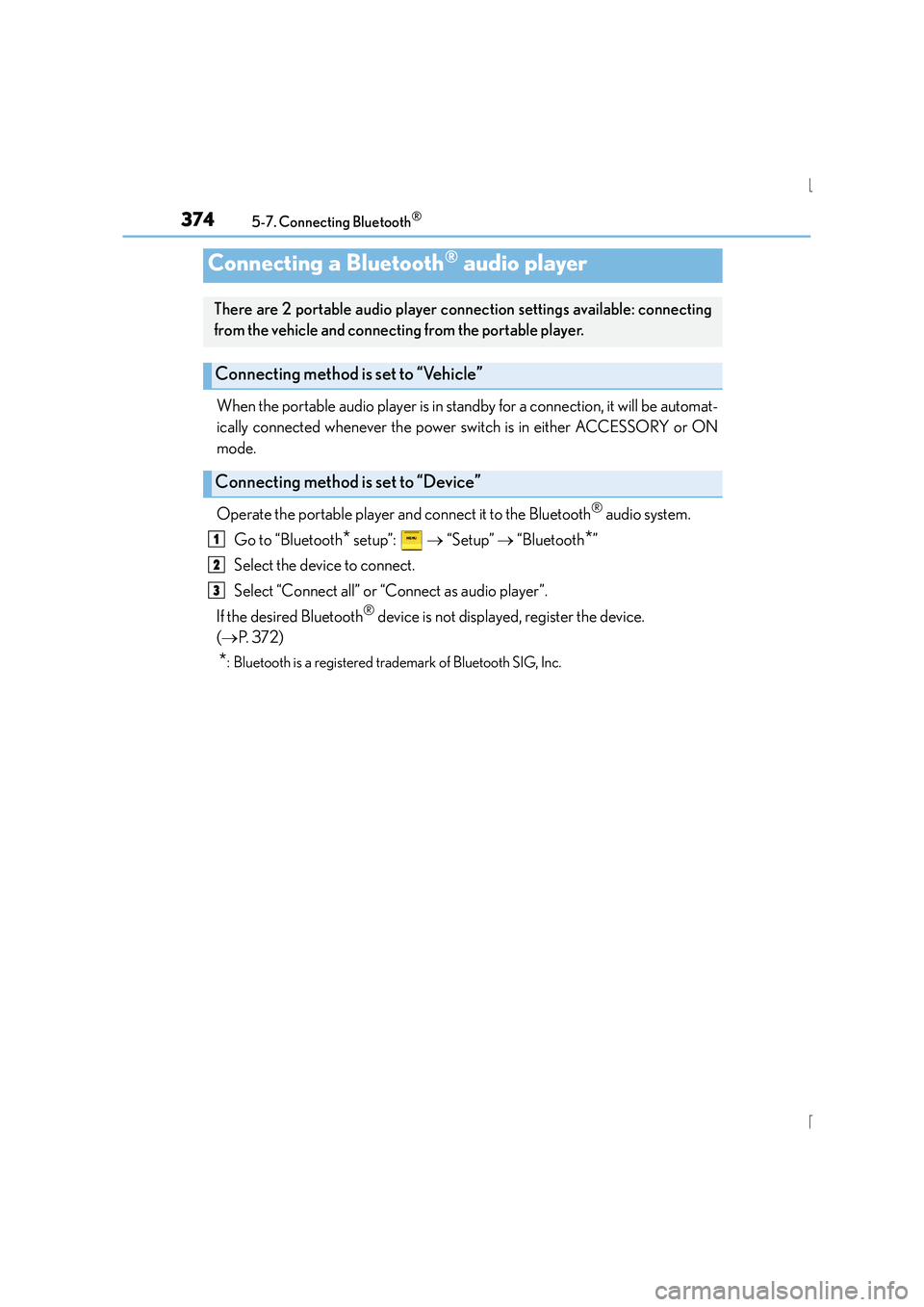
When the portable audio player is in standby for a connection, it will be automat-
ically connected whenever the power switch is in either ACCESSORY or ON
mode.
Operate the portable player and connect it to the Bluetooth
® audio system.
Go to “Bluetooth
* setup”: → “Setup” → “Bluetooth*”
Select the device to connect.
Select “Connect all” or “Connect as audio player”.
If the desired Bluetooth
® device is not displayed, register the device.
( → P. 3 7 2 )
*: Bluetooth is a registered trademark of Bluetooth SIG, Inc.
Connecting a Bluetooth® audio player
There are 2 portable audio player conn ection settings available: connecting
from the vehicle and connecting from the portable player.
Connecting method is set to “Vehicle”
Connecting method is set to “Device”
1
2
3
Page 375 of 628
3755-7. Connecting Bluetooth®
5
Lexus Display Audio system
IS300h_EE(OM53D56E)
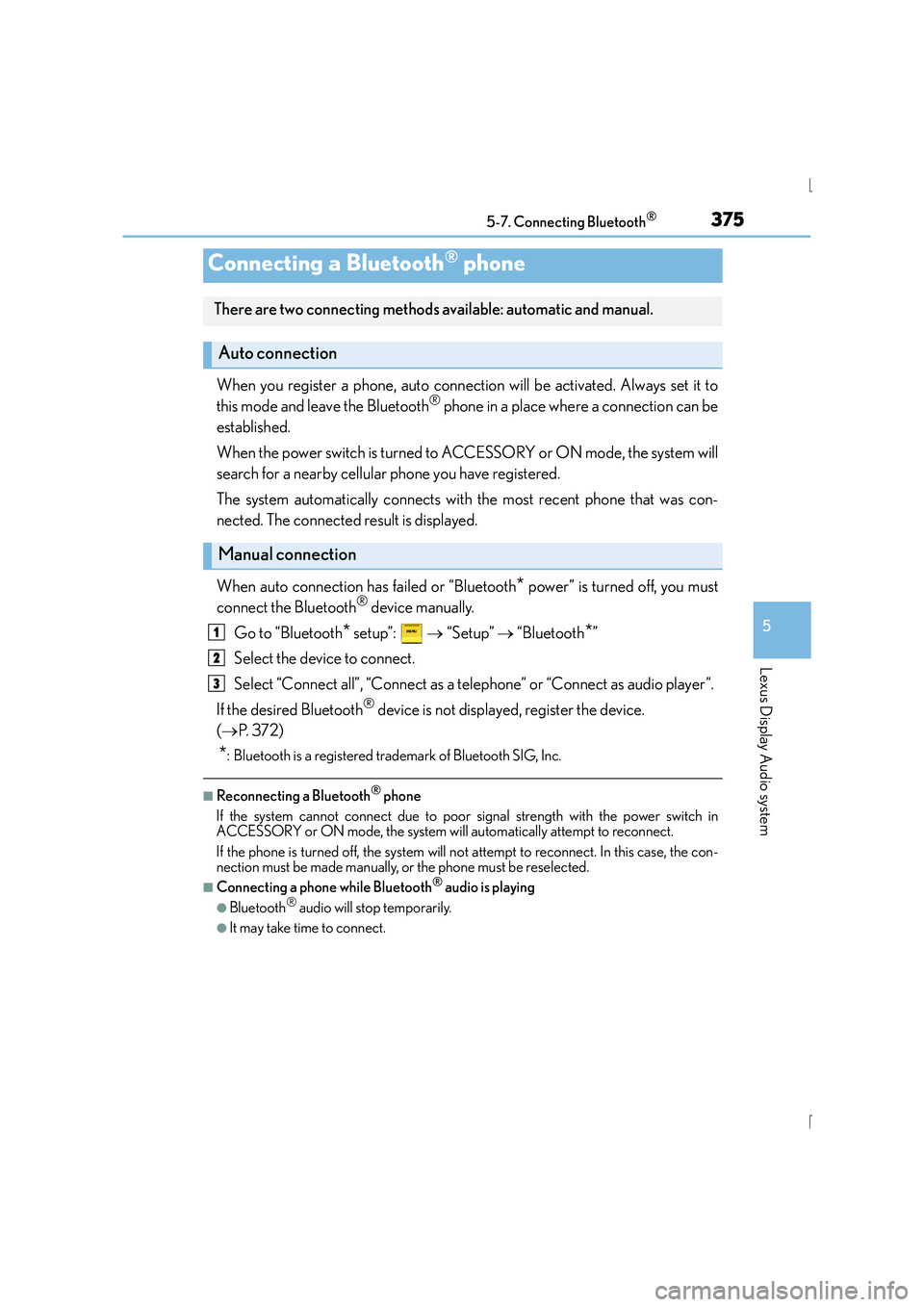
When you register a phone, auto connection will be activated. Always set it to
this mode and leave the Bluetooth® phone in a place where a connection can be
established.
When the power switch is turned to ACCESSORY or ON mode, the system will
search for a nearby cellular phone you have registered.
The system automatically connects with the most recent phone that was con-
nected. The connected result is displayed.
When auto connection has failed or “Bluetooth
* power” is turned off, you must
connect the Bluetooth® device manually.
Go to “Bluetooth
* setup”: → “Setup” → “Bluetooth*”
Select the device to connect.
Select “Connect all”, “Connect as a telephone” or “Connect as audio player”.
If the desired Bluetooth
® device is not displayed, register the device.
( → P. 3 7 2 )
*: Bluetooth is a registered trademark of Bluetooth SIG, Inc.
■Reconnecting a Bluetooth® phone
If the system cannot connect due to poor signal strength with the power switch in
ACCESSORY or ON mode, the system will automatically attempt to reconnect.
If the phone is turned off, the system will no t attempt to reconnect. In this case, the con-
nection must be made manually, or the phone must be reselected.
■Connecting a phone while Bluetooth® audio is playing
●Bluetooth® audio will stop temporarily.
●It may take time to connect.
Connecting a Bluetooth® phone
There are two connecting methods available: automatic and manual.
Auto connection
Manual connection
1
2
3
Page 379 of 628
3795-8. Bluetooth® Audio
5
Lexus Display Audio system
IS300h_EE(OM53D56E)
Pressing the “MEDIA” button displays the Bluetooth® audio top screen from any
screen of the selected source.
■Menu screen
→ P. 3 4 9
■Selecting a song
Press the “ <” or “ >” button or turn the “TUNE/SCROLL” knob to select the
desired song number.
To fast-forward or rewind, press and hold the “ <” or “ >” button.
■Selecting a play mode
Move the controller to the right and then select “Browse”.
Select the desired play mode, and then select a song to begin using the
selected play mode.
■Displaying the now playing list
Move the controller to the right and then select “Now playing list”.
Bluetooth® audio top screen
1
2
Page 387 of 628
3875-9. Bluetooth® Phone
5
Lexus Display Audio system
IS300h_EE(OM53D56E)
XPhone number containing a “w” symbol
When the “w” symbol is dialed in an outgoing call, you need to go to the
“Release tones” screen to dial the following digits. Move the controller to the
left and then select “Release tones”.
Select “Handset mode” to change from a hands-free call to a cellular phone call
or vice versa.
Press the switch on the steering wheel or select .
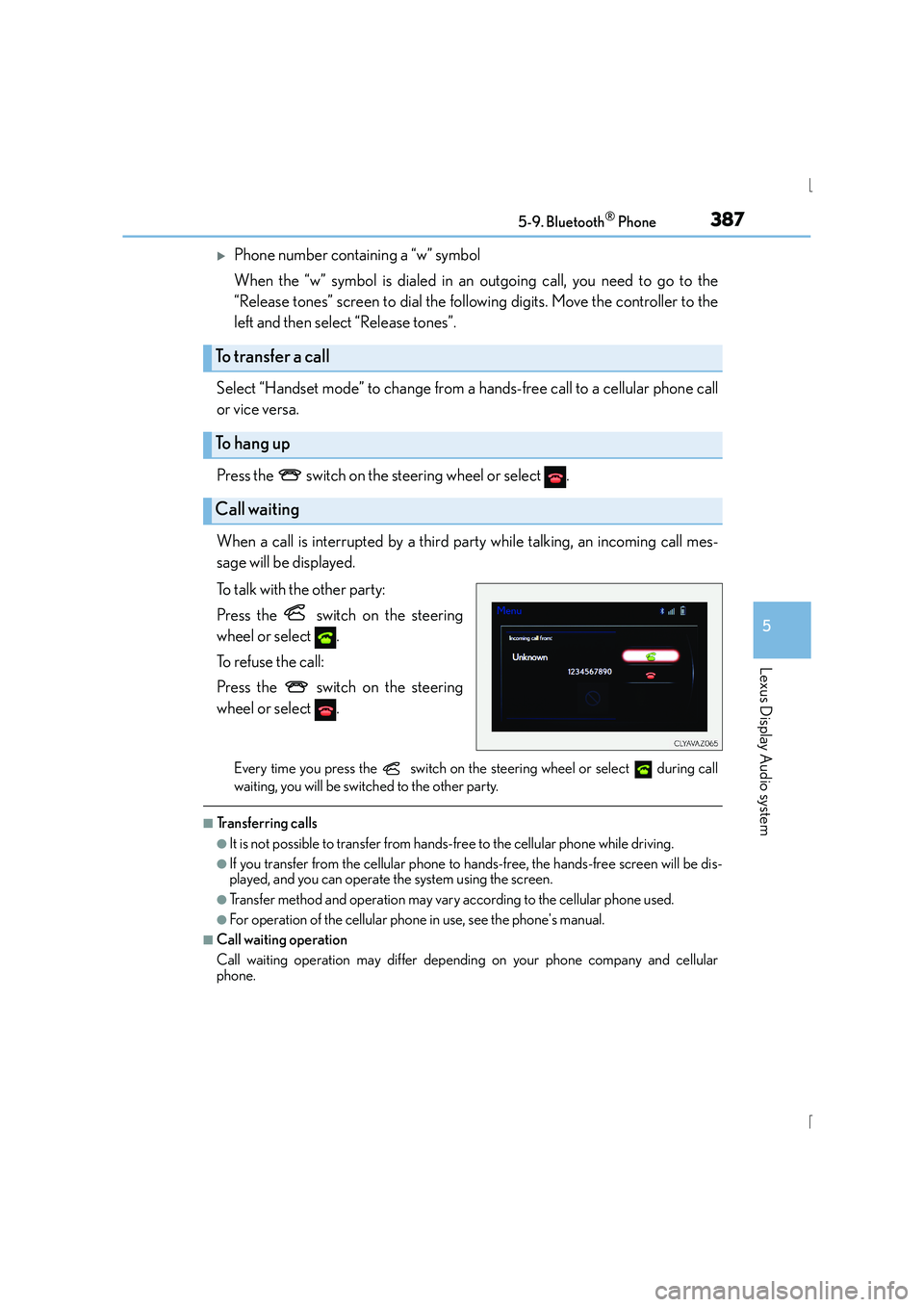
When a call is interrupted by a third party while talking, an incoming call mes-
sage will be displayed.
To talk with the other party:
Press the switch on the steering
wheel or select .
To refuse the call:
Press the switch on the steering
wheel or select .
Every time you press the switch on the steering wheel or select during call
waiting, you will be switched to the other party.
■Tr a n s f e r r i n g c a l l s
●It is not possible to transfer from hand s-free to the cellular phone while driving.
●If you transfer from the cellular phone to ha nds-free, the hands-free screen will be dis-
played, and you can operate the system using the screen.
●Transfer method and operation may vary according to the cellular phone used.
●For operation of the cellular phone in use, see the phone's manual.
■Call waiting operation
Call waiting operation may differ depending on your phone company and cellular
phone.
To transfer a call
To h a n g u p
Call waiting
Page 394 of 628
394
IS300h_EE(OM53D56E)5-10. Phonebook
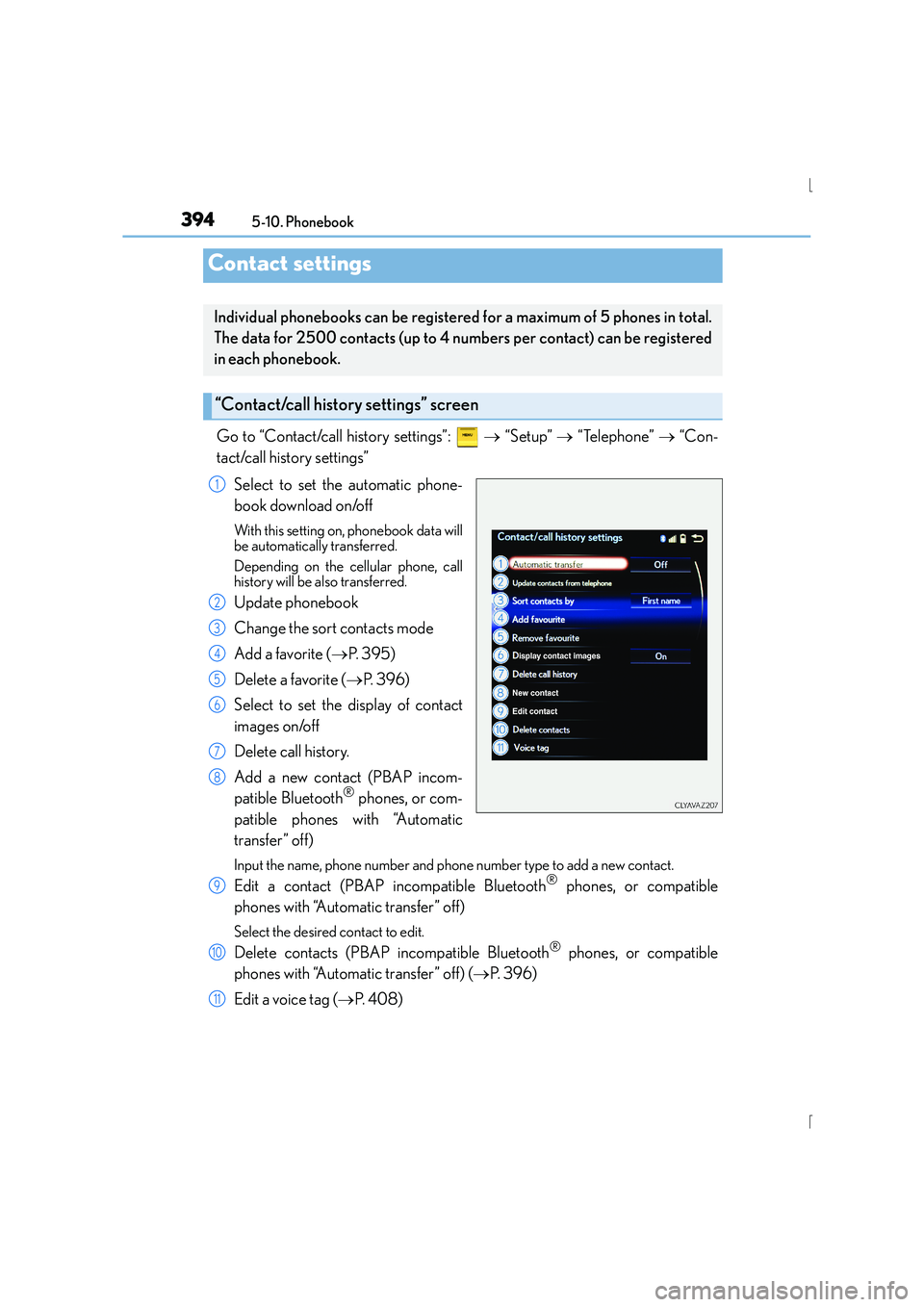
Go to “Contact/call history settings”:
→ “Setup” → “Telephone” → “Con-
tact/call history settings”
Select to set the automatic phone-
book download on/off
With this setting on, phonebook data will
be automatically transferred.
Depending on the cellular phone, call
history will be also transferred.
Update phonebook
Change the sort contacts mode
Add a favorite ( →P. 3 9 5 )
Delete a favorite ( →P. 396)
Select to set the display of contact
images on/off
Delete call history.
Add a new contact (PBAP incom-
patible Bluetooth
® phones, or com-
patible phones with “Automatic
transfer” off)
Input the name, phone number and phone number type to add a new contact.
Edit a contact (PBAP incompatible Bluetooth® phones, or compatible
phones with “Automatic transfer” off)
Select the desired contact to edit.
Delete contacts (PBAP incompatible Bluetooth® phones, or compatible
phones with “Automatic transfer” off) ( →P. 3 9 6 )
Edit a voice tag ( →P. 4 0 8 )
Contact settings
Individual phonebooks can be registered for a maximum of 5 phones in total.
The data for 2500 contacts (up to 4 nu mbers per contact) can be registered
in each phonebook.
“Contact/call history settings” screen
1
2
3
4
5
6
7
8
9
10
11
Page 400 of 628
4005-11. Bluetooth®
IS300h_EE(OM53D56E)
■Compatible models
The Bluetooth® audio system supports portable audio players with the following specifi-
cations
●Bluetooth® specifications:
Ver. 2.0, or higher (Recommended: Ver. 3.0 +EDR or higher)
●Profiles:
• A2DP (Advanced Audio Distribution Profile) Ver. 1.0, or higher (Recommended: Ver. 1.2 or higher)
This is a profile to transmit stereo audio or high quality sound to the audio system.
• AVRCP (Audio/Video Remote Control Profile) Ver. 1.0 or higher (Recommended: Ver. 1.4 or higher)
This is a profile to allow remote control the A/V equipment.
However, please note that some functions may be limited depending on the type of por-
table audio player connected.
The hands-free system supports cellular phones with the following specifications.
●Bluetooth® specification:
Ver. 2.0 or higher (Recommended: Ver. 3.0 +EDR or higher)
●Profiles:
• HFP (Hands Free Profile) Ver. 1.0 or higher (Recommended: Ver. 1.6 or higher) This is a profile to allow hands-free phone calls using a cellular phone or head set. It
has outgoing and incoming call functions.
• OPP (Object Push Profile) Ver. 1.1 or higher (Recommended: Ver. 1.1) This is a profile to transfer phonebook data. When a Bluetooth
® compatible cellular
phone has both PBAP and OPP, OPP cannot be used.
• PBAP (Phone Book Access Profile) Ver. 1.0 or higher (Recommended: Ver. 1.1) This is a profile to tr ansfer phonebook data.
• MAP (Message Access Profile) Ver.1.0 or higher This is a profile to using phone message.
If the cellular phone does not support HFP, you cannot register it with the hands-free sys-
tem. OPP, PBAP or MAP services must be selected individually.
■Reconnecting the portable audio player
If the portable audio player is disconnected due to poor reception when the power
switch is in ACCESSORY or ON mode, the system automatically reconnects the porta-
ble audio player.
If you have switched off the portable audio player yourself, follow the instructions below
to reconnect:
●Select the portable audio player again
●Enter the portable audio player
■When you sell your car
Be sure to delete your personal data. ( →P. 3 4 0 )
Page 404 of 628
4045-12. Other function
IS300h_EE(OM53D56E)
→P. 335
Go to “MirrorLink
*”: → “Info” → “MirrorLink*”
Select the desired application on the application list screen.
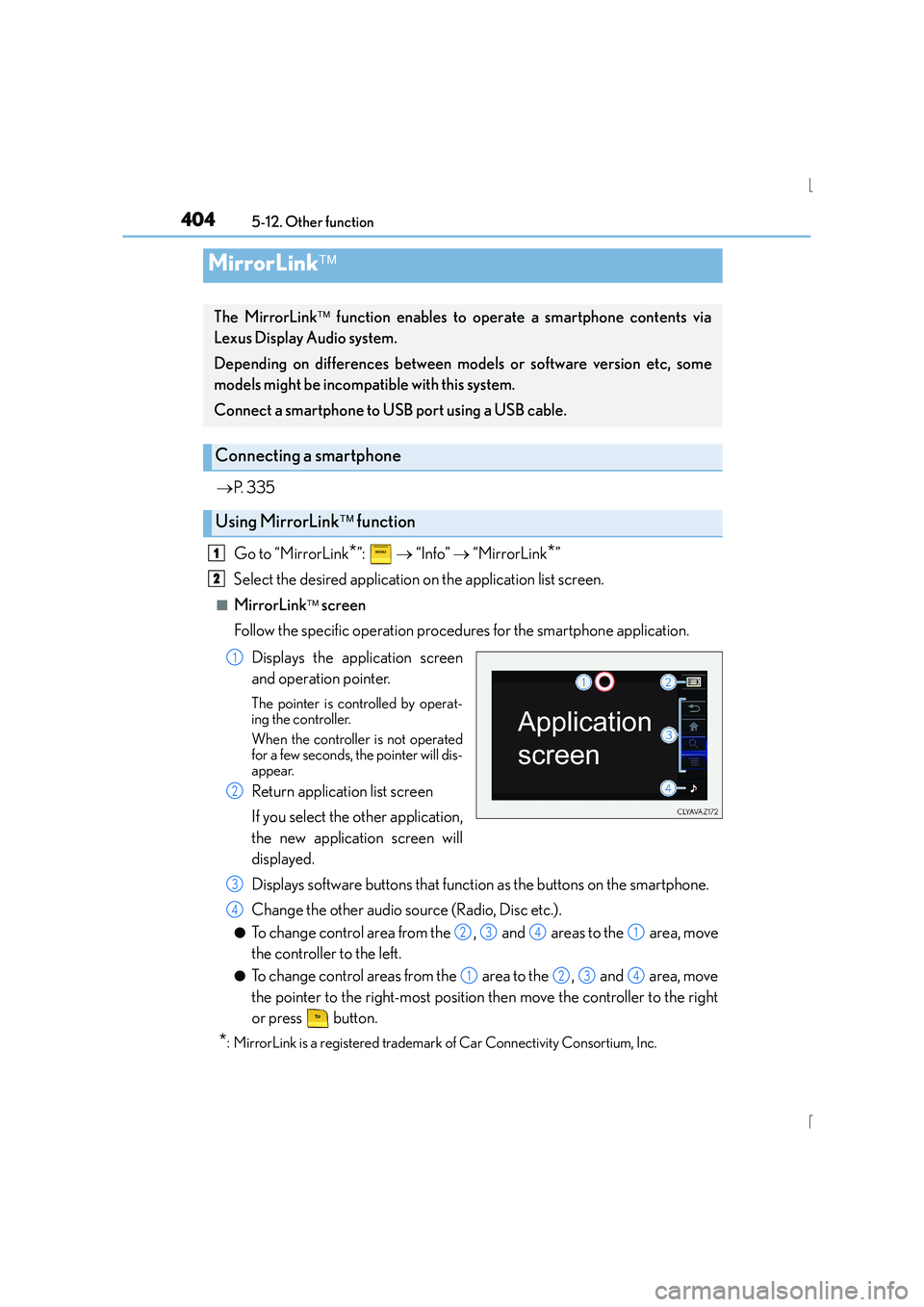
■MirrorLink screen
Follow the specific operation procedures for the smartphone application.
Displays the application screen
and operation pointer.
The pointer is controlled by operat-
ing the controller.
When the controller is not operated
for a few seconds, the pointer will dis-
appear.
Return application list screen
If you select the other application,
the new application screen will
displayed.
Displays software buttons that function as the buttons on the smartphone.
Change the other audio source (Radio, Disc etc.).
●To change control area from the , and areas to the area, move
the controller to the left.
●To change control areas from the area to the , and area, move
the pointer to the right-most position then move the controller to the right
or press button.
*: MirrorLink is a registered trademark of Car Connectivity Consortium, Inc.
MirrorLink
The MirrorLink function enables to operate a smartphone contents via
Lexus Display Audio system.
Depending on differences between models or software version etc, some
models might be incompatible with this system.
Connect a smartphone to USB port using a USB cable.
Connecting a smartphone
Using MirrorLink function
1
2
1
2
3
4
2341
1234