Ev mode Lexus IS300h 2015 Manual Online
[x] Cancel search | Manufacturer: LEXUS, Model Year: 2015, Model line: IS300h, Model: Lexus IS300h 2015Pages: 628, PDF Size: 137.89 MB
Page 265 of 628
2654-5. Using the driving support systems
4
Driving
IS300h_EE(OM53D56E)
CAUTION
■Before using dynamic radar cruise control
Do not overly rely on vehicle-to-vehicle distance control mode.
Be aware of the set speed. If automatic deceleration/acceleration is not appropriate,
adjust the vehicle speed, as well as the distance between your vehicle and vehicles
ahead by applying the brakes etc.
■Cautions regarding the driving assist systems
Observe the following precautions.
Failure to do so may cause an accident resulting in death or serious injury.
●Assisting the driver to measure following distance
The dynamic radar cruise control is only intended to help the driver in determining
the following distance between the driver’s own vehicle and a designated vehicle
traveling ahead. It is not a mechanism that allows careless or inattentive driving, and it
is not a system that can assist the driver in low-visibility conditions. It is still necessary
for driver to pay close attention to the vehicle’s surroundings.
●Assisting the driver to judge proper following distance
The dynamic radar cruise control determines whether the following distance
between the driver’s own vehicle and a designated vehicle traveling ahead is appro-
priate or not. It is not capable of making any other type of judgement. Therefore, it is
absolutely necessary for the driver to remain vigilant and to determine whether or not
there is a possibility of danger in any given situation.
●Assisting the driver to operate the vehicle
The dynamic radar cruise control has no capability to prevent or avoid a collision with
a vehicle traveling ahead. Therefore, if there is ever any danger, the driver must take
immediate and direct control of the vehicle and act appropriately in order to ensure
the safety of all involved.
■To avoid inadvertent cruise control activation
Switch the dynamic radar cruise control off using the “ON/OFF” button when not in
use.
Page 268 of 628
2684-5. Using the driving support systems
IS300h_EE(OM53D56E)
CAUTION
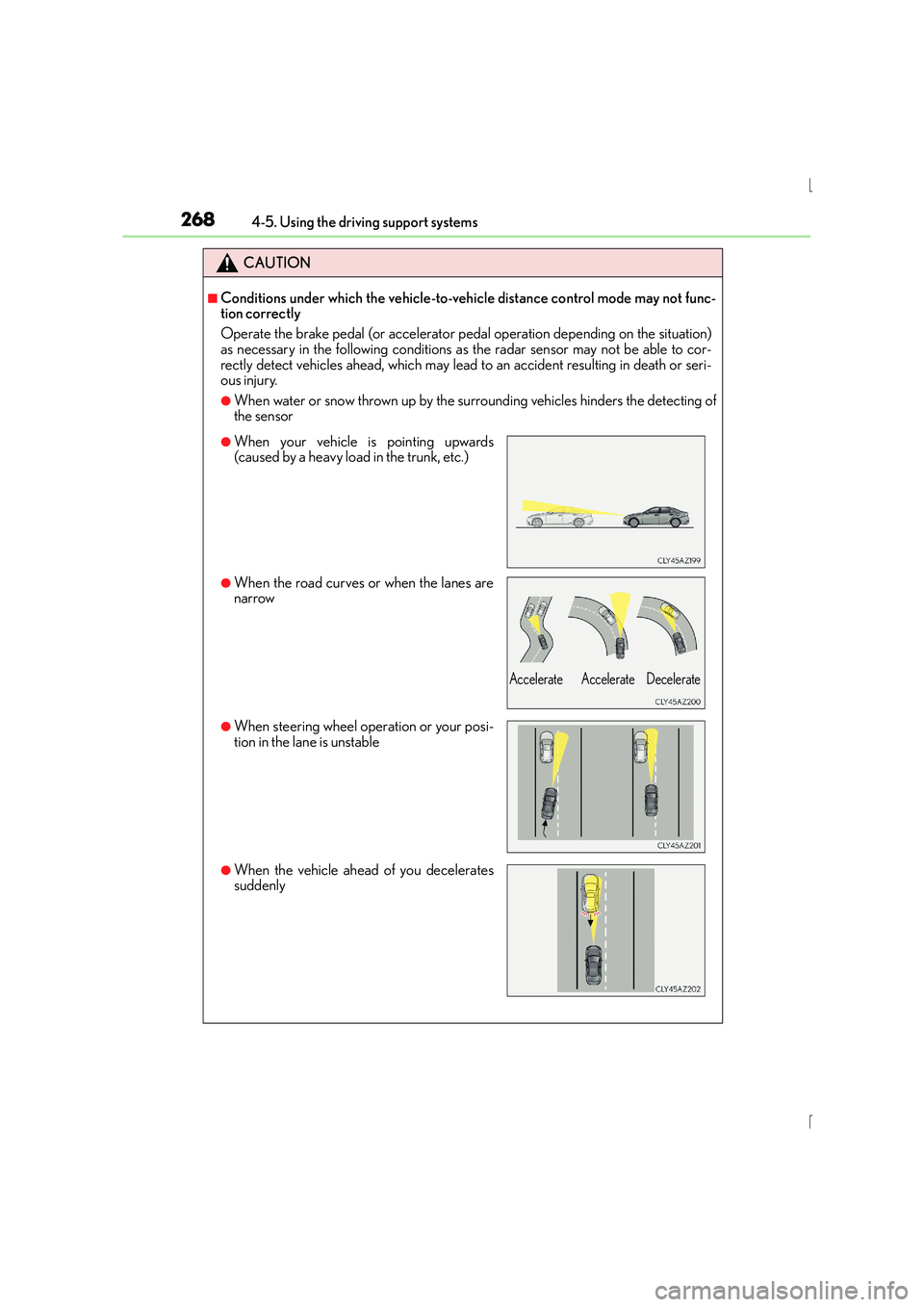
■Conditions under which the vehicle-to-vehicle distance control mode may not func-
tion correctly
Operate the brake pedal (or accelerator pedal operation depending on the situation)
as necessary in the following conditions as the radar sensor may not be able to cor-
rectly detect vehicles ahead, which may lead to an accident resulting in death or seri-
ous injury.
●When water or snow thrown up by the surrounding vehicles hinders the detecting of
the sensor
●When your vehicle is pointing upwards
(caused by a heavy load in the trunk, etc.)
●When the road curves or when the lanes are
narrow
●When steering wheel operation or your posi-
tion in the lane is unstable
●When the vehicle ahead of you decelerates
suddenly
Accelerate Accelerate Decelerate
Page 271 of 628
2714-5. Using the driving support systems
4
Driving
IS300h_EE(OM53D56E)
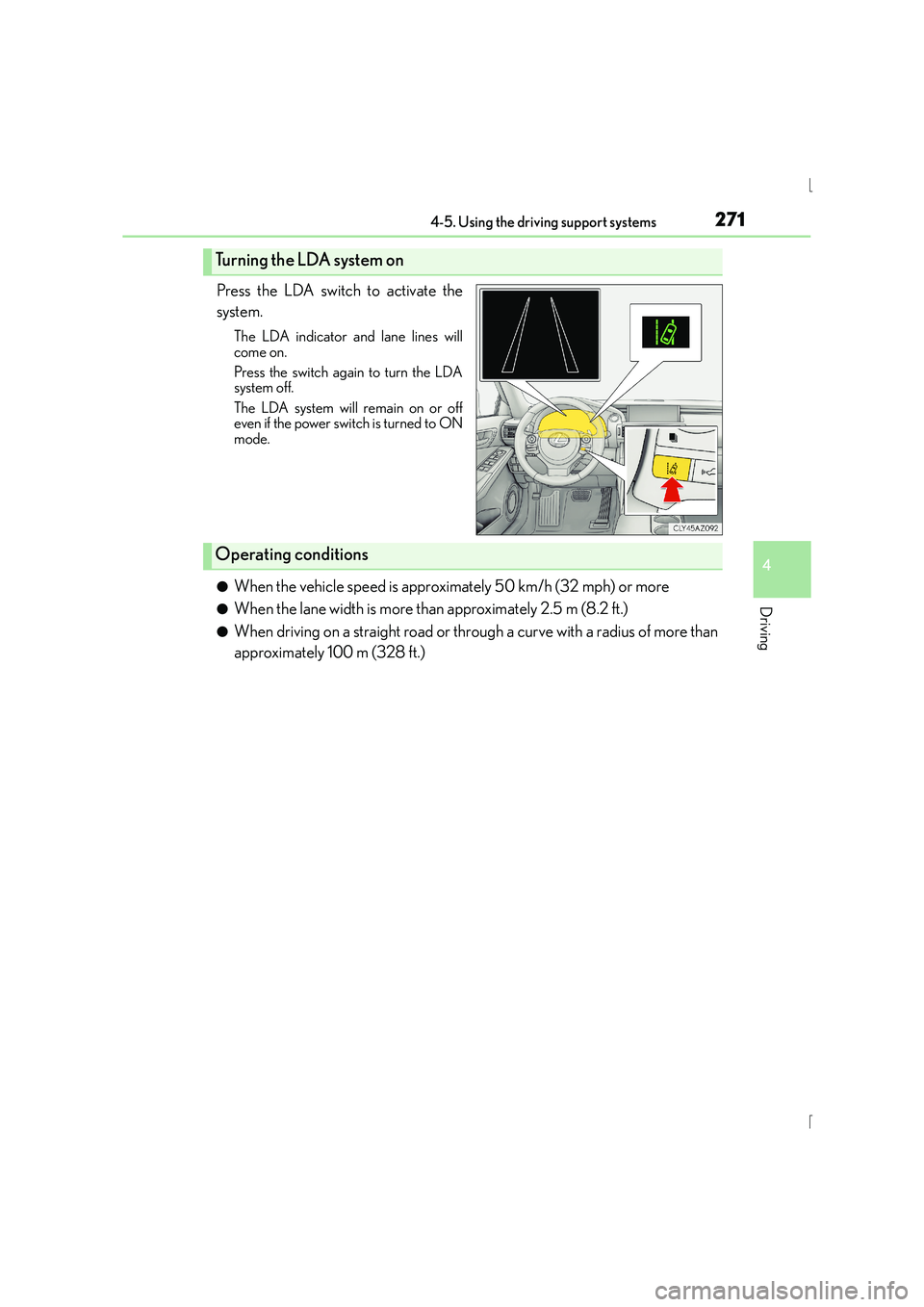
Press the LDA switch to activate the
system.
The LDA indicator and lane lines will
come on.
Press the switch again to turn the LDA
system off.
The LDA system will remain on or off
even if the power switch is turned to ON
mode.
●When the vehicle speed is approximately 50 km/h (32 mph) or more
●When the lane width is more than approximately 2.5 m (8.2 ft.)
●When driving on a straight road or through a curve with a radius of more than
approximately 100 m (328 ft.)
Turning the LDA system on
Operating conditions
Page 280 of 628
2804-5. Using the driving support systems
IS300h_EE(OM53D56E)
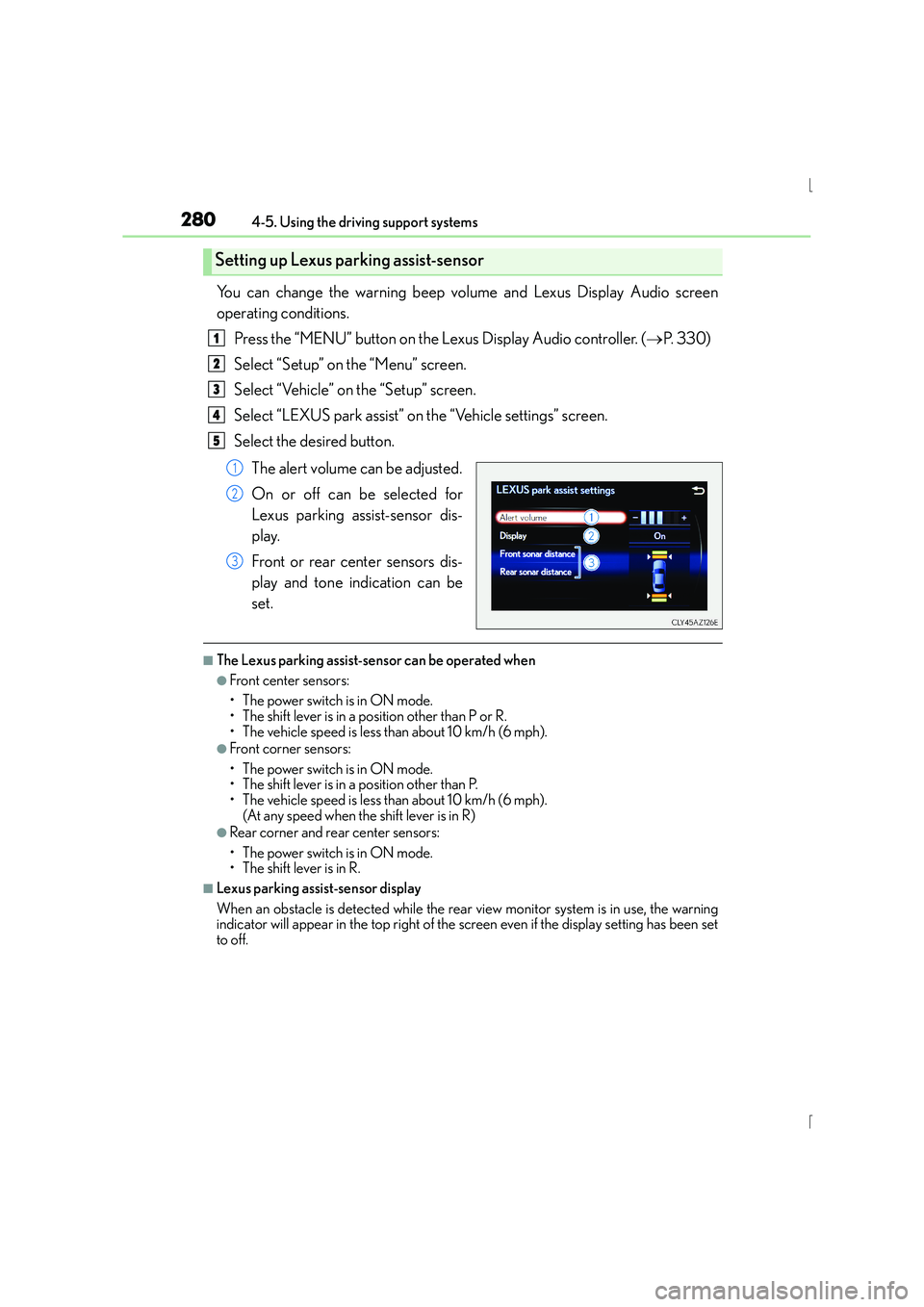
You can change the warning beep volume and Lexus Display Audio screen
operating conditions.Press the “MENU” button on the Lexus Display Audio controller. ( →P. 3 3 0 )
Select “Setup” on the “Menu” screen.
Select “Vehicle” on the “Setup” screen.
Select “LEXUS park assist” on the “Vehicle settings” screen.
Select the desired button.
The alert volume can be adjusted.
On or off can be selected for
Lexus parking assist-sensor dis-
play.
Front or rear center sensors dis-
play and tone indication can be
set.
■The Lexus parking assist-sensor can be operated when
●Front center sensors:
• The power switch is in ON mode.
• The shift lever is in a position other than P or R.
• The vehicle speed is less than about 10 km/h (6 mph).
●Front corner sensors:
• The power switch is in ON mode.
• The shift lever is in a position other than P.
• The vehicle speed is less than about 10 km/h (6 mph). (At any speed when the shift lever is in R)
●Rear corner and rear center sensors:
• The power switch is in ON mode.
• The shift lever is in R.
■Lexus parking assist-sensor display
When an obstacle is detected while the rear view monitor system is in use, the warning
indicator will appear in the top right of the screen even if the display setting has been set
to off.
Setting up Lexus parking assist-sensor
1
2
3
4
5
1
2
3
Page 283 of 628
2834-5. Using the driving support systems
4
Driving
IS300h_EE(OM53D56E)
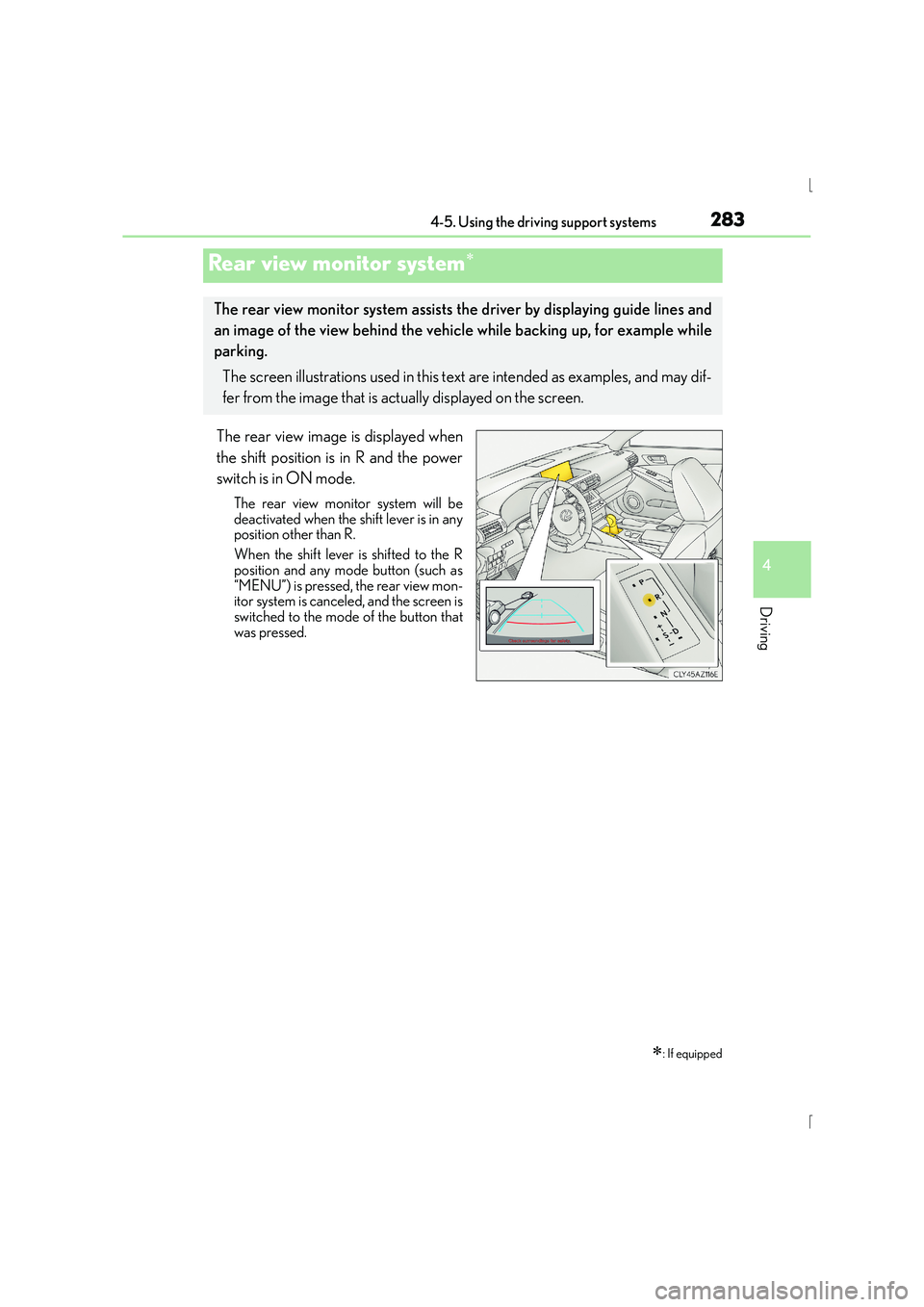
The rear view image is displayed when
the shift position is in R and the power
switch is in ON mode.
The rear view monitor system will be
deactivated when the shift lever is in any
position other than R.
When the shift lever is shifted to the R
position and any mode button (such as
“MENU”) is pressed, the rear view mon-
itor system is canceled, and the screen is
switched to the mode of the button that
was pressed.
Rear view monitor system∗
∗: If equipped
The rear view monitor system assists the driver by displaying guide lines and
an image of the view behind the vehicle while backing up, for example while
parking.
The screen illustrations used in this text are intended as examples, and may dif-
fer from the image that is actually displayed on the screen.
Page 284 of 628
2844-5. Using the driving support systems
IS300h_EE(OM53D56E)
■Screen description
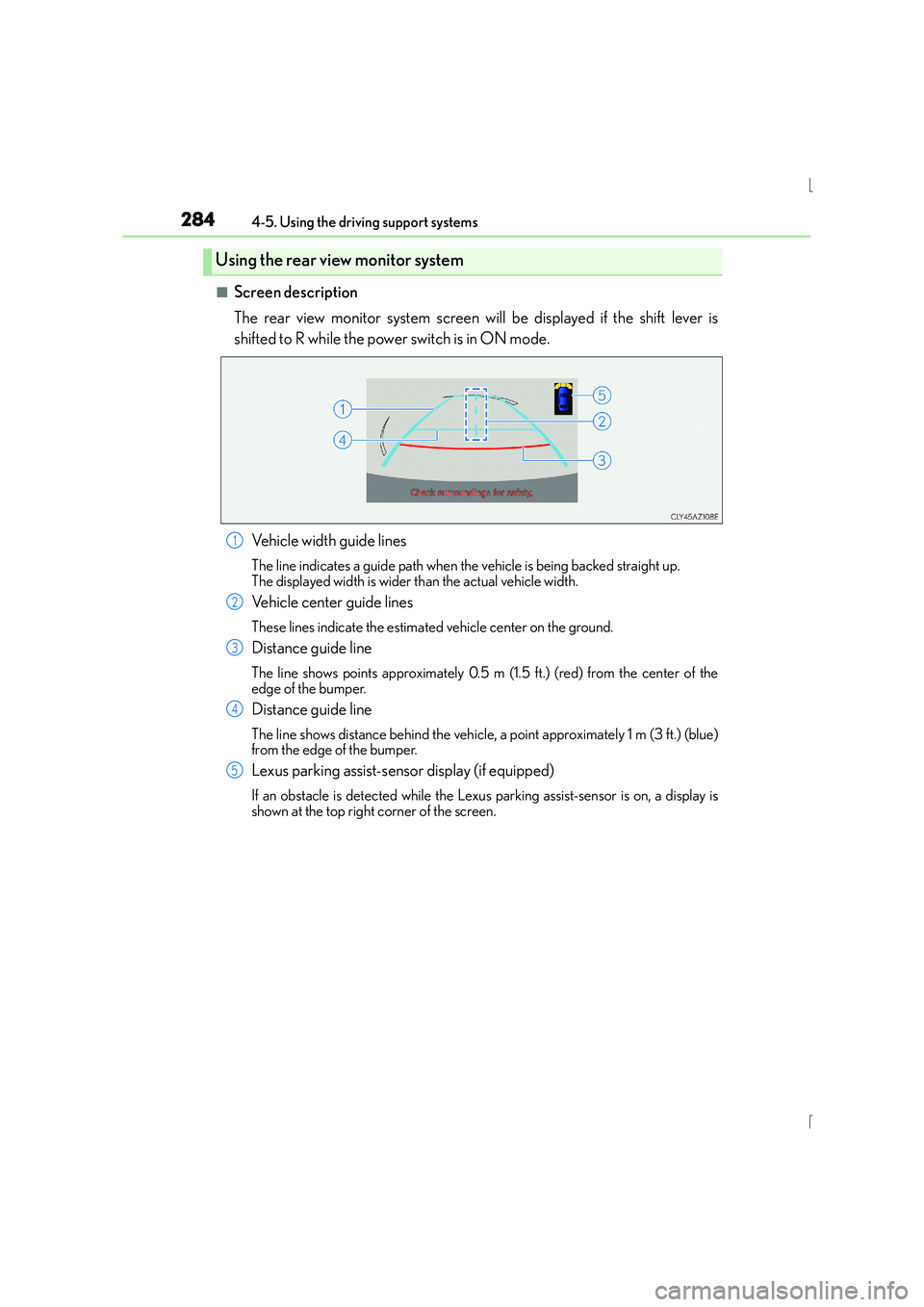
The rear view monitor system screen will be displayed if the shift lever is
shifted to R while the power switch is in ON mode.Vehicle width guide lines
The line indicates a guide path when the vehicle is being backed straight up.
The displayed width is wider than the actual vehicle width.
Vehicle center guide lines
These lines indicate the estimated vehicle center on the ground.
Distance guide line
The line shows points approximately 0.5 m (1.5 ft.) (red) from the center of the
edge of the bumper.
Distance guide line
The line shows distance behind the vehicle, a point approximately 1 m (3 ft.) (blue)
from the edge of the bumper.
Lexus parking assist-sensor display (if equipped)
If an obstacle is detected while the Lexu s parking assist-sensor is on, a display is
shown at the top right corner of the screen.
Using the rear view monitor system
1
2
3
4
5
Page 293 of 628
2934-5. Using the driving support systems
4
Driving
IS300h_EE(OM53D56E)
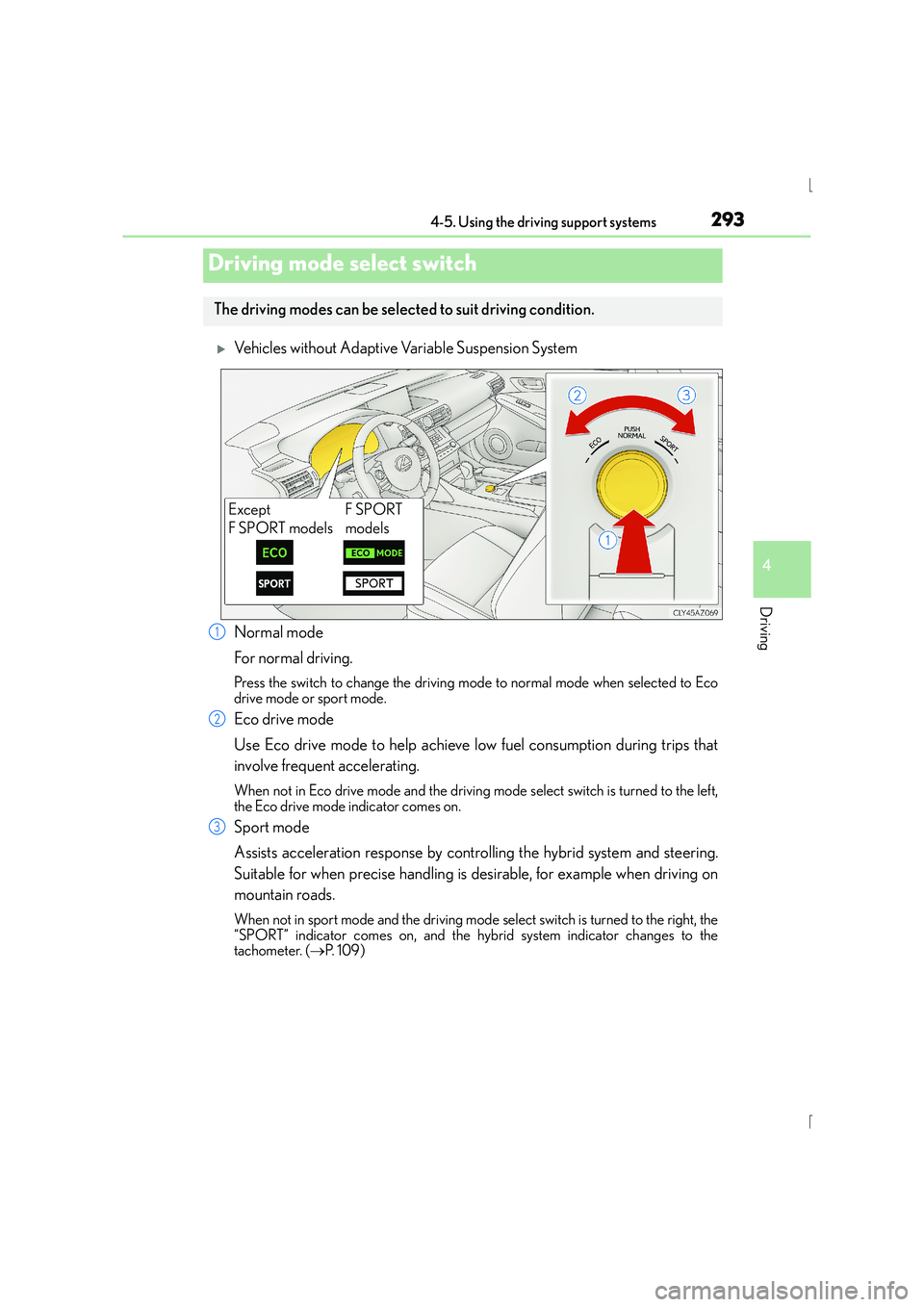
XVehicles without Adaptive Variable Suspension System
Normal mode
For normal driving.
Press the switch to change the driving mode to normal mode when selected to Eco
drive mode or sport mode.
Eco drive mode
Use Eco drive mode to help achieve low fuel consumption during trips that
involve frequent accelerating.
When not in Eco drive mode and the driving mode select switch is turned to the left,
the Eco drive mode indicator comes on.
Sport mode
Assists acceleration response by controlling the hybrid system and steering.
Suitable for when precise handling is desirable, for example when driving on
mountain roads.
When not in sport mode and the driving mode select switch is turned to the right, the
“SPORT” indicator comes on, and the hybrid system indicator changes to the
tachometer. ( →P. 1 0 9 )
Driving mode select switch
The driving modes can be select ed to suit driving condition.
Except
F SPORT modelsF SPORT
models
1
2
3
Page 294 of 628
2944-5. Using the driving support systems
IS300h_EE(OM53D56E)
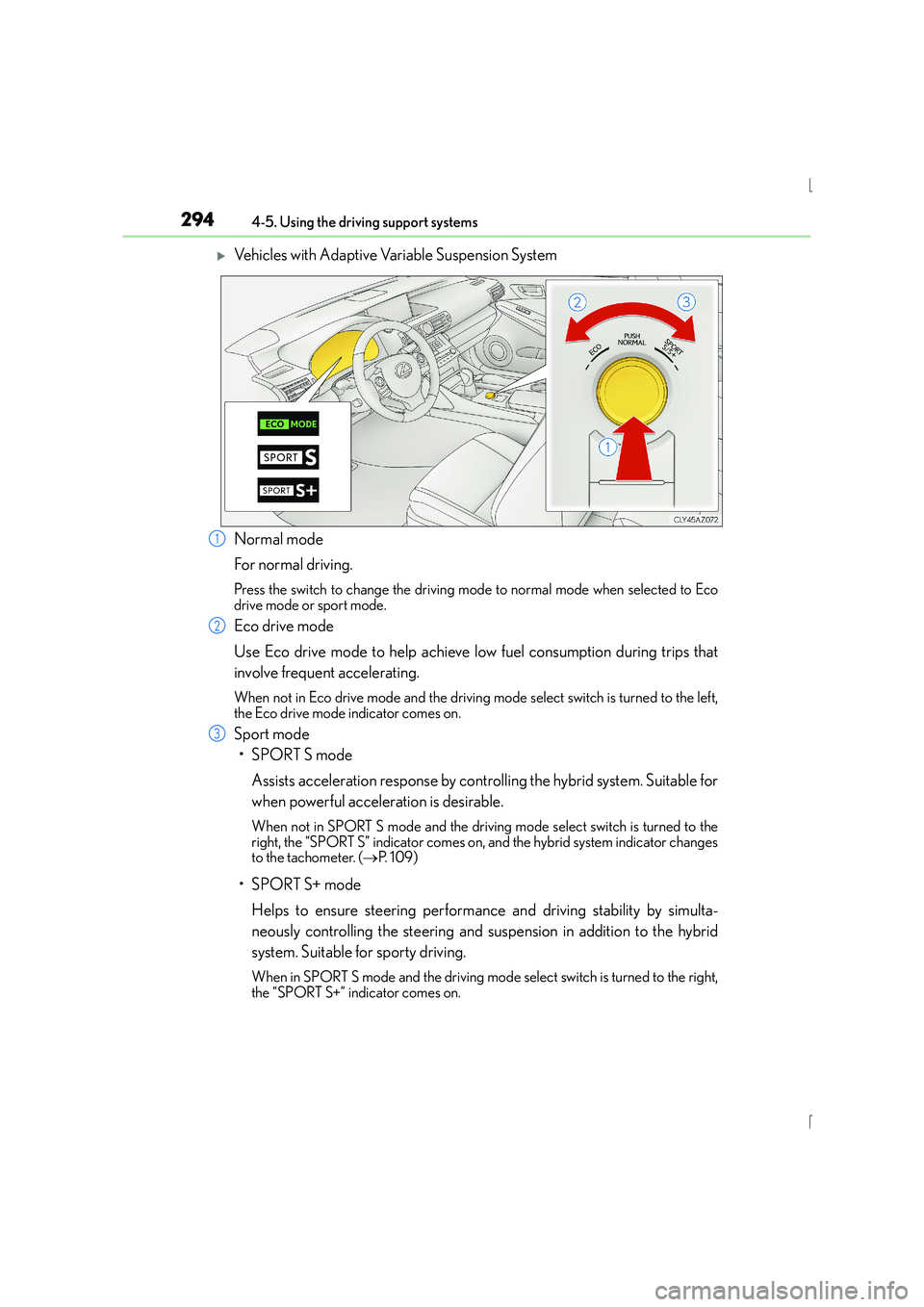
XVehicles with Adaptive Variable Suspension System
Normal mode
For normal driving.
Press the switch to change the driving mode to normal mode when selected to Eco
drive mode or sport mode.
Eco drive mode
Use Eco drive mode to help achieve low fuel consumption during trips that
involve frequent accelerating.
When not in Eco drive mode and the driving mode select switch is turned to the left,
the Eco drive mode indicator comes on.
Sport mode
•SPORT S mode
Assists acceleration response by controlling the hybrid system. Suitable for
when powerful acceleration is desirable.
When not in SPORT S mode an d the driving mode select switch is turned to the
right, the “SPORT S” indicator comes on, and the hybrid system indicator changes
to the tachometer. ( →P. 1 0 9 )
•SPORT S+ mode
Helps to ensure steering performance and driving stability by simulta-
neously controlling the steering and suspension in addition to the hybrid
system. Suitable for sporty driving.
When in SPORT S mode and the driving mode select switch is turned to the right,
the “SPORT S+” indicator comes on.
1
2
3
Page 295 of 628

2954-5. Using the driving support systems
4
Driving
IS300h_EE(OM53D56E)
■Operation of the air conditioning system in Eco drive mode
Eco drive mode controls the heating/cooling operations and fan speed of the air condi-
tioning system to enhance fuel efficiency ( →P. 412). To improve air conditioning perfor-
mance, adjust the fan speed or turn off Eco drive mode.
■Sport mode automatic deactivation
Sport mode is automatically deactivated if th e power switch is turned off after driving in
sport mode.
Page 320 of 628
320
IS300h_EE(OM53D56E)4-6. Driving tips
■Using Eco drive mode
When using Eco drive mode, the torque corresponding to the accelerator
pedal depression amount can be generated more smoothly than it is in normal
conditions. In addition, the operation of the air conditioning system (heating/
cooling) will be minimized, improving the fuel economy. (
→P. 2 9 3 )
■Use of Hybrid System Indicator
Eco-friendly driving is possible by keeping the indicator needle (except F
SPORT models) or bar display (F SPORT models) of Hybrid System Indicator
within the Eco area. ( →P. 1 1 3 )
■When braking
Make sure to operate the brakes gently and in good time. A greater amount
of electrical energy can be regenerated when slowing down.
■Delays
Repeated acceleration and deceleration, as well as long waits at traffic lights,
will lead to bad fuel economy. Check traffic reports before leaving and avoid
delays as much as possible. When driving in a traffic jam, gently release the
brake pedal to allow the vehicle to move forward slightly while avoiding over-
use of the accelerator pedal. Doing so can help control excessive gasoline
consumption.
■Highway driving
Control your speed and keep at a constant speed. Before stopping at a toll
booth or similar, allow plenty of time to release the accelerator and gently
apply the brakes. A greater amount of electrical energy can be regenerated
when slowing down.
Hybrid vehicle driving tips
For economical and ecological driving, pay attention to the following points: