Remote Lexus IS300h 2015 Owner's Guide
[x] Cancel search | Manufacturer: LEXUS, Model Year: 2015, Model line: IS300h, Model: Lexus IS300h 2015Pages: 628, PDF Size: 137.89 MB
Page 144 of 628
1443-2. Opening, closing and locking the doors and trunk
IS300h_EE(OM53D56E)
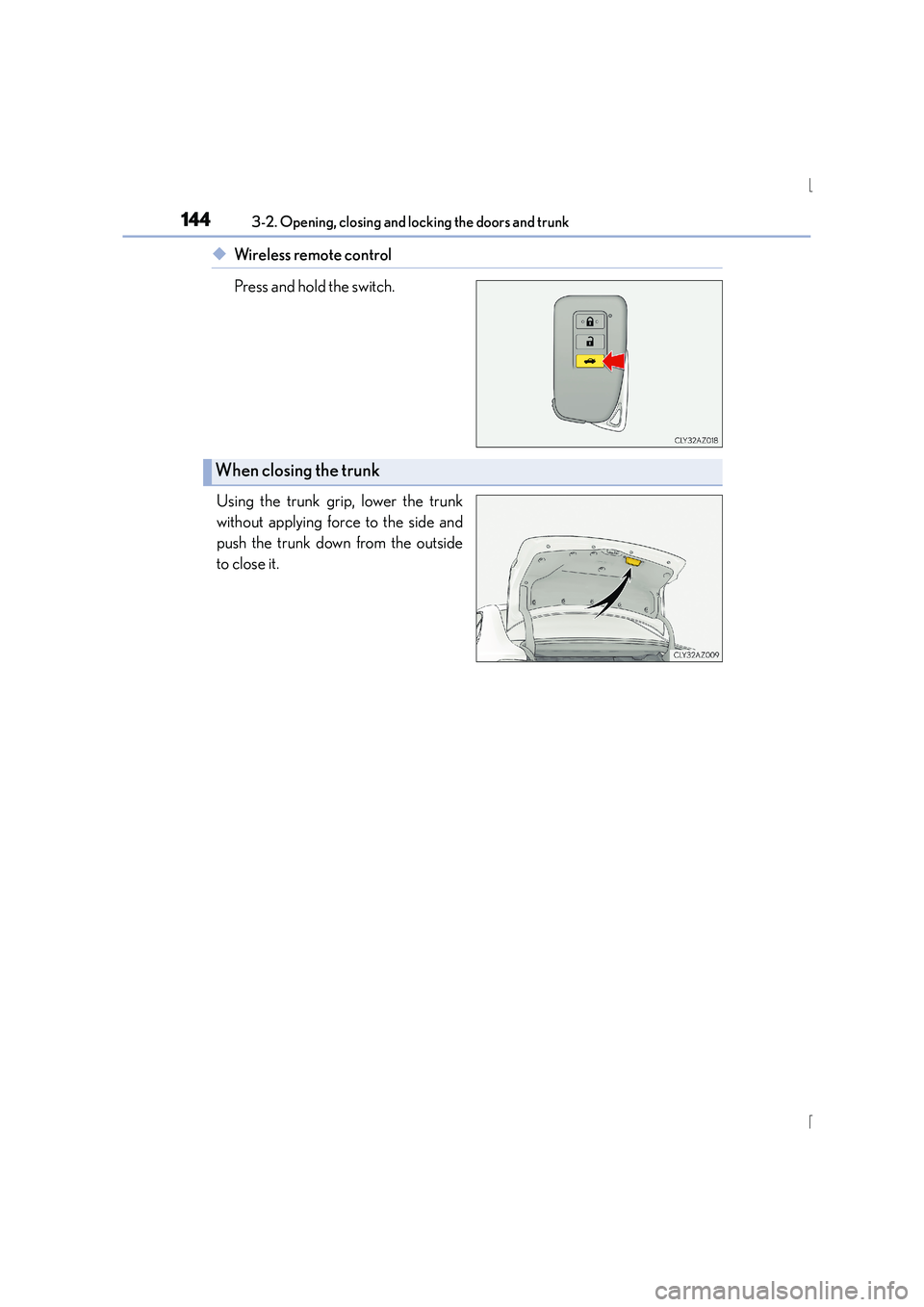
◆Wireless remote control
Press and hold the switch.
Using the trunk grip, lower the trunk
without applying force to the side and
push the trunk down from the outside
to close it.
When closing the trunk
Page 145 of 628
1453-2. Opening, closing and locking the doors and trunk
3
Operation of each component
IS300h_EE(OM53D56E)
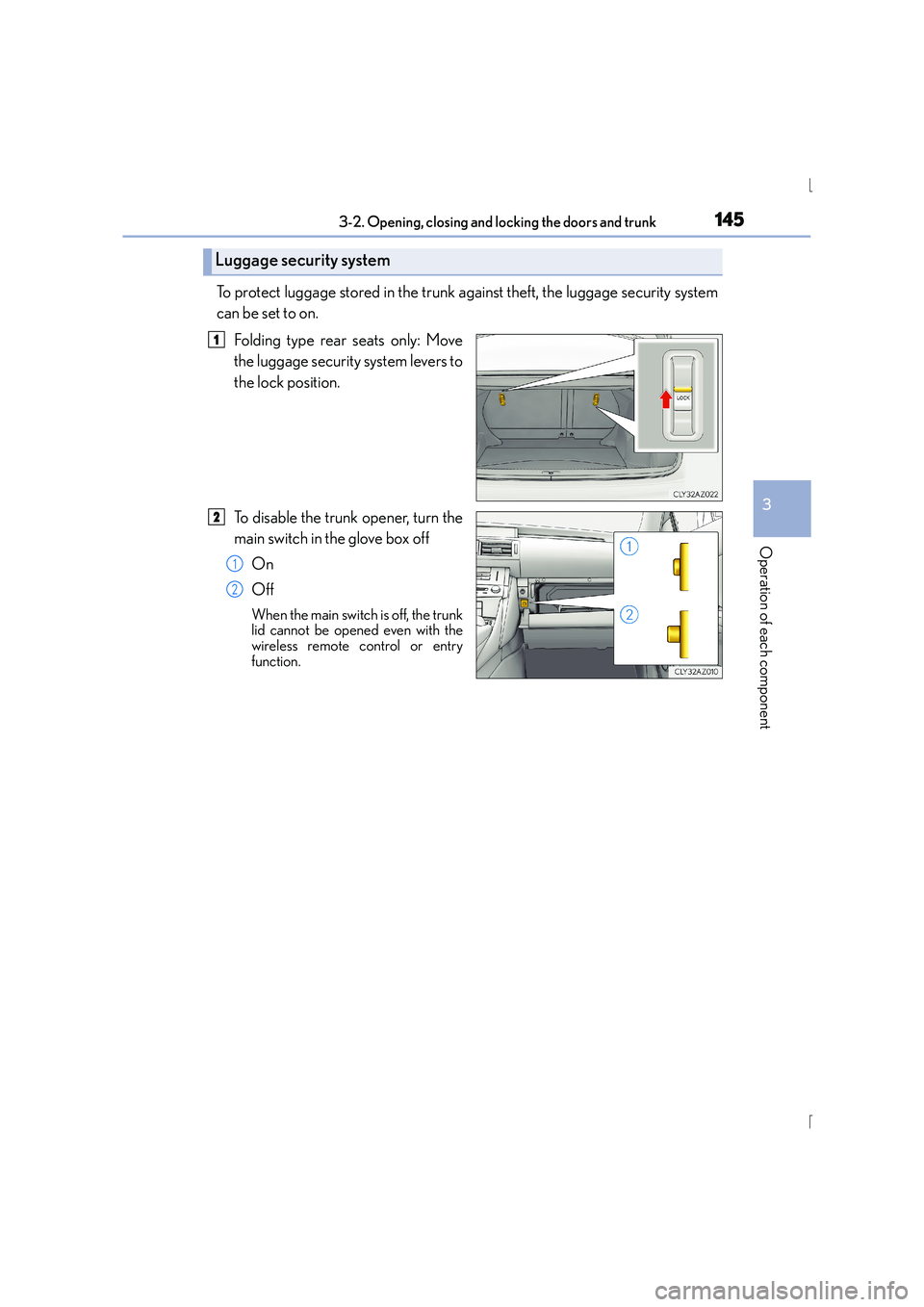
To protect luggage stored in the trunk against theft, the luggage security system
can be set to on.Folding type rear seats only: Move
the luggage security system levers to
the lock position.
To disable the trunk opener, turn the
main switch in the glove box off On
Off
When the main switch is off, the trunk
lid cannot be opened even with the
wireless remote control or entry
function.
Luggage security system
1
2
1
2
Page 146 of 628

1463-2. Opening, closing and locking the doors and trunk
IS300h_EE(OM53D56E)
■Trunk light (if equipped)
The trunk light turns on when the trunk is opened.
■Function to prevent the trunk being locked with the electronic key inside
●When all doors are locked, closing the trunk lid with the electronic key left inside the
trunk will sound an alarm.
In this case, the trunk lid can be opened pressing the trunk release button on the trunk
lid.
●If the spare electronic key is put in the trunk with all the doors locked, the key confine-
ment prevention function is activated so the trunk can be opened. In order to prevent
theft, take all electronic keys with you when leaving the vehicle.
●If the electronic key is put in the trunk with all the doors locked, the key may not be
detected depending on the location of the key and the surrounding radio wave condi-
tions. In this case, the key confinement prevention function cannot be activated, causing
the doors to lock when the trunk is closed. Make sure to check where the key is before
closing the trunk.
●The key confinement prevention function canno t be activated if any one of the doors is
unlocked. In this case, open the trunk using the trunk opener.
■Using the mechanical key
The trunk can be also opened using the mechanical key. ( →P. 5 6 3 )
■If the smart entry & start system or the wireless remote control does not operate prop-
erly
Use the mechanical key to unlock the trunk. ( →P. 5 6 3 )
Replace the key battery with a new one if it is depleted. ( →P. 4 8 8 )
■When leaving a key to the vehicle with a parking attendant
→P. 1 3 2
■Customization
The trunk unlocking operation can be changed. (Customizable features: →P. 5 9 1 )
Page 150 of 628

1503-2. Opening, closing and locking the doors and trunk
IS300h_EE(OM53D56E)
■Battery-saving function (vehicles with entry function)
The battery-saving function will be activated in order to prevent the electronic key bat-
tery and the 12-volt battery from being discharged while the vehicle is not in operation
for a long time.
●In the following situations, the smart entry & start system may take some time to unlock
the doors.
• The electronic key has been left within approximately 2 m (6 ft.) of the outside of the vehicle for 10 minutes or longer.
• The smart entry & start system has not been used for 5 days or longer.
●If the smart entry & start system has not been used for 14 days or longer, the doors can-
not be unlocked at any door except the driver ’s door. In this case, hold the driver’s door
handle, or use the wireless remote control or mechanical key, to unlock the doors.
■Electronic Key battery-Saving Function
When battery-saving mode is set, battery depletion is minimized by stopping the elec-
tronic key from receiving radio waves.
Press twice while pressing and holding
. Confirm that the electronic key indica-
tor flashes 4 times.
While the battery-saving mode is set, the smart
entry & start system cannot be used. To cancel
the function, press any of the electronic key but-
tons.
Page 151 of 628
1513-2. Opening, closing and locking the doors and trunk
3
Operation of each component
IS300h_EE(OM53D56E)
■Conditions affecting operation
The smart entry & start system uses weak radio waves. In the following situations, the
communication between the electronic key and the vehicle may be affected, preventing
the smart entry & start system, wireless remote control and immobilizer system from
operating properly. (Ways of coping: →P. 5 6 3 )
●When the electronic key battery is depleted
●Near a TV tower, electric power plant, gas station, radio station, large display, airport or
other facility that generates strong radio waves or electrical noise
●When carrying a portable radio, cellular ph one, cordless phone or other wireless com-
munication device
●When the electronic key is in contact wi th, or is covered by the following metallic
objects
• Cards to which aluminum foil is attached
• Cigarette boxes that have aluminum foil inside
• Metallic wallets or bags
•Coins
• Hand warmers made of metal
• Media such as CDs and DVDs
●When other wireless keys (that emit radio waves) are being used nearby
●When carrying the electronic key together with the following devices that emit radio
waves
• Another vehicle’s electronic key or a wireless key that emits radio waves
• Personal computers or personal digital assistants (PDAs)
• Digital audio players
• Portable game systems
●If window tint with a metallic content or me tallic objects are attached to the rear win-
dow
Page 152 of 628
1523-2. Opening, closing and locking the doors and trunk
IS300h_EE(OM53D56E)
■Note for the entry function (if equipped)
●Even when the electronic key is within the effective range (detection areas), the system
may not operate properly in the following cases:
• The electronic key is too close to the window or outside door handle, near theground, or in a high place when the doors are locked or unlocked.
• The electronic key is near the ground or in a high place, or too close to the rear
bumper center when the trunk is opened.
●Do not leave the electronic key on top of th e instrument panel or near the door pockets
when exiting the vehicle. Depending on the radio wave reception conditions, it may be
detected by the antenna outside the cabin and the doors will become lockable from the
outside, possibly trapping the electronic key inside the vehicle.
●As long as the electronic key is within the effective range, the doors may be locked or
unlocked by anyone. However, only the doors detecting the electronic key can be used
to unlock the vehicle.
●The doors may unlock or lock if a large amou nt of water splashes on the door handle,
such as in the rain or in a car wash, when the electronic key is within the effective range.
(The doors will automatically be locked af ter approximately 30 seconds if the doors
are not opened and closed.)
●If the wireless remote control is used to lock the doors when the electronic key is near
the vehicle, there is a possibility that the d oor may not be unlocked by the entry func-
tion. (Use the wireless remote control to unlock the doors.)
●Touching the door lock or unlock sensor while wearing gloves may prevent lock or
unlock operation.
●If the door handle becomes wet while the electronic key is within the effective range,
the door may lock and unlock repeatedly. In this case, follow the following correction
procedures to wash the vehicle:
• Place the electronic key in a location 2 m (6 ft.) or more away from the vehicle. (Take care to ensure that the key is not stolen.)
• Set the electronic key to battery-saving mode to disable the smart entry & start sys- tem. ( →P. 1 5 0 )
●If the electronic key is inside the vehicle and a door handle becomes wet during a car
wash, a message may be shown on the multi-information display and a buzzer will
sound outside the vehicle. To turn off the alarm, lock all the doors.
●The lock sensor may not work properly if it comes into contact with ice, snow, mud, etc.
Clean the lock sensor and attempt to operate it again, or use the lock sensor on the
lower part of the door handle.
●A sudden handle operation or a handle operation immediately after entering the effec-
tive range may prevent the doors from being unlocked. Touch the door unlock sensor
and check that the doors are unlocked before pulling the door handle again.
●Unlocking the vehicle may take more time if another electronic key is within the effec-
tive range.
Page 153 of 628
1533-2. Opening, closing and locking the doors and trunk
3
Operation of each component
IS300h_EE(OM53D56E)
■Note for the push-start function
●Even when the electronic key is within the effective range (detection areas), the system
may not operate properly when the electronic key is on the instrument panel, rear
package tray or floor, or in the door pockets or glove box when the hybrid system is
started or power switch modes are changed.
●Even if the electronic key is not inside the vehicle, it may be possible to start the hybrid
system if the electronic key is near the window.
■When the vehicle is not driven for extended periods
●Vehicles with entry function: To prevent theft of the vehicle, do not leave the electronic
key within 2 m (6 ft.) of the vehicle.
●The smart entry & start system can be deactivated in advance. ( →P. 5 9 1 )
■To operate the system properly
●Make sure to carry the electronic key when operating the system. Do not get the elec-
tronic key too close to the vehicle when operating the system from the outside of the
vehicle.
Depending on the position and holding condition of the electronic key, the key may not
be detected correctly and the system may not operate properly. (The alarm may go off
accidentally, or the door lock prev ention function may not operate.)
●Do not leave the electronic key inside the luggage compartment.
The key confinement prevention function may not operate, depending on the location
of the key (close to a spare tire [if equipped], the inside edge of the luggage compart-
ment), conditions (inside a metal bag, close to metallic objects) and the radio waves in
the surrounding area. ( →P. 1 4 6 )
■If the smart entry & start system does not operate properly
●Locking and unlocking the doors and opening the trunk: Use the mechanical key.
(→ P. 5 6 3 )
●Starting the hybrid system: →P. 5 6 4
■Customization
Settings (e. g. smart entry & start system) can be changed.
(Customizable features: →P. 5 9 1 )
■If the smart entry & start system has been deactivated in a customized setting
●Locking and unlocking the doors and opening the trunk:
Use the wireless remote control or mechanical key. ( →P. 136, 144, 563)
●Starting the hybrid system and changing power switch modes: →P. 5 6 4
●Stopping the hybrid system: →P. 2 1 3
Page 172 of 628

1723-3. Adjusting the seats
IS300h_EE(OM53D56E)
Each electronic key (including a card key) can be registered to recall your pre-
ferred driving position.
■Registering procedure
Record your driving position to button “1”, “2” or “3” before performing the
following:
Carry only the key you want to register, and then close the driver’s door. If 2 or
more keys are in the vehicle, the driving position cannot be recorded properly.Check that the shift lever is in P.
Turn the power switch to ON mode.
Recall the driving position that you want to record.
While pressing the recalled but-
ton, press and hold the door lock
switch (either lock or unlock) until
the buzzer sounds.
If the button could not be registered,
the buzzer sounds continuously for
approximately 3 seconds.
■Recall procedureCarry the electronic key that has been registered to the driving position,
and then unlock and open the driver ’s door using the entry function or
wireless remote control.
The driving position will move to the reco rded position (not including the steering
wheel). However, the seat will move to a position slightly behind the recorded posi-
tion in order to make entering the vehicle easier.
If the driving position is in a position that has already been recorded, the seat and
outside rear view mirrors will not move.
Turn the power switch to ACCESSORY mode or ON mode, or fasten a
seat belt.
The seat and steering wheel will move to the recorded position.
Memory recall function
1
2
3
4
1
2
Page 187 of 628
1873-5. Opening, closing the windows and moon roof
3
Operation of each component
IS300h_EE(OM53D56E)
■Door lock linked window operation
●The power windows can be opened and closed using the mechanical key.*
( → P. 5 6 3 )
●The power windows can be opened and closed using the wireless remote control.*(→ P. 1 3 6 )
*: These settings must be customized at any authorized Lexus dealer or repairer, or
another duly qualified and equipped professional.
■When the 12-volt battery is disconnected
The window lock switch is disabled. If nece ssary, press the window lock switch after
reconnecting the 12-volt battery.
■Power windows open warning buzzer
The buzzer sounds and a message is shown on the multi-information display in the instru-
ment cluster when the power switch is turned off and the driver’s door is opened with the
power windows open.
■Customization
Settings (e.g. linked door lock operation) can be changed.
(Customizable features: →P. 5 9 1 )
CAUTION
Observe the following precautions.
Failure to do so may result in death or serious injury.
■Closing the windows
●The driver is responsible for all the power window operations, including the operation
for the passengers. In order to prevent accidental operation, especially by a child, do
not let a child operate the power windows. It is possible for children and other passen-
gers to have body parts caught in the power window. Also, when riding with a child, it
is recommended to use the window lock switch. ( →P. 1 8 5 )
●Check to make sure that all passengers do not have any part of their body in a posi-
tion where it could be caught when a window is being operated.
●When using the wireless remote control or mechanical key and operating the power
windows, operate the power window after checking to make sure that there is no pos-
sibility of any passenger having any of thei r body parts caught in the window. Also do
not let a child operate window by the wireless remote control or mechanical key. It is
possible for children and other passengers to get caught in the power window.
●When exiting the vehicle, turn the power switch off, carry the key and exit the vehicle
along with the child. There may be accidental operation, due to mischief, etc., that
may possibly lead to an accident.
Page 190 of 628
1903-5. Opening, closing the windows and moon roof
IS300h_EE(OM53D56E)
■The moon roof can be operated when
The power switch is in ON mode.
■Operating the moon roof after turning the hybrid system off
The moon roof can be operated for approximately 45 seconds after the power switch is
turned to ACCESSORY mode or turned off. It cannot, however, be operated once either
front door is opened.
■Jam protection function
If an object is detected between the moon roof and the frame while the moon roof is clos-
ing or tilting down, travel is stoppe d and the moon roof opens slightly.
■Sunshade
The sunshade can be opened and closed manually. However, the sunshade will open
automatically when the moon roof is opened.
■Door lock linked moon roof operation
●The moon roof can be opened and closed using the mechanical key.* (→ P. 5 6 3 )
●The moon roof can be open ed and closed using the wireless remote control.*
( → P. 1 3 6 )
*: These settings must be customized at any authorized Lexus dealer or repairer, or
another duly qualified and equipped professional.