Remote Lexus IS300h 2015 Owner's Guide
[x] Cancel search | Manufacturer: LEXUS, Model Year: 2015, Model line: IS300h, Model: Lexus IS300h 2015Pages: 628, PDF Size: 137.89 MB
Page 192 of 628
1923-5. Opening, closing the windows and moon roof
IS300h_EE(OM53D56E)
■Moon roof open warning buzzer
The buzzer sounds and a message is shown on the multi-information display in the instru-
ment cluster when the power switch is turned off and the driver’s door is opened with the
moon roof open.
■Customization
Settings (e.g. linked door lock operation) can be changed.
(Customizable features: →P. 5 9 1 )
CAUTION
Observe the following precautions.
Failure to do so may cause death or serious injury.
■Opening the moon roof
●Do not allow any passengers to put their hands or heads outside the vehicle while it is
moving.
●Do not sit on top of the moon roof.
■Closing the moon roof
●The driver is responsible for moon roof opening and closing operations.
In order to prevent accidental operation, especially by a child, do not let a child oper-
ate the moon roof. It is possible for children and other passengers to have body parts
caught in the moon roof.
●Check to make sure that all passengers do not have any part of their body in a posi-
tion where it could be caught when the moon roof is being operated.
●When using the wireless remote control or mechanical key and operating the moon
roof, operate the moon roof after checking to make sure that there is no possibility of
any passenger having any of their body parts caught in the moon roof. Also, do not let
a child operate moon roof by the wireless remote control or mechanical key. It is pos-
sible for children and other passengers to get caught in the moon roof.
●When exiting the vehicle, turn the power switch off, carry the key and exit the vehicle
along with the child. There may be accidental operation, due to mischief, etc., that
may possibly lead to an accident.
■Jam protection function
●Never use any part of your body to intent ionally activate the jam protection function.
●The jam protection function may not work if something gets caught just before the
moon roof fully closes.
Page 400 of 628
4005-11. Bluetooth®
IS300h_EE(OM53D56E)
■Compatible models
The Bluetooth® audio system supports portable audio players with the following specifi-
cations
●Bluetooth® specifications:
Ver. 2.0, or higher (Recommended: Ver. 3.0 +EDR or higher)
●Profiles:
• A2DP (Advanced Audio Distribution Profile) Ver. 1.0, or higher (Recommended: Ver. 1.2 or higher)
This is a profile to transmit stereo audio or high quality sound to the audio system.
• AVRCP (Audio/Video Remote Control Profile) Ver. 1.0 or higher (Recommended: Ver. 1.4 or higher)
This is a profile to allow remote control the A/V equipment.
However, please note that some functions may be limited depending on the type of por-
table audio player connected.
The hands-free system supports cellular phones with the following specifications.
●Bluetooth® specification:
Ver. 2.0 or higher (Recommended: Ver. 3.0 +EDR or higher)
●Profiles:
• HFP (Hands Free Profile) Ver. 1.0 or higher (Recommended: Ver. 1.6 or higher) This is a profile to allow hands-free phone calls using a cellular phone or head set. It
has outgoing and incoming call functions.
• OPP (Object Push Profile) Ver. 1.1 or higher (Recommended: Ver. 1.1) This is a profile to transfer phonebook data. When a Bluetooth
® compatible cellular
phone has both PBAP and OPP, OPP cannot be used.
• PBAP (Phone Book Access Profile) Ver. 1.0 or higher (Recommended: Ver. 1.1) This is a profile to tr ansfer phonebook data.
• MAP (Message Access Profile) Ver.1.0 or higher This is a profile to using phone message.
If the cellular phone does not support HFP, you cannot register it with the hands-free sys-
tem. OPP, PBAP or MAP services must be selected individually.
■Reconnecting the portable audio player
If the portable audio player is disconnected due to poor reception when the power
switch is in ACCESSORY or ON mode, the system automatically reconnects the porta-
ble audio player.
If you have switched off the portable audio player yourself, follow the instructions below
to reconnect:
●Select the portable audio player again
●Enter the portable audio player
■When you sell your car
Be sure to delete your personal data. ( →P. 3 4 0 )
Page 412 of 628
412
IS300h_EE(OM53D56E)6-1. Using the air conditioning system
Automatic air conditioning system
Air outlets and fan speed are automatically adjusted according to the temper-
ature setting.
Vehicles with a Lexus Display Audio system: Press the “MENU” button on the
Lexus Display Audio controller, then select “Climate” to display the air condi-
tioning operation screen.
For details on the Lexus Display Audio controller, refer to “Lexus Display
Audio controller” on P. 330.
Vehicles with a navigation system:
Press the “MENU” button on the Remote
Touch, then select “Climate” to display the air conditioning control screen.
For details on the Remote Touch, refer to the “NAVIGATION AND MULTI-
MEDIA SYSTEM OWNER’S MANUAL”.
The illustrations below are for left-hand drive vehicles.
The button positions and shapes will di ffer for right-hand drive vehicles.
Also, the display and button positions will differ depending on the type of the
system.
Page 416 of 628
4166-1. Using the air conditioning system
IS300h_EE(OM53D56E)
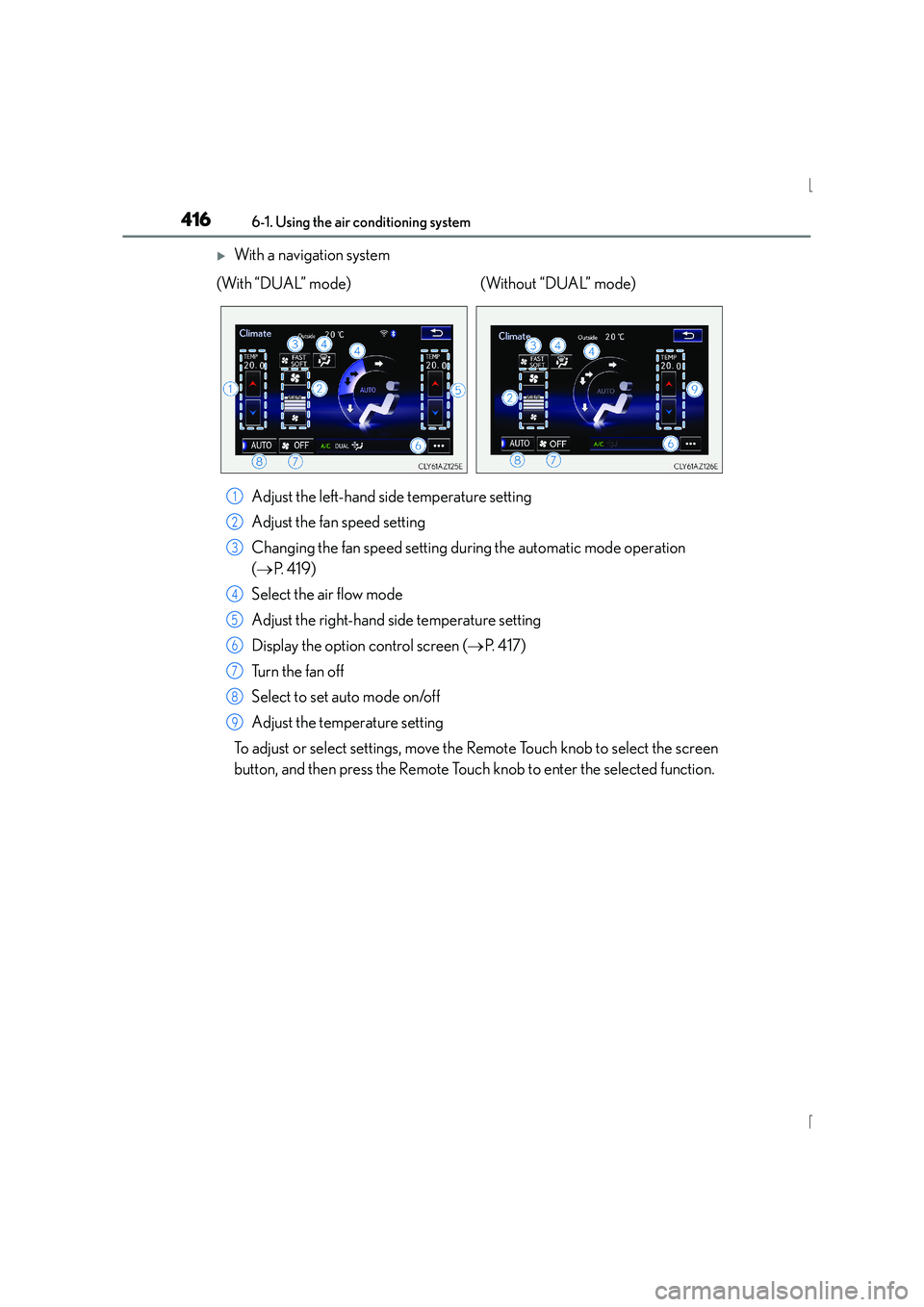
XWith a navigation systemAdjust the left-hand side temperature setting
Adjust the fan speed setting
Changing the fan speed setting during the automatic mode operation
(→ P. 4 1 9 )
Select the air flow mode
Adjust the right-hand side temperature setting
Display the option control screen ( →P. 4 1 7 )
Tu r n t h e f a n o f f
Select to set auto mode on/off
Adjust the temperature setting
To adjust or select settings, move the Remote Touch knob to select the screen
button, and then press the Remote Touch knob to enter the selected function.
(With “DUAL” mode) (Without “DUAL” mode)
1
2
3
4
5
6
7
8
9
Page 464 of 628
4647-3. Do-it-yourself maintenance
IS300h_EE(OM53D56E)
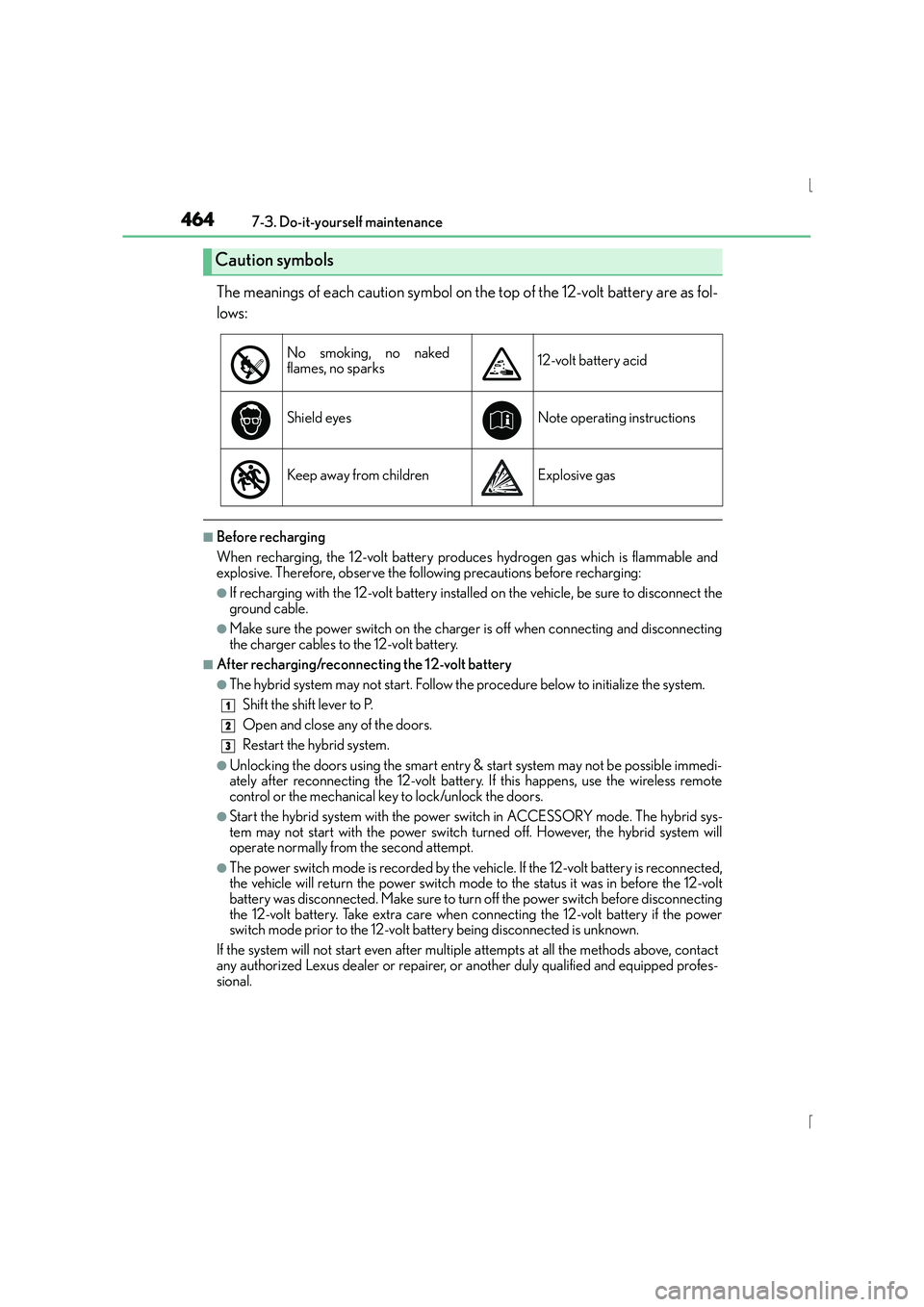
The meanings of each caution symbol on the top of the 12-volt battery are as fol-
lows:
■Before recharging
When recharging, the 12-volt battery produces hydrogen gas which is flammable and
explosive. Therefore, observe the following precautions before recharging:
●If recharging with the 12-volt battery installed on the vehicle, be sure to disconnect the
ground cable.
●Make sure the power switch on the charger is off when connecting and disconnecting
the charger cables to the 12-volt battery.
■After recharging/reconnecting the 12-volt battery
●The hybrid system may not start. Follow the procedure below to initialize the system.Shift the shift lever to P.
Open and close any of the doors.
Restart the hybrid system.
●Unlocking the doors using the smart entry & start system may not be possible immedi-
ately after reconnecting the 12-volt battery. If this happens, use the wireless remote
control or the mechanical key to lock/unlock the doors.
●Start the hybrid system with the power switch in ACCESSORY mode. The hybrid sys-
tem may not start with the power switch turned off. However, the hybrid system will
operate normally from the second attempt.
●The power switch mode is recorded by the vehicle. If the 12-volt battery is reconnected,
the vehicle will return the power switch mode to the status it was in before the 12-volt
battery was disconnected. Make sure to turn off the power switch before disconnecting
the 12-volt battery. Take extra care when connecting the 12-volt battery if the power
switch mode prior to the 12-volt battery being disconnected is unknown.
If the system will not start even after multip le attempts at all the methods above, contact
any authorized Lexus dealer or repairer, or another duly qualified and equipped profes-
sional.
Caution symbols
No smoking, no naked
flames, no sparks12-volt battery acid
Shield eyesNote operatin g instructions
Keep away from childrenExplosive gas
1
2
3
Page 489 of 628
4897-3. Do-it-yourself maintenance
7
Maintenance and care
IS300h_EE(OM53D56E)
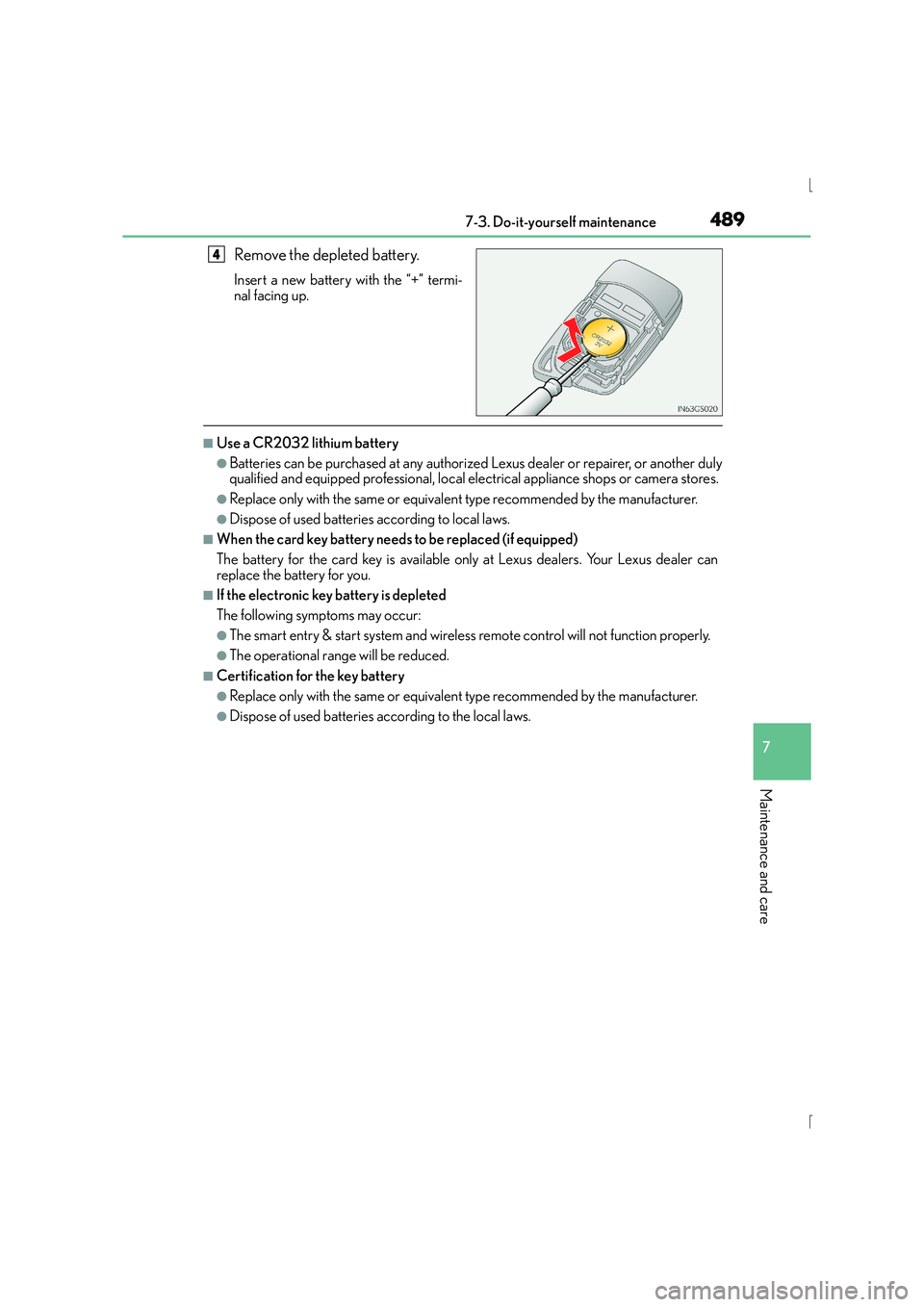
Remove the depleted battery.
Insert a new battery with the “+” termi-
nal facing up.
■Use a CR2032 lithium battery
●Batteries can be purchased at any authorized Lexus dealer or repairer, or another duly
qualified and equipped professional, local electrical appliance shops or camera stores.
●Replace only with the same or equivalent type recommended by the manufacturer.
●Dispose of used batteries according to local laws.
■When the card key battery needs to be replaced (if equipped)
The battery for the card key is available only at Lexus dealers. Your Lexus dealer can
replace the battery for you.
■If the electronic key battery is depleted
The following symptoms may occur:
●The smart entry & start system and wireless remote control will not function properly.
●The operational range will be reduced.
■Certification for the key battery
●Replace only with the same or equivalent type recommended by the manufacturer.
●Dispose of used batteries according to the local laws.
4
Page 490 of 628
4907-3. Do-it-yourself maintenance
IS300h_EE(OM53D56E)
CAUTION
■Removed battery and other parts
These parts are small and if swallowed by a child, they can cause choking. Keep away
from children. Failure to do so could result in death or serious injury.
■Lithium battery precautions
CAUTION:
RISK OF EXPLOSION IF BATTERY IS REPLACED BY AN INCORRECT TYPE.
DISPOSE OF USED BATTERIES ACCORDING TO THE INSTRUCTIONS
NOTICE
■For normal operation after replacing the battery
Observe the following precautions to prevent accidents:
●Always work with dry hands.
Moisture may cause the battery to rust.
●Do not touch or move any other component inside the remote control.
●Do not bend either of the battery terminals.
Page 563 of 628

5638-2. Steps to take in an emergency
8
When trouble arises
IS300h_EE(OM53D56E)
■Doors
Use the mechanical key (→P. 131) in
order to perform the following oper-
ations:
Locks all the doors
Closes the windows and moon
roof (turn and hold)
*
Unlocks all the doors
Opens the windows and moon roof (turn and hold)
*
*
: This setting must be customized at any authorized Lexus dealer or repairer, or another duly qualified and equipped professional.
■Tr u n k
Turn the mechanical key clockwise
to open.
If the electronic key does not operate properly
If communication between the electronic key and vehicle is interrupted ( →P.
151) or the electronic key cannot be us ed because the battery is depleted, the
smart entry & start system and wireless remote control cannot be used. In
such cases, the doors and trunk can be opened and the hybrid system can be
started by following the procedure below.
Locking and unlocking the doors, unlocking the trunk and key linked
functions
1
2
3
4
Page 568 of 628
5688-2. Steps to take in an emergency
IS300h_EE(OM53D56E)
Maintain the engine speed of the second vehicle and start the hybrid system
of your vehicle by turning the power switch to ON mode.
Make sure the “READY” indicator comes on. If the indicator does not come
on, contact any authorized Lexus dealer or repairer, or another duly qualified
and equipped professional.
Once the hybrid system has started, remove the jumper cables in the exact
reverse order from which they were connected.
Once the hybrid system starts, have the vehicle inspected at any authorized
Lexus dealer or repairer, or another duly qualified and equipped professional as
soon as possible.
■Starting the hybrid system when the 12-volt battery is discharged
The hybrid system cannot be started by push-starting.
■To prevent 12-volt battery discharge
●Turn off the headlights and the audio system while the hybrid system is off.
●Turn off any unnecessary electrical components when the vehicle is running at a low
speed for an extended period, such as in heavy traffic.
■Charging the 12-volt battery
The electricity stored in the 12-volt battery will discharge gradually even when the vehicle
is not in use, due to natural discharge and the draining effects of certain electrical appli-
ances. If the vehicle is left for a long time, the 12-volt battery may discharge, and the
hybrid system may be unable to start. (The 12-volt battery recharges automatically while
the hybrid system is operating.)
■When recharging or replacing the 12-volt battery
●In some cases, it may not be possible to un lock the doors using the smart entry & start
system when the 12-volt battery is discharged. Use the wireless remote control or the
mechanical key to lock or unlock the doors.
●The hybrid system may not start on the first attempt after the 12-volt battery has
recharged but will start normally after the second attempt. This is not a malfunction.
●The power switch mode is memorized by the vehicle. When the 12-volt battery is
reconnected, the system will return to the mo de it was in before the 12-volt battery was
discharged. Before disconnecting the 12-volt battery, turn the power switch off.
If you are unsure what mode the power switch was in before the 12-volt battery dis-
charged, be especially careful when reconnecting the 12-volt battery.
7
8
9
Page 591 of 628
591
IS300h_EE(OM53D56E)
9
Vehicle specifications
9-2. Customization
■Changing by using the Remote Touch or Lexus Display Audio controller (if
equipped)
XVe h i c l e s w i t h a R e m o t e To u c h
Press the “MENU” button on the Remote Touch.
Select “Setup” on the “Menu” screen and select “Vehicle”.
Various setting can be changed. Refer to the list of settings that can be
changed for details.
For details on the Remote Touch, refer to the “NAVIGATION AND MULTI-
MEDIA SYSTEM OWNER’S MANUAL”.
XVehicles with a Lexus Display Audio controller
Press the “MENU” button on the Lexus Display Audio controller.
Select “Setup” on the “MENU” screen and select “Vehicle”.
Various setting can be changed. Refer to the list of settings that can be
changed for details.
■Changing by using the meter control switches
→ P. 116
Customizable features
Your vehicle includes a variety of electr onic features that can be personalized
to your preferences. The settings of these features can be changed by using
the meter control switches, the Remote Touch or Lexus Display Audio con-
troller or at any authorized Lexus dealer or repairer, or another duly qualified
and equipped professional.
Customizing vehicle features
1
2
1
2