Driving mode select Lexus IS300h 2015 Owner's Manual
[x] Cancel search | Manufacturer: LEXUS, Model Year: 2015, Model line: IS300h, Model: Lexus IS300h 2015Pages: 628, PDF Size: 137.89 MB
Page 3 of 628
3
1
9 8
7
6 4 3
2
IS300h_EE(OM53D56E)
5
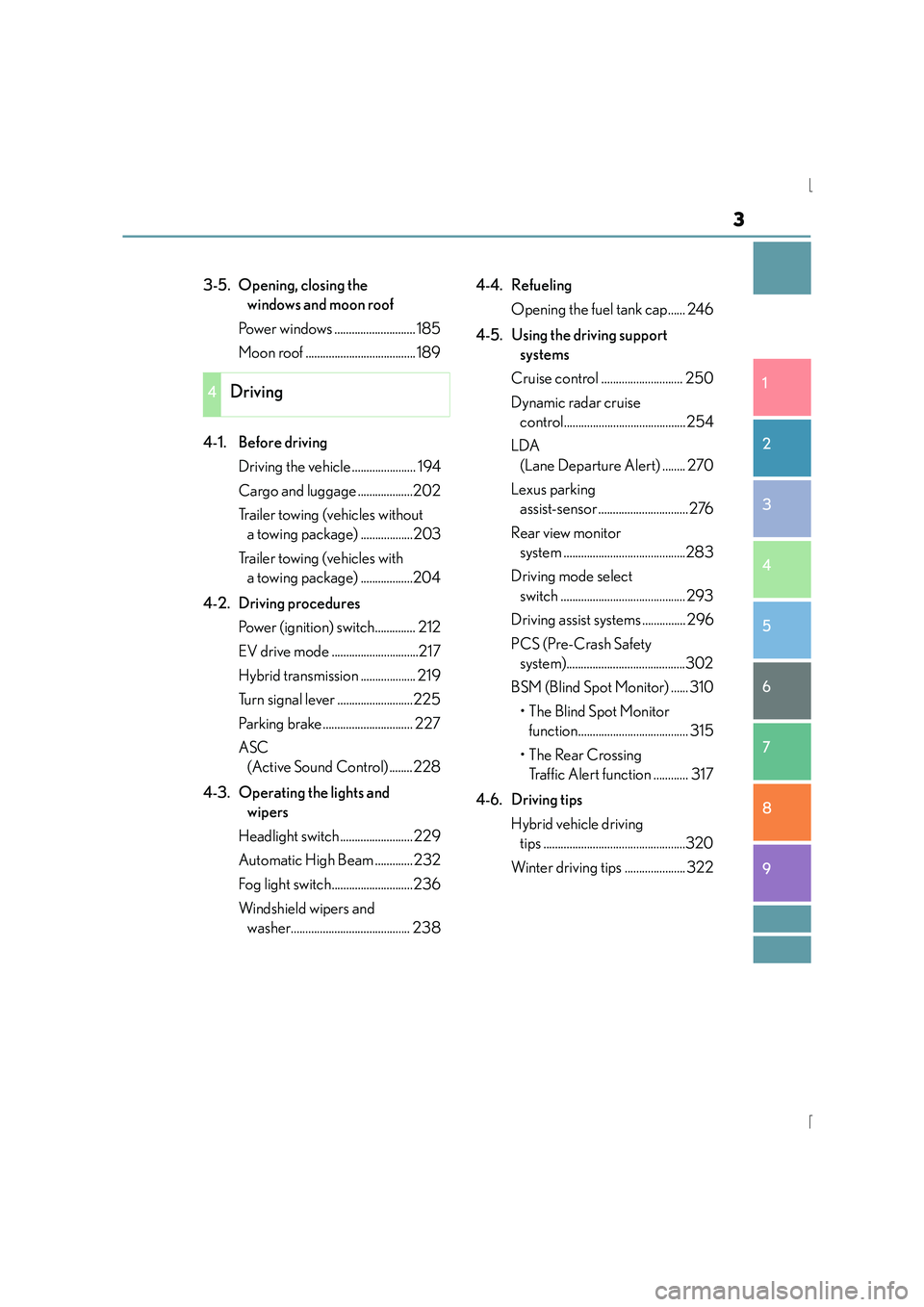
3-5. Opening, closing the windows and moon roof
Power windows ............................ 185
Moon roof ...................................... 189
4-1. Before driving Driving the vehicle ...................... 194
Cargo and luggage ...................202
Trailer towing (vehicles without a towing package) ..................203
Trailer towing (vehicles with a towing package) ..................204
4-2. Driving procedures Power (ignition) switch.............. 212
EV drive mode ..............................217
Hybrid transmission ................... 219
Turn signal lever ..........................225
Parking brake............................... 227
ASC (Active Sound Control) ........228
4-3. Operating the lights and wipers
Headlight switch ......................... 229
Automatic High Beam ............. 232
Fog light switch............................236
Windshield wipers and washer......................................... 238 4-4. Refueling
Opening the fuel tank cap...... 246
4-5. Using the driving support systems
Cruise control ............................ 250
Dynamic radar cruise control..........................................254
LDA (Lane Departure Alert) ........ 270
Lexus parking assist-sensor ...............................276
Rear view monitor system ..........................................283
Driving mode select switch ........................................... 293
Driving assist systems ............... 296
PCS (Pre-Crash Safety system).........................................302
BSM (Blind Spot Monitor) ...... 310 •The Blind Spot Monitor function...................................... 315
•The Rear Crossing Traffic Alert function ............ 317
4-6. Driving tips Hybrid vehicle driving tips .................................................320
Winter driving tips ..................... 322
4Driving
Page 21 of 628
21Pictorial index
IS300h_EE(OM53D56E)
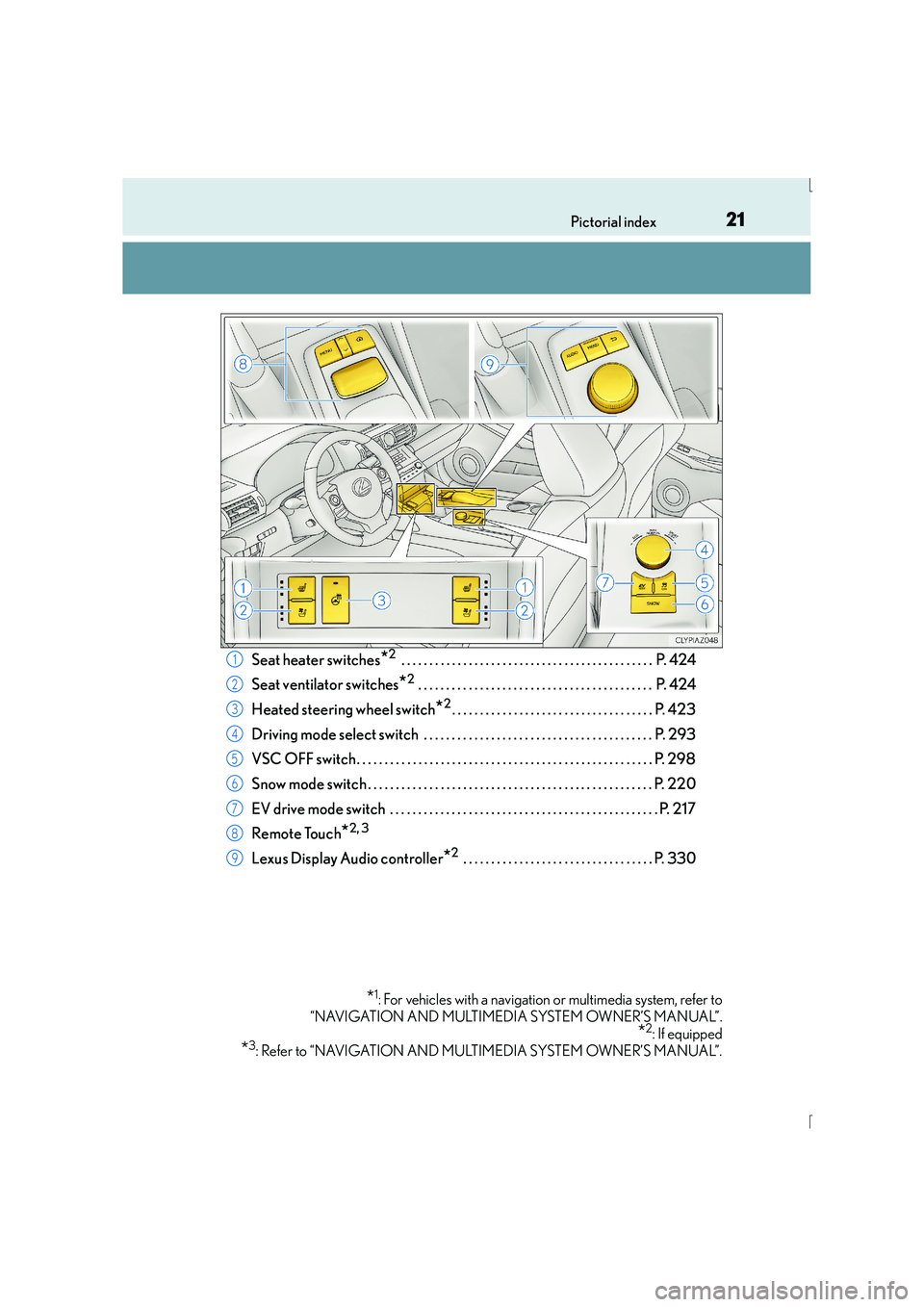
Seat heater switches*2 . . . . . . . . . . . . . . . . . . . . . . . . . . . . . . . . . . . . . . . . . . . . . P. 424
Seat ventilator switches
*2 . . . . . . . . . . . . . . . . . . . . . . . . . . . . . . . . . . . . . . . . . . P. 424
Heated steering wheel switch
*2. . . . . . . . . . . . . . . . . . . . . . . . . . . . . . . . . . . . P. 423
Driving mode select switch . . . . . . . . . . . . . . . . . . . . . . . . . . . . . . . . . . . . . . . . . P. 293
VSC OFF switch. . . . . . . . . . . . . . . . . . . . . . . . . . . . . . . . . . . . . . . . . . . . . . . . . . . . . P. 298
Snow mode switch . . . . . . . . . . . . . . . . . . . . . . . . . . . . . . . . . . . . . . . . . . . . . . . . . . . P. 220
EV drive mode switch . . . . . . . . . . . . . . . . . . . . . . . . . . . . . . . . . . . . . . . . . . . . . . . . P. 217
Remote Touch
*2, 3
Lexus Display Audio controller*2 . . . . . . . . . . . . . . . . . . . . . . . . . . . . . . . . . . P. 330
*1: For vehicles with a navigation or multimedia system, refer to
“NAVIGATION AND MULTIMEDIA SYSTEM OWNER’S MANUAL”.
*2: If equipped
*3: Refer to “NAVIGATION AND MULTIMEDIA SYSTEM OWNER’S MANUAL”.
1
2
3
4
5
6
7
8
9
Page 29 of 628
29Pictorial index
IS300h_EE(OM53D56E)
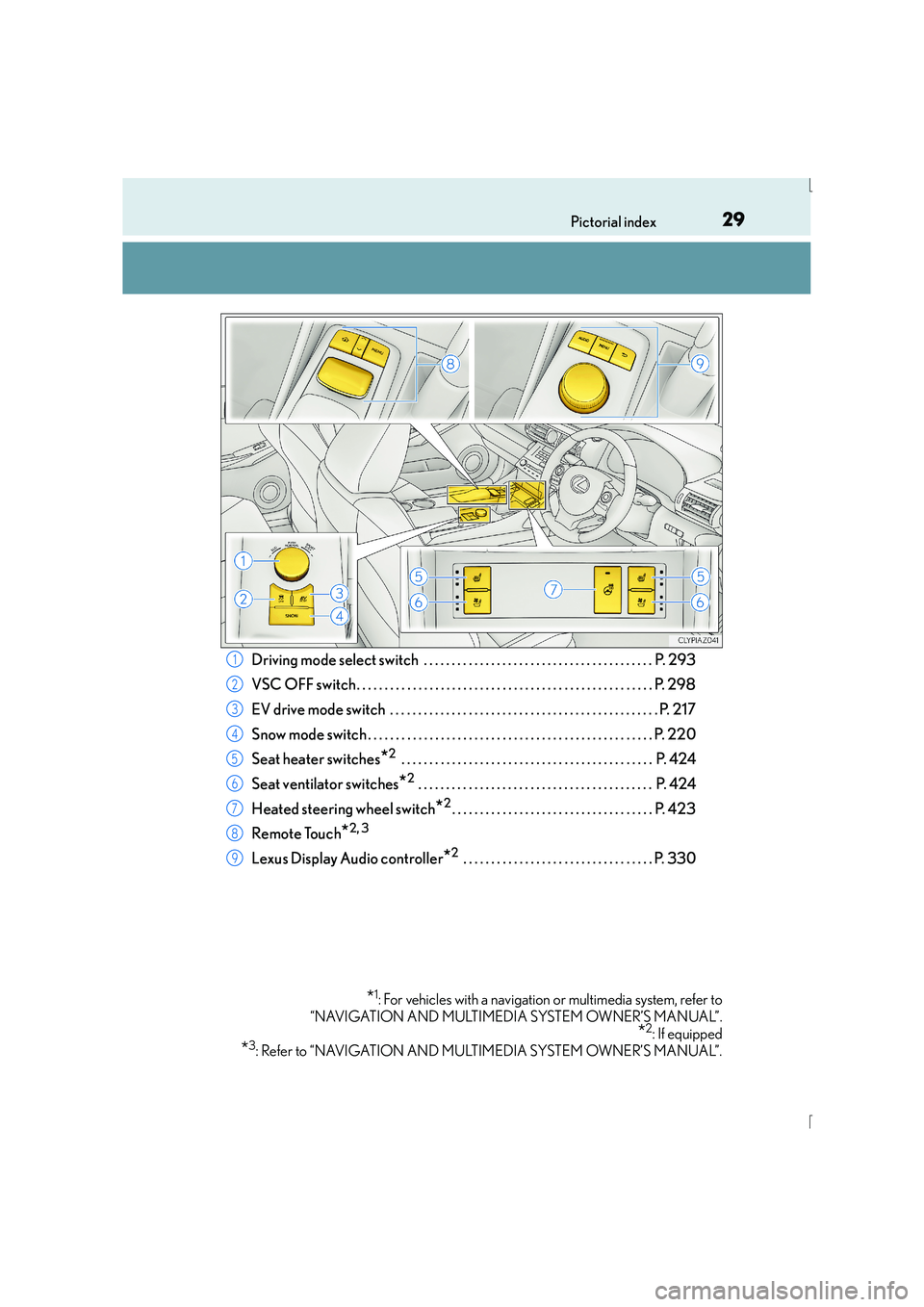
Driving mode select switch . . . . . . . . . . . . . . . . . . . . . . . . . . . . . . . . . . . . . . . . . P. 293
VSC OFF switch. . . . . . . . . . . . . . . . . . . . . . . . . . . . . . . . . . . . . . . . . . . . . . . . . . . . . P. 298
EV drive mode switch . . . . . . . . . . . . . . . . . . . . . . . . . . . . . . . . . . . . . . . . . . . . . . . . P. 217
Snow mode switch . . . . . . . . . . . . . . . . . . . . . . . . . . . . . . . . . . . . . . . . . . . . . . . . . . . P. 220
Seat heater switches
*2 . . . . . . . . . . . . . . . . . . . . . . . . . . . . . . . . . . . . . . . . . . . . . P. 424
Seat ventilator switches
*2 . . . . . . . . . . . . . . . . . . . . . . . . . . . . . . . . . . . . . . . . . . P. 424
Heated steering wheel switch
*2. . . . . . . . . . . . . . . . . . . . . . . . . . . . . . . . . . . . P. 423
Remote Touch
*2, 3
Lexus Display Audio controller*2 . . . . . . . . . . . . . . . . . . . . . . . . . . . . . . . . . . P. 330
*1: For vehicles with a navigation or multimedia system, refer to
“NAVIGATION AND MULTIMEDIA SYSTEM OWNER’S MANUAL”.
*2: If equipped
*3: Refer to “NAVIGATION AND MULTIMEDIA SYSTEM OWNER’S MANUAL”.
1
2
3
4
5
6
7
8
9
Page 117 of 628
1172. Instrument cluster
2
Instrument cluster
IS300h_EE(OM53D56E)
■Distance (driving range/after start)*1
Displays the estimated maximum distance that can be driven with the quantity
of fuel remaining and the distance driven after the hybrid system was started
respectively.
• This distance is computed based on your average fuel consumption. As a result,the actual distance that can be driven may differ from that displayed.
• When only a small amount of fuel is added to the tank, the display may not be
updated.
When refueling, turn the power switch off. If the vehicle is refueled without turning
the power switch off, the display may not be updated.
■Energy monitor
→ P. 1 2 1
*1: Displayed when the item is set in “Drive Info 1” or “Drive Info 2”. Use these values as a
reference.
*2: Resetting The following displays can be reset: average fuel consumption after reset, average
vehicle speed after reset, and elapsed time after reset.
• To reset, display the desired item and press and hold .
• If both displayed items are resettable, a reset selection screen will appear.
■Language
Select to change the language on the display.
■Units
Select to change the unit of measure for fuel consumption.
■Maintenance system
Select to reset the maintenance data after the required maintenance is per-
formed. ( →P. 4 5 8 )
■EV indicator
Select to set the EV indicator on/off.
■ switch settings (except F SPORT models)
Displays a procedure to register a desired screen to .
You can register 1 screen as a shortcut, which can be displayed by pressing . (→ P. 116)
■Drive information 1 /Drive information 2
Select to select up to 2 items that will be displayed on the “Drive Info 1” screen
and “Drive Info 2” screen respectively. ( →P. 1 1 6 )
Settings display
Page 118 of 628
1182. Instrument cluster
IS300h_EE(OM53D56E)
■Pop-up display
Select to set the following pop-up displays, which may appear in some situa-
tions, on/off.• Route guidance display of the navigation system-linked system (if equipped)
• Incoming call display of the hands-free phone system (if equipped)
• Dynamic radar cruise control operation display (if equipped)
• Instrument panel brightne ss adjustment display
• Main meter switch operation display (F SPORT models)
■Accent color (except F SPORT models)
Select to change the accent colors on the screen, such as the cursor color.
■Tachometer settings
Select to set the display of the tachometer or Hybrid System Indicator to auto-
matically change according to the driving mode or static.
■Needle (F SPORT models)
Select to change the needle color for the tachometer.
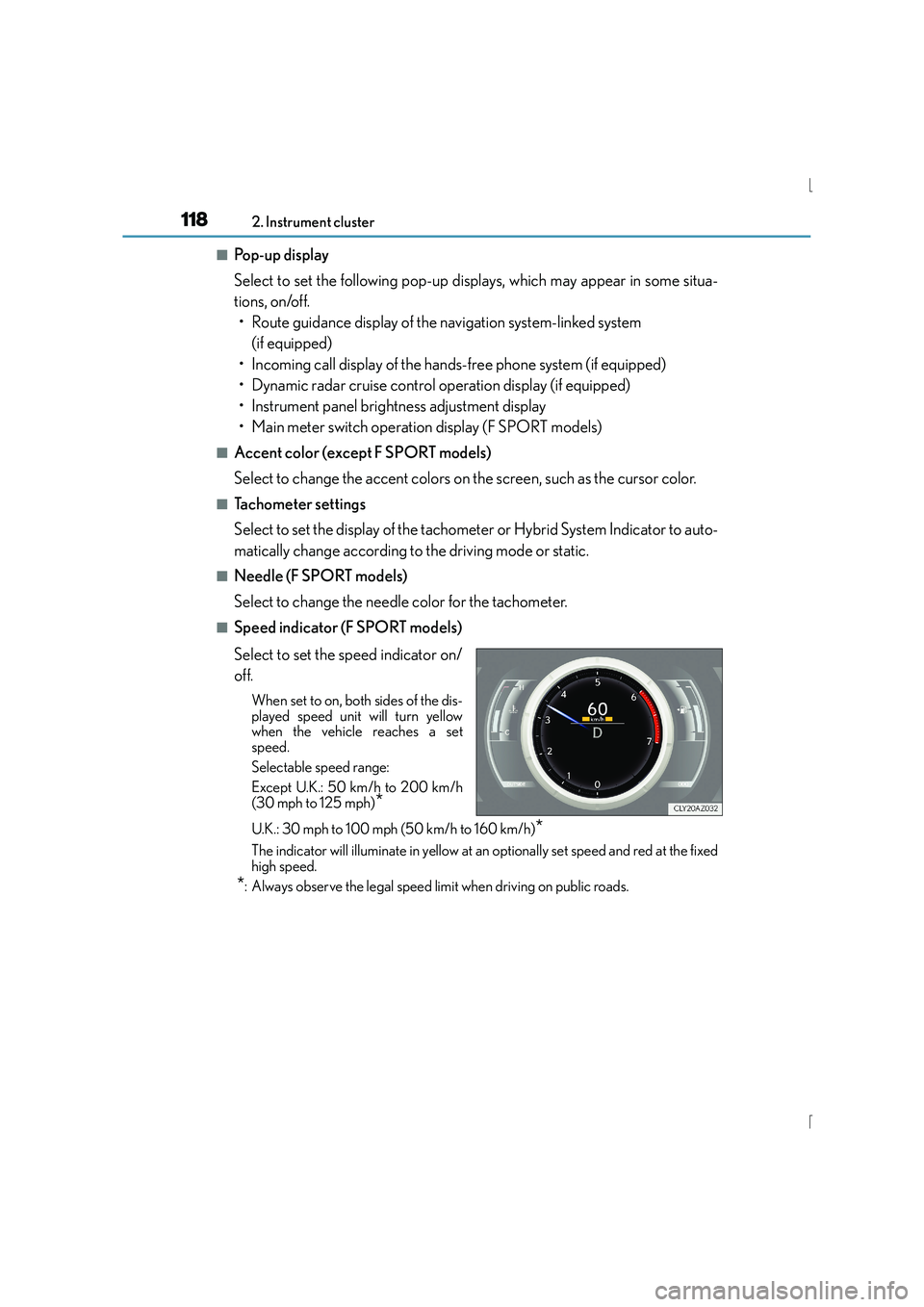
■Speed indicator (F SPORT models)
Select to set the speed indicator on/
off.
When set to on, both sides of the dis-
played speed unit will turn yellow
when the vehicle reaches a set
speed.
Selectable speed range:
Except U.K.: 50 km/h to 200 km/h
(30 mph to 125 mph)
*
U.K.: 30 mph to 100 mph (50 km/h to 160 km/h)*
The indicator will illuminate in yellow at an optionally set speed and red at the fixed
high speed.
*: Always observe the legal speed limit when driving on public roads.
Page 170 of 628

1703-3. Adjusting the seats
IS300h_EE(OM53D56E)
Your preferred driving position (the position of the driver’s seat, steering wheel
and outside rear view mirrors) can be recorded and recalled by pressing a but-
ton.
Three different driving positions can be recorded into memory.
■Recording procedure
Check that the shift lever is in P.
Turn the power switch to ON mode.
Adjust the driver’s seat, steering wheel, and outside rear view mirrors to the
desired positions.
While pressing the “SET” button,
or within 3 seconds after the
“SET” button is pressed, press
button “1”, “2” or “3” until the
buzzer sounds.
If the selected button has already
been preset, the previously recorded
position will be overwritten.
■Recall procedureCheck that the shift lever is in P.
Turn the power switch to ON mode.
Press one of the buttons for the
driving position you want to recall
until the buzzer sounds.
Driving position memory
1
2
3
4
1
2
3
Page 183 of 628
1833-4. Adjusting the steering wheel and mirrors
3
Operation of each component
IS300h_EE(OM53D56E)
When either “L” or “R” of the mirror select switch is selected, the outside rear
view mirrors will automatically angle downwards when the vehicle is reversing in
order to give a better view of the ground.
To disable this function, select neither “L” nor “R”.
■Adjusting the mirror angle when the vehicle is reversing
With the shift lever in R, adjust the mirror angle at a desired position.
The adjusted angle will be memorized and the mirror will automatically tilt to
the memorized angle whenever the shift lever is shifted to R from next time.
The memorized downward tilt position of the mirror is linked to the normal position
(angle adjusted with the shift lever in othe r than R). Therefore, if the normal posi-
tion is changed after adjustment, the tilt position will also change.
When the normal position is changed, readjust the angle in reversing.
■Mirror angle can be adjusted when
The power switch is in ACCESSORY or ON mode.
■When disconnecting and reconnecting battery terminals
The automatic folding/extending mirror function will return to off as default. To turn the
function on, press the switch again to select on.
■When the mirrors are fogged up
The outside rear view mirrors can be cleared using the mirror defoggers. Turn on the
rear window defogger to turn on the outside rear view mirror defoggers. ( →P. 4 1 8 )
■Automatic adjustment of the mirror angle (if equipped)
A desired mirror face angle can be entered to memory and recalled automatically by the
driving position memory. ( →P. 1 6 9 )
■Auto anti-glare function (if equipped)
When the anti-glare inside rear view mirror is set to automatic mode, the outside rear
view mirrors will activate in conjunction with the anti-glare inside rear view mirror to
reduce reflected light. ( →P. 1 8 0 )
■Using automatic mode in cold weather
When automatic mode is used in cold weather, the door mirror could freeze up and
automatic stowing and return may not be possible. In this case, remove any ice and snow
from the door mirror, then either operate the mirror using manual mode or move the mir-
ror by hand.
■Customization
The automatic mirror folding and extending operation can be changed.
(Customizable features: →P. 5 9 1 )
Linked mirror function when reversing (if equipped)
Page 193 of 628
193
4Driving
IS300h_EE(OM53D56E)
4-1. Before drivingDriving the vehicle ...................... 194
Cargo and luggage ...................202
Trailer towing (vehicles without a towing
package) .....................................203
Trailer towing (vehicles with a towing package) ..................204
4-2. Driving procedures Power (ignition) switch.............. 212
EV drive mode ..............................217
Hybrid transmission ................... 219
Turn signal lever ..........................225
Parking brake............................... 227
ASC (Active Sound Control) ........228
4-3. Operating the lights and wipers
Headlight switch ......................... 229
Automatic High Beam ............. 232
Fog light switch............................ 236
Windshield w ipers and washer.................................238
4-4. Refueling Opening the fuel tank cap...... 246 4-5. Using the driving support
systems
Cruise control .............................250
Dynamic radar cruise control ......................................... 254
LDA (Lane Departure Alert) ........ 270
Lexus parking assist-sensor............................... 276
Rear view monitor system .......................................... 283
Driving mode select switch ........................................... 293
Driving assist systems............... 296
PCS (Pre-Crash Safety system) ........................................ 302
BSM (Blind Spot Monitor) ...... 310 •The Blind Spot Monitor function ..................................... 315
•The Rear Crossing Traffic Alert function .............317
4-6. Driving tips Hybrid vehicle driving tips..................................320
Winter driving tips ..................... 322
Page 195 of 628
1954-1. Before driving
4
Driving
IS300h_EE(OM53D56E)
■When starting off on an uphill
The hill-start assist control will activate. (→P. 2 9 6 )
■Driving in the rain
●Drive carefully when it is raining, becaus e visibility will be reduced, the windows may
become fogged-up, and the road will be slippery.
●Drive carefully when it starts to rain, beca use the road surface will be especially slip-
pery.
●Refrain from high speeds when driving on an expressway in the rain, because there may
be a layer of water between the tires and the road surface, preventing the steering and
brakes from operating properly.
■Engine speed while driving
In the following conditions, the engine speed may become high while driving. This is due
to automatic up-shifting control or down-shi fting implementation to meet driving condi-
tions. It does not indicate sudden acceleration.
●The vehicle is judged to be driving uphill or downhill
●When the accelerator pedal is released
●When the brake pedal is depressed while sport mode is selected
■Restraining the hybrid system output (Brake Override System)
●When the accelerator and brake pedals are depressed at the same time, the hybrid sys-
tem output may be restrained.
●A warning message is displayed on the mult i-information display while the system is
operating. If a warning message is shown on the multi-information display, read the
message and follow the instructions.
■Breaking in your new Lexus
To extend the life of the vehicle, observing the following precautions is recommended:
●For the first 300 km (186 miles):
Avoid sudden stops.
●For the first 800 km (500 miles):
Do not tow a trailer.
●For the first 1000 km (621 miles):
• Do not drive at extremely high speeds.
• Avoid sudden acceleration.
• Do not drive continuously in low gears.
• Do not drive at a constant speed for extended periods.
■Drum-in-disc type parking brake system
Your vehicle has a drum-in-disc type parkin g brake system. This type of brake system
needs bedding-down of the brake shoes periodically or whenever the parking brake
shoes and/or drum are replaced. Have any authorized Lexus dealer or repairer, or
another duly qualified and equipped professional, perform the bedding down operation.
■Operating your vehicle in a foreign country
Comply with the relevant vehicle registration laws and confirm the availability of the cor-
rect fuel. ( →P. 5 8 0 )
Page 198 of 628
1984-1. Before driving
IS300h_EE(OM53D56E)
CAUTION
Observe the following precautions.
Failure to do so may result in death or serious injury.
■When driving on slippery road surfaces
●Sudden braking, acceleration and steering may cause tire slippage and reduce your
ability to control the vehicle.
●Sudden acceleration, engine braking due to shifting, or changes in engine speed
could cause the vehicle to skid.
●After driving through a puddle, depress the brake pedal to make sure that the brakes
are functioning properly. Wet brake pads may prevent the brakes from functioning
properly. If the brakes on only one side are wet and not functioning properly, steering
control may be affected.
■When shifting the shift lever
●Do not let the vehicle roll backward while the shift lever is in a driving position, or roll
forward while the shift lever is in R.
Doing so may result in an accident or damage to the vehicle.
●Do not shift the shift lever to P while the vehicle is moving.
Doing so can damage the transmission and may result in a loss of vehicle control.
●Do not shift the shift lever to R while the vehicle is moving forward.
Doing so can damage the transmission and may result in a loss of vehicle control.
●Do not shift the shift lever to a driving position while the vehicle is moving backward.
Doing so can damage the transmission and may result in a loss of vehicle control.
●Shifting the shift lever to N while the vehicle is moving will disengage the hybrid sys-
tem. Engine braking is not available when N is selected.
●Be careful not to shift the shift lever with the accelerator pedal depressed. Shifting the
shift lever to a gear other than P or N may lead to unexpected rapid acceleration of
the vehicle that may cause an accident and result in death or serious injury.
■If you hear a squealing or scraping noise (brake pad wear indicators)
Have the brake pads checked and replaced by any authorized Lexus dealer or
repairer, or another duly qualified and equi pped professional as soon as possible.
Rotor damage may result if the pads are not replaced when needed.
Moderate levels of brake pad and disc wear allow enhanced braking power. As a
result, the discs may wear more quickly than conventional brake discs. Therefore, when
replacing the brake pads, Lexus recommends that you also have the thickness of the
discs measured.
It is dangerous to drive the vehicle when the wear limits of the brake pads and/or those
of the brake discs are exceeded.