brake light Lexus IS300h 2016 User Guide
[x] Cancel search | Manufacturer: LEXUS, Model Year: 2016, Model line: IS300h, Model: Lexus IS300h 2016Pages: 628, PDF Size: 137.89 MB
Page 281 of 628
2814-5. Using the driving support systems
4
Driving
IS300h_EE(OM53D56E)
■Sensor detection information
●The sensor’s detection areas are limited to the areas around the vehicle’s front corner
and rear bumpers.
●Certain vehicle conditions and the surrounding environment may affect the ability of
the sensor to correctly detect obstacles. Particular instances where this may occur are
listed below.
• There is dirt, snow or ice on the sensor. (Wiping the sensors will resolve this prob- lem.)
• The sensor is frozen. (Thawing the area will resolve this problem.)
In especially cold weather, if a sensor is frozen the screen may show an abnormal
display, or obstacles may not be detected.
• The sensor is covered in any way.
• The vehicle is leaning considerably to one side.
• On an extremely bumpy road, on an incline, on gravel, or on grass.
• The vicinity of the vehicle is noisy due to vehicle horns, motorcycle engines, air
brakes of large vehicles, or other loud noises producing ultrasonic waves.
• There is another vehicle equipped with parking assist sensors in the vicinity.
• The sensor is coated with a sheet of spray or heavy rain.
• The vehicle is equipped with a fender pole or wireless antenna.
• Towing eyelets are installed.
• The bumper or sensor receives a strong impact.
• The vehicle is approaching a tall or curved curb.
• In harsh sunlight or intense cold weather.
• The area directly under the bumpers is not detected.
• If obstacles draw too close to the sensor.
• A non-genuine Lexus suspension (low ered suspension etc.) is installed.
• People may not be detected if they are wearing certain types of clothing.
In addition to the examples above, there are instances in which, because of their shape,
signs and other objects may be judged by the sensor to be closer than they are.
●The shape of the obstacle may prevent the sensor from detecting it. Pay particular
attention to the following obstacles:
• Wires, fences, ropes, etc.
• Cotton, snow and other materials that absorb sound waves
• Sharply-angled objects
• Low obstacles
• Tall obstacles with upper sections projecting outwards in the direction of your vehi- cle
●The following situations may occur during use.
• Depending on the shape of the obstacle and other factors, the detection distancemay shorten, or detection may be impossible.
• Obstacles may not be detected if they are too close to the sensor.
• There will be a short delay between obst acle detection and display. Even at slow
speeds, there is a possibility that the obstacl e will come within the sensor’s detection
areas before the display is shown and the warning beep sounds.
• Thin posts or objects lower than the sensor may not be detected when approached, even if they have been detected once.
• It might be difficult to hear beeps due to the volume of the audio system or air flow noise of the air conditioning system.
■If a message is displayed on the multi-information display
→ P. 530, 530
Page 297 of 628
2974-5. Using the driving support systems
4
Driving
IS300h_EE(OM53D56E)
◆Adaptive Variable Suspension System (if equipped)
By independently controlling the damping force of the shock absorbers for
each of the 4 wheels according to the road and driving conditions, this system
helps riding comfort with superior steering stability, and helps good vehicle
posture (→P. 2 9 4 )
◆VDIM (Vehicle Dynamics Integrated Management)
Provides integrated control of the ABS, brake assist, TRC, VSC, hill-start
assist control, and EPS systems
Helps to maintain vehicle stability when swerving on slippery road surfaces by
controlling the brakes and hybrid system output
◆PCS (Pre-Crash Safety system) (if equipped)
→P. 3 0 2
◆Emergency brake signal
When the brakes are applied suddenly, the stop lights automatically flash to
alert the vehicle behind
◆BSM (Blind Spot Monitor) (if equipped)
→P. 3 1 0
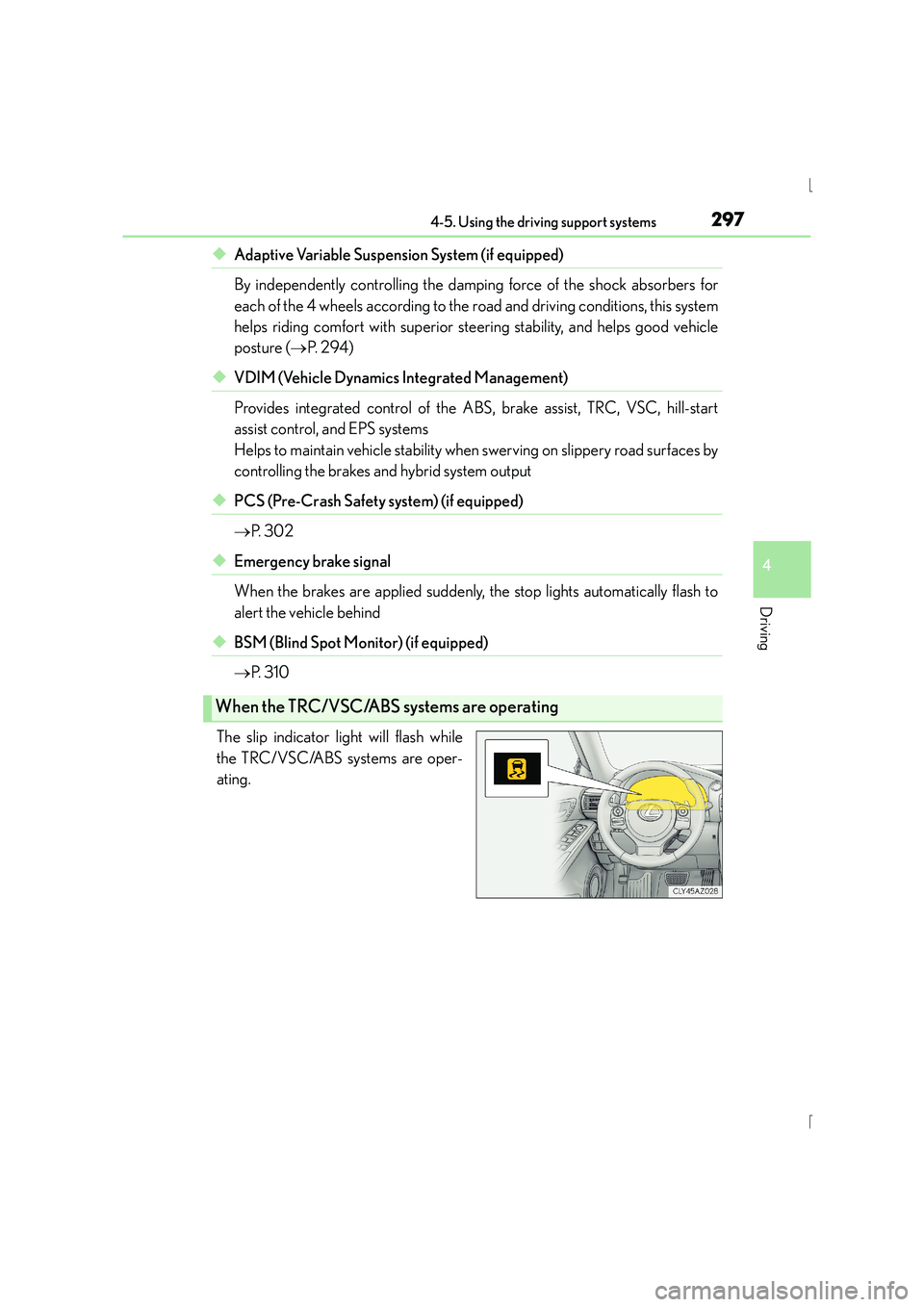
The slip indicator light will flash while
the TRC/VSC/ABS systems are oper-
ating.
When the TRC/VSC/ABS systems are operating
Page 298 of 628
2984-5. Using the driving support systems
IS300h_EE(OM53D56E)
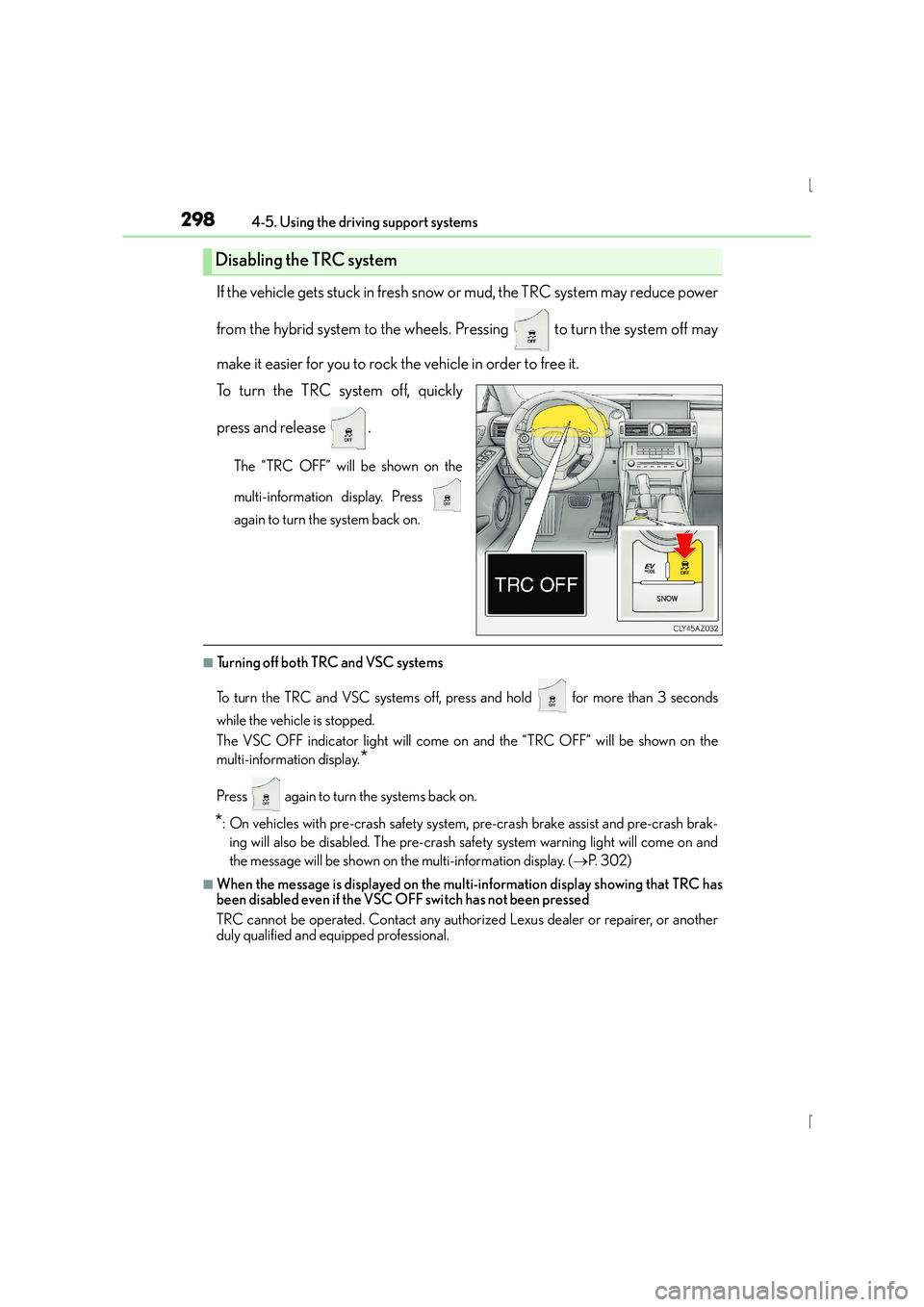
If the vehicle gets stuck in fresh snow or mud, the TRC system may reduce power
from the hybrid system to the wheels. Pressing to turn the system off may
make it easier for you to rock the vehicle in order to free it.
To turn the TRC system off, quickly
press and release .
The “TRC OFF” will be shown on the
multi-information display. Press
again to turn the system back on.
■Turning off both TRC and VSC systems
To turn the TRC and VSC systems off, press and hold for more than 3 seconds
while the vehicle is stopped.
The VSC OFF indicator light will come on and the “TRC OFF” will be shown on the
multi-information display.
*
Press again to turn the systems back on.
*: On vehicles with pre-crash safety system, pre-crash brake assist and pre-crash brak- ing will also be disabled. The pre-crash safe ty system warning light will come on and
the message will be shown on the multi-information display. ( →P. 3 0 2 )
■When the message is displayed on the mult i-information display showing that TRC has
been disabled even if the VSC OFF switch has not been pressed
TRC cannot be operated. Contact any authorized Lexus dealer or repairer, or another
duly qualified and equipped professional.
Disabling the TRC system
Page 301 of 628
3014-5. Using the driving support systems
4
Driving
IS300h_EE(OM53D56E)
CAUTION
■The ABS does not operate effectively when
●The limits of tire gripping performance have been exceeded (such as excessively
worn tires on a snow covered road).
●The vehicle hydroplanes while driving at high speed on wet or slick roads.
■Stopping distance when the ABS is operating may exceed that of normal conditions
The ABS is not designed to shorten the vehi cle’s stopping distance. Always maintain a
safe distance from the vehicle in front of you, especially in the following situations:
●When driving on dirt, gravel or snow-covered roads
●When driving with tire chains
●When driving over bumps in the road
●When driving over roads with potholes or uneven surfaces
■TRC may not operate effectively when
Directional control and power may not be achievable while driving on slippery road
surfaces, even if the TRC system is operating.
Drive the vehicle carefully in conditions where stability and power may be lost.
■Hill- start assist control does not operate effectively when
●Do not overly rely on hill-start assist control. Hill-start assist control may not operate
effectively on steep inclines and roads covered with ice.
●Unlike the parking brake, hill-start assist co ntrol is not intended to hold the vehicle
stationary for an extended period of time. Do not attempt to use hill-start assist con-
trol to hold the vehicle on an incline, as doing so may lead to an accident.
■When the VSC is activated
The slip indicator light flashes. Always dr ive carefully. Reckless driving may cause an
accident. Exercise particular care when the indicator light flashes.
■When the TRC/VSC systems are turned off
Be especially careful and drive at a speed appropriate to the road conditions. As these
are the systems to help ensure vehicle stability and driving force, do not turn the TRC/
VSC systems off unless necessary.
■Replacing tires
Make sure that all tires are of the specif ied size, brand, tread pattern and total load
capacity. In addition, make sure that the tires are inflated to the recommended tire infla-
tion pressure level.
The ABS, TRC and VSC systems will not function correctly if different tires are installed
on the vehicle.
Contact any authorized Lexus dealer or repairer, or another duly qualified and
equipped professional for further information when replacing tires or wheels.
■Handling of tires and the suspension
Using tires with any kind of problem or modi fying the suspension will affect the driving
assist systems, and may cause a system to malfunction.
Page 302 of 628
3024-5. Using the driving support systems
IS300h_EE(OM53D56E)
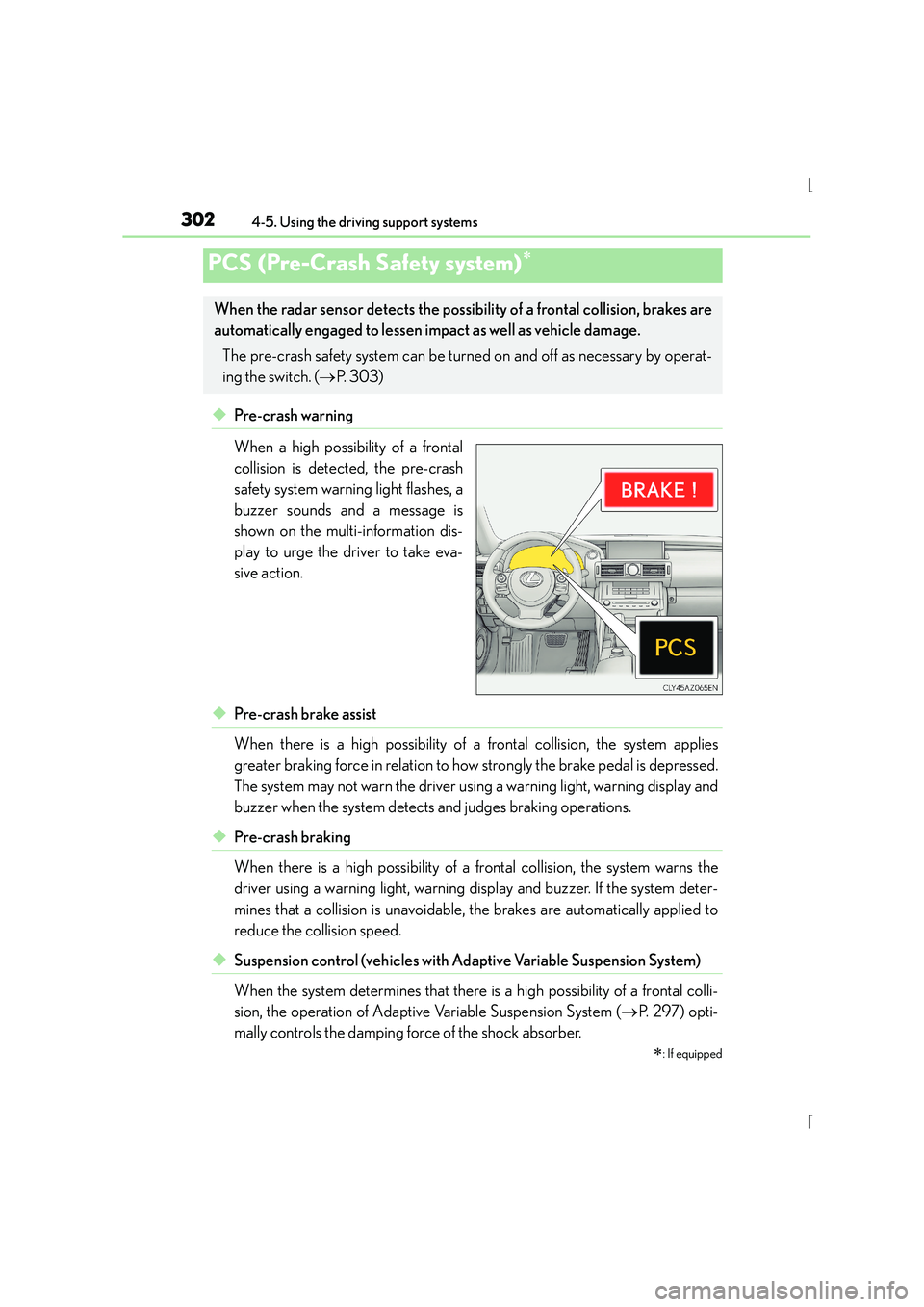
◆Pre-crash warning
When a high possibility of a frontal
collision is detected, the pre-crash
safety system warning light flashes, a
buzzer sounds and a message is
shown on the multi-information dis-
play to urge the driver to take eva-
sive action.
◆Pre-crash brake assist
When there is a high possibility of a frontal collision, the system applies
greater braking force in relation to how strongly the brake pedal is depressed.
The system may not warn the driver using a warning light, warning display and
buzzer when the system detects and judges braking operations.
◆Pre-crash braking
When there is a high possibility of a frontal collision, the system warns the
driver using a warning light, warning display and buzzer. If the system deter-
mines that a collision is unavoidable, the brakes are automatically applied to
reduce the collision speed.
◆Suspension control (vehicles with Ad aptive Variable Suspension System)
When the system determines that there is a high possibility of a frontal colli-
sion, the operation of Adaptive Variable Suspension System ( →P. 2 9 7 ) o p t i -
mally controls the damping force of the shock absorber.
PCS (Pre-Crash Safety system)∗
∗
: If equipped
When the radar sensor detects the possibili ty of a frontal collision, brakes are
automatically engaged to lessen im pact as well as vehicle damage.
The pre-crash safety system can be turned on and off as necessary by operat-
ing the switch. ( →P. 303)
Page 304 of 628
3044-5. Using the driving support systems
IS300h_EE(OM53D56E)
■The pre-crash safety system is operational when
The pre-crash safety system is enabled and the following conditions are met:
●Pre-crash warning:
• Vehicle speed is greater than about 15 km/h (10 mph).
• The speed at which your vehicle is approaching the obstacle or the vehicle runningahead of you is greater than about 15 km/h (10 mph).
●Pre-crash brake assist:
• The VSC system is not disabled.
• Vehicle speed is greater than about 30 km/h (19 mph).
• The speed at which your vehicle is approaching the obstacle or the vehicle runningahead of you is greater than about 30 km/h (19 mph).
• The brake pedal is depressed.
●Pre-crash braking:
• The VSC system is not disabled.
• Vehicle speed is greater than about 15 km/h (10 mph).
• The speed at which your vehicle is approaching the obstacle or the vehicle running ahead of you is greater than about 15 km/h (10 mph).
●Suspension control (vehicles with Adap tive Variable Suspension System):
• Vehicle speed is greater than about 5 km/h (4 mph).
• The speed at which your vehicle is approaching the obstacle or the vehicle running ahead of you is greater than about 30 km/h (19 mph).
■Conditions that may trigger the system ev en if there is no danger of a collision
In any of the following situations where the frontal area of the radar sensor is interrupted,
the radar sensor may detect possibility of a frontal collision and the system may be acti-
vated.
●When passing by an oncoming vehicle in a curve or a turn to the right or the left.
●When rapidly approaching an obstacle ahead (e.g.preceding vehicle, toll gate barrier,
etc.)
●When there is a structural object (billboard , low ceiling, fluorescent light, etc.) above
the uphill road ahead
●When driving on a narrow road or through under a low overhead structure (bridge,
tunnel, fly-under, etc.)
●When driving on an uneven road surface
●When there is a metal object, bump, or protrusion on the road surface
●When vehicle’s front part is raised or lowered depending on loading conditions
●When the direction of radar sensor is misaligned by strong impact applied on an area
around the radar sensor, etc.
●When there is an obstacle (guard rail, etc.) by the roadside at the entrance to a curve
●When the front of your vehicle is pointing upwards (caused by putting a heavy load in
the trunk etc.)
When the system is activated in the situations described above, there is also a possibility
that the brakes may be applied with a force greater than normal.
Page 308 of 628
3084-5. Using the driving support systems
IS300h_EE(OM53D56E)
CAUTION
■Limitations of the pre-crash safety system
●The driver is solely responsible for safe driving. Always drive safely, taking care to
observe your surroundings.
Do not use the pre-crash safety system instead of normal braking operations under
any circumstances. This system will not prevent collisions or lessen damage or inju-
ries in all cases. Do not overly rely on this system. Failure to do so may cause an acci-
dent, resulting in death or serious injury.
This system has been designed to help avoid and reduce the impact of collisions.
However, the system operates differently depending on the situation ( →P. 3 0 4 ,
305). As a result, the same level of performance may not be expected in all cases.
Also, the pre-crash safety brakes may not operate if the driver is depressing the
brake pedal or turning the steering wheel, as the system will determine such condi-
tions as collision avoidance operations.
●As the pre-crash safety system is designed to assist the driver in safe driving, it may
operate under sporty driving conditions, which may cause an accident. For this rea-
son under sporty driving conditions, it is recommended that this system be disabled
by using the PCS OFF switch.
■Handling the radar sensor
Observe the following to ensure the pre-cras h safety system can function effectively.
Otherwise, the system may not function correctly and could result in an accident.
●Keep the sensor and grille cover clean at all times.
Clean the sensor and grille cover with a soft cloth so you do not mark or damage
them.
●Do not subject the sensor or surrounding area to a strong impact.
If the sensor moves even slightly off position, the system may become inaccurate or
malfunction. If the sensor or surrounding area is subject to a strong impact, always
have the area inspected and adjusted by any authorized Lexus dealer or repairer, or
another duly qualified and equipped professional.
●Do not disassemble the sensor.
●Do not attach accessories or stickers to the sensor, grille cover or surrounding area.
●Do not modify or paint the sensor and grille cover.
●If the radar sensor needs to be replaced, contact any authorized Lexus dealer or
repairer, or another duly qualified and equipped professional.
Page 320 of 628
320
IS300h_EE(OM53D56E)4-6. Driving tips
■Using Eco drive mode
When using Eco drive mode, the torque corresponding to the accelerator
pedal depression amount can be generated more smoothly than it is in normal
conditions. In addition, the operation of the air conditioning system (heating/
cooling) will be minimized, improving the fuel economy. (
→P. 2 9 3 )
■Use of Hybrid System Indicator
Eco-friendly driving is possible by keeping the indicator needle (except F
SPORT models) or bar display (F SPORT models) of Hybrid System Indicator
within the Eco area. ( →P. 1 1 3 )
■When braking
Make sure to operate the brakes gently and in good time. A greater amount
of electrical energy can be regenerated when slowing down.
■Delays
Repeated acceleration and deceleration, as well as long waits at traffic lights,
will lead to bad fuel economy. Check traffic reports before leaving and avoid
delays as much as possible. When driving in a traffic jam, gently release the
brake pedal to allow the vehicle to move forward slightly while avoiding over-
use of the accelerator pedal. Doing so can help control excessive gasoline
consumption.
■Highway driving
Control your speed and keep at a constant speed. Before stopping at a toll
booth or similar, allow plenty of time to release the accelerator and gently
apply the brakes. A greater amount of electrical energy can be regenerated
when slowing down.
Hybrid vehicle driving tips
For economical and ecological driving, pay attention to the following points:
Page 322 of 628
3224-6. Driving tips
IS300h_EE(OM53D56E)
●Use fluids that are appropriate to the prevailing outside temperatures. •Engine oil
• Engine/power control unit coolant
•Washer fluid
●Have a service technician inspect the condition of the 12-volt battery.
●Have the vehicle fitted with four snow tires or purchase a set of tire chains for
the rear tires.
*
Ensure that all tires are the specified size and brand, and that chains match the size
of the tires.
*: Tire chains cannot be mounted on the 18-inch tires.
Perform the following according to the driving conditions:
●Do not try to forcibly open a window or move a wiper that is frozen. Pour
warm water over the frozen area to melt the ice. Wipe away the water imme-
diately to prevent it from freezing.
●To ensure proper operation of the climate control system fan, remove any
snow that has accumulated on the air inlet vents in front of the windshield.
●Check for and remove any excess ice or snow that may have accumulated on
the exterior lights, vehicle’s roof, chassis, around the tires or on the brakes.
●Remove any snow or mud from the bottom of your shoes before getting in the
vehicle.
Accelerate the vehicle slowly, keep a safe distance between you and the vehicle
ahead, and drive at a reduced speed suitable to road conditions.
Winter driving tips
Carry out the necessary preparations and inspections before driving the vehi-
cle in winter. Always drive the vehicle in a manner appropriate to the prevail-
ing weather conditions.
Preparation for winter
Before driving the vehicle
When driving the vehicle
Page 445 of 628
4457-1. Maintenance and care
7
Maintenance and care
IS300h_EE(OM53D56E)
NOTICE
■To prevent paint deterioration and corrosion on the body and components (aluminum
wheels etc.)
●Wash the vehicle immediately in the following cases:
• After driving near the sea coast
• After driving on salted roads
• If coal tar or tree sap is present on the paint surface
• If dead insects, insect droppings or bird droppings are present on the paint surface
• After driving in an area contaminated with soot, oi ly smoke, mine dust, iron pow-
der or chemical substances
• If the vehicle becomes heavily soiled with dust or mud
• If liquids such as benzene and gaso line are spilled on the paint surface
●If the paint is chipped or scratched, have it repaired immediately.
●To prevent the wheels from corroding, remove any dirt and store in a place with low
humidity when storing the wheels.
■Cleaning the exterior lights
●Wash carefully. Do not use organic substances or scrub with a hard brush.
This may damage the surfaces of the lights.
●Do not apply wax to the surfaces of the lights.
Wax may cause damage to the lenses.
■When using an automatic car wash (vehicles with rain-sensing windshield wipers)
Set the wipers to the intermittent windshield wipers. ( →P. 2 4 1 )
If AUTO mode is selected, the wipers may operate and the wiper blades may be dam-
aged.
■When using a high pressure car wash
●When washing the vehicle, do not spray the camera or its surrounding area directly
with a high pressure washer. Shock applied from high pressure water may cause the
device to not operate normally.
●Do not bring the nozzle tip close to boots (rubber or resin manufactured cover), con-
nectors or the following parts. The parts may be damaged if they come into contact
with high-pressure water.
• Traction related parts
• Steering parts •Suspension parts
•Brake parts