597
9
9-2. Customization
Vehicle specifications
IS300h_EE(OM53D56E)
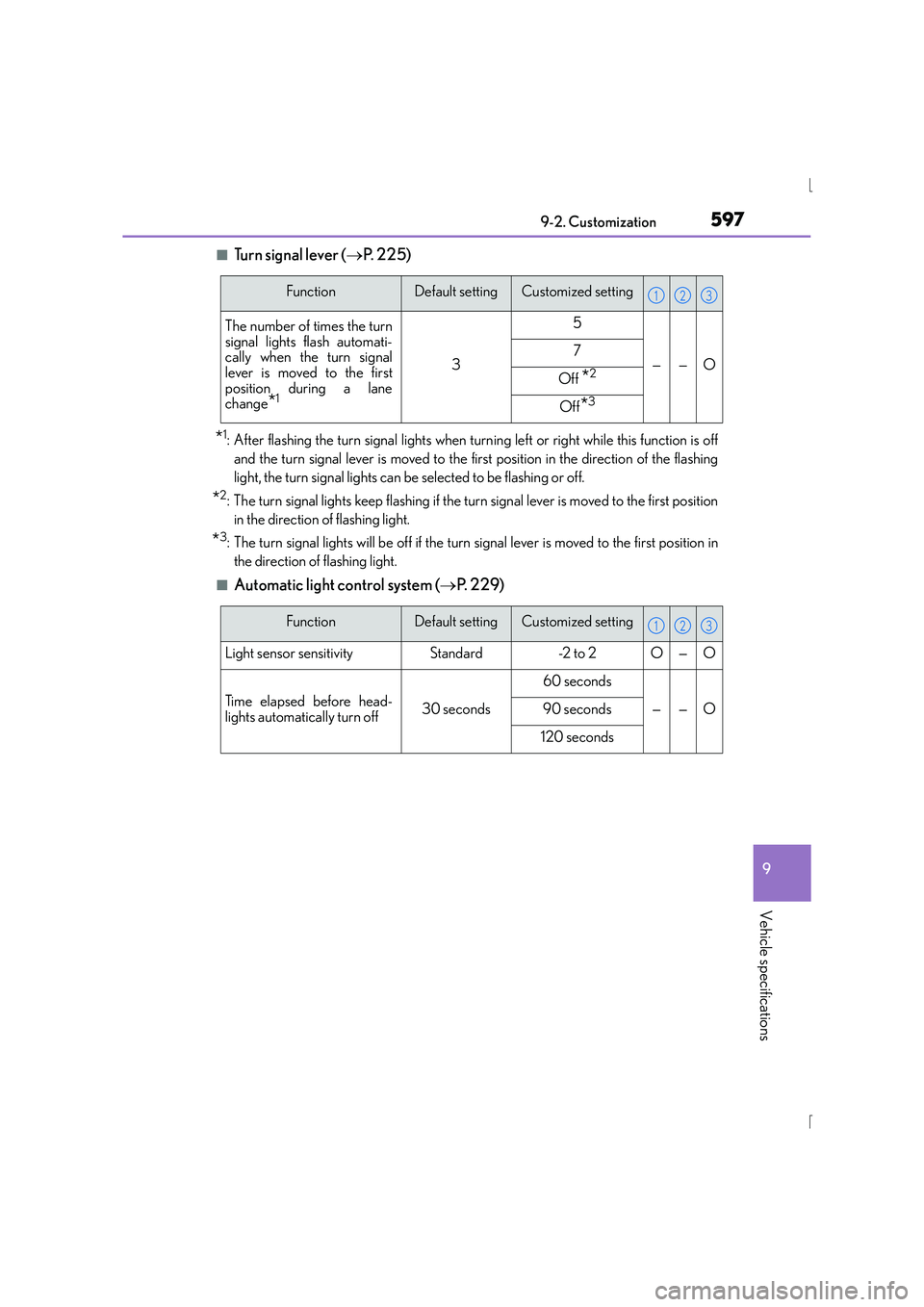
■Tu r n s i g n a l l e v e r (
→P. 225)
*1: After flashing the turn signal lights when turn ing left or right while this function is off
and the turn signal lever is moved to the first position in the direction of the flashing
light, the turn signal lights can be selected to be flashing or off.
*2: The turn signal lights keep flashing if the turn signal lever is moved to the first position in the direction of flashing light.
*3: The turn signal lights will be off if the turn signal lever is moved to the first position inthe direction of flashing light.
■Automatic light control system ( →P. 2 2 9 )
FunctionDefault settingCustomized setting
The number of times the turn
signal lights flash automati-
cally when the turn signal
lever is moved to the first
position during a lane
change
*1
3
5
——O7
Off *2
Off*3
123
FunctionDefault settingCustomized setting
Light sensor sensitivityStandard-2 to 2O—O
Time elapsed before head-
lights automatically turn off30 seconds
60 seconds
——O90 seconds
120 seconds
123
6009-2. Customization
IS300h_EE(OM53D56E)
■Vehicle customization
●When the speed-detecting automatic door lock and shift-linked automatic door lock
are both on, the door lock operates as follows.
• When shifting the shift lever to any position other than P, all the doors will be locked.
• If the vehicle is started with all doors locked, the speed-detecting automatic door lock will not operate.
• If the vehicle is started with any door unlocked, the speed-detecting automatic door
lock will operate.
●When the smart entry & start system is off, the entry unlock function cannot be custom-
ized.
●When the doors remain closed after unlocking the doors and the timer activated auto-
matic door lock function activates, signal s will be generated in accordance with the
operation buzzer volume and operational signal (Emergency flashers) function set-
tings.
●Some settings can be changed using a switch or the audio system screen. If a setting is
changed using a switch, the ch anged setting will not be reflected on the audio system
screen until the power switch is turned off and then to ON mode.
■When customizing using the Remote Touch or Lexus Display Audio controller (if
equipped)
Stop the vehicle in a safe place, apply the parking brake, and shift the shift lever to P. Also,
to prevent 12-volt battery discharge, leave the hybrid system operating while customiz-
ing the features.
CAUTION
■During customization
As the hybrid system needs to be operating during customization, ensure that the vehi-
cle is parked in a place with adequate ventilation. In a closed area such as a garage,
exhaust gases including harmful carbon monoxide (CO) may collect and enter the
vehicle. This may lead to death or a serious health hazard.
NOTICE
■During customization
To prevent 12-volt battery discharge, ensure that the hybrid system is operating while
customizing features.