Air Lexus IS300h 2017 Owner's Manual
[x] Cancel search | Manufacturer: LEXUS, Model Year: 2017, Model line: IS300h, Model: Lexus IS300h 2017Pages: 692, PDF Size: 163.7 MB
Page 362 of 692
3624-6. Driving tips
IS300h_EE(OM53D89E)
●Park the vehicle and move the shift lever to P without setting the parking
brake. The parking brake may freeze up, preventing it from being released. If
the vehicle is parked without setting the parking brake, make sure to block the
wheels.
Failure to do so may be dangerous because it may cause the vehicle to move
unexpectedly, possibly leading to an accident.
●If the vehicle is parked without setting the parking brake, confirm that the shift
lever cannot be moved out of P*.
*: The shift lever will be locked if it is atte mpted to be shifted from P to any other posi-
tion without depressing the brake pedal. If the shift lever can be shifted from P,
there may be a problem with the shift lock system. Have the vehicle inspected by
your authorized Lexus reta iler or Lexus authorized repairer, or any reliable
repairer immediately.
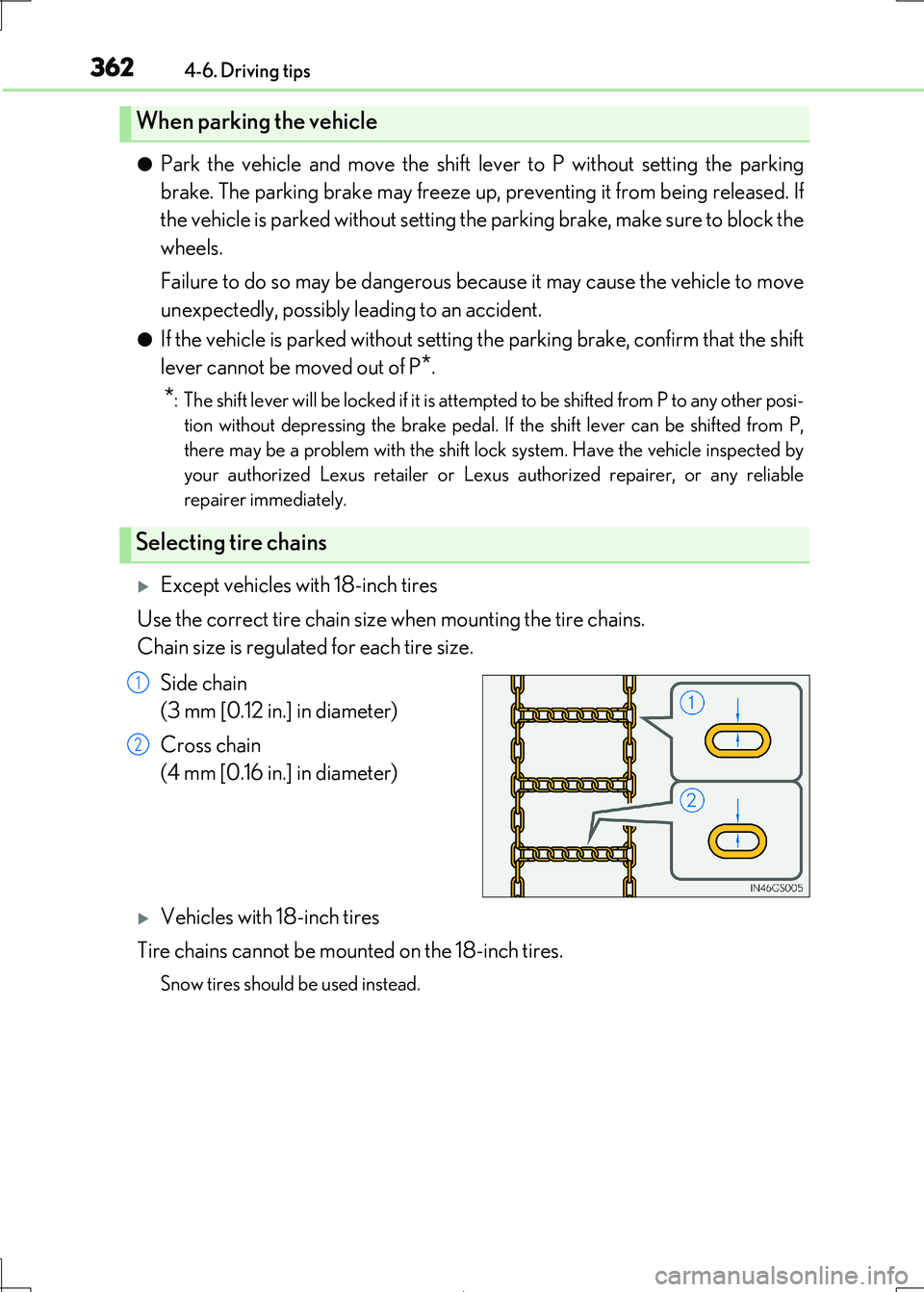
Except vehicles with 18-inch tires
Use the correct tire chain size when mounting the tire chains.
Chain size is regulated for each tire size.
Side chain
(3 mm [0.12 in.] in diameter)
Cross chain
(4 mm [0.16 in.] in diameter)
Vehicles with 18-inch tires
Tire chains cannot be mounted on the 18-inch tires.
Snow tires should be used instead.
When parking the vehicle
Selecting tire chains
1
2
Page 363 of 692
3634-6. Driving tips
4
Driving
IS300h_EE(OM53D89E)
Regulations regarding the use of tire chains vary depending on location and type
of road. Always check local regulations before installing chains.
■Tire chain installation
Observe the following precautions wh en installing and removing chains:
●Install and remove tire chains in a safe location.
●Install tire chains on the rear tires. Do not install tire chains on the front tires.
●Install tire chains on rear tires as tightly as possible. Retighten chains after driving 0.5
1.0 km (1/4 1/2 mile).
●Install tire chains following the instructions provided with the tire chains.
Regulations on the use of tire chains
WARNING
■Driving with snow tires
Observe the following precautions to reduce the risk of accidents.
Failure to do so may result in a loss of vehi cle control and cause death or serious injury.
●Use tires of the specified size.
●Maintain the recommended level of air pressure.
●Do not drive at speeds in excess of the speed limit or the speed limit specified for the snow tires being used.
●Use snow tires on all, not just some wheels.
●Do not use LKA (Lane Keeping Assist) system.
■Driving with tire chains (excep t vehicles with 18-inch tires)
Observe the following precautions to reduce the risk of accidents.
Failure to do so may result in the vehicle being unable to be driven safely, and may cause death or serious injury.
●Do not drive in excess of th e speed limit specified for the tire chains being used, or 50
km/h (30 mph), whichever is lower.
●Avoid driving on bumpy road surfaces or over potholes.
●Avoid sudden acceleration, abrupt steering, sudden braking and shifting operations
that cause sudden engine braking.
●Slow down sufficiently before entering a cu rve to ensure that vehicle control is main-
tained.
Page 364 of 692
3644-6. Driving tips
IS300h_EE(OM53D89E)
NOTICE
■Repairing or replacing snow tires
Request repairs or replacement of snow ti res from Lexus dealers or legitimate tire
retailers.
This is because the removal an d attachment of snow tires affects the operation of the tire pressure warning va lves and transmitters.
■Fitting tire chains (except vehicles with 18-inch tires)
The tire pressure warning valves and transm itters may not function correctly when tire chains are fitted.
Page 369 of 692
3695-1. Basic Operations
5
Lexus Display Audio system
IS300h_EE(OM53D89E)
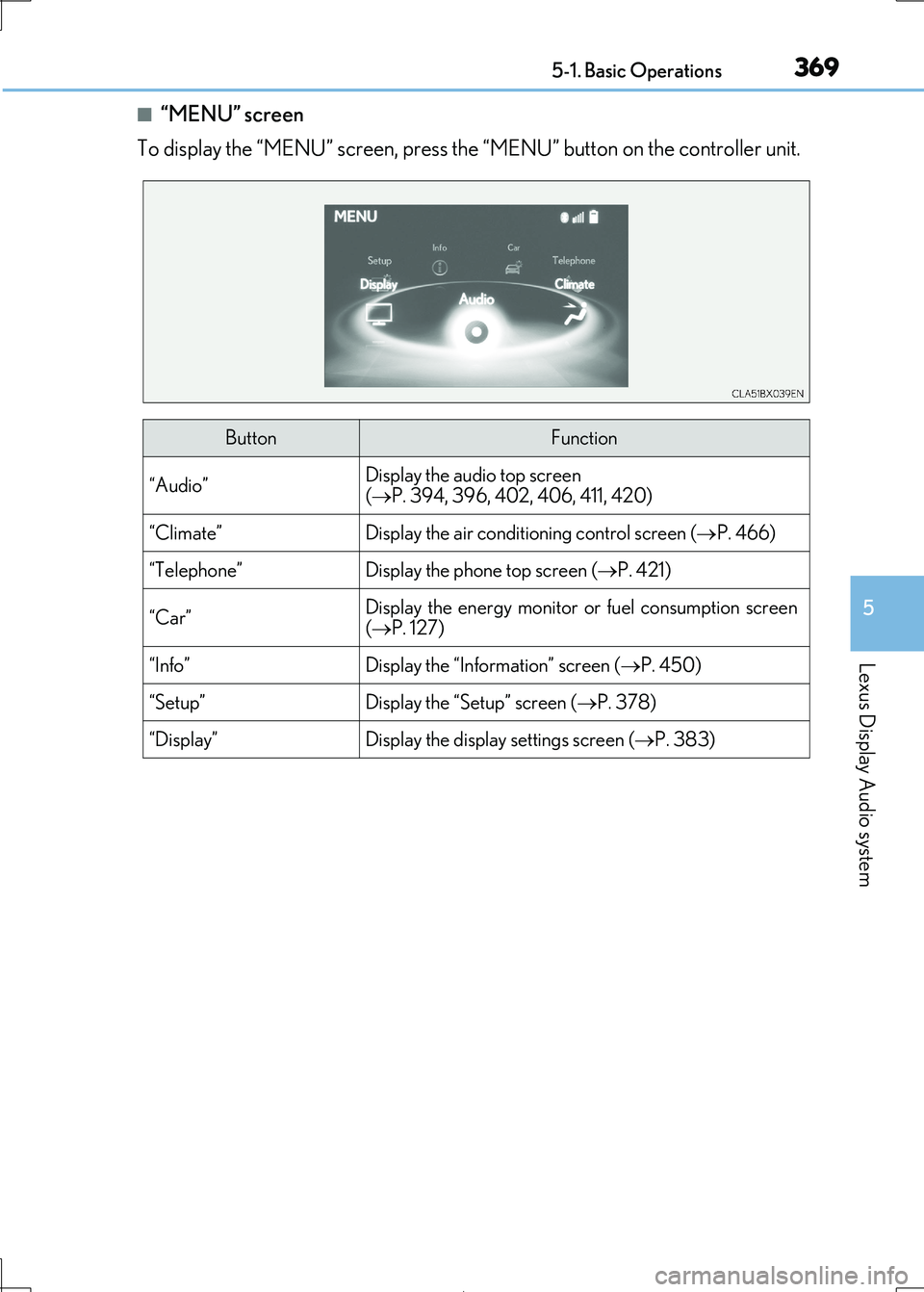
■“MENU” screen
To display the “MENU” screen, press the “MENU” button on the controller unit.
ButtonFunction
“Audio”Display the audio top screen
( P. 394, 396, 402, 406, 411, 420)
“Climate”Display the air conditioning control screen (P. 466)
“Telephone”Display the phone top screen (P. 421)
“Car” Display the energy monitor or fuel consumption screen
( P. 127)
“Info”Display the “Information” screen (P. 450)
“Setup”Display the “Setup” screen (P. 378)
“Display”Display the display settings screen (P. 383)
Page 379 of 692
3795-2. Setup
5
Lexus Display Audio system
IS300h_EE(OM53D89E)
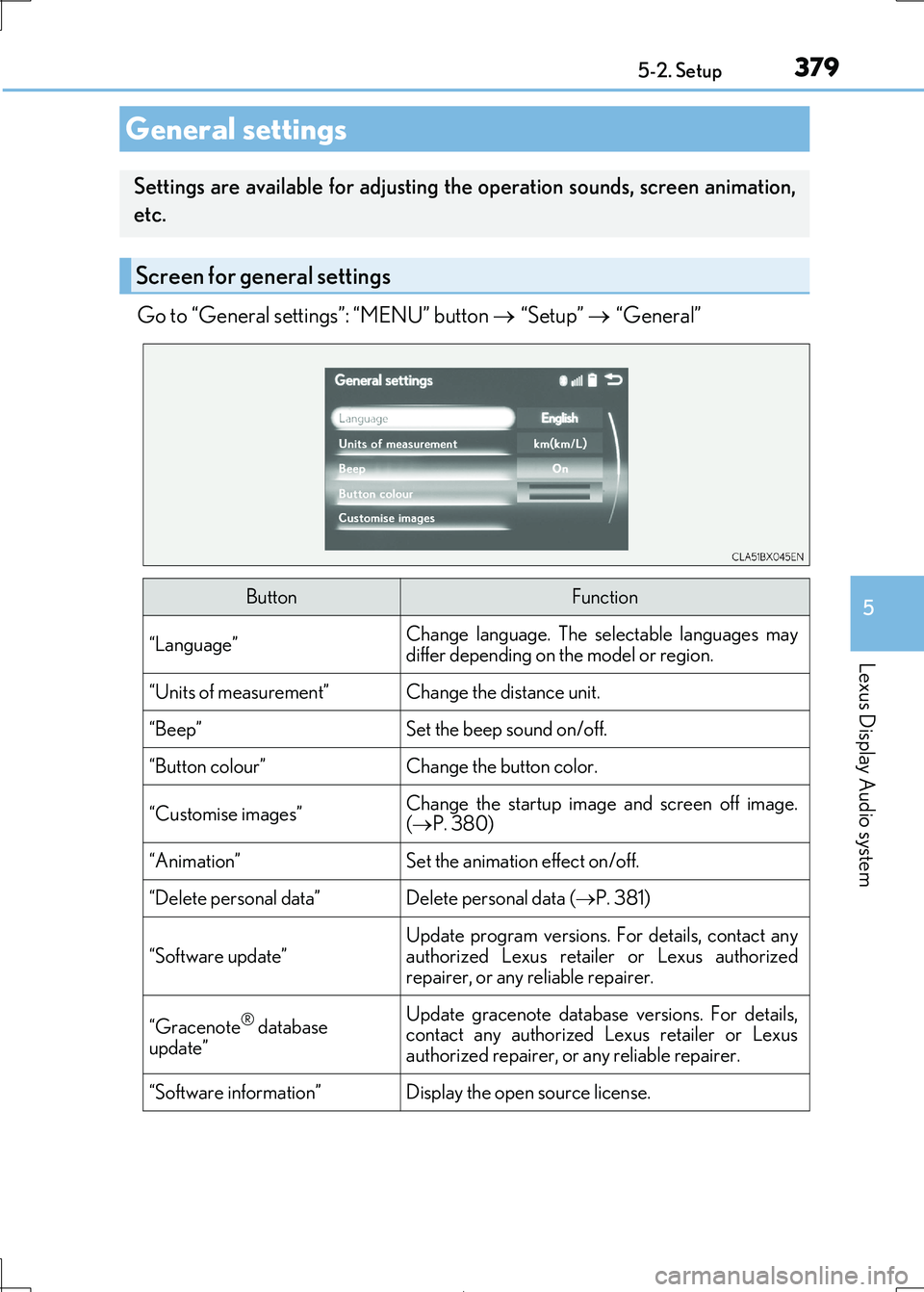
Go to “General settings”: “MENU” button “Setup” “General”
General settings
Settings are available for adjusting the operation sounds, screen animation,
etc.
Screen for general settings
ButtonFunction
“Language”Change language. The se lectable languages may differ depending on the model or region.
“Units of measurement”Change the distance unit.
“Beep”Set the beep sound on/off.
“Button colour”Change the button color.
“Customise images”Change the startup image and screen off image.
( P. 380)
“Animation”Set the animation effect on/off.
“Delete personal data”Delete personal data (P. 381)
“Software update”
Update program versions. For details, contact any
authorized Lexus retailer or Lexus authorized
repairer, or any re liable repairer.
“Gracenote® database
update”
Update gracenote database versions. For details, contact any authorized Lexus retailer or Lexus
authorized repairer, or any reliable repairer.
“Software information”Display the open source license.
Page 397 of 692

3975-5. Playing an audio CD and MP3/WMA/AAC discs
5
Lexus Display Audio system
IS300h_EE(OM53D89E)
■Error messages
If the following error message s appear on the screen, refer to the table and take the
appropriate measures. If the pr oblem is not rectified, take the vehicle to any authorized Lexus retailer or Lexus authorized re pairer, or any reliable repairer.
■Discs that can be used
Discs with the marks sh own below can be used. Playback may not be possible depending on recording format or disc features, or due to
scratches, dirt or deterioration.
CDs with copy-protection features may not play correctly.
■Music disc player protection feature
To protect the internal components, playback is automatically stopped when a problem is
detected.
■If a disc is left inside the Mu sic disc player or in the ejected position for extended peri- ods
Disc may be damaged and may not play properly.
■Lens cleaners
Do not use lens cleaners. Doing so may damage the Music disc player.
■MP3, WMA and AAC files
MP3 (MPEG Audio LAYER3) is a stan dard audio compression format.
Files can be compressed to approximately 1/10 of their original size by using MP3 com-
pression.
WMA (Windows Media Audio) is a Microsoft audio compression format.
This format compresses audio data to a si ze smaller than that of the MP3 format.
AAC is short for Advanced Audio Coding an d refers to an audio compression technol-
ogy standard used wi th MPEG2 and MPEG4.
MP3, WMA and AAC file and media/ formats compatibility are limited.
MessageCauseCorrection procedures
“Check disc”
• The disc is dirty or dam-
aged.
• The disc is inserted upside down.
• The disc is not playable
with the player.
•Clean the disc.
• Insert the disc correctly. •Confirm the disc is play-
able with the player.
“DISC error”There is a malfunction within the system.Eject the disc.
“No music files found.”No playable data is
included on the disc.Eject the disc.
Page 404 of 692
4045-6. Using an external device
IS300h_EE(OM53D89E)
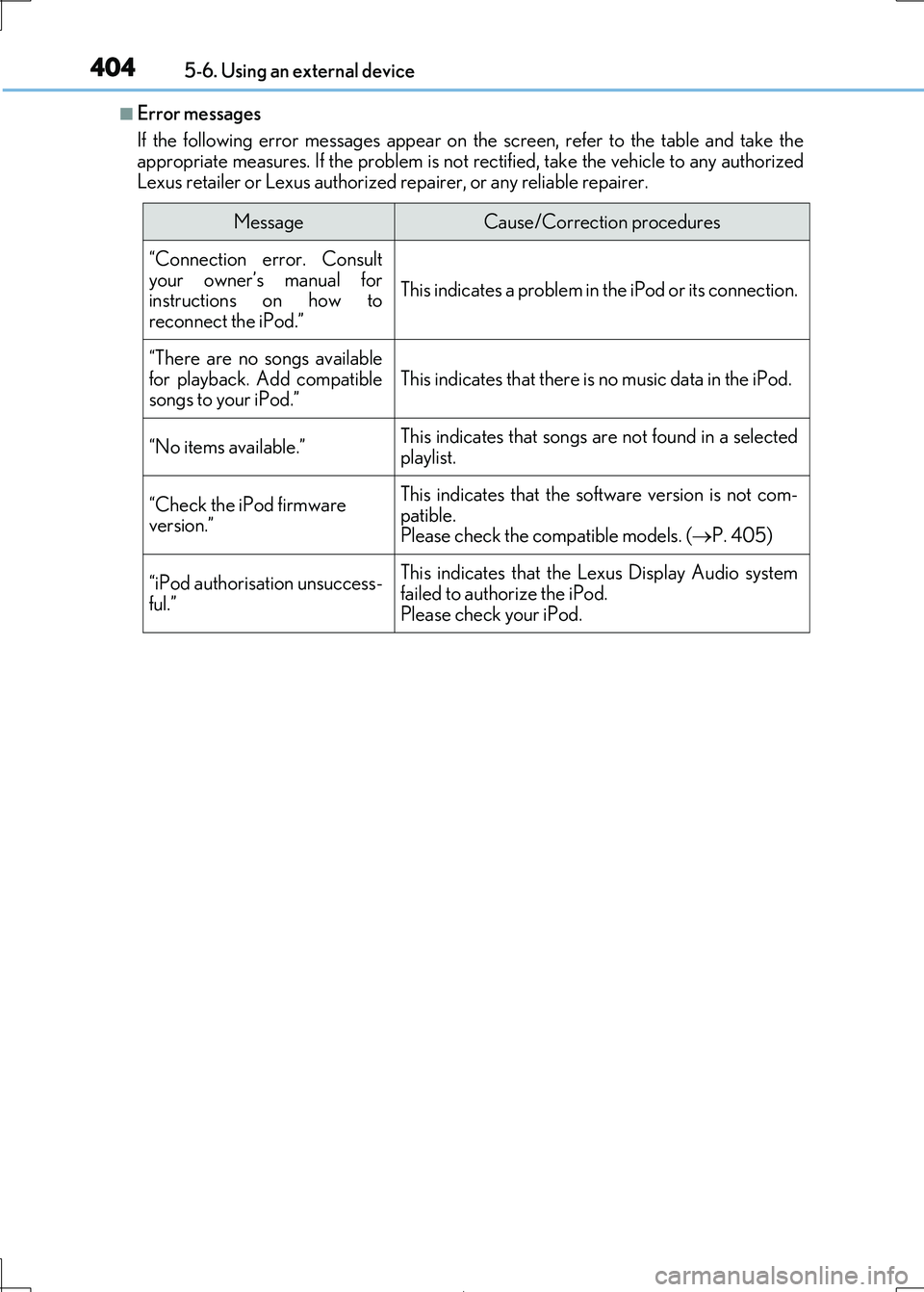
■Error messages
If the following error message s appear on the screen, refer to the table and take the appropriate measures. If the pr oblem is not rectified, take the vehicle to any authorized
Lexus retailer or Lexus authorized re pairer, or any reliable repairer.
MessageCause/Correction procedures
“Connection error. Consult
your owner’s manual for instructions on how to
reconnect the iPod.”
This indicates a problem in the iPod or its connection.
“There are no songs available
for playback. Add compatible songs to your iPod.”This indicates that there is no music data in the iPod.
“No items available.”This indicates that songs are not found in a selected
playlist.
“Check the iPod firmware
version.”
This indicates that the so ftware version is not com-
patible. Please check the compatible models. ( P. 405)
“iPod authorisation unsuccess- ful.”
This indicates that the Lexus Display Audio system
failed to authorize the iPod.
Please check your iPod.
Page 407 of 692
4075-6. Using an external device
5
Lexus Display Audio system
IS300h_EE(OM53D89E)
Moving the controller to the right and selecting “Play video” while the USB audio
screen is displayed changes to USB video mode.
This function cannot be used while USB photo or MirrorLink™ is in use.
■Menu screen
P. 391
■Selecting a file
Press the “ ” or “” button, turn the “TUNE•SCROLL” knob to select the
desired file number.
To fast-forward or reverse, press and hold the “ ” or “” button.
■Selecting a folder
Move the controller to the right and select “Browse”.
Select the desired folder , then select a file to begin using the selected
folder.
■Displaying the now playing list
Move the controller to the righ t and select “Now playing list”.
■USB memory functions
●Depending on the USB memory device that is connected to the system, the device
itself may not be operable and certain functions may not be available. If the device is inoperable or a function is unavailable du e to a malfunction (as opposed to a system
specification), disconnecting the device an d reconnecting it may resolve the problem.
●If the USB memory device still does not begin operation after being disconnected and reconnected, format the device.
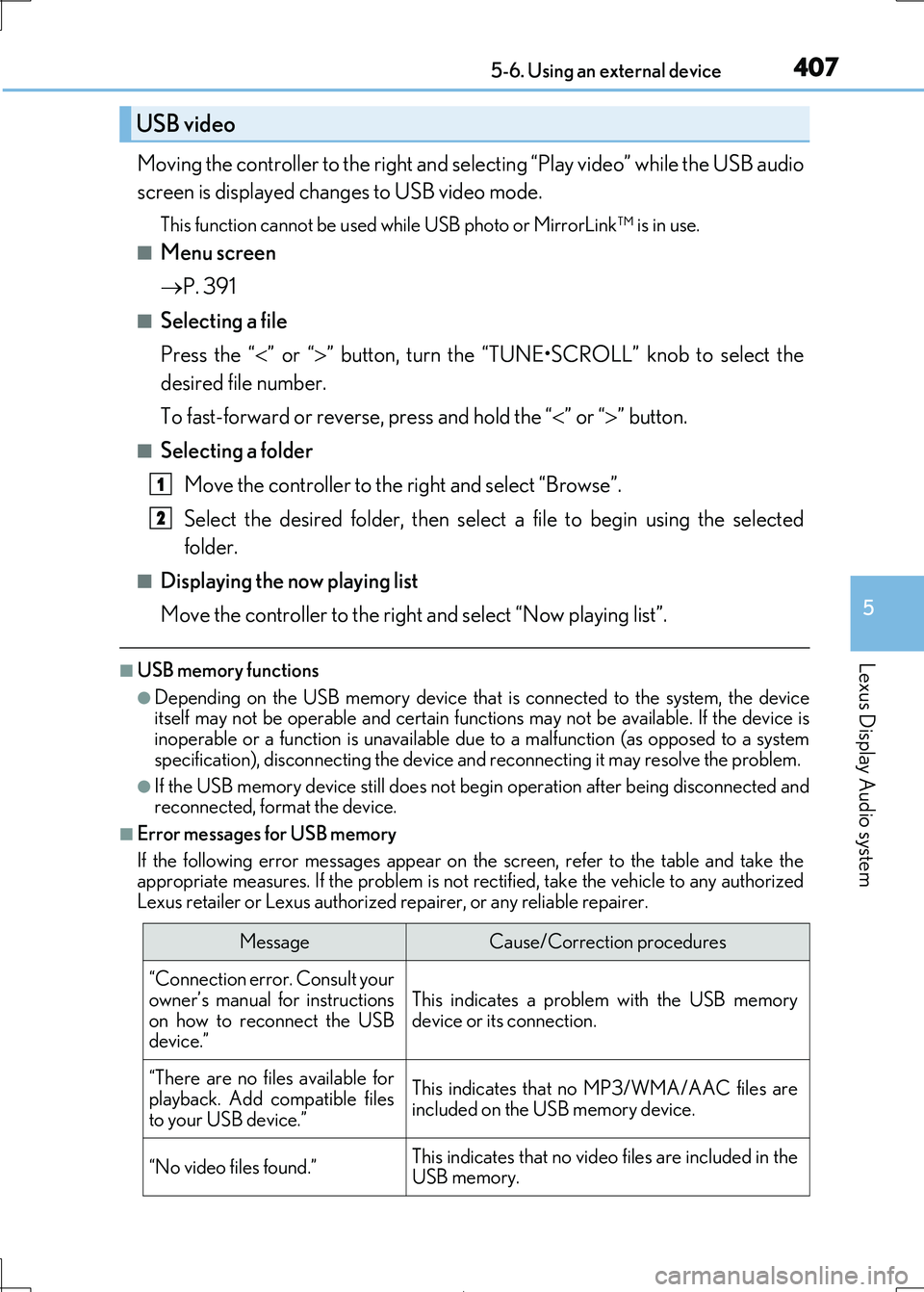
■Error messages for USB memory
If the following error message s appear on the screen, refer to the table and take the appropriate measures. If the pr oblem is not rectified, take the vehicle to any authorized
Lexus retailer or Lexus authorized re pairer, or any reliable repairer.
USB video
MessageCause/Correction procedures
“Connection error. Consult your
owner’s manual for instructions
on how to reconnect the USB device.”
This indicates a problem with the USB memory
device or its connection.
“There are no files available for
playback. Add compatible files
to your USB device.”
This indicates that no MP3/WMA/AAC files are included on the USB memory device.
“No video files found.”This indicates that no video files are included in theUSB memory.
1
2
Page 414 of 692
4145-7. Connecting Bluetooth®
IS300h_EE(OM53D89E)
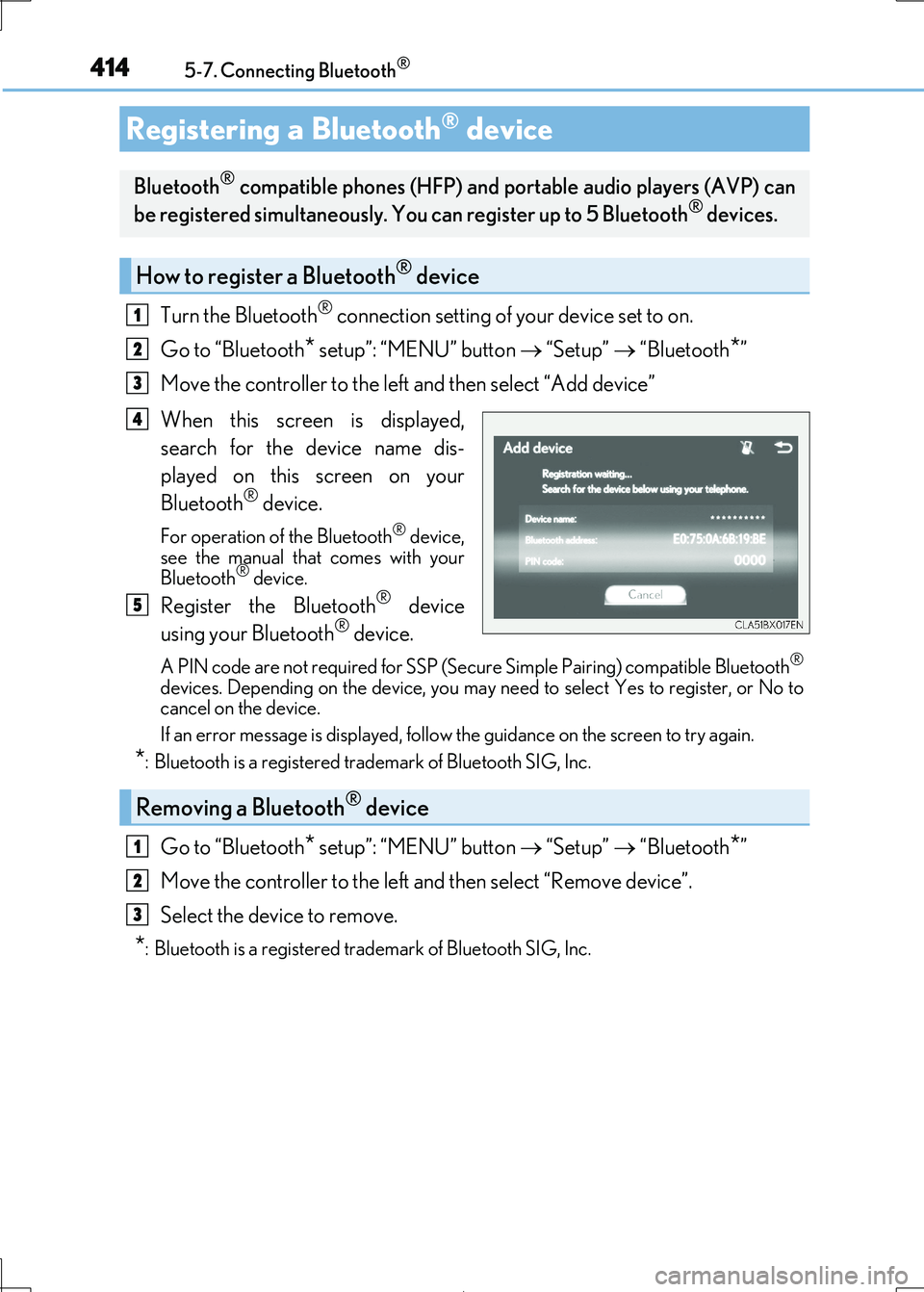
Turn the Bluetooth® connection setting of your device set to on.
Go to “Bluetooth* setup”: “MENU” button “Setup” “Bluetooth*”
Move the controller to the left and then select “Add device”
When this screen is displayed,
search for the device name dis-
played on this screen on your
Bluetooth® device.
For operation of the Bluetooth® device, see the manual that comes with your
Bluetooth® device.
Register the Bluetooth® device
using your Bluetooth® device.
A PIN code are not required for SSP (Secur e Simple Pairing) compatible Bluetooth®
devices. Depending on the device, you may need to select Yes to register, or No to cancel on the device.
If an error message is disp layed, follow the guidance on the screen to try again.
*: Bluetooth is a registered trademark of Bluetooth SIG, Inc.
Go to “Bluetooth* setup”: “MENU” button “Setup” “Bluetooth*”
Move the controller to the left and then select “Remove device”.
Select the device to remove.
*: Bluetooth is a registered trad emark of Bluetooth SIG, Inc.
Registering a Bluetooth® device
Bluetooth® compatible phones (HFP) and portable audio players (AVP) can
be registered simultaneously. You can register up to 5 Bluetooth® devices.
How to register a Bluetooth® device
1
2
3
4
5
Removing a Bluetooth® device
1
2
3
Page 442 of 692

4425-11. Bluetooth®
IS300h_EE(OM53D89E)
■When using the Bluetooth® audio system
●In the following situations, the system may not function.
• If the portable audio player is turned off • If the portable audio player is not connected
• If the portable audio player’s battery is low
●There may be a delay if a cellular phon e connection is made during Bluetooth® audio
play.
●Depending on the type of portable audio play er that is connected to the system, opera- tion may differ slightly and cert ain functions may not be available.
■When using the hands-free system
●The audio system is muted when making a call.
●If both parties speak at the same time, it may be difficult to hear.
●If the received call volume is overly loud, an echo may be heard.
If the Bluetooth® phone is too close to the system, quality of the sound may deteriorate and connection stat us may deteriorate.
●In the following situations, it may be difficult to hear the other party:
• When driving on unpaved roads • When driving at high speeds
• If a window is open
• If the air conditioning is blow ing directly on the microphone • If there is interference from the network of the cellular phone
●Depending on the type of phone, certain functions may not be available.
■Conditions under which the system will not operate
●If using a cellular phone that does not support Bluetooth®
●If the cellular phone is turned off
●If you are outside of cellular phone service coverage
●If the cellular phone is not connected
●If the cellular phone’s battery is low
●When outgoing calls are controlled, due to heavy traffic on phone lines, etc.
●When the cellular phone itself cannot be used
●When transferring phonebook data from the cellular phone
Bluetooth®