display Lexus IS300h 2017 Owner's Manual
[x] Cancel search | Manufacturer: LEXUS, Model Year: 2017, Model line: IS300h, Model: Lexus IS300h 2017Pages: 692, PDF Size: 163.7 MB
Page 443 of 692
4435-11. Bluetooth®
5
Lexus Display Audio system
IS300h_EE(OM53D89E)
■Bluetooth® antenna
The antenna is built into the display. If the portable audio player is behind the se at or in the glove box or console box, or is
touching or covered by metal objects, the connection status may deteriorate.
If the cellular phone is behind the seat or in the console box, or touching or covered by metal objects, the connecti on status may deteriorate.
■Battery charge/signal status
●This display may not correspond exactly with the portable audio player or cellular phone itself.
●This system does not have a charging function.
●The portable audio player or cellular phone battery will be depleted quickly when the device is connected to Bluetooth®.
■When using the Bluetooth® audio and hands-free system at the same time
The following problems may occur.
●The Bluetooth® audio connection may be interrupted.
●Noise may be heard during Bluetooth® audio playback.
■About the contact in this system
The following data is stored for every registered cellular phone. When another phone is
connecting, you cannot read the registered data.
●Contact data
●Call history
●Favorite
●Message
When removing a Bluetooth® phone from the system, the above-mentioned data is also deleted.
■About Bluetooth®
The Bluetooth® word mark and logos are regis-
tered trademarks owned by Bluetooth SIG, Inc.
and any use of such marks by FUJITSU TEN LIMITED is under licen se. Other trademarks
and trade names are those of their respective
owners.
Page 445 of 692

4455-11. Bluetooth®
5
Lexus Display Audio system
IS300h_EE(OM53D89E)
■Certification
Page 447 of 692

4475-11. Bluetooth®
5
Lexus Display Audio system
IS300h_EE(OM53D89E)
Page 449 of 692
4495-11. Bluetooth®
5
Lexus Display Audio system
IS300h_EE(OM53D89E)
WARNING
■While driving
Do not operate the portable audio player, ce llular phone or connect a device to the
Bluetooth® system.
■Caution regarding interference with electronic devices
●Your audio unit is fitted with Bluetooth® antennas. People with implantable cardiac
pacemakers, cardiac resynchronization ther apy-pacemakers or implantable cardio-
verter defibrillators should maintain a re asonable distance between themselves and the Bluetooth® antennas. The radio waves may affe ct the operation of such devices.
●Before using Bluetooth® devices, users of any electrical medical device other than
implantable cardiac pacemakers, cardiac resynchronization therapy-pacemakers or implantable cardioverter defi brillators should consult the manufacturer of the device
for information about its operation under the influence of radio waves. Radio waves
could have unexpected effects on the operation of such medical devices.
NOTICE
■When leaving the vehicle
Do not leave your portable audio player or cellular phone in the vehicle. The inside of the vehicle may become hot, causing damage to the portable audio player or cellular
phone.
Page 450 of 692
450
IS300h_EE(OM53D89E)
5-12. Other function
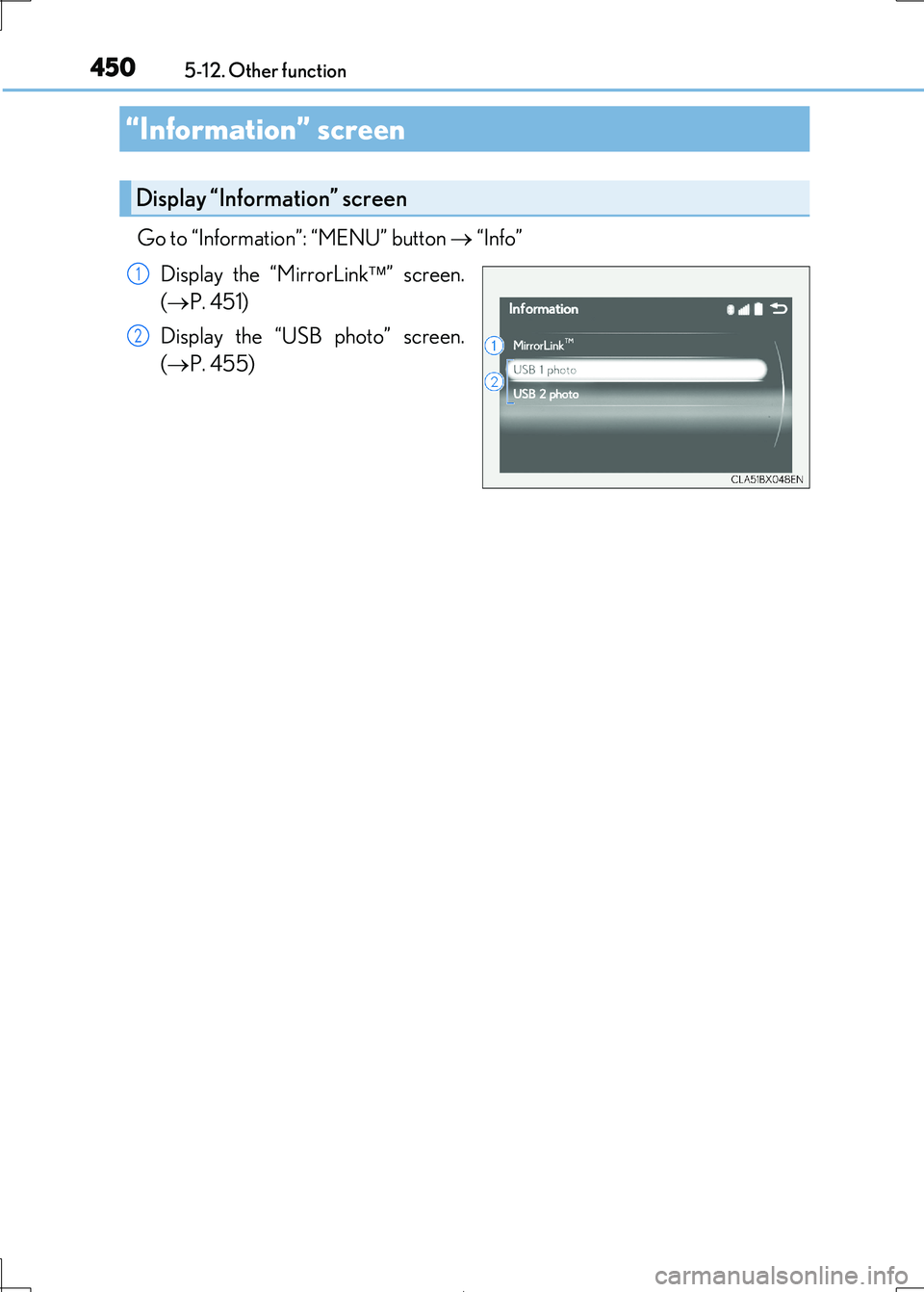
Go to “Information”: “MENU” button “Info”
Display the “MirrorLink ” screen.
( P. 451)
Display the “USB photo” screen.
( P. 455)
“Information” screen
Display “Information” screen
1
2
Page 451 of 692
4515-12. Other function
5
Lexus Display Audio system
IS300h_EE(OM53D89E)
P. 375
MirrorLink™
The MirrorLink™ function enables operations of some smartphone content
via the Lexus Display Audio system.
Depending on differences between mode ls or software version etc., some
models might be incompatible with this system.
Connect a smartphone to USB port using a USB cable.
For safety reasons, the safe driving sc reen is displayed while driving depend-
ing on the application.
Connecting a smartphone
Page 452 of 692
4525-12. Other function
IS300h_EE(OM53D89E)
Go to “MirrorLink”: “MENU” button “Info” “MirrorLink”
Select the desired application on the application list screen.
■MirrorLink™ screen
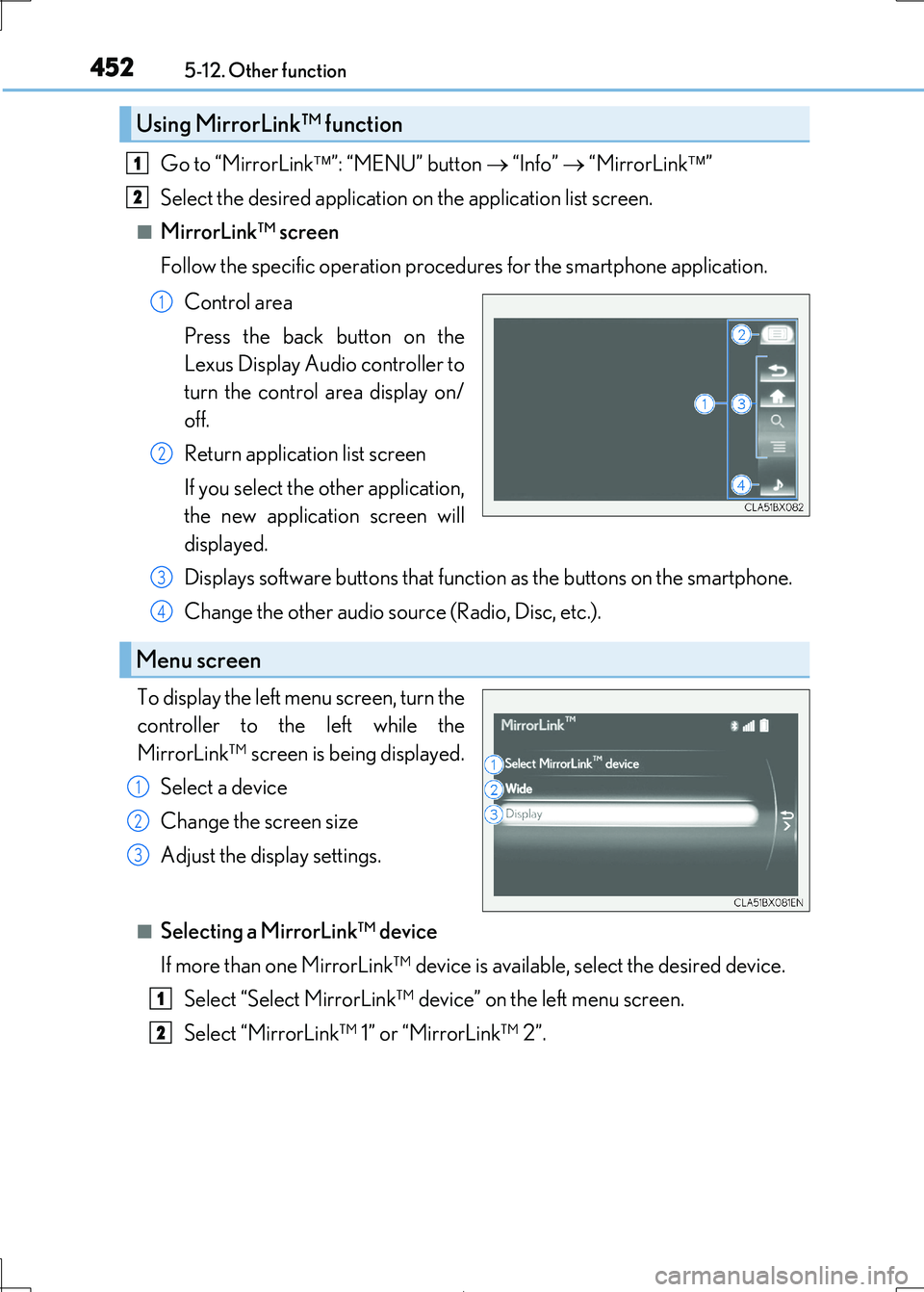
Follow the specific operation procedur es for the smartphone application.
Control area
Press the back button on the
Lexus Display Audio controller to
turn the control area display on/
off.
Return application list screen
If you select the other application,
the new application screen will
displayed.
Displays software buttons that functi on as the buttons on the smartphone.
Change the other audio source (Radio, Disc, etc.).
To display the left menu screen, turn the
controller to the left while the
MirrorLink™ screen is being displayed.
Select a device
Change the screen size
Adjust the display settings.
■Selecting a MirrorLink™ device
If more than one MirrorLink™ device is available, select the desired device.
Select “Select MirrorLink™ device” on the left menu screen.
Select “MirrorLink™ 1” or “MirrorLink™ 2”.
Using MirrorLink™ function
1
2
1
2
Menu screen
3
4
1
2
3
1
2
Page 453 of 692
4535-12. Other function
5
Lexus Display Audio system
IS300h_EE(OM53D89E)
■Operational conditions
●When MirrorLink™ is activated, previous applications, run with a USB, are closed, and
vice versa.
●Compatible devices
Smartphones, which passed the Car Connect ivity Consortium certification program
ver1.1 or later. Confirm with the smartphone manufacture or the distributor for the MirrorLink™ compatibility.
●Compatible applications
Applications, which are cert ified by Car Connectivity Consortium as MirrorLink™Base-Certified or Drive-Certified applications.
■About MirrorLink™
MirrorLink is a registered trademar k of Car Connectivity Consortium, Inc.
■When using MirrorLink™
●Check that the smartphone screen is unlocked. Unlock the smartphone screen before
connecting it to the Lexus Display Audio system. (Some smartphones may not be able to be connected via MirrorLink™ if the screen is locked.)
●Make sure that the smartphone has been connected via Bluetooth®. (Some smart-
phones may not be able to perform hands-free calls using the MirrorLink™ function if it has not been connected to the vehicle via Bluetooth®.)
●If a MirrorLink™ application cannot be starte d, check that the MirrorLink™ applica-
tion certificate has not expired. The certificates of MirrorLink™ applications have an expiration date. (An internet connection is required to automatically update the certifi-
cate.) If a MirrorLink™ application becomes un available, it may be due to the certifi-
cate expiring. In this case, the certificate must be updated manually. Check with the smartphone manufacturer or application de veloper for how to update the certificate.
●Make sure the volume of the smartphone is set to an appropriate level. If the Mirror-
Link™ application volume is ex cessively low even when the volume of the Lexus Dis- play Audio system is increased, check the vo lume of the smartphone and increase it as
necessary.
WARNING
■While driving
Do not connect smartphone or operate the controls.
Page 455 of 692
4555-12. Other function
5
Lexus Display Audio system
IS300h_EE(OM53D89E)
Go to “USB photo”: “MENU” button “Info” “USB 1 photo” or “USB 2
photo”
P. 375
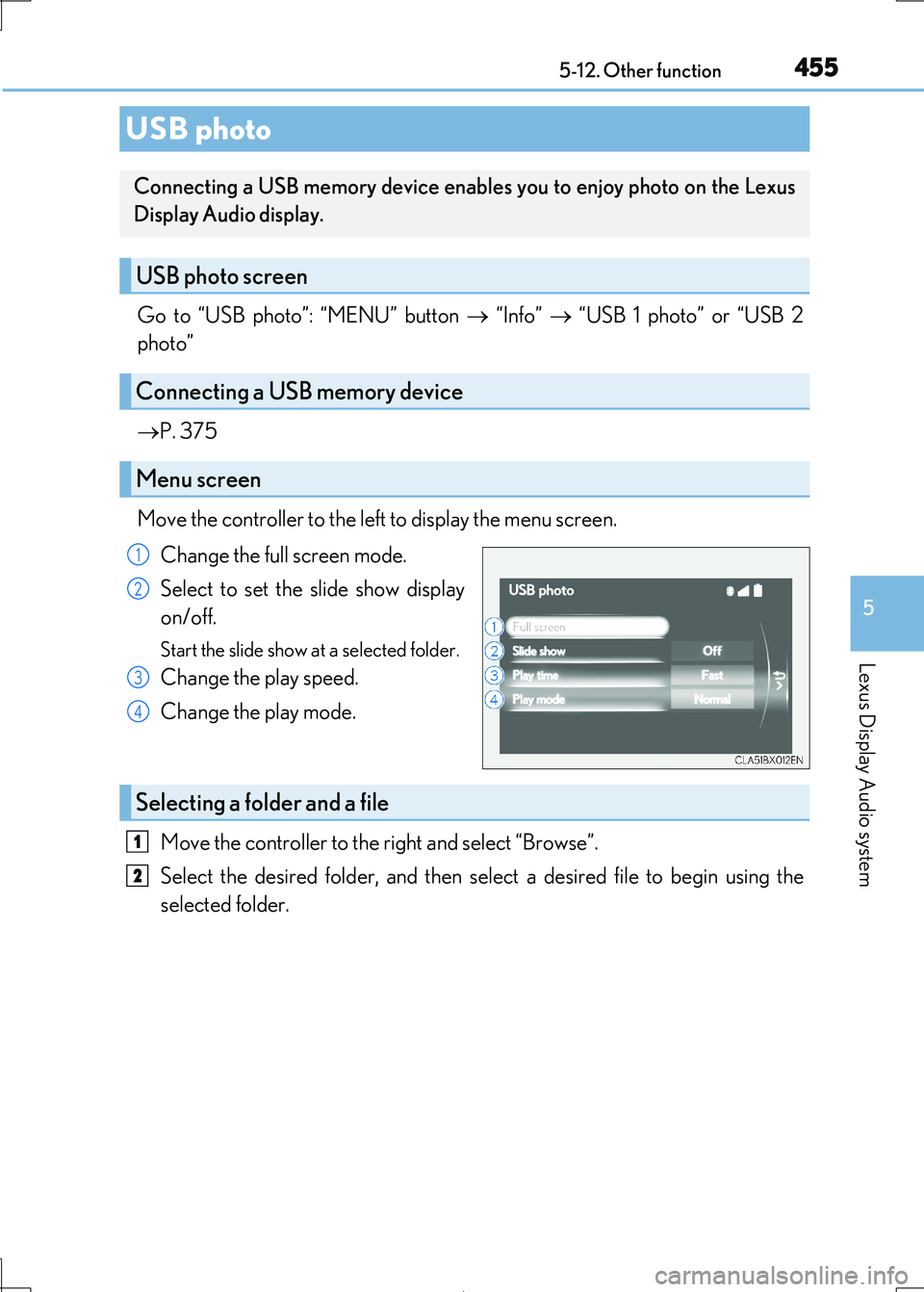
Move the controller to the left to display the menu screen.
Change the full screen mode.
Select to set the slide show display
on/off.
Start the slide show at a selected folder.
Change the play speed.
Change the play mode.
Move the controller to the right and select “Browse”.
Select the desired folder, and then sele ct a desired file to begin using the
selected folder.
USB photo
Connecting a USB memory device enable s you to enjoy photo on the Lexus
Display Audio display.
USB photo screen
Connecting a USB memory device
Menu screen
1
2
3
4
Selecting a folder and a file
1
2
Page 456 of 692
4565-12. Other function
IS300h_EE(OM53D89E)
■USB memory functions
P. 407
■USB memory
●Compatible devices
USB memory device that can be used for JPEG display.
●Compatible device formats
The following device format can be used:
• USB communication format: USB2.0 FS (480 Mbps)
• File system format: FAT16/32 (Windows) • Correspondence class: Mass storage class
●JPEG file compatibility
• Compatible image size: Maximum 10MB
• Compatible pixel size: Maximum 10,000,000 pixels
NOTICE
■To prevent damage to the USB me mory device or its terminals
P. 410