driving mode select Lexus IS300h 2017 User Guide
[x] Cancel search | Manufacturer: LEXUS, Model Year: 2017, Model line: IS300h, Model: Lexus IS300h 2017Pages: 692, PDF Size: 163.7 MB
Page 227 of 692
2274-2. Driving procedures
4
Driving
IS300h_EE(OM53D89E)
*1: To improve fuel efficiency and reduce noise, shift the shift lever to D for normal driv-
ing.
*2: By selecting shift ranges using S mode, yo u can control accelerating force and engine
braking force.
■Sport mode/Eco drive mode
P. 348
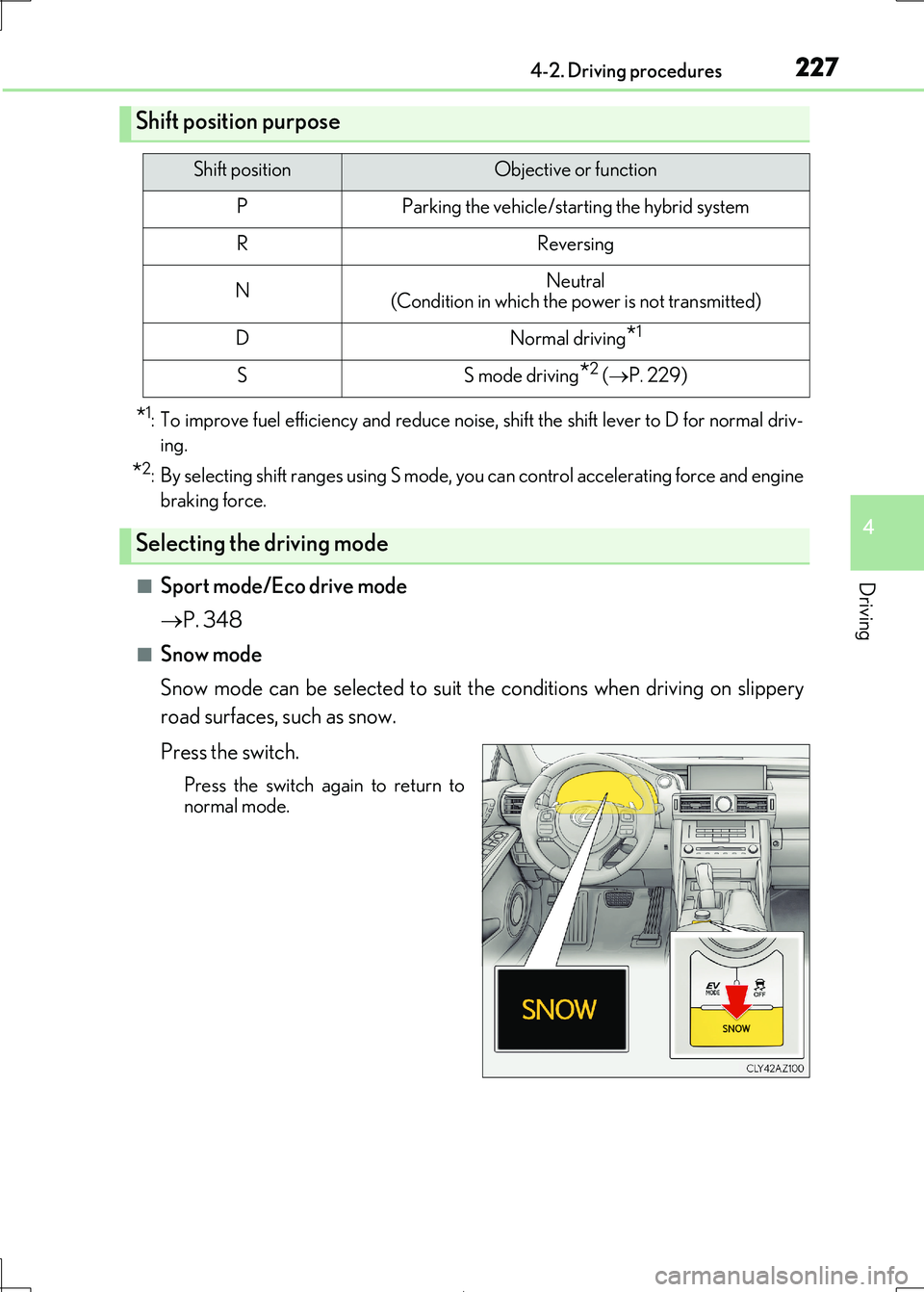
■Snow mode
Snow mode can be selected to suit th e conditions when driving on slippery
road surfaces, such as snow.
Press the switch.
Press the switch again to return to
normal mode.
Shift position purpose
Shift positionObjective or function
PParking the vehicle/starting the hybrid system
RReversing
NNeutral
(Condition in which the power is not transmitted)
DNormal driving*1
SS mode driving*2 ( P. 229)
Selecting the driving mode
Page 229 of 692
2294-2. Driving procedures
4
Driving
IS300h_EE(OM53D89E)
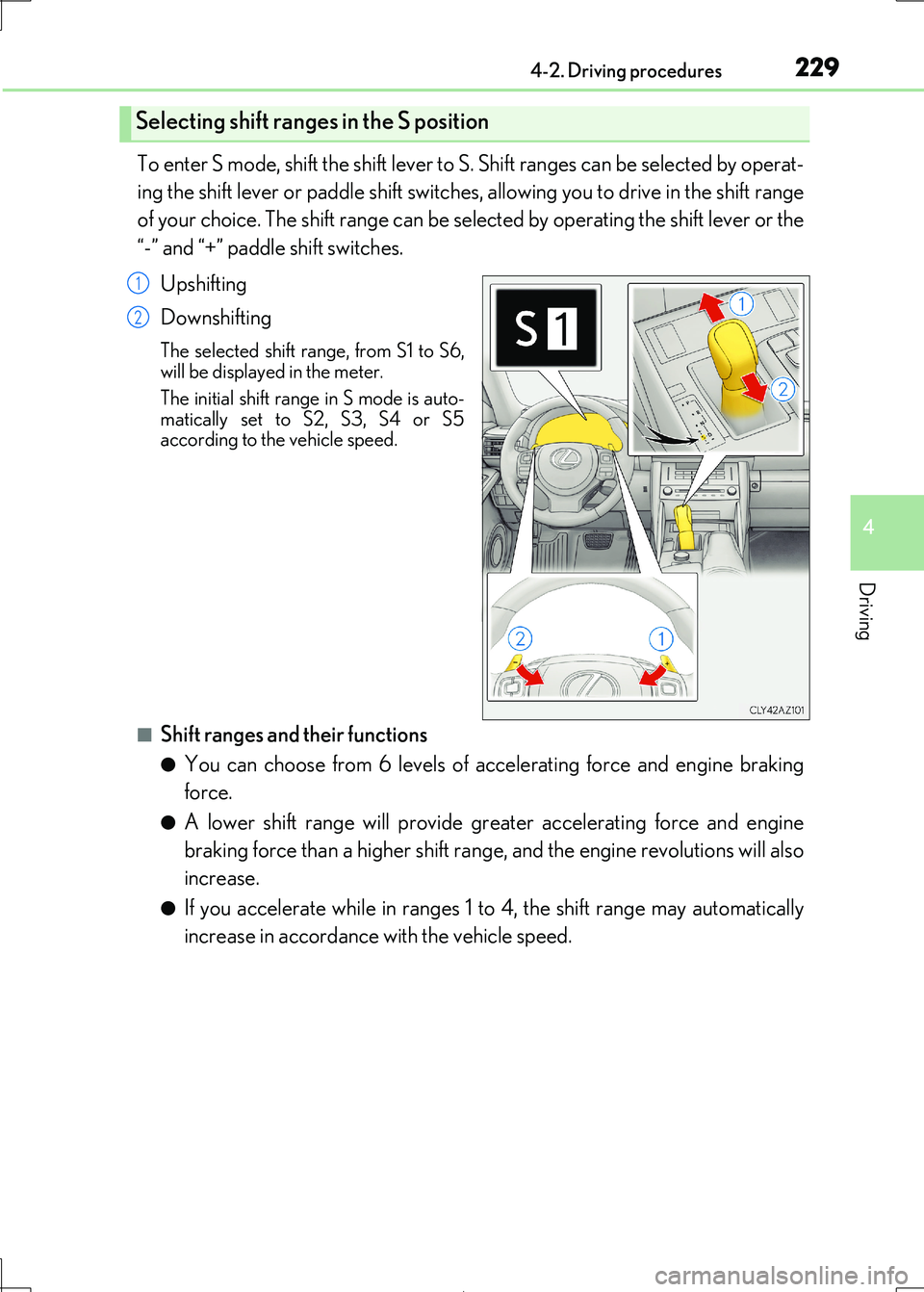
To enter S mode, shift the shift lever to S. Shift ranges can be selected by operat-
ing the shift lever or paddle shift switches , allowing you to drive in the shift range
of your choice. The shift range can be sele cted by operating the shift lever or the
“-” and “+” paddle shift switches.
Upshifting
Downshifting
The selected shift range, from S1 to S6, will be displayed in the meter.
The initial shift range in S mode is auto-
matically set to S2, S3, S4 or S5 according to the vehicle speed.
■Shift ranges and their functions
●You can choose from 6 levels of acce lerating force and engine braking
force.
●A lower shift range will provide gr eater accelerating force and engine
braking force than a higher shift rang e, and the engine revolutions will also
increase.
●If you accelerate while in ranges 1 to 4, the shift range may automatically
increase in accordance with the vehicle speed.
Selecting shift ranges in the S position
1
2
Page 230 of 692

2304-2. Driving procedures
IS300h_EE(OM53D89E)
■When the “-” paddle shift switch is operated with the shift lever in the D position
The shift range is downshifted to a range that enables engine braking force that is suit-
able to driving conditions.
■Automatic deactivation of shift range selection in the D position
Shift range selection in the D position will be deactivated in the following situations:
●When the vehicle comes to a stop
●If the accelerator pedal is depressed for more than a certain period of time
●When the shift lever is shifted to a position other than D
■Downshifting restriction warning buzzer
To help ensure safety and driving performance, downshifting operation may sometimes
be restricted. In some circum stances, downshifting may not be possible even when the
shift lever or paddle shif t switch is operated. (A buzzer will sound twice.)
■Snow mode automatic deactivation
Snow mode is automatically deactivated if th e power switch is turned off after driving in
snow mode.
■When driving with cruise control or dynamic radar cruise control activated
Even when performing the following actions with the intent of enabling engine braking,
engine braking will not activate because crui se control or dynamic radar cruise control will not be canceled.
●While driving in D or S mode, downshifting to 5 or 4. ( P. 293, 305)
●When switching the driving mode to sport mode while driving in D position. (P. 348)
■Restraining sudden start (Drive-Start Control)
When the following unusual operation is performed, the hybrid system output may be
restrained.
●When the shift lever is shifted from R to D, D to R, N to R, P to D, or P to R (D includes S)
with the accelerator pedal depressed, a wa rning message appears on the multi-infor-
mation display. If a warning message is shown on the multi-information display, read the message and follow the instructions.
●When the accelerator pedal is depressed too while the vehicle is in reverse.
■Shift lock system
The shift lock system is a system to prevent ac cidental operation of the shift lever in start-
ing.
The shift lever can be shifted from P only wh en the power switch is in ON mode and the brake pedal is being depressed.
Page 236 of 692
2364-2. Driving procedures
IS300h_EE(OM53D89E)
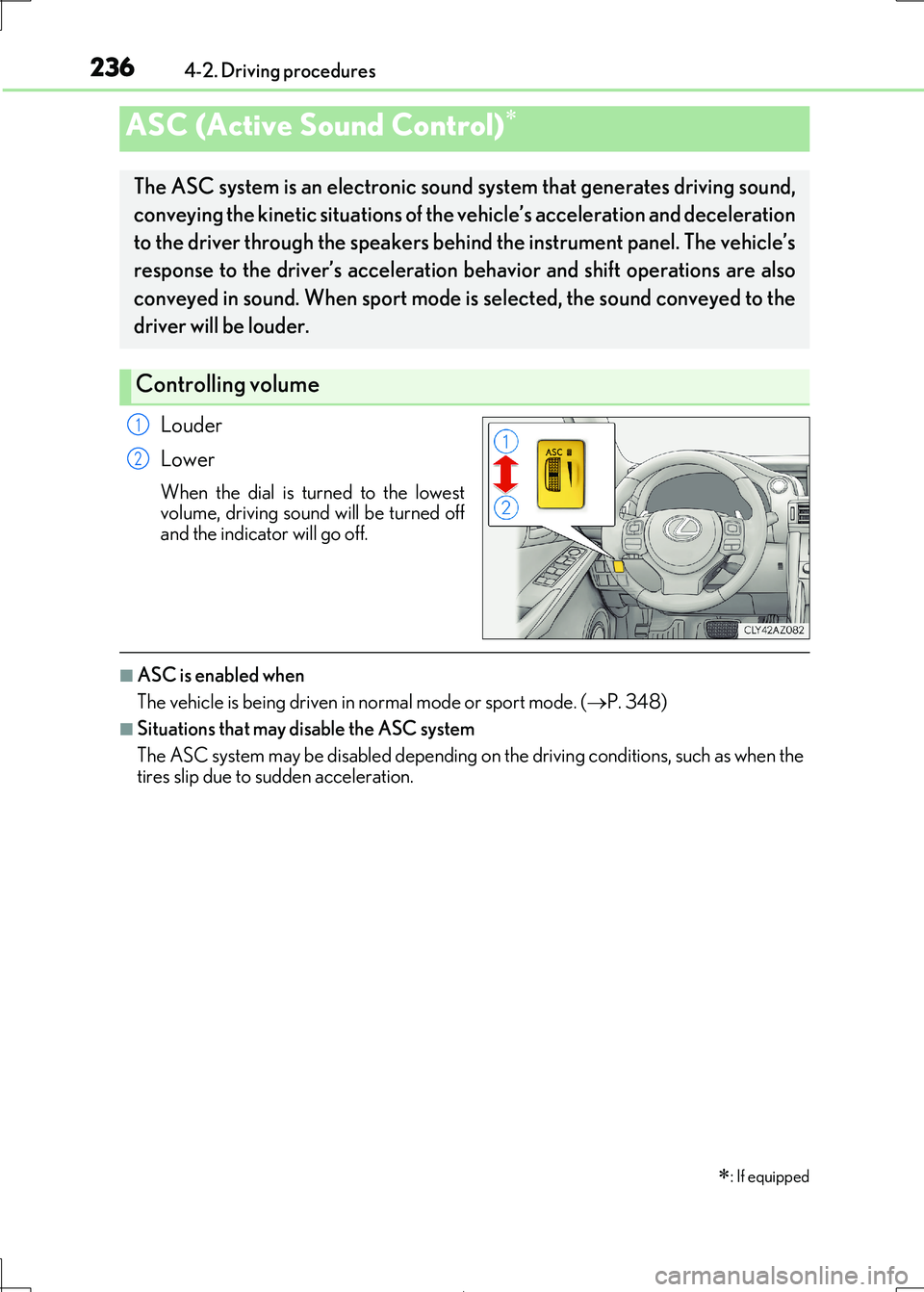
Louder
Lower
When the dial is turned to the lowest
volume, driving sound will be turned off
and the indicator will go off.
■ASC is enabled when
The vehicle is being driven in normal mode or sport mode. ( P. 348)
■Situations that may disable the ASC system
The ASC system may be disabled depending on the driving conditions, such as when the
tires slip due to sudden acceleration.
ASC (Active Sound Control)
: If equipped
The ASC system is an electronic soun d system that generates driving sound,
conveying the kinetic situations of the vehicle’s acceleration and deceleration
to the driver through the speakers behi nd the instrument panel. The vehicle’s
response to the driver’s acceleration behavior and shift operations are also
conveyed in sound. When sport mode is selected, the sound conveyed to the
driver will be louder.
Controlling volume
1
2
Page 247 of 692
2474-3. Operating the lights and wipers
4
Driving
IS300h_EE(OM53D89E)
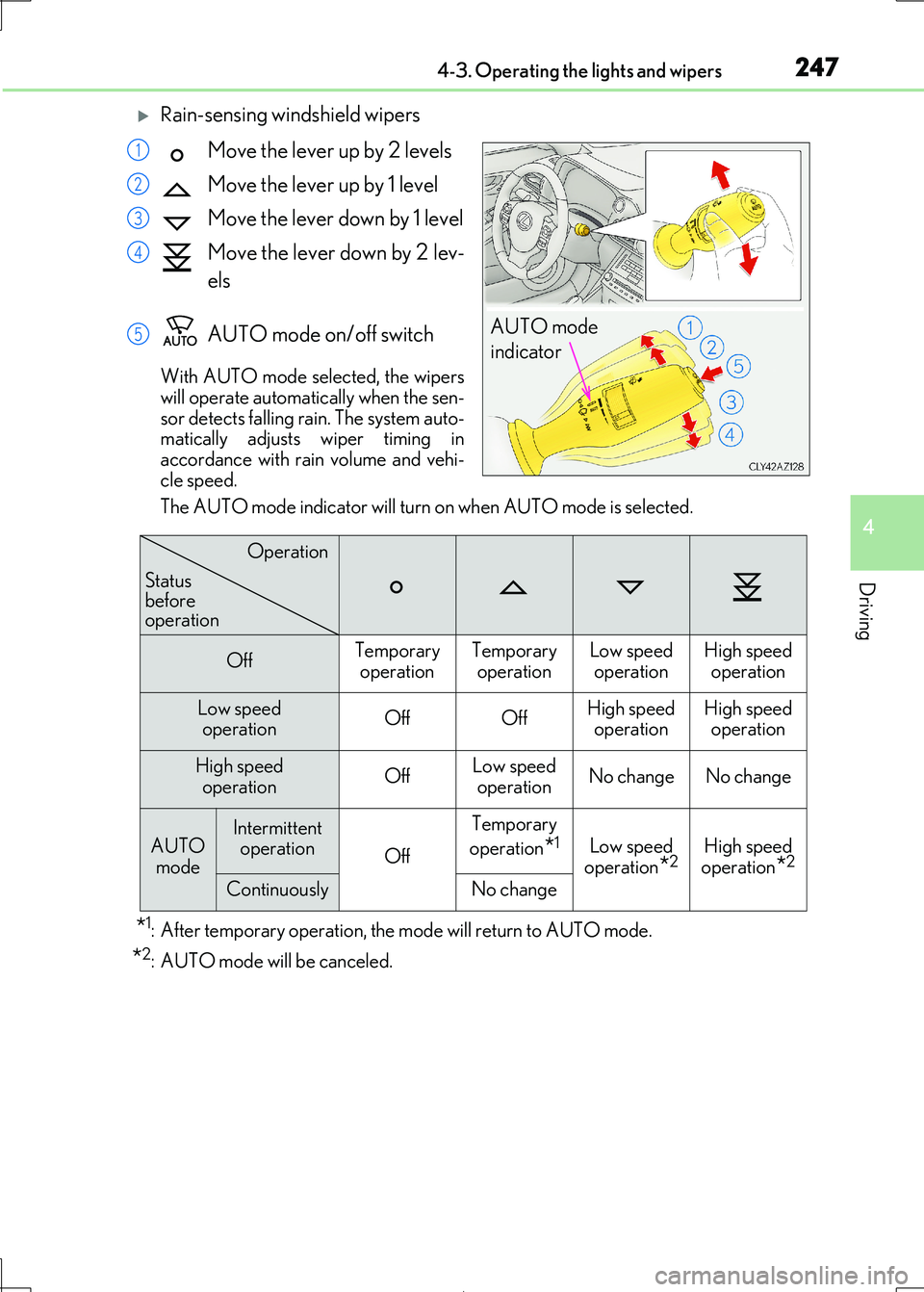
Rain-sensing windshield wipers
Move the lever up by 2 levels
Move the lever up by 1 level
Move the lever down by 1 level
Move the lever down by 2 lev-
els
AUTO mode on/off switch
With AUTO mode selected, the wipers
will operate automatically when the sen- sor detects falling rain . The system auto-
matically adjusts wiper timing in
accordance with rain volume and vehi- cle speed.
The AUTO mode indicator will turn on when AUTO mode is selected.
*1: After temporary operation, the mode will return to AUTO mode.
*2: AUTO mode will be canceled.
AUTO mode
indicator
1
2
3
4
5
OffTemporary
operation
Temporary
operation
Low speed
operation
High speed
operation
Low speed
operationOffOffHigh speed
operation
High speed
operation
High speed operationOffLow speedoperationNo changeNo change
AUTO
mode
Intermittent
operationOff
Temporary
operation*1Low speed
operation*2High speed
operation*2
ContinuouslyNo change
Operation
Status before operation
Page 251 of 692
2514-3. Operating the lights and wipers
4
Driving
IS300h_EE(OM53D89E)
■The windshield wiper and washer can be operated when
The power switch is in ON mode.
■Dripping prevention wiper sweep
After performing a washing and wiping operat ion several times, the wipers operate one
more time after a short delay to prevent dripping.
However, this final wiper operation will not be performed while driving.
■Effects of vehicle speed on wiper operation (vehicles with rain-sensing windshield wip-
ers)
Vehicle speed affects the following even when the wipers are not in AUTO mode.
●Intermittent wiper interval
●Wiper operation when the washer is being used (delay until drip prevention wiper
sweep occurs)
With low speed windshield wiper operation selected, wiper operation will be switched
from low speed to intermitte nt wiper operation only when the vehicle is stationary.
■Raindrop sensor (vehicles with rain-sensing windshield wipers)
●If the wiper is turned to AUTO mode while the power switch is in ON mode, the wipers
will operate once to show th at AUTO mode is activated.
●If the temperature of the raindrop sensor is 85°C (185°F) or higher, or -30°C (-22°F)
or lower, automatic operation may not occur. In this case, operate the wipers in any
mode other than AUTO mode.
■When the windshield wipers are in tempor ary operation (vehicles with rain-sensing
windshield wipers)
AUTO mode cannot be activated even if is pressed.
■If no windshield washer fluid sprays
Check that the washer nozzles are not blocked if there is washer fluid in the windshield
washer fluid reservoir.
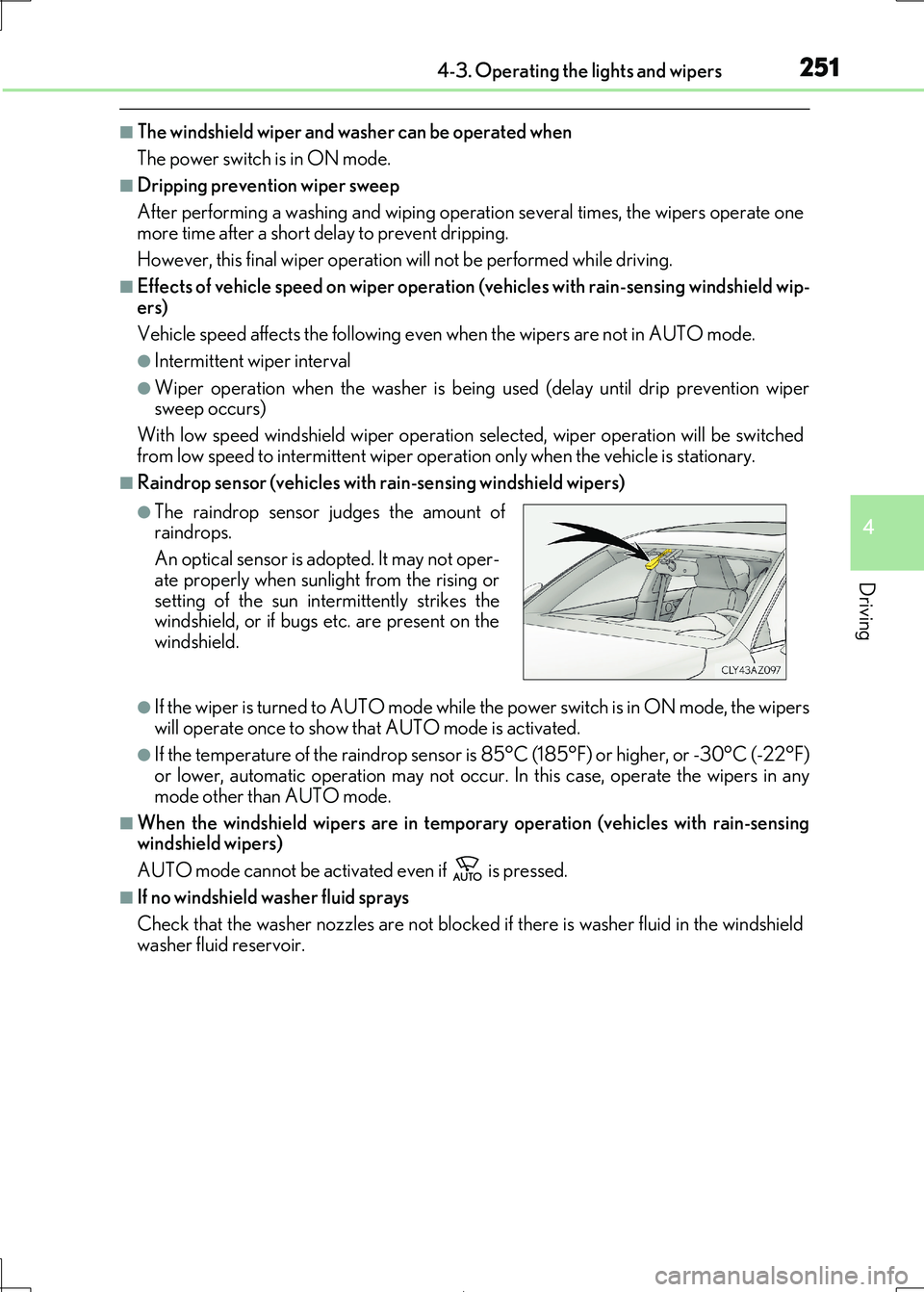
●The raindrop sensor judges the amount of
raindrops.
An optical sensor is ad opted. It may not oper-
ate properly when sunlight from the rising or
setting of the sun inte rmittently strikes the windshield, or if bugs etc. are present on the
windshield.
Page 292 of 692
2924-5. Using the driving support systems
IS300h_EE(OM53D89E)
●Side road speed signs may be detected and displayed (if positioned in sight of the cam-
era sensor) while the vehicle is traveling on the main road.
●Roundabout exit road speed signs may be detected and displayed (if positioned in sight
of the camera sensor) while traveling on a roundabout.
■When driving vehicle in country with different speed unit
Since RSA recognizes signs based on the set un it of the meter, it is necessary to change
the set unit of the meter. Adjust the set unit of the meter to the speed unit of signs in the
current location. ( P. 657)
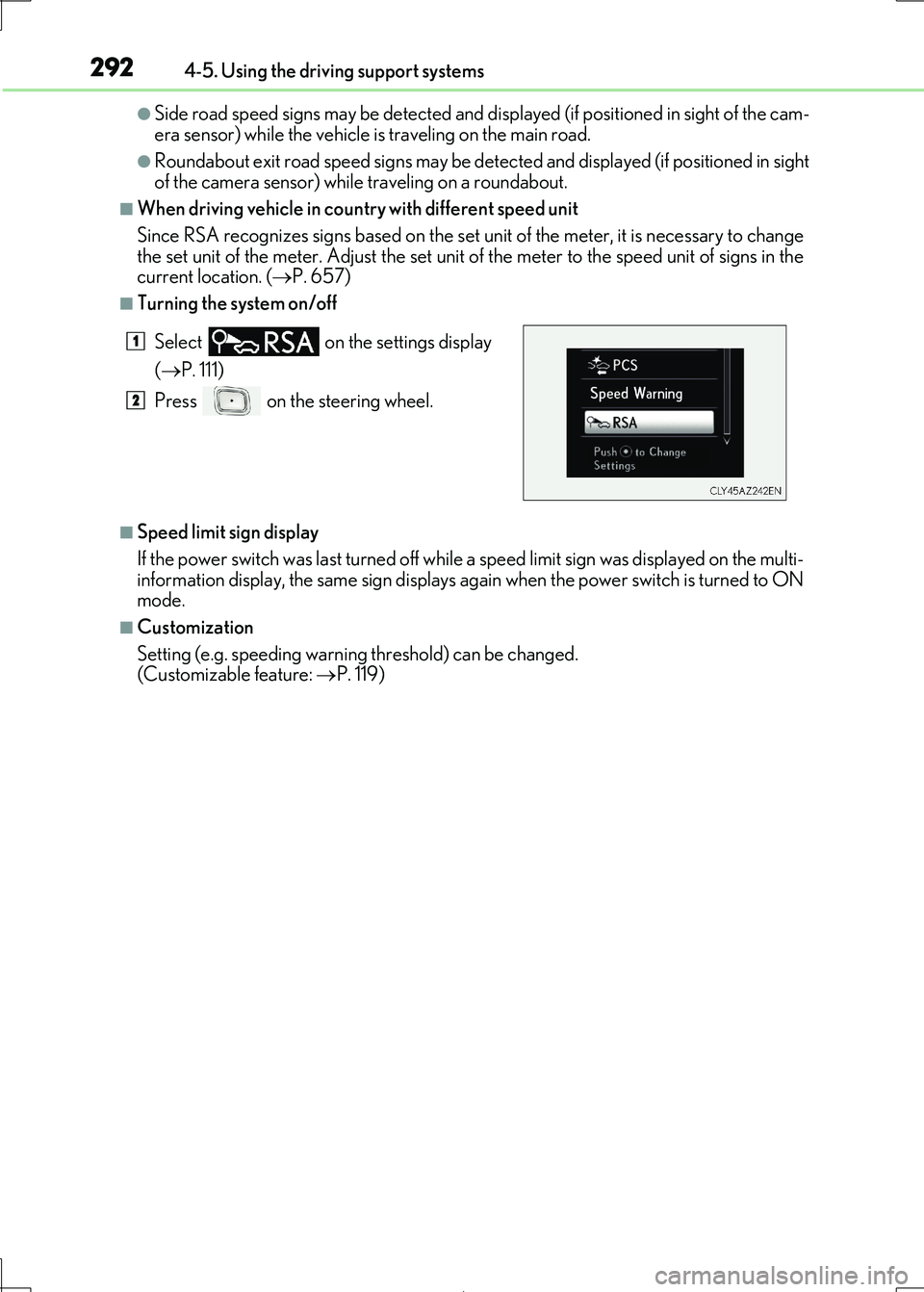
■Turning the system on/off
■Speed limit sign display
If the power switch was last turned off while a speed limit sign was displayed on the multi- information display, the same sign displays again when the power switch is turned to ON
mode.
■Customization
Setting (e.g. speeding warning threshold) can be changed.
(Customizable feature: P. 119)
Select on the settings display
( P. 111)
Press on the steering wheel.
1
2
Page 299 of 692
2994-5. Using the driving support systems
4
Driving
IS300h_EE(OM53D89E)
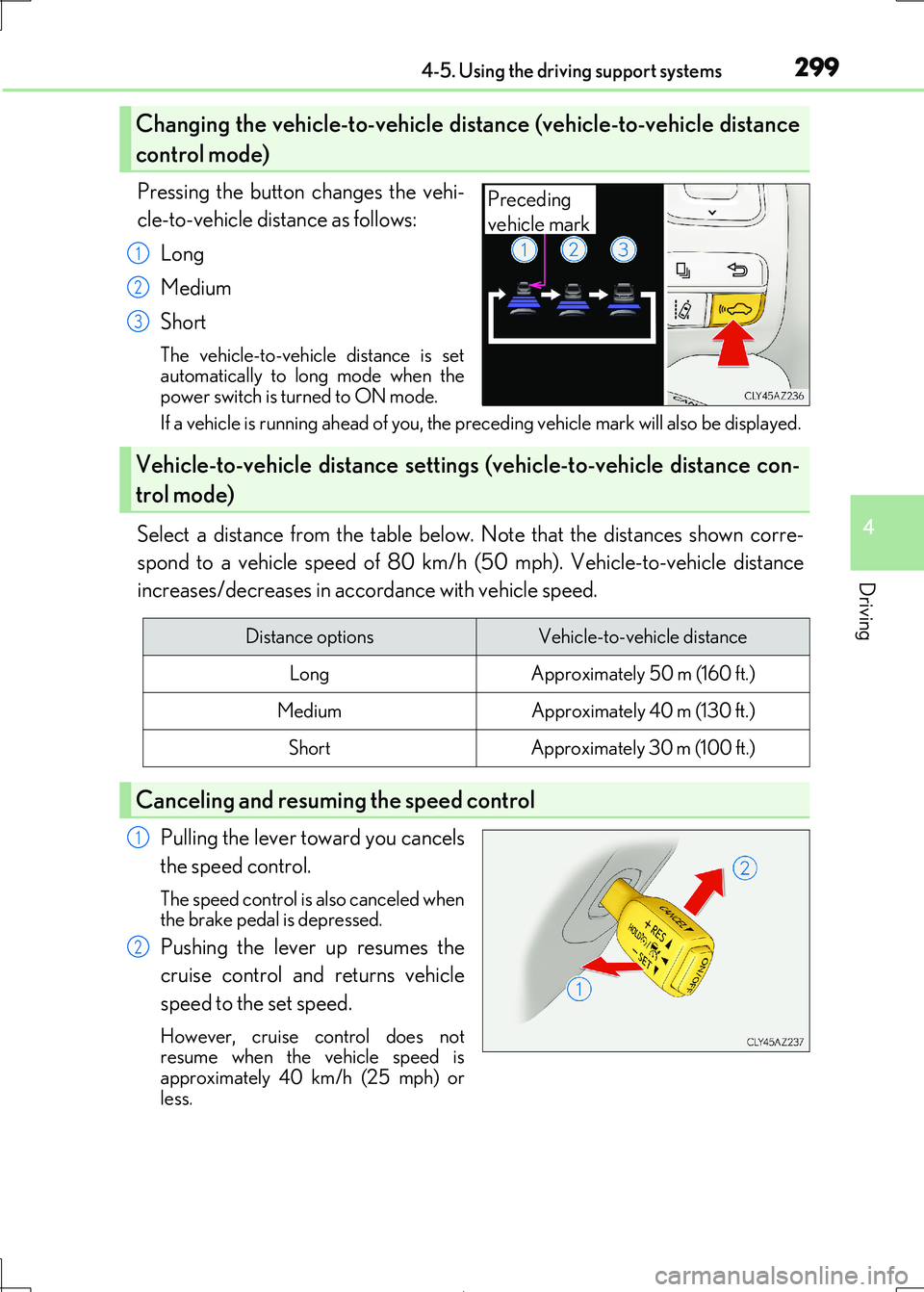
Pressing the button changes the vehi-
cle-to-vehicle distance as follows:
Long
Medium
Short
The vehicle-to-vehicle distance is set
automatically to long mode when the power switch is turned to ON mode.
If a vehicle is running ahead of you, the preceding vehicle mark will also be displayed.
Select a distance from the table below. Note that the distances shown corre-
spond to a vehicle speed of 80 km/h (50 mph). Vehicle-to-vehicle distance
increases/decreases in acco rdance with vehicle speed.
Pulling the lever toward you cancels
the speed control.
The speed control is also canceled when
the brake pedal is depressed.
Pushing the lever up resumes the
cruise control and returns vehicle
speed to the set speed.
However, cruise control does not
resume when the vehicle speed is
approximately 40 km/h (25 mph) or less.
Changing the vehicle-to-vehicle distance (vehicle-to-vehicle distance
control mode)
Preceding
vehicle mark
1
2
3
Vehicle-to-vehicle distance settings (vehicle-to-vehicle distance con-
trol mode)
Distance optionsVehicle-to-vehicle distance
LongApproximately 50 m (160 ft.)
MediumApproximately 40 m (130 ft.)
ShortApproximately 30 m (100 ft.)
Canceling and resuming the speed control
1
2
Page 301 of 692
3014-5. Using the driving support systems
4
Driving
IS300h_EE(OM53D89E)
When constant speed control mode is selected, your vehicle will maintain a set
speed without controlling the vehicle-to-veh icle distance. Select this mode only
when vehicle-to-vehicle distance contro l mode does not function correctly due
to a dirty radar sensor, etc.
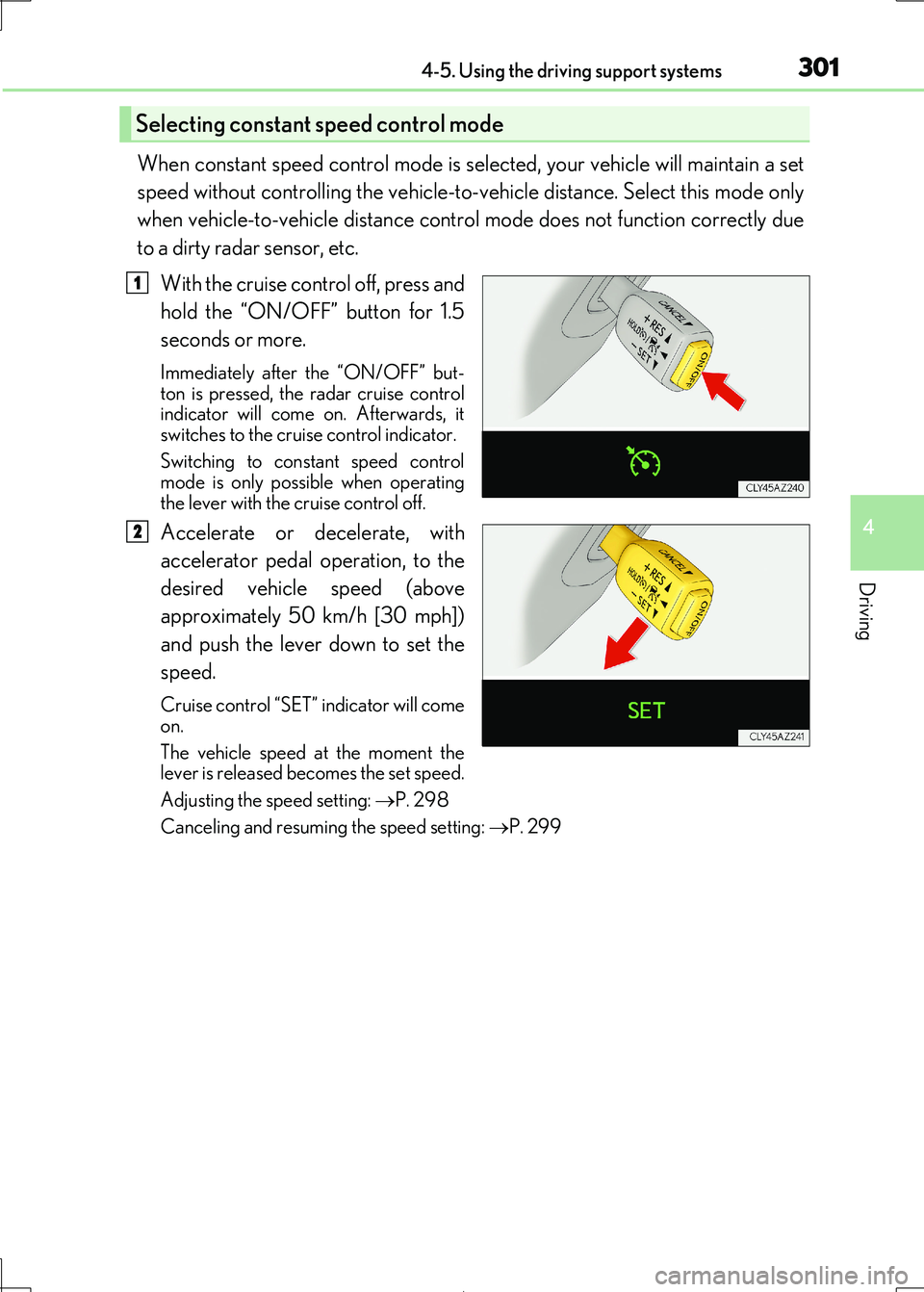
With the cruise control off, press and
hold the “ON/OFF” button for 1.5
seconds or more.
Immediately after the “ON/OFF” but- ton is pressed, the radar cruise control
indicator will come on. Afterwards, it
switches to the cruise control indicator.
Switching to constant speed control
mode is only possible when operating
the lever with the cruise control off.
Accelerate or decelerate, with
accelerator pedal operation, to the
desired vehicle speed (above
approximately 50 km/h [30 mph])
and push the lever down to set the
speed.
Cruise control “SET” indicator will come
on.
The vehicle speed at the moment the lever is released becomes the set speed.
Adjusting the speed setting: P. 298
Canceling and resuming the speed setting: P. 299
Selecting constant speed control mode
1
2
Page 302 of 692
3024-5. Using the driving support systems
IS300h_EE(OM53D89E)
■Dynamic radar cruise control can be set when
●The shift lever is in D or range 4 or higher of S has been selected.
●Range 4 or higher of D has been selected by using the paddle shift switch.
●Vehicle speed is above approximately 50 km/h (30 mph).
■Accelerating after setting the vehicle speed
The vehicle can accelerate by operating the accelerator pedal. After accelerating, the set speed resumes. However, du ring vehicle-to-vehicle distance control mode, the vehi-
cle speed may decrease below the set speed in order to maintain the distance to the pre-
ceding vehicle.
■Automatic cancelation of vehicle-to-vehicle distance control mode
Vehicle-to-vehicle distance control mode is automatically canceled in the following situ-
ations.
●Actual vehicle speed falls below approximately 40 km/h (25 mph).
●VSC is activated.
●TRC is activated for a period of time.
●When the VSC or TRC system is turned off by pressing the VSC OFF switch.
●When snow mode is set.
●The sensor cannot detect correctly because it is covered in some way.
●Pre-collision braking is activated.
If vehicle-to-vehicle distance control mode is automatically canceled for any other rea-
son, there may be a malfunction in the syst em. Contact any authorized Lexus retailer or Lexus authorized repairer, or any reliable repairer.