mirror Lexus IS300h 2017 User Guide
[x] Cancel search | Manufacturer: LEXUS, Model Year: 2017, Model line: IS300h, Model: Lexus IS300h 2017Pages: 692, PDF Size: 163.7 MB
Page 102 of 692

1022. Instrument cluster
IS300h_EE(OM53D89E)
The indicators inform the driver of the operating state of the vehicle’s various sys-
tems.
Indicators
Turn signal indicator
( P. 233)
*2
(if equipped)
LDA (Lane Departure
Alert) indicator ( P. 279)
Tail light indicator
( P. 237)
(if equipped)
Lexus parking assist-sensor
indicator ( P. 309)
Headlight high beam indi-
cator ( P. 237)
*1, 2 Slip indicator
( P. 353)
*1
(if equipped)
Automatic High Beam indi-
cator ( P. 240)
*1VSC OFF indicator
( P. 354)
Rear fog light indicator
( P. 244)
*1, 3
(if equipped)
PCS warning light
( P. 269)
(if equipped)
Cruise control indicator ( P. 293, 305)
*4, 5
(if equipped)
BSM (Blind Spot Monitor)
outside rear view mirror
indicators ( P. 334)
(if equipped)
Dynamic radar cruise con-
trol indicator ( P. 293)
*6Security indicator
( P. 86, 92)
(if equipped)
Cruise control “SET” indica-
tor ( P. 293, 305)
*7Low outside temperature
indicator ( P. 105)
(if equipped)
LDA (Lane Departure
Alert) indicator ( P. 279)
“READY” indicator
( P. 219)
(if equipped)
LDA (Lane Departure Alert) indicator ( P. 279) EV indicator ( P. 79)
Page 103 of 692
1032. Instrument cluster
2
Instrument cluster
IS300h_EE(OM53D89E)
*1: These lights turn on when the power switch is turned to ON mode to indicate that a
system check is being performe d. They will turn off after the hybrid system is on, or
after a few seconds. There may be a malfunct ion in a system if a light does not come
on, or turn off. Have the vehicle inspected by any authorized Lexus retailer or Lexus
authorized repairer, or any reliable repairer.
*2: The light flashes to indicate that the system is operating.
*3: The light comes on when the system is turned off.
*4: In order to confirm operation, the BSM outside rear view mirror indicators illuminate
in the following situations:
• When the power switch is turned to ON mode while the BSM main switch is set to
ON.
• When the BSM main switch is set to ON while the power switch is in ON mode.
If the system is functioning correctly, the BSM outside rear view mirror indicators will
turn off after a few seconds.
If the BSM outside rear view mirror indicato rs do not illuminate or do not turn off, there may be a malfunction in the system.
If this occurs, have the vehicle inspected by any authorized Lexus retailer or Lexus
authorized repairer, or any reliable repairer.
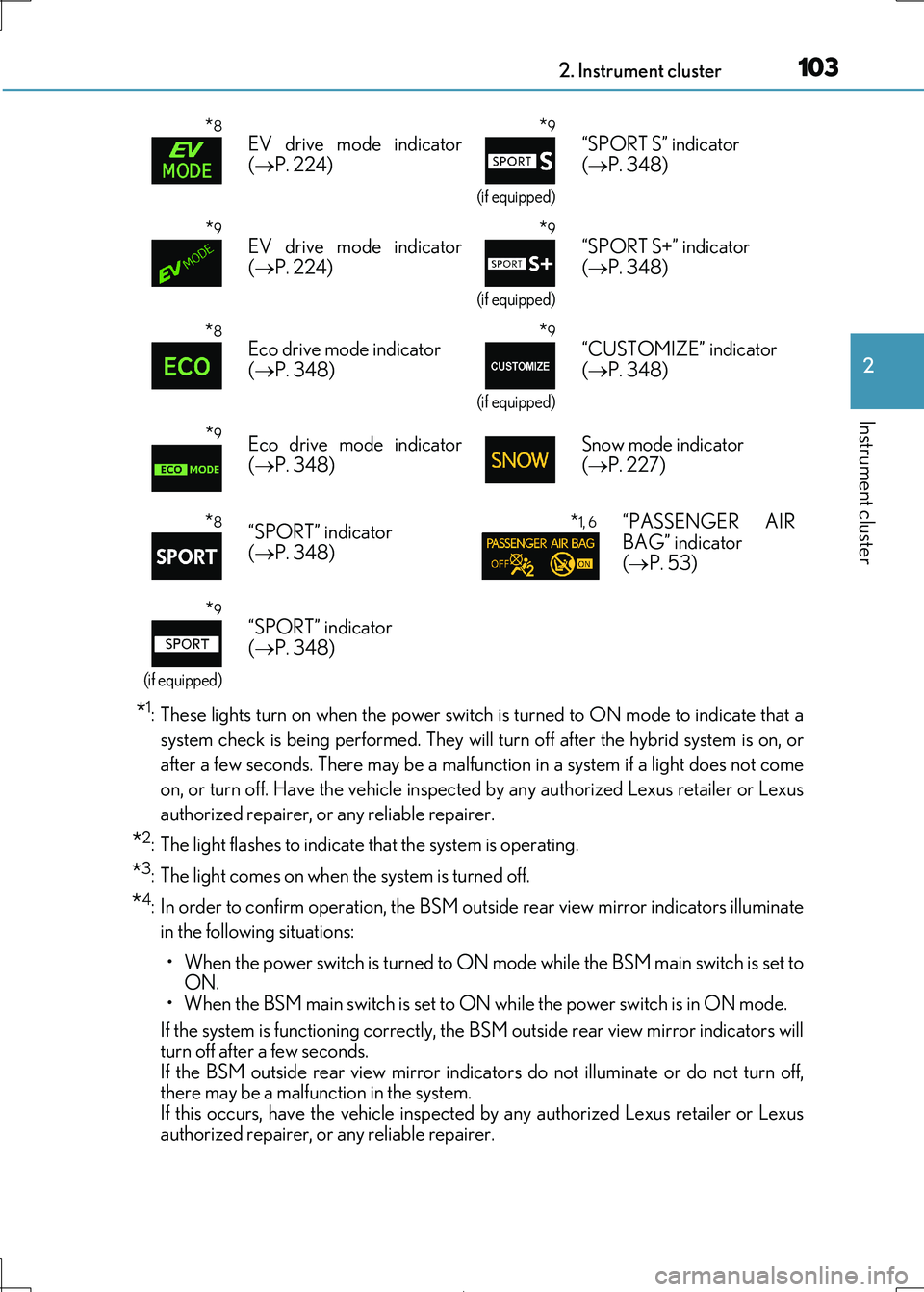
*8EV drive mode indicator
( P. 224)
*9
(if equipped)
“SPORT S” indicator
( P. 348)
*9EV drive mode indicator
( P. 224)
*9
(if equipped)
“SPORT S+” indicator
( P. 348)
*8Eco drive mode indicator
( P. 348)
*9
(if equipped)
“CUSTOMIZE” indicator
( P. 348)
*9Eco drive mode indicator ( P. 348) Snow mode indicator ( P. 227)
*8“SPORT” indicator
( P. 348)
*1, 6“PASSENGER AIR
BAG” indicator ( P. 53)
*9
(if equipped)
“SPORT” indicator ( P. 348)
Page 104 of 692
1042. Instrument cluster
IS300h_EE(OM53D89E)
*5: This light illuminates on the outside rear view mirrors.
*6: This light illuminates on the center panel.
*7: When the outside temperature is approximately 3°C (37°F) or lower, the indicator
will flash for approximately 10 seconds, then stay on.
*8:Except F SPORT models
*9: F SPORT models
WARNING
■If a safety system warning light does not come on
Should a safety system light such as the ABS and SRS warning light not come on when you start the hybrid system, this could mean that these systems are not available to help
protect you in an accident, which could result in death or serious injury. Have the vehi-
cle inspected by any authorized Lexus retailer or Lexus authorized repairer, or any reli- able repairer immediat ely if this occurs.
Page 137 of 692

137
3
Operation of
each component
IS300h_EE(OM53D89E)
3-1. Key information
Keys .................................................. 138
3-2. Opening, closing and
locking the doors and
trunk
Doors ................................................144
Trunk .................................................. 151
Smart entry & start system .......157
3-3. Adjusting the seats
Front seats.......................................173
Rear seats (folding type) ...........175
Driving position memory .......... 177
Head restraints ............................ 182
3-4. Adjusting the steering
wheel and mirrors
Steering wheel ............................. 185
Inside rear view mirror ............. 187
Outside rear view mirrors....... 189
3-5. Opening, closing the
windows and moon roof
Power windows ........................... 193
Moon roof .......................................197
Page 177 of 692
1773-3. Adjusting the seats
3
Operation of each component
IS300h_EE(OM53D89E)
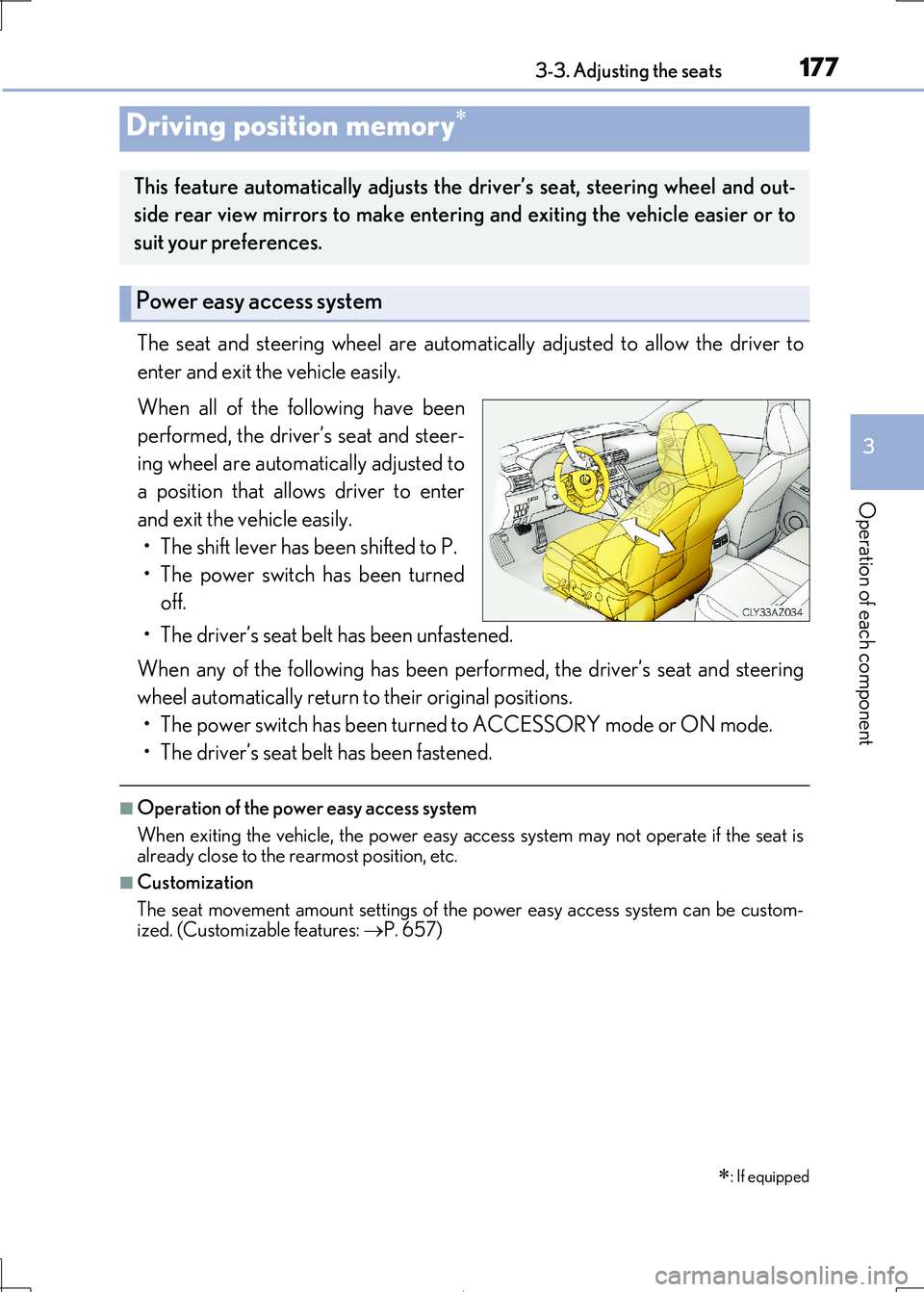
The seat and steering wheel are automatically adjusted to allow the driver to
enter and exit the vehicle easily.
When all of the following have been
performed, the driver’s seat and steer-
ing wheel are automatically adjusted to
a position that allows driver to enter
and exit the vehicle easily.
• The shift lever has been shifted to P.
• The power switch has been turned
off.
• The driver’s seat belt has been unfastened.
When any of the following has been perf ormed, the driver’s seat and steering
wheel automatically return to their original positions.
• The power switch has been turned to ACCESSORY mode or ON mode.
• The driver’s seat belt has been fastened.
■Operation of the power easy access system
When exiting the vehicle, the power easy access system may not operate if the seat is
already close to the rearmost position, etc.
■Customization
The seat movement amount settings of th e power easy access system can be custom-
ized. (Customizable features: P. 657)
Driving position memory
: If equipped
This feature automatically adjusts the driver’s seat, steering wheel and out-
side rear view mirrors to make enteri ng and exiting the vehicle easier or to
suit your preferences.
Power easy access system
Page 178 of 692
1783-3. Adjusting the seats
IS300h_EE(OM53D89E)
Your preferred driving position (the position of the driver’s seat, steering wheel
and outside rear view mirrors) can be re corded and recalled by pressing a but-
ton.
Three different driving positions can be recorded into memory.
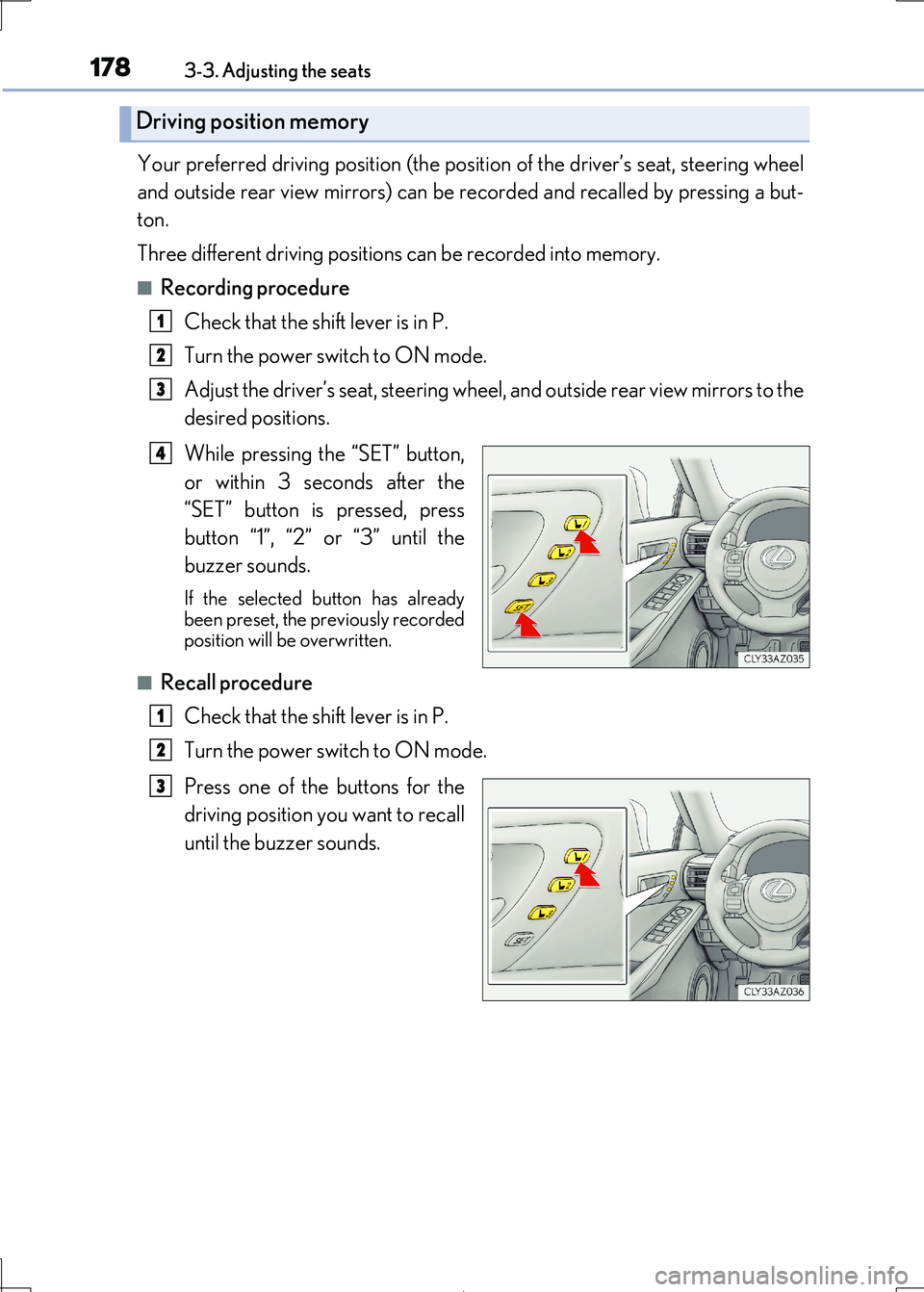
■Recording procedure
Check that the shift lever is in P.
Turn the power switch to ON mode.
Adjust the driver’s seat, steering wheel, and outside rear view mirrors to the
desired positions.
While pressing the “SET” button,
or within 3 seconds after the
“SET” button is pressed, press
button “1”, “2” or “3” until the
buzzer sounds.
If the selected button has already been preset, the previously recorded
position will be overwritten.
■Recall procedure
Check that the shift lever is in P.
Turn the power switch to ON mode.
Press one of the buttons for the
driving position you want to recall
until the buzzer sounds.
Driving position memory
1
2
3
4
1
2
3
Page 180 of 692
1803-3. Adjusting the seats
IS300h_EE(OM53D89E)
Each electronic key (including a card key) can be registered to recall your pre-
ferred driving position.
■Registering procedure
Record your driving position to button “1”, “2” or “3” before performing the
following:
Carry only the key you want to register, and then close the driver’s door. If 2 or
more keys are in the vehicle, the drivin g position cannot be recorded properly.
Check that the shift lever is in P.
Turn the power switch to ON mode.
Recall the driving position that you want to record.
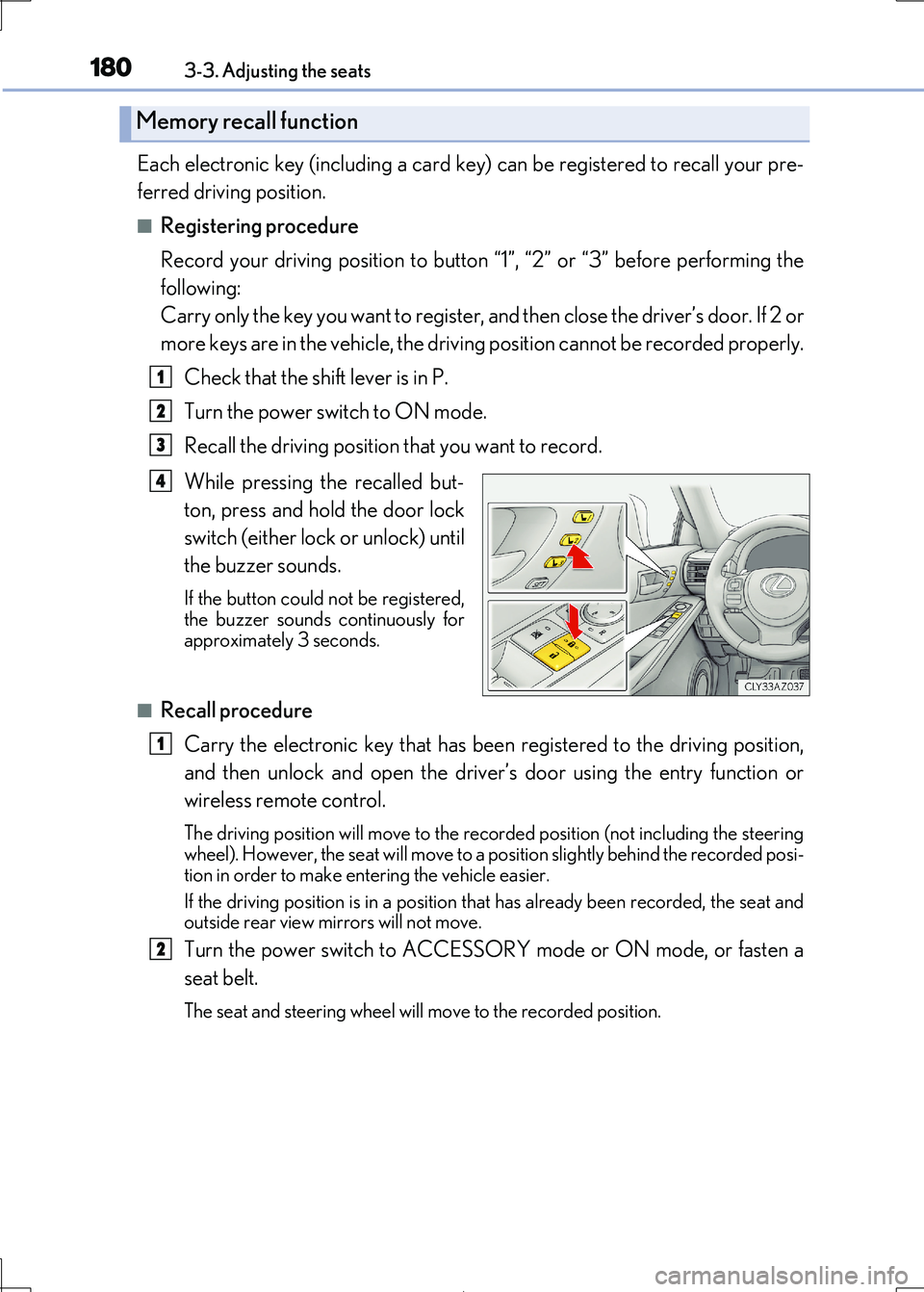
While pressing the recalled but-
ton, press and hold the door lock
switch (either lock or unlock) until
the buzzer sounds.
If the button could not be registered, the buzzer sounds continuously for
approximately 3 seconds.
■Recall procedure
Carry the electronic key that has been registered to the driving position,
and then unlock and open the driver ’s door using the entry function or
wireless remote control.
The driving position will move to the reco rded position (not including the steering
wheel). However, the se at will move to a position slightly behind the recorded posi-
tion in order to make en tering the vehicle easier.
If the driving position is in a position th at has already been recorded, the seat and
outside rear view mirrors will not move.
Turn the power switch to ACCESSORY mode or ON mode, or fasten a
seat belt.
The seat and steering wheel will move to the recorded position.
Memory recall function
1
2
3
4
1
2
Page 185 of 692
185
3
Operation of each component
IS300h_EE(OM53D89E)
3-4. Adjusting the steering wheel and mirrors
Power type
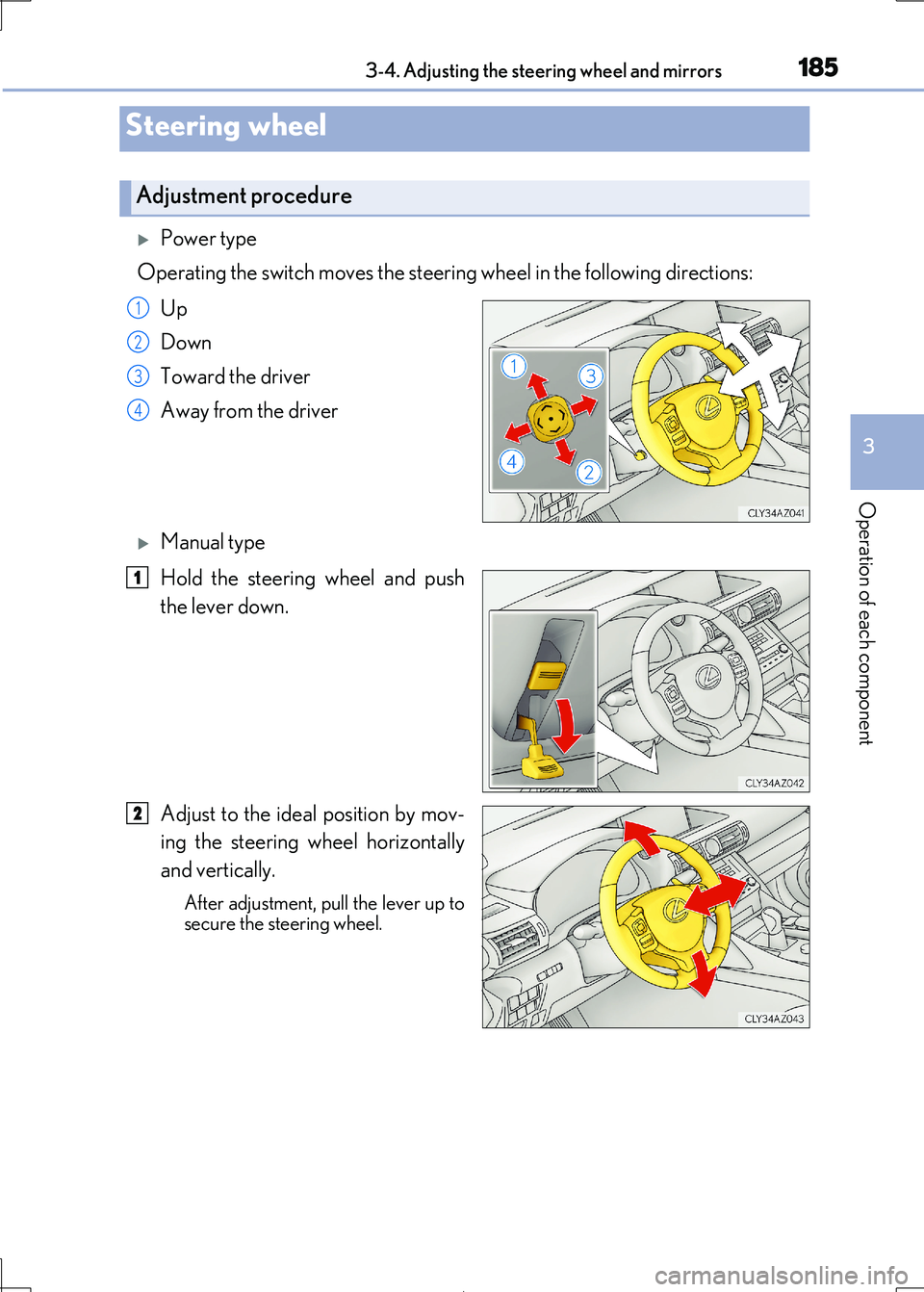
Operating the switch moves the steerin g wheel in the following directions:
Up
Down
Toward the driver
Away from the driver
Manual type
Hold the steering wheel and push
the lever down.
Adjust to the ideal position by mov-
ing the steering wheel horizontally
and vertically.
After adjustment, pull the lever up to
secure the steering wheel.
Steering wheel
Adjustment procedure
1
2
3
4
1
2
Page 186 of 692
1863-4. Adjusting the steering wheel and mirrors
IS300h_EE(OM53D89E)
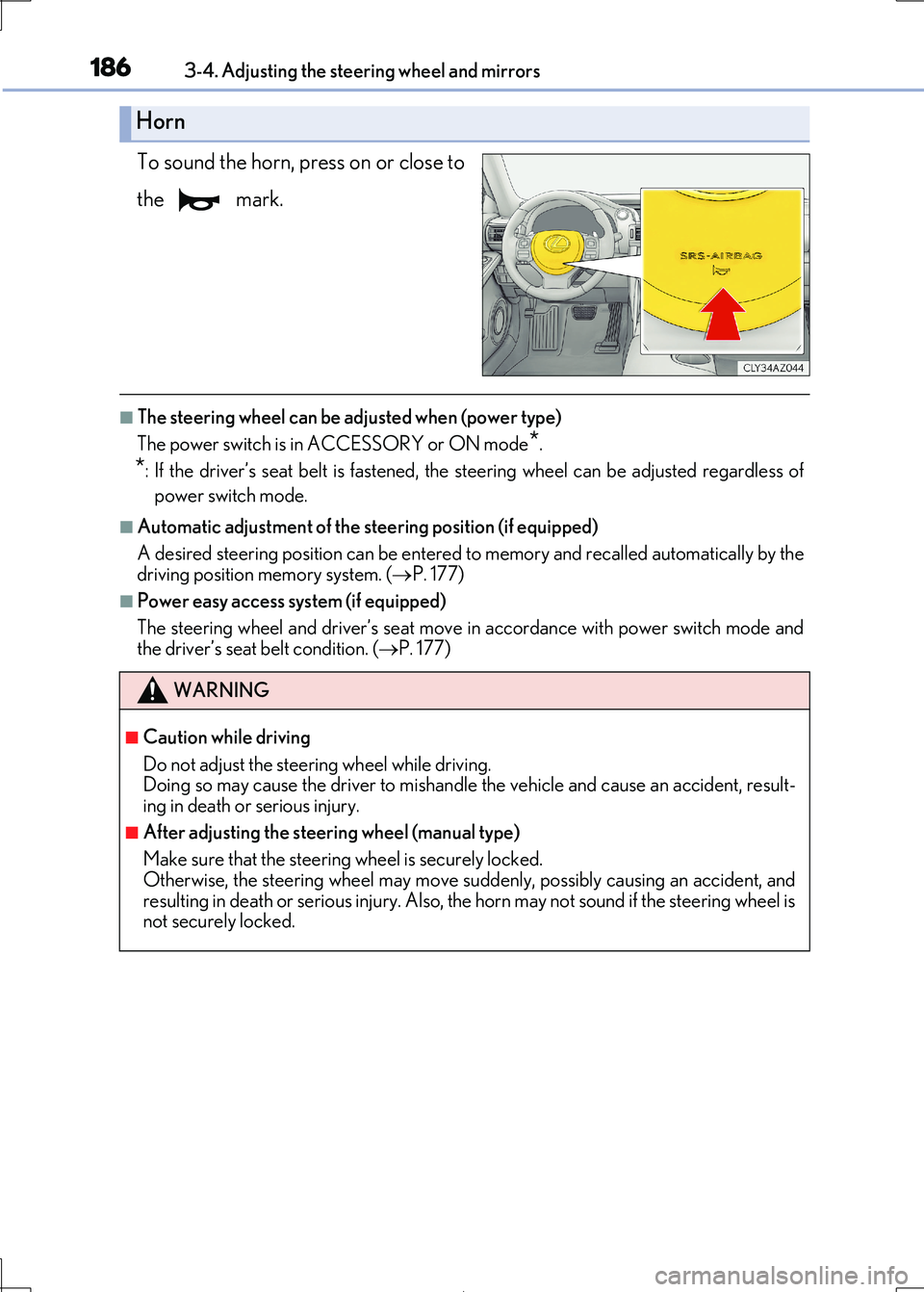
To sound the horn, press on or close to
the mark.
■The steering wheel can be adjusted when (power type)
The power switch is in ACCESSORY or ON mode*.
*: If the driver’s seat belt is fastened, the steering wheel can be adjusted regardless of
power switch mode.
■Automatic adjustment of the steering position (if equipped)
A desired steering position ca n be entered to memory and recalled automatically by the
driving position memory system. ( P. 177)
■Power easy access system (if equipped)
The steering wheel and driver’s seat move in accordance with power switch mode and
the driver’s seat belt condition. ( P. 177)
Horn
WARNING
■Caution while driving
Do not adjust the steering wheel while driving.
Doing so may cause the driver to mishandle the vehicle and cause an accident, result- ing in death or serious injury.
■After adjusting the steering wheel (manual type)
Make sure that the steering wheel is securely locked. Otherwise, the steering wheel may move su ddenly, possibly causing an accident, and
resulting in death or serious injury. Also, th e horn may not sound if the steering wheel is
not securely locked.
Page 187 of 692
1873-4. Adjusting the steering wheel and mirrors
3
Operation of each component
IS300h_EE(OM53D89E)
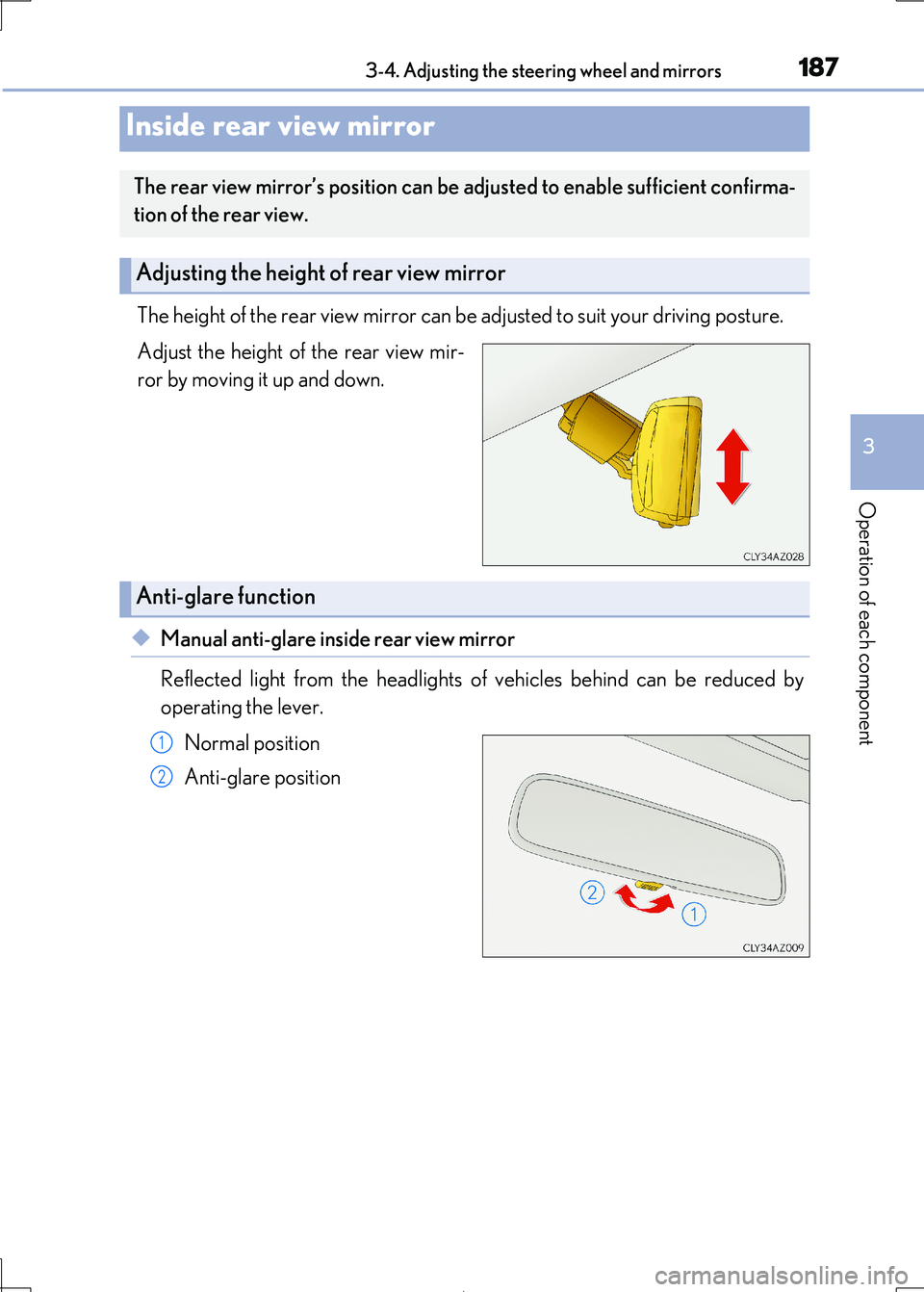
The height of the rear view mirror can be adjusted to suit your driving posture.
Adjust the height of the rear view mir-
ror by moving it up and down.
◆Manual anti-glare insi de rear view mirror
Reflected light from the headlights of vehicles behind can be reduced by
operating the lever.
Normal position
Anti-glare position
Inside rear view mirror
The rear view mirror’s position can be adjusted to enable sufficient confirma-
tion of the rear view.
Adjusting the height of rear view mirror
Anti-glare function
1
2