sport mode Lexus IS300h 2017 User Guide
[x] Cancel search | Manufacturer: LEXUS, Model Year: 2017, Model line: IS300h, Model: Lexus IS300h 2017Pages: 692, PDF Size: 163.7 MB
Page 114 of 692
1142. Instrument cluster
IS300h_EE(OM53D89E)
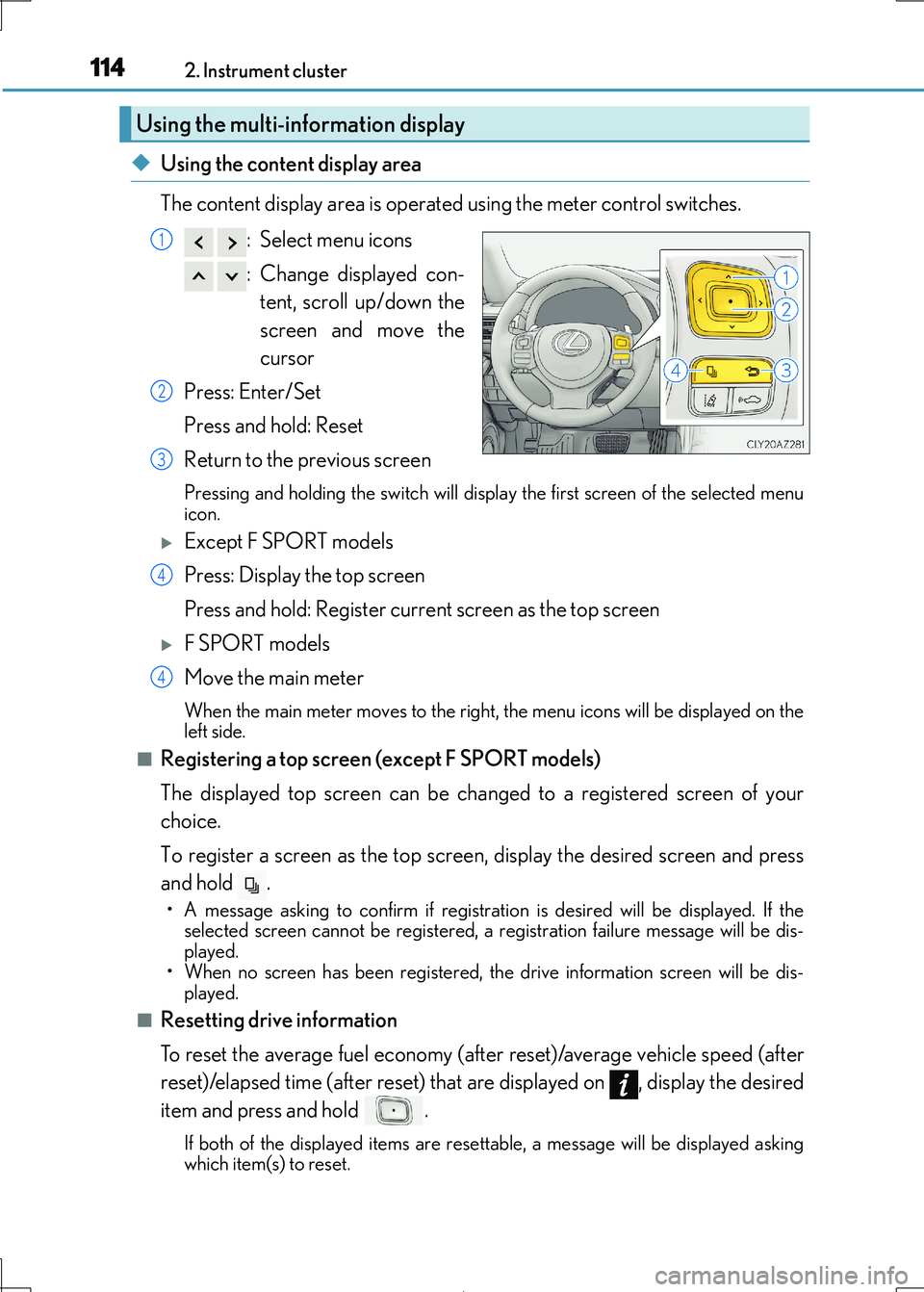
◆Using the content display area
The content display area is operated using the meter control switches.
: Select menu icons
: Change displayed con-
tent, scroll up/down the
screen and move the
cursor
Press: Enter/Set
Press and hold: Reset
Return to the previous screen
Pressing and holding the switch will display the first screen of the selected menu
icon.
Except F SPORT models
Press: Display the top screen
Press and hold: Register current screen as the top screen
F SPORT models
Move the main meter
When the main meter moves to the right, the menu icons will be displayed on the
left side.
■Registering a top screen (except F SPORT models)
The displayed top screen can be changed to a registered screen of your
choice.
To register a screen as the top screen, display the desired screen and press
and hold .
• A message asking to confirm if registrati on is desired will be displayed. If the selected screen canno t be registered, a registration failure message will be dis-
played.
• When no screen has been registered, the drive information screen will be dis-
played.
■Resetting drive information
To reset the average fuel economy (after reset)/average vehicle speed (after
reset)/elapsed time (after reset) that are displayed on , display the desired
item and press and hold .
If both of the disp layed items are resettable, a message will be displayed asking
which item(s) to reset.
Using the multi-information display
1
2
3
4
4
Page 116 of 692
1162. Instrument cluster
IS300h_EE(OM53D89E)
F SPORT models: Some drive information items can only be displayed when the
main meter is in the center position or when it is moved to the right.
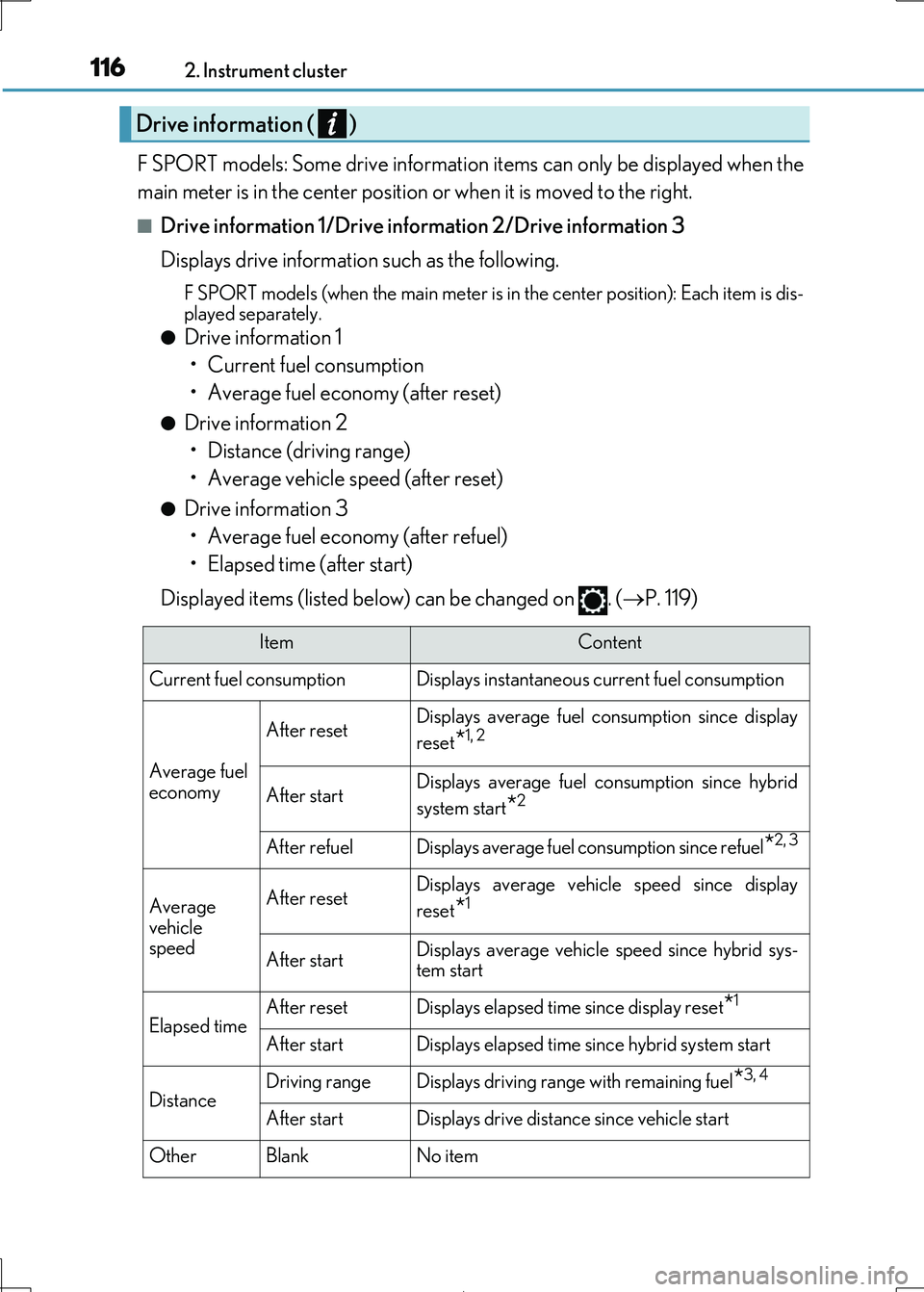
■Drive information 1/Drive information 2/Drive information 3
Displays drive information such as the following.
F SPORT models (when the main meter is in the center position): Each item is dis-
played separately.
●Drive information 1
• Current fuel consumption
• Average fuel economy (after reset)
●Drive information 2
• Distance (driving range)
• Average vehicle speed (after reset)
●Drive information 3
• Average fuel economy (after refuel)
• Elapsed time (after start)
Displayed items (listed below) can be changed on . ( P. 119)
Drive information ( )
ItemContent
Current fuel consumption Displays in stantaneous current fuel consumption
Average fuel
economy
After resetDisplays average fuel consumption since display
reset*1, 2
After startDisplays average fuel consumption since hybrid
system start*2
After refuelDisplays average fuel consumption since refuel*2, 3
Average
vehicle speed
After resetDisplays average vehicle speed since display
reset*1
After startDisplays average vehicle speed since hybrid sys-
tem start
Elapsed timeAfter resetDisplays elapsed time since display reset*1
After startDisplays elapsed time since hybrid system start
DistanceDriving rangeDisplays driving range with remaining fuel*3, 4
After startDisplays drive distance since vehicle start
OtherBlankNo item
Page 117 of 692
1172. Instrument cluster
2
Instrument cluster
IS300h_EE(OM53D89E)
*1:Resetting: P. 114
*2: Use the displayed fuel consumption as a reference.
*3: When only a small amount of fuel is added to the tank, the display may not be
updated.
When refueling, turn the power switch off. If the vehicle is refueled without turning the
power switch off, the display may not be updated.
*4: This distance is computed based on your average fuel consumption. As a result, the
actual distance that can be driven may differ from that displayed.
■Energy monitor
P. 127
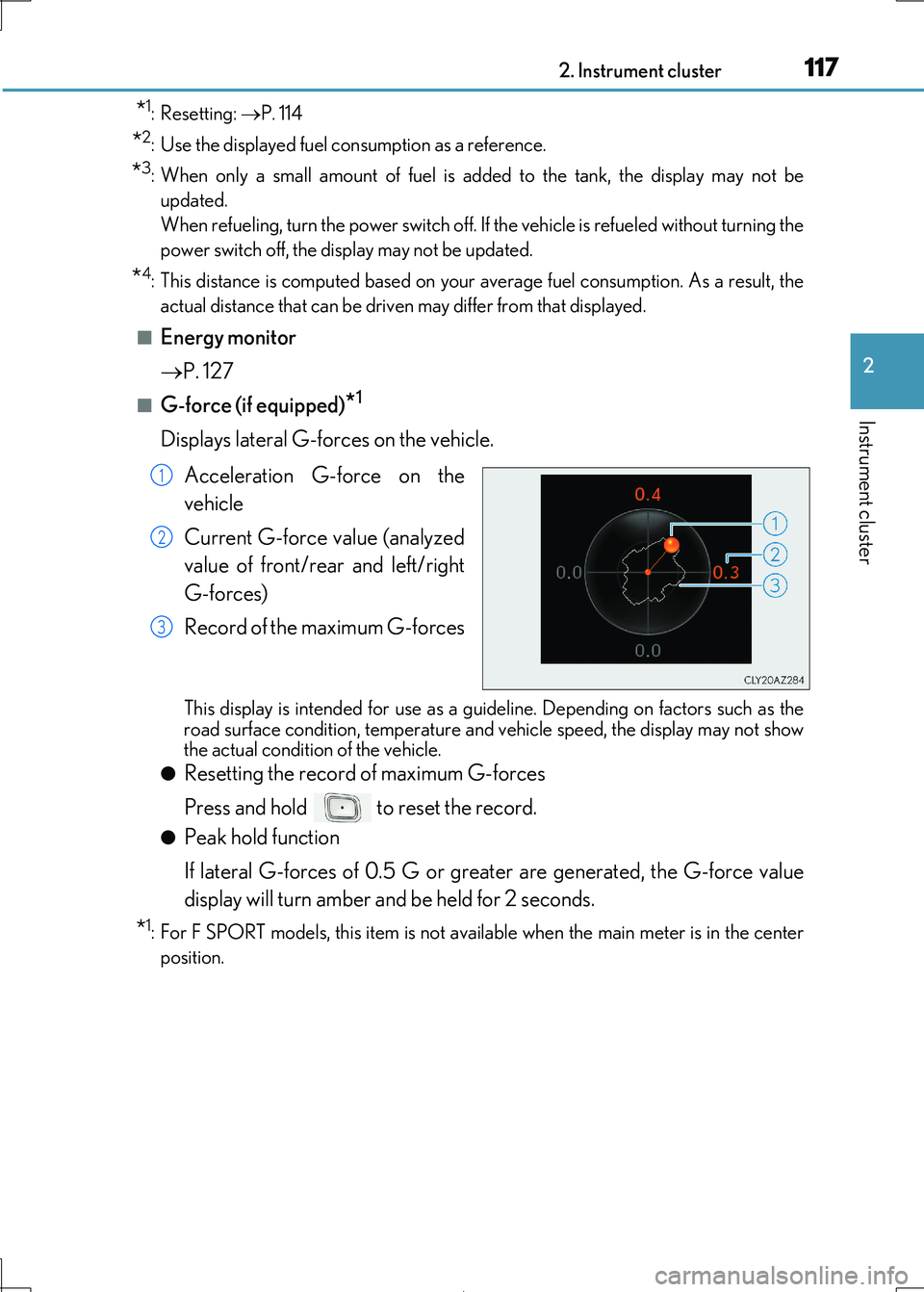
■G-force (if equipped)*1
Displays lateral G-forces on the vehicle.
Acceleration G-force on the
vehicle
Current G-force value (analyzed
value of front/rear and left/right
G-forces)
Record of the maximum G-forces
This display is intended fo r use as a guideline. Depending on factors such as the road surface condition, temperature and vehicle speed, the display may not show
the actual condition of the vehicle.
●Resetting the record of maximum G-forces
Press and hold to reset the record.
●Peak hold function
If lateral G-forces of 0.5 G or greater are generated, the G-force value
display will turn amber and be held for 2 seconds.
*1: For F SPORT models, this item is not ava ilable when the main meter is in the center
position.
1
2
3
Page 118 of 692
1182. Instrument cluster
IS300h_EE(OM53D89E)
■Sway warning (if equipped)*1
Detects the sway of the vehicle within a lane, which is often associated with a
decrease in the driver’s at tention level, and displays the decrease in attention
using a bar display.
The shorter the bar length, the more the driver may need to rest.
This display is a part of the LDA (Lane Departure Alert with steering control) sys-
tem. The display is enabled when the op erating conditions of the vehicle sway warning are met. ( P. 279)
*1: For F SPORT models, this item is not available when the main meter is in the center
position.
■Units (if equipped)*2
The units of measure used can be changed while driving.
Unlike the units setting performed on , the units setting performed on can
be changed while driving.
*2: For F SPORT models, this item is not available when the main meter is in the right-side
position.
■Blank (No items)
Displays no drive information contents.
Page 122 of 692
1222. Instrument cluster
IS300h_EE(OM53D89E)
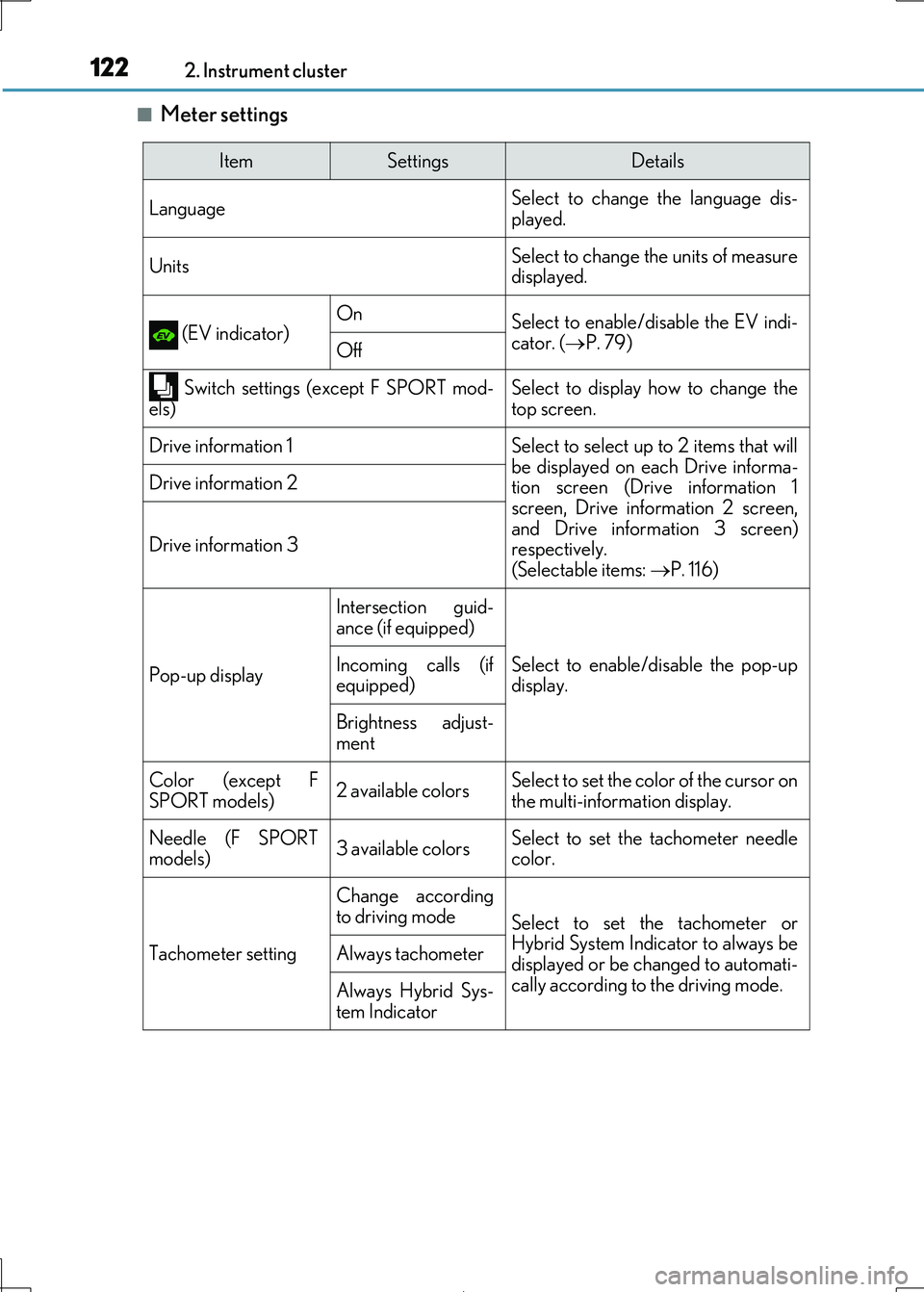
■Meter settings
ItemSettingsDetails
Language Select to change the language dis-
played.
UnitsSelect to change the units of measure
displayed.
(EV indicator)OnSelect to enable/dis able the EV indi-
cator. ( P. 79)Off
Switch settings (except F SPORT mod- els)Select to display how to change thetop screen.
Drive information 1Select to select up to 2 items that will
be displayed on ea ch Drive informa-
tion screen (Drive information 1 screen, Drive information 2 screen,
and Drive information 3 screen)
respectively. (Selectable items: P. 116)
Drive information 2
Drive information 3
Pop-up display
Intersection guid-
ance (if equipped)
Select to enable/disable the pop-up
display.
Incoming calls (if
equipped)
Brightness adjust-
ment
Color (except F SPORT models)2 available colorsSelect to set the color of the cursor onthe multi-information display.
Needle (F SPORT
models)3 available colorsSelect to set the tachometer needle
color.
Tachometer setting
Change according
to driving modeSelect to set the tachometer or Hybrid System Indicator to always be
displayed or be changed to automati-
cally according to the driving mode.
Always tachometer
Always Hybrid Sys- tem Indicator
Page 123 of 692

1232. Instrument cluster
2
Instrument cluster
IS300h_EE(OM53D89E)
Rev indicator (F SPORT models)
OnSelect to enable/disable the Rev indi-
cator. ( P. 107)Off
Rev setting
Select to set the desired engine speed at which the Rev indicator will begin
to be displayed.
Selectable engine speed range: 2000 r/min to 6000 r/min
Rev peak (F SPORT
models)
OnSelect to enable/disable the Rev peak.
( P. 107)Off
Default settingSelect to reset the meter display set-
tings to the default setting.
ItemSettingsDetails
Page 125 of 692

1252. Instrument cluster
2
Instrument cluster
IS300h_EE(OM53D89E)
■Background color of the indicator/shift position display area (except F SPORT models)
The background color of the indicator/shift po sition display area is changed according to
the driving mode as follows ( P. 348):
●Eco drive mode: Blue
●Sport mode: Red
■G-force display (if equipped)
The G-force values may not be zero even when the vehicle is parked, such as when it is
parked on an incline.
■Suspension of the settings display
●Some settings cannot be changed while driv ing. When changing settings, park the
vehicle in a safe place.
●If a warning message is displayed, operatio n of the settings display will be suspended.
■Liquid crystal display
Small spots or light spots may appear on the display. This phenomenon is characteristic
of liquid crystal displays, and there is no problem continuing to use the display.
■Customization
Some functions can be customized. ( P. 119, 657)
WARNING
■Caution for use while driving
●When operating the multi-information display while driving, pay extra attention to the
safety of the area around the vehicle.
●Do not look continuously at the multi-info rmation display while driving as you may fail to see pedestrians, objects on the road, etc. ahead of the vehicle.
■The information display at low temperatures
Allow the interior of the vehicle to warm up before using the liquid crystal information display. At extremely low temperatures, th e information display monitor may respond
slowly, and display changes may be delayed.
For example, there is a lag between the dr iver’s shifting and the new gear number appearing on the display. This lag could ca use the driver to downshift again, causing
rapid and excessive engine braking and possibly an accident resulting in death or
injury.
■Cautions during setting up the display
As the hybrid system needs to be operating during setting up the display, ensure that
the vehicle is parked in a pl ace with adequate ventilation. In a closed area such as a garage, exhaust gases including harmful carbon monoxide (CO) may collect and enter
the vehicle. This may lead to de ath or a serious health hazard.
Page 224 of 692
2244-2. Driving procedures
IS300h_EE(OM53D89E)
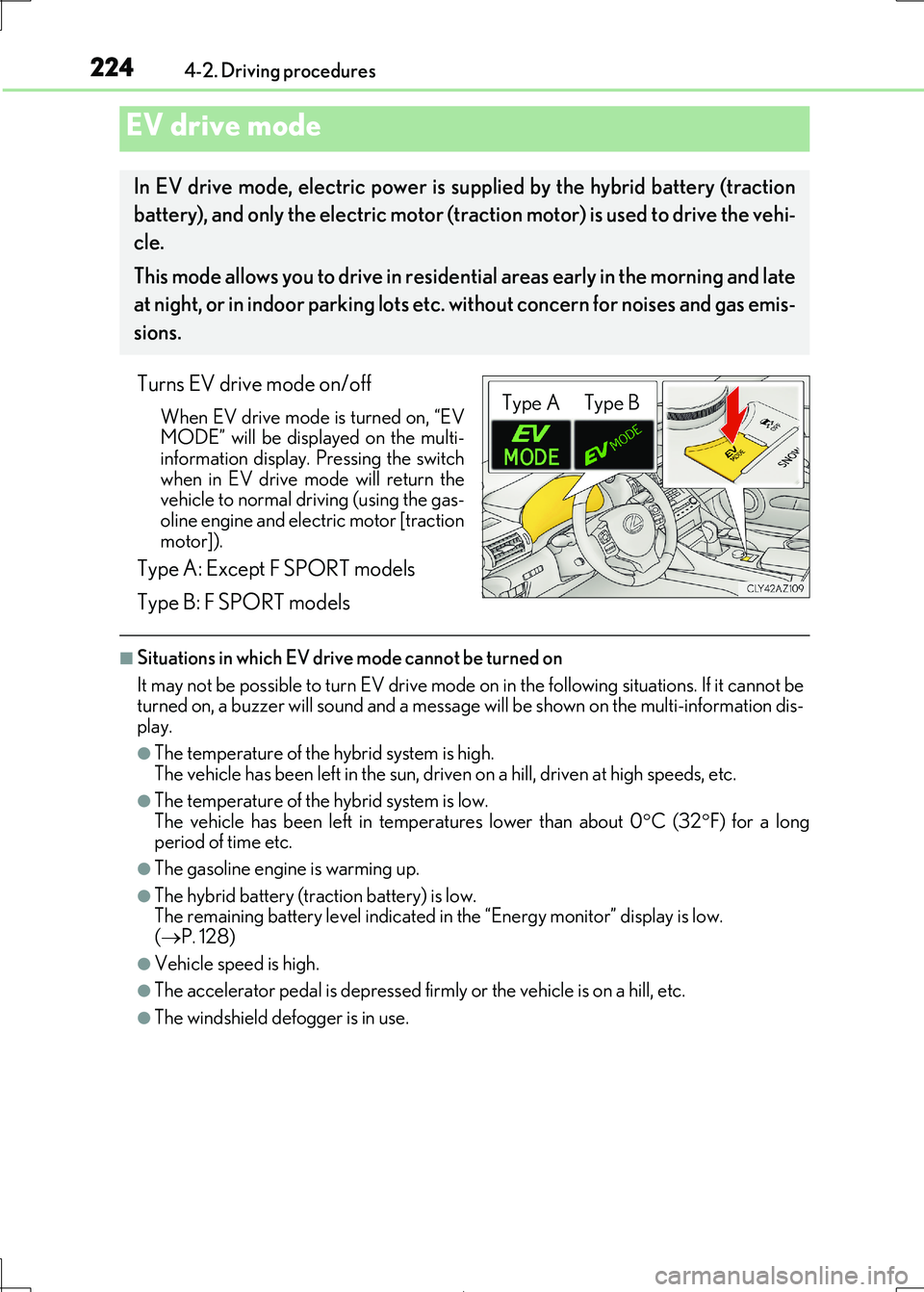
Turns EV drive mode on/off
When EV drive mode is turned on, “EV
MODE” will be displayed on the multi- information display. Pressing the switch
when in EV drive mode will return the
vehicle to normal driving (using the gas- oline engine and electric motor [traction
motor]).
Type A: Except F SPORT models
Type B: F SPORT models
■Situations in which EV drive mode cannot be turned on
It may not be possible to turn EV drive mode on in the following situations. If it cannot be
turned on, a buzzer will sound and a message will be shown on the multi-information dis- play.
●The temperature of the hybrid system is high.
The vehicle has been left in the sun, driven on a hill, driven at high speeds, etc.
●The temperature of the hybrid system is low.
The vehicle has been left in temperatures lower than about 0 C (32F) for a long
period of time etc.
●The gasoline engine is warming up.
●The hybrid battery (tra ction battery) is low.
The remaining battery level indicated in the “Energy monitor” display is low. ( P. 128)
●Vehicle speed is high.
●The accelerator pedal is depressed firmly or the vehicle is on a hill, etc.
●The windshield defogger is in use.
EV drive mode
In EV drive mode, electric power is supplied by the hybrid battery (traction
battery), and only the electr ic motor (traction motor) is used to drive the vehi-
cle.
This mode allows you to drive in reside ntial areas early in the morning and late
at night, or in indoor parking lots etc. without concern for noises and gas emis-
sions.
Type A Type B
Page 227 of 692
2274-2. Driving procedures
4
Driving
IS300h_EE(OM53D89E)
*1: To improve fuel efficiency and reduce noise, shift the shift lever to D for normal driv-
ing.
*2: By selecting shift ranges using S mode, yo u can control accelerating force and engine
braking force.
■Sport mode/Eco drive mode
P. 348
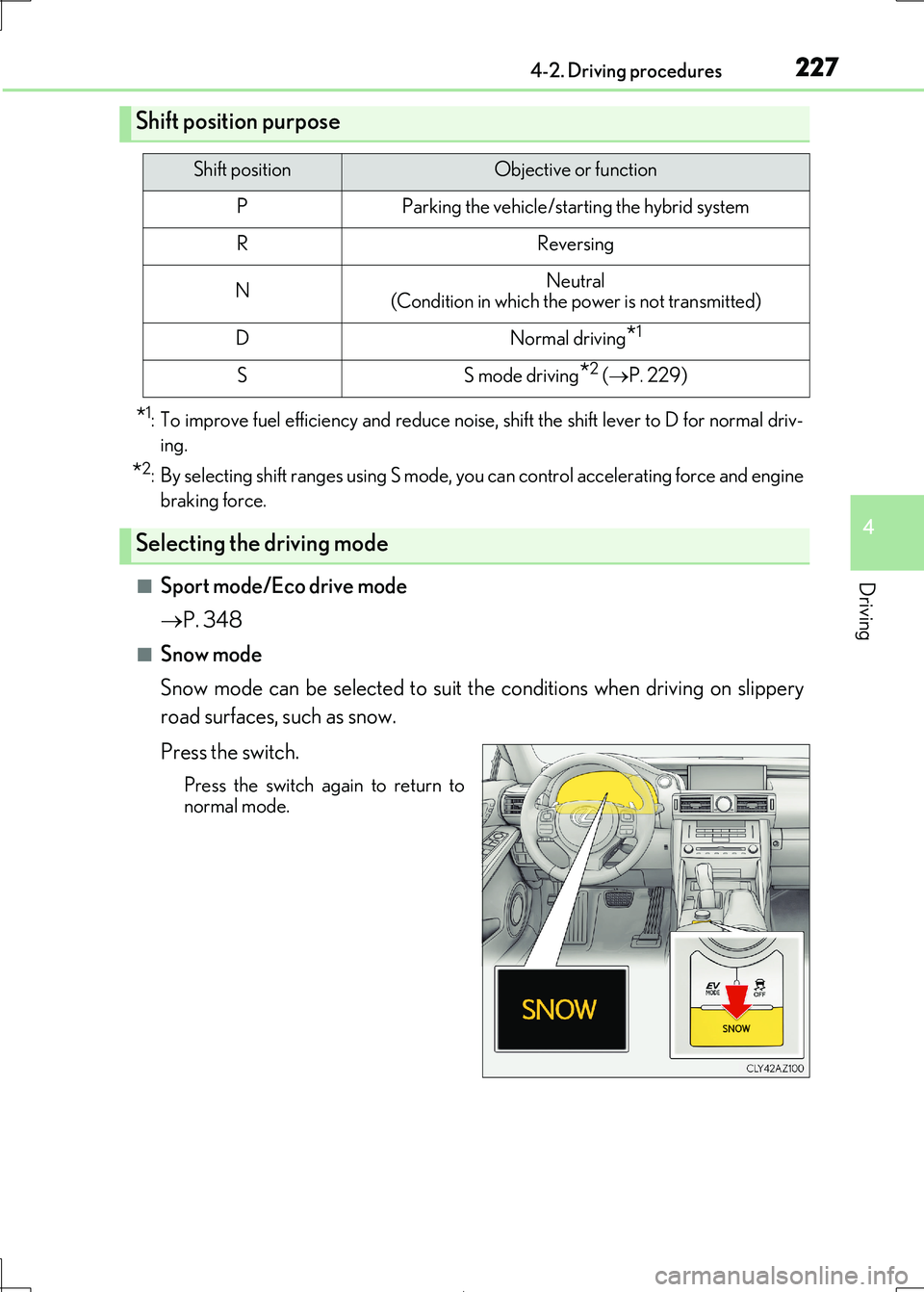
■Snow mode
Snow mode can be selected to suit th e conditions when driving on slippery
road surfaces, such as snow.
Press the switch.
Press the switch again to return to
normal mode.
Shift position purpose
Shift positionObjective or function
PParking the vehicle/starting the hybrid system
RReversing
NNeutral
(Condition in which the power is not transmitted)
DNormal driving*1
SS mode driving*2 ( P. 229)
Selecting the driving mode
Page 230 of 692

2304-2. Driving procedures
IS300h_EE(OM53D89E)
■When the “-” paddle shift switch is operated with the shift lever in the D position
The shift range is downshifted to a range that enables engine braking force that is suit-
able to driving conditions.
■Automatic deactivation of shift range selection in the D position
Shift range selection in the D position will be deactivated in the following situations:
●When the vehicle comes to a stop
●If the accelerator pedal is depressed for more than a certain period of time
●When the shift lever is shifted to a position other than D
■Downshifting restriction warning buzzer
To help ensure safety and driving performance, downshifting operation may sometimes
be restricted. In some circum stances, downshifting may not be possible even when the
shift lever or paddle shif t switch is operated. (A buzzer will sound twice.)
■Snow mode automatic deactivation
Snow mode is automatically deactivated if th e power switch is turned off after driving in
snow mode.
■When driving with cruise control or dynamic radar cruise control activated
Even when performing the following actions with the intent of enabling engine braking,
engine braking will not activate because crui se control or dynamic radar cruise control will not be canceled.
●While driving in D or S mode, downshifting to 5 or 4. ( P. 293, 305)
●When switching the driving mode to sport mode while driving in D position. (P. 348)
■Restraining sudden start (Drive-Start Control)
When the following unusual operation is performed, the hybrid system output may be
restrained.
●When the shift lever is shifted from R to D, D to R, N to R, P to D, or P to R (D includes S)
with the accelerator pedal depressed, a wa rning message appears on the multi-infor-
mation display. If a warning message is shown on the multi-information display, read the message and follow the instructions.
●When the accelerator pedal is depressed too while the vehicle is in reverse.
■Shift lock system
The shift lock system is a system to prevent ac cidental operation of the shift lever in start-
ing.
The shift lever can be shifted from P only wh en the power switch is in ON mode and the brake pedal is being depressed.