Fog Lexus IS300h 2017 Owner's Guide
[x] Cancel search | Manufacturer: LEXUS, Model Year: 2017, Model line: IS300h, Model: Lexus IS300h 2017Pages: 692, PDF Size: 163.7 MB
Page 342 of 692

3424-5. Using the driving support systems
IS300h_EE(OM53D89E)
■Conditions under which the BSM function may not function correctly
●The BSM function may not detect vehicles correctly in the following situations:
• When the sensor is misaligned due to a stro ng impact to the sensor or its surround-
ing area
• When mud, snow, ice, a sticker, etc. is covering the sensor or surrounding area on the rear bumper
• When driving on a road surface that is wet with standing water during bad weather,
such as heavy rain, snow, or fog • When multiple vehicles are approaching wi th only a small gap between each vehicle
• When the distance between your vehicle and a following vehicle is short
• When there is a significant difference in speed between your vehicle and the vehicle that enters the detection area
• When the difference in speed between your vehicle and another vehicle is changing
• When a vehicle enters a detection area traveling at about the same speed as your vehicle
• As your vehicle starts from a stop, a vehicle remains in the detection area
• When driving up and down consecutive steep inclines, such as hills, dips in the road, etc.
• When driving on roads with sharp bends, consecutive curves, or uneven surfaces
• When vehicle lanes are wide, or when drivin g on the edge of a lane, and the vehicle in an adjacent lane is fa r away from your vehicle
• When towing a trailer (vehicles with towing package)
• When items such as a bicycle carrier are installed on the rear of the vehicle • When there is a significant difference in height between your vehicle and the vehicle
that enters the detection area
• Immediately after the BSM function is turned on
●Instances of the BSM function unnecessarily detecting a vehicle and/or object may
increase in the following situations:
• When the sensor is misaligned due to a stro ng impact to the sensor or its surround- ing area
• When the distance between your vehicle and a guardrail, wall, etc. that enters the
detection area is short • When driving up and down consecutive steep inclines, such as hills, dips in the road,
etc.
• When vehicle lanes are narrow, or when driv ing on the edge of a lane, and a vehicle traveling in a lane other than the ad jacent lanes enters the detection area
• When driving on roads with sharp bends, consecutive curves, or uneven surfaces
• When the tires are slipping or spinning • When the distance between your vehicle and a following vehicle is short
• When a bicycle carrier or other accessory is installed to the rear of the vehicle
• When towing a trailer (vehicles with towing package)
Page 346 of 692

3464-5. Using the driving support systems
IS300h_EE(OM53D89E)
■Conditions under which the RCTA function will not detect a vehicle
The RCTA function is not designed to dete ct the following types of vehicles and/or objects:
●Vehicles approaching from directly behind
●Vehicles backing up in a parking space next to your vehicle
●Guardrails, walls, signs, parked vehi cles and similar stationary objects*
●Small motorcycles, bicycles, pedestrians, etc.*
●Vehicles moving away from your vehicle
●Vehicles approaching from the parking spaces next to your vehicle*
*: Depending on the conditions, detection of a vehicle and/or object may occur.
■Conditions under which the RCTA function may not function correctly
●The RCTA function may not detect vehicles correctly in the following situations:
• When the sensor is misaligned due to a stro ng impact to the sensor or its surround-
ing area • When mud, snow, ice, a sticker, etc. is covering the sensor or surrounding area on
the rear bumper
• When driving on a road surface that is wet with standing water during bad weather,
such as heavy rain, snow, or fog • When multiple vehicles are approaching wi th only a small gap between each vehicle
• When a vehicle is approaching at high speed
• When towing a trailer (vehicles with towing package)
●Vehicles that the sensors cannot detect due to
obstructions
• When backing up on a slope with a sharp
change in grade
Page 468 of 692
4686-2. Using the air conditioning system
IS300h_EE(OM53D89E)
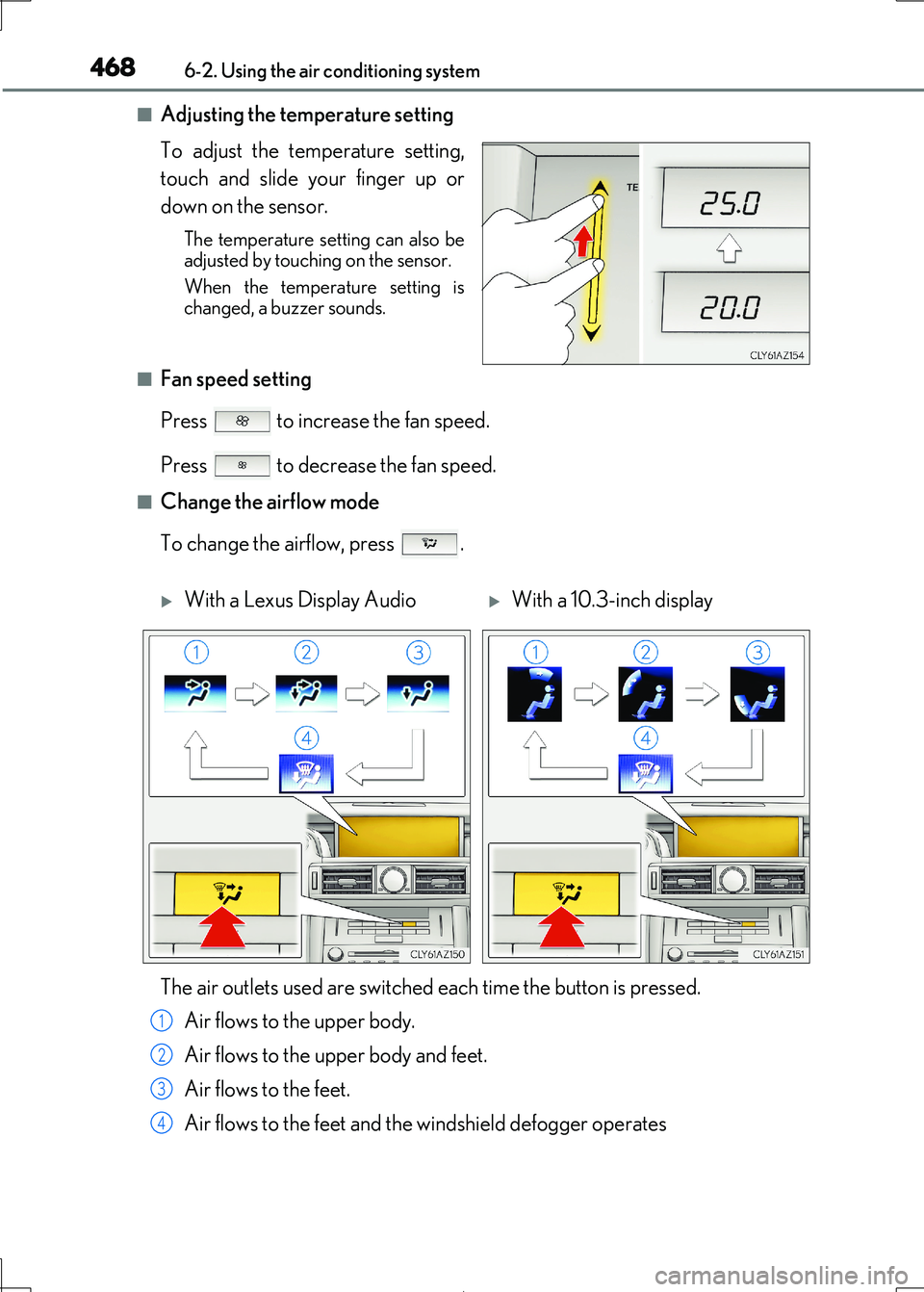
■Adjusting the temperature setting
To adjust the temperature setting,
touch and slide your finger up or
down on the sensor.
The temperature setting can also be adjusted by touching on the sensor.
When the temperature setting is
changed, a buzzer sounds.
■Fan speed setting
Press to increase the fan speed.
Press to decrease the fan speed.
■Change the airflow mode
To change the airflow, press .
With a Lexus Display AudioWith a 10.3-inch display
The air outlets used are switched each time the button is pressed.
Air flows to the upper body.
Air flows to the upper body and feet.
Air flows to the feet.
Air flows to the feet and the windshield defogger operates
1
2
3
4
Page 469 of 692
4696-2. Using the air conditioning system
6
Interior features
IS300h_EE(OM53D89E)
■S-FLOW mode (if equipped)
When there are no passengers in the rear seats, airflow can be directed to the
front seats only to reduce the air co nditioning effect on the rear seats.
However, depending on both the temperature inside and outside the vehicle, air-
flow may be directed to the rear seats even though S-FLOW mode is on to main- tain comfort insi de the vehicle.
Press .
The indicator comes on when S-FLOW mode is on.
Press again to resume airflow to the rear seats.
■Other functions
●Switching between outside air and recirculated air modes ( P. 474)
●Defogging the windshield (P. 474)
●Defogging the rear window and outside rear view mirrors (P. 474)
Page 474 of 692
4746-2. Using the air conditioning system
IS300h_EE(OM53D89E)
■Switching between outside air and recirculated air modes
Press to change to recirculated air mode.
Press to change to outside air mode.
The indicator above the selected button comes on.
■Pollen removal mode (if equipped)
Pollen is removed from the air and the ai r flows to the upper part of the body.
Select on the option control screen.
When the pollen removal mode is on, is displayed on the air conditioning
control screen.
In order to prevent the windshield from fo gging up when the outside air is cold, the
dehumidification function may operate.
The pollens are filtered out even if th e pollen removal mode is turned off.
■Defogging the windshield
Defoggers are used to defog the windshield and front side windows.
Press .
Set the outside/recirculated air mode button to outside air mode if the recirculated
air mode is used. (It may switch automatically.)
To defog the windshield and the side wind ows early, turn the air flow and tempera- ture up.
To return to the previous mode, press again when the windshield is
defogged.
■Defogging the rear window and outside rear view mirrors
Defoggers are used to defog the rear window, and to remove raindrops, dew
and frost from the outside rear view mirrors.
Press .
The defoggers will automatically tu rn off after a period of time.
Other functions
Page 477 of 692
4776-2. Using the air conditioning system
6
Interior features
IS300h_EE(OM53D89E)
■Registering air conditioning settings to electronic keys (vehicles with driving position
memory)
●Unlocking the vehicle using an electronic key and turning the power switch to ON mode will recall that ke y’s registered air conditioning settings.
●When the power switch is turned off, the current air conditioning settings will automati-
cally be registered to the electronic key that was used to unlock the vehicle.
●The system may not operate correctly if more than one electronic key is in the vicinity or
if the smart entry & start system is used to unlock a passenger door.
●The doors that can recall the air conditioning setting when unlocked using the smart entry & start system can be changed.* For details, contact any authorized Lexus
retailer or Lexus authorized re pairer, or any reliable repairer.
*: The doors that can recall the driving position memory are changed at the same time.
■Using automatic mode
Fan speed is adjusted automatically accordin g to the temperature setting and the ambi-
ent conditions.
Therefore, the fan may stop for a while until wa rm or cool air is ready to flow immediately
after is pressed or “AUTO” is selected.
■Fogging up of the windows
The windows will easily fog up when the hu midity in the vehicle is high. Turning
(“A/C”) on will dehumidify the air from the outlets and defog the windshield effectively.
●If you turn (“A/C”) off, the windows may fog up more easily.
●The windows may fog up if the recirculated air mode is used.
■Outside/recirculated air mode
●When driving on dusty roads such as tunnels or in heavy traffic, set the outside/recircu-
lated air mode button to the recirculated ai r mode. This is effective in preventing out- side air from entering the vehicle interi or. During cooling operation, setting the
recirculated air mode will also cool the vehicle interior effectively.
●Outside/recirculated air mode may automa tically switch depending on the tempera-
ture setting or the inside temperature.
■Operation of the air conditioni ng system in Eco drive mode
In Eco drive mode, the air conditioning system is controlled as follows to prioritize fuel
efficiency:
●Engine speed and compressor operation controlled to restrict heating/cooling capac-
ity
●Fan speed restricted when automatic mode is selected
To improve air conditioning performanc e, perform the following operations:
●Adjust the fan speed
●Turn off Eco drive mode
Page 478 of 692
4786-2. Using the air conditioning system
IS300h_EE(OM53D89E)
■Ventilation and air conditioning odors
●To let fresh air in, set the air conditioning system to the outside air mode.
●During use, various odors from inside and outside the vehicle may enter into and accu-
mulate in the air conditioning system. This may then cause odor to be emitted from the
vents.
●To reduce potential odors from occurring:
• It is recommended that the air conditioning system be set to outside air mode prior
to turning the vehicle off. • The start timing of the blower may be dela yed for a short period of time immediately
after the air conditioning system is started in automatic mode.
■Air conditioning filter
P. 547
■Customization
Settings (e.g. A/C Auto switch operation) can be changed. (Customizable features: P. 663)
WARNING
■To prevent the windshield from fogging up
●Do not use during cool air operation in extremely humid weather. The differ- ence between the temperature of the outside air and that of the windshield can cause
the outer surface of the windshield to fog up, blocking your vision.
■To prevent burns
●Do not touch the rear view mirror surfaces when the outside rear view mirror defog-
gers are on.
●Do not touch the glass at lower part of the windshield or to the side of the front pillars
when the windshield wiper de-icer is on.
NOTICE
■To prevent 12-vol t battery discharge
Do not leave the air conditioni ng system on longer than necessary when the hybrid sys- tem is off.
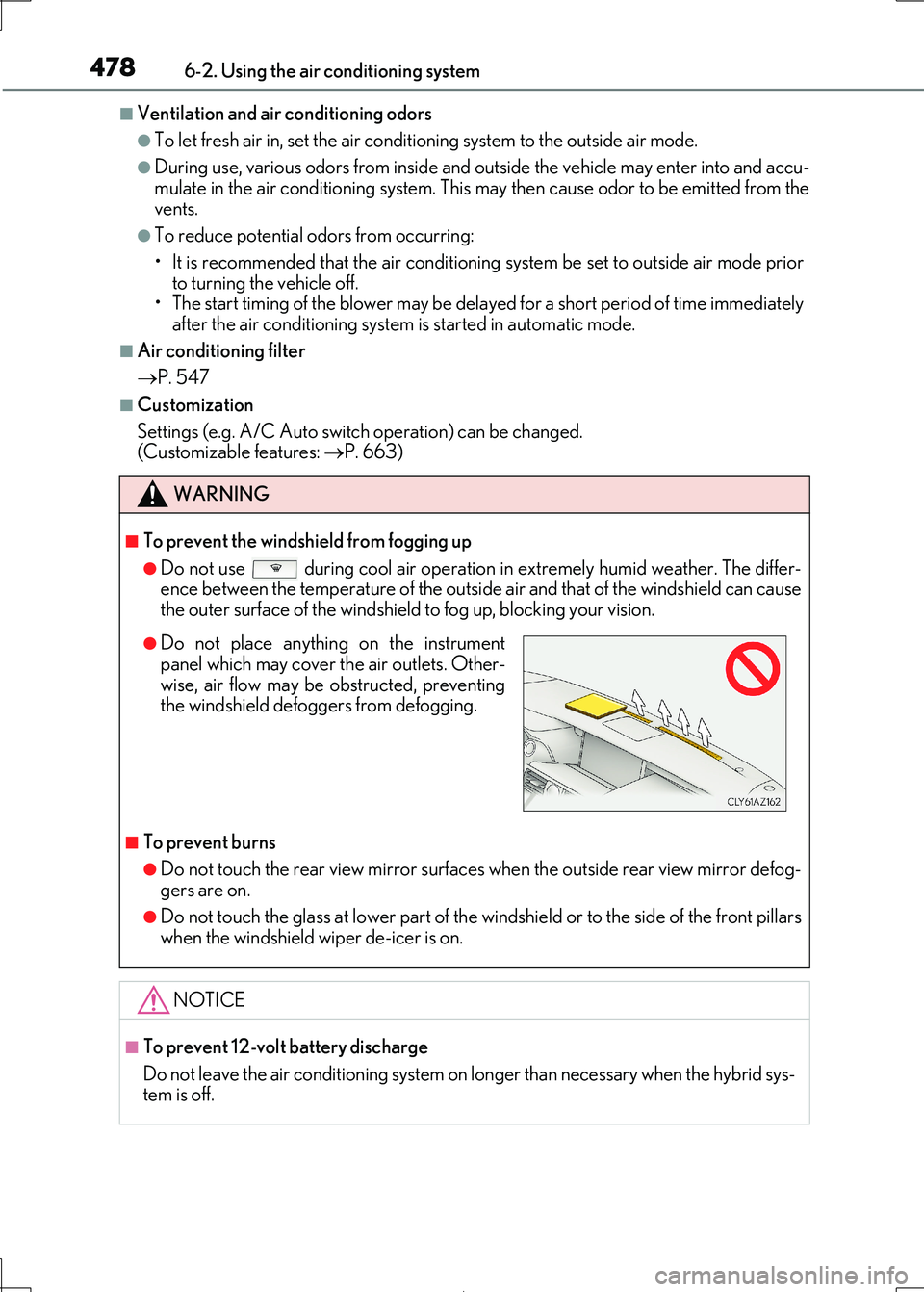
●Do not place anything on the instrumentpanel which may cover th e air outlets. Other-
wise, air flow may be obstructed, preventing
the windshield defoggers from defogging.
Page 508 of 692
5087-1. Maintenance and care
IS300h_EE(OM53D89E)
NOTICE
■Cleaning detergents
●Do not use the following liquids, as they may discolor the vehicle interior or cause
streaks or damage to painted surfaces:
• Audio system screen: Organic substances such as benzine or gasoline, alkaline solutions, and alcohol
• Seats: Alkaline solutions, organic substances such as thinner or benzine, and alco-
hol • Other parts: Organic substances such as benzine or gasoline, alkaline or acidic
solutions, dye, and bleach
●Do not use polish wax or polish cleaner. The instrument panel’s or other interior part’s
painted surface may be damaged.
■Preventing damage to leather surfaces
Observe the following precautions to avoid damage to and deterioration of leather
surfaces:
●Remove any dust or dirt from leather surfaces immediately.
●Do not expose the vehicle to direct sunlight for extended periods of time. Park the
vehicle in the shade, especially during summer.
●Do not place items made of vinyl, plastic, or containing wax on the upholstery, as they may stick to the leather surface if the vehicle interior heats up significantly.
■Water on the floor
Do not wash the vehicle floor with water. Vehicle systems such as the audio system ma y be damaged if water comes into contact
with electrical components such as the au dio system above or under the floor of the
vehicle. Water may also cause the body to rust.
■When cleaning the inside of the windshie ld (vehicles with Lexus Safety System+)
Do not allow glass cleaner to contact the lens. Also, do not touch the lens. ( P. 259)
■Cleaning the inside of the rear window
●Do not use glass cleaner to clean the rear window, as this may cause damage to the
rear window defogger heater wires or antenna. Use a cloth dampened with luke-
warm water to gently wipe the window clean. Wipe the window in strokes running parallel to the heater wires or antenna.
●Be careful not to scratch or dama ge the heater wires or antenna.
Page 562 of 692
5627-3. Do-it-yourself maintenance
IS300h_EE(OM53D89E)
■Replacing the following bulbs
If any of the lights listed below has burn t out, have it replaced by any autho-
rized Lexus retailer or Lexus authorized repairer, or any reliable repairer.
●Headlights
●Front position lights and daytime running lights
●Front turn signal lights (LED type)
●Side turn signal lights
●Stop/tail lights
●Tail lights
●Back-up light
●Rear turn signal lights
●Rear fog light
●High mounted stoplight
●License plate lights
■LED Lights
The lights other than the front turn signal lights (bulb type) and outer foot lights each con- sist of a number of LEDs. If any of the LEDs burn out, take your vehicle to any authorized
Lexus retailer or Lexus author ized repairer, or any reliable repairer to have the light
replaced.
■Condensation build-up on the inside of the lens
Temporary condensation build-up on the inside of the headlight lens does not indicate a
malfunction. Contact any authorized Lexus re tailer or Lexus authorized repairer, or any reliable repairer for more inform ation in the following situations:
●Large drops of water have built up on the inside of the lens.
●Water has built up inside the headlight.
■When replacing the front turn signal lights (bulb type)
When the washer fluid filler opening is remo ved with a large amount of washer fluid con-
tained in the washer tank, washer fluid may spill onto the vehicle and cleaning may be required.
■When replacing light bulbs
P. 555
Page 675 of 692
675Alphabetical index
IS300h_EE(OM53D89E)
Condenser .............................................. 521
Console box ...........................................485
Coolant ...................................................... 519
Capacity .................................................649
Checking ................................................ 519
Preparing and checking
before winter ......................................361
Cooling system....................................... 519
Engine overheating ..........................636
Hybrid system overheating ..........636
Cruise control
Cruise control .................................... 305
Dynamic radar cruise control ..... 293
Cup holders ............................................486
Current fuel
consumption..................... 130, 132, 134
Curtain shield airbags ........................... 43
Customizable features ....................... 657
DAB (Digital Audio Broadcast)..... 394
Daytime running light system ......... 238
Defogger
Outside rear view mirrors .............474
Rear window.........................................474
Windshield ............................................474
Differential.................................................651
Digital Audio Broadcast (DAB)..... 394
Dimensions ............................................. 644
Display
Drive information...................................116
Dynamic radar cruise control ..... 293
LDA (Lane Departure Alert
with steering control)................... 283
Multi-information display.....................111
Warning message ..............................581
Do-it-yourself maintenance ................ 511
Door courtesy lights
Location ...................................................481
Wattage ................................................. 654
Door lock
Doors......................................................... 144
Smart entry & start system ............. 157
Wireless remote control .................138
D