audio Lexus IS300h 2017 Owner's Guide
[x] Cancel search | Manufacturer: LEXUS, Model Year: 2017, Model line: IS300h, Model: Lexus IS300h 2017Pages: 692, PDF Size: 163.7 MB
Page 285 of 692
2854-5. Using the driving support systems
4
Driving
IS300h_EE(OM53D89E)
■Temporary cancellation of functions
When operation conditions are no longer met, a function may be temporarily canceled. However, when the operation co nditions are met again, operation of the function is auto-
matically restored. ( P. 284)
■Steering control function
Depending on the vehicle speed, lane depart ure situation, road conditions, etc., the
driver may not feel the function is operat ing or the function may not operate at all.
■Lane departure alert function
The warning buzzer may be difficult to hear due to external noise, audio playback, etc.
Also, it may be difficult to feel steering wheel vibrations due to the road conditions, etc.
■Hands off steering wheel alert
Except for Israel: When the system determines that the driver has removed the hands
from the steering wheel while the steering co ntrol function is operating, a warning mes-
sage is displayed on the multi-information display.
If the driver continues to keep the hands off of the steering wheel, the buzzer sounds, a
warning message is displayed and the function is temporarily canceled. This alert also
operates in the same way when the vehicle is driven with the steering wheel lightly gripped. However, depending on the road co nditions, etc., the function may not cancel.
For Israel: When the system determines that the driver has removed the hands from the
steering wheel while the steering control func tion is operating, a warning message is dis- played on the multi-informatio n display and the buzzer sounds.
■White (yellow) lines are only on one side of road
The LDA system will not operate for the side on which white (yellow) lines could not be recognized.
Page 310 of 692

3104-5. Using the driving support systems
IS300h_EE(OM53D89E)
When the sensors detect an obstacle, the following displays inform the driver of
the position and distance to the obstacle.
■Multi-information display
Front corner sensor operation
Front center sensor operation
Rear corner sensor operation
Rear center sensor operation
■Lexus Display Audio screen
Lexus parking assist-sensor
When the vehicle is moving forward.
A graphic is automatically displayed
when an obstacle is detected. The screen can be set so that the graphic
is not displayed. ( P. 314)
: Select to mute the buzzer
sounds.
Lexus parking assist-sensor
Rear Crossing Traffic Alert
(if equipped)
When the vehicle is moving back- ward.
A simplified image is displayed on
the upper part of the screen when an obstacle is detected.
Display
1
2
3
4
1
2
3
Page 313 of 692
3134-5. Using the driving support systems
4
Driving
IS300h_EE(OM53D89E)
*1: The images may differ from that shown in the illustrations. (P. 310)
*2: Multi-information display
*3: Audio system screen
■Buzzer operation and distance to an obstacle
A buzzer sounds when the sensors are operating.
●The buzzer beeps faster as the vehicle approaches an obstacle.
When the vehicle comes within the following distance of the obstacle, the
buzzer sounds continuously:
• Front center sensors: Appr oximately 30 cm (1.0 ft.)
• Corner sensors: Approximately 30 cm (1.0 ft.)
• Rear center sensors: Approximately 35 cm (1.1 ft.)
●When 2 or more obstacles are detect ed simultaneously, the buzzer system
responds to the nearest obstacle. If on e or both come within the above dis-
tances, the beep will repeat a lo ng tone, followed by fast beeps.
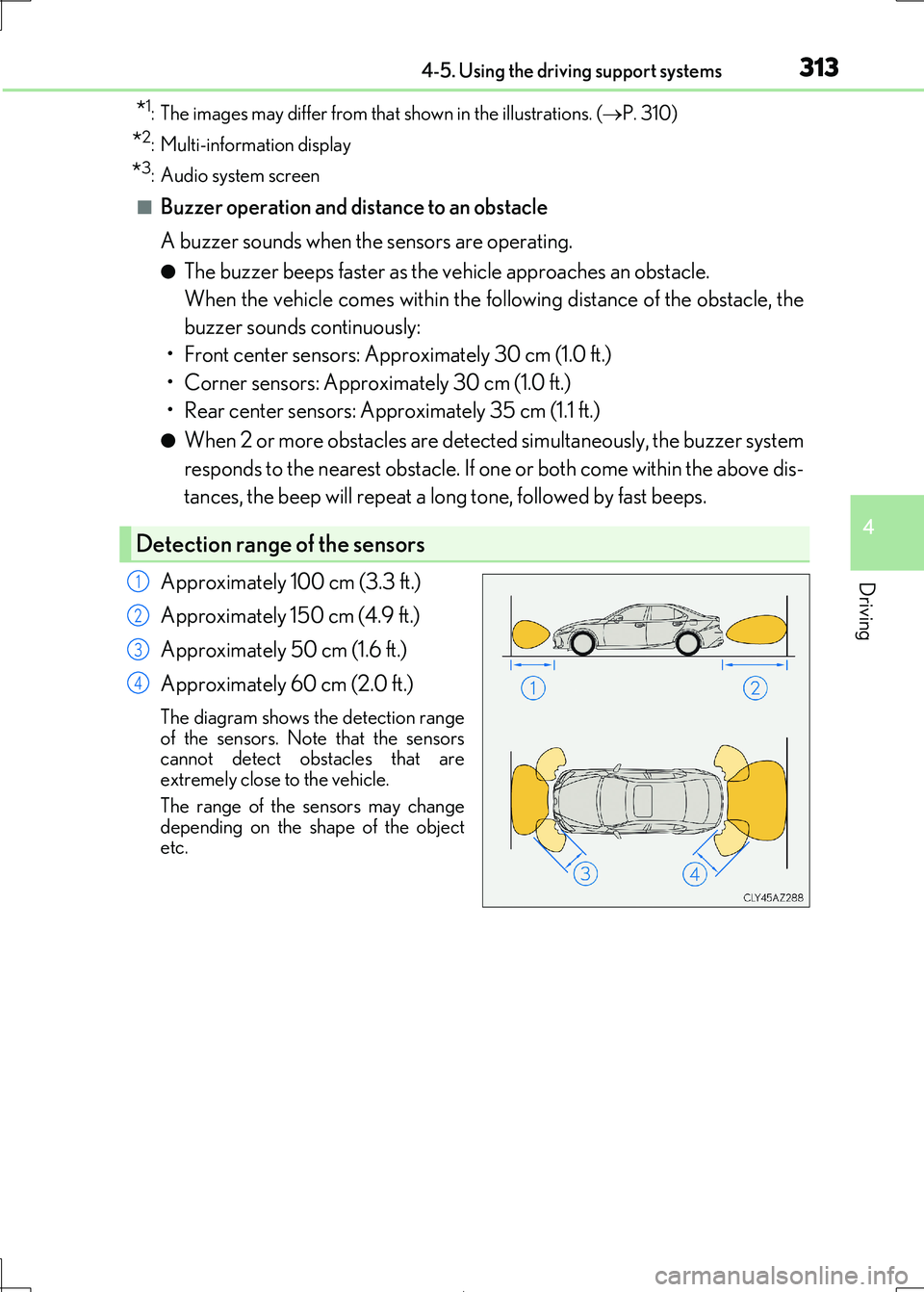
Approximately 100 cm (3.3 ft.)
Approximately 150 cm (4.9 ft.)
Approximately 50 cm (1.6 ft.)
Approximately 60 cm (2.0 ft.)
The diagram shows the detection range
of the sensors. Note that the sensors
cannot detect obstacles that are extremely close to the vehicle.
The range of the sensors may change
depending on the shape of the object etc.
Detection range of the sensors
1
2
3
4
Page 314 of 692
3144-5. Using the driving support systems
IS300h_EE(OM53D89E)
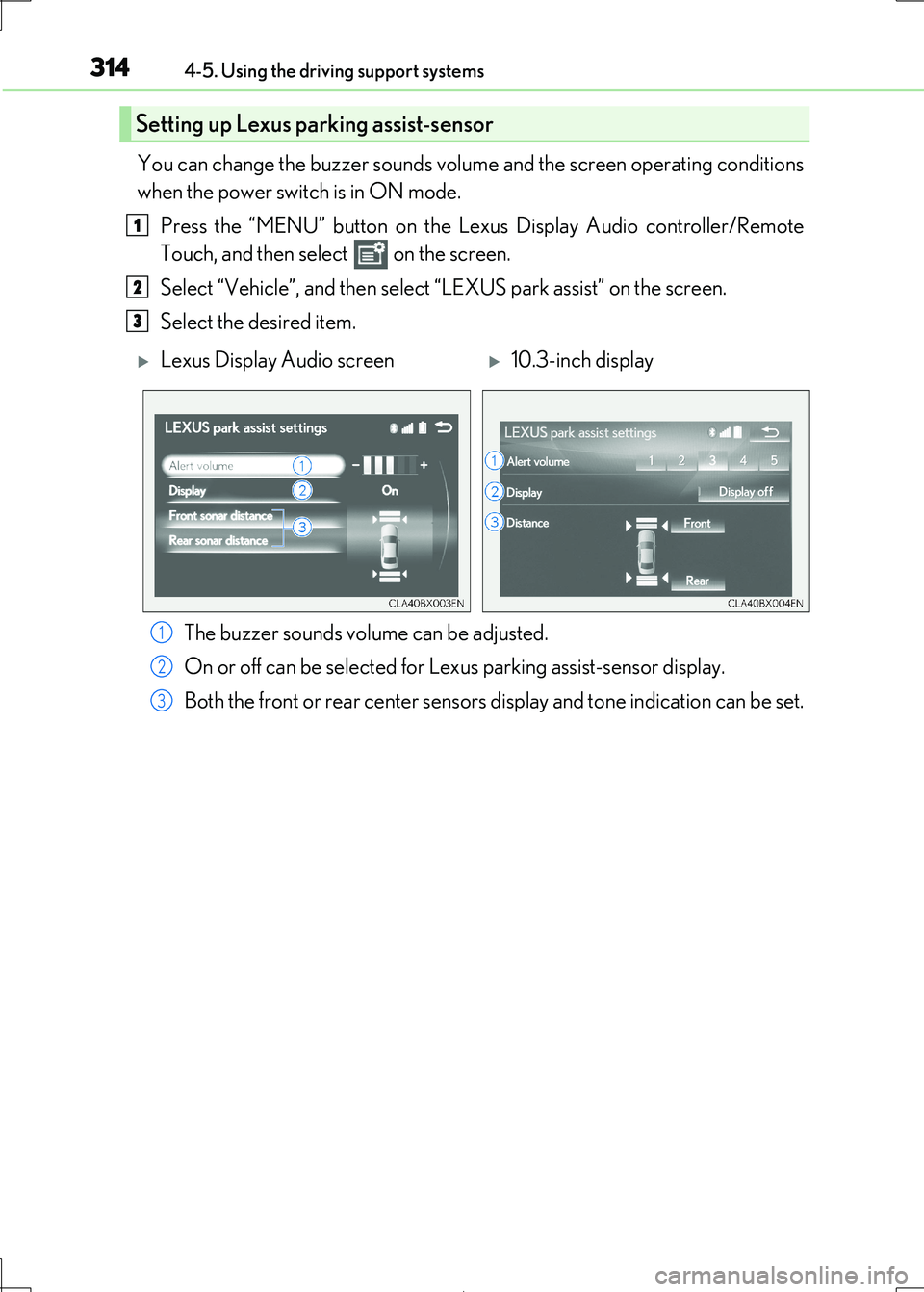
You can change the buzzer sounds volume and the screen operating conditions
when the power switch is in ON mode.
Press the “MENU” button on the Le xus Display Audio controller/Remote
Touch, and then select on the screen.
Select “Vehicle”, and then select “LEXUS park assist” on the screen.
Select the desired item.
The buzzer sounds volume can be adjusted.
On or off can be selected for Le xus parking assist-sensor display.
Both the front or rear center sensors display and tone indication can be set.
Setting up Lexus parking assist-sensor
1
2
3
Lexus Display Audio screen10.3-inch display
1
2
3
Page 315 of 692

3154-5. Using the driving support systems
4
Driving
IS300h_EE(OM53D89E)
■The Lexus parking assist-sensor can be operated when
●Front corner sensors:
• The power switch is in ON mode. • The shift lever is in other than P.
• The vehicle speed is less th an about 10 km/h (6 mph).
(At any speed when the shift lever is in R)
●Front center sensors:
• The power switch is in ON mode. • The shift lever is in other than P or R.
• The vehicle speed is less th an about 10 km/h (6 mph).
●Rear corner and rear center sensors:
• The power switch is in ON mode.
• The shift lever is in R.
■Lexus parking assist-sensor display
Vehicles with a Lexus Display Audio system: When an obstacle is detected while the
Lexus parking assist monitor is in use, the warning indicator will appear in the upper part of the screen even if the disp lay setting has been set to off.
■If a message is displayed on the multi-information display
P. 581
■Customization
Some functions can be customized. ( P. 314,657)
WARNING
■When using the Lexus parking assist-sensor
Observe the following precautions.
Failing to do so may result in the vehicle be ing unable to be driven safely and possibly
cause an accident.
●Do not use the sensor at speeds in excess of 10 km/h (6 mph).
●The sensors’ detection areas and reaction times are limited. When moving forward or
reversing, check the areas surrounding the vehicle (especially the sides of the vehi- cle) for safety, and drive slowly, using the brake to control the vehicle’s speed.
●Do not install accessories within the sensors’ detection areas.
Page 317 of 692
3174-5. Using the driving support systems
4
Driving
IS300h_EE(OM53D89E)
WARNING
●The following situations may occur during use.
• Depending on the shape of the obstacle and other factors, the detection distance
may shorten, or detect ion may be impossible.
• Obstacles may not be detected if they are too close to the sensor. • There will be a short delay between obstac le detection and display. Even at slow
speeds, there is a possibility that the ob stacle will come within the sensor’ detec-
tion areas before the display is shown and the buzzer sounds. • Thin posts or objects lower than th e sensor may not be detected when
approached, even if they have been detected once.
• It might be difficult to hear beeps due to the volume of audio system or air flow noise of the air conditioning system.
NOTICE
■When using Lexus parking assist-sensor
In the following situations, the system may not function correctly due to a sensor mal-
function, etc. Have the vehicle checked by any authorized Lexus retailer or Lexus
authorized repairer, or any reliable repairer.
●The Lexus parking assist-sensor operation display flashes, and a buzzer sounds when
no obstacles are detected.
●If the area around a sensor co llides with something, or is subjected to strong impact.
●If the bumper collides with something.
●If the display shows continuously without beeping, except when the buzzer mute
switch has been turned on.
●If a display error occurs , first check the sensor.
If the error occurs even if there is no ice, sn ow or mud on the sensor, it is likely that the
sensor is malfunctioning.
■Notes when washing the vehicle
Do not apply intensive bursts of wa ter or steam to the sensor area.
Doing so may result in the sensor malfunctioning.
Page 320 of 692
3204-5. Using the driving support systems
IS300h_EE(OM53D89E)
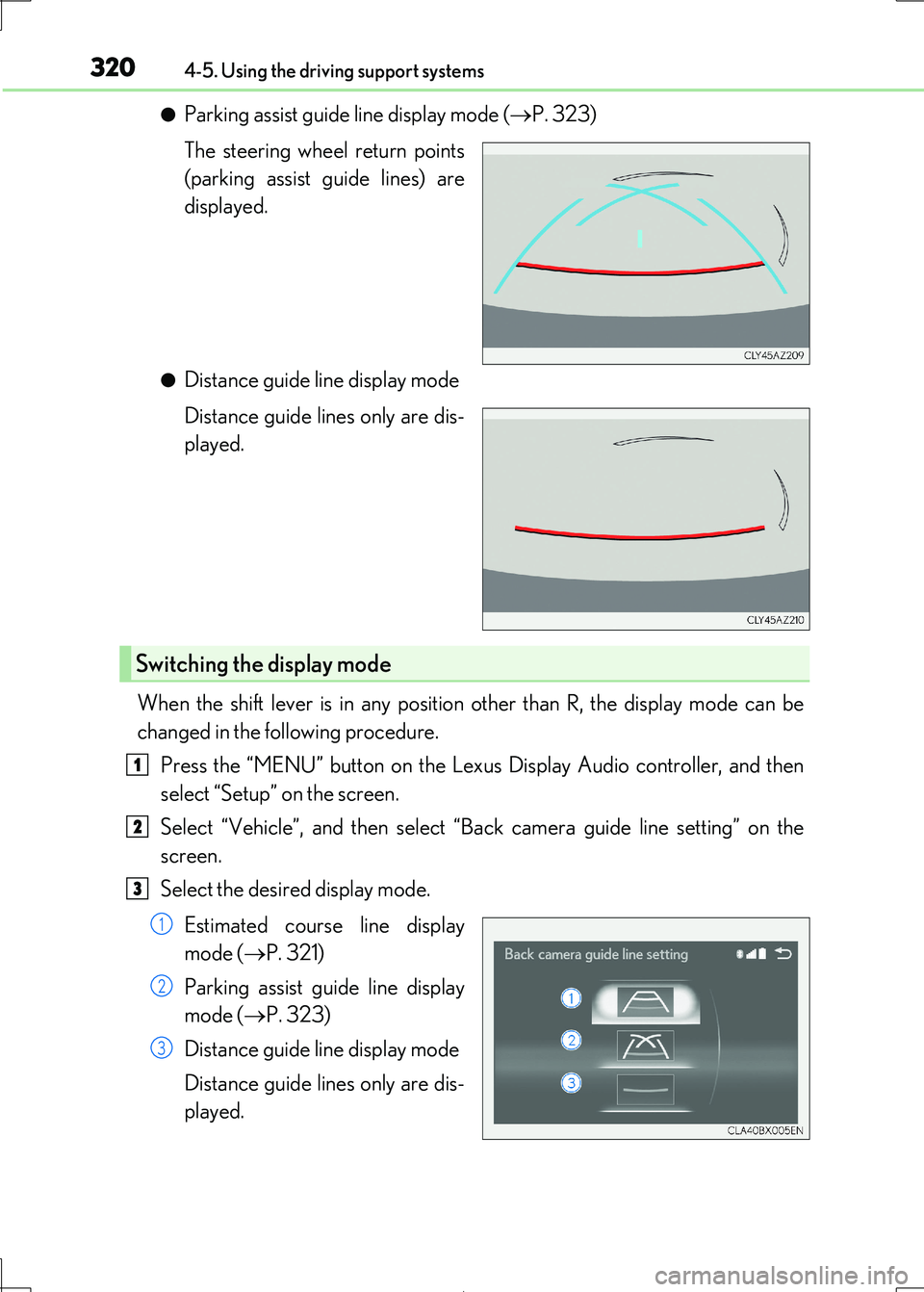
●Parking assist guide line display mode (P. 323)
The steering wheel return points
(parking assist guide lines) are
displayed.
●Distance guide line display mode
Distance guide lines only are dis-
played.
When the shift lever is in any position other than R, the display mode can be
changed in the following procedure.
Press the “MENU” button on the Lexu s Display Audio controller, and then
select “Setup” on the screen.
Select “Vehicle”, and then select “ Back camera guide line setting” on the
screen.
Select the desired display mode.
Estimated course line display
mode ( P. 321)
Parking assist guide line display
mode ( P. 323)
Distance guide line display mode
Distance guide lines only are dis-
played.
Switching the display mode
1
2
3
1
2
3
Page 336 of 692
3364-5. Using the driving support systems
IS300h_EE(OM53D89E)
■Outside rear view mirror indicator visibility
In strong sunlight, the outside rear view mirror indicator may be difficult to see.
■Hearing the RCTA buzzer
The RCTA buzzer may be difficult to hear over loud noises, such as if the audio system
volume is high.
■When there is a malfunction in the Blind Spot Monitor
If a system malfunction is detected due to any of the following, a warning message will be
displayed: ( P. 581)
●A sensor is malfunctioning
●A sensor is dirty or covered with snow or a sticker
●The outside temperature is extremely high or low
●Sensor voltage is abnormal
●A sensor is misaligned
■Certification for the Blind Spot Monitor
Page 344 of 692
3444-5. Using the driving support systems
IS300h_EE(OM53D89E)
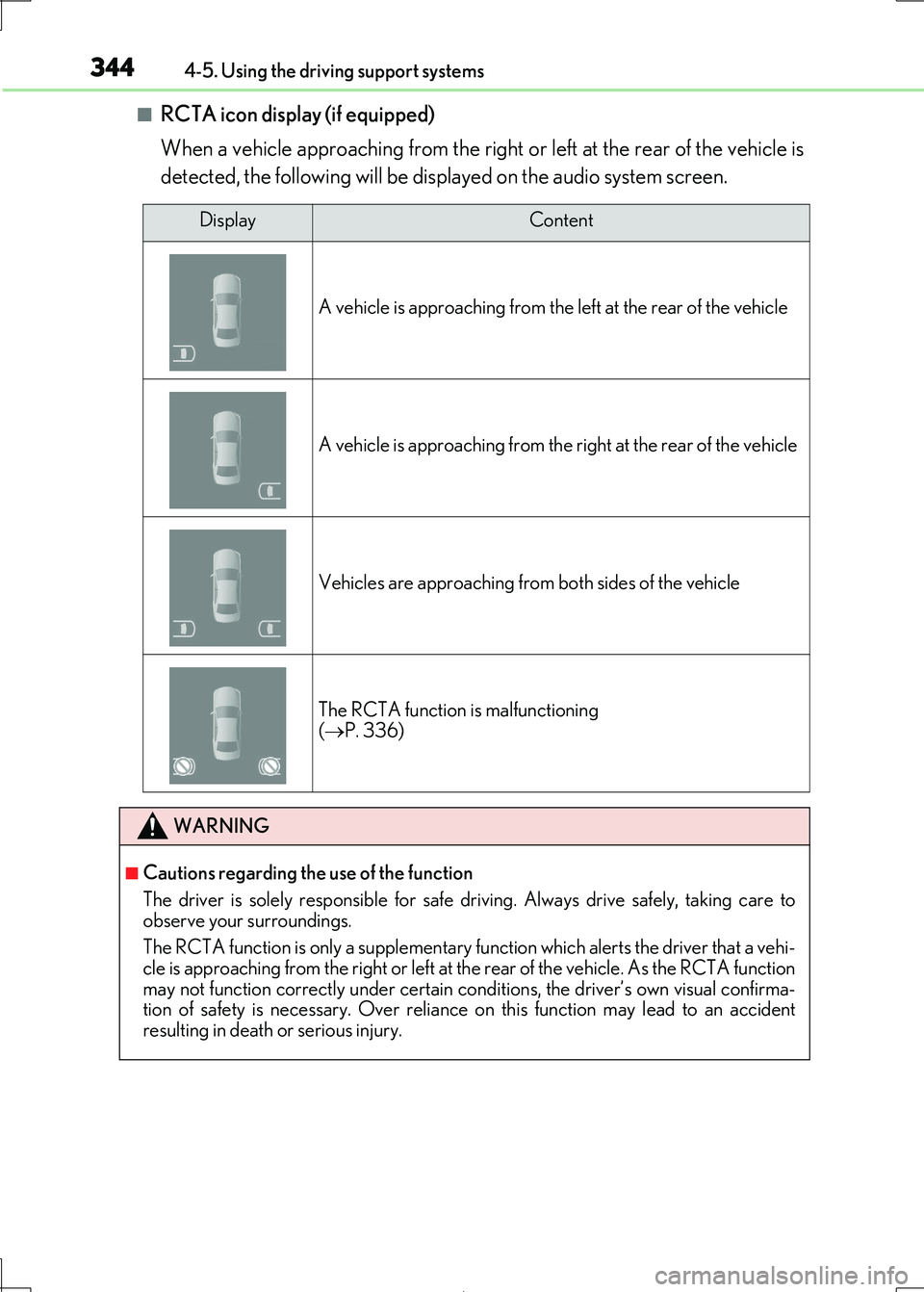
■RCTA icon display (if equipped)
When a vehicle approaching from the right or left at the rear of the vehicle is
detected, the following will be displayed on the audio system screen.
DisplayContent
A vehicle is approaching from the left at the rear of the vehicle
A vehicle is approaching from the right at the rear of the vehicle
Vehicles are approaching from both sides of the vehicle
The RCTA function is malfunctioning ( P. 336)
WARNING
■Cautions regarding the use of the function
The driver is solely responsible for safe dr iving. Always drive safely, taking care to
observe your surroundings.
The RCTA function is only a supplementary fu nction which alerts the driver that a vehi- cle is approaching from the right or left at the rear of the vehicle. As the RCTA function
may not function correctly under certain cond itions, the driver’s own visual confirma-
tion of safety is necessary. Over reliance on this function may lead to an accident resulting in death or serious injury.
Page 349 of 692
3494-5. Using the driving support systems
4
Driving
IS300h_EE(OM53D89E)
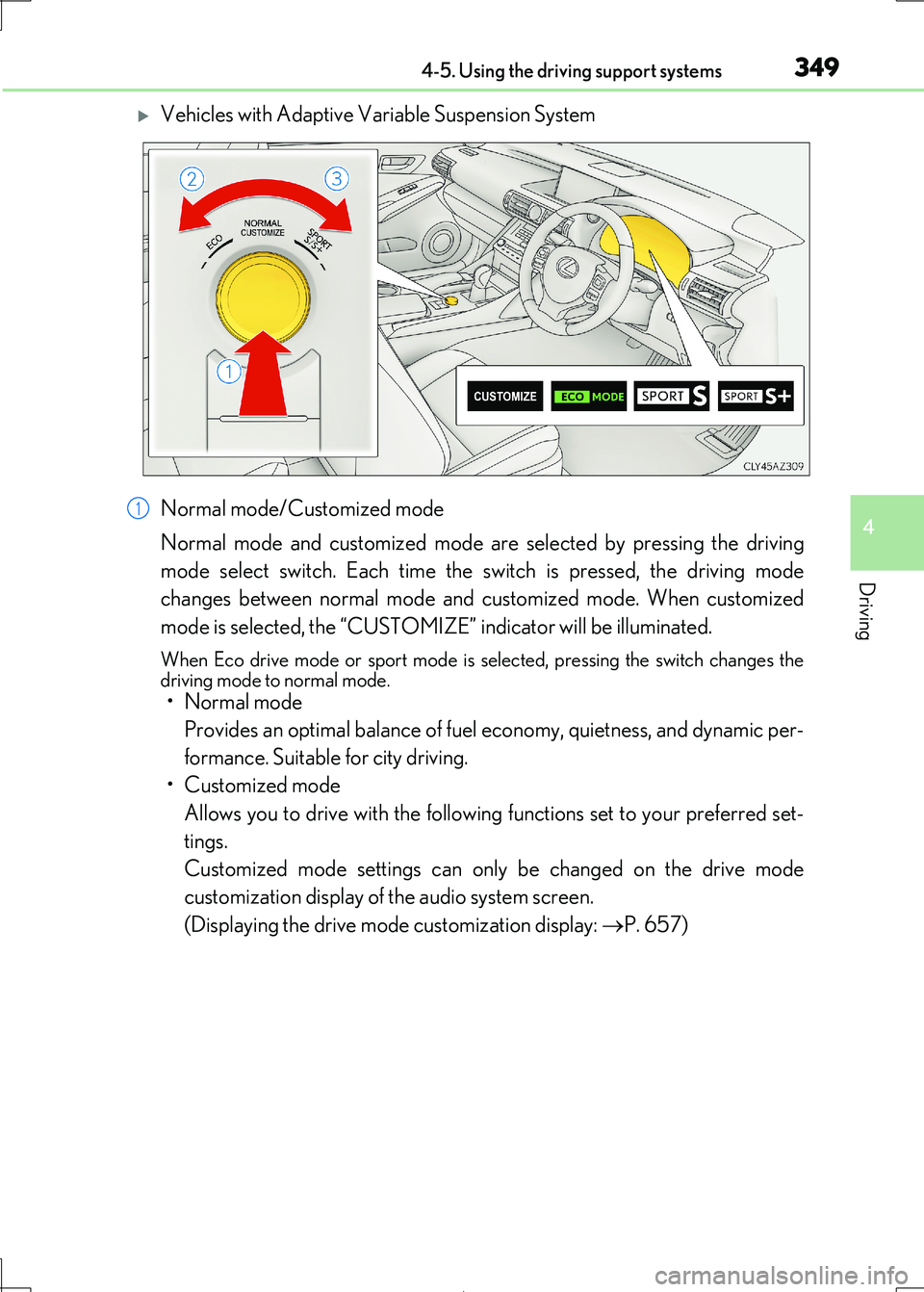
Vehicles with Adaptive Variable Suspension System
Normal mode/Customized mode
Normal mode and customized mode ar e selected by pressing the driving
mode select switch. Each time the switch is pressed, the driving mode
changes between normal mode and customized mode. When customized
mode is selected, the “CUSTOMIZE” indicator will be illuminated.
When Eco drive mode or sport mode is se lected, pressing the switch changes the driving mode to normal mode.
• Normal mode
Provides an optimal balance of fuel economy, quietness, and dynamic per-
formance. Suitable for city driving.
• Customized mode
Allows you to drive with the following functions set to your preferred set-
tings.
Customized mode settings can on ly be changed on the drive mode
customization display of the audio system screen.
(Displaying the drive mode customization display: P. 657)
1