remote Lexus IS300h 2017 Service Manual
[x] Cancel search | Manufacturer: LEXUS, Model Year: 2017, Model line: IS300h, Model: Lexus IS300h 2017Pages: 692, PDF Size: 163.7 MB
Page 465 of 692
4656-1. Basic operation of the Remote Touch screen
6
Interior features
IS300h_EE(OM53D89E)
■Selecting the operation screen
When selecting the main display, move the Remote Touch knob to the left.
When selecting the side display, move the Remote Touch knob to the right.
■ Main display
For details about the functions and operat ion of the main display, refer to the
respective section and “NAVIGATION AND MULTIMEDIA SYSTEM
OWNER’S MANUAL”.
■Side display
Basic screens
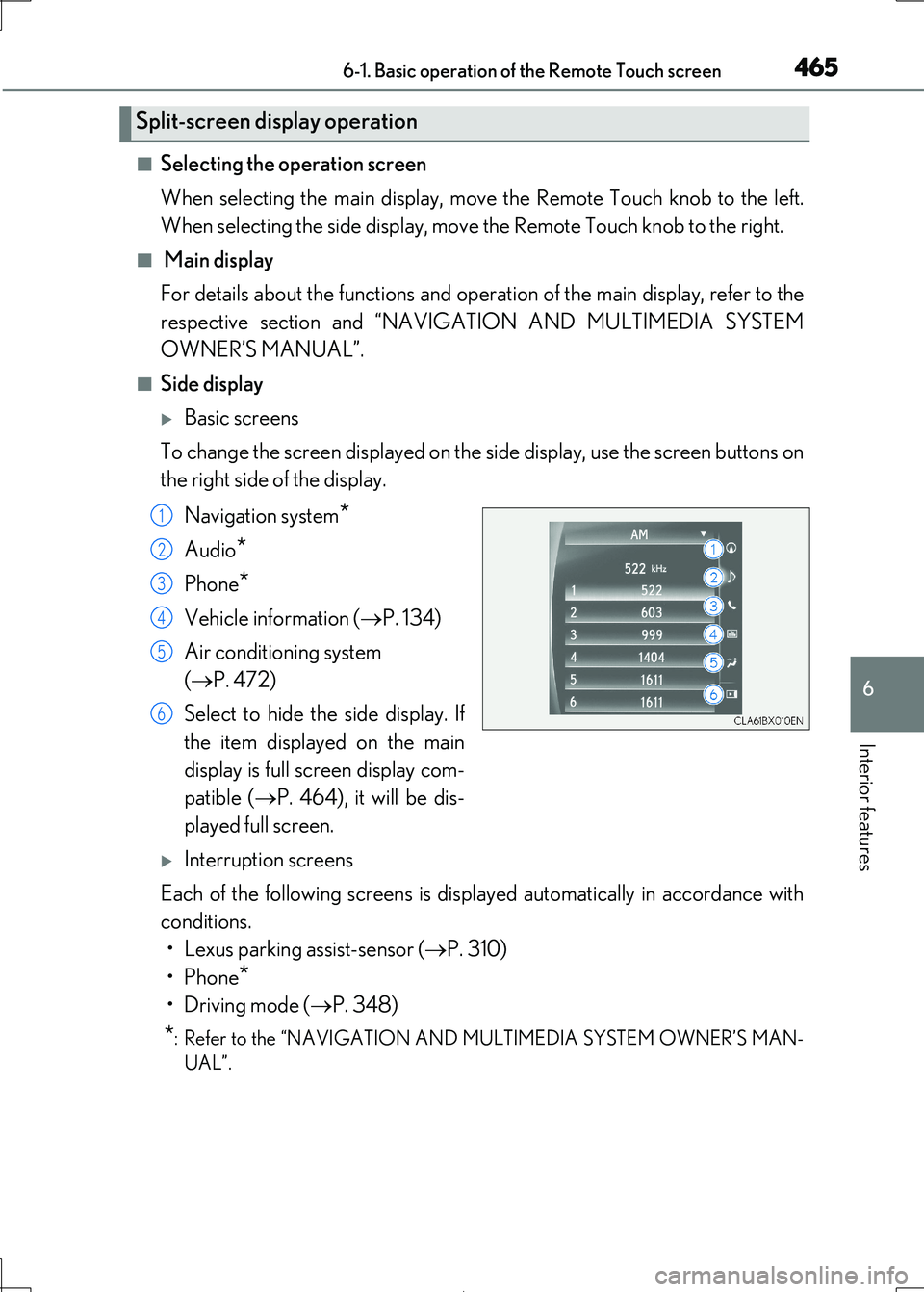
To change the screen displayed on the side display, use the screen buttons on
the right side of the display.
Navigation system*
Audio*
Phone*
Vehicle information ( P. 134)
Air conditioning system
( P. 472)
Select to hide the side display. If
the item displayed on the main
display is full screen display com-
patible ( P. 464), it will be dis-
played full screen.
Interruption screens
Each of the following screens is displayed automatically in accordance with
conditions.
• Lexus parking assist-sensor ( P. 310)
•Phone*
•Driving mode ( P. 348)
*: Refer to the “NAVIGATION AND MULTIMEDIA SYSTEM OWNER’S MAN-
UAL”.
Split-screen display operation
1
2
3
4
5
6
Page 466 of 692
466
IS300h_EE(OM53D89E)
6-2. Using the air conditioning system
Automatic air conditioning system
Air outlets and fan speed are automati cally adjusted according to the tem-
perature setting.
Vehicles with a Lexus Disp lay Audio system: Press the “MENU” button on the
Lexus Display Audio controller, then sele ct “Climate” to display the air condi-
tioning operation screen.
For details on the Lexus Display Audio controller, refer to “Lexus Display
Audio controller” on P. 370.
Vehicles with a 10.3-inch display: Pr ess the “MENU” button on the Remote
Touch, then select to display the ai r conditioning control screen. The air
conditioning system can be displayed and operated on the side display.
( P. 465)
The illustrations below are f or left-hand drive vehicles.
The button positions and shapes will differ for right-hand drive vehicles.
Also, the display and button positions will differ depending on the type of the
system.
Page 523 of 692
5237-3. Do-it-yourself maintenance
7
Maintenance and care
IS300h_EE(OM53D89E)
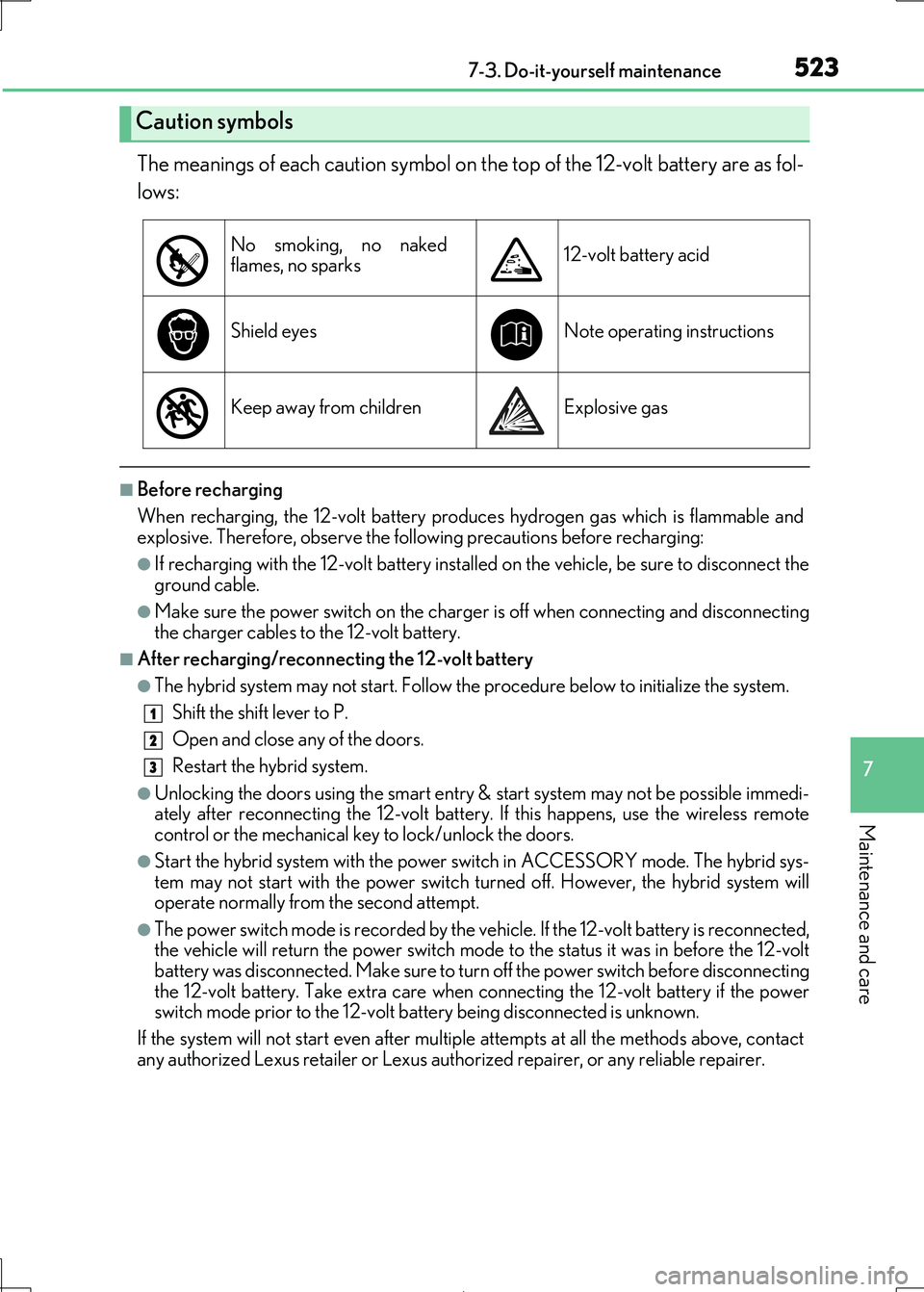
The meanings of each caution symbol on the top of the 12-volt battery are as fol-
lows:
■Before recharging
When recharging, the 12-volt battery produc es hydrogen gas which is flammable and
explosive. Therefore, observe the following precautions before recharging:
●If recharging with the 12-volt battery installed on the vehicle, be sure to disconnect the
ground cable.
●Make sure the power switch on the charge r is off when connecting and disconnecting
the charger cables to the 12-volt battery.
■After recharging/reconnecting the 12-volt battery
●The hybrid system may not start. Follow the procedure below to initialize the system.
Shift the shift lever to P.
Open and close any of the doors.
Restart the hybrid system.
●Unlocking the doors using the smart entry & start system may not be possible immedi- ately after reconnecting the 12-volt battery. If this happens, use the wireless remote
control or the mechanical key to lock/unlock the doors.
●Start the hybrid system with the power switch in ACCESSORY mode. The hybrid sys- tem may not start with the power switch turned off. However, the hybrid system will
operate normally from the second attempt.
●The power switch mode is recorded by the vehicle. If the 12-volt battery is reconnected, the vehicle will return the power switch mode to the status it was in before the 12-volt
battery was disconnected. Make sure to turn off the power switch before disconnecting
the 12-volt battery. Take extra care when connecting the 12-volt battery if the power switch mode prior to the 12-volt battery being disconnected is unknown.
If the system will not start ev en after multiple attempts at all the methods above, contact
any authorized Lexus retailer or Lexus author ized repairer, or any reliable repairer.
Caution symbols
No smoking, no naked flames, no sparks12-volt battery acid
Shield eyesNote operating instructions
Keep away from childrenExplosive gas
1
2
3
Page 551 of 692
5517-3. Do-it-yourself maintenance
7
Maintenance and care
IS300h_EE(OM53D89E)
WARNING
■Removed battery and other parts
These parts are small and if swallowed by a child, they can cause choking. Keep away from children. Failure to do so coul d result in death or serious injury.
■Lithium battery precautions
CAUTION: RISK OF EXPLOSION IF BATTERY IS REPLACED BY AN INCORRECT TYPE. DISPOSE OF USED BATTERIES ACCORDING TO THE INSTRUCTIONS
NOTICE
■For normal operation after replacing the battery
Observe the following precautions to prevent accidents:
●Always work with dry hands. Moisture may cause the battery to rust.
●Do not touch or move any other co mponent inside the remote control.
●Do not bend either of the battery terminals.
Page 628 of 692
6288-2. Steps to take in an emergency
IS300h_EE(OM53D89E)
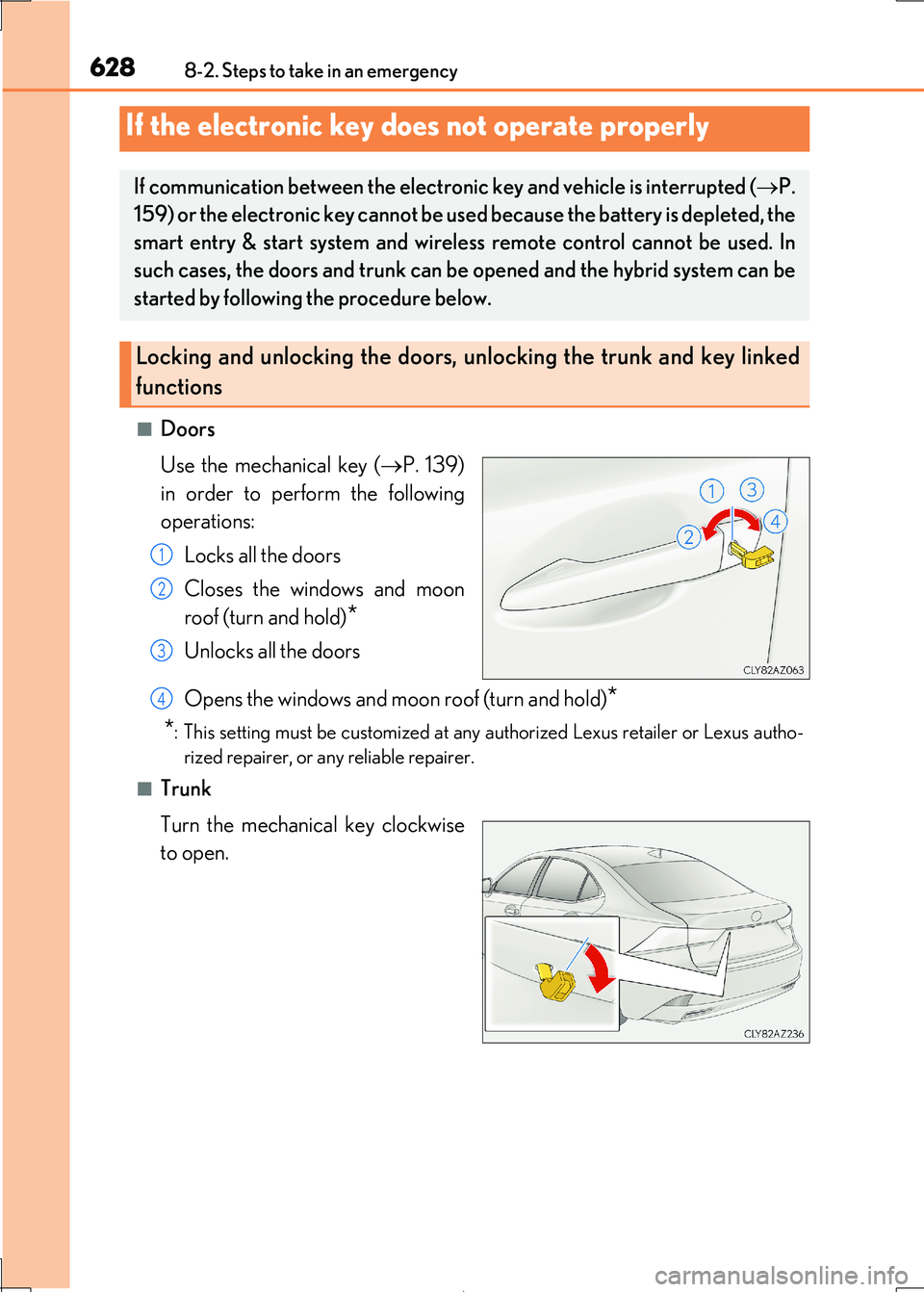
■Doors
Use the mechanical key ( P. 139)
in order to perform the following
operations:
Locks all the doors
Closes the windows and moon
roof (turn and hold)*
Unlocks all the doors
Opens the windows and moon roof (turn and hold)*
*: This setting must be customized at any authorized Lexus retailer or Lexus autho-
rized repairer, or an y reliable repairer.
■Trunk
Turn the mechanical key clockwise
to open.
If the electronic key does not operate properly
If communication between the electronic key and vehicle is interrupted ( P.
159) or the electronic key cannot be us ed because the battery is depleted, the
smart entry & start system and wireless remote control cannot be used. In
such cases, the doors and trunk can be opened and the hybrid system can be
started by following the procedure below.
Locking and unlocking the doors, unlocking the trunk and key linked
functions
1
2
3
4
Page 633 of 692
6338-2. Steps to take in an emergency
8
When trouble arises
IS300h_EE(OM53D89E)
Maintain the engine speed of the second vehicle and start the hybrid system
of your vehicle by turning the power switch to ON mode.
Make sure the “READY” indicator comes on. If the indicator does not come
on, contact any authorized Lexus retailer or Lexus authorized repairer, or any
reliable repairer.
Once the hybrid system has started, remove the jumper cables in the exact
reverse order from which they were connected.
Once the hybrid system starts, have the vehicle inspected at any authorized
Lexus retailer or Lexus authorized repair er, or any reliable repairer as soon as
possible.
■Starting the hybrid system when the 12-volt battery is discharged
The hybrid system cannot be started by push-starting.
■To prevent 12-volt battery discharge
●Turn off the headlights and the audio system while the hybrid system is off.
●Turn off any unnecessary electrical componen ts when the vehicle is running at a low
speed for an extended period , such as in heavy traffic.
■Charging the 12-volt battery
The electricity stored in the 12-volt battery w ill discharge gradually even when the vehicle
is not in use, due to natural discharge and the draining effects of certain electrical appli-
ances. If the vehicle is left for a long time, the 12-volt battery may discharge, and the hybrid system may be unable to start. (The 12-volt battery recharges automatically while
the hybrid system is operating.)
■When recharging or repl acing the 12-volt battery
●In some cases, it may not be possible to unlock the doors using the smart entry & start
system when the 12-volt battery is discharged. Use the wireless remote control or the
mechanical key to lock or unlock the doors.
●The hybrid system may not start on the first attempt after the 12-volt battery has
recharged but will start normally after the second attempt. This is not a malfunction.
●The power switch mode is memorized by the vehicle. When the 12-volt battery is reconnected, the system will retu rn to the mode it was in before the 12-volt battery was
discharged. Before disconnecting the 12-vol t battery, turn the power switch off.
If you are unsure what mode the power switch was in before the 12-volt battery dis- charged, be especially careful when reconnecting the 12-volt battery.
7
8
9
Page 657 of 692
657
IS300h_EE(OM53D89E)
9
Vehicle specifications
9-2. Customization
When customizing vehicle features, ensure that the vehicle is parked in a safe
place with the shift lever in P and the parking brake set.
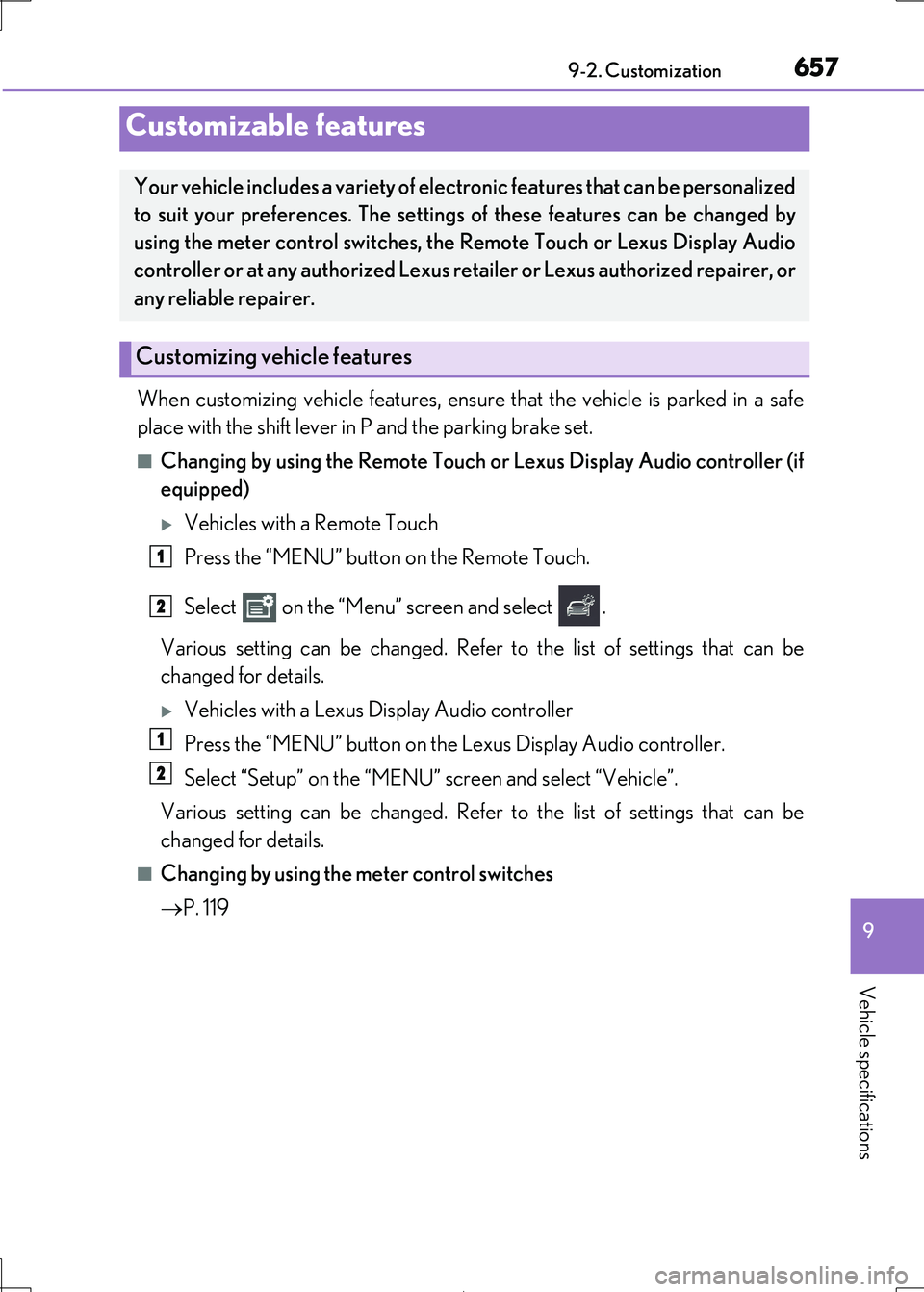
■Changing by using the Remote Touch or Lexus Display Audio controller (if
equipped)
Vehicles with a Remote Touch
Press the “MENU” button on the Remote Touch.
Select on the “Menu” screen and select .
Various setting can be changed. Refer to the list of settings that can be
changed for details.
Vehicles with a Lexus Display Audio controller
Press the “MENU” button on the Lexus Display Audio controller.
Select “Setup” on the “MENU” screen and select “Vehicle”.
Various setting can be changed. Refer to the list of settings that can be
changed for details.
■Changing by using the meter control switches
P. 119
Customizable features
Your vehicle includes a variety of electronic features that can be personalized
to suit your preferences. The settings of these features can be changed by
using the meter control switches, the Remote Touch or Lexus Display Audio
controller or at any auth orized Lexus retailer or Lexus authorized repairer, or
any reliable repairer.
Customizing vehicle features
1
2
1
2
Page 658 of 692
6589-2. Customization
IS300h_EE(OM53D89E)
Some function settings are changed simu ltaneously with other functions being
customized. Contact any authorized Lexus retailer or Lexus authorized repairer,
or any reliable repairer.
Vehicles with a Remote Touch or Lexus Display Audio controller: Settings that
can be changed using the Remote Touc h or Lexus Display Audio controller
Settings that can be changed by any au thorized Lexus retailer or Lexus autho-
rized repairer, or any reliable repairer
Definition of symbols: O = Available, — = Not available
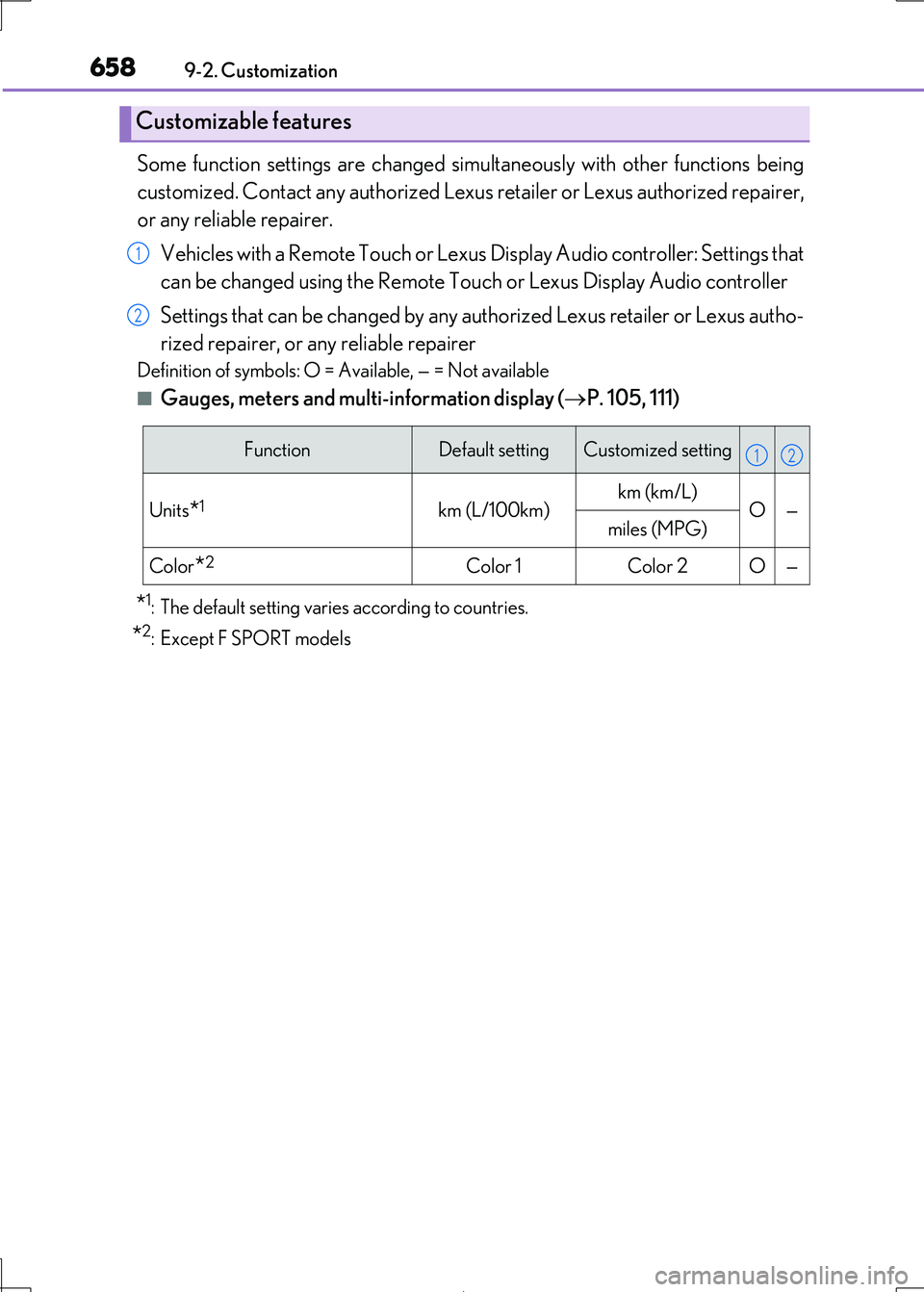
■Gauges, meters and multi-information display (P. 105, 111)
*1: The default setting varies according to countries.
*2:Except F SPORT models
Customizable features
1
2
FunctionDefault settingCustomized setting
Units*1km (L/100km)km (km/L) O—miles (MPG)
Color*2Color 1Color 2O—
12
Page 659 of 692
659
9
9-2. Customization
Vehicle specifications
IS300h_EE(OM53D89E)
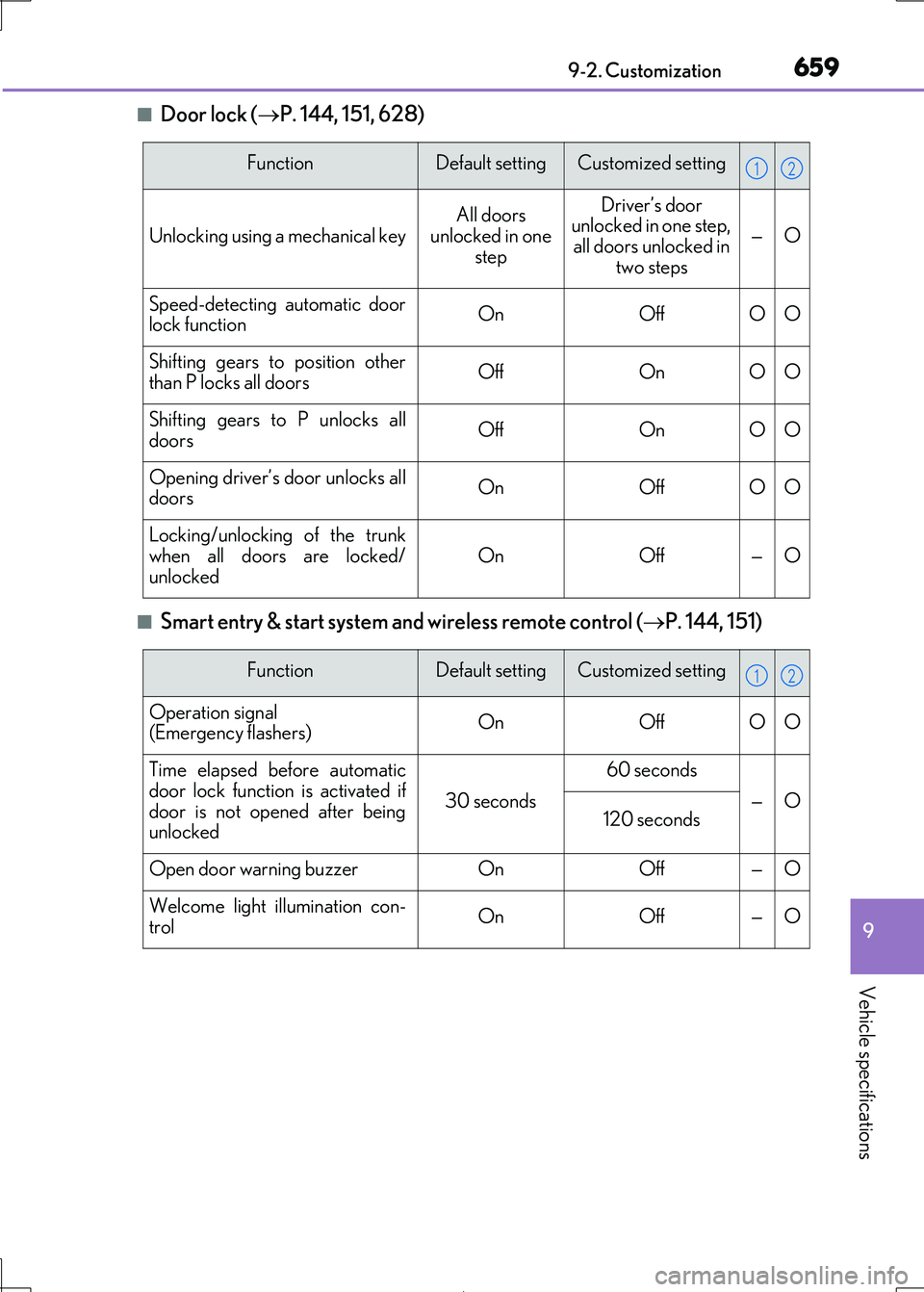
■Door lock ( P. 144, 151, 628)
■Smart entry & start system and wireless remote control (P. 144, 151)
FunctionDefault settingCustomized setting
Unlocking using a mechanical key
All doors
unlocked in one step
Driver’s door unlocked in one step,
all doors unlocked in
two steps
—O
Speed-detecting automatic door lock functionOnOffOO
Shifting gears to position other
than P locks all doorsOffOnOO
Shifting gears to P unlocks all
doorsOffOnOO
Opening driver’s door unlocks all doorsOnOffOO
Locking/unlocking of the trunk
when all doors are locked/
unlocked
OnOff—O
12
FunctionDefault settingCustomized setting
Operation signal (Emergency flashers)OnOffOO
Time elapsed before automatic
door lock function is activated if
door is not opened after being unlocked
30 seconds
60 seconds
—O120 seconds
Open door warning buzzerOnOff—O
Welcome light illumination con-
trolOnOff—O
12
Page 660 of 692
6609-2. Customization
IS300h_EE(OM53D89E)
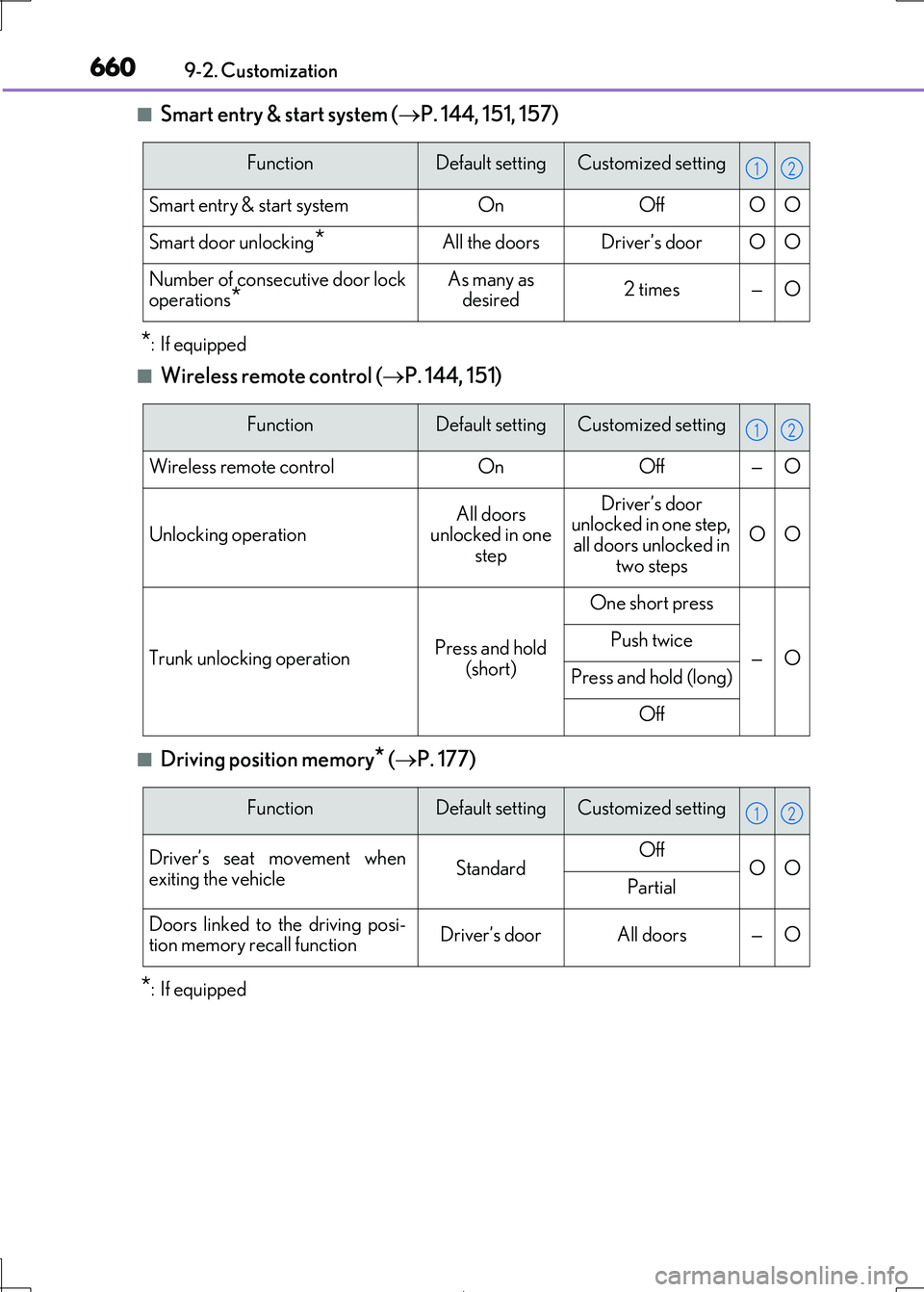
■Smart entry & start system ( P. 144, 151, 157)
*:If equipped
■Wireless remote control (P. 144, 151)
■Driving position memory* (P. 177)
*:If equipped
FunctionDefault settingCustomized setting
Smart entry & start systemOnOffOO
Smart door unlocking*All the doorsDriver’s doorOO
Number of consecutive door lock operations*As many as desired2 times—O
12
FunctionDefault settingCustomized setting
Wireless remote controlOnOff—O
Unlocking operationAll doors unlocked in one
step
Driver’s door
unlocked in one step,
all doors unlocked in two steps
OO
Trunk unlocking operationPress and hold
(short)
One short press
—OPush twice
Press and hold (long)
Off
12
FunctionDefault settingCustomized setting
Driver’s seat movement when
exiting the vehicleStandardOffOOPartial
Doors linked to the driving posi-
tion memory recall functionDriver’s doorAll doors—O
12