sensor Lexus IS300h 2017 Repair Manual
[x] Cancel search | Manufacturer: LEXUS, Model Year: 2017, Model line: IS300h, Model: Lexus IS300h 2017Pages: 692, PDF Size: 163.7 MB
Page 334 of 692
3344-5. Using the driving support systems
IS300h_EE(OM53D89E)
The Blind Spot Monitor is a system that has 2 functions:
●The BSM (Blind Spot Monitor) function
Assists the driver in making a decision when changing lanes
●The RCTA (Rear Crossing Traffic Alert) function
Assists the driver when backing up
These functions use same sensors.
BSM (Blind Spot Monitor)
: If equipped
Summary of the Blind Spot Monitor
Page 336 of 692
3364-5. Using the driving support systems
IS300h_EE(OM53D89E)
■Outside rear view mirror indicator visibility
In strong sunlight, the outside rear view mirror indicator may be difficult to see.
■Hearing the RCTA buzzer
The RCTA buzzer may be difficult to hear over loud noises, such as if the audio system
volume is high.
■When there is a malfunction in the Blind Spot Monitor
If a system malfunction is detected due to any of the following, a warning message will be
displayed: ( P. 581)
●A sensor is malfunctioning
●A sensor is dirty or covered with snow or a sticker
●The outside temperature is extremely high or low
●Sensor voltage is abnormal
●A sensor is misaligned
■Certification for the Blind Spot Monitor
Page 339 of 692
3394-5. Using the driving support systems
4
Driving
IS300h_EE(OM53D89E)
WARNING
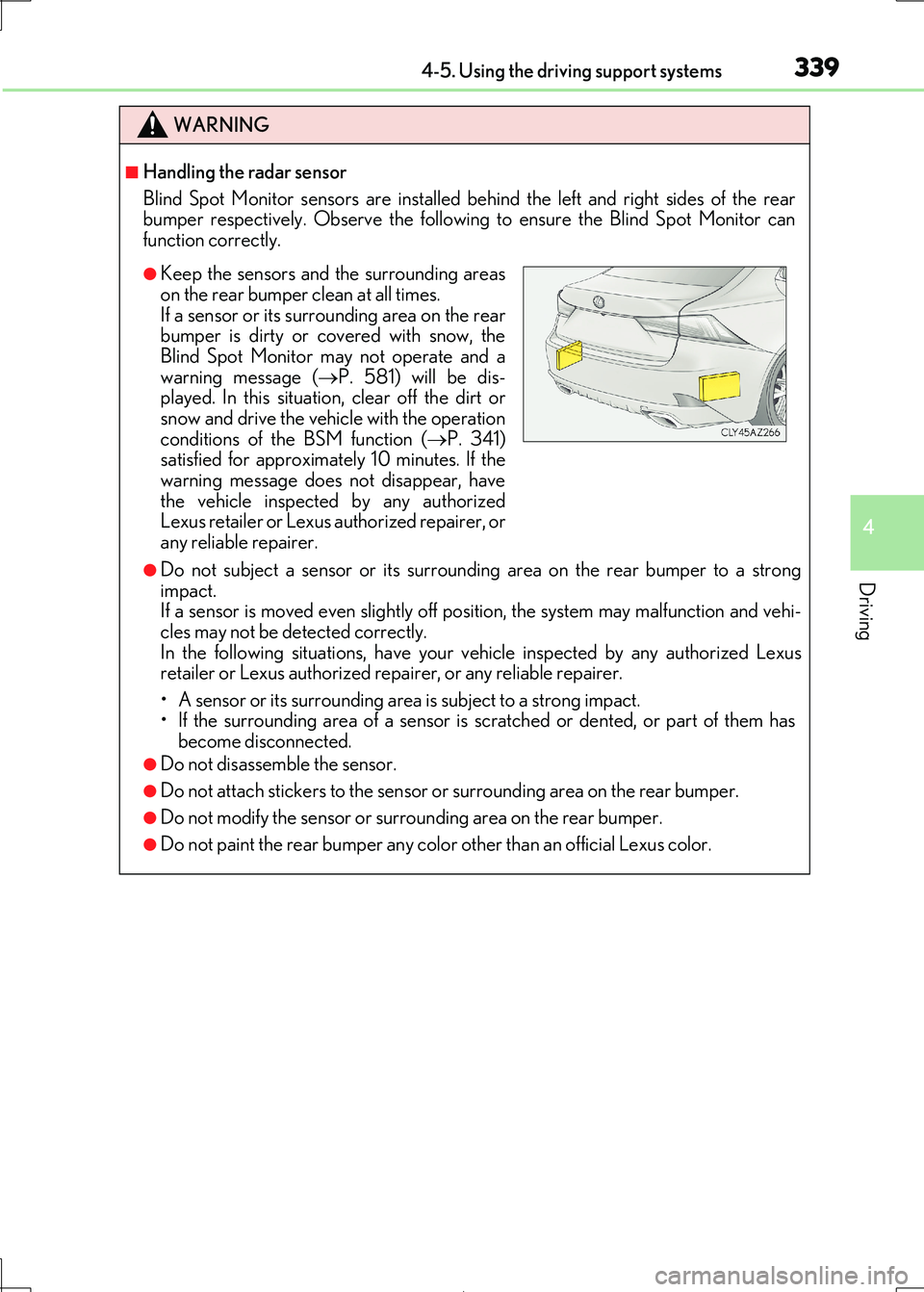
■Handling the radar sensor
Blind Spot Monitor sensors are installed be hind the left and right sides of the rear
bumper respectively. Observe the following to ensure the Blind Spot Monitor can
function correctly.
●Do not subject a sensor or its surrounding area on the rear bumper to a strong impact.
If a sensor is moved even slightly off position, the system may malfunction and vehi-
cles may not be detected correctly. In the following situations, have your ve hicle inspected by any authorized Lexus
retailer or Lexus authorized repa irer, or any reliable repairer.
• A sensor or its surrounding area is subject to a strong impact. • If the surrounding area of a sensor is sc ratched or dented, or part of them has
become disconnected.
●Do not disassemble the sensor.
●Do not attach stickers to the sensor or surrounding area on the rear bumper.
●Do not modify the sensor or surrounding area on the rear bumper.
●Do not paint the rear bumper any color other than an official Lexus color.
●Keep the sensors and the surrounding areas
on the rear bumper clean at all times.
If a sensor or its surrounding area on the rear bumper is dirty or covered with snow, the
Blind Spot Monitor may not operate and a
warning message ( P. 581) will be dis- played. In this situation, clear off the dirt or
snow and drive the vehicle with the operation
conditions of the BSM function ( P. 341) satisfied for approximately 10 minutes. If the
warning message does not disappear, have
the vehicle inspected by any authorized Lexus retailer or Lexus authorized repairer, or
any reliable repairer.
Page 340 of 692
3404-5. Using the driving support systems
IS300h_EE(OM53D89E)
The Blind Spot Monitor function uses radar sensors to detect vehicles that are
traveling in an adjacent lane in the area that is not reflected in the outside rear
view mirror (the blind spot), and advises the driver of the vehicles existence via
the outside rear view mirror indicator.
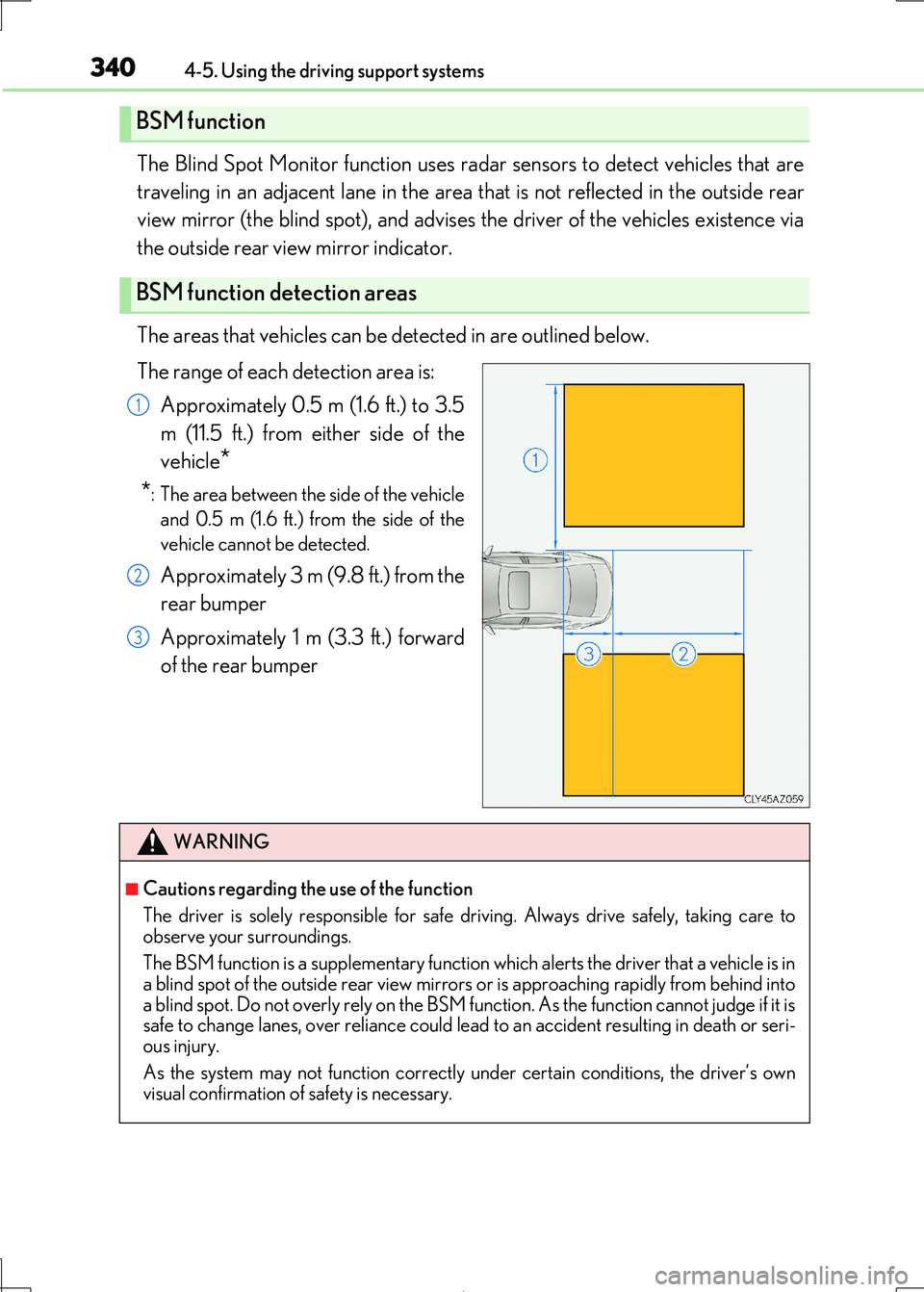
The areas that vehicles can be detected in are outlined below.
The range of each detection area is:
Approximately 0.5 m (1.6 ft.) to 3.5
m (11.5 ft.) from either side of the
vehicle*
*: The area between the side of the vehicle
and 0.5 m (1.6 ft.) from the side of the
vehicle cannot be detected.
Approximately 3 m (9.8 ft.) from the
rear bumper
Approximately 1 m (3.3 ft.) forward
of the rear bumper
BSM function
BSM function detection areas
1
2
3
WARNING
■Cautions regarding the use of the function
The driver is solely responsible for safe dr iving. Always drive safely, taking care to
observe your surroundings.
The BSM function is a supplementary function which alerts the driver that a vehicle is in
a blind spot of the outside rear view mirrors or is approaching rapidly from behind into
a blind spot. Do not overly rely on the BSM function. As the function cannot judge if it is safe to change lanes, over reliance could lead to an accident resulting in death or seri-
ous injury.
As the system may not function correctly under certain conditions, the driver’s own visual confirmation of safety is necessary.
Page 342 of 692

3424-5. Using the driving support systems
IS300h_EE(OM53D89E)
■Conditions under which the BSM function may not function correctly
●The BSM function may not detect vehicles correctly in the following situations:
• When the sensor is misaligned due to a stro ng impact to the sensor or its surround-
ing area
• When mud, snow, ice, a sticker, etc. is covering the sensor or surrounding area on the rear bumper
• When driving on a road surface that is wet with standing water during bad weather,
such as heavy rain, snow, or fog • When multiple vehicles are approaching wi th only a small gap between each vehicle
• When the distance between your vehicle and a following vehicle is short
• When there is a significant difference in speed between your vehicle and the vehicle that enters the detection area
• When the difference in speed between your vehicle and another vehicle is changing
• When a vehicle enters a detection area traveling at about the same speed as your vehicle
• As your vehicle starts from a stop, a vehicle remains in the detection area
• When driving up and down consecutive steep inclines, such as hills, dips in the road, etc.
• When driving on roads with sharp bends, consecutive curves, or uneven surfaces
• When vehicle lanes are wide, or when drivin g on the edge of a lane, and the vehicle in an adjacent lane is fa r away from your vehicle
• When towing a trailer (vehicles with towing package)
• When items such as a bicycle carrier are installed on the rear of the vehicle • When there is a significant difference in height between your vehicle and the vehicle
that enters the detection area
• Immediately after the BSM function is turned on
●Instances of the BSM function unnecessarily detecting a vehicle and/or object may
increase in the following situations:
• When the sensor is misaligned due to a stro ng impact to the sensor or its surround- ing area
• When the distance between your vehicle and a guardrail, wall, etc. that enters the
detection area is short • When driving up and down consecutive steep inclines, such as hills, dips in the road,
etc.
• When vehicle lanes are narrow, or when driv ing on the edge of a lane, and a vehicle traveling in a lane other than the ad jacent lanes enters the detection area
• When driving on roads with sharp bends, consecutive curves, or uneven surfaces
• When the tires are slipping or spinning • When the distance between your vehicle and a following vehicle is short
• When a bicycle carrier or other accessory is installed to the rear of the vehicle
• When towing a trailer (vehicles with towing package)
Page 343 of 692
3434-5. Using the driving support systems
4
Driving
IS300h_EE(OM53D89E)
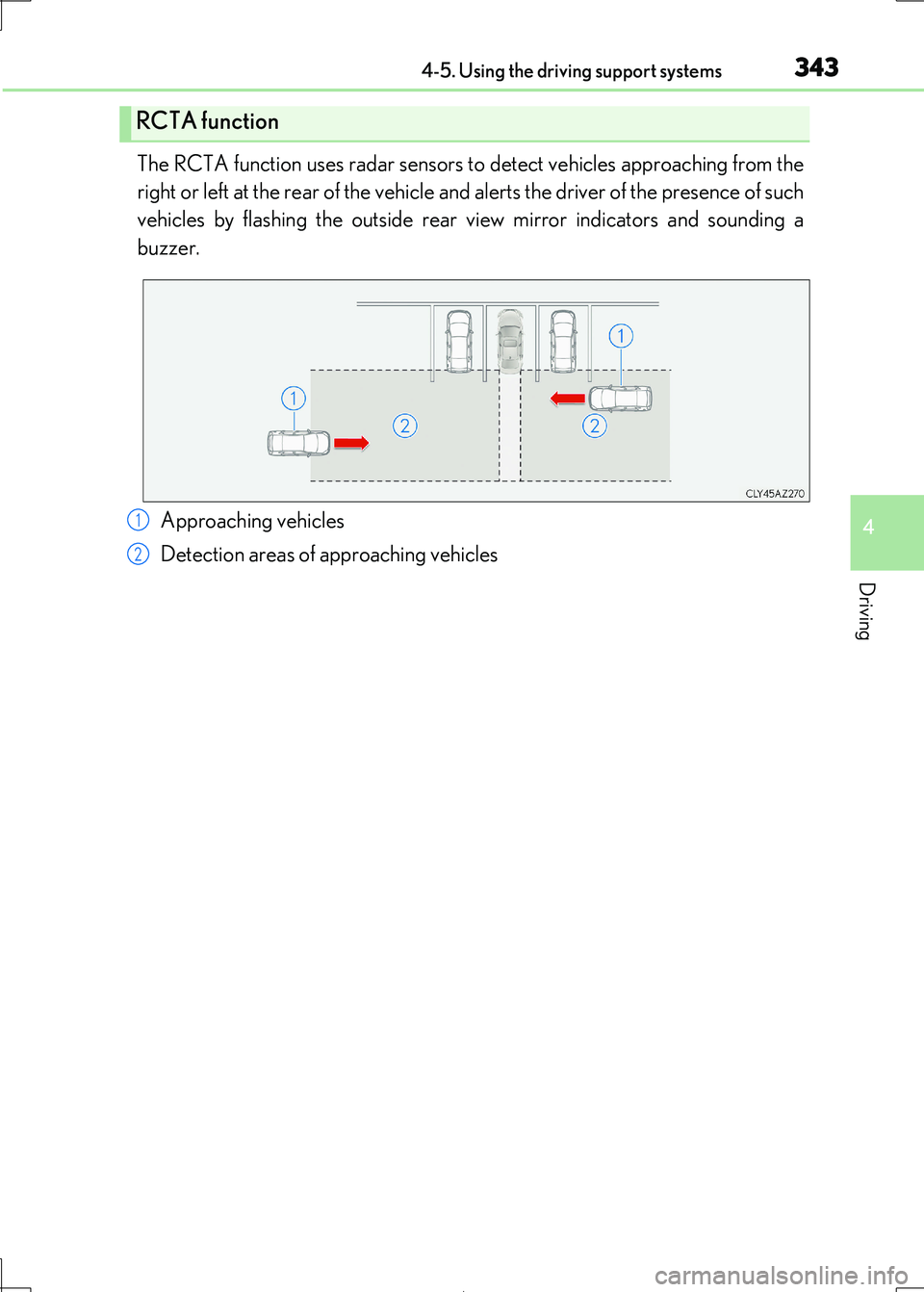
The RCTA function uses radar sensors to detect vehicles approaching from the
right or left at the rear of the vehicle an d alerts the driver of the presence of such
vehicles by flashing the outside rear view mirror indicators and sounding a
buzzer.
Approaching vehicles
Detection areas of approaching vehicles
RCTA function
1
2
Page 346 of 692

3464-5. Using the driving support systems
IS300h_EE(OM53D89E)
■Conditions under which the RCTA function will not detect a vehicle
The RCTA function is not designed to dete ct the following types of vehicles and/or objects:
●Vehicles approaching from directly behind
●Vehicles backing up in a parking space next to your vehicle
●Guardrails, walls, signs, parked vehi cles and similar stationary objects*
●Small motorcycles, bicycles, pedestrians, etc.*
●Vehicles moving away from your vehicle
●Vehicles approaching from the parking spaces next to your vehicle*
*: Depending on the conditions, detection of a vehicle and/or object may occur.
■Conditions under which the RCTA function may not function correctly
●The RCTA function may not detect vehicles correctly in the following situations:
• When the sensor is misaligned due to a stro ng impact to the sensor or its surround-
ing area • When mud, snow, ice, a sticker, etc. is covering the sensor or surrounding area on
the rear bumper
• When driving on a road surface that is wet with standing water during bad weather,
such as heavy rain, snow, or fog • When multiple vehicles are approaching wi th only a small gap between each vehicle
• When a vehicle is approaching at high speed
• When towing a trailer (vehicles with towing package)
●Vehicles that the sensors cannot detect due to
obstructions
• When backing up on a slope with a sharp
change in grade
Page 347 of 692
3474-5. Using the driving support systems
4
Driving
IS300h_EE(OM53D89E)
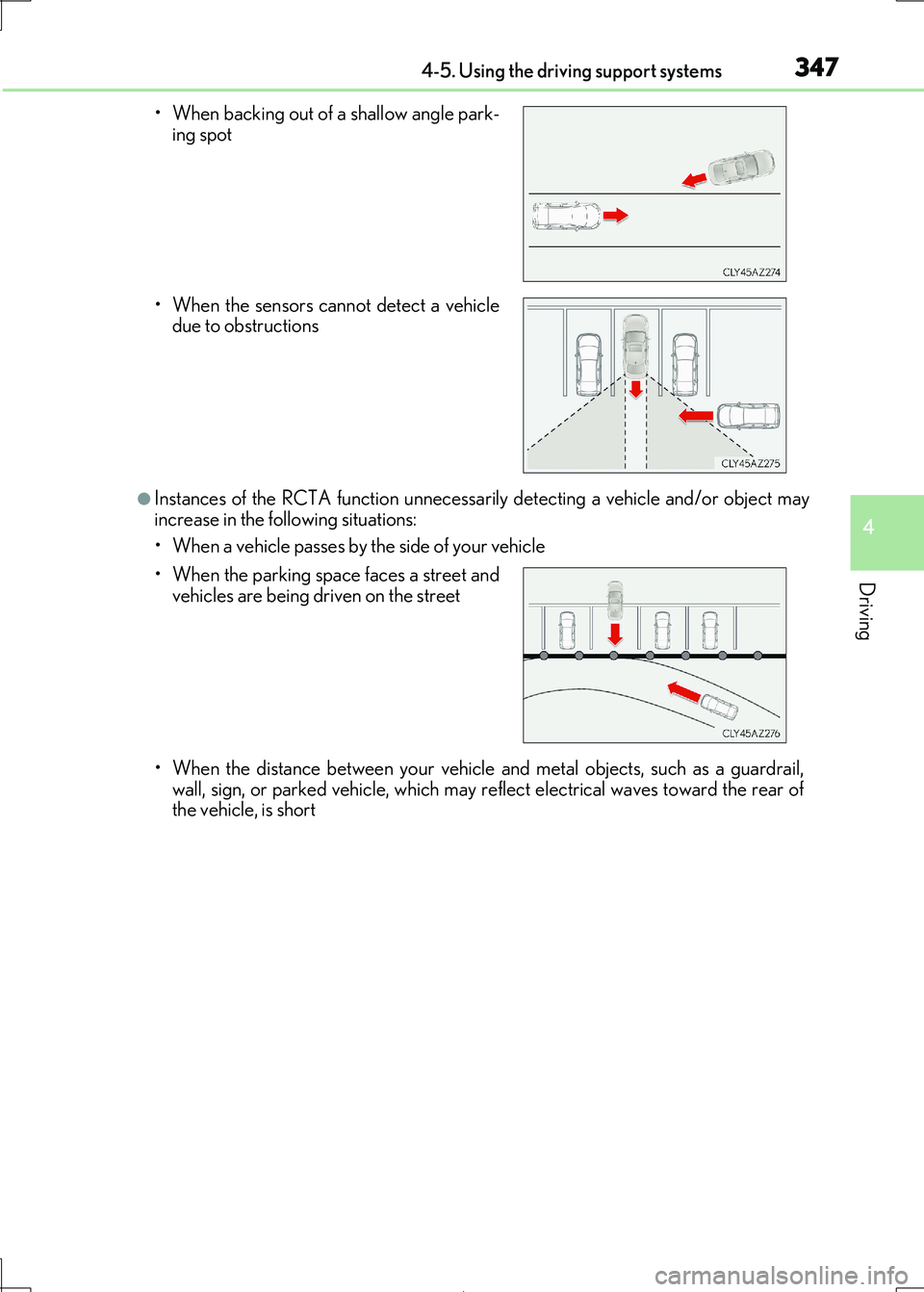
●Instances of the RCTA function unnecessarily detecting a vehicle and/or object may
increase in the following situations:
• When a vehicle passes by the side of your vehicle
• When the distance between your vehicle and metal objects, such as a guardrail,
wall, sign, or parked vehicle, which may re flect electrical waves toward the rear of
the vehicle, is short
• When backing out of a shallow angle park-
ing spot
• When the sensors cannot detect a vehicle due to obstructions
• When the parking space faces a street and vehicles are being driven on the street
Page 465 of 692
4656-1. Basic operation of the Remote Touch screen
6
Interior features
IS300h_EE(OM53D89E)
■Selecting the operation screen
When selecting the main display, move the Remote Touch knob to the left.
When selecting the side display, move the Remote Touch knob to the right.
■ Main display
For details about the functions and operat ion of the main display, refer to the
respective section and “NAVIGATION AND MULTIMEDIA SYSTEM
OWNER’S MANUAL”.
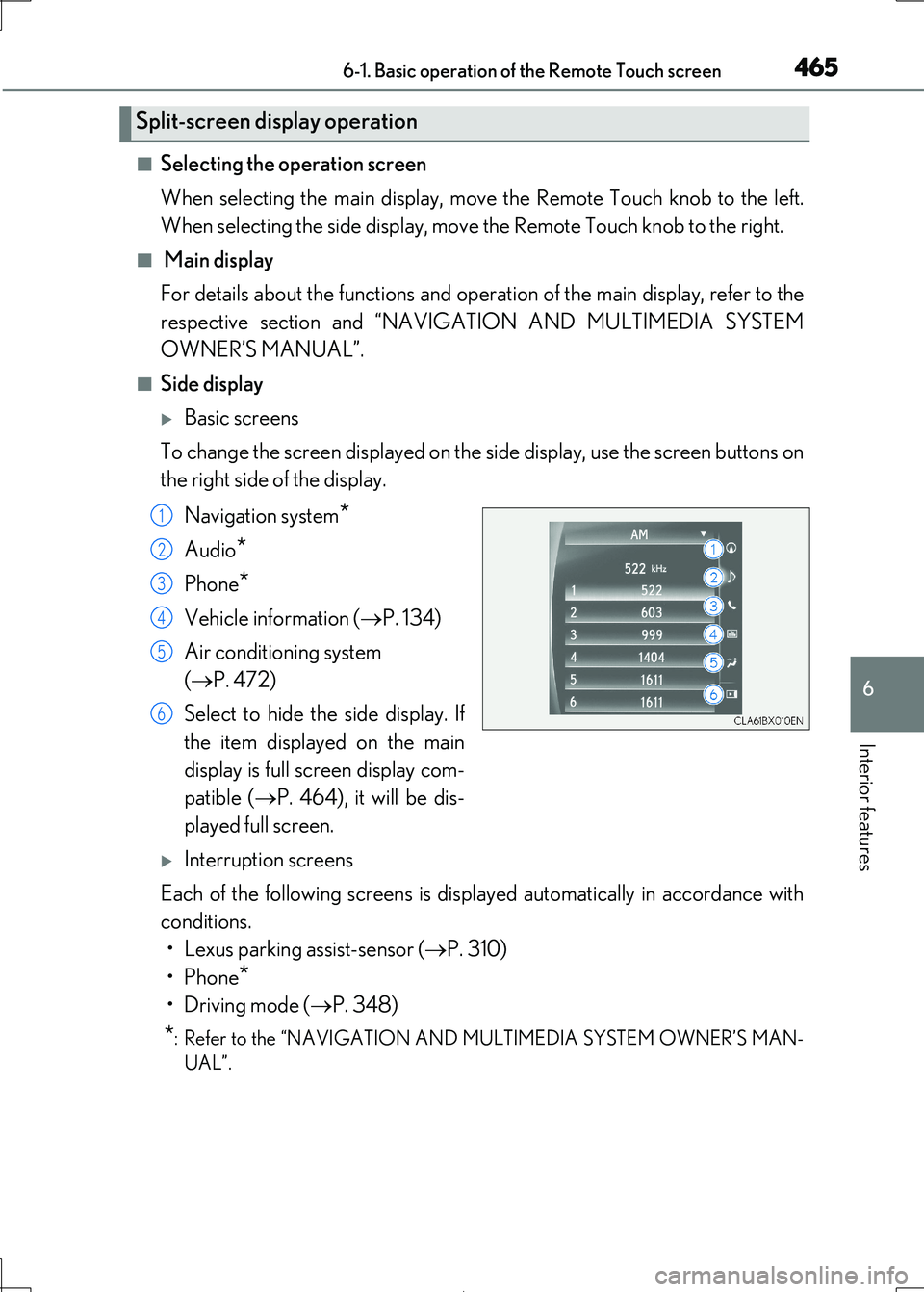
■Side display
Basic screens
To change the screen displayed on the side display, use the screen buttons on
the right side of the display.
Navigation system*
Audio*
Phone*
Vehicle information ( P. 134)
Air conditioning system
( P. 472)
Select to hide the side display. If
the item displayed on the main
display is full screen display com-
patible ( P. 464), it will be dis-
played full screen.
Interruption screens
Each of the following screens is displayed automatically in accordance with
conditions.
• Lexus parking assist-sensor ( P. 310)
•Phone*
•Driving mode ( P. 348)
*: Refer to the “NAVIGATION AND MULTIMEDIA SYSTEM OWNER’S MAN-
UAL”.
Split-screen display operation
1
2
3
4
5
6
Page 468 of 692
4686-2. Using the air conditioning system
IS300h_EE(OM53D89E)
■Adjusting the temperature setting
To adjust the temperature setting,
touch and slide your finger up or
down on the sensor.
The temperature setting can also be adjusted by touching on the sensor.
When the temperature setting is
changed, a buzzer sounds.
■Fan speed setting
Press to increase the fan speed.
Press to decrease the fan speed.
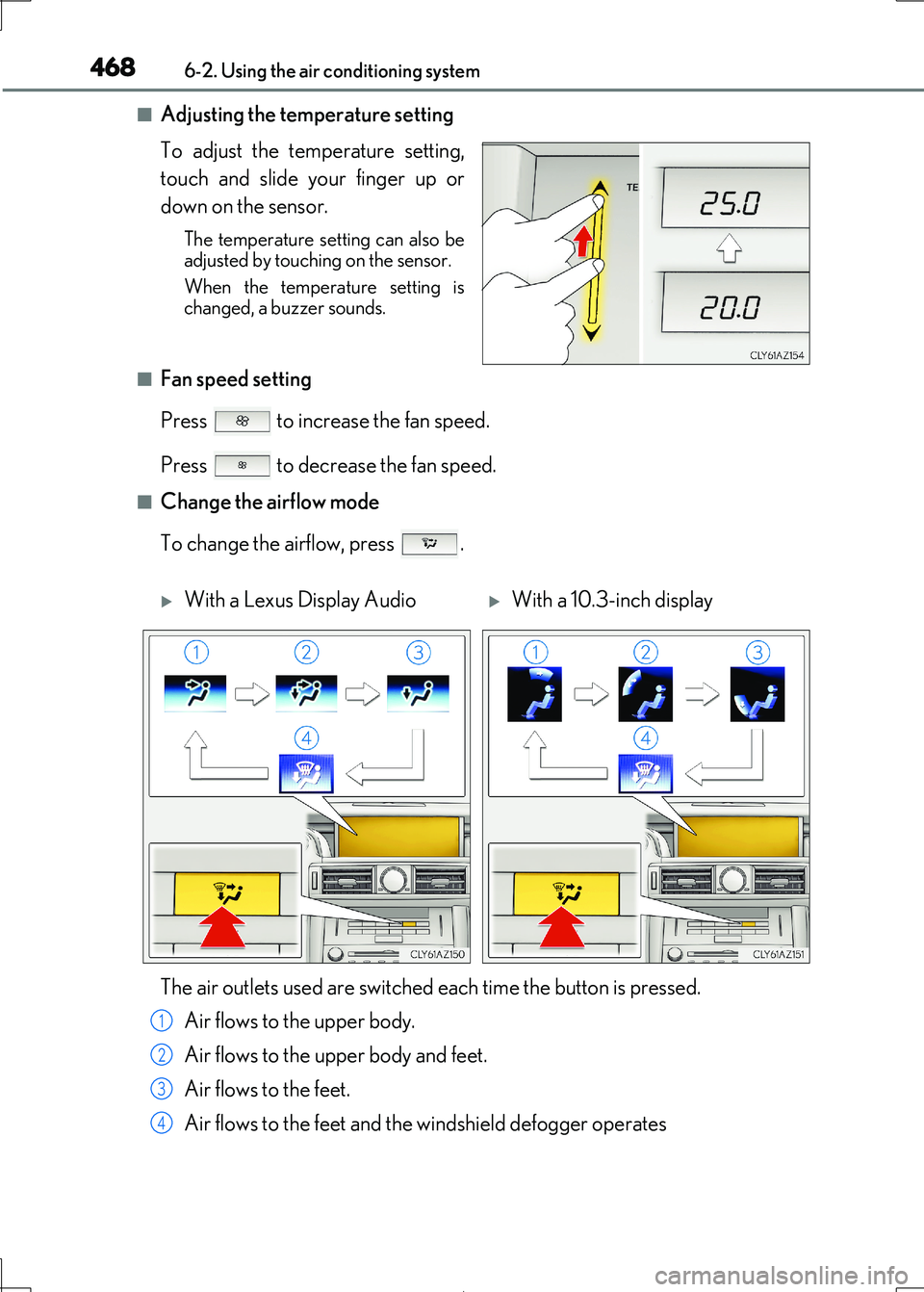
■Change the airflow mode
To change the airflow, press .
With a Lexus Display AudioWith a 10.3-inch display
The air outlets used are switched each time the button is pressed.
Air flows to the upper body.
Air flows to the upper body and feet.
Air flows to the feet.
Air flows to the feet and the windshield defogger operates
1
2
3
4