fuel consumption Lexus IS300h 2017 Owner's Manual
[x] Cancel search | Manufacturer: LEXUS, Model Year: 2017, Model line: IS300h, Model: Lexus IS300h 2017Pages: 692, PDF Size: 163.7 MB
Page 116 of 692
1162. Instrument cluster
IS300h_EE(OM53D89E)
F SPORT models: Some drive information items can only be displayed when the
main meter is in the center position or when it is moved to the right.
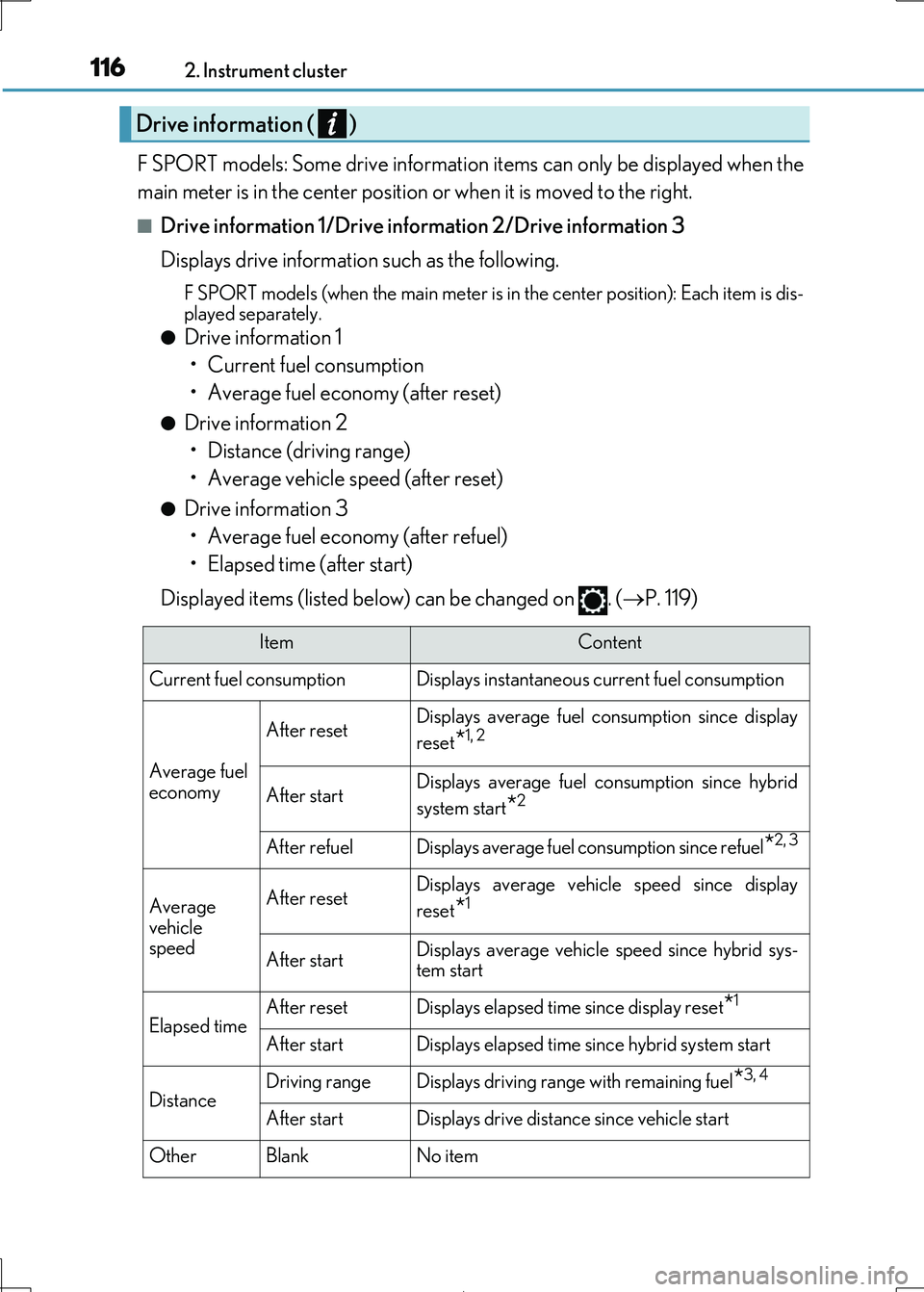
■Drive information 1/Drive information 2/Drive information 3
Displays drive information such as the following.
F SPORT models (when the main meter is in the center position): Each item is dis-
played separately.
●Drive information 1
• Current fuel consumption
• Average fuel economy (after reset)
●Drive information 2
• Distance (driving range)
• Average vehicle speed (after reset)
●Drive information 3
• Average fuel economy (after refuel)
• Elapsed time (after start)
Displayed items (listed below) can be changed on . ( P. 119)
Drive information ( )
ItemContent
Current fuel consumption Displays in stantaneous current fuel consumption
Average fuel
economy
After resetDisplays average fuel consumption since display
reset*1, 2
After startDisplays average fuel consumption since hybrid
system start*2
After refuelDisplays average fuel consumption since refuel*2, 3
Average
vehicle speed
After resetDisplays average vehicle speed since display
reset*1
After startDisplays average vehicle speed since hybrid sys-
tem start
Elapsed timeAfter resetDisplays elapsed time since display reset*1
After startDisplays elapsed time since hybrid system start
DistanceDriving rangeDisplays driving range with remaining fuel*3, 4
After startDisplays drive distance since vehicle start
OtherBlankNo item
Page 117 of 692
1172. Instrument cluster
2
Instrument cluster
IS300h_EE(OM53D89E)
*1:Resetting: P. 114
*2: Use the displayed fuel consumption as a reference.
*3: When only a small amount of fuel is added to the tank, the display may not be
updated.
When refueling, turn the power switch off. If the vehicle is refueled without turning the
power switch off, the display may not be updated.
*4: This distance is computed based on your average fuel consumption. As a result, the
actual distance that can be driven may differ from that displayed.
■Energy monitor
P. 127
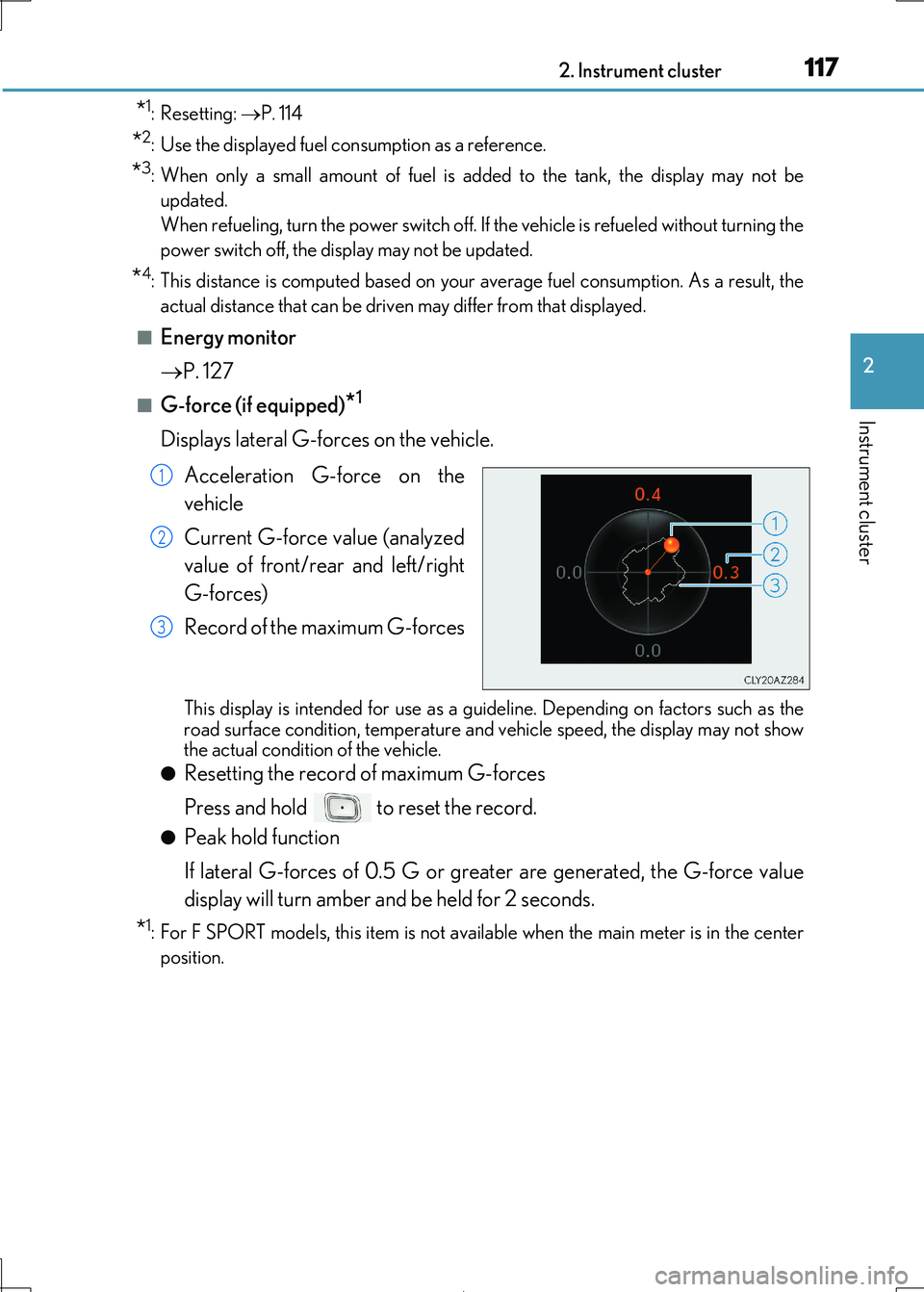
■G-force (if equipped)*1
Displays lateral G-forces on the vehicle.
Acceleration G-force on the
vehicle
Current G-force value (analyzed
value of front/rear and left/right
G-forces)
Record of the maximum G-forces
This display is intended fo r use as a guideline. Depending on factors such as the road surface condition, temperature and vehicle speed, the display may not show
the actual condition of the vehicle.
●Resetting the record of maximum G-forces
Press and hold to reset the record.
●Peak hold function
If lateral G-forces of 0.5 G or greater are generated, the G-force value
display will turn amber and be held for 2 seconds.
*1: For F SPORT models, this item is not ava ilable when the main meter is in the center
position.
1
2
3
Page 130 of 692

1302. Instrument cluster
IS300h_EE(OM53D89E)
■Trip information
Lexus Display Audio screen
Press the “MENU” button on the Lexu s Display Audio controller, and then
select “Car” on the “MENU” screen.
If the “Trip information” screen does not appear, move the controller to the right
and select “Trip information”.
Fuel consumption in the past 15
minutes
Current fuel consumption
Regenerated energy in the past
15 minutes
One symbol indicates 50 Wh.
Up to 5 symbols are shown.
Average vehicle speed since the
hybrid system was started.
Elapsed time since the hybrid system was started.
Cruising range ( P. 133)
Fuel consumption
1
2
3
4
5
6
Page 131 of 692

1312. Instrument cluster
2
Instrument cluster
IS300h_EE(OM53D89E)
10.3-inch display
Press the “MENU” button on the Remote Touch, and then select on the
“Menu” screen.
If the “Energy monitor” or “Past record” sc reen is displayed, select “Trip informa-
tion”.
Resetting the consumption data
Fuel consumption in the past 15
minutes
Current fuel consumption
Regenerated energy in the past
15 minutes
One symbol indicates 50 Wh.
Up to 5 symbols are shown.
Average vehicle speed since the hybrid system was started.
Elapsed time since the hybrid system was started.
Cruising range ( P. 133)
Average fuel consumption for the past 15 minutes is divided by color into past
averages and averages attained since the power switch was last turned to ON
mode. Use the displayed average fuel consumption as a reference.
The image is an example only.
1
2
3
4
5
6
7
Page 132 of 692
1322. Instrument cluster
IS300h_EE(OM53D89E)
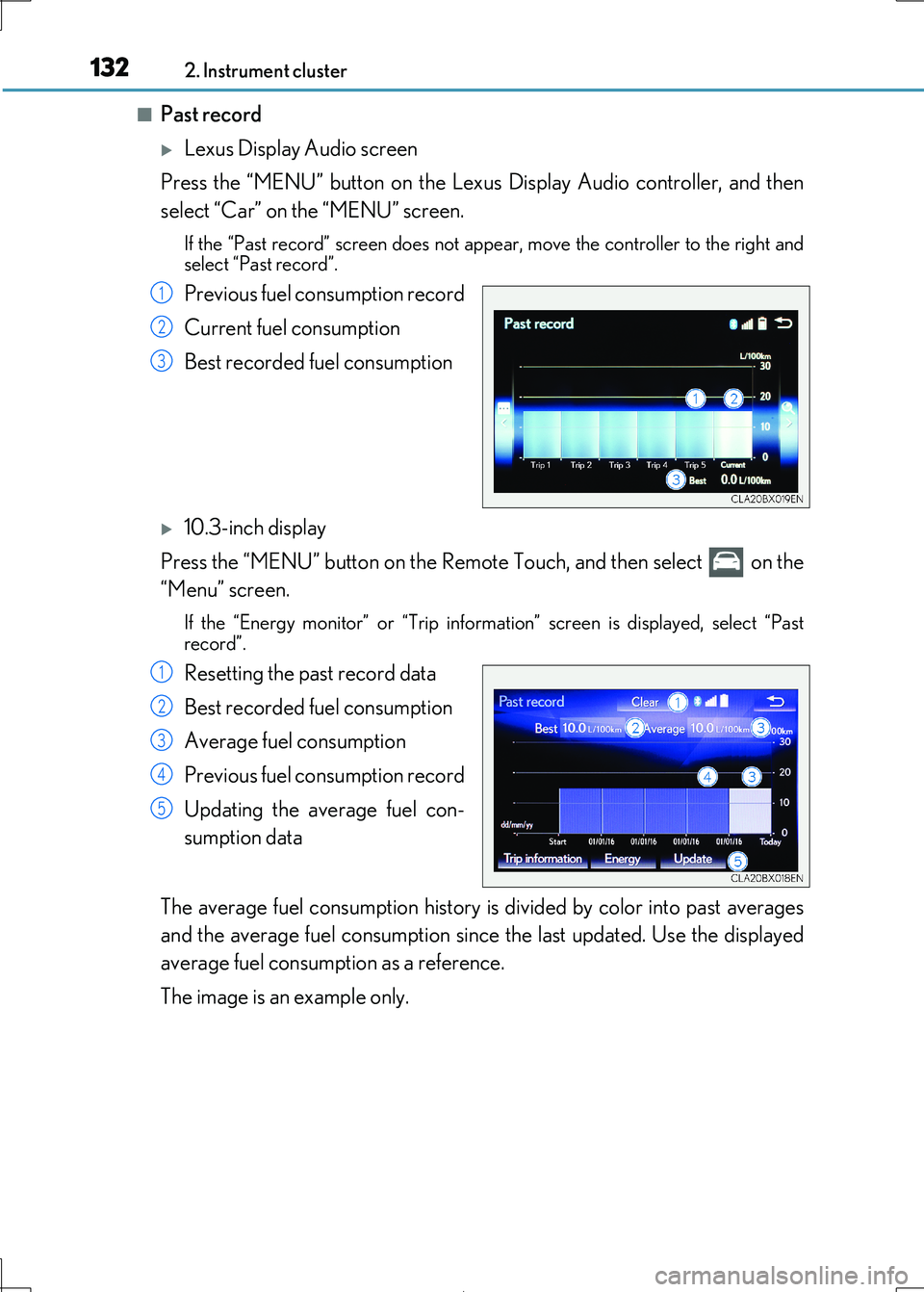
■Past record
Lexus Display Audio screen
Press the “MENU” button on the Lexu s Display Audio controller, and then
select “Car” on the “MENU” screen.
If the “Past record” screen does not appe ar, move the controller to the right and
select “Past record”.
Previous fuel consumption record
Current fuel consumption
Best recorded fuel consumption
10.3-inch display
Press the “MENU” button on the Remote Touch, and then select on the
“Menu” screen.
If the “Energy monitor” or “Trip informat ion” screen is displayed, select “Past
record”.
Resetting the past record data
Best recorded fuel consumption
Average fuel consumption
Previous fuel consumption record
Updating the average fuel con-
sumption data
The average fuel consumption history is divided by color into past averages
and the average fuel consumption since the last updated. Use the displayed
average fuel consumption as a reference.
The image is an example only.
1
2
3
1
2
3
4
5
Page 133 of 692
1332. Instrument cluster
2
Instrument cluster
IS300h_EE(OM53D89E)
■Updating the past record data
Vehicles with a Lexus Display Audio system
Update the average fuel consumption by mo ving the controller to the left and select “Update” to measure the curre nt fuel consumption again.
Vehicles with a 10.3-inch display
Update the average fuel consumption by selecting “Update” to measure the current fuel consumption again.
■Resetting the data
Vehicles with a Lexus Display Audio system
The fuel consumption data can be deleted by moving the controller to the left and select
“Clear”.
Vehicles with a 10.3-inch display
The fuel consumption data can be deleted by selecting “Clear”.
■Cruising range
Displays the estimated maximum distance that can be driven with the quantity of fuel remaining.
This distance is computed based on your average fuel consumption.
As a result, the actual distance that can be driven may differ from that displayed.
Page 134 of 692
1342. Instrument cluster
IS300h_EE(OM53D89E)
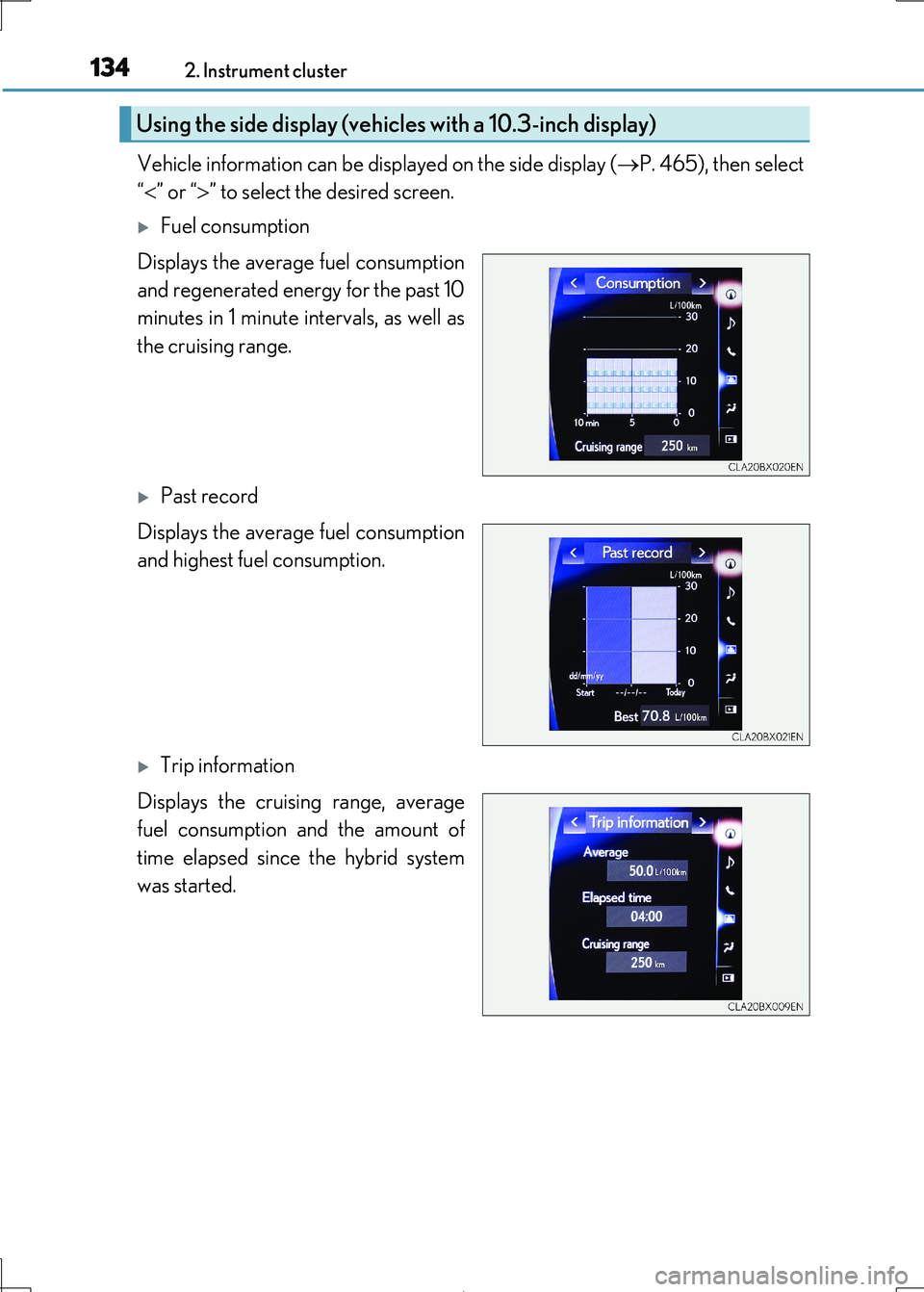
Vehicle information can be displayed on the side display (P. 465), then select
“ ” or “” to select the desired screen.
Fuel consumption
Displays the average fuel consumption
and regenerated energy for the past 10
minutes in 1 minute intervals, as well as
the cruising range.
Past record
Displays the average fuel consumption
and highest fuel consumption.
Trip information
Displays the cruising range, average
fuel consumption and the amount of
time elapsed since the hybrid system
was started.
Using the side display (vehicles with a 10.3-inch display)
Page 211 of 692
2114-1. Before driving
4
Driving
IS300h_EE(OM53D89E)
◆Weight limits
Check the allowable towing capacity, GVM (Gross Vehicle Mass), MPAC
(Maximum Permissible Axle Capacity), and permissible draw bar load before
towing. ( P. 644)
◆Towing hitch/bracket
Lexus recommends the use of the Lexus hi tch/bracket for your vehicle. Other
products of a suitable nature and comparable quality may also be used.
◆To prevent an accident
The handling of the vehicle will feel diff erent when towing a trailer. Beware of
the 3 most common causes of towing-rel ated accidents: driver error, exces-
sive speed, and overloading.
Trailer towing (vehicles with a towing package)
The strain of towing a trailer will have a negative impact on the running perfor-
mance, handling, fuel consumption and endurance of your vehicle. Use the
vehicle features in the correct manner and operate the vehicle with care for
safer driving and optimal comfort. Dama ge and/or malfunctions that occur as
a result of towing performed for comme rcial purposes are not covered by the
Lexus warranty.
Ask your local authorized Lexus retailer or Lexus authorized repairer, or any
reliable repairer for furthe r details before towing, as there are additional legal
requirements in some countries.
Page 358 of 692
358
IS300h_EE(OM53D89E)
4-6. Driving tips
◆Using Eco drive mode
When using Eco drive mode, the torq ue corresponding to the accelerator
pedal depression amount can be generate d more smoothly than it is in normal
conditions. In addition, the operation of the air conditioning system (heating/
cooling) will be minimized, im proving the fuel economy. (P. 348)
◆Use of Hybrid System Indicator
The Eco-friendly driving is possible by keeping the indicator needle (except F
SPORT models) or bar display (F SPOR T models) of Hybrid System Indicator
within the Eco area. ( P. 109)
◆Shift lever operation
Shift the shift lever to D wh en stopped at a traffic light, or driving in heavy traf-
fic, etc. Shift the shift lever to P when parking. When using the N, there is no
positive effect on fuel consumption. In the N, the gasoline engine operates but
electricity cannot be genera ted. Also, when using the air conditioning system,
etc., the hybrid battery (tractio n battery) power is consumed.
◆Accelerator pedal/brake pedal operation
●Drive your vehicle smoothly. Avoid abrupt acceleration and deceleration.
Gradual acceleration and deceleration will make more effective use of the
electric motor (traction motor) withou t having to use gasoline engine power.
●Avoid repeated acceleration. Repeated acceleration consumes hybrid bat-
tery (traction battery) power, resulting in poor fuel consumption. Battery
power can be restored by driving with the accelerator pedal slightly released.
◆When braking
Make sure to operate the brakes gently and in a timely manner. A greater
amount of electrical energy can be regenerated when slowing down.
Hybrid vehicle driving tips
For economical and ecological driving, pay attention to the following points:
Page 359 of 692
3594-6. Driving tips
4
Driving
IS300h_EE(OM53D89E)
◆Delays
Repeated acceleration and deceleration, as well as long waits at traffic lights,
will lead to bad fuel economy. Check tr affic reports before leaving and avoid
delays as much as possible. When drivin g in a traffic jam, gently release the
brake pedal to allow the vehicle to move forward slightly while avoiding over-
use of the accelerator pedal. Doing so can help control excessive gasoline
consumption.
◆Highway driving
Control and maintain the vehicle at a co nstant speed. Before stopping at a toll
booth or similar, allow plenty of ti me to release the accelerator and gently
apply the brakes. A greater amount of electrical energy can be regenerated
when slowing down.
◆Air conditioning
Use the air conditioning only when necessary. Doing so can help reduce
excessive gasoline consumption.
In summer: When the ambient temperature is high, use the recirculated air
mode. Doing so will help to reduce the burden on the air conditioning system
and reduce fuel consumption as well.
In winter: Because the gasoline engine will not automatically cut out until it
and the interior of the vehicle are warm , it will consume fuel. Also, fuel con-
sumption can be improved by av oiding overuse of the heater.
◆Checking tire inflation pressure
Make sure to check the tire inflation pr essure frequently. Improper tire infla-
tion pressure can caus e poor fuel economy.
Also, as snow tires can cause large amou nts of friction, their use on dry roads
can lead to poor fuel economy. Use ti res that are appropriate for the season.
◆Luggage
Carrying heavy luggage will lead to poor fuel economy. Avoid carrying
unnecessary luggage. Installing a large roof rack will also cause poor fuel
economy.