oil Lexus IS300h 2017 Owner's Manual
[x] Cancel search | Manufacturer: LEXUS, Model Year: 2017, Model line: IS300h, Model: Lexus IS300h 2017Pages: 692, PDF Size: 163.7 MB
Page 7 of 692
7
1
9
8
7
6
4
3
2
IS300h_EE(OM53D89E)
5
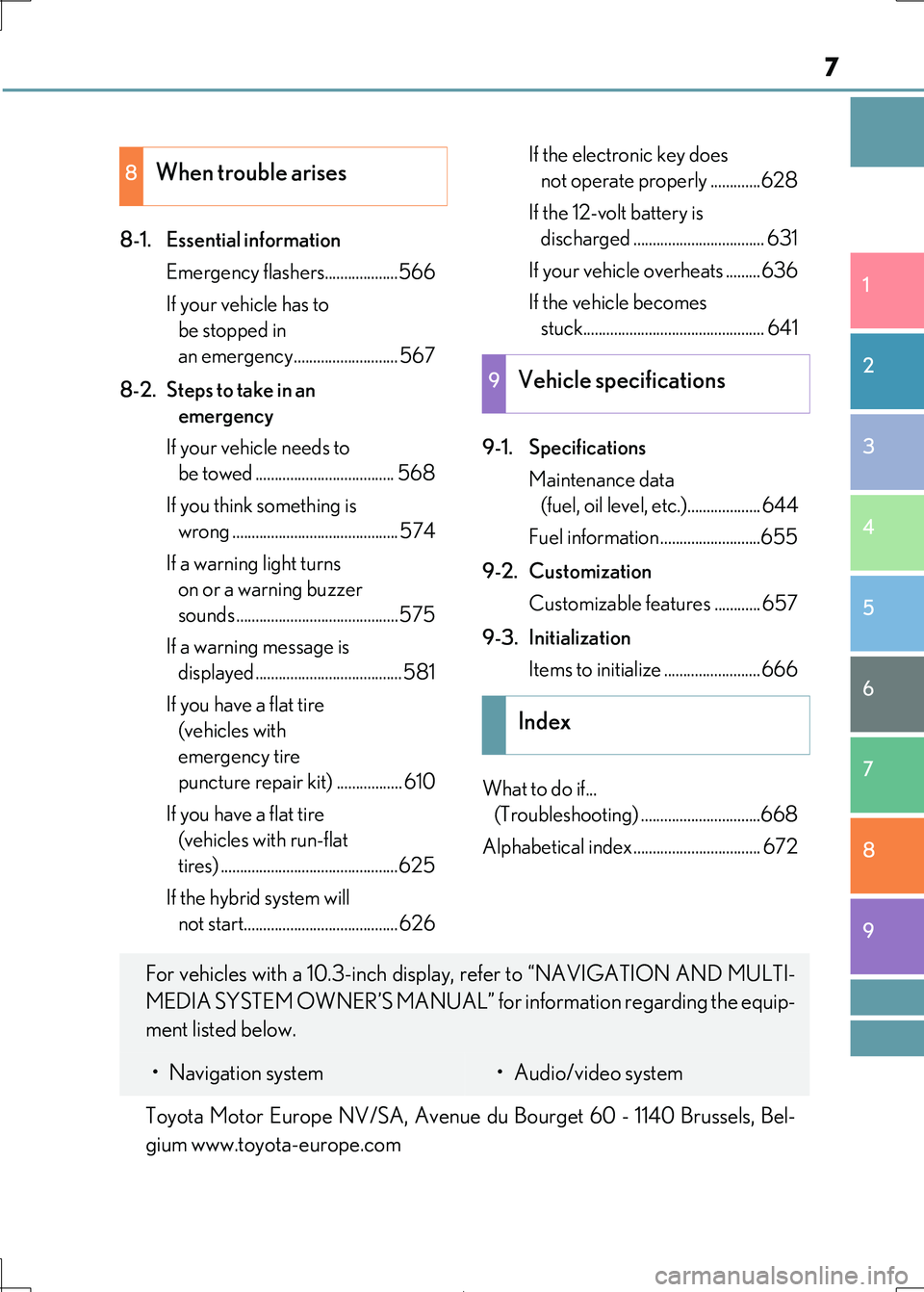
8-1. Essential information
Emergency flashers...................566
If your vehicle has to
be stopped in
an emergency........................... 567
8-2. Steps to take in an
emergency
If your vehicle needs to
be towed .................................... 568
If you think something is
wrong ........................................... 574
If a warning light turns
on or a warning buzzer
sounds ..........................................575
If a warning message is
displayed ...................................... 581
If you have a flat tire
(vehicles with
emergency tire
puncture repair kit) ................. 610
If you have a flat tire
(vehicles with run-flat
tires) ..............................................625
If the hybrid system will
not start........................................ 626
If the electronic key does
not operate properly .............628
If the 12-volt battery is
discharged .................................. 631
If your vehicle overheats .........636
If the vehicle becomes
stuck............................................... 641
9-1. Specifications
Maintenance data
(fuel, oil level, etc.)................... 644
Fuel information ..........................655
9-2. Customization
Customizable features ............ 657
9-3. Initialization
Items to initialize ......................... 666
What to do if...
(Troubleshooting) ...............................668
Alphabetical index................................. 672
8When trouble arises
9Vehicle specifications
Index
For vehicles with a 10.3-inch display, refer to “NAVIGATION AND MULTI-
MEDIA SYSTEM OWNER’S MANUAL” for information regarding the equip-
ment listed below.
• Navigation system• Audio/video system
Toyota Motor Europe NV/SA, Avenue du Bourget 60 - 1140 Brussels, Bel-
gium www.toyota-europe.com
Page 15 of 692
15Pictorial index
IS300h_EE(OM53D89E)
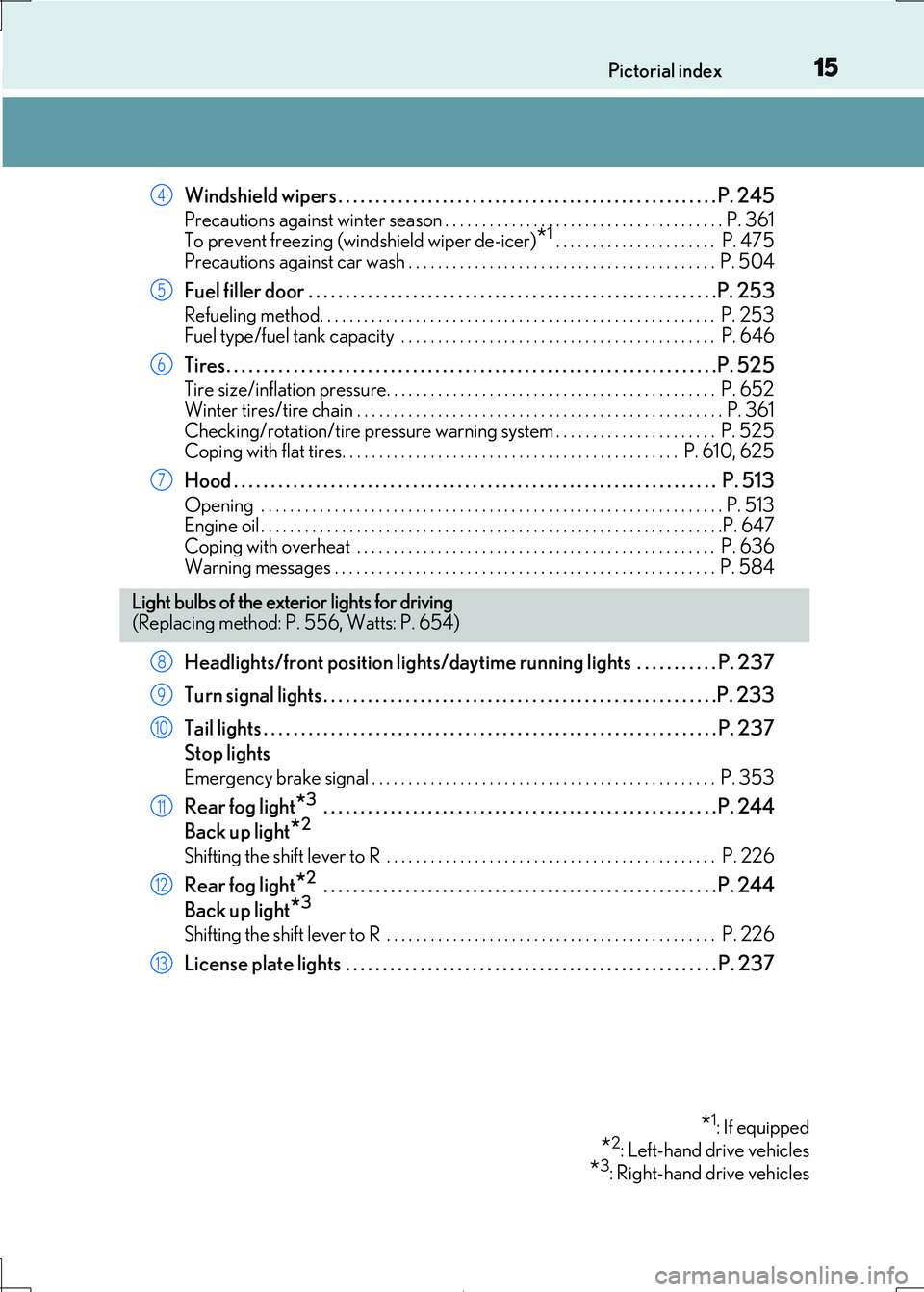
Windshield wipers . . . . . . . . . . . . . . . . . . . . . . . . . . . . . . . . . . . . . . . . . . . . . . . . . . . P. 245
Precautions against winter season . . . . . . . . . . . . . . . . . . . . . . . . . . . . . . . . . . . . . . P. 361
To prevent freezing (windshield wiper de-icer)*1 . . . . . . . . . . . . . . . . . . . . . . P. 475
Precautions against car wash . . . . . . . . . . . . . . . . . . . . . . . . . . . . . . . . . . . . . . . . . . P. 504
Fuel filler door . . . . . . . . . . . . . . . . . . . . . . . . . . . . . . . . . . . . . . . . . . . . . . . . . . . . . . .P . 253
Refueling method. . . . . . . . . . . . . . . . . . . . . . . . . . . . . . . . . . . . . . . . . . . . . . . . . . . . . . P. 253
Fuel type/fuel tank capacity . . . . . . . . . . . . . . . . . . . . . . . . . . . . . . . . . . . . . . . . . . . P. 646
Tires. . . . . . . . . . . . . . . . . . . . . . . . . . . . . . . . . . . . . . . . . . . . . . . . . . . . . . . . . . . . . . . . . .P. 525
Tire size/inflation pressure. . . . . . . . . . . . . . . . . . . . . . . . . . . . . . . . . . . . . . . . . . . . . P. 652
Winter tires/tire chain . . . . . . . . . . . . . . . . . . . . . . . . . . . . . . . . . . . . . . . . . . . . . . . . . . P. 361
Checking/rotation/tire pressure warning system . . . . . . . . . . . . . . . . . . . . . . P. 525 Coping with flat tires. . . . . . . . . . . . . . . . . . . . . . . . . . . . . . . . . . . . . . . . . . . . . . P. 610, 625
Hood . . . . . . . . . . . . . . . . . . . . . . . . . . . . . . . . . . . . . . . . . . . . . . . . . . . . . . . . . . . . . . . . . P. 513
Opening . . . . . . . . . . . . . . . . . . . . . . . . . . . . . . . . . . . . . . . . . . . . . . . . . . . . . . . . . . . . . . . P. 513 Engine oil . . . . . . . . . . . . . . . . . . . . . . . . . . . . . . . . . . . . . . . . . . . . . . . . . . . . . . . . . . . . . . .P. 647
Coping with overheat . . . . . . . . . . . . . . . . . . . . . . . . . . . . . . . . . . . . . . . . . . . . . . . . . P. 636
Warning messages . . . . . . . . . . . . . . . . . . . . . . . . . . . . . . . . . . . . . . . . . . . . . . . . . . . . P. 584
Headlights/front position li ghts/daytime running lights . . . . . . . . . . . P. 237
Turn signal lights . . . . . . . . . . . . . . . . . . . . . . . . . . . . . . . . . . . . . . . . . . . . . . . . . . . . .P. 2 33
Tail lights . . . . . . . . . . . . . . . . . . . . . . . . . . . . . . . . . . . . . . . . . . . . . . . . . . . . . . . . . . . . . P. 237
Stop lights
Emergency brake signal . . . . . . . . . . . . . . . . . . . . . . . . . . . . . . . . . . . . . . . . . . . . . . . P. 353
Rear fog light*3 . . . . . . . . . . . . . . . . . . . . . . . . . . . . . . . . . . . . . . . . . . . . . . . . . . . . . P. 244
Back up light*2
Shifting the shift lever to R . . . . . . . . . . . . . . . . . . . . . . . . . . . . . . . . . . . . . . . . . . . . . P. 226
Rear fog light*2 . . . . . . . . . . . . . . . . . . . . . . . . . . . . . . . . . . . . . . . . . . . . . . . . . . . . . P. 244
Back up light*3
Shifting the shift lever to R . . . . . . . . . . . . . . . . . . . . . . . . . . . . . . . . . . . . . . . . . . . . . P. 226
License plate lights . . . . . . . . . . . . . . . . . . . . . . . . . . . . . . . . . . . . . . . . . . . . . . . . . . P. 237
4
5
6
7
Light bulbs of the exte rior lights for driving
(Replacing method: P. 556, Watts: P. 654)
*1: If equipped
*2: Left-hand drive vehicles
*3: Right-hand drive vehicles
8
9
10
11
12
13
Page 112 of 692

1122. Instrument cluster
IS300h_EE(OM53D89E)
Odometer/trip meter display area (P. 124)
Displays the following items:
• Odometer/trip meter
• Distance until next engine oil change
•Speed warning
Meter control switches ( P. 114)
Odometer/trip meter and trip meter reset button ( P. 115)
◆F SPORT models
Main meter in center position
Main meter moved to the right
4
5
6
Page 113 of 692

1132. Instrument cluster
2
Instrument cluster
IS300h_EE(OM53D89E)
Outside temperature (P. 105)
Indicator/shift position display area
Displays the following items:
•Indicators ( P. 100) • Shift position display ( P. 226)
• RSA (Road Sign Assi st) (if equipped) (P. 288)
Content display area
Main meter in center position:
Displays various drive inform ation on the main meter. Additionally, warning or advice
pop-up displays will be disp layed in some situations.
• Drive information ( P. 116) • Warning message ( P. 581)
Main meter moved to the right:
A variety of information can be displayed by selecting a menu icon. Additionally, warning or advice pop-up displays w ill be displayed in some situations.
• Menu icon content ( P. 115)
• Warning message ( P. 581)
Odometer/trip meter display area (P. 124)
Displays the following items:
• Odometer/trip meter
• Distance until next engine oil change
•Speed warning
Menu icons ( P. 115)
Meter control switches ( P. 114)
Odometer/trip meter and trip meter reset button ( P. 115)
1
2
3
4
5
6
7
Page 121 of 692
1212. Instrument cluster
2
Instrument cluster
IS300h_EE(OM53D89E)
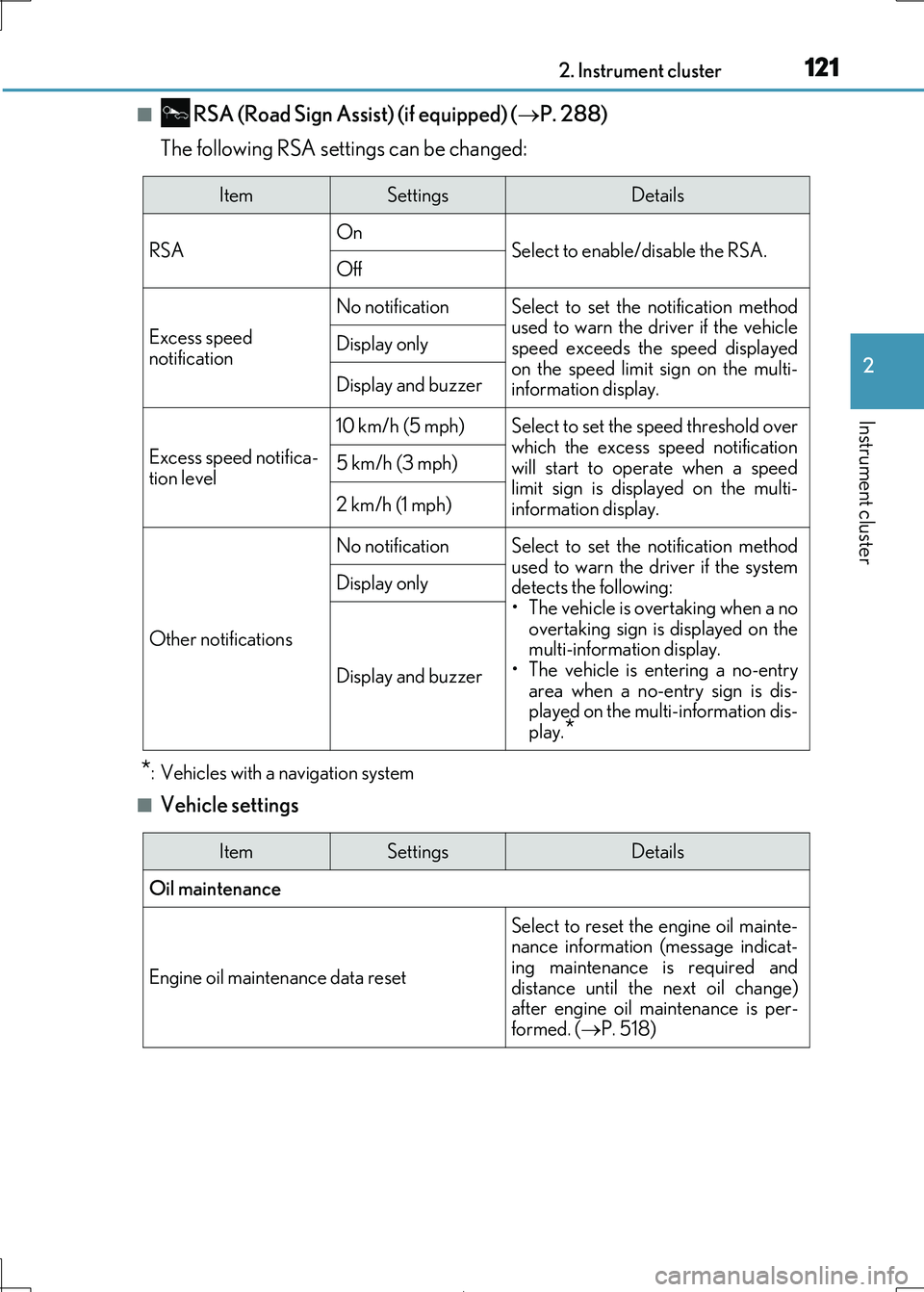
■ RSA (Road Sign Assist) (if equipped) (P. 288)
The following RSA settings can be changed:
*: Vehicles with a navigation system
■Vehicle settings
ItemSettingsDetails
RSA On Select to enable/disable the RSA.Off
Excess speed
notification
No notificationSelect to set the notification method
used to warn the driver if the vehicle
speed exceeds the speed displayed on the speed limit sign on the multi-
information display.
Display only
Display and buzzer
Excess speed notifica-
tion level
10 km/h (5 mph)Select to set the speed threshold over
which the excess speed notification will start to operate when a speed
limit sign is disp layed on the multi-
information display.
5 km/h (3 mph)
2 km/h (1 mph)
Other notifications
No notificationSelect to set the notification method used to warn the driver if the system
detects the following:
• The vehicle is overtaking when a no overtaking sign is displayed on the
multi-information display.
• The vehicle is entering a no-entry
area when a no-entry sign is dis- played on the multi-information dis-
play.*
Display only
Display and buzzer
ItemSettingsDetails
Oil maintenance
Engine oil maintenance data reset
Select to reset the engine oil mainte- nance information (message indicat-
ing maintenance is required and
distance until the next oil change) after engine oil ma intenance is per-
formed. ( P. 518)
Page 124 of 692
1242. Instrument cluster
IS300h_EE(OM53D89E)
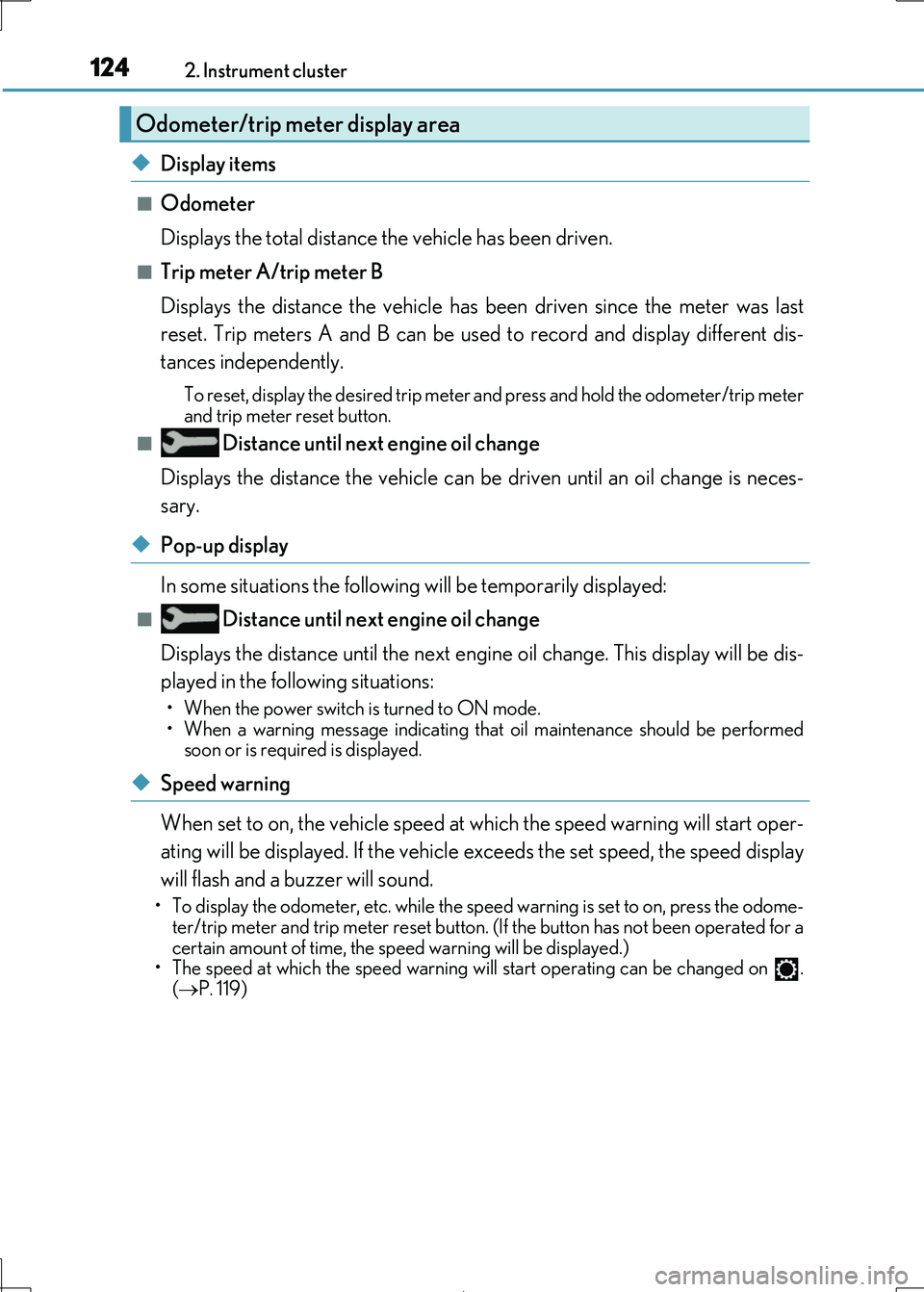
◆Display items
■Odometer
Displays the total distance the vehicle has been driven.
■Trip meter A/trip meter B
Displays the distance the vehicle has been driven since the meter was last
reset. Trip meters A and B can be used to record and display different dis-
tances independently.
To reset, display the desired trip meter and press and hold the odometer/trip meter
and trip meter reset button.
■ Distance until next engine oil change
Displays the distance the vehicle can be driven until an oil change is neces-
sary.
◆Pop-up display
In some situations the following will be temporarily displayed:
■ Distance until next engine oil change
Displays the distance until the next engi ne oil change. This display will be dis-
played in the following situations:
• When the power switch is turned to ON mode.
• When a warning message indicating that oil maintenance should be performed soon or is required is displayed.
◆Speed warning
When set to on, the vehicl e speed at which the speed warning will start oper-
ating will be displayed. If the vehicle exceeds the set speed, the speed display
will flash and a buzzer will sound.
• To display the odometer, etc. while the sp eed warning is set to on, press the odome-
ter/trip meter and trip meter reset button. (If the button has not been operated for a
certain amount of time, the sp eed warning will be displayed.) • The speed at which the speed warning wi ll start operating can be changed on .
( P. 119)
Odometer/trip meter display area
Page 159 of 692

1593-2. Opening, closing and locking the doors and trunk
3
Operation of each component
IS300h_EE(OM53D89E)
■Conditions affecting operation
The smart entry & start system uses weak ra dio waves. In the following situations, the communication between the electronic key and the vehicle may be affected, preventing
the smart entry & start system, wireless re mote control and immobilizer system from
operating properly. (Ways of coping: P. 628)
●When the electronic key battery is depleted
●Near a TV tower, electric power plant, gas station, radio station, large display, airport or
other facility that gene rates strong radio waves or electrical noise
●When carrying a portable radio, cellular phone, cordless phone or other wireless com-
munication device
●When the electronic key is in contact wi th, or is covered by the following metallic objects
• Cards to which aluminum foil is attached
• Cigarette boxes that have aluminum foil inside • Metallic wallets or bags
•Coins
• Hand warmers made of metal • Media such as CDs and DVDs
●When other wireless keys (that emit radio waves) are being used nearby
●When carrying the electronic key together with the following devices that emit radio
waves
• Another vehicle’s electronic key or a wireless key that emits radio waves • Personal computers or person al digital assistants (PDAs)
• Digital audio players
• Portable game systems
●If window tint with a metallic content or me tallic objects are attached to the rear win-
dow
Page 208 of 692
2084-1. Before driving
IS300h_EE(OM53D89E)
NOTICE
■When driving the vehicle
●Do not depress the accelerator and brake pedals at the same time during driving, as
this may restrain the hybrid system output.
●Do not use the accelerator pedal or depress the accelerator and brake pedals at the same time to hold the vehicle on a hill.
■When parking the vehicle
Always set the parking brake, and shift the shift lever to P. Failure to do so may cause the vehicle to move or the vehicle may accelerate suddenly if the accelerator pedal is
accidentally depressed.
■Avoiding damage to vehicle parts
●Do not turn the steering wheel fully in either direction and hold it there for an
extended period of time.
Doing so may damage the power steering motor.
●When driving over bumps in the road, drive as slowly as possible to avoid damaging
the wheels, underside of the vehicle, etc.
■If you get a flat tire while driving
A flat or damaged tire may cause the following situations. Hold the steering wheel
firmly and gradually depress the brake pedal to slow down the vehicle.
●It may be difficult to control your vehicle.
●The vehicle will make abnormal sounds or vibrations.
●The vehicle will lean abnormally.
Information on what to do in case of a flat tire (P. 610, 625)
■When encountering flooded roads
Do not drive on a road that has flooded af ter heavy rain etc. Doing so may cause the
following serious damage to the vehicle:
●Engine stalling
●Short in electrical components
●Engine damage caused by water immersion
In the event that you drive on a flooded road and the vehicle is flooded, be sure to have
any authorized Lexus retailer or Lexus auth orized repairer, or any reliable repairer
check the following:
●Brake function
●Changes in quantity and quality of oil and fluid used for the engine, hybrid transmis-
sion, differential, etc.
●Lubricant condition for the pr opeller shaft, bearings and suspension joints (where
possible), and the function of all joints, bearings, etc.
Page 260 of 692
2604-5. Using the driving support systems
IS300h_EE(OM53D89E)
WARNING
■To avoid malfunction of the camera sensor
Observe the following precautions.
Otherwise, the camera sensor may not operate properly, possibly leading to an acci-
dent resulting in death or serious injury.
●Keep the windshield clean at all times.
• If the windshield is dirty or covered with an oily film, water droplets, snow, etc.,
clear the windshield. • If a glass coating agent is applied to the wi ndshield, it will still be necessary to use
the windshield wipers to remove water droplets, etc. from the area of the wind-
shield in front of the camera sensor. • If the inner side of the windshield where th e camera sensor is installed is dirty, con-
tact your authorized Lexus retailer or Le xus authorized repairer, or any reliable
repairer.
●If the part of the windshield in front of the camera sensor is fogged up or covered with
condensation or ice, use the windshield de fogger to remove the fog, condensation or ice. ( P. 474)
●If water droplets cannot be properly removed from the area of the windshield in front
of the camera sensor by th e windshield wipers, replace the wiper insert or wiper blade.
If the wiper inserts or wiper blades need to be replaced, contact your authorized
Lexus retailer or Lexus authorized re pairer, or any reliable repairer.
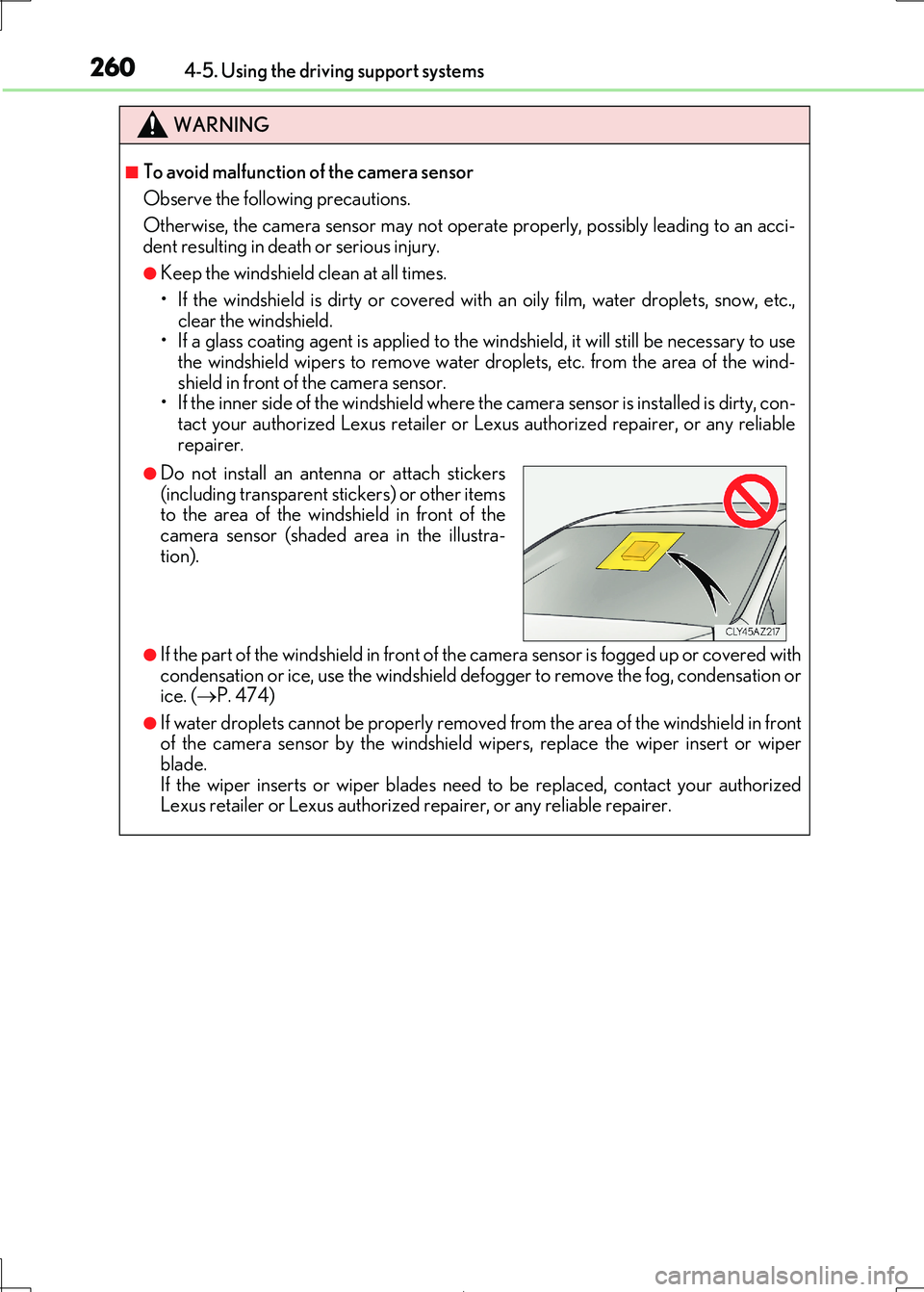
●Do not install an antenna or attach stickers
(including transparent st ickers) or other items
to the area of the windshield in front of the camera sensor (shaded area in the illustra-
tion).
Page 361 of 692
3614-6. Driving tips
4
Driving
IS300h_EE(OM53D89E)
●Use fluids that are appropriate to the prevailing outside temperatures.
•Engine oil
• Engine/power cont rol unit coolant
•Washer fluid
●Have a service technician inspect the condition of the 12-volt battery.
●Have the vehicle fitted with four snow tires or purchase a set of tire chains for
the rear tires.*
Ensure that all tires are the specified size and brand, and that chains match the size
of the tires.
*: Tire chains cannot be mounted on the 18-inch tires.
Perform the following according to the driving conditions:
●Do not try to forcibly open a window or move a wiper that is frozen. Pour
warm water over the frozen area to me lt the ice. Wipe away the water imme-
diately to prevent it from freezing.
●To ensure proper operation of the c limate control system fan, remove any
snow that has accumulated on the air inlet vents in front of the windshield.
●Check for and remove any excess ice or snow that may have accumulated on
the exterior lights, vehicle’s roof, chassi s, around the tires or on the brakes.
●Remove any snow or mud from the bottom of your shoes before getting in the
vehicle.
Accelerate the vehicle slowly, keep a sa fe distance between you and the vehicle
ahead, and drive at a reduced spee d suitable to road conditions.
Winter driving tips
Carry out the necessary preparations and inspections before driving the vehi-
cle in winter. Always drive the vehicle in a manner appropriate to the prevail-
ing weather conditions.
Preparation for winter
Before driving the vehicle
When driving the vehicle