warning lexus LC500C 2021 / LEXUS 2021 LC500 CONVERTIBLE (OM11498U) Workshop Manual
[x] Cancel search | Manufacturer: LEXUS, Model Year: 2021, Model line: LC500C, Model: Lexus LC500C 2021Pages: 410, PDF Size: 8.71 MB
Page 101 of 410
993-2. Opening, closing and locking the doors and trunk
3
Before driving
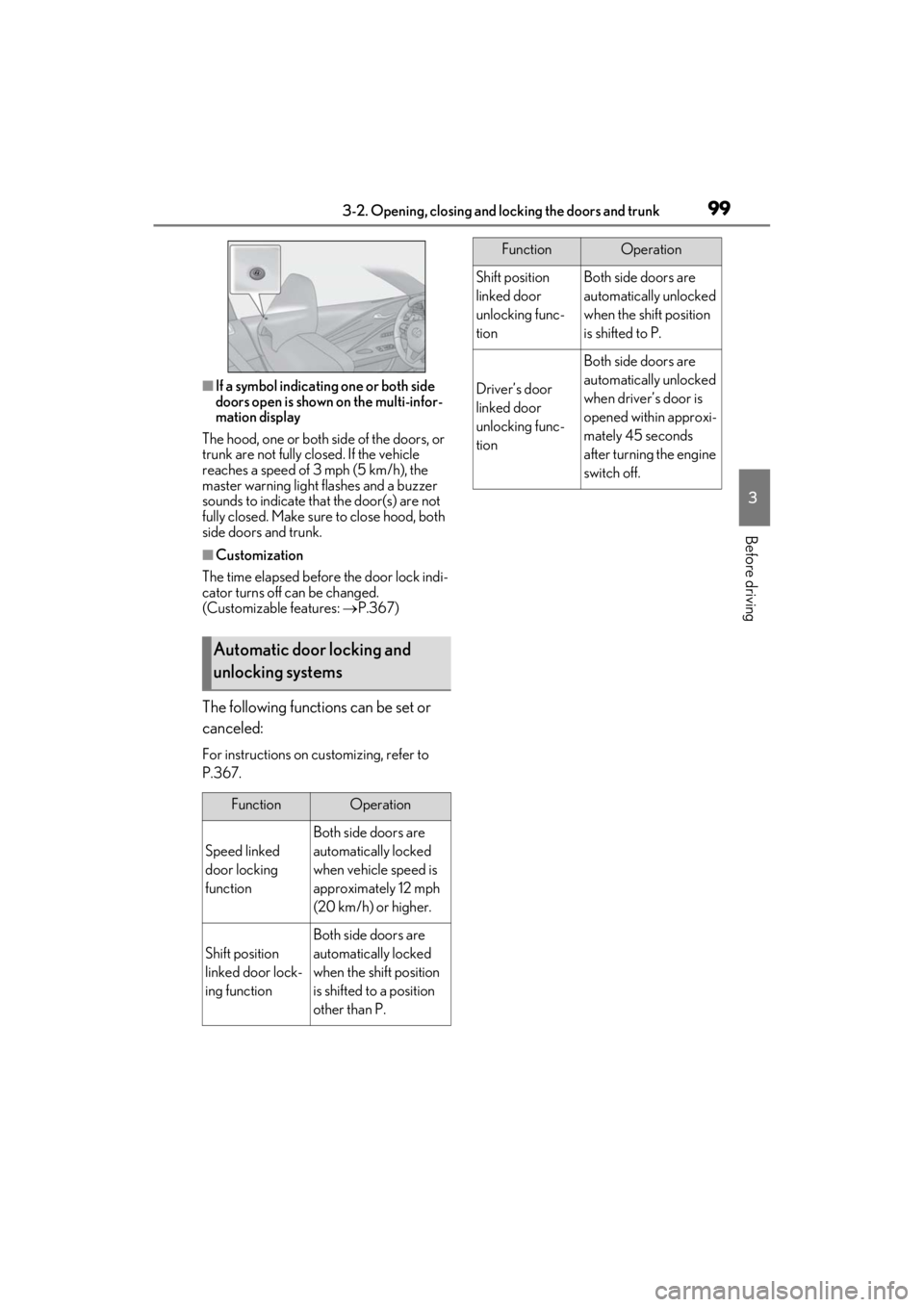
■If a symbol indicating one or both side
doors open is shown on the multi-infor-
mation display
The hood, one or both side of the doors, or
trunk are not fully closed. If the vehicle
reaches a speed of 3 mph (5 km/h), the
master warning light flashes and a buzzer
sounds to indicate that the door(s) are not
fully closed. Make sure to close hood, both
side doors and trunk.
■Customization
The time elapsed before the door lock indi-
cator turns off can be changed.
(Customizable features: P.367)
The following functions can be set or
canceled:
For instructions on customizing, refer to
P.367.
Automatic door locking and
unlocking systems
FunctionOperation
Speed linked
door locking
function
Both side doors are
automatically locked
when vehicle speed is
approximately 12 mph
(20 km/h) or higher.
Shift position
linked door lock-
ing function
Both side doors are
automatically locked
when the shift position
is shifted to a position
other than P.
Shift position
linked door
unlocking func-
tionBoth side doors are
automatically unlocked
when the shift position
is shifted to P.
Driver’s door
linked door
unlocking func-
tion
Both side doors are
automatically unlocked
when driver’s door is
opened within approxi-
mately 45 seconds
after turning the engine
switch off.
FunctionOperation
Page 102 of 410
1003-2. Opening, closing and locking the doors and trunk
Trunk
The trunk can be opened using the
trunk opener switch, entry function
or wireless remote control.
WARNING
Observe the following precautions.
Failure to do so may result in death or
serious injury.
■Before driving
●Make sure that the trunk lid is fully
closed. If the trunk lid is not fully
closed, it may open unexpectedly
while driving and hit near-by objects or
luggage in the trunk may be thrown
out, causing an accident.
●Do not allow children to play in the
trunk.
If a child is accidentally locked in the
trunk, they could suffer from heat
exhaustion, suffocation or other inju-
ries.
●Do not allow a child to open or close
the trunk lid.
Doing so may cause the trunk lid to
open unexpectedly, or cause the
child’s hands, head, or neck to be
caught by the closing trunk lid.
■Important points while driving
Never let anyone sit in the trunk. In the
event of sudden braking or a collision,
they are susceptible to death or serious
injury.
■Using the trunk
Observe the following precautions.
Failure to do so may cause parts of the
body to be caught, resulting in serious
injury.
●Remove any heavy loads, such as
snow and ice, from the trunk lid before
opening it. Failure to do so may cause
the trunk lid to suddenly shut again
after it is opened.
●When opening or closing the trunk lid,
thoroughly check to make sure the
surrounding area is safe.
●If anyone is in the vicinity, make sure
they are safe and let them know that
the trunk is about to open or close.
●Use caution when opening or closing
the trunk lid in windy weather as it may
move abruptly in strong wind.
●On an incline it is more difficult to
open or close the trunk lid than on a
level surface, so beware of the trunk lid
unexpectedly opening or closing by
itself. Make sure th at the trunk lid is
fully open and secure before using the
trunk.
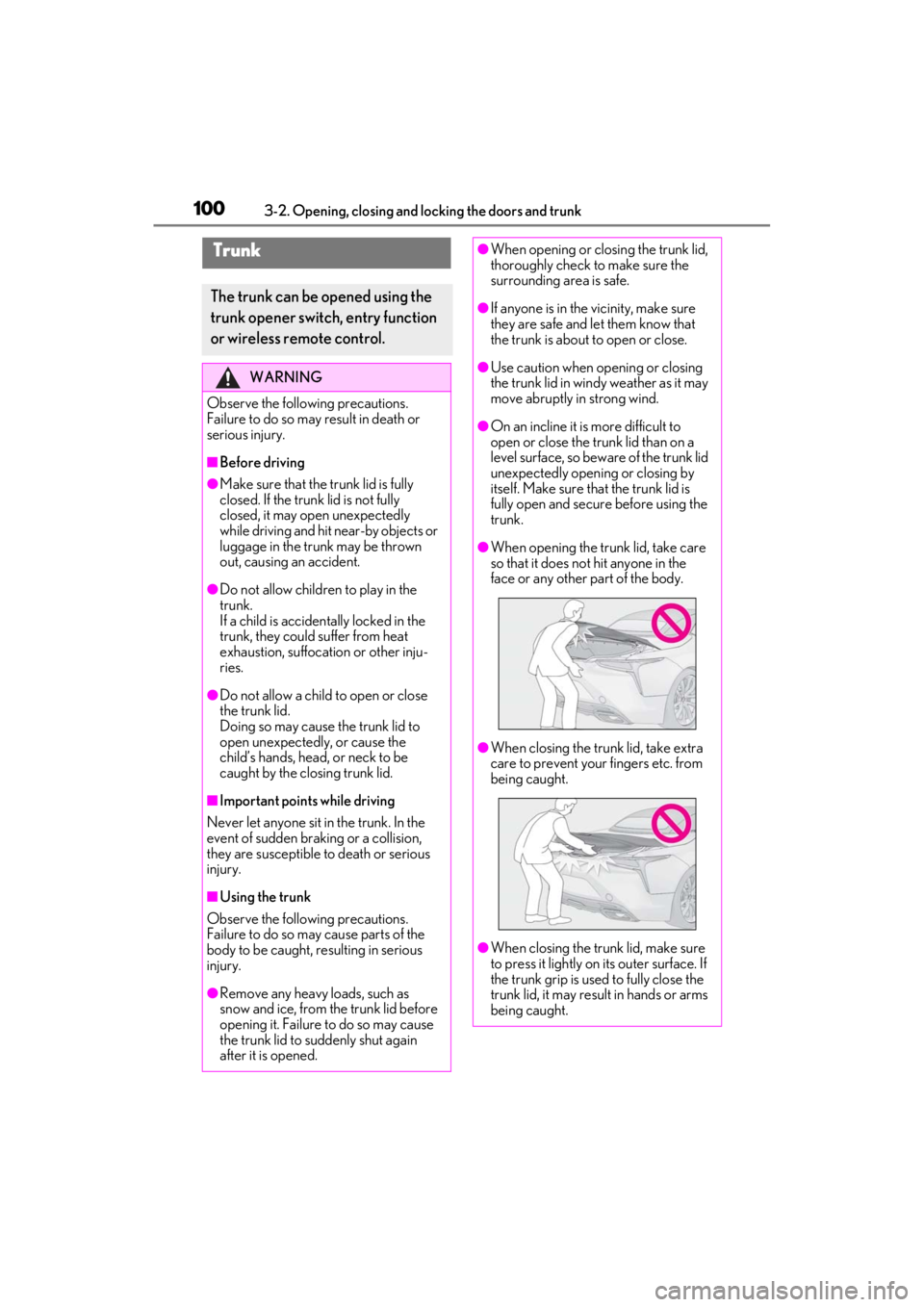
●When opening the tr unk lid, take care
so that it does no t hit anyone in the
face or any other part of the body.
●When closing the trunk lid, take extra
care to prevent your fingers etc. from
being caught.
●When closing the trunk lid, make sure
to press it lightly on its outer surface. If
the trunk grip is used to fully close the
trunk lid, it may resu lt in hands or arms
being caught.
Page 103 of 410
1013-2. Opening, closing and locking the doors and trunk
3
Before driving
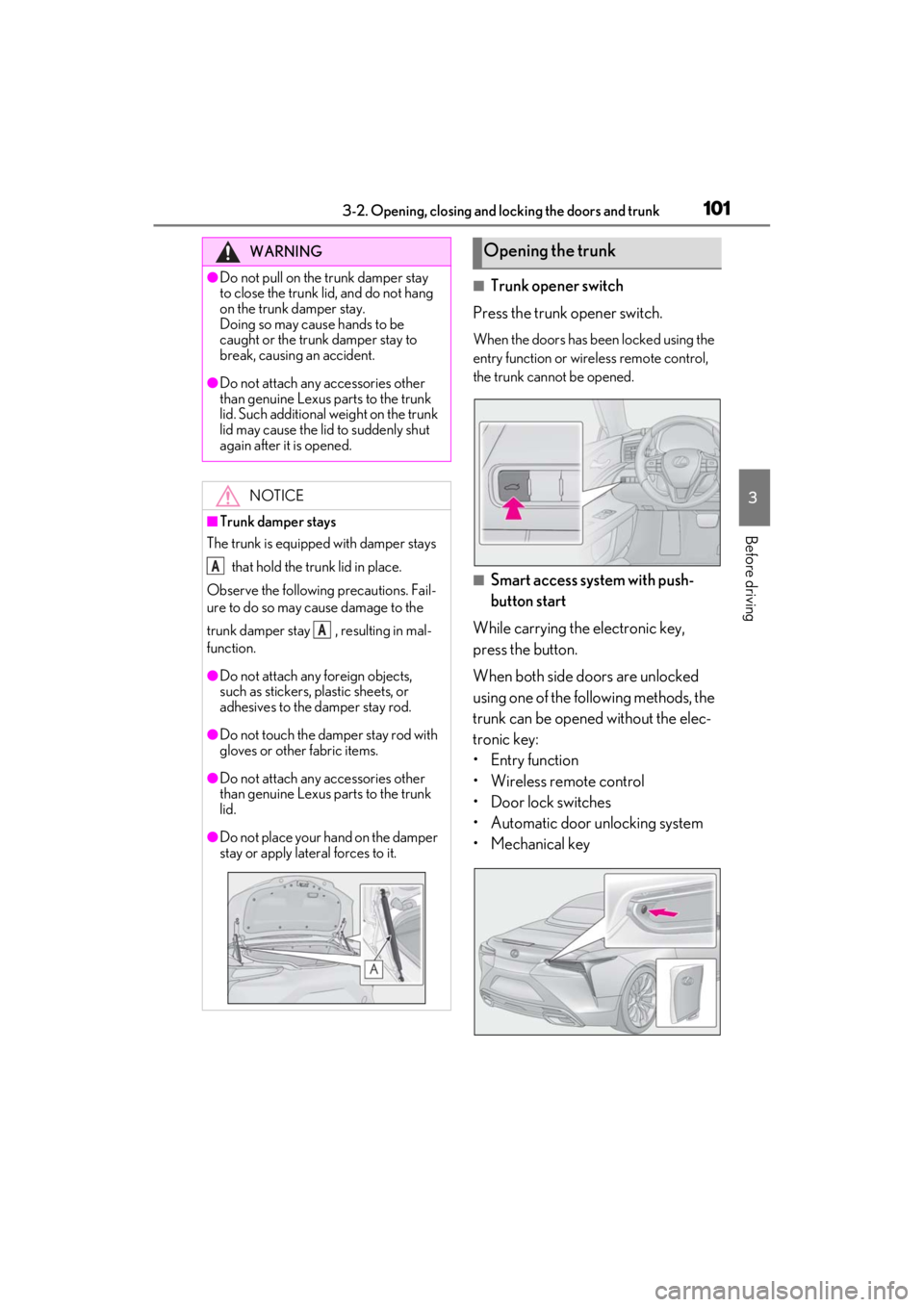
■Trunk opener switch
Press the trunk opener switch.
When the doors has been locked using the
entry function or wireless remote control,
the trunk cannot be opened.
■Smart access system with push-
button start
While carrying the electronic key,
press the button.
When both side doors are unlocked
using one of the following methods, the
trunk can be opened without the elec-
tronic key:
• Entry function
• Wireless remote control
• Door lock switches
• Automatic door unlocking system
• Mechanical key
WARNING
●Do not pull on the trunk damper stay
to close the trunk lid, and do not hang
on the trunk damper stay.
Doing so may cause hands to be
caught or the trunk damper stay to
break, causing an accident.
●Do not attach any accessories other
than genuine Lexus parts to the trunk
lid. Such additional weight on the trunk
lid may cause the lid to suddenly shut
again after it is opened.
NOTICE
■Trunk damper stays
The trunk is equipped with damper stays
that hold the trunk lid in place.
Observe the following precautions. Fail-
ure to do so may cause damage to the
trunk damper stay , resulting in mal-
function.
●Do not attach any foreign objects,
such as stickers, plastic sheets, or
adhesives to the damper stay rod.
●Do not touch the damper stay rod with
gloves or other fabric items.
●Do not attach any accessories other
than genuine Lexus parts to the trunk
lid.
●Do not place your hand on the damper
stay or apply lateral forces to it.
A
A
Opening the trunk
Page 104 of 410
1023-2. Opening, closing and locking the doors and trunk
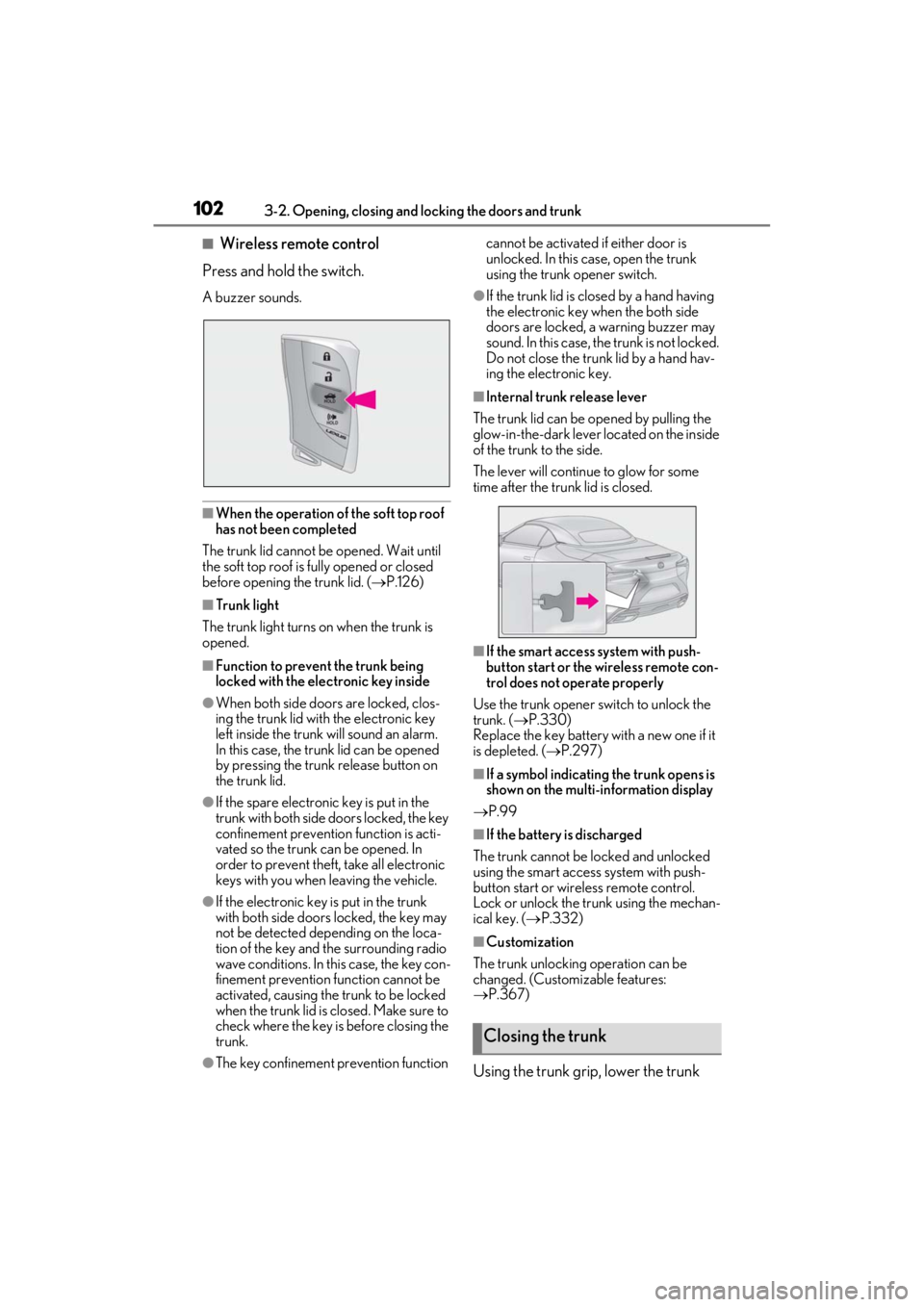
■Wireless remote control
Press and hold the switch.
A buzzer sounds.
■When the operation of the soft top roof
has not been completed
The trunk lid cannot be opened. Wait until
the soft top roof is fully opened or closed
before opening the trunk lid. ( P.126)
■Trunk light
The trunk light turns on when the trunk is
opened.
■Function to prevent the trunk being
locked with the electronic key inside
●When both side doors are locked, clos-
ing the trunk lid with the electronic key
left inside the trunk will sound an alarm.
In this case, the trunk lid can be opened
by pressing the trunk release button on
the trunk lid.
●If the spare electronic key is put in the
trunk with both side doors locked, the key
confinement prevention function is acti-
vated so the trunk can be opened. In
order to prevent theft, take all electronic
keys with you when leaving the vehicle.
●If the electronic key is put in the trunk
with both side doors locked, the key may
not be detected depending on the loca-
tion of the key and the surrounding radio
wave conditions. In th is case, the key con-
finement prevention function cannot be
activated, causing the trunk to be locked
when the trunk lid is closed. Make sure to
check where the key is before closing the
trunk.
●The key confinement prevention function cannot be activated if either door is
unlocked. In this case, open the trunk
using the trunk opener switch.
●If the trunk lid is closed by a hand having
the electronic key when the both side
doors are locked, a warning buzzer may
sound. In this case, the trunk is not locked.
Do not close the trunk lid by a hand hav-
ing the electronic key.
■Internal trunk release lever
The trunk lid can be opened by pulling the
glow-in-the-dark lever located on the inside
of the trunk to the side.
The lever will continue to glow for some
time after the trunk lid is closed.
■If the smart access system with push-
button start or the wireless remote con-
trol does not operate properly
Use the trunk opener switch to unlock the
trunk. ( P.330)
Replace the key battery with a new one if it
is depleted. ( P.297)
■If a symbol indicating the trunk opens is
shown on the multi-information display
P.99
■If the battery is discharged
The trunk cannot be locked and unlocked
using the smart access system with push-
button start or wireless remote control.
Lock or unlock the trunk using the mechan-
ical key. ( P.332)
■Customization
The trunk unlocking operation can be
changed. (Customizable features:
P.367)
Using the trunk grip, lower the trunk
Closing the trunk
Page 106 of 410
1043-2. Opening, closing and locking the doors and trunk
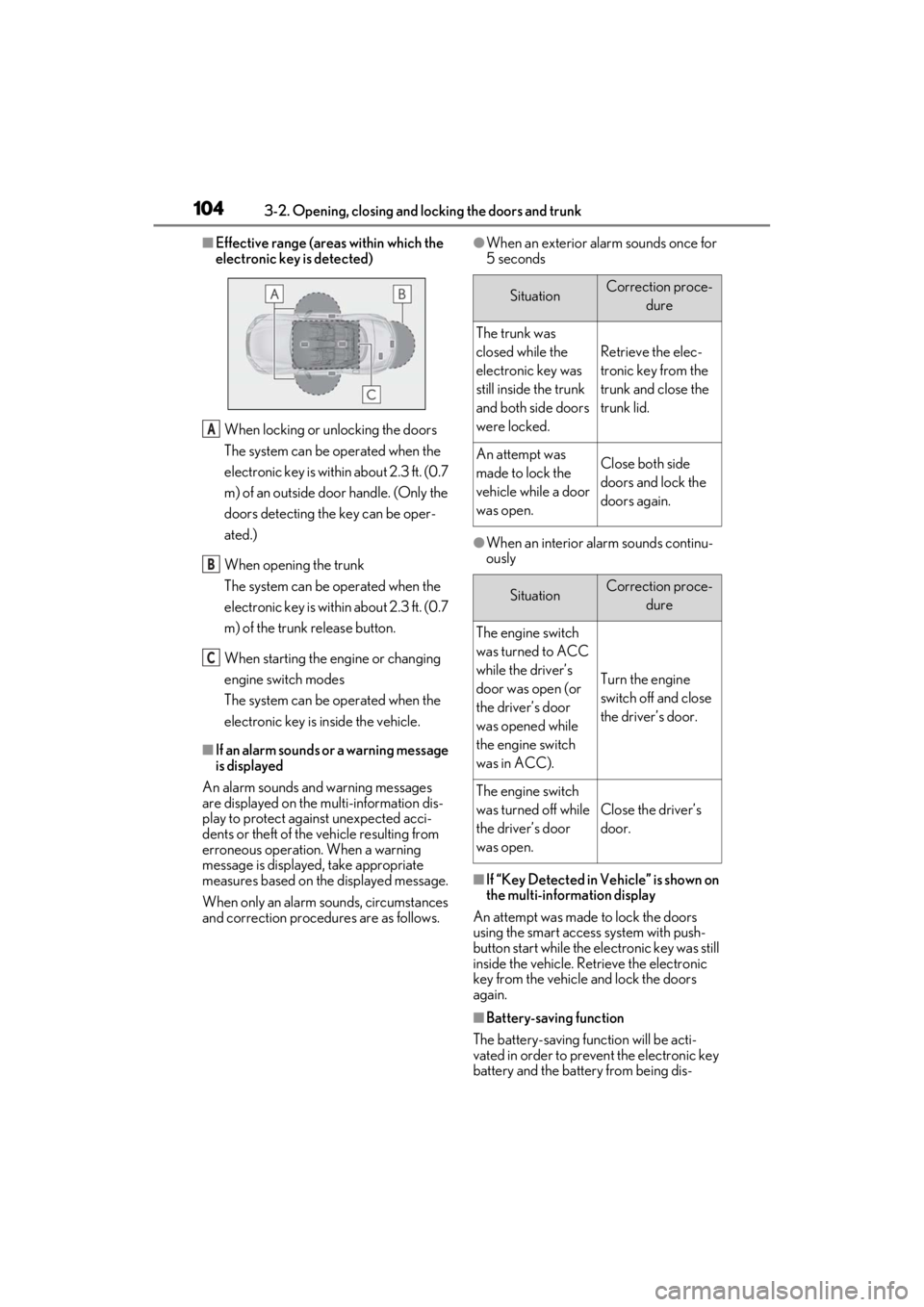
■Effective range (areas within which the
electronic key is detected)
When locking or unlocking the doors
The system can be operated when the
electronic key is within about 2.3 ft. (0.7
m) of an outside door handle. (Only the
doors detecting the key can be oper-
ated.)
When opening the trunk
The system can be operated when the
electronic key is within about 2.3 ft. (0.7
m) of the trunk release button.
When starting the engine or changing
engine switch modes
The system can be operated when the
electronic key is inside the vehicle.
■If an alarm sounds or a warning message
is displayed
An alarm sounds and warning messages
are displayed on the multi-information dis-
play to protect against unexpected acci-
dents or theft of the vehicle resulting from
erroneous operation. When a warning
message is displayed, take appropriate
measures based on the displayed message.
When only an alarm sounds, circumstances
and correction procedures are as follows.
●When an exterior alarm sounds once for
5 seconds
●When an interior alarm sounds continu-
ously
■If “Key Detected in Vehicle” is shown on
the multi-information display
An attempt was made to lock the doors
using the smart access system with push-
button start while the electronic key was still
inside the vehicle. Retrieve the electronic
key from the vehicle and lock the doors
again.
■Battery-saving function
The battery-saving function will be acti-
vated in order to prevent the electronic key
battery and the battery from being dis-
A
B
C
SituationCorrection proce- dure
The trunk was
closed while the
electronic key was
still inside the trunk
and both side doors
were locked.
Retrieve the elec-
tronic key from the
trunk and close the
trunk lid.
An attempt was
made to lock the
vehicle while a door
was open.Close both side
doors and lock the
doors again.
SituationCorrection proce-dure
The engine switch
was turned to ACC
while the driver’s
door was open (or
the driver’s door
was opened while
the engine switch
was in ACC).
Turn the engine
switch off and close
the driver’s door.
The engine switch
was turned off while
the driver’s door
was open.
Close the driver’s
door.
Page 109 of 410
1073-2. Opening, closing and locking the doors and trunk
3
Before driving
alarm may go off accidentally, or the door
lock prevention function may not oper-
ate.)
●Do not leave the electronic key inside the
trunk.
The key confinement prevention function
may not operate, depending on the loca-
tion of the key (the inside edge of the
trunk), conditions (inside a metal bag,
close to metallic objects) and the radio
waves in the surrounding area. ( P.102)
■If an electronic key does not work prop-
erly
●If the doors cannot be locked or
unlocked and the trunk cannot be
opened, perform the following.
• Bring the electronic key close to the door
handle and perform a lock or unlock
operation.
• Bring the electronic key close to the but-
ton on the trunk ( P.101) and press the
button.
• Use the wireless remote control.
If the doors cannot be locked or unlocked by perform the above, use the mechanical
key. (
P.330)
For Canada: However, if the mechanical
key is used while the al arm system is set, the
warning will sound. ( P.65)
●If the engine cannot be started, refer to
P.331
■Customization
Settings (e. g. smart access system with
push-button start) can be changed.
(Customizable features: P.367)
If the smart access system with push-button
start has been deactivated in a customized
setting, refer to the explanations for the fol-
lowing operations.
●Locking and unloc king the doors and
opening the trunk:
Use the wireless remote control or
mechanical key. ( P.96, 102, 330)
●Starting the engine and changing engine
switch modes: P.331
●Stopping the engine: P.147
■Certification for the smart access system with push-button start
For vehicles sold in the U.S.A., Hawaii, Guam and Puerto Rico
Page 111 of 410
1093-2. Opening, closing and locking the doors and trunk
3
Before driving
WARNING
■Caution regarding interference with
electronic devices
●People with implantable cardiac pace-
makers, cardiac resynchronization
therapy-pacemakers or implantable
cardioverter defibrillators should keep
away from the smart access system
with push-button start antennas.
( P.103)
The radio waves may affect the opera-
tion of such devices. If necessary, the
entry function can be disabled. Ask
your Lexus dealer for details, such as
the frequency of radio waves and tim-
ing of the emitted radio waves. Then,
consult your doctor to see if you
should disable the entry function.
●Users of any electrical medical device
other than implantable cardiac pace-
makers, cardiac resynchronization
therapy-pacemakers or implantable
cardioverter defibrillators should con-
sult the manufacturer of the device for
information about its operation under
the influence of radio waves.
Radio waves could have unexpected
effects on the operation of such medi-
cal devices.
Ask your Lexus dealer for details on dis-
abling the entry function.
Page 112 of 410
1103-3. Adjusting the seats
3-3.Adjusting the seats
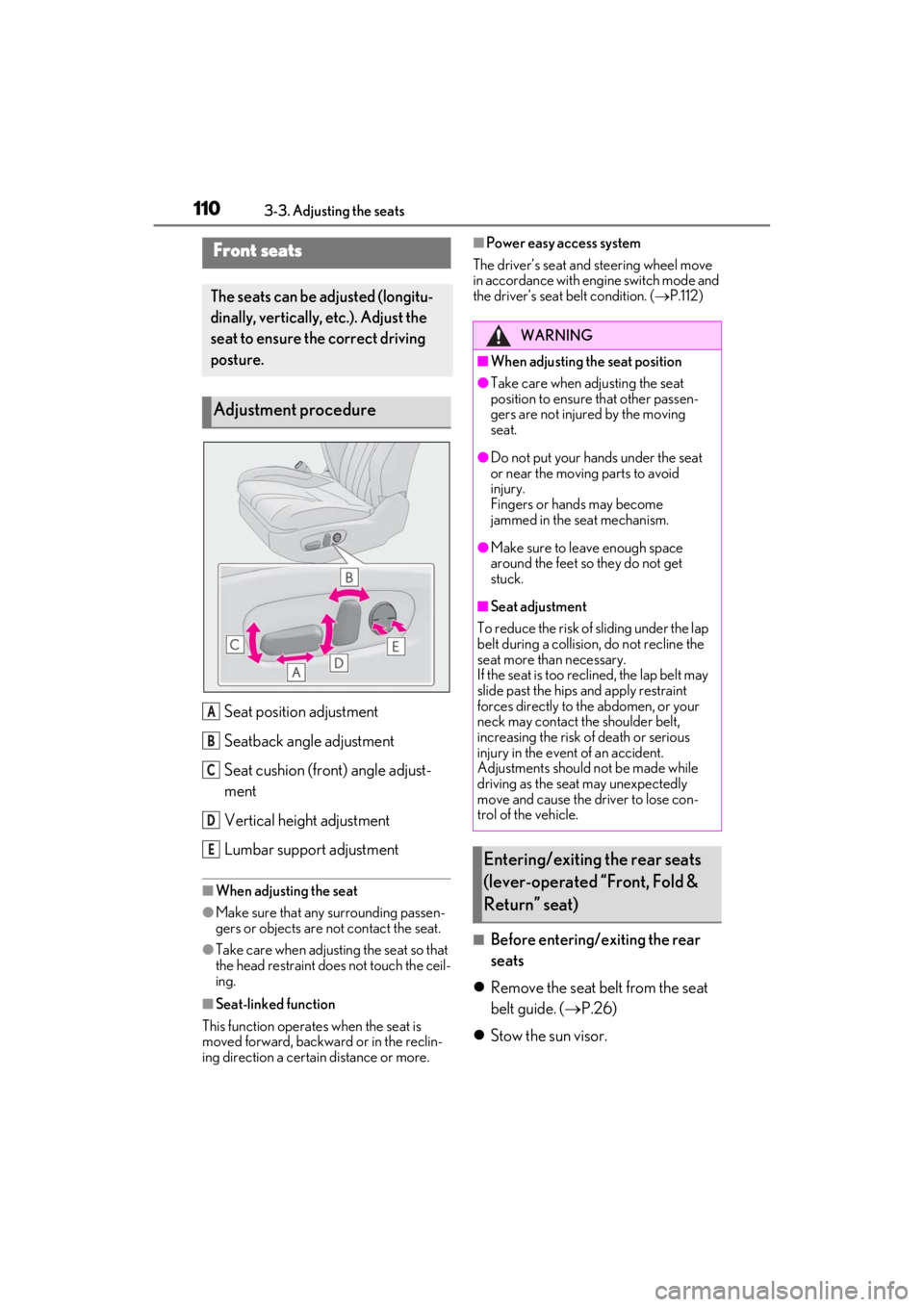
Seat position adjustment
Seatback angle adjustment
Seat cushion (front) angle adjust-
ment
Vertical height adjustment
Lumbar support adjustment
■When adjusting the seat
●Make sure that any surrounding passen-
gers or objects are not contact the seat.
●Take care when adjusting the seat so that
the head restraint does not touch the ceil-
ing.
■Seat-linked function
This function operates when the seat is
moved forward, backward or in the reclin-
ing direction a certain distance or more.
■Power easy access system
The driver’s seat and steering wheel move
in accordance with engine switch mode and
the driver’s seat belt condition. ( P.112)
■Before entering/exiting the rear
seats
Remove the seat belt from the seat
belt guide. ( P.26)
Stow the sun visor.
Front seats
The seats can be adjusted (longitu-
dinally, vertically, etc.). Adjust the
seat to ensure the correct driving
posture.
Adjustment procedure
A
B
C
D
E
WARNING
■When adjusting the seat position
●Take care when adjusting the seat
position to ensure that other passen-
gers are not injured by the moving
seat.
●Do not put your hands under the seat
or near the moving parts to avoid
injury.
Fingers or hands may become
jammed in the seat mechanism.
●Make sure to leave enough space
around the feet so they do not get
stuck.
■Seat adjustment
To reduce the risk of sliding under the lap
belt during a collision, do not recline the
seat more than necessary.
If the seat is too rec lined, the lap belt may
slide past the hips and apply restraint
forces directly to the abdomen, or your
neck may contact the shoulder belt,
increasing the risk of death or serious
injury in the event of an accident.
Adjustments should not be made while
driving as the seat may unexpectedly
move and cause the driver to lose con-
trol of the vehicle.
Entering/exiting the rear seats
(lever-operated “Front, Fold &
Return” seat)
Page 113 of 410
1113-3. Adjusting the seats
3
Before driving
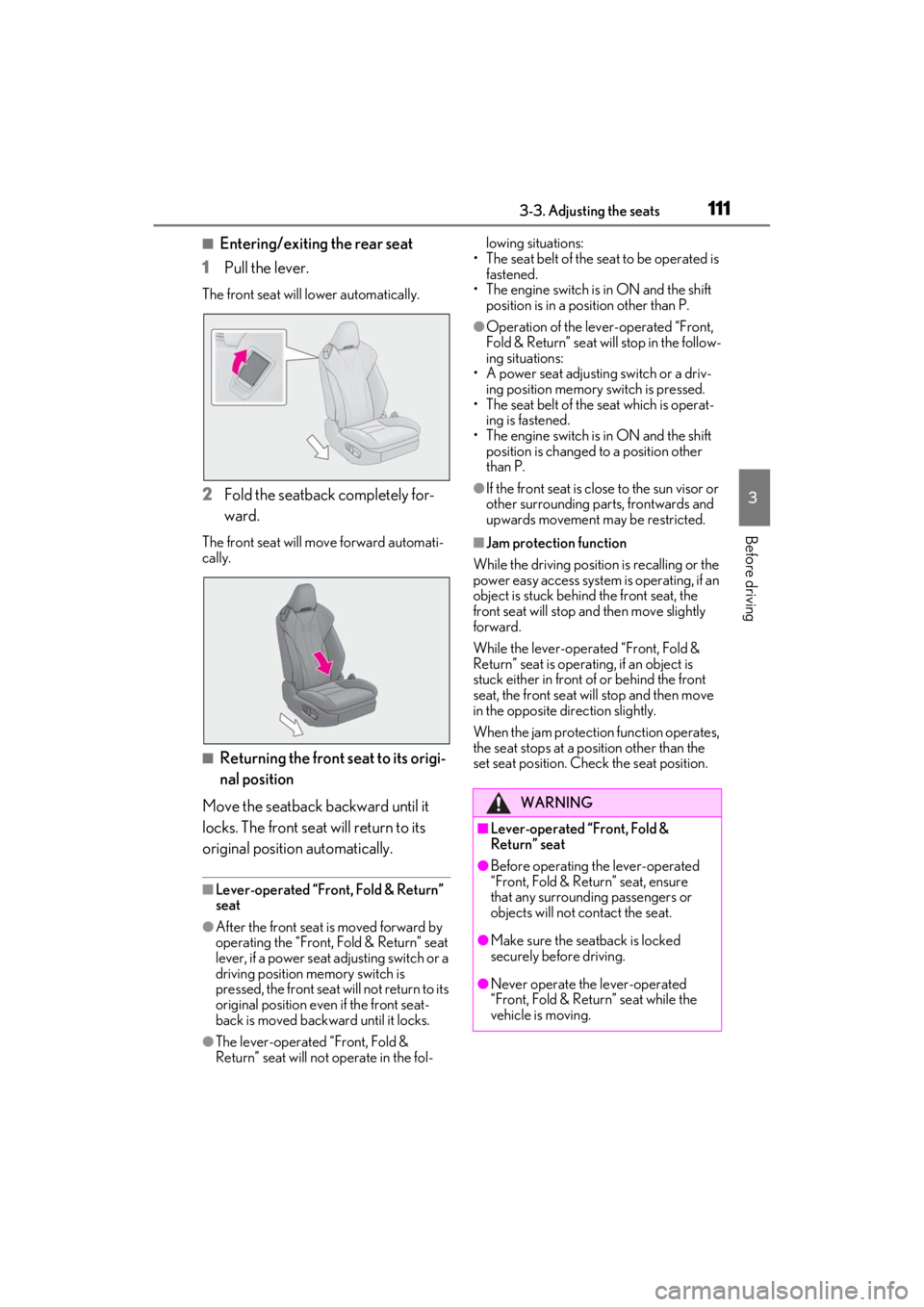
■Entering/exiting the rear seat
1
Pull the lever.
The front seat will lower automatically.
2Fold the seatback completely for-
ward.
The front seat will move forward automati-
cally.
■Returning the front seat to its origi-
nal position
Move the seatback backward until it
locks. The front seat will return to its
original position automatically.
■Lever-operated “Front, Fold & Return”
seat
●After the front seat is moved forward by
operating the “Front, Fold & Return” seat
lever, if a power seat adjusting switch or a
driving position memory switch is
pressed, the front seat will not return to its
original position even if the front seat-
back is moved backward until it locks.
●The lever-operated “Front, Fold &
Return” seat will not operate in the fol- lowing situations:
• The seat belt of the seat to be operated is fastened.
• The engine switch is in ON and the shift position is in a position other than P.
●Operation of the lever-operated “Front,
Fold & Return” seat will stop in the follow-
ing situations:
• A power seat adjusting switch or a driv- ing position memory switch is pressed.
• The seat belt of the seat which is operat-
ing is fastened.
• The engine switch is in ON and the shift position is changed to a position other
than P.
●If the front seat is close to the sun visor or
other surrounding parts, frontwards and
upwards movement may be restricted.
■Jam protection function
While the driving position is recalling or the
power easy access system is operating, if an
object is stuck behind the front seat, the
front seat will stop an d then move slightly
forward.
While the lever-operated “Front, Fold &
Return” seat is operatin g, if an object is
stuck either in front of or behind the front
seat, the front seat will stop and then move
in the opposite direction slightly.
When the jam protection function operates,
the seat stops at a po sition other than the
set seat position. Chec k the seat position.
WARNING
■Lever-operated “Front, Fold &
Return” seat
●Before operating the lever-operated
“Front, Fold & Return” seat, ensure
that any surrounding passengers or
objects will not contact the seat.
●Make sure the seat back is locked
securely before driving.
●Never operate the lever-operated
“Front, Fold & Return” seat while the
vehicle is moving.
Page 114 of 410
1123-3. Adjusting the seats
The seat and steering wheel are auto-
matically adjusted to allow the driver to
enter and exit the vehicle easily.
When all of the following have been
performed, the seat and steering wheel
are automatically adjusted to a position
that allows the driver to enter and exit
the vehicle easily.
The shift position has been shifted to
P.
The engine switch has been turned
off.
The driver’s seat belt has been
unfastened.
WARNING
■Jam protection function
Do not use a hand, foot, or any other part
of your body to intentionally activate the
jam protection function.
Driving position memory
This feature automatically adjusts
the positions of the driver’s seat,
steering wheel, outside rear view
mirrors and head-up display (if
equipped) to make entering and
exiting the vehicle easier or to suit
your preferences.
Up to 3 different driving positions
can be recorded.
Each electronic key (including a
card key) can be registered to
recall your preferred driving posi-
tion.
Power easy access system