warning lexus LC500C 2021 / LEXUS 2021 LC500 CONVERTIBLE (OM11498U) Manual Online
[x] Cancel search | Manufacturer: LEXUS, Model Year: 2021, Model line: LC500C, Model: Lexus LC500C 2021Pages: 410, PDF Size: 8.71 MB
Page 145 of 410
1434-1. Before driving
4
Driving
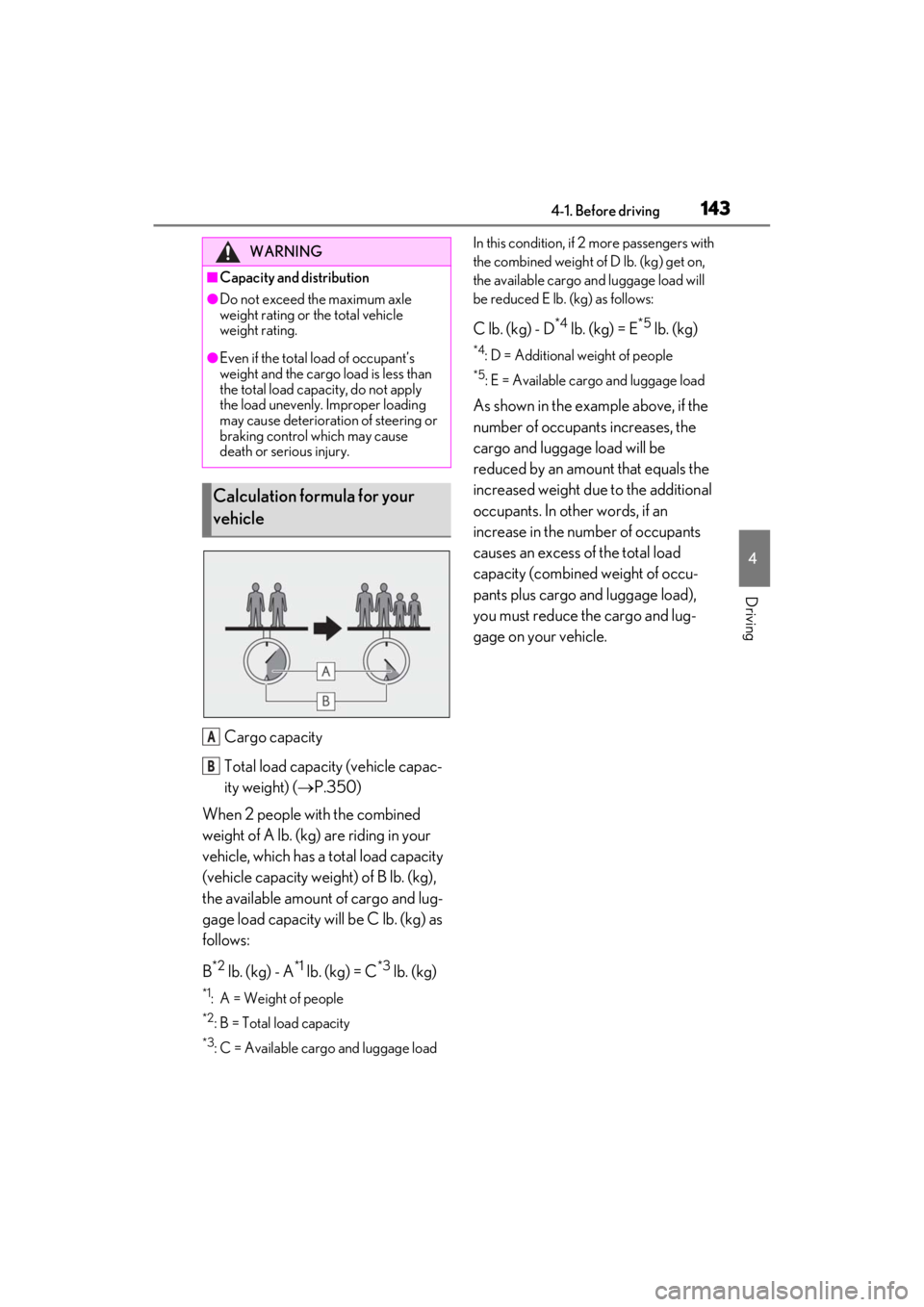
Cargo capacity
Total load capacity (vehicle capac-
ity weight) (P.350)
When 2 people with the combined
weight of A lb. (kg) are riding in your
vehicle, which has a total load capacity
(vehicle capacity weight) of B lb. (kg),
the available amount of cargo and lug-
gage load capacity will be C lb. (kg) as
follows:
B
*2 lb. (kg) - A*1 lb. (kg) = C*3 lb. (kg)
*1: A = Weight of people
*2: B = Total load capacity
*3: C = Available cargo and luggage load In this condition, if 2 more passengers with
the combined weight of D lb. (kg) get on,
the available cargo and luggage load will
be reduced E lb. (kg) as follows:
C lb. (kg) - D*4 lb. (kg) = E*5 lb. (kg)
*4: D = Additional weight of people
*5: E = Available cargo and luggage load
As shown in the example above, if the
number of occupant
s increases, the
cargo and luggage load will be
reduced by an amount that equals the
increased weight due to the additional
occupants. In other words, if an
increase in the number of occupants
causes an excess of the total load
capacity (combined weight of occu-
pants plus cargo and luggage load),
you must reduce the cargo and lug-
gage on your vehicle.
WARNING
■Capacity and distribution
●Do not exceed the maximum axle
weight rating or the total vehicle
weight rating.
●Even if the total load of occupant’s
weight and the cargo load is less than
the total load capacity, do not apply
the load unevenly. Improper loading
may cause deterioration of steering or
braking control which may cause
death or serious injury.
Calculation formula for your
vehicle
A
B
Page 146 of 410
1444-1. Before driving
■Total load capacity and seating capacity
These details are also described on the tire
and loading information label. ( P.293)
Vehicle load limits
Vehicle load limits include total
load capacity, seating capacity,
towing capacity and cargo capac-
ity.
Total load capacity (vehicle
capacity weight): P.350
Total load capacity means the com-
bined weight of occupants, cargo
and luggage.
Seating capacity: P.350
Seating capacity means the maxi-
mum number of occupants whose
estimated average weight is 150 lb.
(68 kg) per person.
Towing capacity
Lexus does not recommend towing
a trailer with your vehicle.
Cargo capacity
Cargo capacity may increase or
decrease depending on the weight
and the number of occupants.
WARNING
■Overloading the vehicle
Do not overload the vehicle.
It may not only cause damage to the tires,
but also degrade steering and braking
ability, resulting in an accident.
Trailer towing
Lexus does not recommend towing
a trailer with your vehicle. Lexus
also does not recommend the
installation of a tow hitch or the use
of a tow hitch carrier for a wheel-
chair, scooter, bicycle, etc. Your
vehicle is not designed for trailer
towing or for the use of tow hitch
mounted carriers.
Page 149 of 410
1474-2. Driving procedures
4
Driving
be displayed on the multi-information dis-
play.
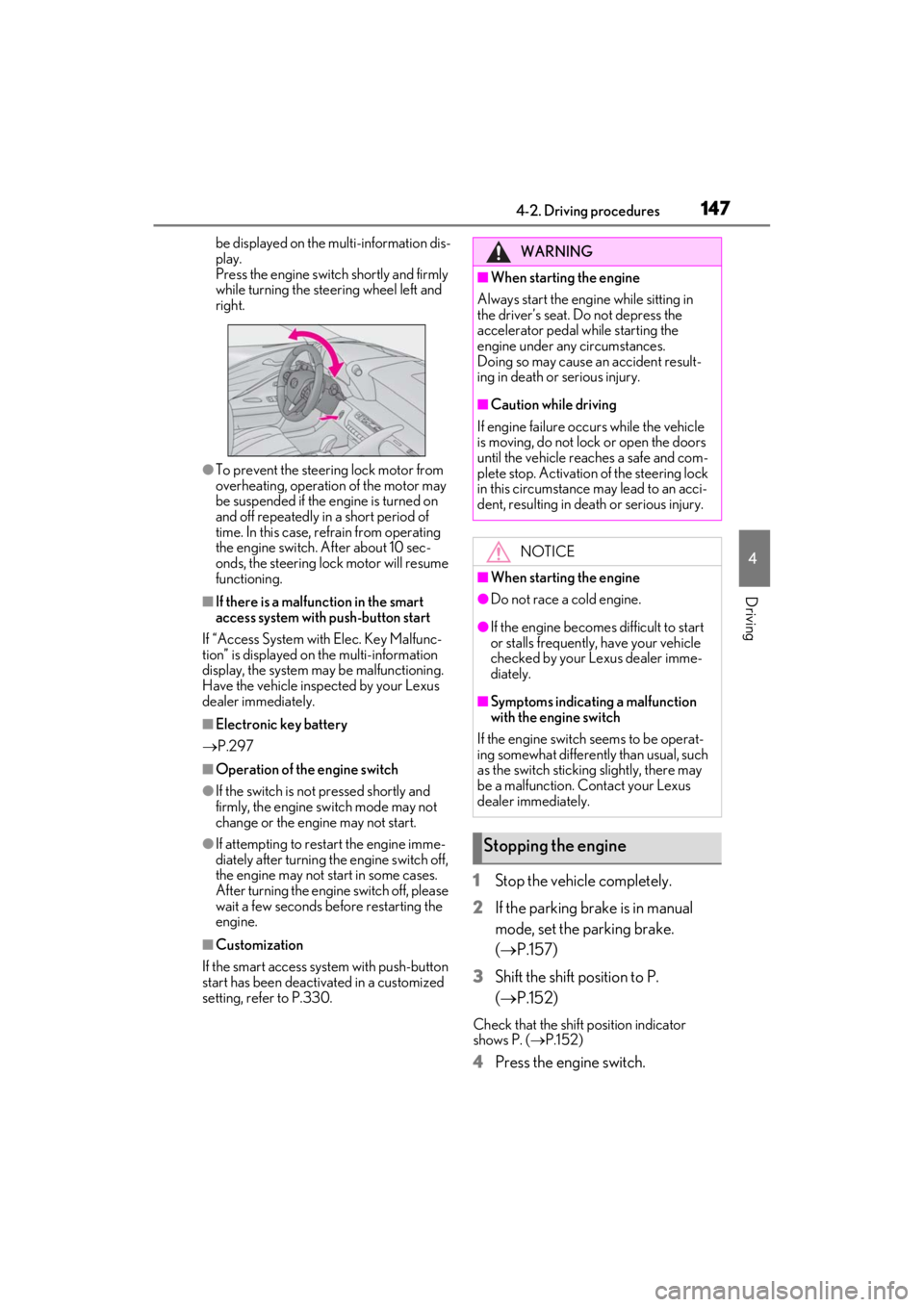
Press the engine switch shortly and firmly
while turning the steering wheel left and
right.
●To prevent the steering lock motor from
overheating, operation of the motor may
be suspended if the engine is turned on
and off repeatedly in a short period of
time. In this case, refrain from operating
the engine switch. After about 10 sec-
onds, the steering lock motor will resume
functioning.
■If there is a malfun ction in the smart
access system with push-button start
If “Access System with Elec. Key Malfunc-
tion” is displayed on the multi-information
display, the system may be malfunctioning.
Have the vehicle inspected by your Lexus
dealer immediately.
■Electronic key battery
P.297
■Operation of the engine switch
●If the switch is not pressed shortly and
firmly, the engine switch mode may not
change or the engine may not start.
●If attempting to restart the engine imme-
diately after turning the engine switch off,
the engine may not start in some cases.
After turning the engine switch off, please
wait a few seconds before restarting the
engine.
■Customization
If the smart access sy stem with push-button
start has been deactivated in a customized
setting, refer to P.330.
1Stop the vehicle completely.
2
If the parking brake is in manual
mode, set the parking brake.
( P.157)
3
Shift the shift position to P.
( P.152)
Check that the shift position indicator
shows P. ( P.152)
4Press the engine switch.
WARNING
■When starting the engine
Always start the engine while sitting in
the driver’s seat. Do not depress the
accelerator pedal while starting the
engine under any circumstances.
Doing so may cause an accident result-
ing in death or serious injury.
■Caution while driving
If engine failure occurs while the vehicle
is moving, do not lock or open the doors
until the vehicle reaches a safe and com-
plete stop. Activation of the steering lock
in this circumstance may lead to an acci-
dent, resulting in death or serious injury.
NOTICE
■When starting the engine
●Do not race a cold engine.
●If the engine becomes difficult to start
or stalls frequently, have your vehicle
checked by your Lexus dealer imme-
diately.
■Symptoms indicating a malfunction
with the engine switch
If the engine switch seems to be operat-
ing somewhat differently than usual, such
as the switch sticking slightly, there may
be a malfunction. Contact your Lexus
dealer immediately.
Stopping the engine
Page 150 of 410
1484-2. Driving procedures
The engine will stop, and the meter display
will be extinguished (the shift position indi-
cator will be extinguished a few seconds
after the meter display).
5Check that “ACCESSORY” or
“IGNITION ON” is not shown on
the meter.
■Automatic engine shut off feature
●The vehicle is equipped with a feature
that automatically shuts off the engine
when the shift position is in P with the
engine running for an extended period.
●The engine will automatically shut off
after approximately 1 hour if it has been
left running while the shift position is in P.
●The timer for the automatic engine shut
off feature will reset if the brake pedal is
depressed or if the shift position is in a
position other than P.
●After the vehicle is parked, if the door is
locked with the door lock switch
( P.98) from the inside or the mechani-
cal key ( P.330) from the outside, the
automatic engine shut off feature will be
disabled. The timer for the automatic
engine shut off feature will be re-enabled
if the driver’s door is opened.
■Automatic P position selection function
P.153
WARNING
■Stopping the engine in an emergency
●If you want to stop the engine in an
emergency while driving the vehicle,
press and hold the engine switch for
more than 2 seconds, or press it briefly
3 times or more in succession.
( P.306)
However, do not touch the engine
switch while driving except in an emer-
gency. Turning the engine off while
driving will not cause loss of steering
or braking control, however, power
assist to the steering will be lost. This
will make it more difficult to steer
smoothly, so you should pull over and
stop the vehicle as soon as it is safe to
do so.
●If the engine switch is operated while
the vehicle is running, a warning mes-
sage will be shown on the multi-infor-
mation display and a buzzer sounds.
●When restarting the engine after an
emergency shutdown, press the
engine switch.
■When parking
Exhaust gases include harmful carbon
monoxide (CO), which is colorless and
odorless. Observe the following precau-
tions.
Failure to do so may cause exhaust gases
to enter the vehicle and may lead to an
accident caused by light-headedness, or
may lead to death or a serious health
hazard.
●If the vehicle is in a poorly ventilated
area or a closed area, such as a
garage, stop the engine.
●Do not leave the vehicle with the
engine running for a long time. If such
a situation cannot be avoided, park the
vehicle in an open space and ensure
that exhaust fumes do not enter the
vehicle interior.
Page 151 of 410
1494-2. Driving procedures
4
Driving
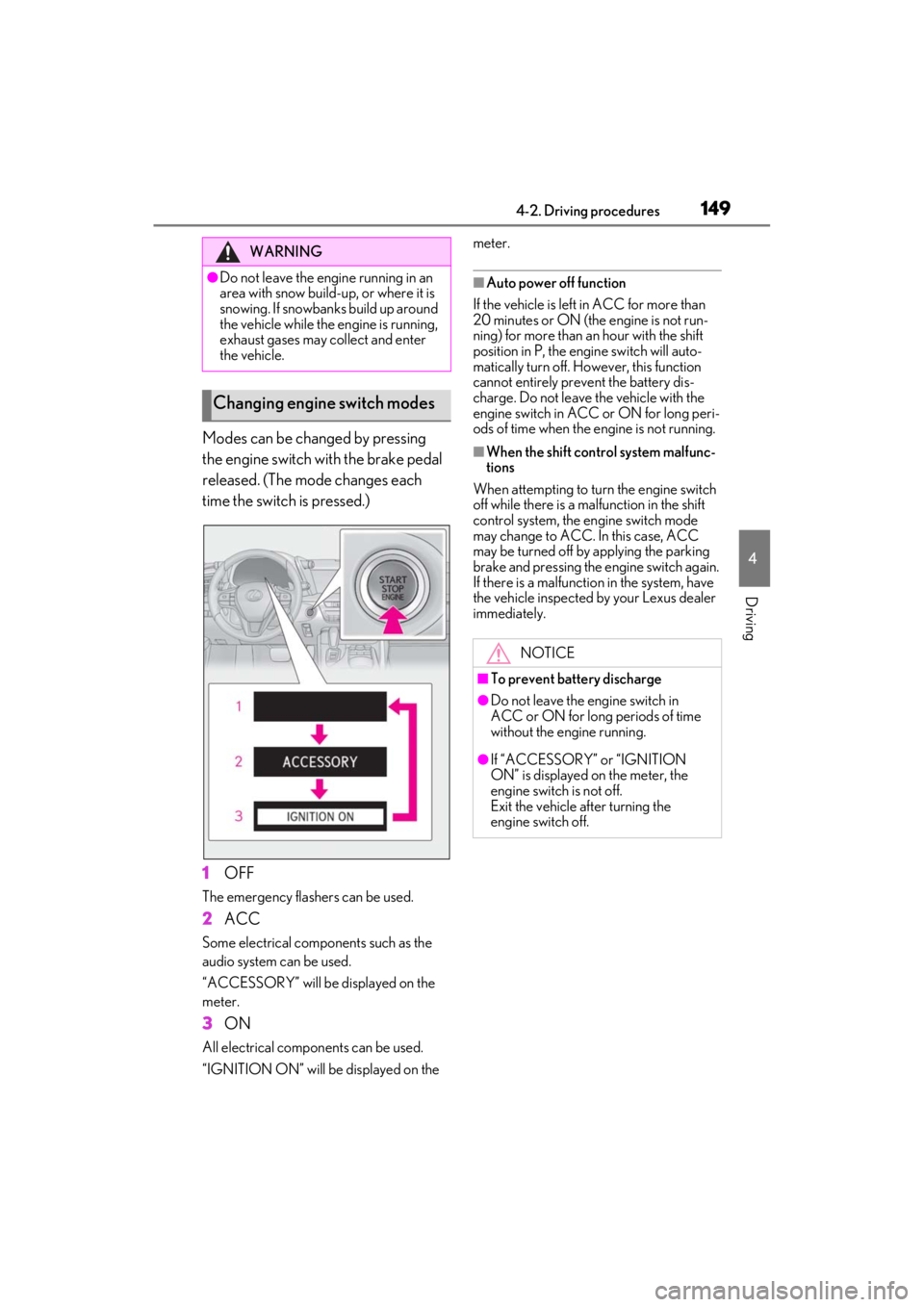
Modes can be changed by pressing
the engine switch with the brake pedal
released. (The mode changes each
time the switch is pressed.)
1
OFF
The emergency flashers can be used.
2ACC
Some electrical components such as the
audio system can be used.
“ACCESSORY” will be displayed on the
meter.
3ON
All electrical components can be used.
“IGNITION ON” will be displayed on the meter.
■Auto power off function
If the vehicle is left in ACC for more than
20 minutes or ON (the engine is not run-
ning) for more than an hour with the shift
position in P, the engine switch will auto-
matically turn off. However, this function
cannot entirely prevent the battery dis-
charge. Do not leave the vehicle with the
engine switch in ACC or ON for long peri-
ods of time when the engine is not running.
■When the shift control system malfunc-
tions
When attempting to turn the engine switch
off while there is a ma lfunction in the shift
control system, the engine switch mode
may change to ACC. In this case, ACC
may be turned off by applying the parking
brake and pressing the engine switch again.
If there is a malfunctio n in the system, have
the vehicle inspected by your Lexus dealer
immediately.
WARNING
●Do not leave the engine running in an
area with snow build-up, or where it is
snowing. If snowbanks build up around
the vehicle while the engine is running,
exhaust gases may collect and enter
the vehicle.
Changing engine switch modes
NOTICE
■To prevent battery discharge
●Do not leave the engine switch in
ACC or ON for long periods of time
without the engine running.
●If “ACCESSORY” or “IGNITION
ON” is displayed on the meter, the
engine switch is not off.
Exit the vehicle after turning the
engine switch off.
Page 152 of 410
1504-2. Driving procedures
*1: To improve fuel efficiency and reduce noise, set the shift position in D for nor-
mal driving. You can choose gear range
suitable for your driving situation by
operating the paddle shift switches.
*2: Any gear range can be fixed when driv-
ing in M mode.
■For the shift positions
●When the engine switch is off or in ACC,
the shift position cannot be changed.
●When the engine switch is in ON, the
shift position can only be changed to N.
●When the engine is running, the shift
position can be changed from P to D, N
or R.
●The shift position can only be changed to
M directly from D.
In addition, if an atte mpt is made to change
the shift position by moving the shift lever or
by pressing the P position switch in any of the following situations, the buzzer will
sound and the shifting
operation will be dis-
abled or the shift posi tion will automatically
change to N. When this happens, select an
appropriate shift position.
●Situations where the shifting operation
will be disabled:
• When an attempt is made to change the
shift position from P to another position
by moving the shift lever without
depressing the brake pedal.
• When an attempt is made to change the shift position from P or N to M by moving
the shift lever.
• When the P position switch is pressed
while the vehicle is running.
*1
●Situations where the shift position will
automatically change to N:
• When an attempt is made to select the R position by moving the shift lever when
the vehicle is moving forward.
*2
• When an attempt is made to select the D
position by moving the shift lever when
the vehicle is moving in reverse.
*3
• When the shift position is changed from R to M
●If N is selected while driving at a certain
speed, even if the shift lever is not held in
the N position, the shift position changes
to N. In this situation, the buzzer sounds
and a confirmation message is displayed
on the multi-information display to inform
the driver that the shift position has
changed to N.
*1: Shift position may be changed to P when
driving at extremely low speeds.
*2: Shift position may be changed to R when driving at low speeds.
*3: Shift position may be changed to D when driving at low speeds.
■Reverse warning buzzer
When shifting into R, a buzzer will sound to
inform the driver that the shift position is in
R.
■To protect the automatic transmission
If the automatic transmission fluid tempera-
ture is high, “Transmission Fluid Temp High
See Owner’s Manual” will be displayed on
Automatic transmission
Select the shift position depending
on your purpose and situation.
Shift position purpose and func-
tions
Shift posi- tionObjective or function
PParking the vehicle/starting the engine
RReversing
N
Neutral
(Condition in which the
power is not transmitted)
DNormal driving*1
MM mode driving*2 ( P.155)
Page 153 of 410
1514-2. Driving procedures
4
Driving
the multi-information display and the vehi-
cle will go into transmission protection
mode automatically. Have the vehicle
inspected by your Lexus dealer.
■When driving with dynamic radar cruise
control with full-speed range activated
Even when performing the following
actions with the intent of enabling engine
braking, engine braking will not be acti-
vated because dynamic radar cruise con-
trol with full-speed range will not be
canceled.
●While driving in the D position, down-
shifting to 9, 8, 7, 6, 5 or 4.
●When switching the driving mode to
sport mode while driving in D position.
( P.203)
■Restraining sudden start (Drive-Start
Control)
P.137
■AI-SHIFT
The AI-SHIFT automatica lly selects the suit-
able gear according to driver performance
and driving conditions.
The AI-SHIFT automatically operates when
the shift position is in D. (Shifting the shift
position to M cancels the function.)
■If a message about a shift operation is
shown
To prevent the shift position from being
selected incorrectly or the vehicle from
moving unexpectedly, the shift position may
be changed automatically or operating the
shift lever may be required. In this case,
change the shift positi on following the mes-
sages on the multi-information display.
■After recharging/reconnecting the bat-
tery
P.279
■Customization
Settings (e.g. revers e warning buzzer) can
be changed. (Customizable features:
P.367)
WARNING
■When driving on slippery road sur-
faces
Do not accelerate or shift the shift posi-
tion suddenly.
Sudden changes in engine braking may
cause the vehicle to sp in or skid, resulting
in an accident.
NOTICE
■Situations where sh ift control system
malfunctions are possible
If any of the following situations occurs,
shift control system malfunctions are
possible.
Immediately stop the vehicle in a safe
place on level ground, apply the parking
brake, and then contact your Lexus
dealer.
●When the warning message indicating
the shift control system appears on the
multi-information display.
●The display indicates that no shift posi-
tion is selected for more than a few
seconds.
Page 154 of 410
1524-2. Driving procedures
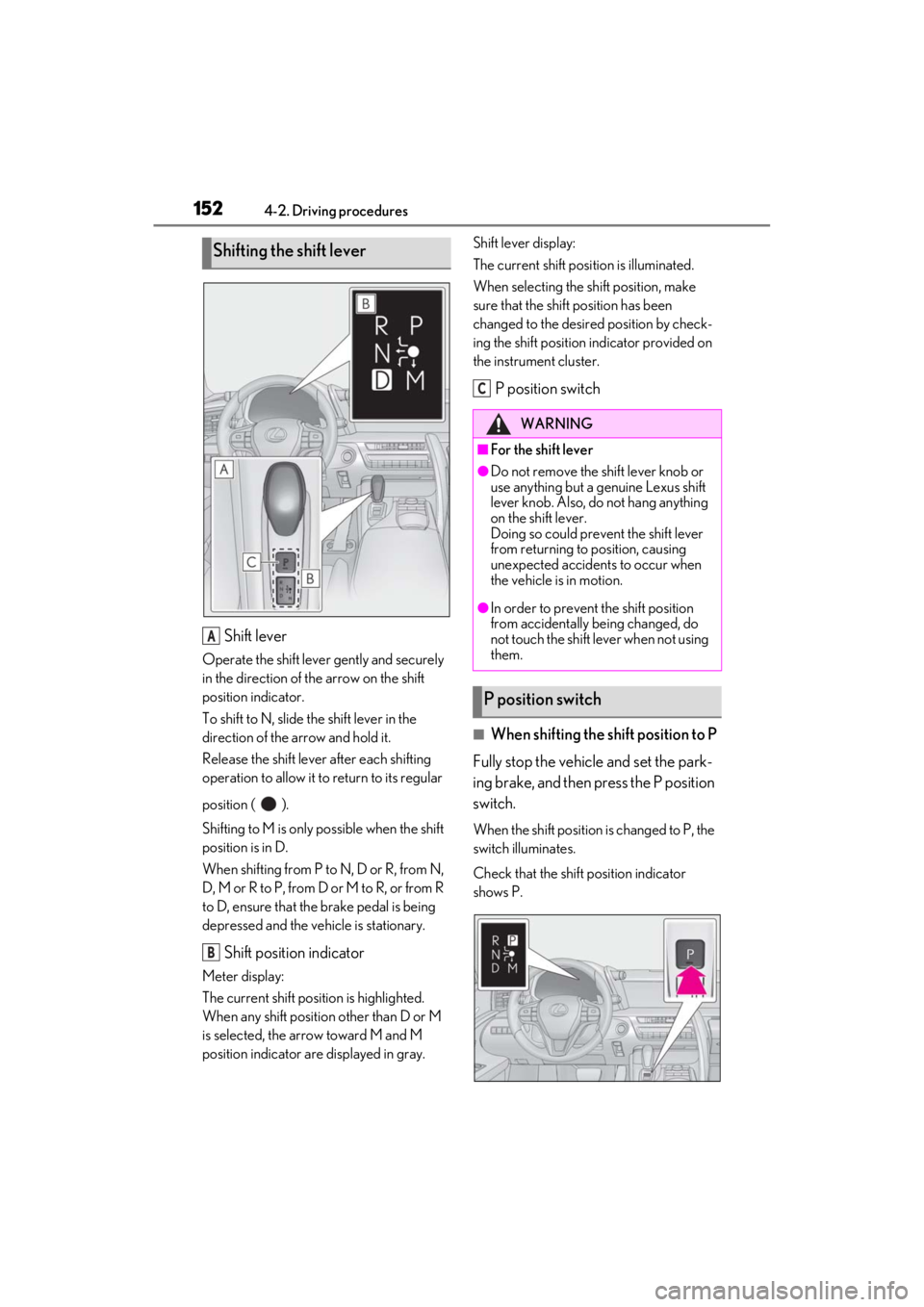
Shift lever
Operate the shift lever gently and securely
in the direction of the arrow on the shift
position indicator.
To shift to N, slide the shift lever in the
direction of the arrow and hold it.
Release the shift lever after each shifting
operation to allow it to return to its regular
position ( ).
Shifting to M is only possible when the shift
position is in D.
When shifting from P to N, D or R, from N,
D, M or R to P, from D or M to R, or from R
to D, ensure that the brake pedal is being
depressed and the vehicle is stationary.
Shift position indicator
Meter display:
The current shift position is highlighted.
When any shift position other than D or M
is selected, the arrow toward M and M
position indicator are displayed in gray. Shift lever display:
The current shift posi
tion is illuminated.
When selecting the shift position, make
sure that the shift position has been
changed to the desired position by check-
ing the shift position indicator provided on
the instrument cluster.
P position switch
■When shifting the shift position to P
Fully stop the vehicle and set the park-
ing brake, and then press the P position
switch.
When the shift position is changed to P, the
switch illuminates.
Check that the shift position indicator
shows P.
Shifting the shift lever
A
B
WARNING
■For the shift lever
●Do not remove the shift lever knob or
use anything but a genuine Lexus shift
lever knob. Also, do not hang anything
on the shift lever.
Doing so could prevent the shift lever
from returning to position, causing
unexpected accidents to occur when
the vehicle is in motion.
●In order to prevent the shift position
from accidentally being changed, do
not touch the shift lever when not using
them.
P position switch
C
Page 156 of 410
1544-2. Driving procedures
■Driving mode
P.203
■Snow mode
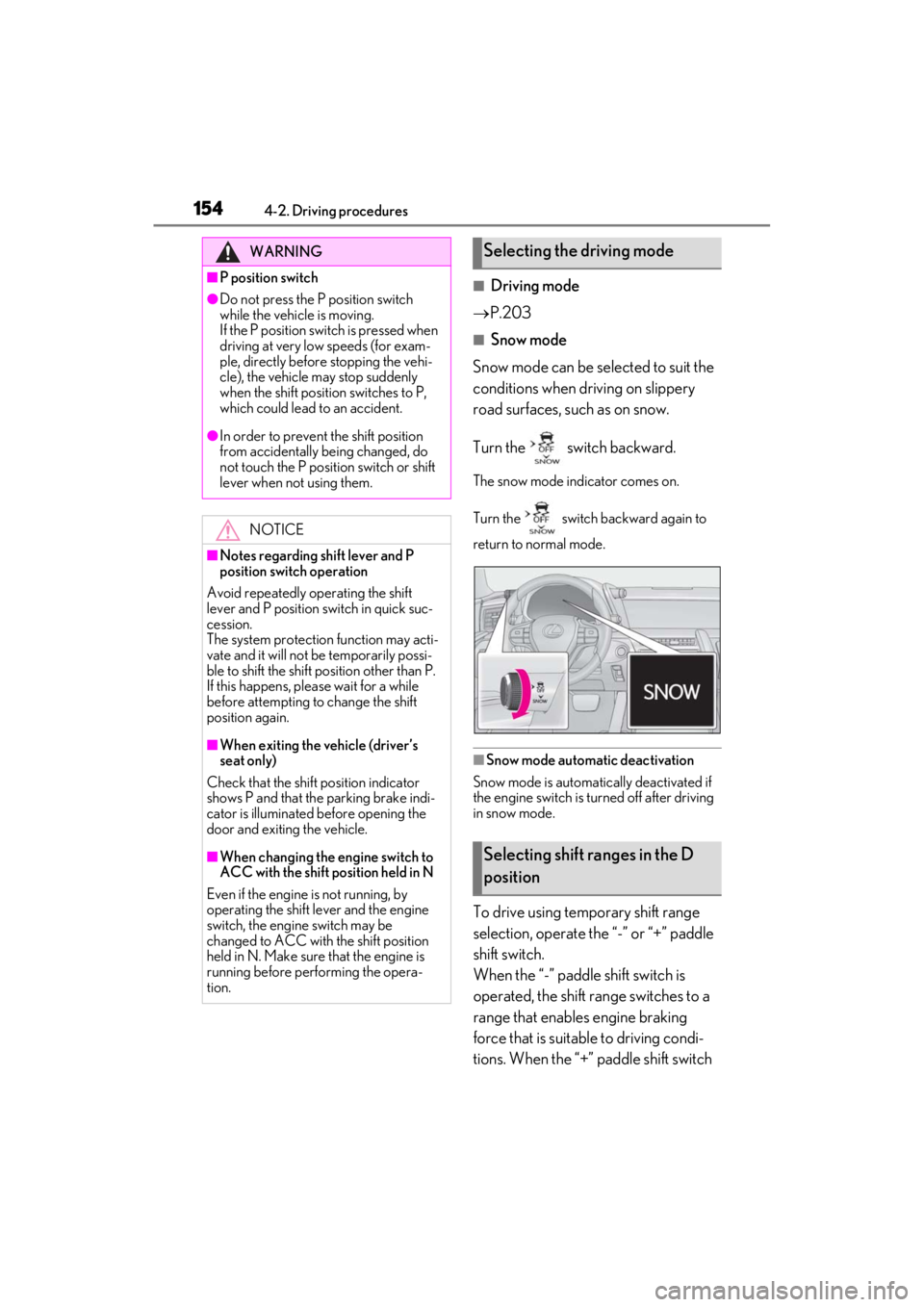
Snow mode can be se lected to suit the
conditions when driving on slippery
road surfaces, such as on snow.
Turn the switch backward.
The snow mode indicator comes on.
Turn the switch backward again to
return to normal mode.
■Snow mode automatic deactivation
Snow mode is automatically deactivated if
the engine switch is turned off after driving
in snow mode.
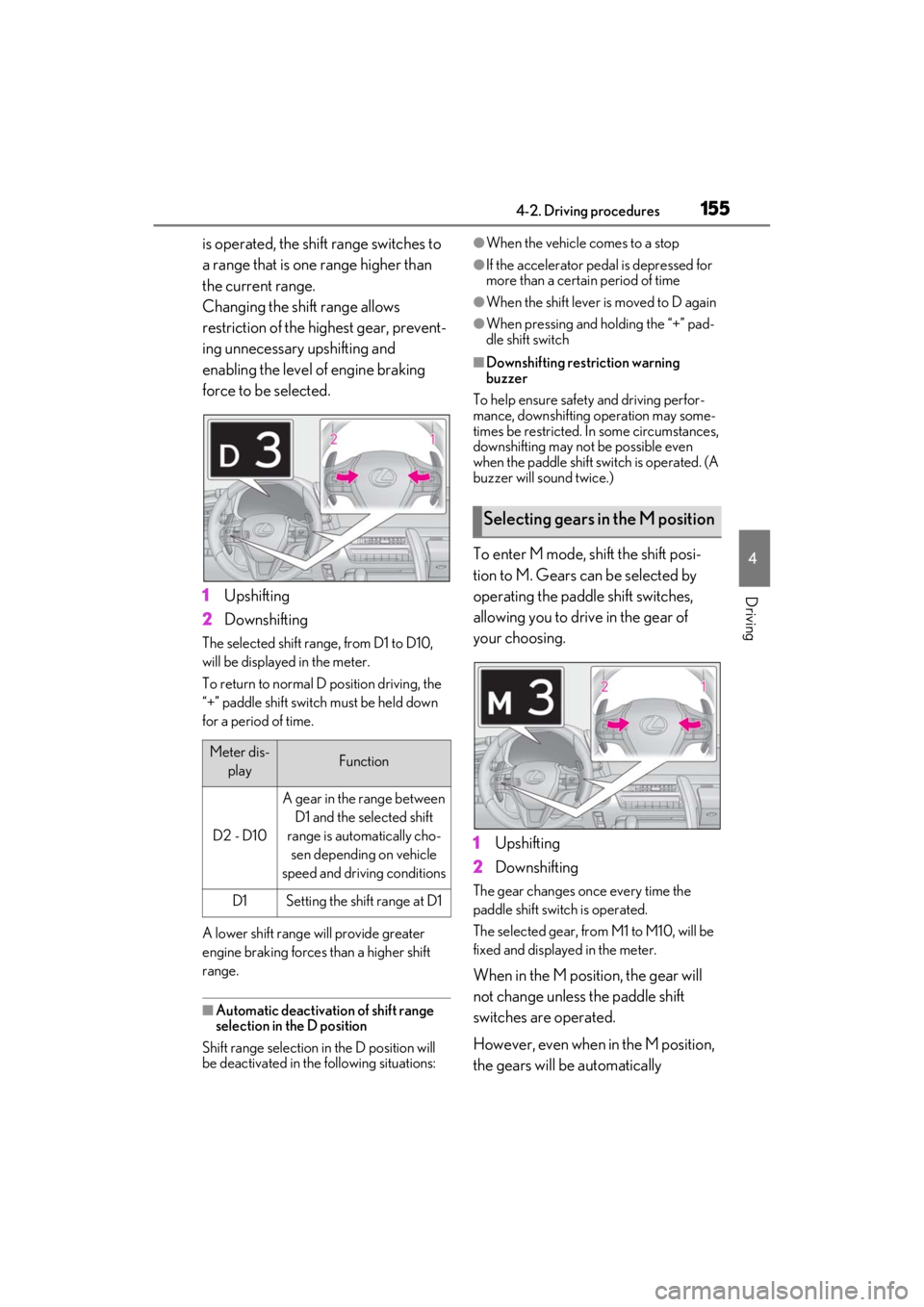
To drive using temporary shift range
selection, operate the “-” or “+” paddle
shift switch.
When the “-” paddle shift switch is
operated, the shift range switches to a
range that enables engine braking
force that is suitable to driving condi-
tions. When the “+” paddle shift switch
WARNING
■P position switch
●Do not press the P position switch
while the vehicle is moving.
If the P position switch is pressed when
driving at very low speeds (for exam-
ple, directly before stopping the vehi-
cle), the vehicle may stop suddenly
when the shift position switches to P,
which could lead to an accident.
●In order to prevent the shift position
from accidentally being changed, do
not touch the P position switch or shift
lever when not using them.
NOTICE
■Notes regarding shift lever and P
position switch operation
Avoid repeatedly operating the shift
lever and P position switch in quick suc-
cession.
The system protection function may acti-
vate and it will not be temporarily possi-
ble to shift the shift position other than P.
If this happens, plea se wait for a while
before attempting to change the shift
position again.
■When exiting the vehicle (driver’s
seat only)
Check that the shift position indicator
shows P and that the parking brake indi-
cator is illuminated before opening the
door and exiting the vehicle.
■When changing the engine switch to
ACC with the shift position held in N
Even if the engine is not running, by
operating the shift le ver and the engine
switch, the engine switch may be
changed to ACC with the shift position
held in N. Make sure that the engine is
running before performing the opera-
tion.
Selecting the driving mode
Selecting shift ranges in the D
position
Page 157 of 410
1554-2. Driving procedures
4
Driving
is operated, the shift range switches to
a range that is one range higher than
the current range.
Changing the shift range allows
restriction of the highest gear, prevent-
ing unnecessary upshifting and
enabling the level of engine braking
force to be selected.
1Upshifting
2 Downshifting
The selected shift rang e, from D1 to D10,
will be displaye d in the meter.
To return to normal D position driving, the
“+” paddle shift switch must be held down
for a period of time.
A lower shift range will provide greater
engine braking forces than a higher shift
range.
■Automatic deactivation of shift range
selection in the D position
Shift range selection in the D position will
be deactivated in the following situations:
●When the vehicle comes to a stop
●If the accelerator pedal is depressed for
more than a certai n period of time
●When the shift lever is moved to D again
●When pressing and holding the “+” pad-
dle shift switch
■Downshifting restriction warning
buzzer
To help ensure safety and driving perfor-
mance, downshifting operation may some-
times be restricted. In some circumstances,
downshifting may not be possible even
when the paddle shift switch is operated. (A
buzzer will sound twice.)
To enter M mode, shift the shift posi-
tion to M. Gears can be selected by
operating the paddle shift switches,
allowing you to drive in the gear of
your choosing.
1 Upshifting
2 Downshifting
The gear changes once every time the
paddle shift switch is operated.
The selected gear, from M1 to M10, will be
fixed and displayed in the meter.
When in the M position, the gear will
not change unless the paddle shift
switches are operated.
However, even when in the M position,
the gears will be automatically
Meter dis-
playFunction
D2 - D10
A gear in the range between D1 and the selected shift
range is automatically cho- sen depending on vehicle
speed and driving conditions
D1Setting the shift range at D1
Selecting gears in the M position