seat memory lexus LC500C 2021 Owner's Manual / LEXUS 2021 LC500 CONVERTIBLE OWNER'S MANUAL (OM11498U)
[x] Cancel search | Manufacturer: LEXUS, Model Year: 2021, Model line: LC500C, Model: Lexus LC500C 2021Pages: 410, PDF Size: 8.71 MB
Page 2 of 410
2TABLE OF CONTENTS
For your information ......................................6
Reading this manual .................................... 10
How to search ................................................. 11
Pictorial index ................................................. 12
1-1. For safe use Before driving .................................... 22
For safe driving.................................. 23
Seat belts ............................................. 24
SRS airbags ........................................ 29
Pop Up Hood ................................... 36
Active roll bar ................................... 38
Front passenger occupant classifi- cation system ................................... 41
Exhaust gas precautions .............. 45
1-2. Child safety Riding with children........................ 46
Child restraint systems ................. 46
1-3. Lexus Enform Lexus Enform Safety Connect .. 56
Lexus Enform Remote .................... 61
Lexus Enform Service Connect. 62
1-4. Theft deterrent system Engine immobilizer system ......... 63
Alarm.................................................... 65
Theft prevention labels (U.S.A.) 67
2-1. Instrument cluster Warning lights and indicators .... 70
Gauges and meters ....................... 75
Multi-information display............. 79
Head-up display .............................. 85Fuel consumption information...
88
3-1. Key information Keys ....................................................... 92
3-2. Opening, closing and locking the doors and trunk
Doors .................................................... 96
Trunk .................................................. 100
Smart access system with push- button start.................................... 103
3-3. Adjusting the seats Front seats......................................... 110
Driving position memory ............. 112
Head restraints ................................ 116
3-4. Adjusting the steering wheel and mirrors
Steering wheel ................................. 117
Inside rear view mirror ................ 118
Outside rear view mirrors........... 119
3-5. Opening and closing the windows Power windows .............................. 122
3-6. Opening and closing the soft top roof
Soft top roof ..................................... 126
4-1. Before driving Driving the vehicle........................ 136
Cargo and luggage....................... 142
Vehicle load limits.......................... 144
Trailer towing................................... 144
Dinghy towing ................................ 145
1For safety and security
2Vehicle status information and
indicators
3Before driving
4Driving
Page 93 of 410

91
3
3
Before driving
Before driving
3-1. Key informationKeys ................................................... 92
3-2. Opening, closing and locking the doors and trunk
Doors................................................. 96
Trunk................................................ 100
Smart access system with push- button start ................................. 103
3-3. Adjusting the seats Front seats ...................................... 110
Driving position memory ......... 112
Head restraints............................. 116
3-4. Adjusting the steering wheel and mirrors
Steering wheel.............................. 117
Inside rear view mirror.............. 118
Outside rear view mirrors ....... 119
3-5. Opening and closing the win- dows
Power windows........................... 122
3-6. Opening and closing the soft top roof
Soft top roof.................................. 126
Page 113 of 410
1113-3. Adjusting the seats
3
Before driving
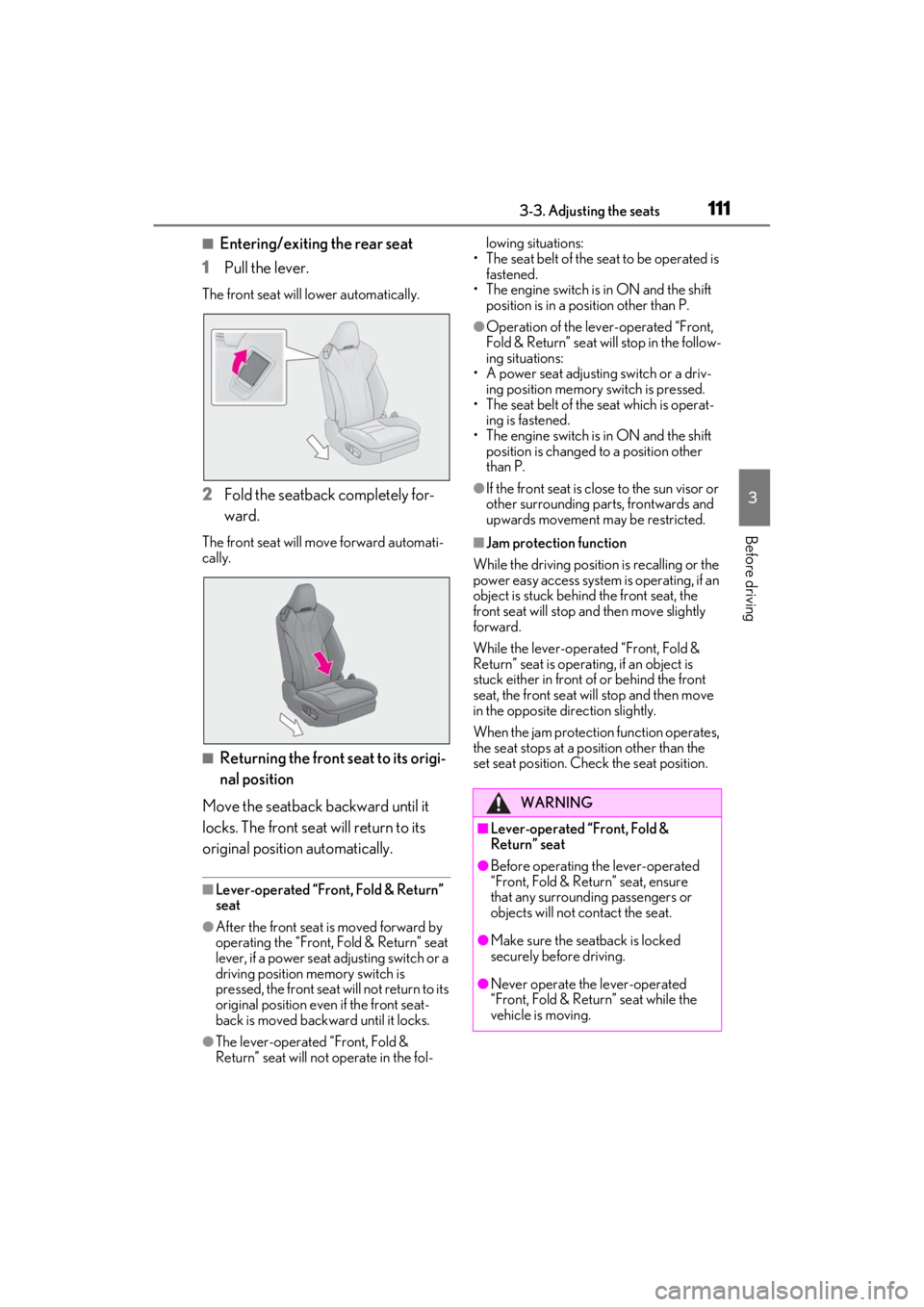
■Entering/exiting the rear seat
1
Pull the lever.
The front seat will lower automatically.
2Fold the seatback completely for-
ward.
The front seat will move forward automati-
cally.
■Returning the front seat to its origi-
nal position
Move the seatback backward until it
locks. The front seat will return to its
original position automatically.
■Lever-operated “Front, Fold & Return”
seat
●After the front seat is moved forward by
operating the “Front, Fold & Return” seat
lever, if a power seat adjusting switch or a
driving position memory switch is
pressed, the front seat will not return to its
original position even if the front seat-
back is moved backward until it locks.
●The lever-operated “Front, Fold &
Return” seat will not operate in the fol- lowing situations:
• The seat belt of the seat to be operated is fastened.
• The engine switch is in ON and the shift position is in a position other than P.
●Operation of the lever-operated “Front,
Fold & Return” seat will stop in the follow-
ing situations:
• A power seat adjusting switch or a driv- ing position memory switch is pressed.
• The seat belt of the seat which is operat-
ing is fastened.
• The engine switch is in ON and the shift position is changed to a position other
than P.
●If the front seat is close to the sun visor or
other surrounding parts, frontwards and
upwards movement may be restricted.
■Jam protection function
While the driving position is recalling or the
power easy access system is operating, if an
object is stuck behind the front seat, the
front seat will stop an d then move slightly
forward.
While the lever-operated “Front, Fold &
Return” seat is operatin g, if an object is
stuck either in front of or behind the front
seat, the front seat will stop and then move
in the opposite direction slightly.
When the jam protection function operates,
the seat stops at a po sition other than the
set seat position. Chec k the seat position.
WARNING
■Lever-operated “Front, Fold &
Return” seat
●Before operating the lever-operated
“Front, Fold & Return” seat, ensure
that any surrounding passengers or
objects will not contact the seat.
●Make sure the seat back is locked
securely before driving.
●Never operate the lever-operated
“Front, Fold & Return” seat while the
vehicle is moving.
Page 114 of 410
1123-3. Adjusting the seats
The seat and steering wheel are auto-
matically adjusted to allow the driver to
enter and exit the vehicle easily.
When all of the following have been
performed, the seat and steering wheel
are automatically adjusted to a position
that allows the driver to enter and exit
the vehicle easily.
The shift position has been shifted to
P.
The engine switch has been turned
off.
The driver’s seat belt has been
unfastened.
WARNING
■Jam protection function
Do not use a hand, foot, or any other part
of your body to intentionally activate the
jam protection function.
Driving position memory
This feature automatically adjusts
the positions of the driver’s seat,
steering wheel, outside rear view
mirrors and head-up display (if
equipped) to make entering and
exiting the vehicle easier or to suit
your preferences.
Up to 3 different driving positions
can be recorded.
Each electronic key (including a
card key) can be registered to
recall your preferred driving posi-
tion.
Power easy access system
Page 115 of 410
1133-3. Adjusting the seats
3
Before driving
When any of the following has been
performed, the driver’s seat and steer-
ing wheel automatically return to their
original positions.
The engine switch has been turned
to ACC or ON.
The driver’s seat belt has been fas-
tened.
■Operation of the power easy access
system
●When exiting the vehicle, the power easy
access system may not operate if the seat
is already close to the rearmost position,
etc.
●If the seat position is adjusted during the
power easy access sy stem operation, the
automatic operating will stop. (The seat
will change to manual operation.)
●If the seat position is adjusted during or
after the power easy access system oper-
ation when the driver is exiting the vehi-
cle, the power easy access system will not
operate when entering the vehicle.
■Customization
The seat movement amou nt settings of the
power easy access sy stem can be custom-
ized.
(Customizable features: P.367)
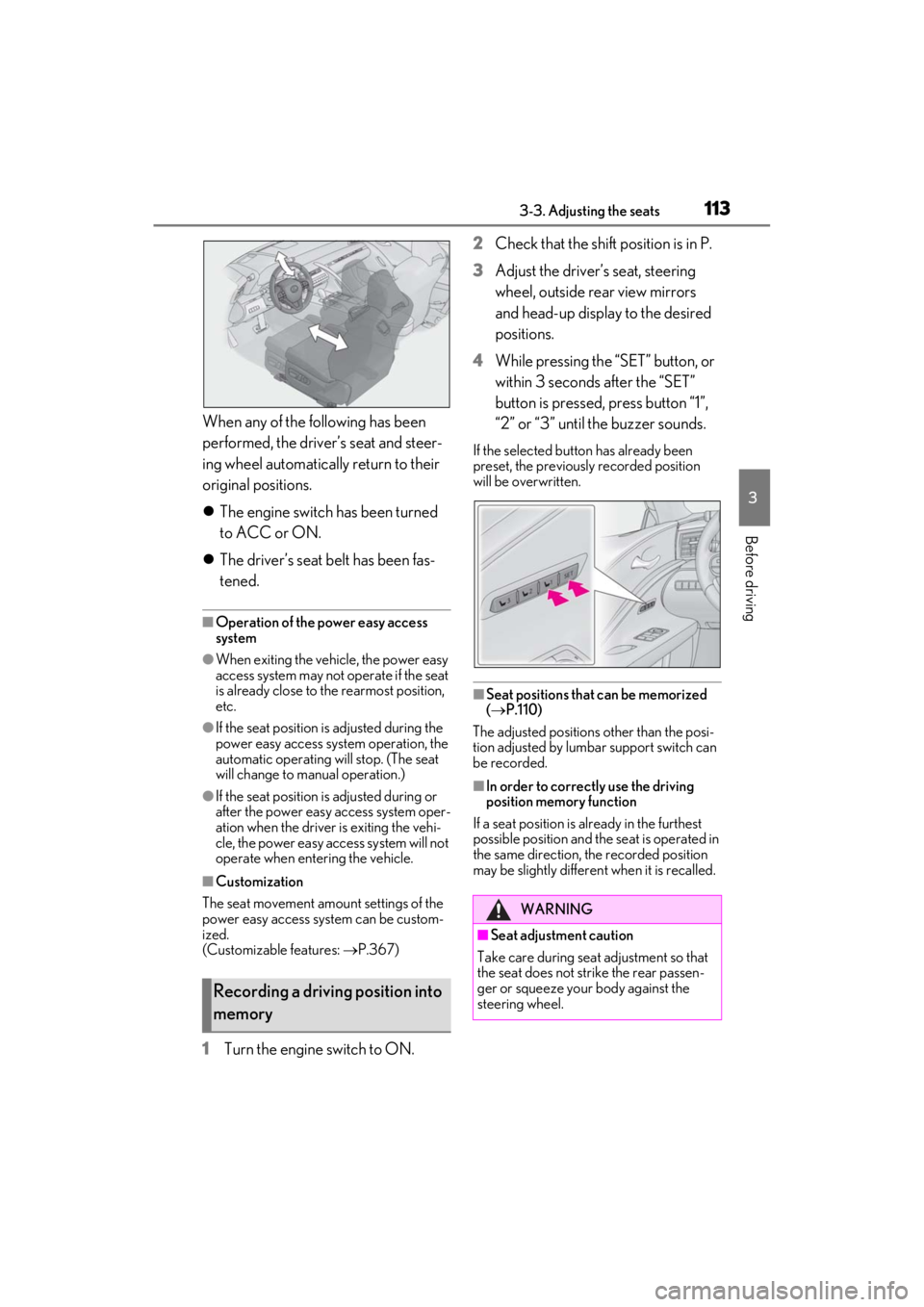
1Turn the engine switch to ON. 2
Check that the shift position is in P.
3
Adjust the driver’s seat, steering
wheel, outside rear view mirrors
and head-up display to the desired
positions.
4
While pressing the “SET” button, or
within 3 seconds after the “SET”
button is pressed, press button “1”,
“2” or “3” until the buzzer sounds.
If the selected button has already been
preset, the previously recorded position
will be overwritten.
■Seat positions that can be memorized
( P.110)
The adjusted positions other than the posi-
tion adjusted by lumbar support switch can
be recorded.
■In order to correctly use the driving
position memory function
If a seat position is already in the furthest
possible position and the seat is operated in
the same direction, the recorded position
may be slightly differen t when it is recalled.
Recording a driving position into
memory
WARNING
■Seat adjustment caution
Take care during seat adjustment so that
the seat does not strike the rear passen-
ger or squeeze your body against the
steering wheel.
Page 116 of 410

1143-3. Adjusting the seats
1Turn the engine switch to ON.
2 Check that the shift position is in P.
3 Press one of the buttons for the
driving position you want to recall
until the buzzer sounds.
■To stop the position recall operation
part-way through
Perform any of the following:
●Press the “SET” button.
●Press button “1”, “2” or “3”.
●Operate any of the seat adjustment
switches (only cancels seat position
recall).
●Operate the tilt and telescopic steering
control switch (only cancels steering
wheel position recall).
●Operate the head-up display position
adjustment switch (if equipped) (only
cancels head-up display position recall).
■Operating the driving position memory
after turning the engine switch off
Recorded seat positions can be activated
up to 180 seconds after the driver’s door is
opened and another 60 seconds after it is
closed again.
■Registering procedure
Record your driving position to button
“1”, “2” or “3” before performing the
following:
Carry only the key you want to regis-
ter, and then close the driver’s door.
If 2 or more keys are in the vehicle, the
driving position cannot be recorded
properly.
1 Turn the engine switch to ON.
2 Check that the shift position is in P.
3 Recall the driving position that you
want to record.
4 While pressing the recalled button,
press and hold the door lock switch
(either lock or unlock) until the
buzzer sounds.
If the button could not be registered, the
buzzer sounds continuously for approxi-
mately 3 seconds.
■Cancelation procedure
1 Carry only the key you want to can-
cel and then close the driver’s door.
If 2 or more keys are in the vehicle, the
Recalling a driving positionRegistering/canceling/recall a
driving position to an electronic
key (including a card key) (mem-
ory recall function)
Page 117 of 410

1153-3. Adjusting the seats
3
Before driving
driving position cannot be canceled prop-
erly.
2Turn the engine switch to ON.
3 Check that the shift position is in P.
4 While pressing the “SET” button,
press and hold the door lock switch
(either lock or unlock) until the
buzzer sounds twice.
If the button could not be canceled, the
buzzer sounds continuously for approxi-
mately 3 seconds.
■Recall procedure
1 Make sure that the doors are
locked before recalling the driving
position. Carry the electronic key
that has been registered to the driv-
ing position, and then unlock and
open the driver’s door using the
smart access system with push-but-
ton start or wireless remote control.
The driving position will move to the
recorded position (not including the steer-
ing wheel and head-up display).
If the driving position is in a position that
has already been recorded, the seat and
outside rear view mirrors will not move.
2Turn the engine switch to ACC or
ON, or fasten a seat belt.
The steering wheel and head-up display
will move to the recorded position.
■Recalling the driving position using the
memory recall function
●Different driving positions can be regis-
tered for each electronic key. Therefore,
the driving position that is recalled may
be different depending on the key being
carried.
●If the passenger’s door is unlocked with
the smart access system with push-but-
ton start, the driving position cannot be
recalled. In this case, press the driving
position button which has been set.
■Customization
The unlock door sett ings of the memory
recall function can be changed.
(Customizable features: P.367)
Page 119 of 410
1173-4. Adjusting the steering wheel and mirrors
3
Before driving
3-4.Adjusting the steering wheel and mirrors
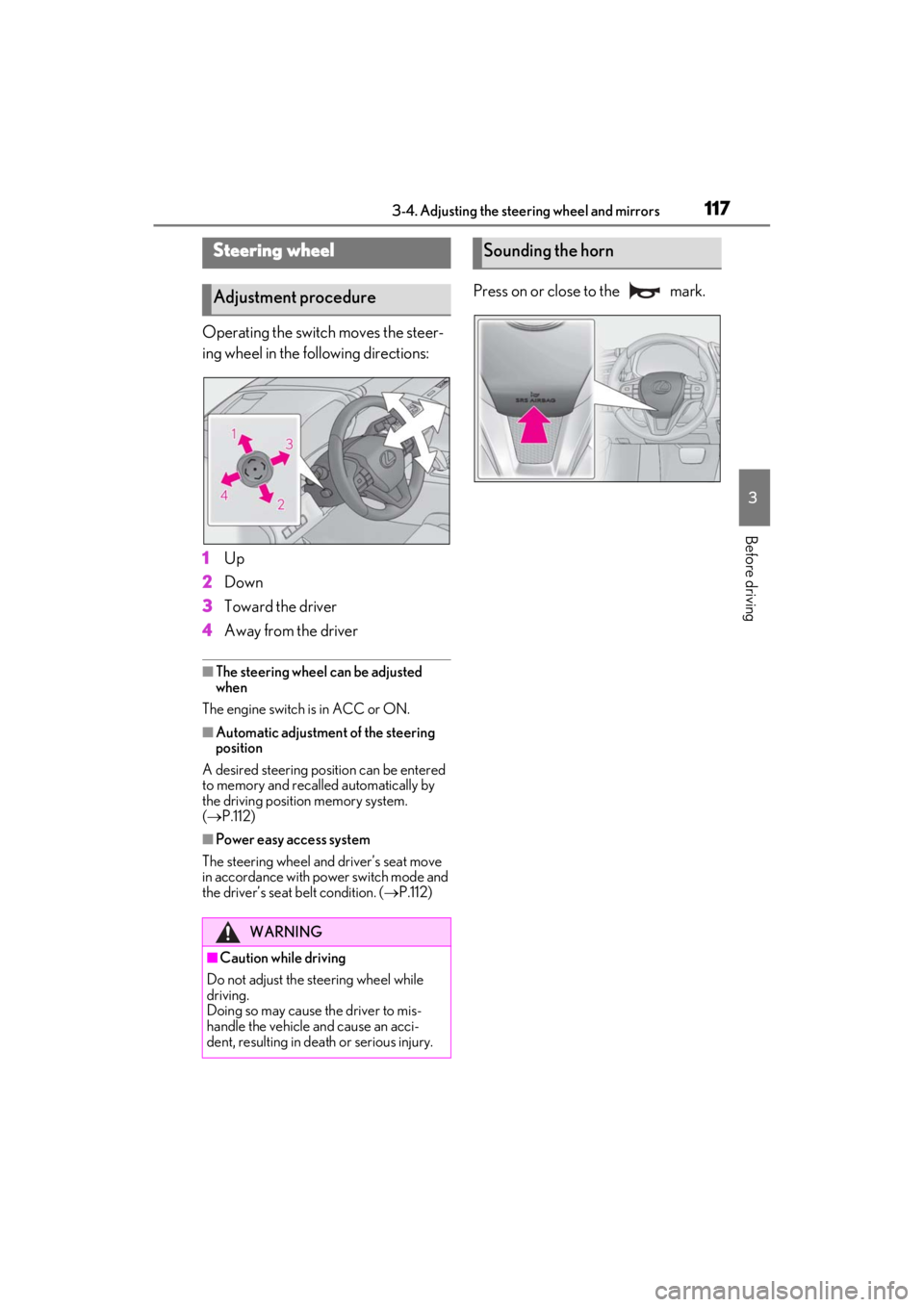
Operating the switch moves the steer-
ing wheel in the following directions:
1
Up
2
Down
3
Toward the driver
4
Away from the driver
■The steering wheel can be adjusted
when
The engine switch is in ACC or ON.
■Automatic adjustment of the steering
position
A desired steering position can be entered
to memory and recalled automatically by
the driving position memory system.
( P.112)
■Power easy access system
The steering wheel and driver’s seat move
in accordance with power switch mode and
the driver’s seat belt condition. ( P.112)
Press on or close to the mark.
Steering wheel
Adjustment procedure
WARNING
■Caution while driving
Do not adjust the steering wheel while
driving.
Doing so may cause the driver to mis-
handle the vehicle and cause an acci-
dent, resulting in death or serious injury.
Sounding the horn
Page 375 of 410
3738-2. Customization
8
Vehicle specifications
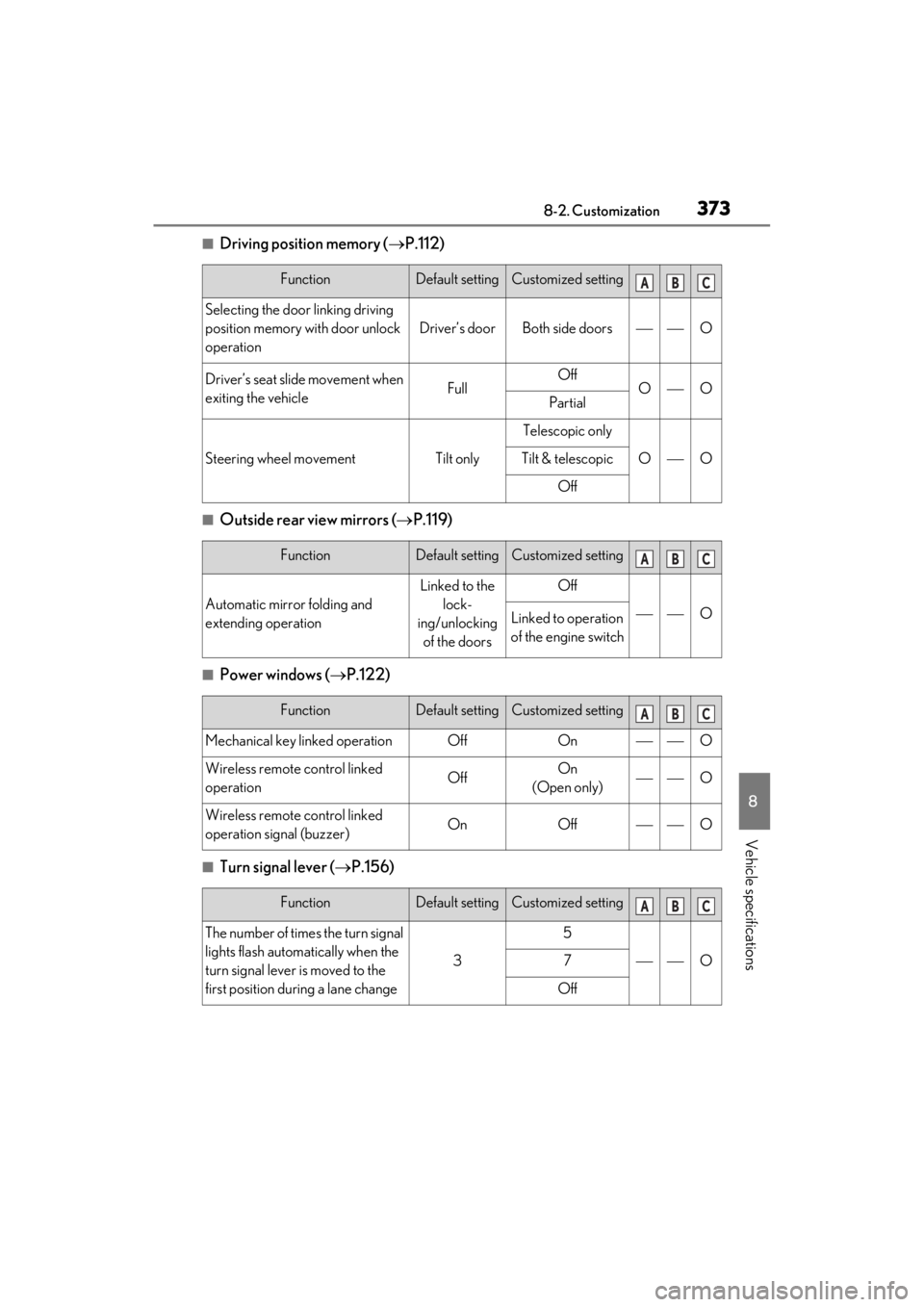
■Driving position memory (P.112)
■Outside rear view mirrors ( P.119)
■Power windows ( P.122)
■Turn signal lever ( P.156)
FunctionDefault settingCustomized setting
Selecting the door linking driving
position memory with door unlock
operation
Driver’s doorBoth side doorsO
Driver’s seat slide movement when
exiting the vehicleFullOffOOPartial
Steering wheel movementTilt only
Telescopic only
OOTilt & telescopic
Off
FunctionDefault settingCustomized setting
Automatic mirror folding and
extending operation
Linked to the
lock-
ing/unlocking of the doorsOff
OLinked to operation
of the engine switch
FunctionDefault settingCustomized setting
Mechanical key linked operationOffOnO
Wireless remote control linked
operationOffOn
(Open only)O
Wireless remote control linked
operation signal (buzzer)OnOffO
FunctionDefault settingCustomized setting
The number of times the turn signal
lights flash automatically when the
turn signal lever is moved to the
first position during a lane change
3
5
O7
Off
ABC
ABC
ABC
ABC
Page 398 of 410

396Alphabetical index
Door lock.......................................................... 96
Open door warning buzzer .......... 97, 99
Outside rear view mirrors ....................... 119
Drive info 1/Drive info 2 .............................. 80
Drive information ........................................... 80
Driver’s seat position memory .................. 112 Driving position memory...........................112
Memory recall function ..............................114
Power easy access system .......................112
Drive-start control ........................................ 137
Driving................................................................136 Break-in tips ................................................... 137
Correct driving posture .............................23
Driving mode select switch .................. 203
Procedures .....................................................136
Winter drive tips......................................... 223
Driving mode select switch ..................... 203
Driving position memory Power easy access system .......................112
Dynamic radar cruise control with full- speed range..................................................194Warning message.......................................201
E
ECB (Electronically Controlled Brake Sys- tem) ..................................................................218
Eco drive mode ............................................ 203
Eco Driving Indicator.....................................73
Eco Driving Indicator Light .........................73
EDR (Event data recorder) ............................7
Elapsed time ..................................................... 80
Electric Power Steering (EPS) Function ............................................................ 219
Warning light .................................................315
Electronically Controlled Brake System (ECB) ..............................................................218
Electronic key .................................................. 92 Battery-saving function ........................... 104
If the electronic key does not operate properly.......................................................330
Replacing the battery............................... 297
Emergency, in case of If a warning buzzer sounds.....................314
If a warning light turns on.........................314
If a warning message is displayed ..... 323
If the battery is discharged .................... 332
If the electronic key does not operate
properly ...................................................... 330
If the engine will not start........................328
If the fuel filler do or cannot be opened
......................................................................... 330
If the soft top roof cannot be closed 338
If the vehicle is trapped in rising water ..........................................................................307
If you have a flat tire .................................. 327
If you lose your keys .................................329
If you think something is wrong............312
If your vehicle becomes stuck ............. 347
If your vehicle has to be stopped in an emergency ................................................ 306
If your vehicle needs to be towed .... 309
If your vehicle overheats ........................345
Emergency flashers .................................... 306
Engine ACC.................................................................. 149
Compartment.............................................. 274
Engine switch ................................................ 146
Fuel pump shut off system...................... 313
Hood ................................................................ 272
How to start the engine ........................... 146
Identification number ................................ 351
If the engine will not start........................328
If your vehicle has to be stopped in an emergency ................................................ 306
Ignition switch (engine switch)............. 146
Overheating .................................................345
Engine coolant...............................................276 Capacity .........................................................352
Checking ....................................................... 276
Preparing and checking before winter.......................................................................... 223
Engine coolant temperature gauge ....... 75
Engine immobilizer system ........................ 63
Engine oil .........................................................274