trunk release lexus LC500C 2021 Owner's Manual / LEXUS 2021 LC500 CONVERTIBLE OWNER'S MANUAL (OM11498U)
[x] Cancel search | Manufacturer: LEXUS, Model Year: 2021, Model line: LC500C, Model: Lexus LC500C 2021Pages: 410, PDF Size: 8.71 MB
Page 16 of 410

16Pictorial index
Applying/releasing ............................................................................................................P.157
Precautions against winter season ............................................................................ P.224
Warning buzzer/message.................................................................................. P.317, 324
Turn signal lever ...................................................................................................... P.156
Headlight switch....................................................................................................... P.161
Headlights/parking lights/tail lights/license plate lights/
daytime running lights ........................................................................................................ P .161
Automatic High Beam ......................................................................................................P.164
Windshield wiper and washer switch ................................................................ P.167
Usage.......................................................................................................................... .............P.167
Adding washer fluid ......................................................................................................... P.2 78
Warning messages .......................................................................................................... P.324
Emergency flasher switch ...................................................................................P.306
Hood lock release lever ....................................................................................... P.272
Tilt and telescopic steering cont rol switch....................................................... P.117
Adjustment ..................................................................................................................... ........ P.117
Driving position memory .................................................................................................. P.112
Air conditioning system ...................................................................................... P.232
Usage.......................................................................................................................... ........... P.232
Rear window defogger................................................................................................... P.233
Audio system
*
Trunk opener main switch ....................................................................................P.103
*: Refer to “NAVIGATION SYSTEM OWNER’S MANUAL”.
F
G
H
I
J
K
L
M
Page 96 of 410
943-1. Key information
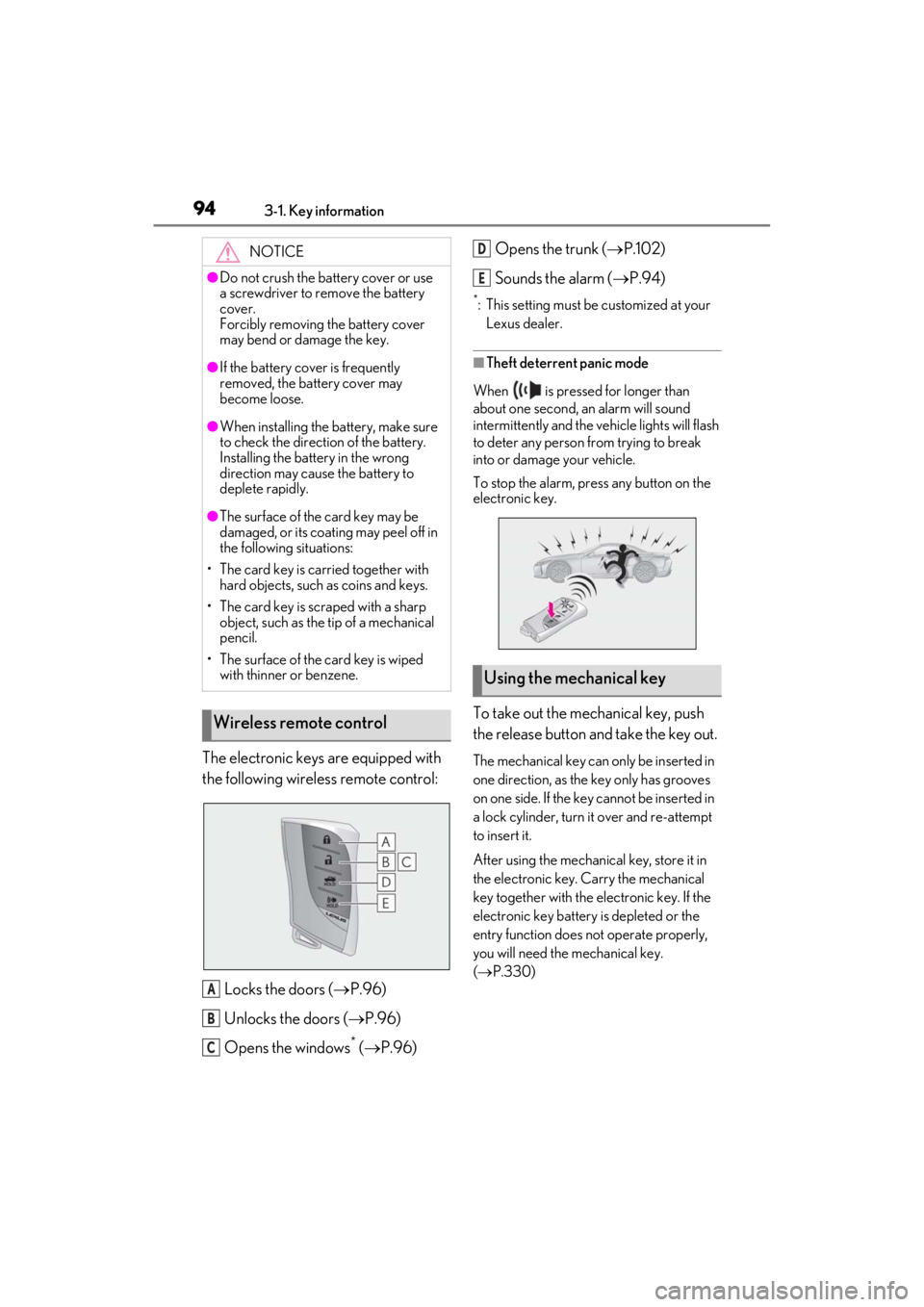
The electronic keys are equipped with
the following wireless remote control:Locks the doors ( P.96)
Unlocks the doors ( P.96)
Opens the windows
* ( P.96) Opens the trunk (
P.102)
Sounds the alarm ( P.94)
*: This setting must be customized at your
Lexus dealer.
■Theft deterrent panic mode
When is pressed for longer than
about one second, an alarm will sound
intermittently and the vehicle lights will flash
to deter any person from trying to break
into or damage your vehicle.
To stop the alarm, press any button on the
electronic key.
To take out the mechanical key, push
the release button and take the key out.
The mechanical key can only be inserted in
one direction, as the key only has grooves
on one side. If the key cannot be inserted in
a lock cylinder, turn it over and re-attempt
to insert it.
After using the mechanical key, store it in
the electronic key. Carry the mechanical
key together with the electronic key. If the
electronic key battery is depleted or the
entry function does not operate properly,
you will need the mechanical key.
( P.330)
NOTICE
●Do not crush the battery cover or use
a screwdriver to remove the battery
cover.
Forcibly removing the battery cover
may bend or damage the key.
●If the battery cover is frequently
removed, the battery cover may
become loose.
●When installing the ba
ttery, make sure
to check the direction of the battery.
Installing the battery in the wrong
direction may cause the battery to
deplete rapidly.
●The surface of the card key may be
damaged, or its coating may peel off in
the following situations:
• The card key is carried together with hard objects, such as coins and keys.
• The card key is scraped with a sharp object, such as the tip of a mechanical
pencil.
• The surface of the card key is wiped with thinner or benzene.
Wireless remote control
A
B
C
Using the mechanical key
D
E
Page 97 of 410
953-1. Key information
3
Before driving
■When required to leave the vehicle’s
key with a parking attendant
Turn the trunk opener main switch off and
lock the glove box ( P.246) as circum-
stances demand.
Remove the mechanical key for your own
use and provide the attendant with the elec-
tronic key only.
■If you lose your mechanical keys
P.329
■If a wrong key is used
The key cylinder rotates freely, isolated
from the internal mechanism.
■Card key (if equipped)
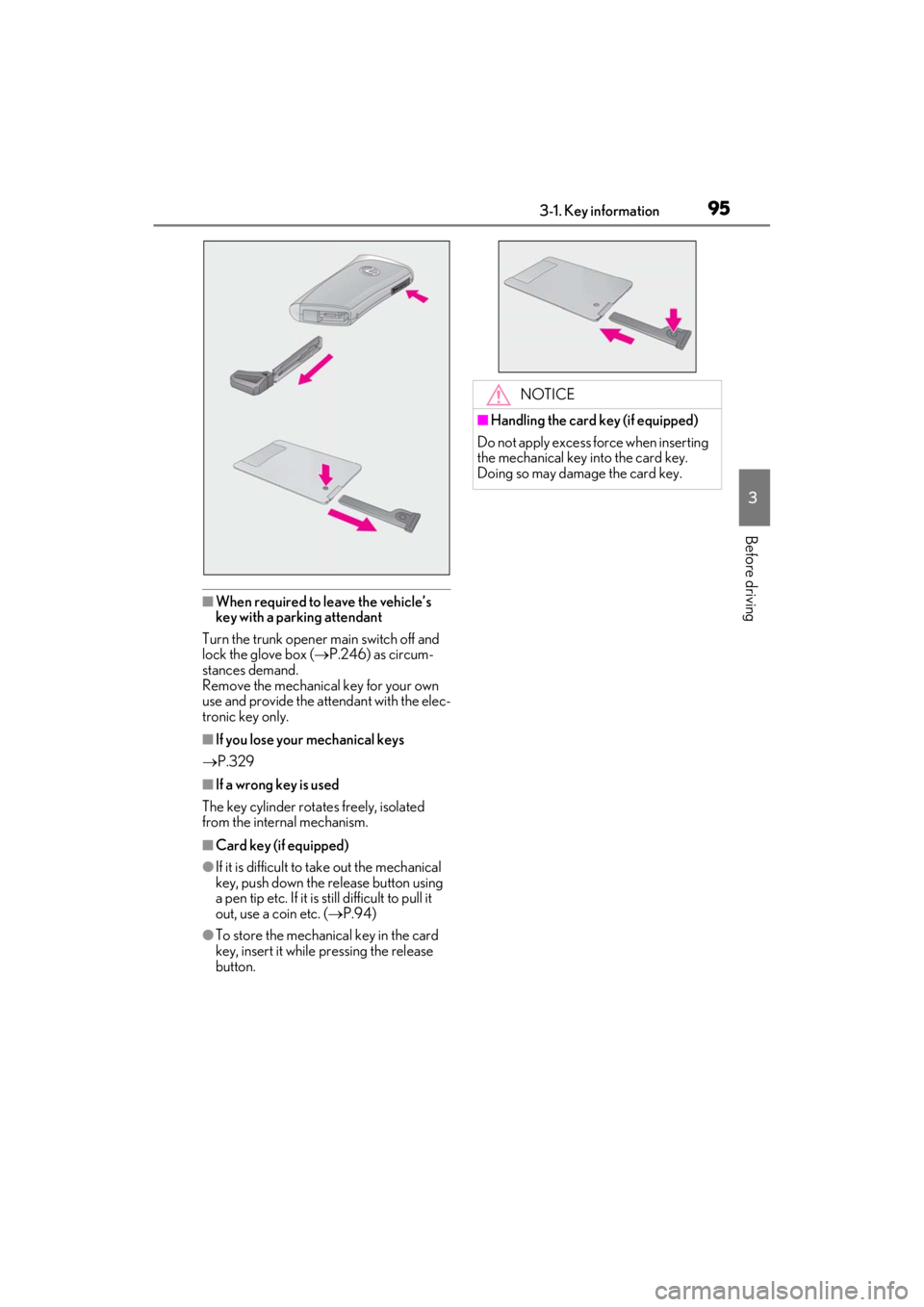
●If it is difficult to take out the mechanical
key, push down the release button using
a pen tip etc. If it is still difficult to pull it
out, use a coin etc. ( P.94)
●To store the mechanical key in the card
key, insert it while pressing the release
button.
NOTICE
■Handling the card key (if equipped)
Do not apply excess force when inserting
the mechanical key into the card key.
Doing so may damage the card key.
Page 99 of 410
973-2. Opening, closing and locking the doors and trunk
3
Before driving
■Switching the door unlock function
It is possible to set which doors the entry
function unlocks using the wireless remote
control.
1 Turn the engine switch off.
2 When the indicator light on the key sur-
face is not on, press and hold ,
or for approximately 5
seconds while pressing and holding
.
The setting changes each time an operation
is performed, as shown below. (When
changing the setting continuously, release
the buttons, wait for at least 5 seconds, and
repeat step 2 .)
To prevent unintended triggering of the
alarm, unlock the doors using the wireless
remote control and open and close a door
once after the settings have been changed.
(If a door is not opened within 60 seconds
after is pressed, the doors will be
locked again and the alarm will automati-
cally be set.) In a case that the alarm is triggered, imme-
diately stop the alarm. (
P.65)
■Impact detection door lock release sys-
tem
In the event that the vehicle is subject to a
strong impact, both side doors are
unlocked. Depending on the force of the
impact or the type of accident, however, the
system may not operate.
■Operation signals
A buzzer sounds and the emergency flash-
ers flash to indicate that the doors have
been locked/unlocked. (Locked: once;
Unlocked: twice)
A buzzer sounds to in dicate that the win-
dows are operating.
Depending on the open ing/closing state of
the soft top roof, the buzzer may be
delayed.
■Security feature
If a door is not opened within approximately
60 seconds after the vehicle is unlocked,
the security feature automatically locks the
vehicle again.
■Open door warning buzzer
If an attempt to lock the doors is made when
a door is not fully closed, a buzzer sounds
continuously for 5 seconds. Fully close the
door to stop the buzzer, and lock the vehi-
cle once more.
■Setting the alarm
Locking the doors will set the alarm system.
( P.65)
■Conditions affecting the operation of
the smart access system with push-but-
ton start or wireless remote control
P.105
■If the smart access system with push-
button start or the wireless remote con-
trol does not operate properly
Use the mechanical key to lock and unlock
the doors. ( P.330)
Replace the key battery with a new one if it
is depleted. ( P.297)
■If the battery is discharged
The doors cannot be locked and unlocked
Multi-information display/BeepUnlocking function
Exterior: Beeps 3 times
Interior: Pings once
Pushing the depres-
sion on the front edge
of the driver’s door
handle unlocks only
the driver’s door.
Pushing the depres-
sion on the front edge
of the passenger’s
door handle unlocks
both side doors.
Exterior: Beeps twice
Interior: Pings once
Pushing the depres-
sion on the front edge
of either door handle
unlocks both side
doors.
Page 104 of 410
1023-2. Opening, closing and locking the doors and trunk
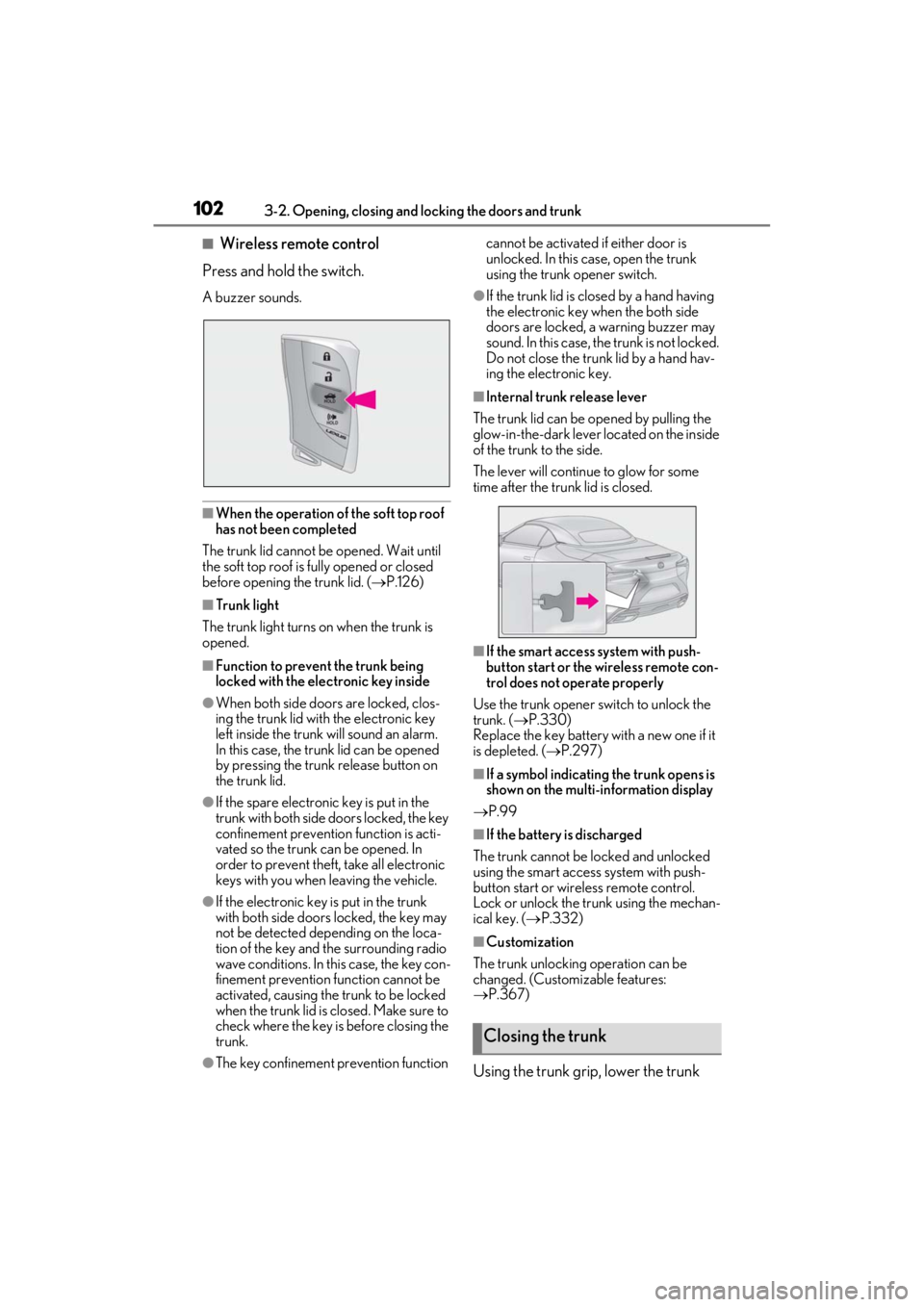
■Wireless remote control
Press and hold the switch.
A buzzer sounds.
■When the operation of the soft top roof
has not been completed
The trunk lid cannot be opened. Wait until
the soft top roof is fully opened or closed
before opening the trunk lid. ( P.126)
■Trunk light
The trunk light turns on when the trunk is
opened.
■Function to prevent the trunk being
locked with the electronic key inside
●When both side doors are locked, clos-
ing the trunk lid with the electronic key
left inside the trunk will sound an alarm.
In this case, the trunk lid can be opened
by pressing the trunk release button on
the trunk lid.
●If the spare electronic key is put in the
trunk with both side doors locked, the key
confinement prevention function is acti-
vated so the trunk can be opened. In
order to prevent theft, take all electronic
keys with you when leaving the vehicle.
●If the electronic key is put in the trunk
with both side doors locked, the key may
not be detected depending on the loca-
tion of the key and the surrounding radio
wave conditions. In th is case, the key con-
finement prevention function cannot be
activated, causing the trunk to be locked
when the trunk lid is closed. Make sure to
check where the key is before closing the
trunk.
●The key confinement prevention function cannot be activated if either door is
unlocked. In this case, open the trunk
using the trunk opener switch.
●If the trunk lid is closed by a hand having
the electronic key when the both side
doors are locked, a warning buzzer may
sound. In this case, the trunk is not locked.
Do not close the trunk lid by a hand hav-
ing the electronic key.
■Internal trunk release lever
The trunk lid can be opened by pulling the
glow-in-the-dark lever located on the inside
of the trunk to the side.
The lever will continue to glow for some
time after the trunk lid is closed.
■If the smart access system with push-
button start or the wireless remote con-
trol does not operate properly
Use the trunk opener switch to unlock the
trunk. ( P.330)
Replace the key battery with a new one if it
is depleted. ( P.297)
■If a symbol indicating the trunk opens is
shown on the multi-information display
P.99
■If the battery is discharged
The trunk cannot be locked and unlocked
using the smart access system with push-
button start or wireless remote control.
Lock or unlock the trunk using the mechan-
ical key. ( P.332)
■Customization
The trunk unlocking operation can be
changed. (Customizable features:
P.367)
Using the trunk grip, lower the trunk
Closing the trunk
Page 106 of 410
1043-2. Opening, closing and locking the doors and trunk
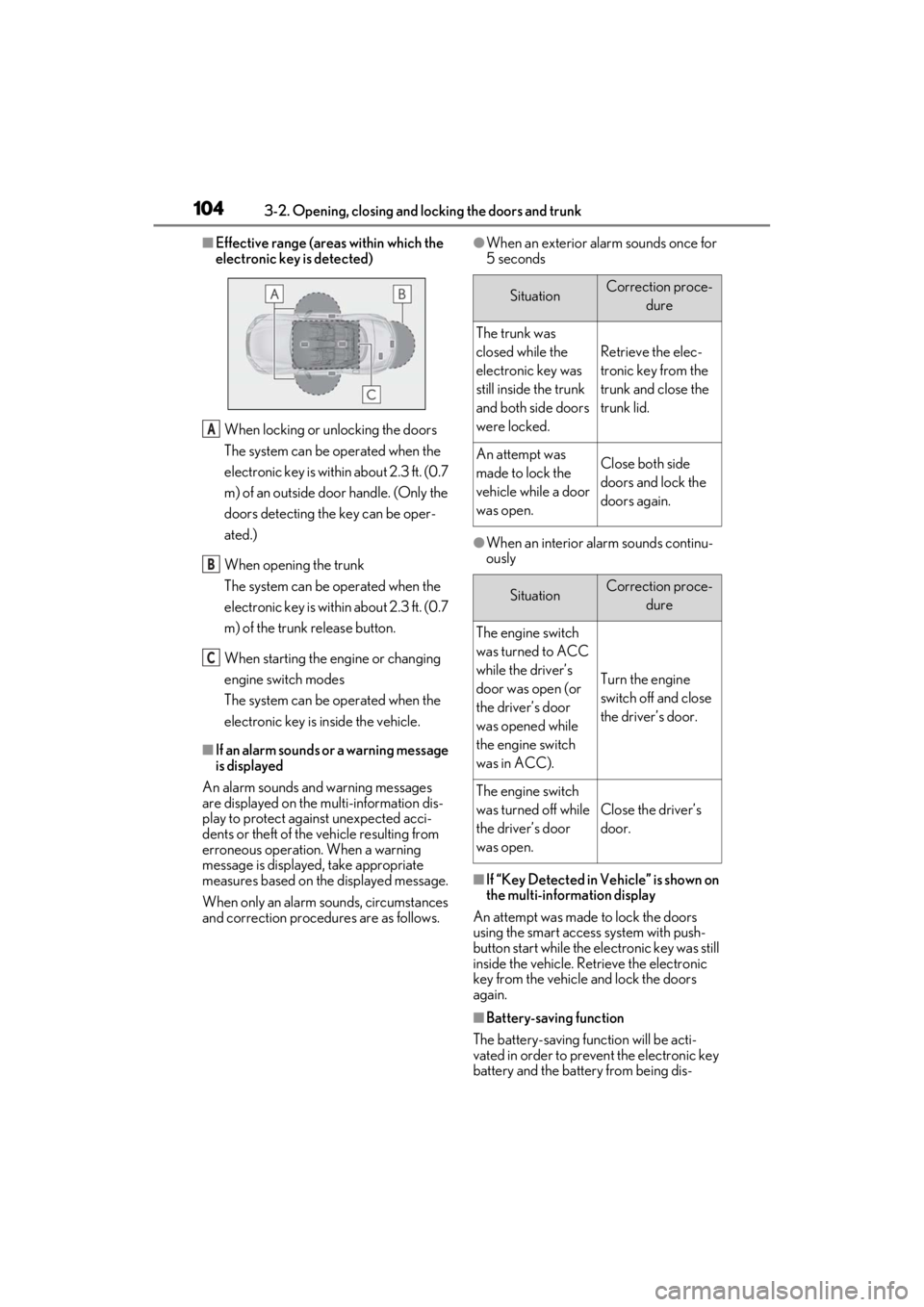
■Effective range (areas within which the
electronic key is detected)
When locking or unlocking the doors
The system can be operated when the
electronic key is within about 2.3 ft. (0.7
m) of an outside door handle. (Only the
doors detecting the key can be oper-
ated.)
When opening the trunk
The system can be operated when the
electronic key is within about 2.3 ft. (0.7
m) of the trunk release button.
When starting the engine or changing
engine switch modes
The system can be operated when the
electronic key is inside the vehicle.
■If an alarm sounds or a warning message
is displayed
An alarm sounds and warning messages
are displayed on the multi-information dis-
play to protect against unexpected acci-
dents or theft of the vehicle resulting from
erroneous operation. When a warning
message is displayed, take appropriate
measures based on the displayed message.
When only an alarm sounds, circumstances
and correction procedures are as follows.
●When an exterior alarm sounds once for
5 seconds
●When an interior alarm sounds continu-
ously
■If “Key Detected in Vehicle” is shown on
the multi-information display
An attempt was made to lock the doors
using the smart access system with push-
button start while the electronic key was still
inside the vehicle. Retrieve the electronic
key from the vehicle and lock the doors
again.
■Battery-saving function
The battery-saving function will be acti-
vated in order to prevent the electronic key
battery and the battery from being dis-
A
B
C
SituationCorrection proce- dure
The trunk was
closed while the
electronic key was
still inside the trunk
and both side doors
were locked.
Retrieve the elec-
tronic key from the
trunk and close the
trunk lid.
An attempt was
made to lock the
vehicle while a door
was open.Close both side
doors and lock the
doors again.
SituationCorrection proce-dure
The engine switch
was turned to ACC
while the driver’s
door was open (or
the driver’s door
was opened while
the engine switch
was in ACC).
Turn the engine
switch off and close
the driver’s door.
The engine switch
was turned off while
the driver’s door
was open.
Close the driver’s
door.
Page 130 of 410
1283-6. Opening and closing the soft top roof
When the soft top roof of the rear win-
dow side stops near the fully closing posi-
tion.
1 Operate the roof switch to open the
soft top roof, and release the switch with
the luggage cover opened.
2 Operate the roof switch to fully close
the soft top roof.
When the rear soft top roof stops near
the fully opening position.
Operate the roof switch to fully close the soft top roof.
If the luggage cover does not operate by
performing the procedure above, check
that a warning message is displayed on the
multi-information display or the operational
conditions are met. If
the luggage cover still
does not operate, have the vehicle
inspected by your Lexus dealer.
■If the soft top roof cannot be operated properly when the roof switch is operated
In the following situations, perform the actions specified in the table, and then operate the
switch again.
●Soft top roof operation stops partway
SituationWarning messageAction
The engine switch is
turned to OFF or
ACC while the soft
top roof is operating.
-Start the engine, or turn the engine switch
to ON, and then operate the roof switch.
The vehicle speed
exceeds approxi-
mately 31 mph (50
km/h) while the soft
top roof is operating.
“SLOW DOWN to
Compelete Soft Top
Operation”Decelerate to approximately 31 mph (50
km/h), and then operate the roof switch.
The trunk lid is
opened using the
mechanical key while
the soft top roof is
operating.
-Close the trunk lid, and then operate the
roof switch.
A collision is
detected.-Contact your Lexus dealer.
The catch protection
function of a power
window is activated.
- P.123
The soft top roof is
operated manually.
“SLOW DOWN to
Compelete Soft Top
Operation”
“Soft Top Operation
Not Completed”Manually return the soft top roof to the
previous position. If the soft top roof cannot
be operated, repeat opening and closing
operations several times.
Page 248 of 410
2465-5. Using the storage features
5-5.Using the storage features
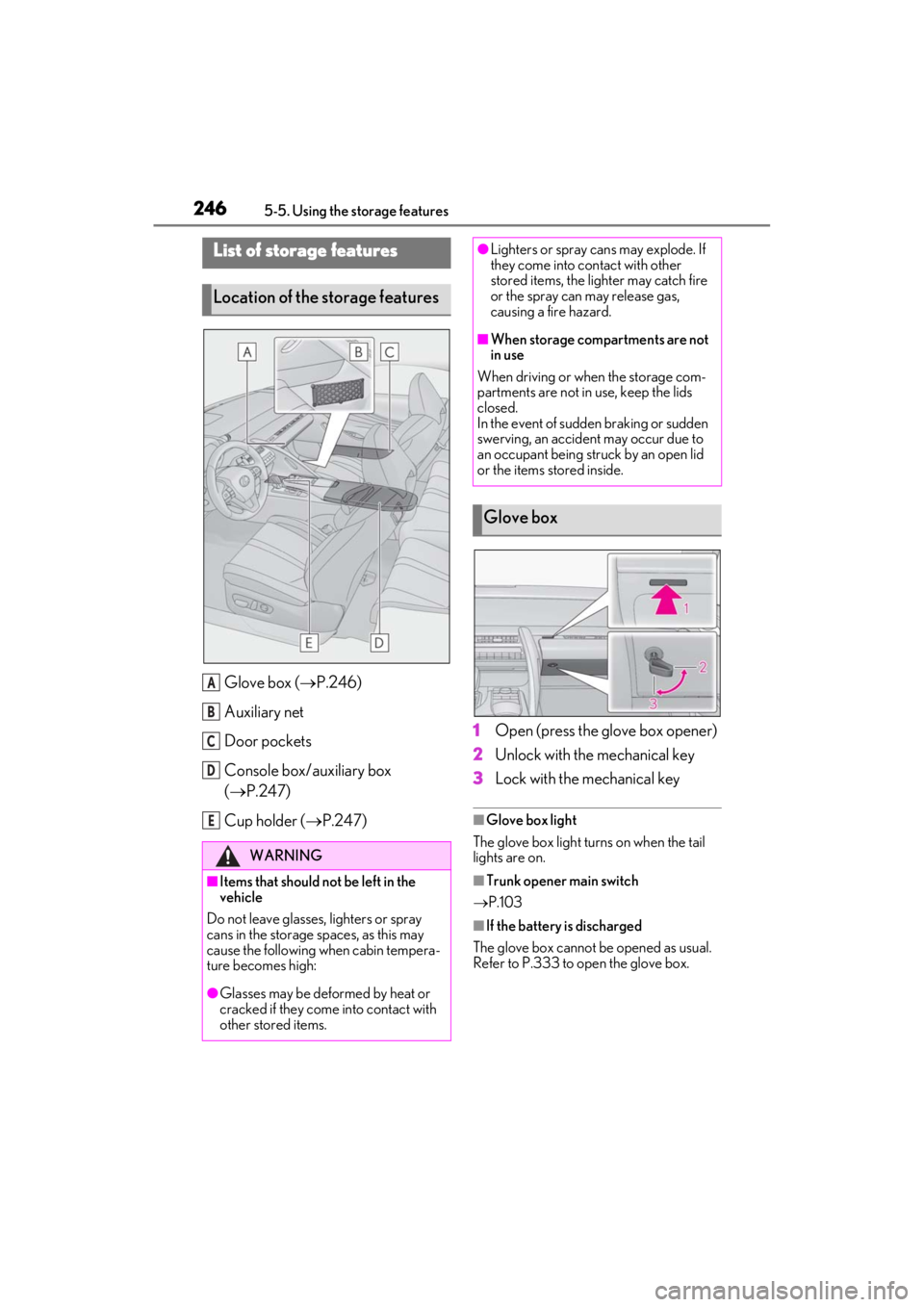
Glove box (P.246)
Auxiliary net
Door pockets
Console box/auxiliary box
( P.247)
Cup holder ( P.247) 1
Open (press the glove box opener)
2
Unlock with the mechanical key
3
Lock with the mechanical key
■Glove box light
The glove box light turns on when the tail
lights are on.
■Trunk opener main switch
P.103
■If the battery is discharged
The glove box cannot be opened as usual.
Refer to P.333 to open the glove box.
List of storage features
Location of the storage features
WARNING
■Items that should not be left in the
vehicle
Do not leave glasses, lighters or spray
cans in the storage spaces, as this may
cause the following when cabin tempera-
ture becomes high:
●Glasses may be deformed by heat or
cracked if they come into contact with
other stored items.
A
B
C
D
E
●Lighters or spray ca ns may explode. If
they come into contact with other
stored items, the lighter may catch fire
or the spray can may release gas,
causing a fire hazard.
■When storage compartments are not
in use
When driving or when the storage com-
partments are not in use, keep the lids
closed.
In the event of sudden braking or sudden
swerving, an accident may occur due to
an occupant being struck by an open lid
or the items stored inside.
Glove box
Page 334 of 410
3327-2. Steps to take in an emergency
setting, the engine switch will turn to ACC.
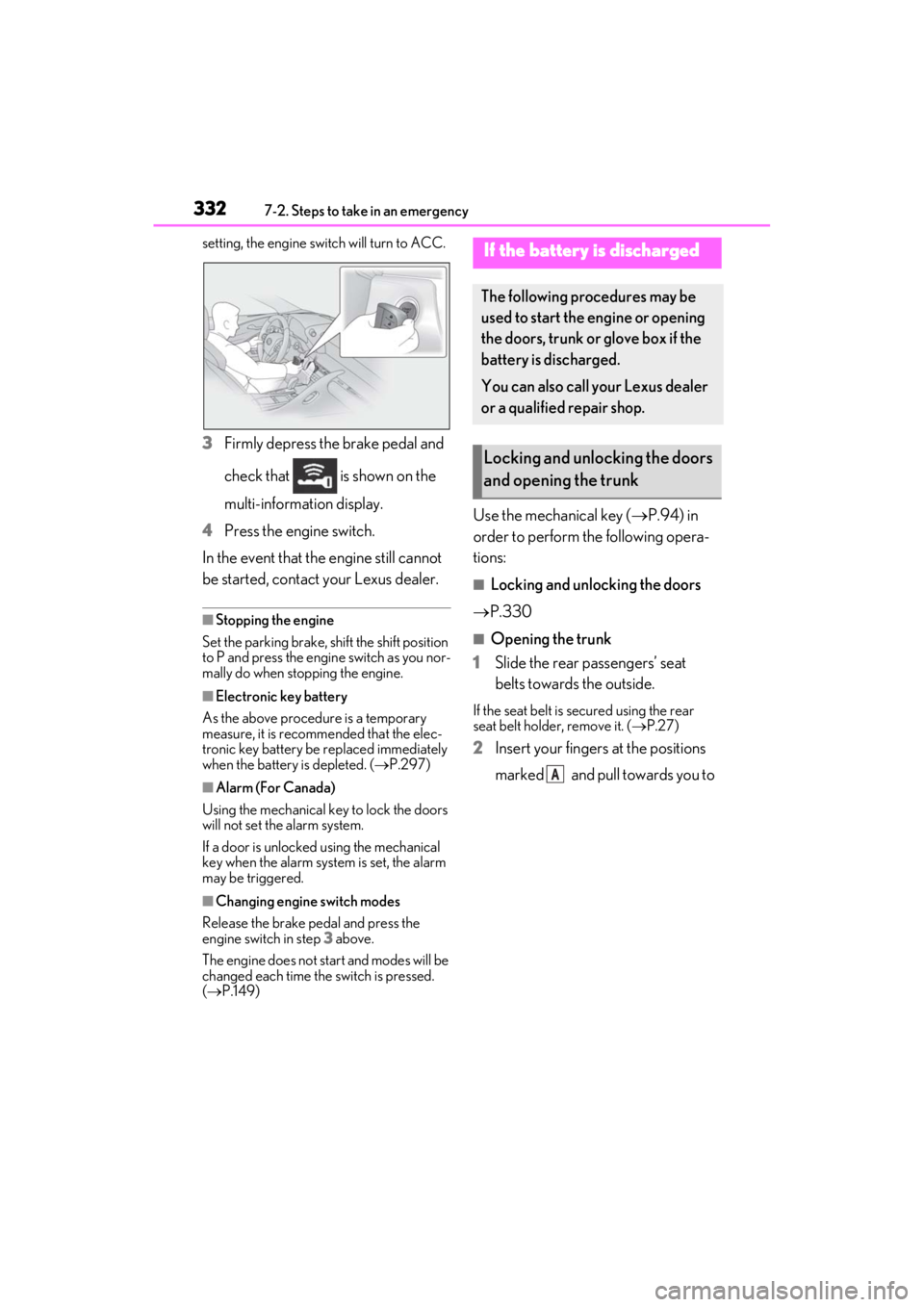
3Firmly depress the brake pedal and
check that is shown on the
multi-information display.
4 Press the engine switch.
In the event that the engine still cannot
be started, contact your Lexus dealer.
■Stopping the engine
Set the parking brake, shift the shift position
to P and press the engine switch as you nor-
mally do when stopping the engine.
■Electronic key battery
As the above procedure is a temporary
measure, it is recomme nded that the elec-
tronic key battery be replaced immediately
when the battery is depleted. ( P.297)
■Alarm (For Canada)
Using the mechanical key to lock the doors
will not set the alarm system.
If a door is unlocked using the mechanical
key when the alarm system is set, the alarm
may be triggered.
■Changing engine switch modes
Release the brake pedal and press the
engine switch in step 3 above.
The engine does not start and modes will be
changed each time the switch is pressed.
( P.149)
Use the mechanical key ( P.94) in
order to perform th e following opera-
tions:
■Locking and unlocking the doors
P.330
■Opening the trunk
1 Slide the rear passengers’ seat
belts towards the outside.
If the seat belt is secured using the rear
seat belt holder, remove it. ( P.27)
2 Insert your fingers at the positions
marked and pull towards you to
If the battery is discharged
The following procedures may be
used to start the engine or opening
the doors, trunk or glove box if the
battery is discharged.
You can also call your Lexus dealer
or a qualified repair shop.
Locking and unlocking the doors
and opening the trunk
A
Page 401 of 410

Alphabetical index399
LeverAuxiliary catch lever ..................................272
Hood lock release lever..........................272
Internal trunk release lever .....................102
Shift lever......................................................... 150
Turn signal lever .......................................... 156
Wiper lever..................................................... 167
Lexus climate concierge .......................... 230
Lexus Enform Safety Connect.................. 56
Lexus Safety System +................................. 173 Automatic High Beam ..............................164
Dynamic radar cruise control with full-speed range ................................................194
LKA (Lane-Keeping Assist).................. 186
PCS (Pre-Collision System).................. 179
License plate lights......................................... 161 Light switch ...................................................... 161
Replacing light bulbs................................303
Light bulbs Replacing .......................................................303
Wattage..........................................................356
Lights Automatic High Beam system..............164
Headlight switch ........................................... 161
Illuminated entry system......................... 244
Interior lights list.......................................... 244
Interior lights................................................. 244
Personal lights ............................................. 245
Replacing light bulbs................................303
Trunk light........................................................102
Turn signal lever .......................................... 156
Vanity lights .................................................. 249
Wattage..........................................................356
Welcome light illumination control .... 162
LKA (Lane-Keeping Assist)..................... 186 Operation....................................................... 186
Warning messages .................................... 192
Lock steering column ..................................146
Low profile tire................................................281
Luggage cover ............................................... 126M
Maintenance Do-it-yourself maintenance ................. 270
General maintenance .............................266
Maintenance data ..................................... 350
Maintenance requirements ..................265
Malfunction indicator lamp .......................315
Master warning light ....................................319
Meter Changing the display.................................. 78
Head-up display............................................85
Indicators............................................................. 71
Instrument panel light control................. 78
Meters................................................................. 75
Multi-information display .......................... 79
Operating the meter control switches............................................................................ 80
Settings...............................................................83
Warning lights ...............................................314
Warning message ..................................... 323
Micro dust and pollen filter ..................... 237
Mirrors Inside rear view mirror ............................... 118
Outside rear view mirror defoggers233
Outside rear view mirrors........................ 119
Vanity mirrors .............................................. 249
Multi-information display .............................79 Audio system-linked ................................... 82
Drive information ......................................... 80
Dynamic radar cruise control with full-
speed range ............................................... 194
Eco Driving Indicator.................................. 73
Gear positions ................................................ 81
G-force ............................................................... 81
LKA (Lane-Keeping Assist) .................. 189
Navigation system-linked......................... 82
Settings...............................................................83
Suggestion function .....................................84
Switching the display.................................. 80
Tire pressure ................................................283
Warning message ..................................... 323