reset lexus LC500h 2018 Owner's Manual / LEXUS 2018 LC500, LC500H OWNER'S MANUAL QUICK GUIDE (OM11444U)
[x] Cancel search | Manufacturer: LEXUS, Model Year: 2018, Model line: LC500h, Model: Lexus LC500h 2018Pages: 110, PDF Size: 2.04 MB
Page 7 of 110
7
LC500_LC500h_QG_OM11444U_(U)
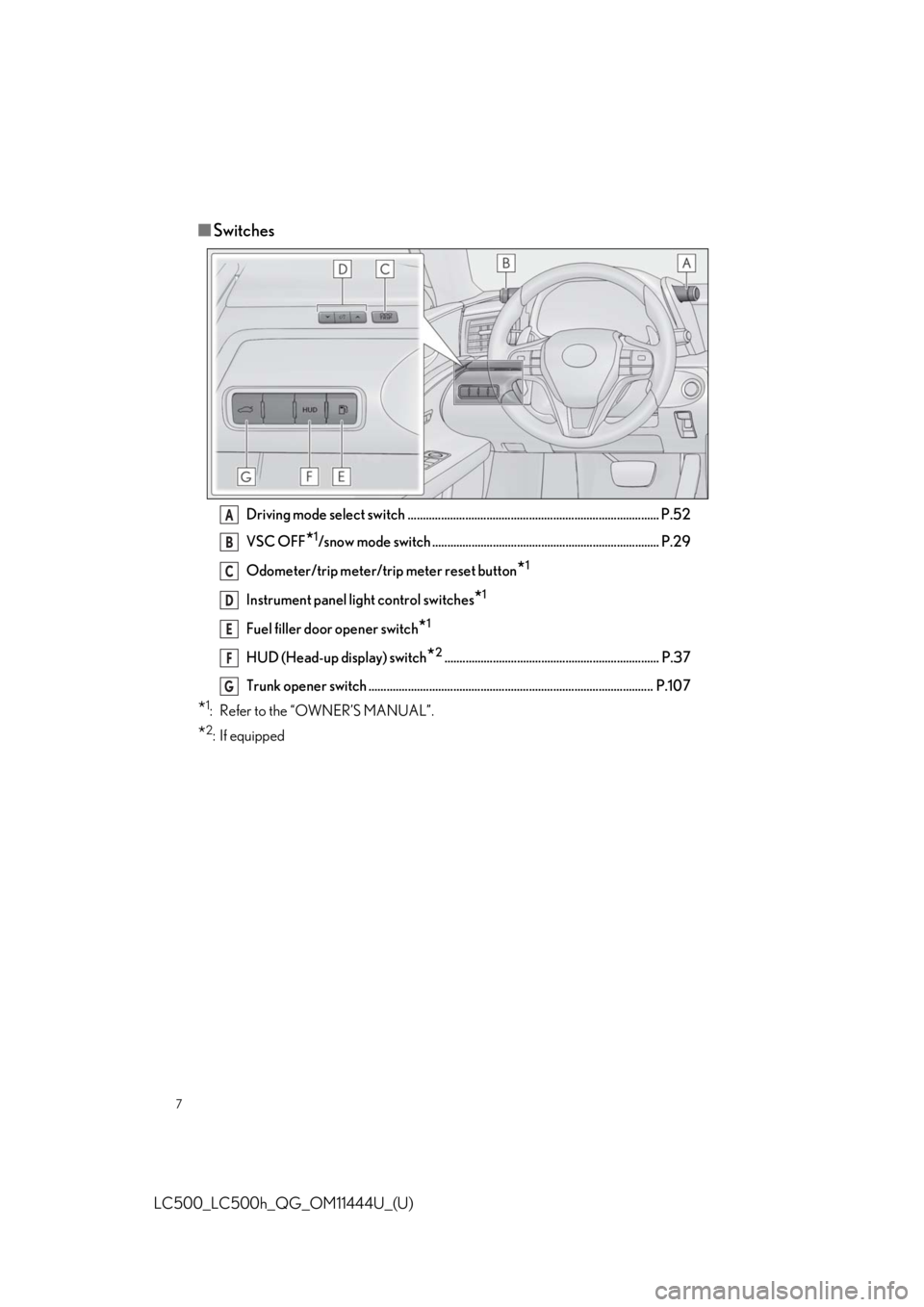
■Switches
Driving mode select switch ................................................................................... P.52
VSC OFF
*1/snow mode switch ........................................................................... P.29
Odometer/trip meter/trip meter reset button
*1
Instrument panel light control switches*1
Fuel filler door opener switch*1
HUD (Head-up display) switch*2....................................................................... P.37
Trunk opener switch .............................................................................................. P.107
*1: Refer to the “OWNER’S MANUAL”.
*2: If equipped
A
B
C
D
E
F
G
Page 21 of 110
21
LC500_LC500h_QG_OM11444U_(U)
1Turn the engine switch
2Check that the shift position is in P.
3Adjust the driver’s seat, steering wheel, outside rear view mirrors and head-up display
to the desired positions.
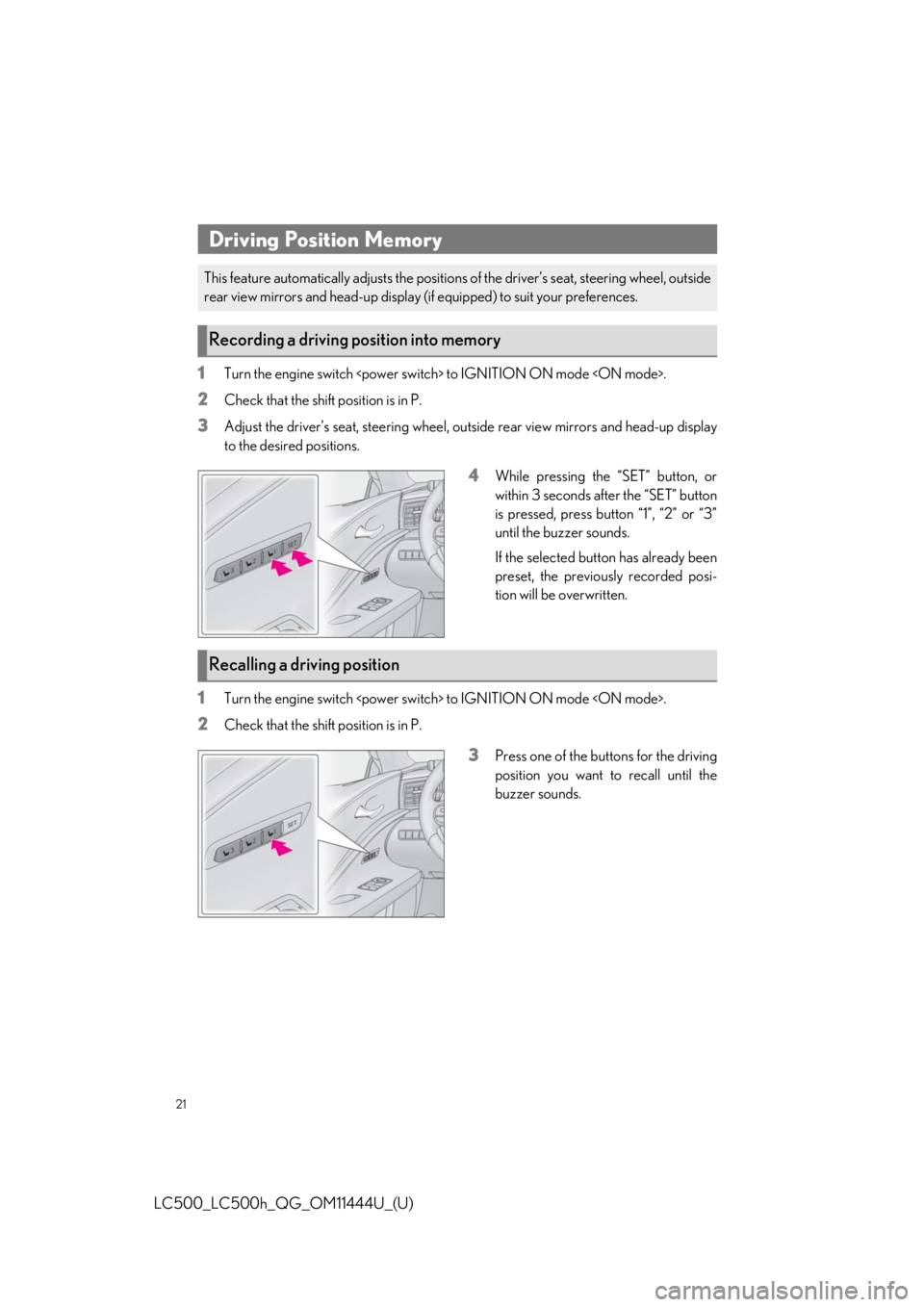
4While pressing the “SET” button, or
within 3 seconds after the “SET” button
is pressed, press button “1”, “2” or “3”
until the buzzer sounds.
If the selected button has already been
preset, the previously recorded posi-
tion will be overwritten.
1Turn the engine switch
2Check that the shift position is in P.
3Press one of the buttons for the driving
position you want to recall until the
buzzer sounds.
Driving Position Memory
This feature automatically adjusts the positions of the driver’s seat, steering wheel, outside
rear view mirrors and head-up display (if equipped) to suit your preferences.
Recording a driving position into memory
Recalling a driving position
Page 35 of 110
35
LC500_LC500h_QG_OM11444U_(U)
When the main meter is in the center position
Displays various drive information on the main meter.
Some of the contents which are displayed when th e main meter is in the side position cannot
be displayed.
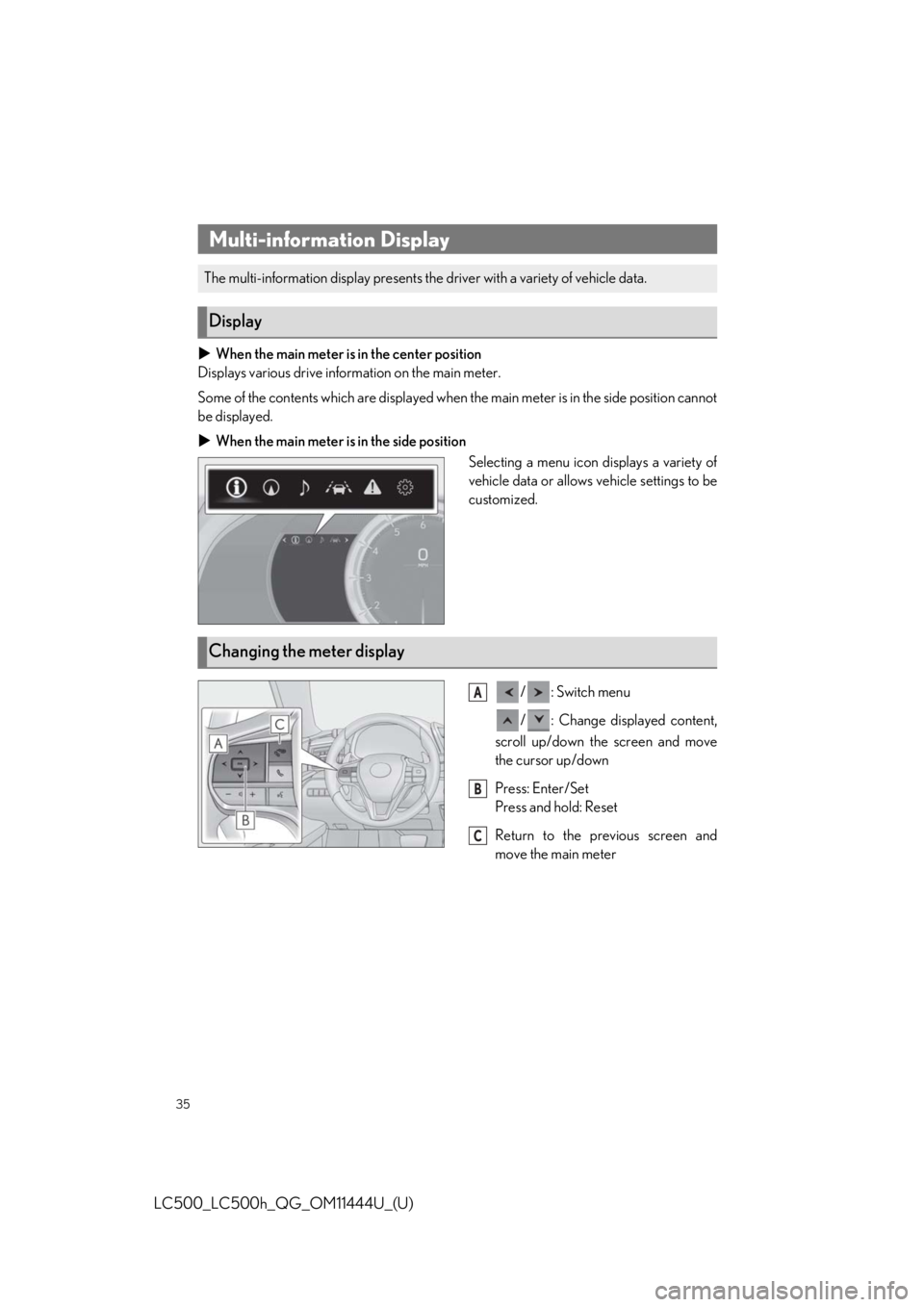
When the main meter is in the side position
Selecting a menu icon displays a variety of
vehicle data or allows vehicle settings to be
customized.
/: Switch menu
/ : Change displayed content,
scroll up/down the screen and move
the cursor up/down
Press: Enter/Set
Press and hold: Reset
Return to the previous screen and
move the main meter
Multi-information Display
The multi-information display presents the driver with a variety of vehicle data.
Display
Changing the meter display
A
B
C
Page 63 of 110
63
LC500_LC500h_QG_OM11444U_(U)
Press the “MENU” button on the Remote Touch, then select on the menu screen, and
then select “Trip Information” or “History”.
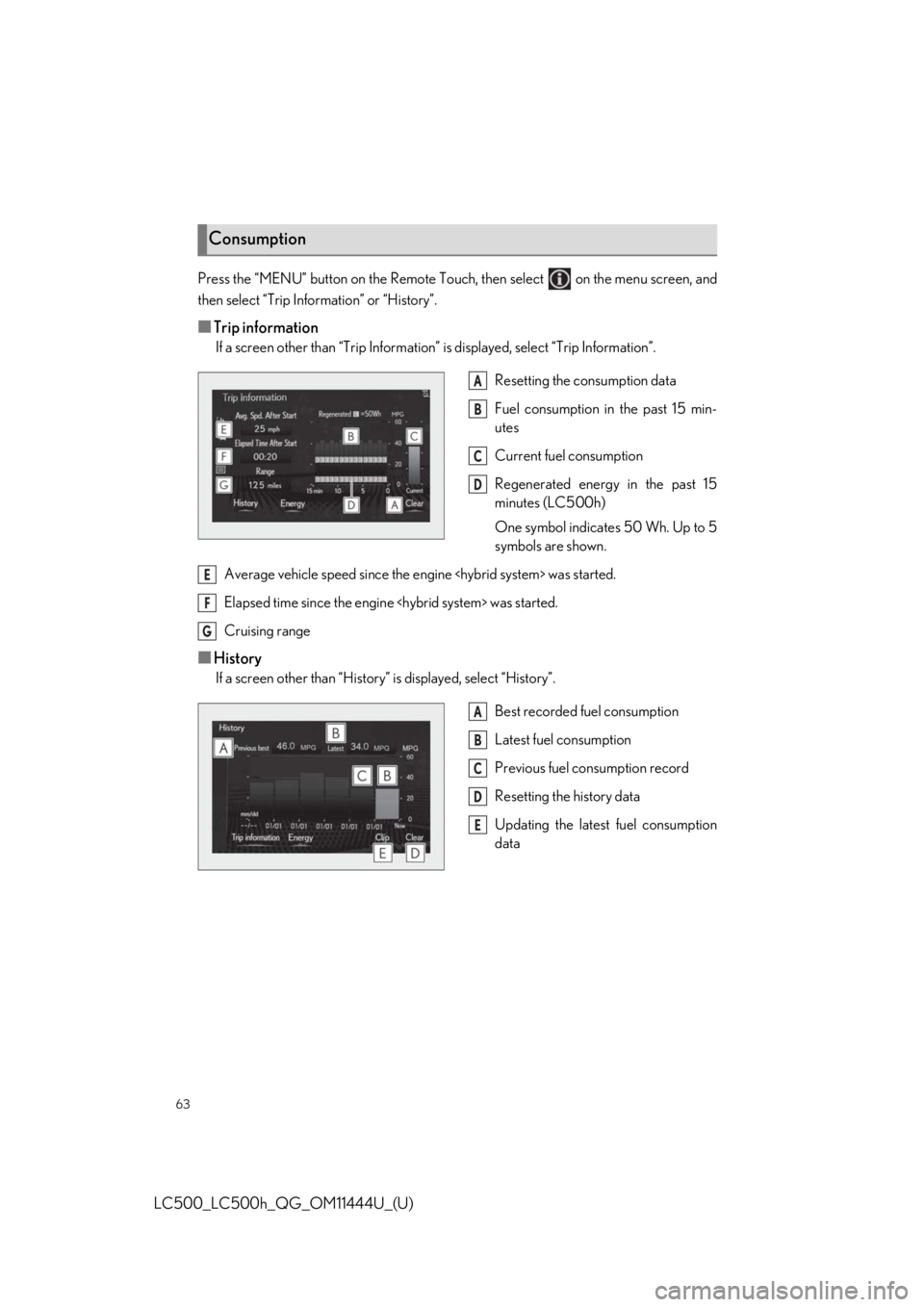
■Trip information
If a screen other than “Trip Information” is displayed, select “Trip Information”.
Resetting the consumption data
Fuel consumption in the past 15 min-
utes
Current fuel consumption
Regenerated energy in the past 15
minutes (LC500h)
One symbol indicates 50 Wh. Up to 5
symbols are shown.
Average vehicle speed since the engine
Elapsed time since the engine
Cruising range
■History
If a screen other than “History” is displayed, select “History”.
Best recorded fuel consumption
Latest fuel consumption
Previous fuel consumption record
Resetting the history data
Updating the latest fuel consumption
data
Consumption
A
B
C
D
E
F
G
A
B
C
D
E
Page 75 of 110
75
LC500_LC500h_QG_OM11444U_(U)
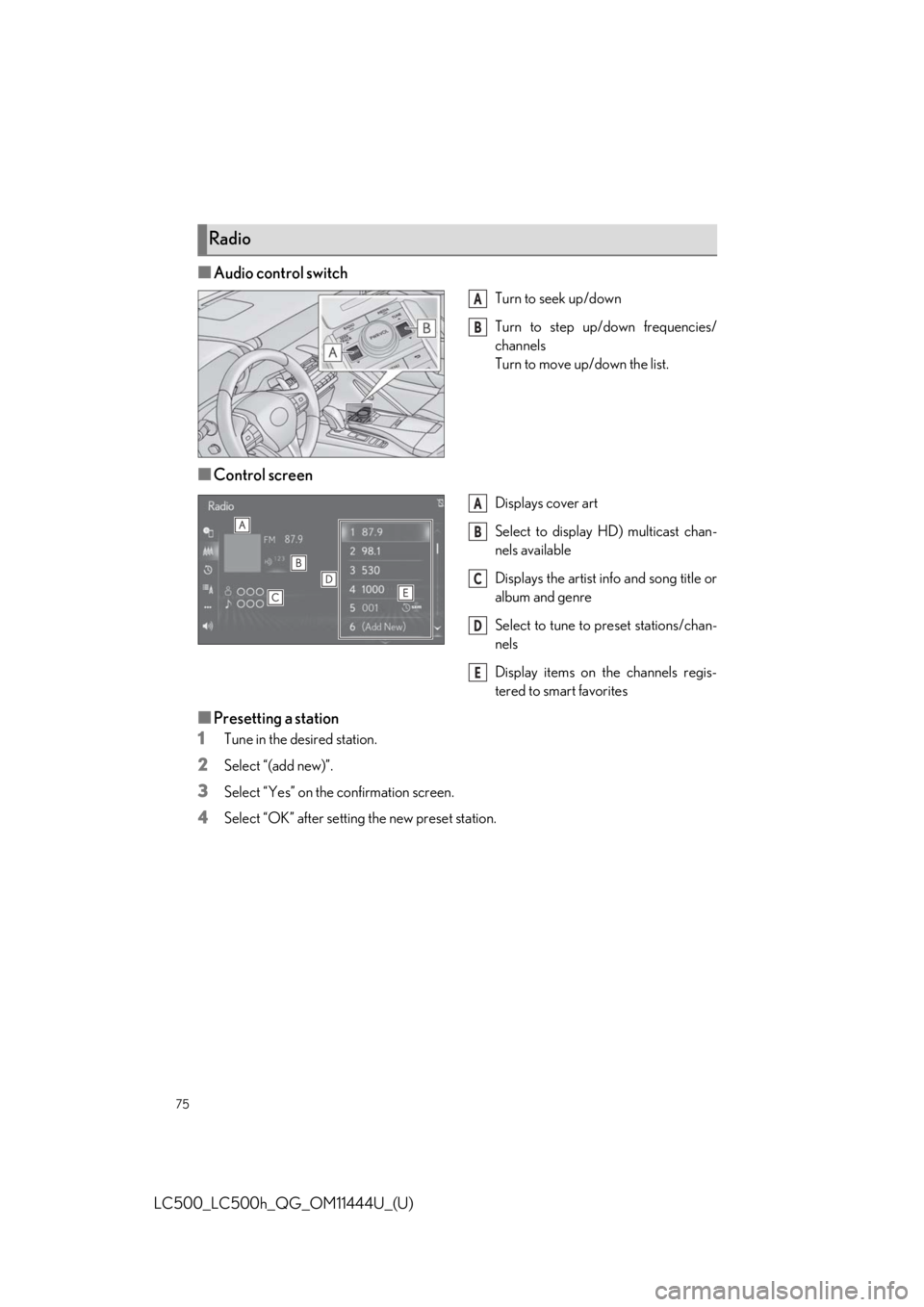
■Audio control switch
Turn to seek up/down
Turn to step up/down frequencies/
channels
Turn to move up/down the list.
■Control screen
Displays cover art
Select to display HD) multicast chan-
nels available
Displays the artist info and song title or
album and genre
Select to tune to preset stations/chan-
nels
Display items on the channels regis-
tered to smart favorites
■Presetting a station
1
Tune in the desired station.
2Select “(add new)”.
3Select “Yes” on the confirmation screen.
4Select “OK” after setting the new preset station.
Radio
A
B
A
B
C
D
E
Page 88 of 110
88
LC500_LC500h_QG_OM11444U_(U)
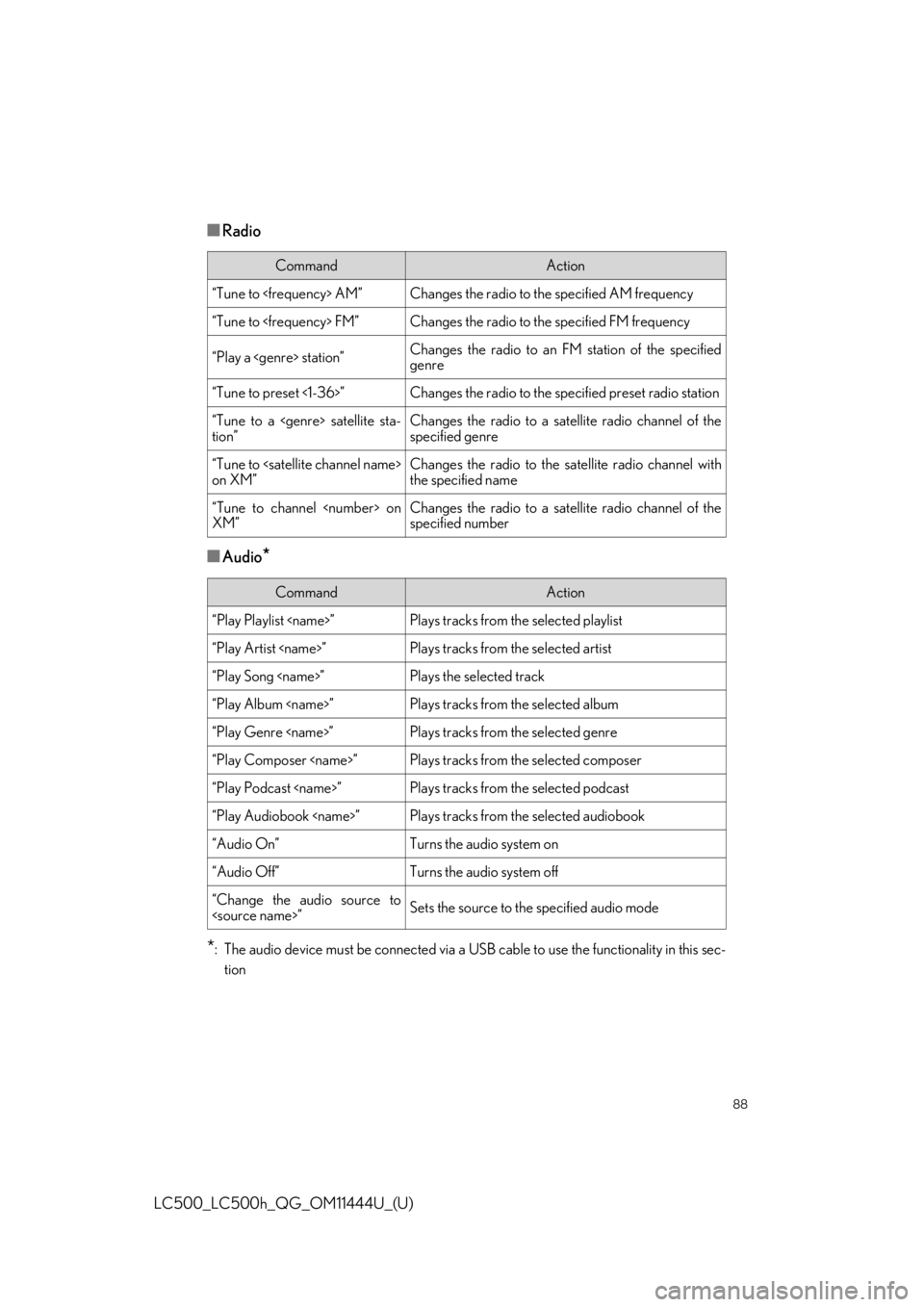
■Radio
■Audio*
*
: The audio device must be connected via a US B cable to use the functionality in this sec-
tion
CommandAction
“Tune to
“Tune to
“Play a
genre
“Tune to preset <1-36>”Changes the radio to the specified preset radio station
“Tune to a
tion”Changes the radio to a satellite radio channel of the
specified genre
“Tune to
on XM”Changes the radio to the satellite radio channel with
the specified name
“Tune to channel
XM”Changes the radio to a satellite radio channel of the
specified number
CommandAction
“Play Playlist
“Play Artist
“Play Song
“Play Album
“Play Genre
“Play Composer
“Play Podcast
“Play Audiobook
“Audio On”Turns the audio system on
“Audio Off”Turns the audio system off
“Change the audio source to