heating lexus LC500h 2020 Owner's Manual / LEXUS 2020 LC500,LC500H OWNER'S MANUAL (OM11537U)
[x] Cancel search | Manufacturer: LEXUS, Model Year: 2020, Model line: LC500h, Model: Lexus LC500h 2020Pages: 436, PDF Size: 13.86 MB
Page 13 of 436
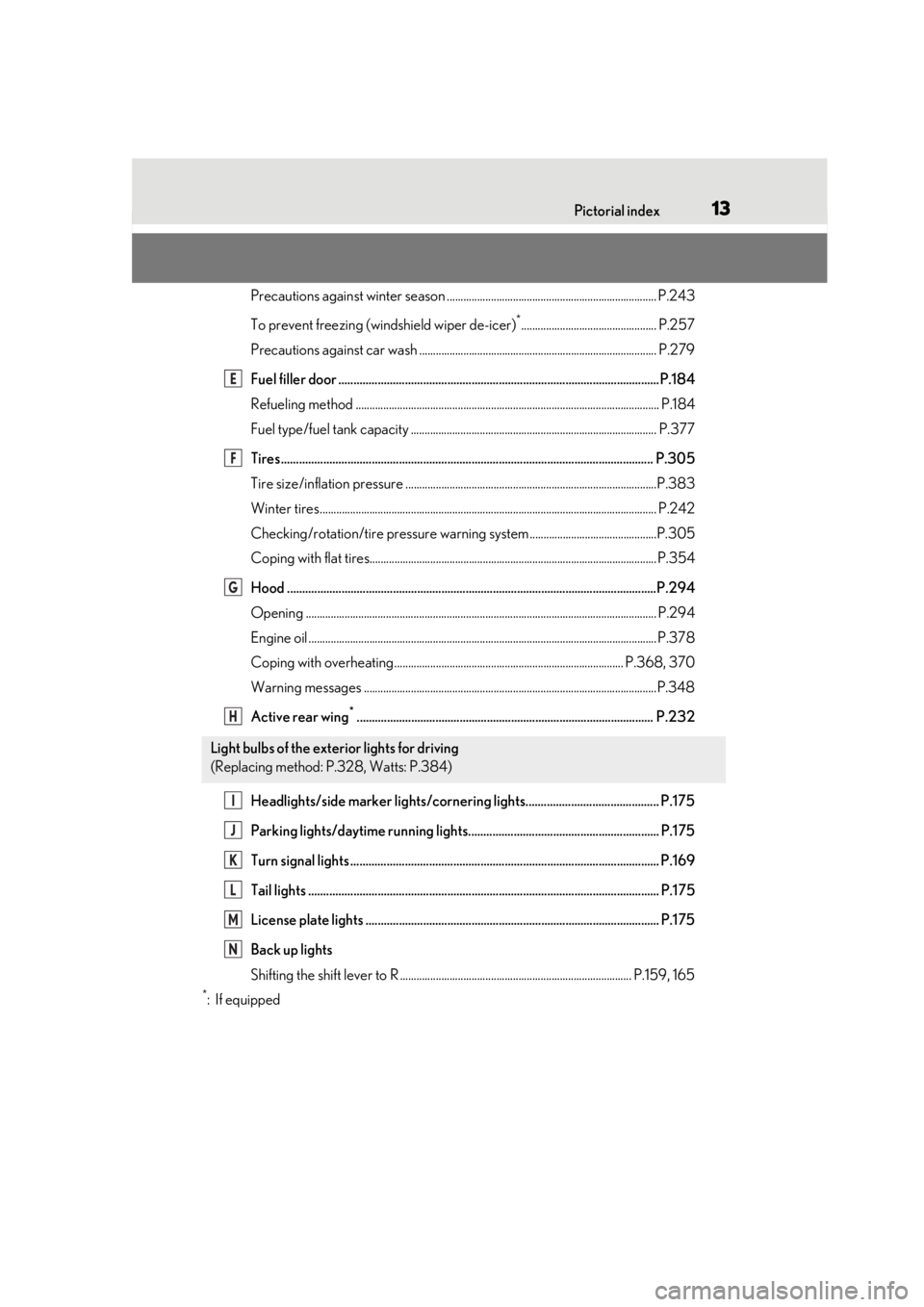
13Pictorial index
Precautions against winter season ............................................................................ P.243
To prevent freezing (windshield wiper de-icer)
*................................................. P.257
Precautions against car wash ...................................................................................... P.279
Fuel filler door ..........................................................................................................P.184
Refueling method .............................................................................................................. P .184
Fuel type/fuel tank capacity ...... ................................................................................... P.377
Tires.......................................................................................................................... .P.305
Tire size/inflation pressure ............................ ...............................................................P.383
Winter tires.......................................................................................................................... P.242
Checking/rotation/tire pressure warning system..............................................P.305
Coping with flat tires........................................................................................................ P .354
Hood ..........................................................................................................................P.294
Opening ............................................................................................................................... P.294
Engine oil ..................................................................................................................... ......... P.378
Coping with overheating ................................................................................... P.368, 370
Warning messages ..........................................................................................................P.348
Active rear wing
*.................................................................................................. P.232
Headlights/side marker lights/cornering lights............................................ P.175
Parking lights/daytime running lights............................................................... P.175
Turn signal lights ...................................................................................................... P.169
Tail lights .................................................................................................................... P.175
License plate lights ................................................................................................. P.175
Back up lights
Shifting the shift lever to R .................................................................................... P.159, 165
*:If equipped
Light bulbs of the exterior lights for driving
(Replacing method: P.328, Watts: P.384)
E
F
G
H
I
J
K
L
M
N
Page 83 of 436
832-1. Instrument cluster
2
Vehicle status information and indicators
■Liquid crystal display
Small spots or light spots may appear on the
display. This phenomenon is characteristic
of liquid crystal displays, and there is no
problem continuing to use the display.
■Customization
The meter display can be customized on
the multi-information display. ( P.395)
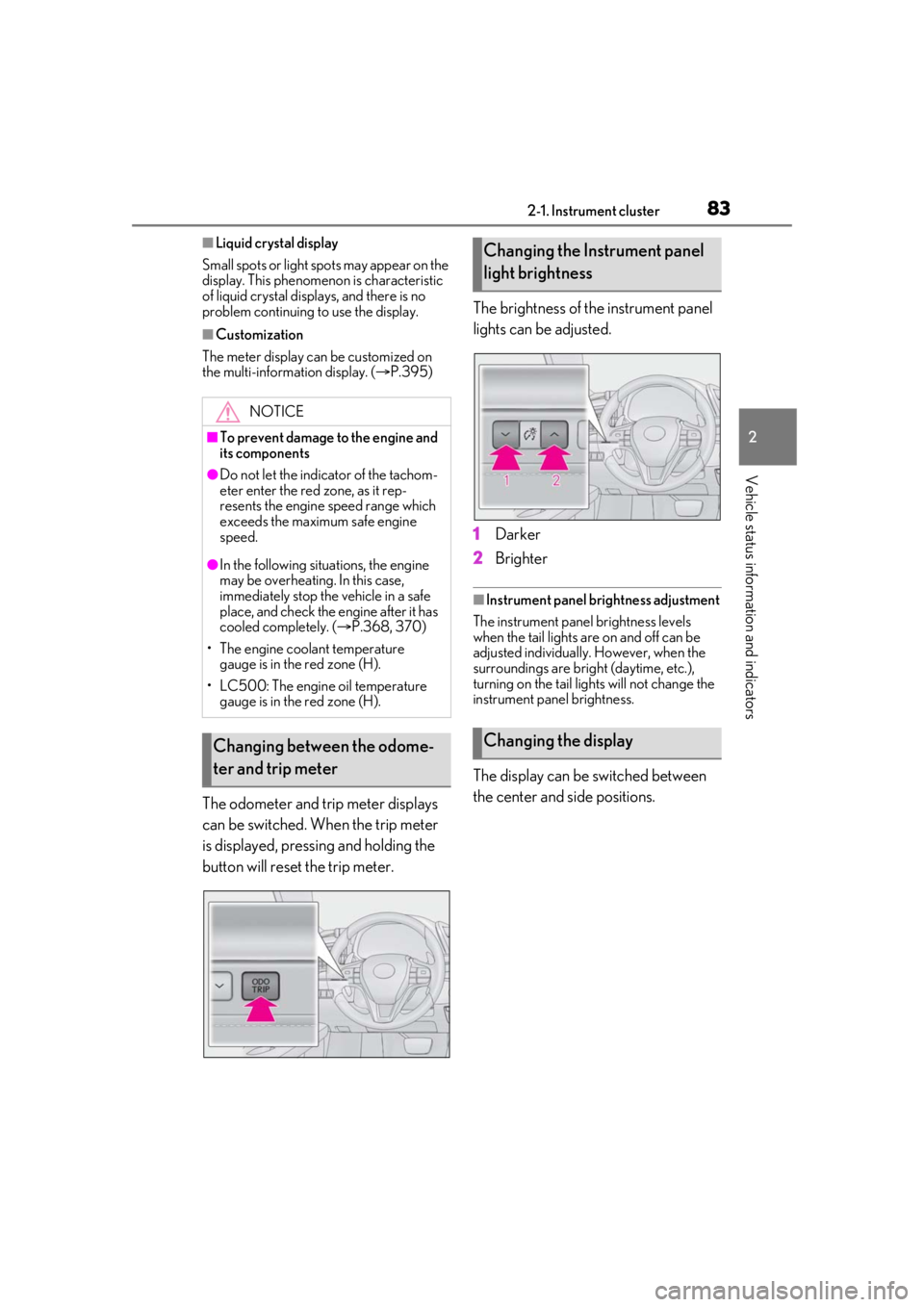
The odometer and trip meter displays
can be switched. When the trip meter
is displayed, pressing and holding the
button will reset the trip meter. The brightness of the instrument panel
lights can be adjusted.
1
Darker
2 Brighter
■Instrument panel brightness adjustment
The instrument panel brightness levels
when the tail lights are on and off can be
adjusted individually. However, when the
surroundings are bright (daytime, etc.),
turning on the tail lights will not change the
instrument pa nel brightness.
The display can be switched between
the center and side positions.
NOTICE
■To prevent damage to the engine and
its components
●Do not let the indicator of the tachom-
eter enter the red zone, as it rep-
resents the engine speed range which
exceeds the maximum safe engine
speed.
●In the following situations, the engine
may be overheating. In this case,
immediately stop the vehicle in a safe
place, and check the engine after it has
cooled completely. ( P.368, 370)
• The engine coolant temperature gauge is in the red zone (H).
• LC500: The engine oil temperature gauge is in the red zone (H).
Changing between the odome-
ter and trip meter
Changing the Instrument panel
light brightness
Changing the display
Page 149 of 436
1494-2. Driving procedures
4
Driving
■Conditions affecting operation
P.117
■Notes for the entry function
P.117
■Steering lock function
●After turning the engine switch off and
opening and closing the doors, the steer-
ing wheel will be lock ed due to the steer-
ing lock function. Operating the engine
switch again automatically cancels the
steering lock.
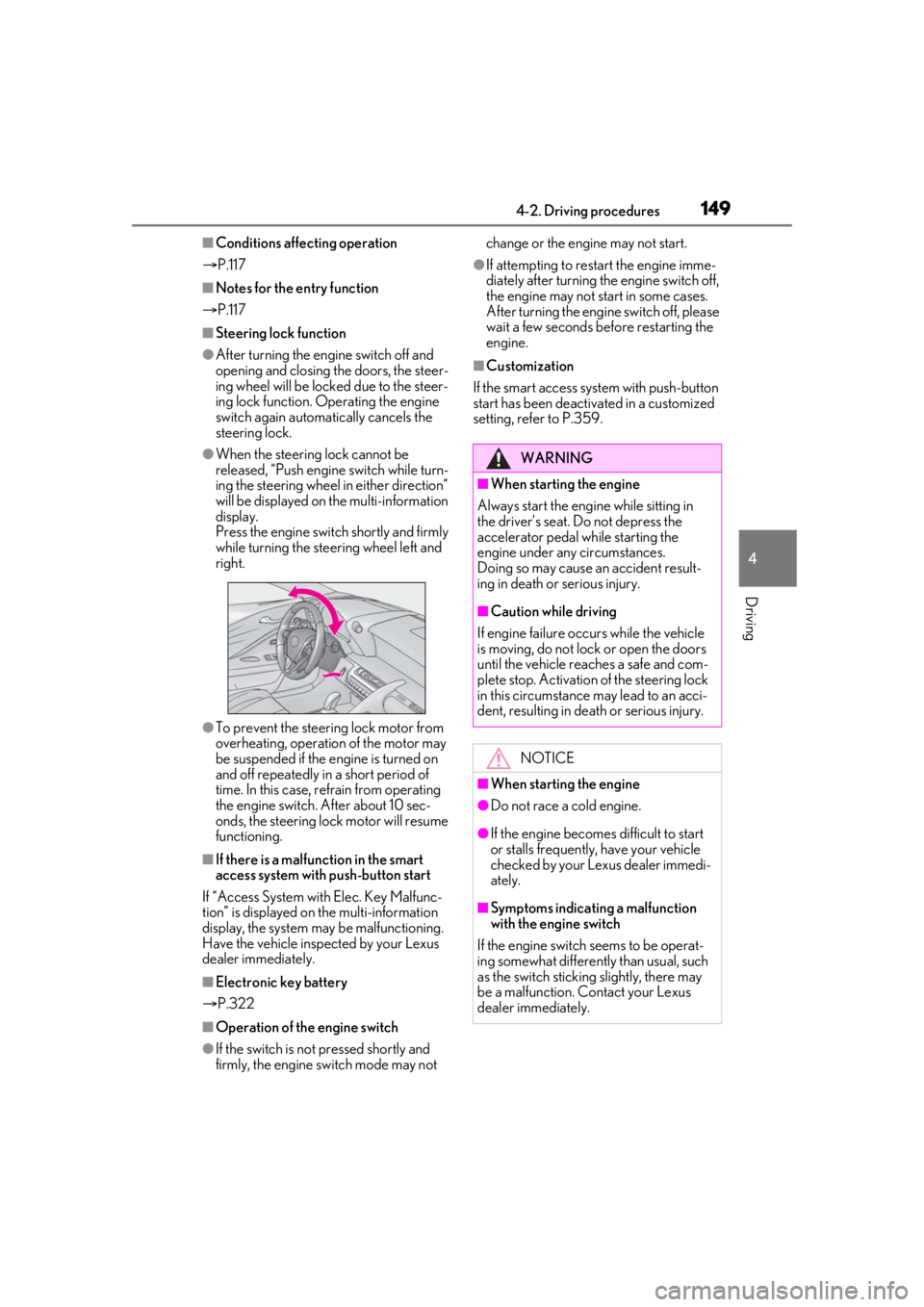
●When the steering lock cannot be
released, “Push engine switch while turn-
ing the steering wheel in either direction”
will be displayed on the multi-information
display.
Press the engine switch shortly and firmly
while turning the steering wheel left and
right.
●To prevent the steering lock motor from
overheating, operation of the motor may
be suspended if the engine is turned on
and off repeatedly in a short period of
time. In this case, refrain from operating
the engine switch. After about 10 sec-
onds, the steering lock motor will resume
functioning.
■If there is a malfun ction in the smart
access system with push-button start
If “Access System with Elec. Key Malfunc-
tion” is displayed on the multi-information
display, the system may be malfunctioning.
Have the vehicle inspected by your Lexus
dealer immediately.
■Electronic key battery
P.322
■Operation of the engine switch
●If the switch is not pressed shortly and
firmly, the engine switch mode may not change or the engine may not start.
●If attempting to restart the engine imme-
diately after turning th
e engine switch off,
the engine may not start in some cases.
After turning the engine switch off, please
wait a few seconds be fore restarting the
engine.
■Customization
If the smart access system with push-button
start has been deactivated in a customized
setting, refer to P.359.
WARNING
■When starting the engine
Always start the engine while sitting in
the driver’s seat. Do not depress the
accelerator pedal while starting the
engine under any circumstances.
Doing so may cause an accident result-
ing in death or serious injury.
■Caution while driving
If engine failure occurs while the vehicle
is moving, do not lock or open the doors
until the vehicle reaches a safe and com-
plete stop. Activation of the steering lock
in this circumstance may lead to an acci-
dent, resulting in death or serious injury.
NOTICE
■When starting the engine
●Do not race a cold engine.
●If the engine becomes difficult to start
or stalls frequently, have your vehicle
checked by your Lexus dealer immedi-
ately.
■Symptoms indicating a malfunction
with the engine switch
If the engine switch seems to be operat-
ing somewhat differently than usual, such
as the switch sticking slightly, there may
be a malfunction. Contact your Lexus
dealer immediately.
Page 153 of 436
1534-2. Driving procedures
4
Driving
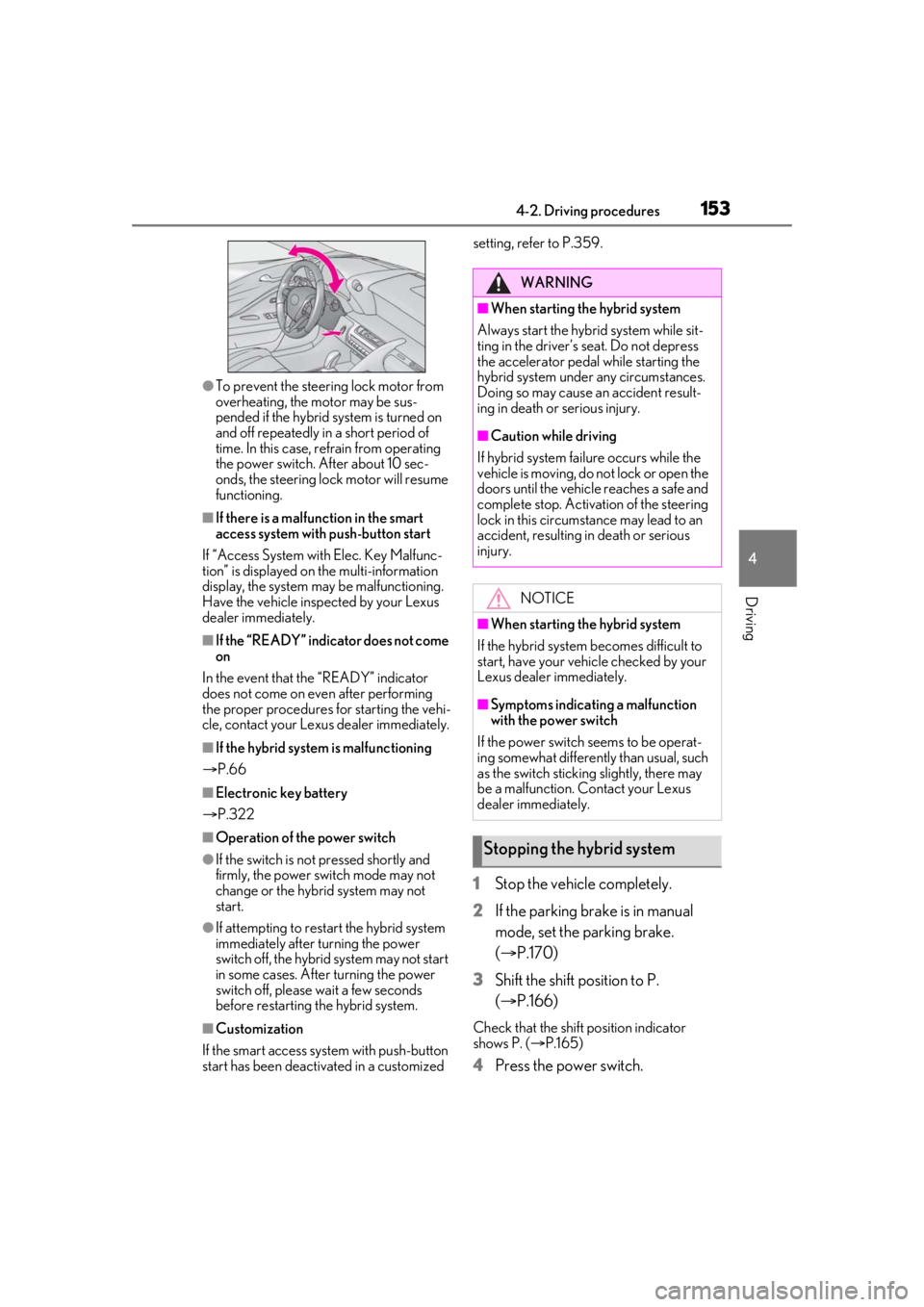
●To prevent the steering lock motor from
overheating, the motor may be sus-
pended if the hybrid system is turned on
and off repeatedly in a short period of
time. In this case, refrain from operating
the power switch. After about 10 sec-
onds, the steering lock motor will resume
functioning.
■If there is a malfun ction in the smart
access system with push-button start
If “Access System with Elec. Key Malfunc-
tion” is displayed on the multi-information
display, the system may be malfunctioning.
Have the vehicle inspected by your Lexus
dealer immediately.
■If the “READY” indicator does not come
on
In the event that the “READY” indicator
does not come on even after performing
the proper procedures for starting the vehi-
cle, contact your Lexus dealer immediately.
■If the hybrid system is malfunctioning
P.66
■Electronic key battery
P.322
■Operation of the power switch
●If the switch is not pressed shortly and
firmly, the power switch mode may not
change or the hybrid system may not
start.
●If attempting to restart the hybrid system
immediately after turning the power
switch off, the hybrid system may not start
in some cases. After turning the power
switch off, please wait a few seconds
before restarting the hybrid system.
■Customization
If the smart access sy stem with push-button
start has been deactivated in a customized setting, refer to P.359.
1
Stop the vehicle completely.
2 If the parking brake is in manual
mode, set the parking brake.
(P.170)
3 Shift the shift position to P.
(P.166)
Check that the shift position indicator
shows P. ( P.165)
4 Press the power switch.
WARNING
■When starting the hybrid system
Always start the hybrid system while sit-
ting in the driver’s seat. Do not depress
the accelerator pedal while starting the
hybrid system under any circumstances.
Doing so may cause an accident result-
ing in death or serious injury.
■Caution while driving
If hybrid system failure occurs while the
vehicle is moving, do not lock or open the
doors until the vehicle reaches a safe and
complete stop. Activation of the steering
lock in this circumstance may lead to an
accident, resulting in death or serious
injury.
NOTICE
■When starting the hybrid system
If the hybrid system becomes difficult to
start, have your vehicle checked by your
Lexus dealer immediately.
■Symptoms indicating a malfunction
with the power switch
If the power switch seems to be operat-
ing somewhat differently than usual, such
as the switch sticking slightly, there may
be a malfunction. Contact your Lexus
dealer immediately.
Stopping the hybrid system
Page 171 of 436
1714-2. Driving procedures
4
Driving
2Pull the switch to release the park-
ing brake
• Operate the parking brake switch while
depressing the brake pedal.
• Using the parking brake automatic release function, the parking brake can
be released by depressing the accelera-
tor pedal. When using this function,
slowly depress the accelerator pedal.
Make sure that the pa rking brake indicator
light turn off.
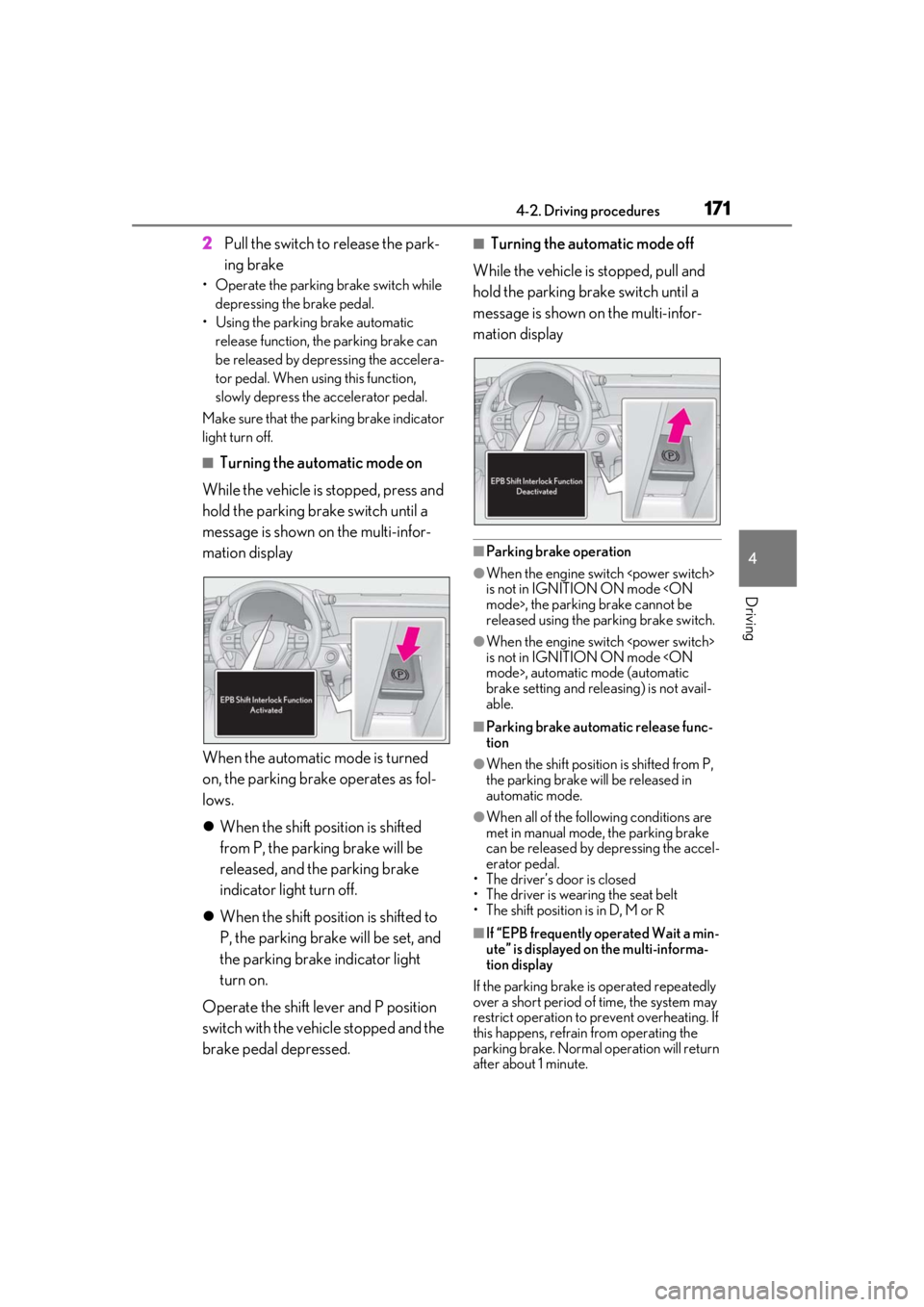
■Turning the automatic mode on
While the vehicle is stopped, press and
hold the parking brake switch until a
message is shown on the multi-infor-
mation display
When the automatic mode is turned
on, the parking brake operates as fol-
lows.
When the shift position is shifted
from P, the parking brake will be
released, and the parking brake
indicator light turn off.
When the shift position is shifted to
P, the parking brake will be set, and
the parking brake indicator light
turn on.
Operate the shift lever and P position
switch with the vehicle stopped and the
brake pedal depressed.
■Turning the automatic mode off
While the vehicle is stopped, pull and
hold the parking brake switch until a
message is shown on the multi-infor-
mation display
■Parking brake operation
●When the engine switch
is not in IGNITION ON mode
released using the parking brake switch.
●When the engine switch
is not in IGNITION ON mode
brake setting and releasing) is not avail-
able.
■Parking brake automatic release func-
tion
●When the shift position is shifted from P,
the parking brake will be released in
automatic mode.
●When all of the follo wing conditions are
met in manual mode, the parking brake
can be released by depressing the accel-
erator pedal.
• The driver’s door is closed
• The driver is wearing the seat belt
• The shift position is in D, M or R
■If “EPB frequently operated Wait a min-
ute” is displayed on the multi-informa-
tion display
If the parking brake is operated repeatedly
over a short period of time, the system may
restrict operation to prevent overheating. If
this happens, refrain from operating the
parking brake. Normal operation will return
after about 1 minute.
Page 172 of 436

1724-2. Driving procedures
■If “EPB Activation Stopped Incom-
pletely” or “EPB unavailable” is dis-
played on the multi-information display
Operate the parking brake switch. If the
message does not disappear after operat-
ing the switch several times, the system may
be malfunctioning. Have the vehicle
inspected by your Lexus dealer.
■Parking brake operation sound
When the parking brake operates, a motor
sound (whirring sound) may be heard. This
does not indicate a malfunction.
■Parking brake indicator light
●Depending on the engine switch
tor light will turn on and stay on as
described below:
IGNITION ON mode
Comes on until the parking brake is
released.
Not in IGNITION ON mode
seconds.
●When the engine switch
is turned off with the parking brake set,
the parking brake indi cator light will stay
on for about 15 seconds. This does not
indicate a malfunction.
■When the parking brake switch mal-
functions
Automatic mode (automatic brake setting
and releasing) will be turned on automati-
cally.
■Parking the vehicle
P.138
■Parking brake engaged warning buzzer
A buzzer will sound if the vehicle is driven
with the parking brake engaged. “EPB
applied” is displayed on the multi-informa-
tion display (with the vehicle reached a
speed of 3 mph [5 km/h]).
■If the brake system warning light comes
on
P.339
■Usage in winter time
P.242
WARNING
■When parking the vehicle
Do not leave a child in the vehicle alone.
The parking brake may be released unin-
tentionally and there is the danger of the
vehicle moving that may lead to an acci-
dent resulting in death or serious injury.
NOTICE
■When parking the vehicle
Before you leave the vehicle, shift the
shift position to P, set the parking brake
and make sure that the vehicle does not
move.
■When the system malfunctions
Stop the vehicle in a safe place and
check the warning messages.
■When the parking brake cannot be
released due to a malfunction
Driving the vehicle with the parking
brake set will lead to brake components
overheating, which may affect braking
performance and increase brake wear.
Have the vehicle inspected by your
Lexus dealer immediately if this occurs.
Page 216 of 436
2164-5. Using the driving support systems
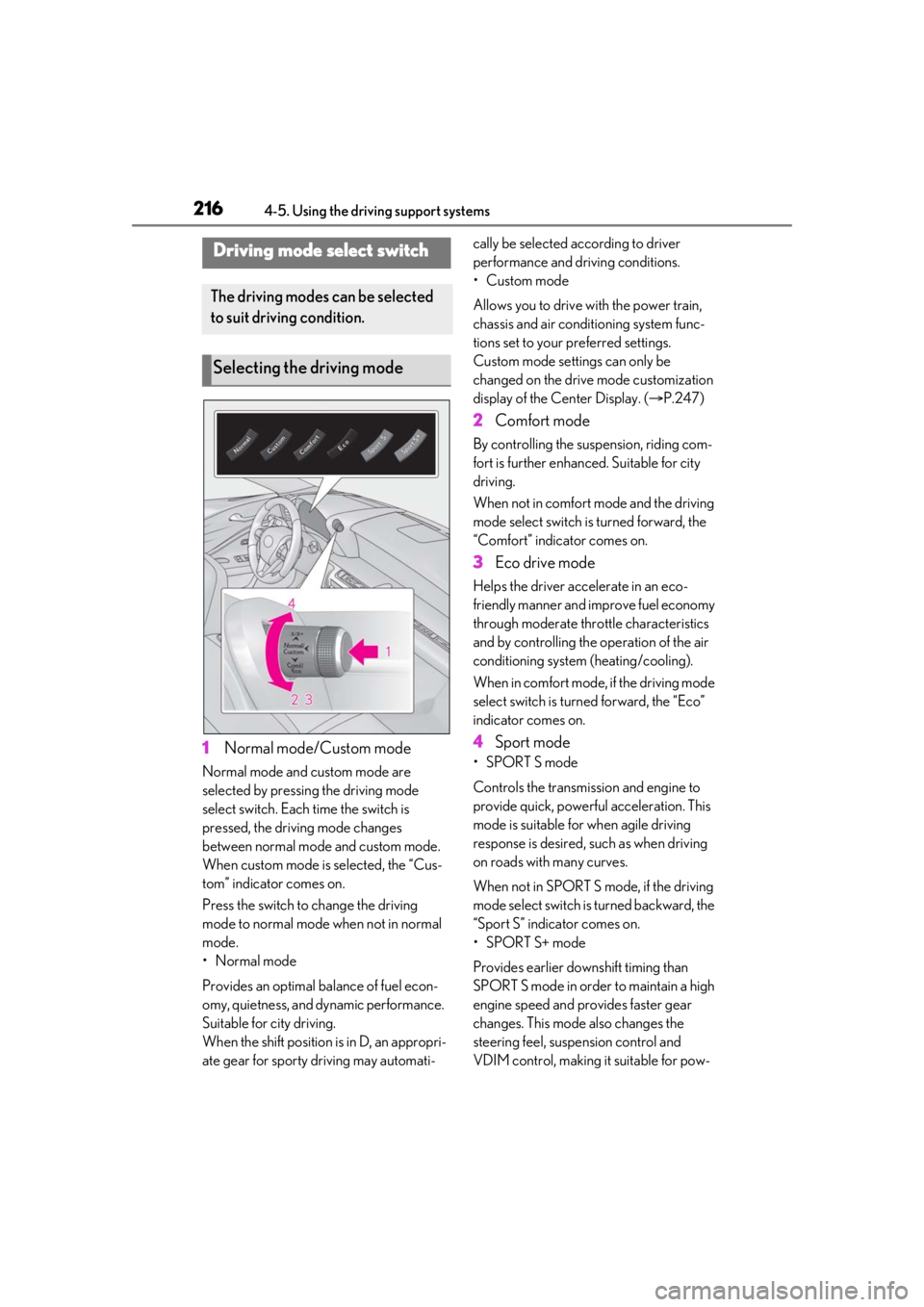
1Normal mode/Custom mode
Normal mode and custom mode are
selected by pressing the driving mode
select switch. Each time the switch is
pressed, the driving mode changes
between normal mode and custom mode.
When custom mode is selected, the “Cus-
tom” indicator comes on.
Press the switch to change the driving
mode to normal mode when not in normal
mode.
•Normal mode
Provides an optimal ba lance of fuel econ-
omy, quietness, and dynamic performance.
Suitable for city driving.
When the shift position is in D, an appropri-
ate gear for sporty driving may automati- cally be selected according to driver
performance and driving conditions.
• Custom mode
Allows you to drive with the power train,
chassis and air conditioning system func-
tions set to your preferred settings.
Custom mode settings can only be
changed on the drive mode customization
display of the Center Display. (
P.247)
2 Comfort mode
By controlling the suspension, riding com-
fort is further enhanced. Suitable for city
driving.
When not in comfort mode and the driving
mode select switch is turned forward, the
“Comfort” indicator comes on.
3Eco drive mode
Helps the driver acce lerate in an eco-
friendly manner and improve fuel economy
through moderate thro ttle characteristics
and by controlling the operation of the air
conditioning system (heating/cooling).
When in comfort mode, if the driving mode
select switch is turned forward, the “Eco”
indicator comes on.
4 Sport mode
•SPORT S mode
Controls the transmission and engine to
provide quick, powerful acceleration. This
mode is suitable for when agile driving
response is desired, such as when driving
on roads with many curves.
When not in SPORT S mode, if the driving
mode select switch is turned backward, the
“Sport S” indicator comes on.
•SPORT S+ mode
Provides earlier downshift timing than
SPORT S mode in order to maintain a high
engine speed and provides faster gear
changes. This mode also changes the
steering feel, susp ension control and
VDIM control, making it suitable for pow-
Driving mode select switch
The driving modes can be selected
to suit driving condition.
Selecting the driving mode
Page 217 of 436
2174-5. Using the driving support systems
4
Driving
erful sporty driving.
When in SPORT S mode, if the driving
mode select switch is turned backward, the
“Sport S+” indicator comes on.
■Operation of the air conditioning sys-
tem in Eco drive mode
Eco drive mode controls the heating/cool-
ing operations and fan speed of the air con-
ditioning system to enhance fuel efficiency.
To improve air condit ioning performance,
perform the following operations:
●Turn off eco air conditioning mode
( P.257)
●Adjust the fan speed ( P.255)
●Turn off Eco drive mode ( P.216)
■Automatic deactivation of sport mode
and custom mode
If the engine switch
turned off after drivin g in sport mode or
custom mode, the drive mode will be
changed to normal mode.
■Driving mode pop-up display
When the driving mode is changed, the
selected driving mode will be temporarily
displayed on the side display. ( P.248)
For custom mode, select “Setting” on the
display to customize the driving mode.
*: If equipped
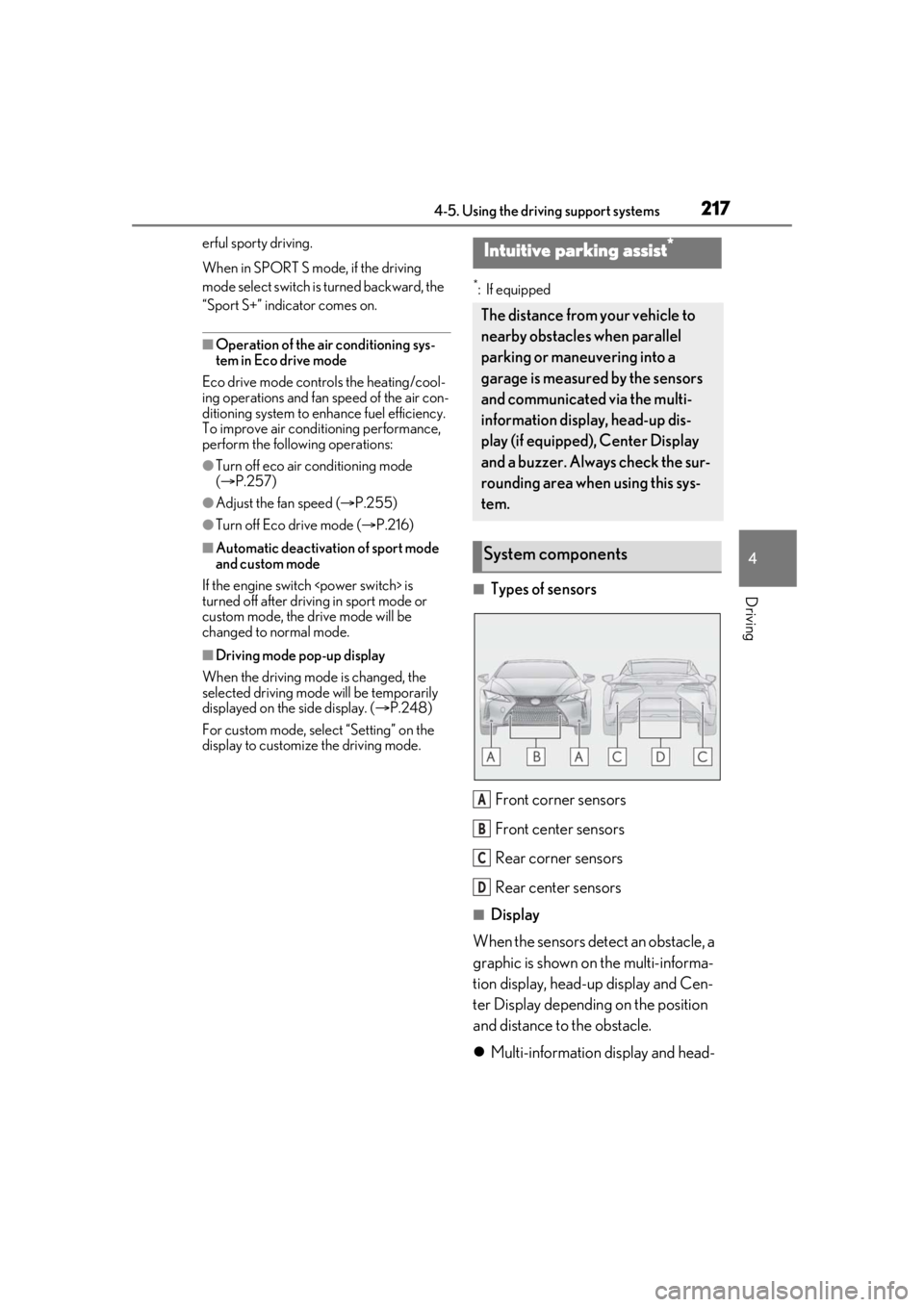
■Types of sensors
Front corner sensors
Front center sensors
Rear corner sensors
Rear center sensors
■Display
When the sensors detect an obstacle, a
graphic is shown on the multi-informa-
tion display, head-up display and Cen-
ter Display depending on the position
and distance to the obstacle.
Multi-information display and head-
Intuitive parking assist*
The distance from your vehicle to
nearby obstacles when parallel
parking or maneuvering into a
garage is measured by the sensors
and communicated via the multi-
information display, head-up dis-
play (if equipped), Center Display
and a buzzer. Always check the sur-
rounding area when using this sys-
tem.
System components
A
B
C
D
Page 238 of 436
2384-5. Using the driving support systems
●If only the TRAC system is turned off, the
TRAC will turn on when vehicle speed
increases
If both the TRAC and VSC systems are
turned off, automatic re-enabling will not
occur when vehicle speed increases.
■Secondary Collision Brake operating
conditions
The vehicle speed is approximately 6 mph
(10 km/h) or more and the airbag sensor
detects a collision. (The Secondary Colli-
sion Brake will not operate when the vehicle
speed is below approximately 6 mph [10
km/h].)
■Secondary Collision Brake automatic
cancellation
The Secondary Collision Brake is automati-
cally canceled in the following situations.
●The vehicle speed drops below approxi-
mately 6 mph (10 km/h)
●A certain amount of time elapses during
operation
●The accelerator pedal is depressed a
large amount
■If “Secondary Collision Brake system
Malfunction” is disp layed on the multi-
information display
The system may be malfunctioning. Have
the vehicle inspected at your Lexus dealer.
■Reduced effectiveness of the EPS sys-
tem
The effectiveness of the EPS system is
reduced to prevent the system from over-
heating when there is frequent steering
input over an extended period of time. The
steering wheel may feel heavy as a result.
Should this occur, re frain from excessive
steering input or stop the vehicle and turn
the engine
tem should return to normal within 10 min-
utes.
WARNING
■The ABS does not operate effectively
when
●The limits of tire gripping performance
have been exceeded (such as exces-
sively worn tires on a snow covered
road).
●The vehicle hydroplanes while driving
at high speed on wet or slick roads.
■Stopping distance when the ABS is
operating may exceed that of normal
conditions
The ABS is not designed to shorten the
vehicle’s stopping di stance. Always main-
tain a safe distance from the vehicle in
front of you, especially in the following
situations:
●When driving on dirt, gravel or snow-
covered roads
●When driving over bumps in the road
●When driving over roads with potholes
or uneven surfaces
■TRAC/VSC may not operate effec-
tively when
Directional control and power may not
be achievable while driving on slippery
road surfaces, even if the TRAC/VSC
system is operating.
Drive the vehicle carefully in conditions
where stability and po wer may be lost.
■Hill- start assist control does not
operate effectively when
●Do not overly rely on hill-start assist
control. Hill-start assist control may
not operate effectively on steep
inclines and roads covered with ice.
●Unlike the parking brake, hill-start
assist control is not intended to hold
the vehicle stationary for an extended
period of time. Do not attempt to use
hill-start assist control to hold the vehi-
cle on an incline, as doing so may lead
to an accident.
Page 240 of 436
2404-6. Driving tips
4-6.Driving tips
When using Eco drive mode, the
torque corresponding to the accelera-
tor pedal depression amount can be
generated more smoothly than it is in
normal conditions. In addition, the
operation of the air conditioning sys-
tem (heating/cooling) will be mini-
mized, improving the fuel economy.
( P.216)
The Eco-friendly driving is possible by
keeping the indicate of Hybrid System
Indicator within Eco area. ( P.78)
Shift the shift position to D when
stopped at a traffic light, or driving in
heavy traffic etc. Shift the shift position
to P when parking. When using the N
position, there is no positive effect on
fuel consumption. In the N position, the
gasoline engine operates but electric-
ity cannot be generated. Also, when
using the air conditio ning system, etc.,
the hybrid battery (traction battery)
power is consumed.
Drive your vehicle smoothly. Avoid
abrupt acceleration and decelera-
tion. Gradual acceleration and
deceleration will make more effec-
tive use of the electric motor (trac-
tion motor) without having to use
gasoline engine power.
Avoid repeated acceleration.
Repeated acceleration consumes
hybrid battery (traction battery)
power, resulting in poor fuel con-
sumption. Battery power can be
restored by driving with the acceler-
ator pedal slightly released.
Make sure to operate the brakes gently
and in a timely manner. A greater
amount of electrical energy can be
regenerated when slowing down.
Repeated acceleration and decelera-
tion, as well as long waits at traffic
lights, will lead to bad fuel economy.
Check traffic reports before leaving
and avoid delays as much as possible.
When driving in a traffic jam, gently
release the brake pedal to allow the
vehicle to move forward slightly while
avoiding overuse of the accelerator
pedal. Doing so can help control
excessive gasoline consumption.
Hybrid vehicle driving tips
(LC500h)
For economical and ecological
driving, pay attention to the follow-
ing points:
Using Eco drive mode
Use of Hybrid System Indicator
Changing the shift position
Accelerator pedal/brake pedal
operation
When braking
Delays