air condition lexus LFA 2012 Owner's Manual / LEXUS 2012 LFA (OM77006U) User Guide
[x] Cancel search | Manufacturer: LEXUS, Model Year: 2012, Model line: LFA, Model: Lexus LFA 2012Pages: 420, PDF Size: 5.02 MB
Page 159 of 420

157
2-2. Instrument cluster
2
When driving
■Using the “Lap Timer”
●When the “Lap Timer” function is turned “OFF” or the engine is stopped while a
lap is being timed, the lap timer will stop and the lap time up to that point will be
recorded.
●If the lap time being recorded ends with the same time as the fastest lap, the
newer time will be saved as the fastest lap time.
●If the lap time exceeds “9:59:59.99”, the display will return to “0:00:00.00” but
the total time will be recorded.
●If a warning message is displayed when a lap time is being measured, the lap
time will still continue to be recorded.
Operating the control pad while the warning message is shown returns the dis-
play to the stopwatch but the warning message will continue to appear until the
warning is resolved.
●In the normal display, the current measurement time and the latest lap time will
be displayed.
■Changing the temperature measurement unit
When the “Temp” measurement unit is ch anged, the air conditioning system tem-
perature setting, air outlet s and fan speed characteristic s may be changed. This is
normal and does not indicate a malfunction.
■If the battery is disconnected or discharges
“Lap Timer” data and “Clock” settings will be reset.
Page 182 of 420

180
2-5. Driving information
Winter driving tips
Carry out the necessary preparations and inspections before driving the
vehicle in winter. Always drive the vehicle in a manner appropriate to the pre-
vailing weather conditions.
■ Pre-winter preparations
●Use fluids that are appropriate to the prevailing outside tempera-
tures.
• Engine coolant
• Washer fluid
● Have the vehicle fitted with four snow tires.
Ensure that all tires are the specified size and the same brand.
■Before driving the vehicle
Perform the following according to the driving conditions.
● Do not try to forcibly open a window or move a wiper that is frozen.
Pour warm water over the frozen area to melt the ice. Wipe away
the water immediately to prevent it from freezing.
● To ensure proper operation of the climate control system fan,
remove any snow that has accumulated on the air inlet vents in front
of the windshield.
● Remove any ice that has accumu lated on the vehicle chassis.
● Periodically check for and remove any excess ice or snow that may
have accumulated in the wheel well or on the brakes.
■ When driving the vehicle
Accelerate the vehicle slowly and driv e at a reduced speed suitable to
road conditions.
Page 183 of 420
181
2-5. Driving information
2
When driving
■Tire grip at low temperatures
The tires fitted to the LFA are designed for dry road conditions. As such, tire grip on
cold, snowy and/or icy roads will be reduced compared to standard tires.
Be sure to use snow tires on snowy and/or icy roads and drive carefully at a speed
appropriate for road and weather conditions.
■Engine starting restrictions
In order to protect the engine, the engine may not start when the engine coolant
temperature or engine oil temperature is below -13 F (-25C). In that case, a
buzzer will sound and “Temp low Engine cannot be started” will be shown on the
meter. ( P. 3 2 7 )
CAUTION
■Driving with snow tires
Observe the following precautions to reduce the risk of accidents.
Failing to do so may result in a loss of vehicle control and cause death or serious
injury.
●Use tires of the specified size.
●Maintain the recommended level of air pressure.
●Do not drive in excess of 75 mph (120 km/h), regardless of the type of snow tires
being used.
●Use snow tires on all, not just some wheels.
NOTICE
■Driving with tire chains
Do not fit tire chains. Tire chains may da mage the vehicle body and suspension, and
adversely affect driving performance.
■Repairing or replacing snow tires
Request repairs or replacement of snow ti res from Lexus dealers or legitimate tire
retailers.
This is because the removal and attachment of snow tires affects the operation of
the tire pressure warning valves and transmitters.
Page 187 of 420

Interior features3
185
3-1. Using the air conditioning system and defogger
Automatic air conditioning system (with
navigation system) ............... 186
Automatic air conditioning system (without
navigation system) ............... 194
Rear window and outside rear view mirror
defoggers ............................... 201
3-2. Using the audio system Audio/video system some basics .......................... 202
3-3. Using the interior lights Interior lights list ..................... 207
3-4. Using the storage features List of storage features ........ 209
• Glove box ............................... 210
• Door pockets ......................... 212 3-5. Other interior features
Sun visors .................................. 213
Power outlet ............................. 214
Floor mats ................................. 215
Luggage compartment features ................................... 218
Safety Connect ....................... 219
Page 188 of 420
186
3-1.Using the air conditioning system and defogger
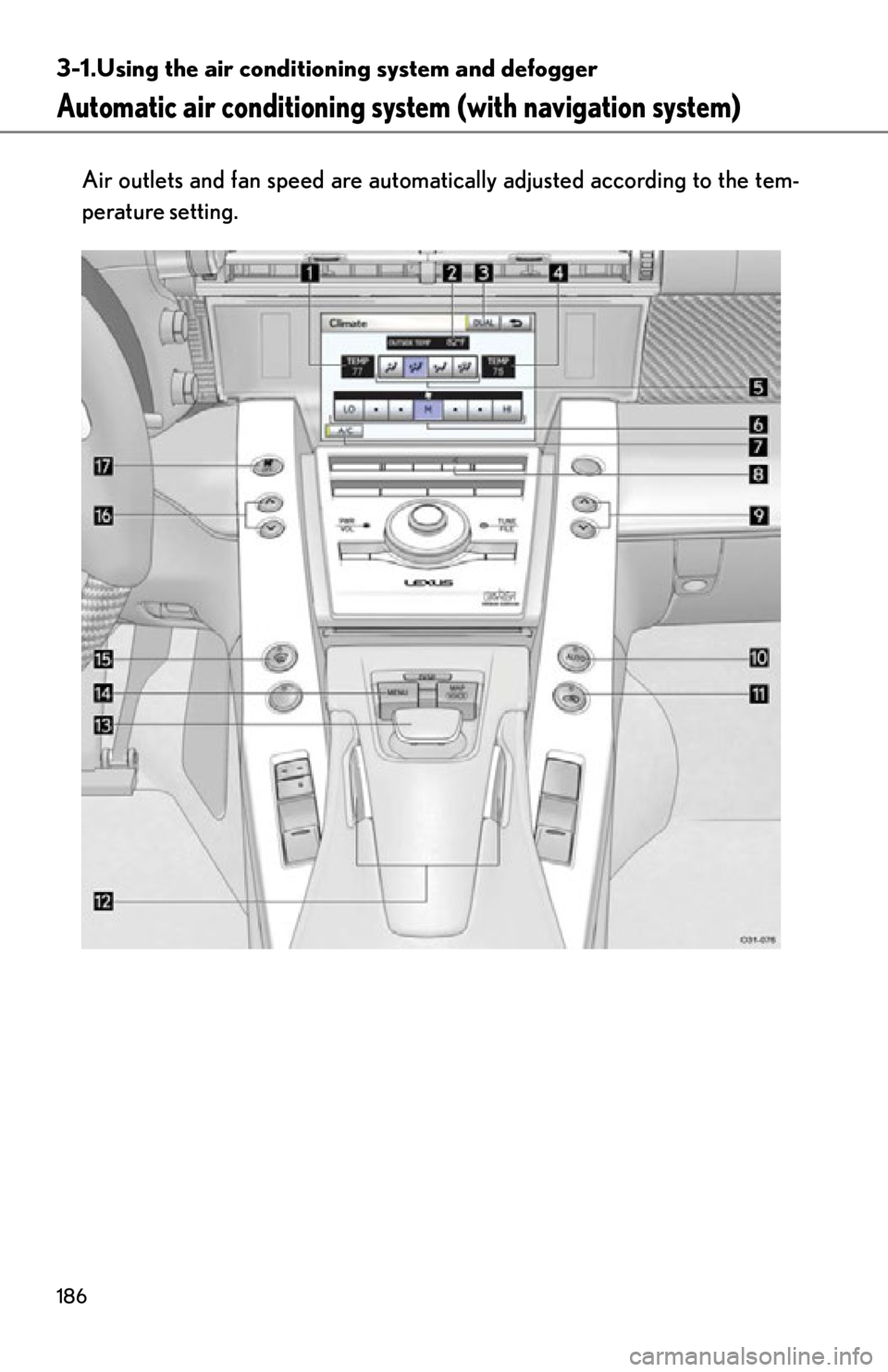
Automatic air conditioning syst em (with navigation system)
Air outlets and fan speed are automati cally adjusted according to the tem-
perature setting.
Page 189 of 420
187
3-1. Using the air conditioning system and defogger
3
Interior features
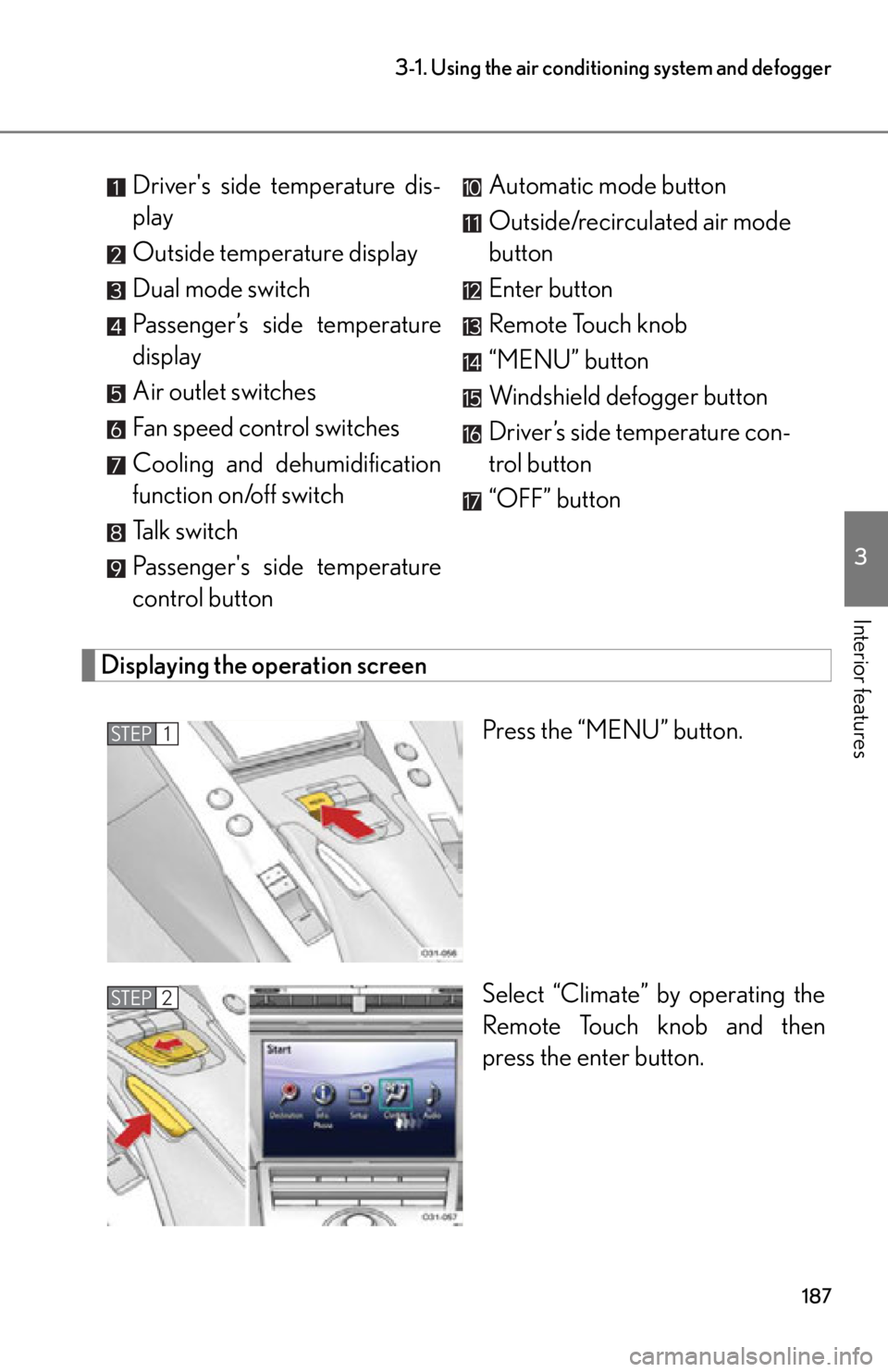
Displaying the operation screen
Press the “MENU” button.
Select “Climate” by operating the
Remote Touch knob and then
press the enter button.
Driver's side temperature dis-
play
Outside temperature display
Dual mode switch
Passenger’s side temperature
display
Air outlet switches
Fan speed control switches
Cooling and dehumidification
function on/off switch
Talk switch
Passenger's side temperature
control button
Automatic mode button
Outside/recirculated air mode
button
Enter button
Remote Touch knob
“MENU” button
Windshield defogger button
Driver’s side temperature con-
trol button
“OFF” button
STEP1
STEP2
Page 190 of 420

188
3-1. Using the air conditioning system and defogger
Using the automatic air conditioning system
Press .
The air conditioning system begins to operate. Air outlets and fan
speed are automatically adjusted according to the temperature setting.
Press on the driver’s side to increase the temperature and
to decrease the temperature.
When “DUAL” is selected on the oper ation screen (the indicator is on)
or the passenger's side temperature control button is pressed, the tem-
perature for the driver and passenge r seats can be adjusted separately.
Adjusting the settings manually
■ Turning the cooling and dehumidification function on and off
Select “A/C” on the operation screen.
The air conditioning system turns on and off each time “A/C” is selected.
■Adjusting the temperature setting
Press to increase the temperat ure and to decrease the tem-
perature.
When “DUAL” is selected on the oper ation screen (the indicator is on) or
the passenger’s side temperature cont rol button is pressed, the tempera-
ture for the driver and passenger seats can be adjusted separately.
■ Adjusting the fan speed
Select any switch of (decrease
increase) on the operation screen.
Press to turn the fan off.
STEP1
STEP2
Page 191 of 420
189
3-1. Using the air conditioning system and defogger
3
Interior features
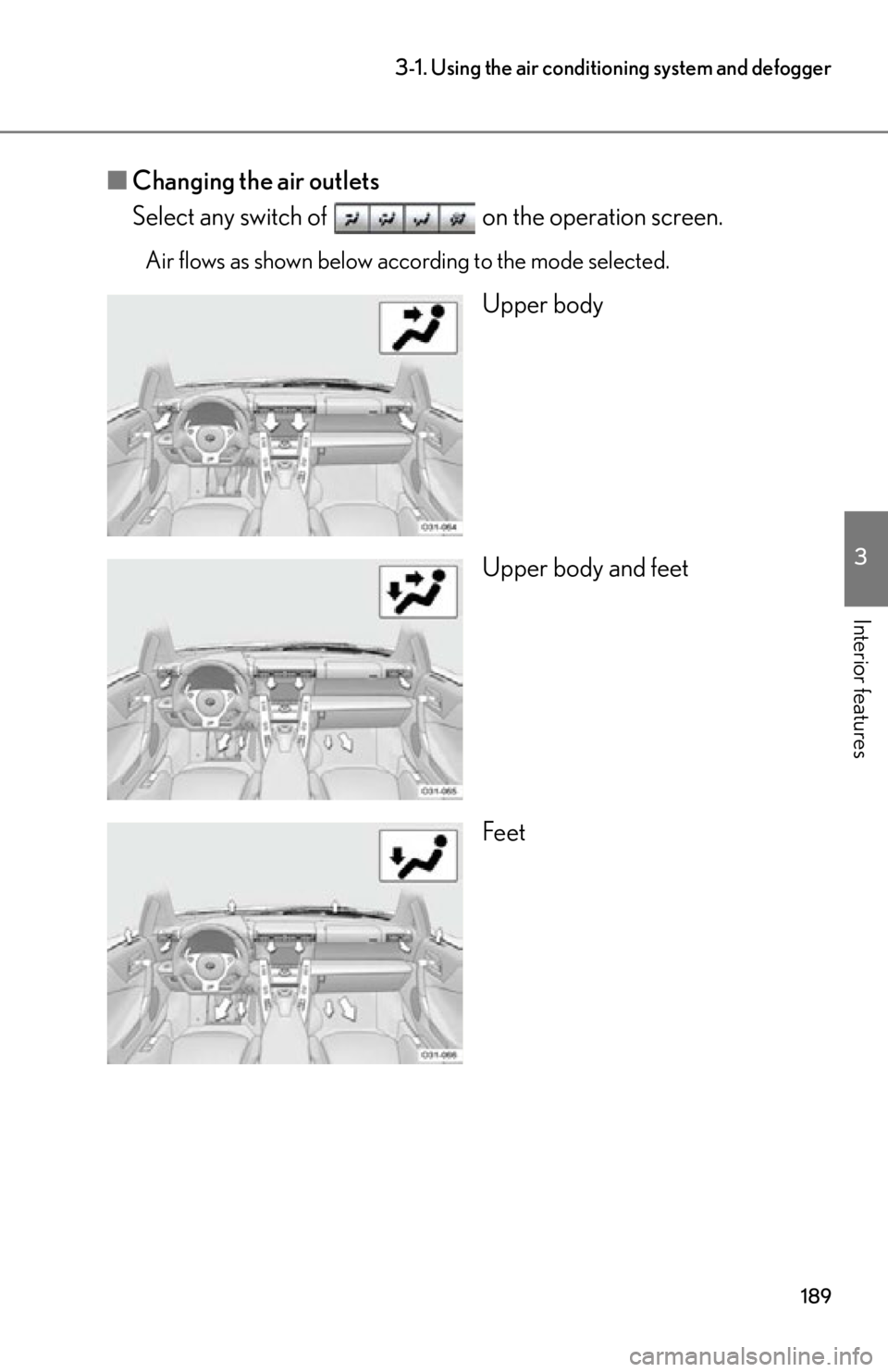
■Changing the air outlets
Select any switch of on the operation screen.
Air flows as shown below according to the mode selected.
Upper body
Upper body and feet
Feet
Page 192 of 420
190
3-1. Using the air conditioning system and defogger
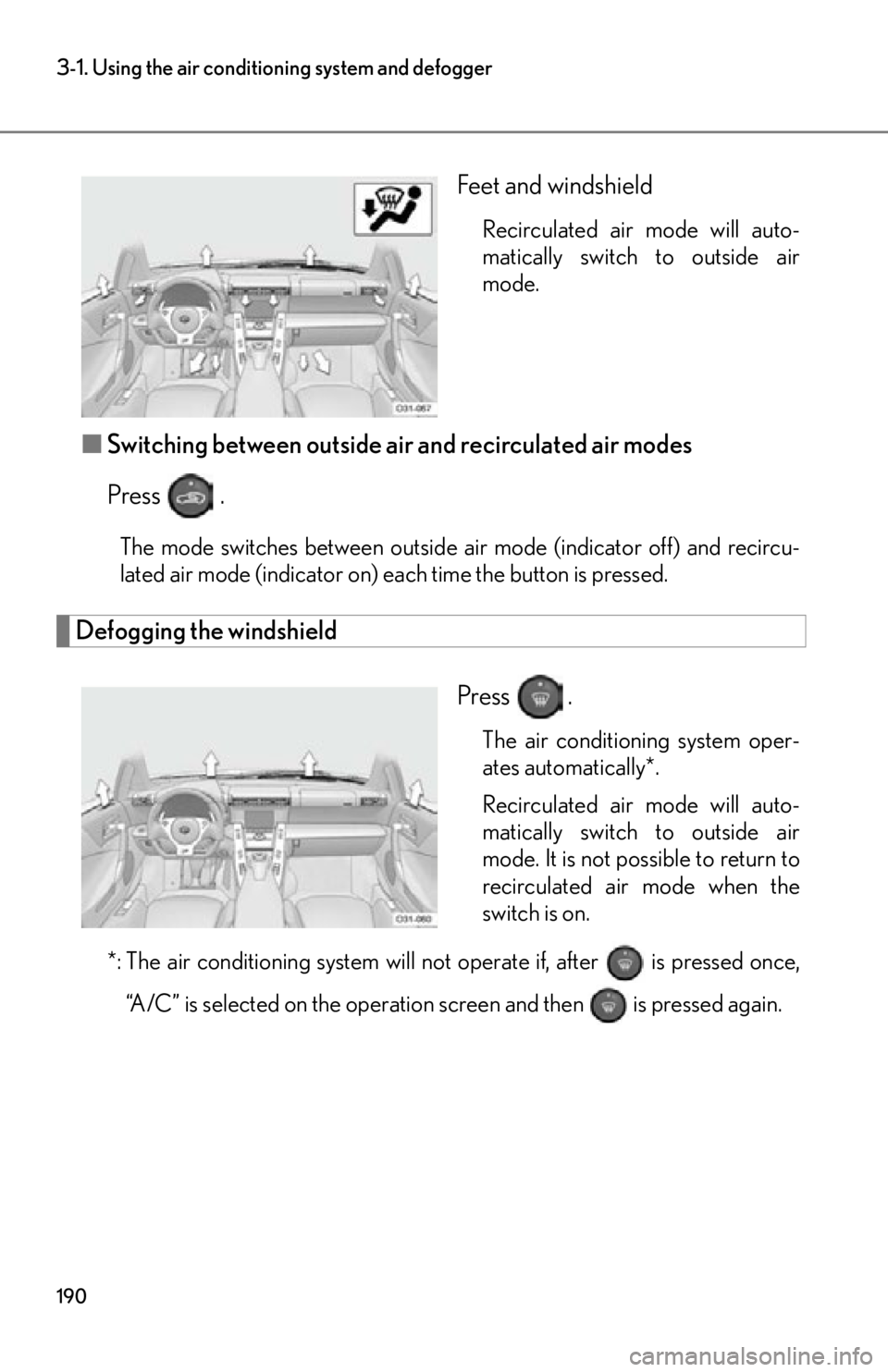
Feet and windshield
Recirculated air mode will auto-
matically switch to outside air
mode.
■Switching between outside air and recirculated air modes
Press .
The mode switches between outside ai r mode (indicator off) and recircu-
lated air mode (indicator on) each time the button is pressed.
Defogging the windshield
Press
.
The air conditioning system oper-
ates automatically*.
Recirculated air mode will auto-
matically switch to outside air
mode. It is not possible to return to
recirculated air mode when the
switch is on.
*: The air conditioning system will not operate if, after is pressed once, “A/C” is selected on the operation screen and then is pressed again.
Page 193 of 420
191
3-1. Using the air conditioning system and defogger
3
Interior features
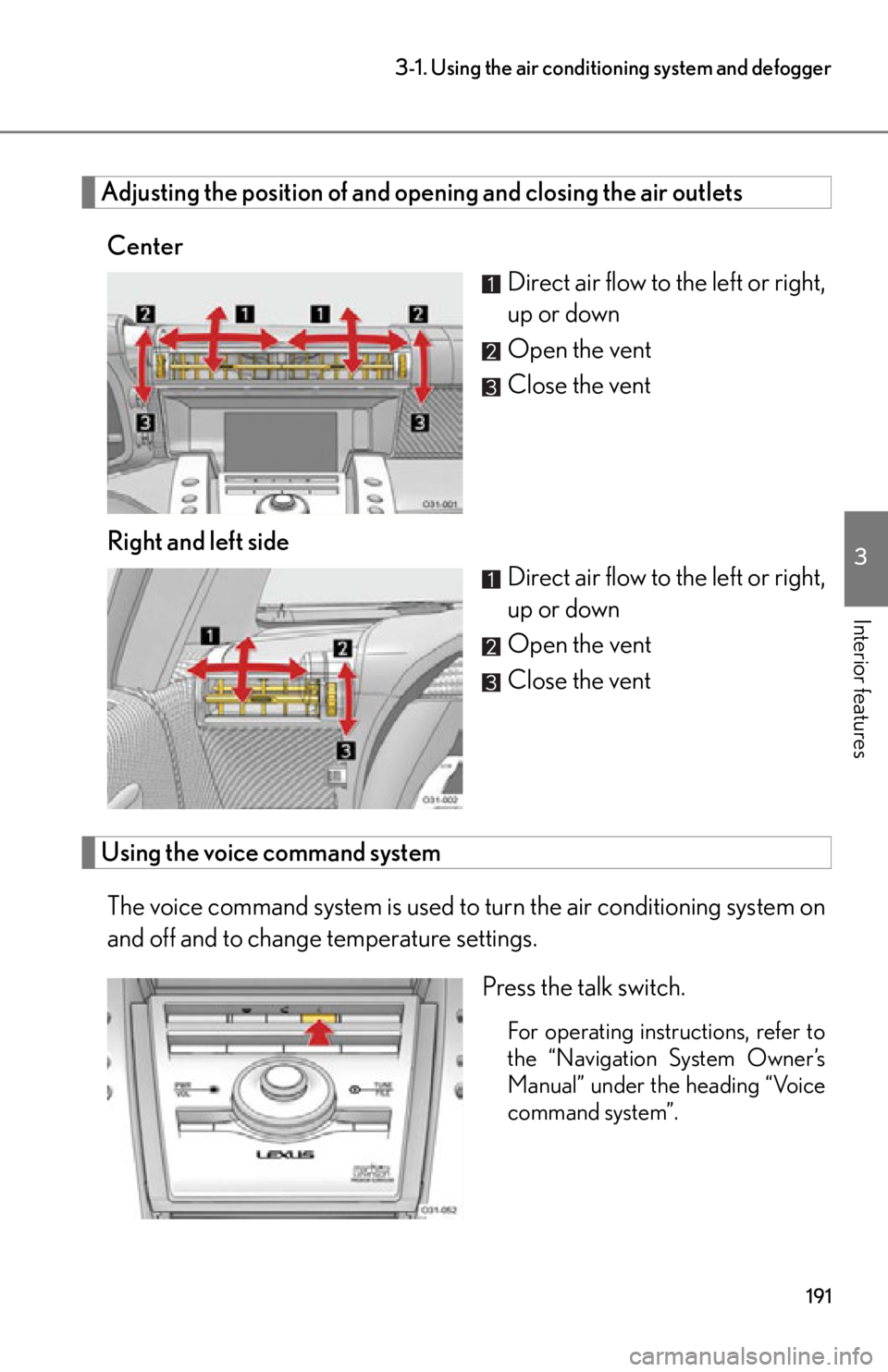
Adjusting the position of and opening and closing the air outlets
Center Direct air flow to the left or right,
up or down
Open the vent
Close the vent
Right and left side Direct air flow to the left or right,
up or down
Open the vent
Close the vent
Using the voice command system
The voice command system is used to turn the air conditioning system on
and off and to change temperature settings.
Press the talk switch.
For operating instructions, refer to
the “Navigation System Owner’s
Manual” under the heading “Voice
command system”.