engine lexus LFA 2012 Technical Information / LEXUS 2012 LFA (OM77006U) Owner's Guide
[x] Cancel search | Manufacturer: LEXUS, Model Year: 2012, Model line: LFA, Model: Lexus LFA 2012Pages: 420, PDF Size: 5.02 MB
Page 125 of 420
123
2-2. Instrument cluster
2
When driving
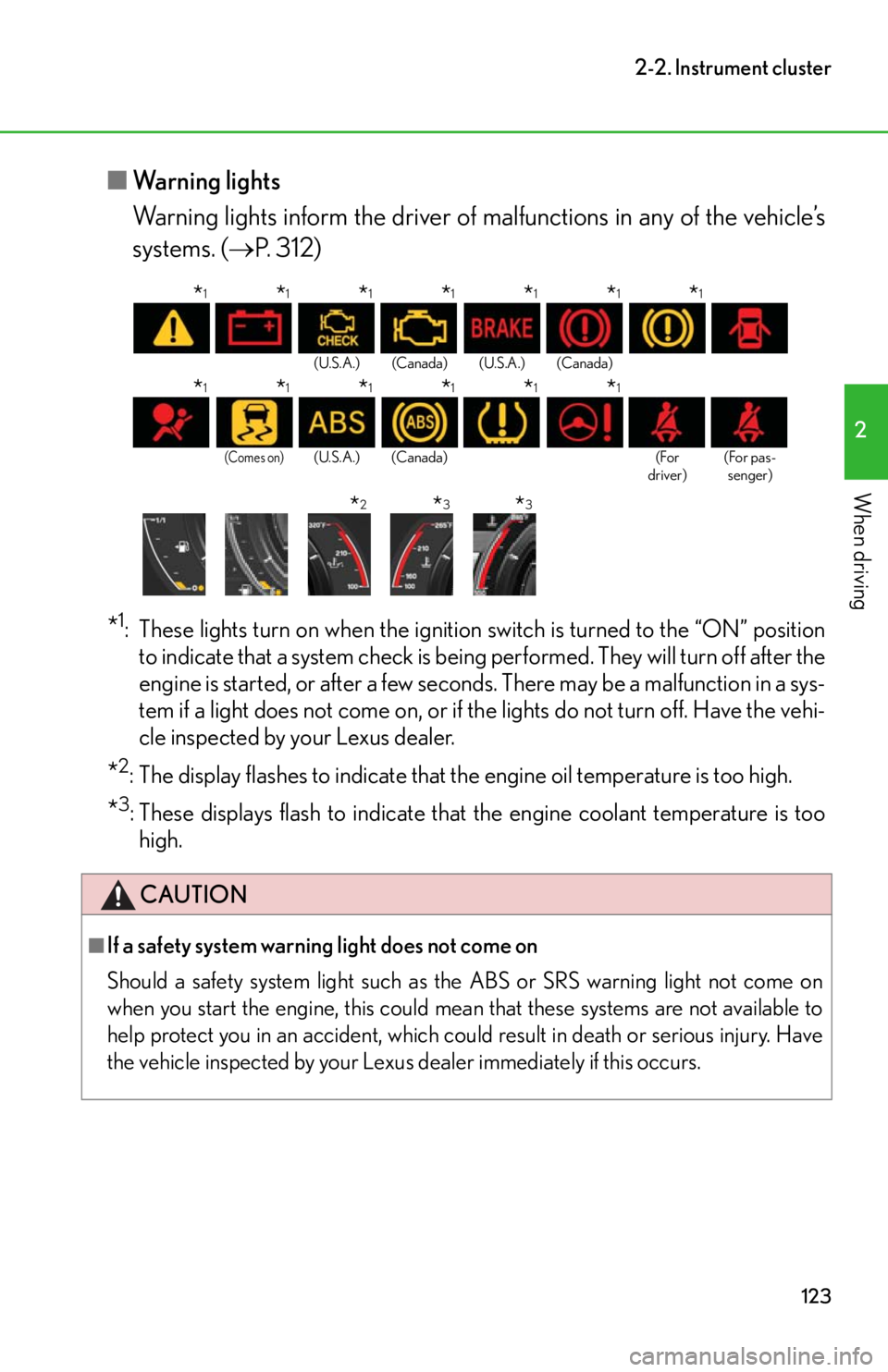
■Warning lights
Warning lights inform the driver of ma lfunctions in any of the vehicle’s
systems. ( P. 312)
*1: These lights turn on when the ignition switch is turned to the “ON” position
to indicate that a system check is being performed. They will turn off after the
engine is started, or after a few seconds. There may be a malfunction in a sys-
tem if a light does not come on, or if th e lights do not turn off. Have the vehi-
cle inspected by your Lexus dealer.
*2: The display flashes to indicate that the engine oil temperature is too high.
*3: These displays flash to indicate that the engine coolant temperature is too
high.
(U.S.A.) (Canada) (U.S.A.) (Canada)
(Comes on)(U.S.A.) (Canada) (For
driver) (For pas-
senger)
CAUTION
■If a safety system warning light does not come on
Should a safety system lig ht such as the ABS or SRS warning light not come on
when you start the engine, this could mean that these systems are not available to
help protect you in an accident, which could result in death or serious injury. Have
the vehicle inspected by your Lexus dealer immediately if this occurs.
*1*1*1*1*1*1*1
*1*1*1*1*1*1
*2*3*3
Page 126 of 420
124
2-2. Instrument cluster
Using the menu
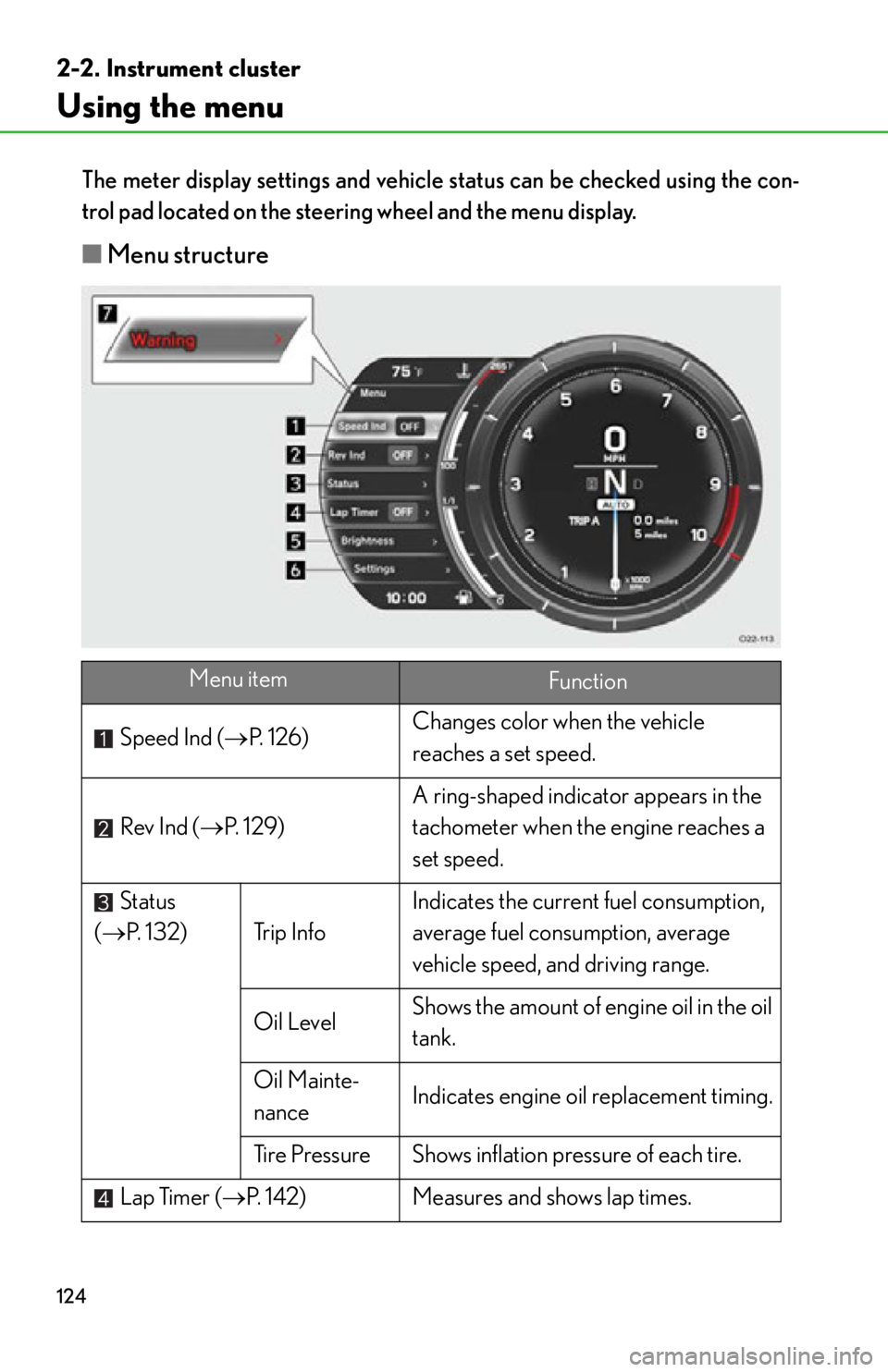
The meter display settings and vehicle status can be checked using the con-
trol pad located on the steer ing wheel and the menu display.
■Menu structure
Menu itemFunction
Speed Ind ( P. 1 2 6 ) Changes color when the vehicle
reaches a set speed.
Rev Ind ( P. 1 2 9 ) A ring-shaped indicat
or appears in the
tachometer when the engine reaches a
set speed.
Status
( P. 132) Trip Info Indicates the current fuel consumption,
average fuel consumption, average
vehicle speed, and driving range.
Oil Level Shows the amount of engine oil in the oil
tank.
Oil Mainte-
nance Indicates engine oil replacement timing.
Tire Pressure Shows inflation pressure of each tire.
Lap Timer ( P. 142) Measures and shows lap times.
Page 127 of 420
125
2-2. Instrument cluster
2
When driving
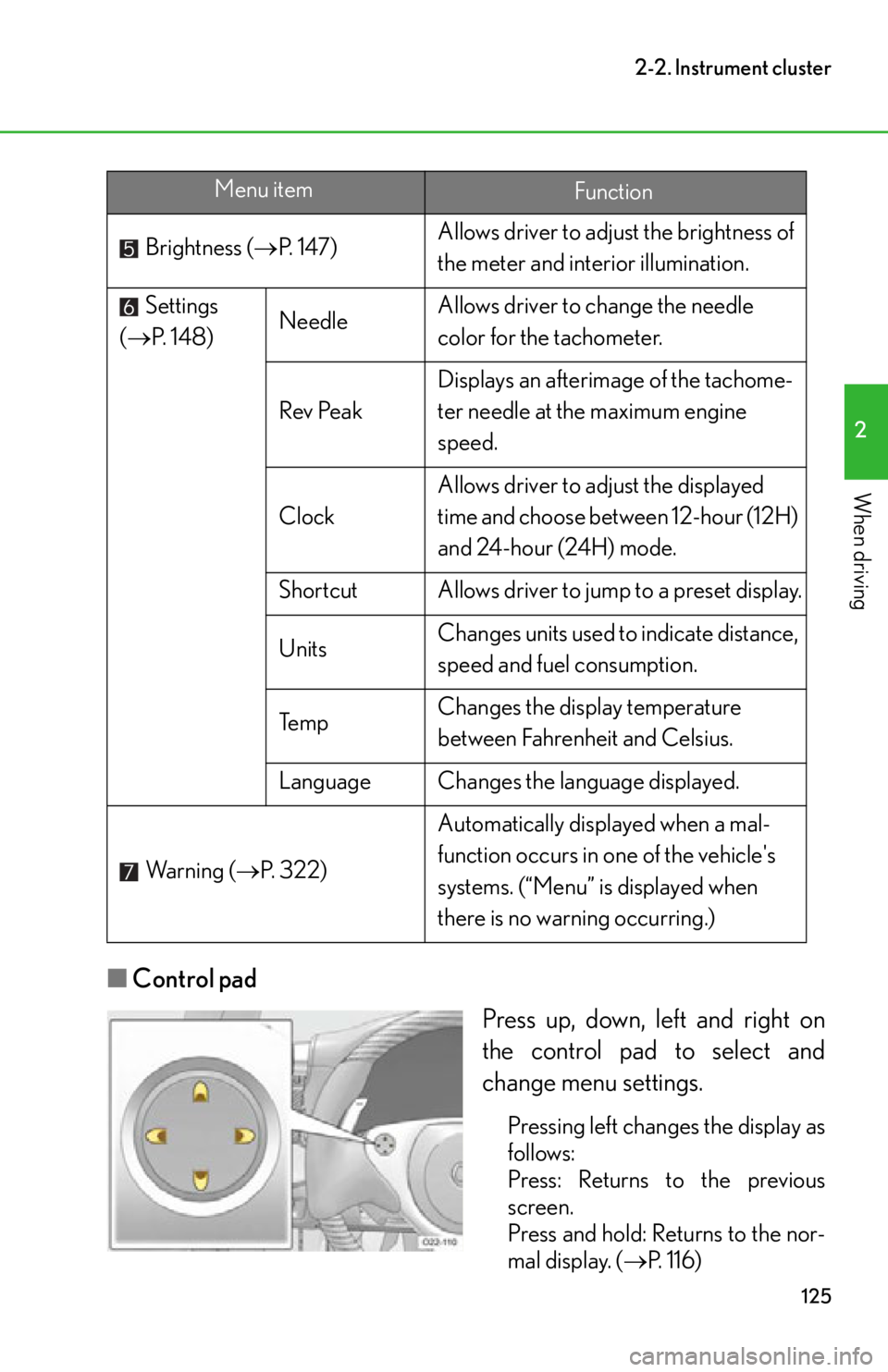
■Control pad
Press up, down, left and right on
the control pad to select and
change menu settings.
Pressing left changes the display as
follows:
Press: Returns to the previous
screen.
Press and hold: Returns to the nor-
mal display. (P. 116)
Brightness (
P. 1 4 7 ) Allows driver to adju
st the brightness of
the meter and interior illumination.
Settings
( P. 1 4 8 ) Needle
Allows driver to change the needle
color for the tachometer.
Rev Peak Displays an afterimage of the tachome-
ter needle at th
e maximum engine
speed.
Clock Allows driver to adjust the displayed
time and choose between 12-hour (12H)
and 24-hour (24H) mode.
Shortcut Allows driver to jump to a preset display.
Units Changes units used to indicate distance,
speed and fuel consumption.
Te m p Changes the display temperature
between Fahrenheit and Celsius.
Language Changes the language displayed.
Wa r n i n g ( P. 322) Automatically displayed when a mal-
function occurs in one of the vehicle's
systems. (“Menu” is displayed when
there is no warning occurring.)
Menu itemFunction
Page 131 of 420
129
2-2. Instrument cluster
2
When driving
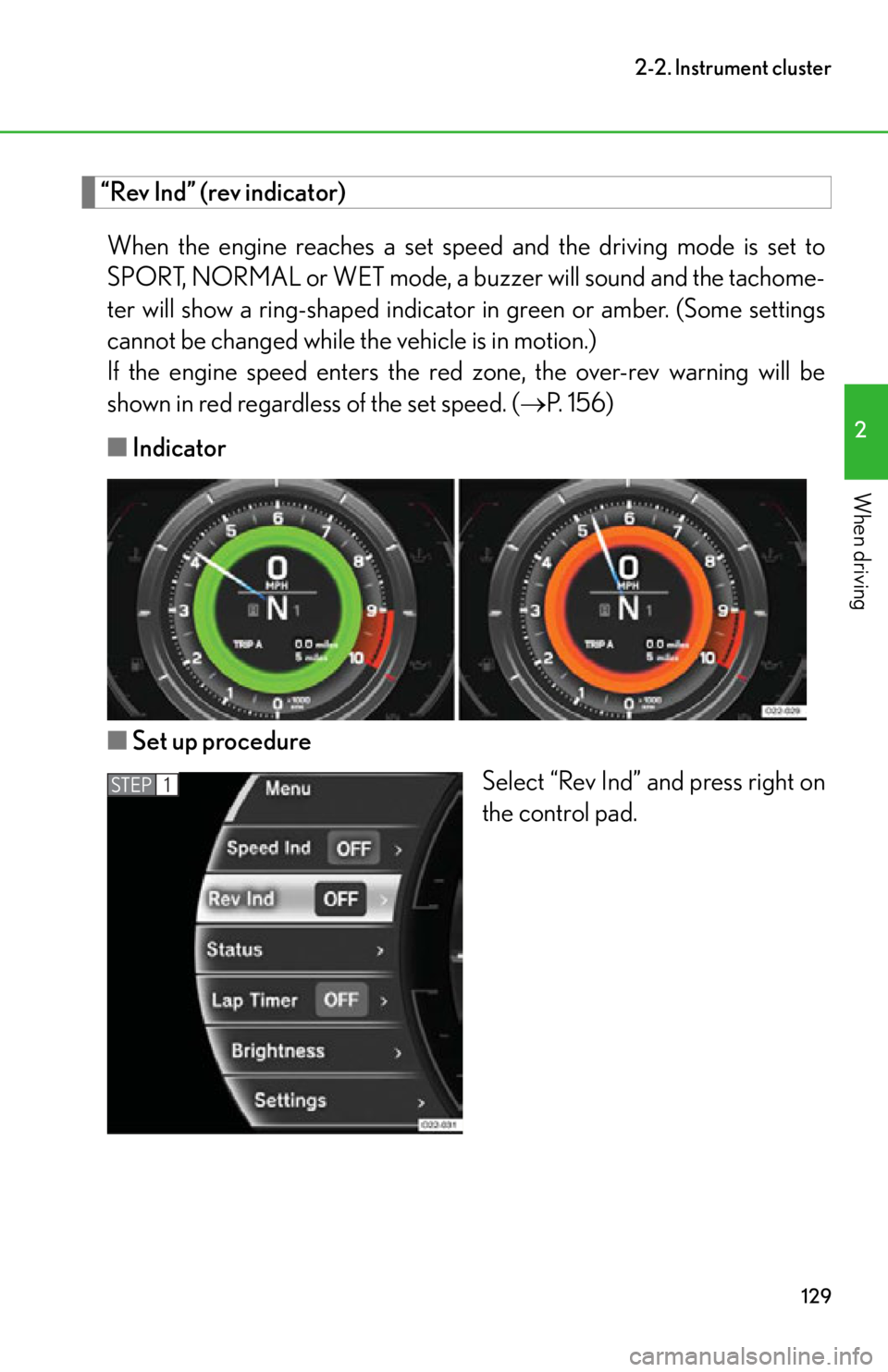
“Rev Ind” (rev indicator)When the engine reaches a set speed and the driving mode is set to
SPORT, NORMAL or WET mode, a buzzer will sound and the tachome-
ter will show a ring-shaped indicato r in green or amber. (Some settings
cannot be changed while the vehicle is in motion.)
If the engine speed enters the red zone, the over-rev warning will be
shown in red regardless of the set speed. ( P. 1 5 6 )
■ Indicator
■ Set up procedure
Select “Rev Ind” and press right on
the control pad.
STEP1
Page 132 of 420
130
2-2. Instrument cluster
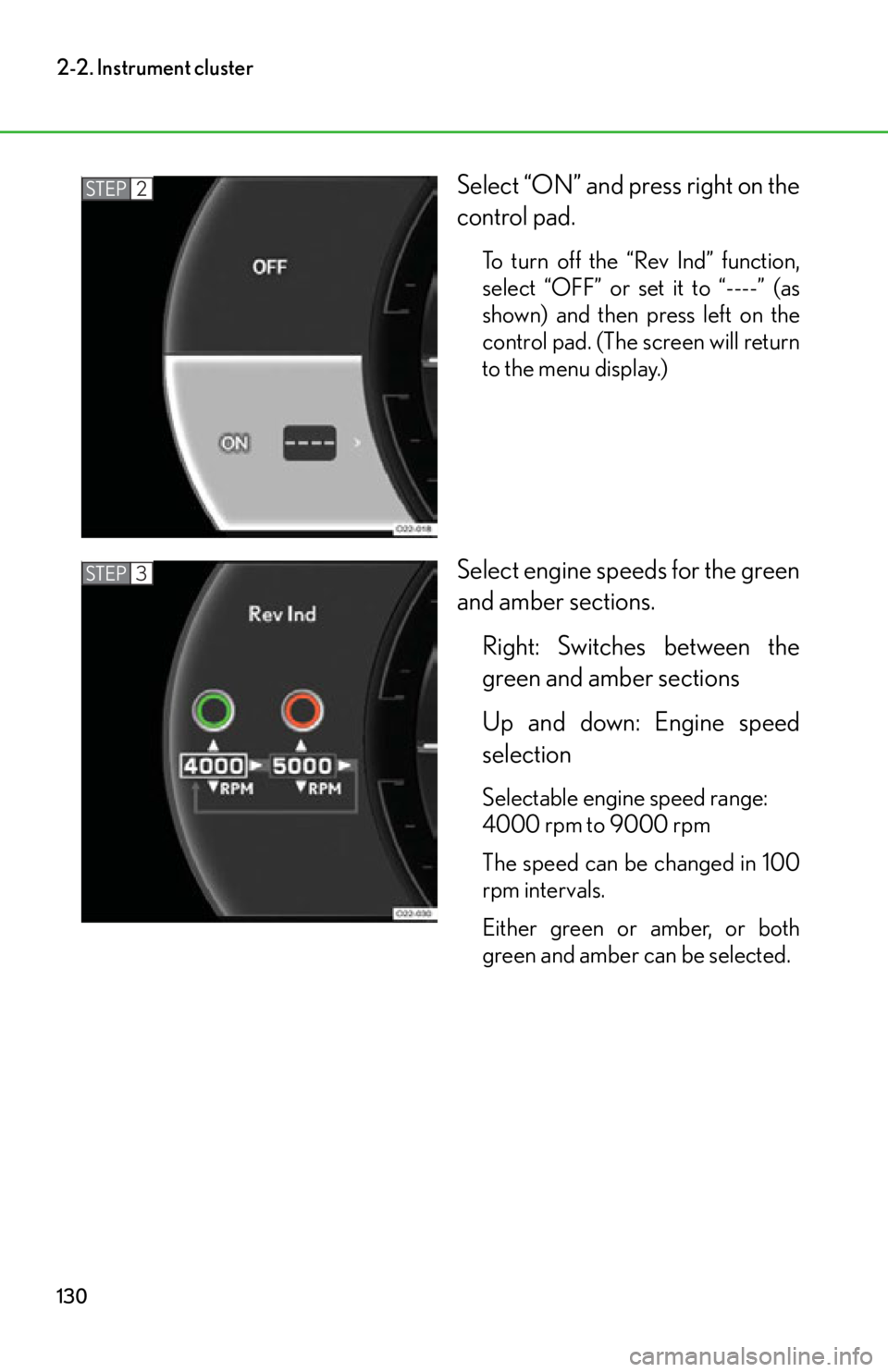
Select “ON” and press right on the
control pad.
To turn off the “Rev Ind” function,
select “OFF” or set it to “----” (as
shown) and then press left on the
control pad. (The screen will return
to the menu display.)
Select engine speeds for the green
and amber sections.Right: Switches between the
green and amber sections
Up and down: Engine speed
selection
Selectable engine speed range:
4000 rpm to 9000 rpm
The speed can be changed in 100
rpm intervals.
Either green or amber, or both
green and amber can be selected.
STEP2
STEP3
Page 133 of 420
131
2-2. Instrument cluster
2
When driving
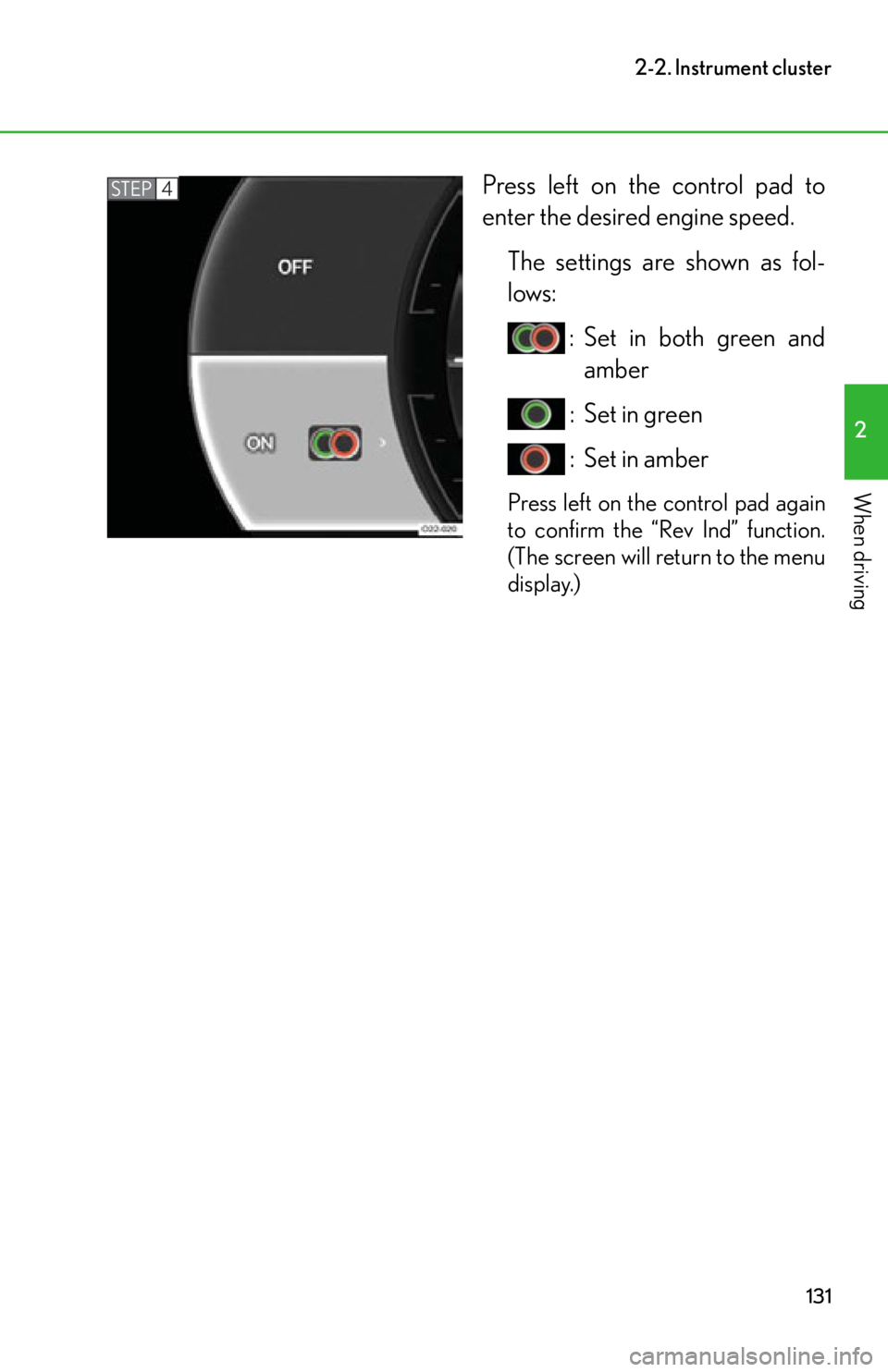
Press left on the control pad to
enter the desired engine speed.The settings are shown as fol-
lows: : Set in both green andamber
: Set in green
: Set in amber
Press left on the control pad again
to confirm the “Rev Ind” function.
(The screen will return to the menu
display.)
STEP4
Page 137 of 420
135
2-2. Instrument cluster
2
When driving
■“Oil Level” (engine oil level)
The amount of oil remaining in the ta nk can be calculated and is shown
on a scale of one to ten . If the engine oil level cannot be measured, the
reason will be shown on the screen.
Conditions for measurement
● The engine oil temperature is between 203 F and 230F (95C and
110 C).
● The engine is idling.
● The vehicle is stopped on level ground.
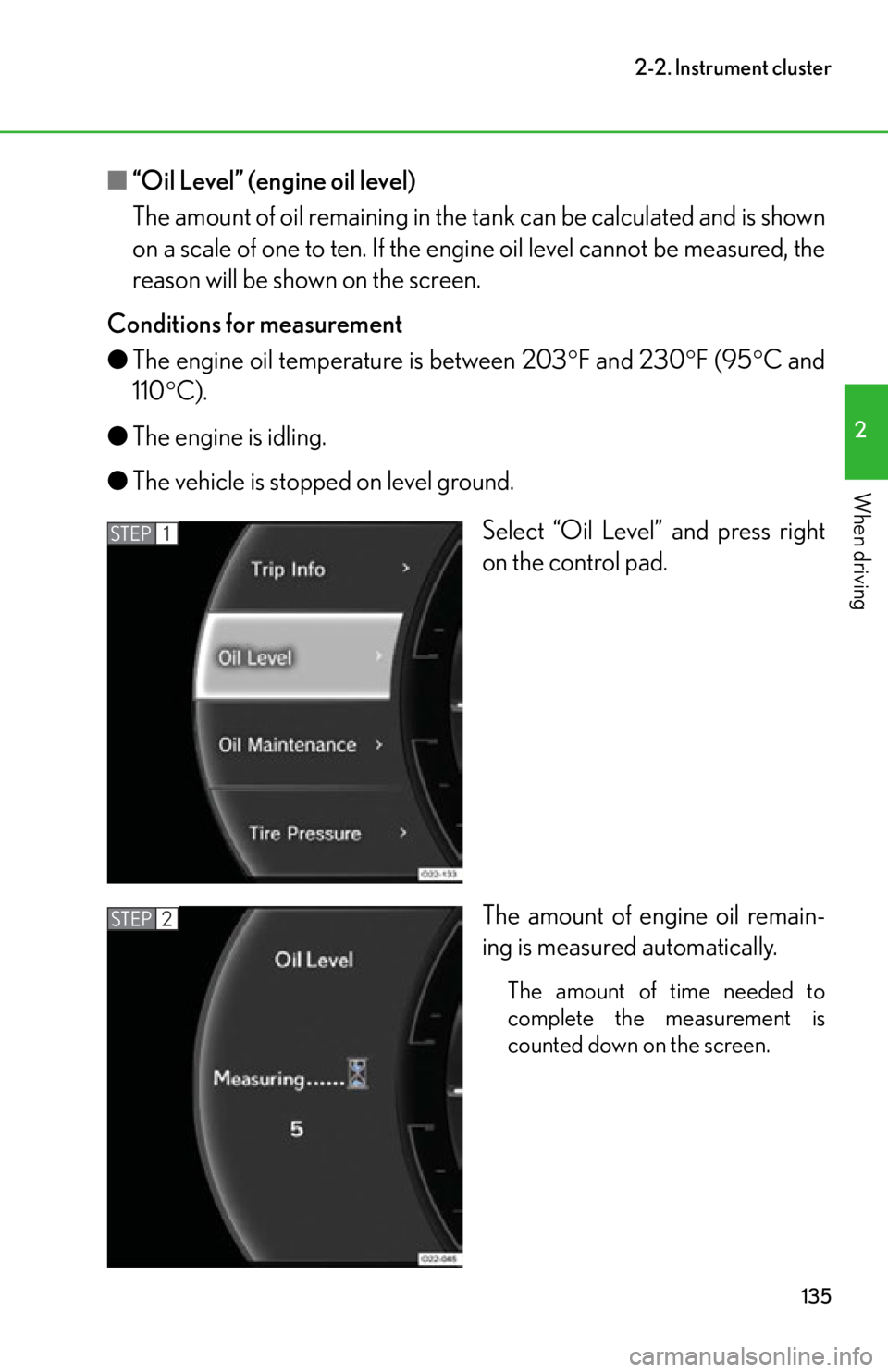
Select “Oil Level” and press right
on the control pad.
The amount of engine oil remain-
ing is measured automatically.
The amount of time needed to
complete the measurement is
counted down on the screen.
STEP1
STEP2
Page 138 of 420
136
2-2. Instrument cluster
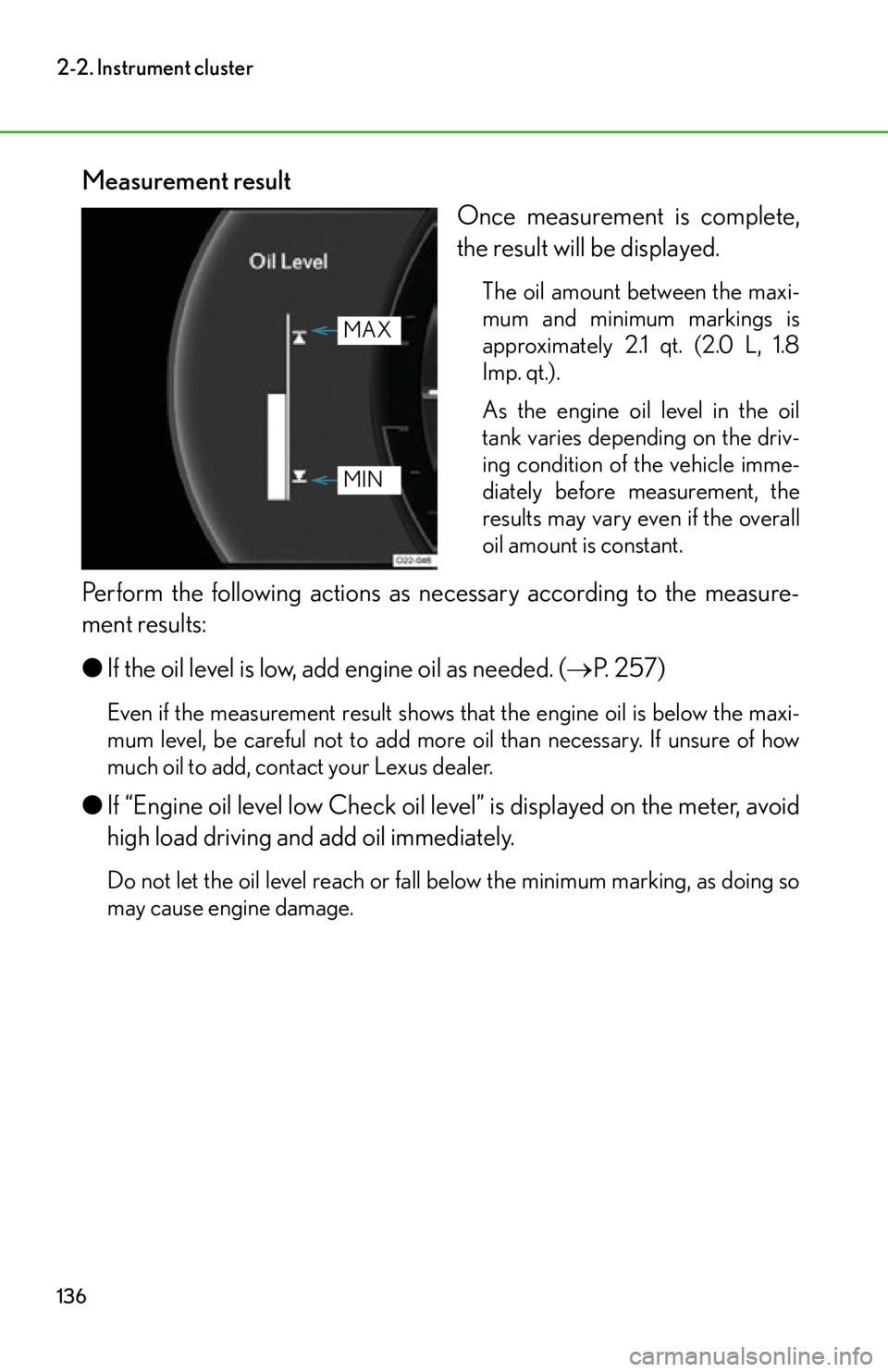
Measurement resultOnce measurement is complete,
the result will be displayed.
The oil amount between the maxi-
mum and minimum markings is
approximately 2.1 qt. (2.0 L, 1.8
Imp. qt.).
As the engine oil level in the oil
tank varies depending on the driv-
ing condition of the vehicle imme-
diately before measurement, the
results may vary even if the overall
oil amount is constant.
Perform the following actions as necessary according to the measure-
ment results:
● If the oil level is low, add engine oil as needed. ( P. 257)
Even if the measurement result shows th at the engine oil is below the maxi-
mum level, be careful not to add more oil than necessary. If unsure of how
much oil to add, contact your Lexus dealer.
● If “Engine oil level low Check oil le vel” is displayed on the meter, avoid
high load driving and add oil immediately.
Do not let the oil level reach or fall below the minimum marking, as doing so
may cause engine damage.
MAX
MIN
Page 139 of 420
137
2-2. Instrument cluster
2
When driving
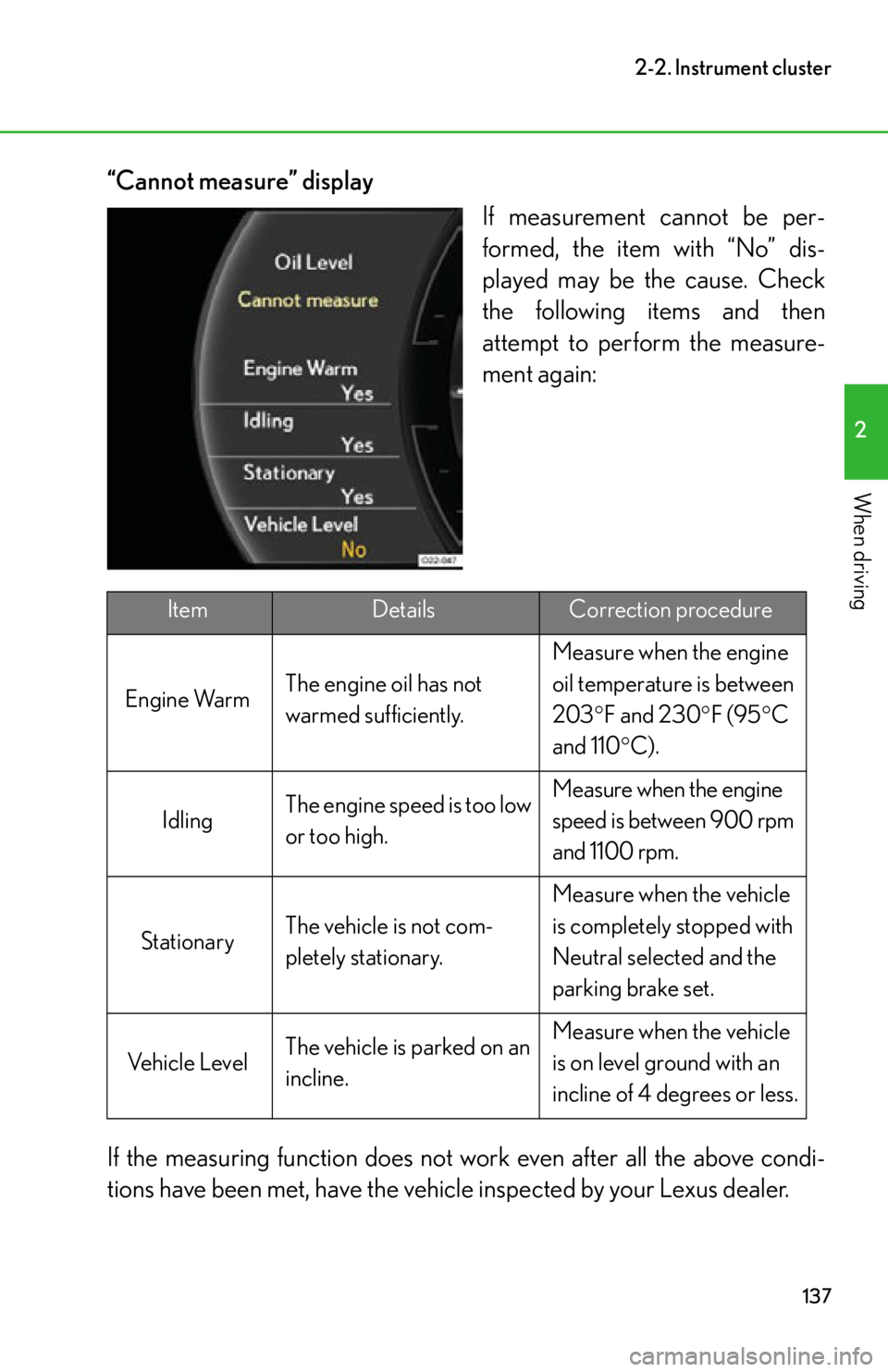
“Cannot measure” displayIf measurement cannot be per-
formed, the item with “No” dis-
played may be the cause. Check
the following items and then
attempt to perform the measure-
ment again:
If the measuring function does not work even after all the above condi-
tions have been met, have the vehicle inspected by your Lexus dealer.
ItemDetailsCorrection procedure
Engine Warm The engine oil has not
warmed sufficiently. Measure when the engine
oil temperature is between
203
F and 230 F (95 C
and 110 C).
Idling The engine speed is too low
or too high. Measure when the engine
speed is between 900 rpm
and 1100 rpm.
Stationary The vehicle is not com-
pletely stationary. Measure when the vehicle
is completely stopped with
Neutral selected and the
parking brake set.
Vehicle Level The vehicle is parked on an
incline. Measure when the vehicle
is on level ground with an
incline of 4 degrees or less.
Page 140 of 420
138
2-2. Instrument cluster
■“Oil Maintenance” (engine oil maintenance)
This system calculates engine oil replacement timing and reminds the
driver when it is time to replace th e oil. Resetting operation should be
performed at your Lexus dealer when you have them change the
engine oil. (This procedure cannot be performed while the vehicle is in
motion.)
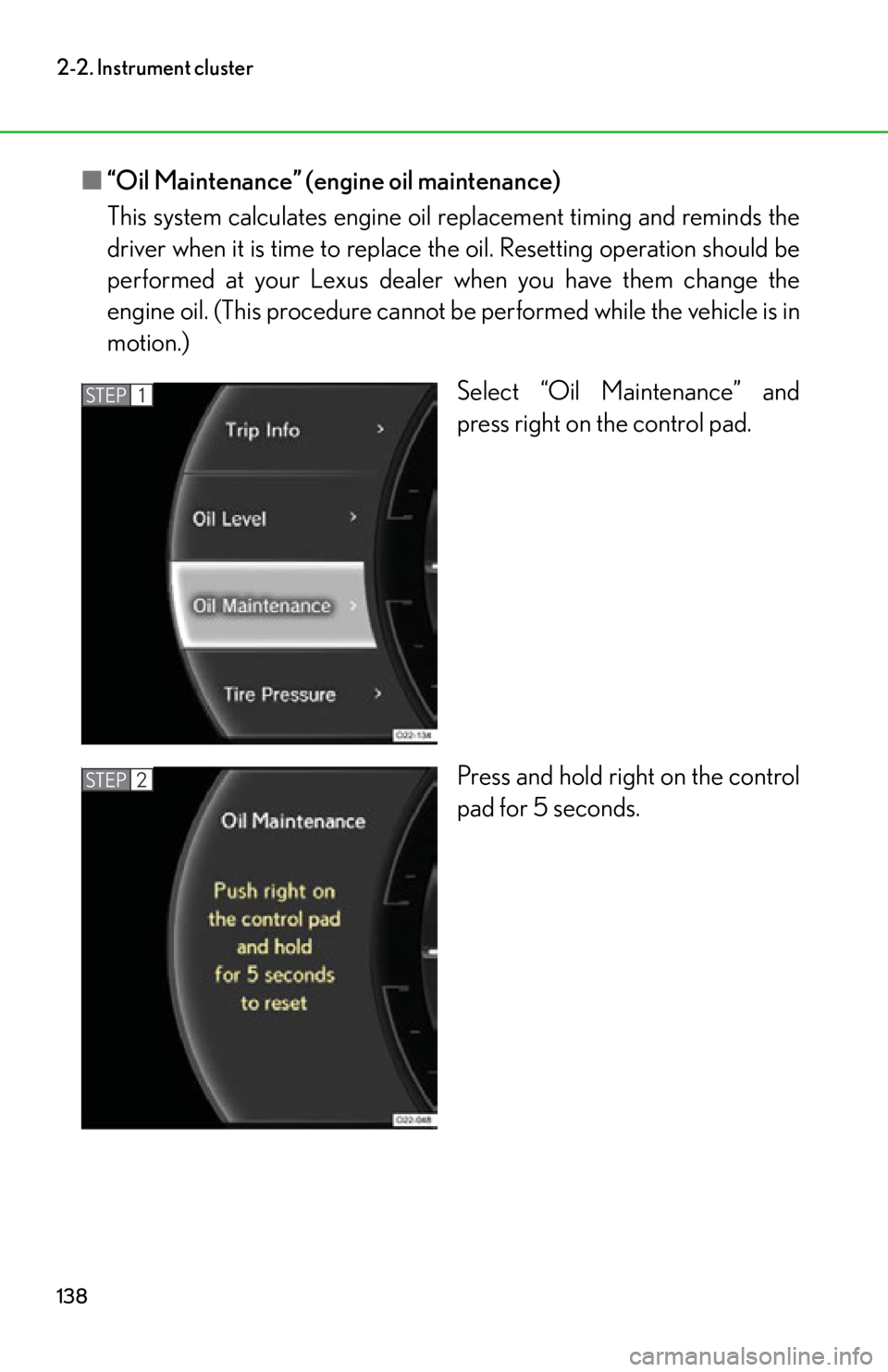
Select “Oil Maintenance” and
press right on the control pad.
Press and hold right on the control
pad for 5 seconds.
STEP1
STEP2