warning LEXUS LS430 2006 User Guide
[x] Cancel search | Manufacturer: LEXUS, Model Year: 2006, Model line: LS430, Model: LEXUS LS430 2006Pages: 419, PDF Size: 11.19 MB
Page 123 of 419
107
2-2. Instrument cluster
2
When driving
Multi-information display
Cruise information
■Changing the cruise information displayed
Push . Pushing the button changes the cruise information in the fol-
lowing order
• Available driving distance
• Average fuel consumption
• Current fuel consumption
• Average fuel consumption after being refueling
• Driving distance after being refueled
• Elapsed time
• Average vehicle speed
• No display
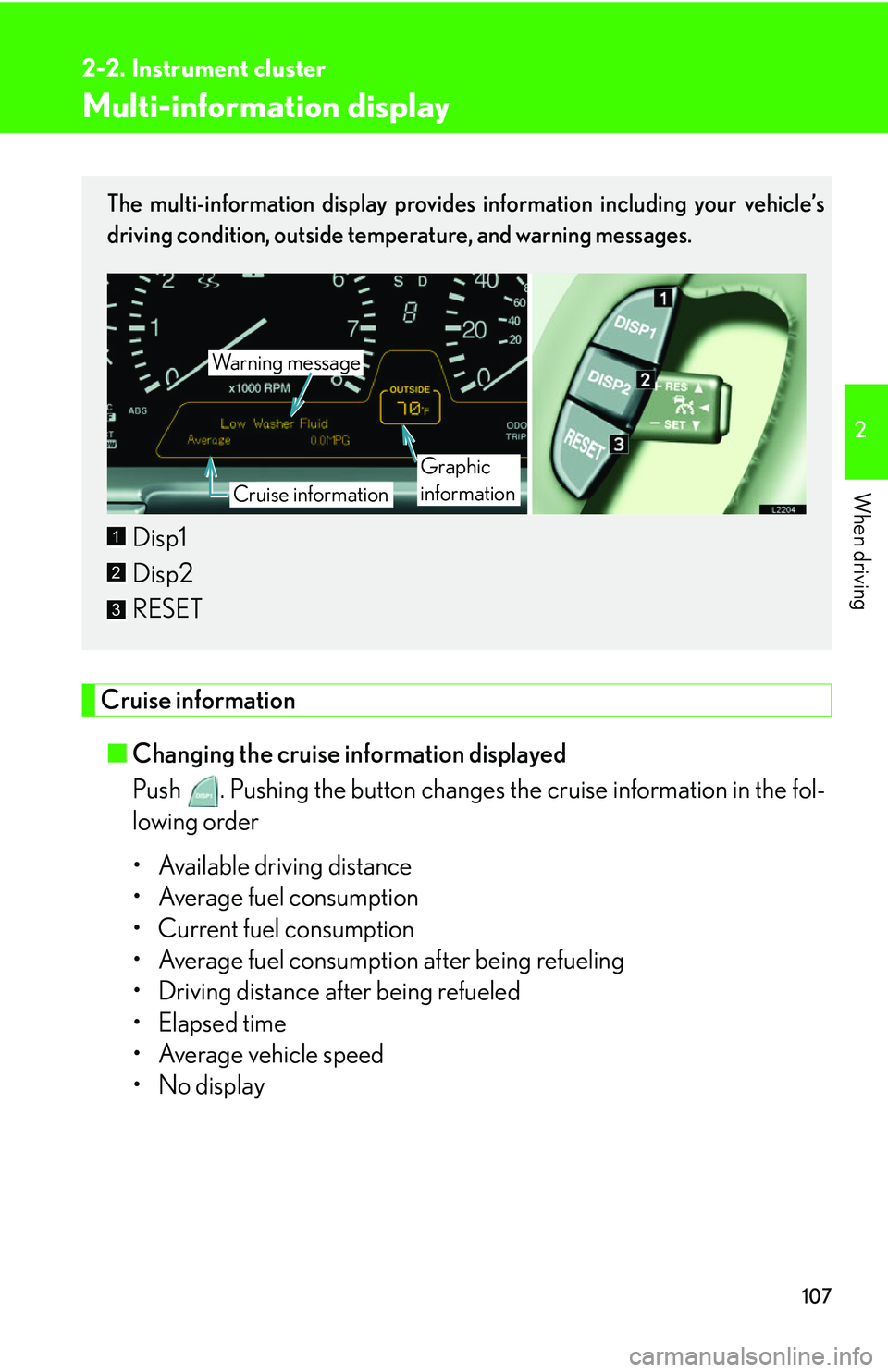
The multi-information display provides information including your vehicle’s
driving condition, outside temperature, and warning messages.
Disp1
Disp2
RESET
Wa r n i n g m e s s a g e
Cruise information
Graphic
information
1
2
3
Page 125 of 419
109
2-2. Instrument cluster
2
When driving
Graphic information
Following graphic information is shown on the display
• Outside temperature display ( P.216 )
• Compass display (if equipped P.238 )
• Dynamic radar/ laser cruise control display (if equipped P.129 )
Appears when activate the system
• Lexus park assist system display (if equipped P.118 )
Appears when the system is activated
• Door ajar (with warning message P.334 )
Appears when any door is opened with the ignition s
witch is ON
position
Each time you push and hold for 1 or 2 seconds, the graphic informa-
tion changes in the following order
Compass display**
Outside temperature display Dynamic radar/
laser cruise control display**
Blank screen
**Skipped if not equipped or not activated
■Wa r n i n g m e s s a g e s
If any problem (malfunction) arises, a warning message appears on the
multi-information display. (
P. 334 )
Page 137 of 419
121
2-4. Using other driving systems
2
When driving
■Objects which may not be detected
●Wires or ropes.
●Objects with a surface area too small to reflect ultrasonic waves such as a
chain-link fence.
●Sound wave absorbing objects such as cotton or snow.
●Objects with a sharp edge.
●Shorter objects.
●Tall objects with the upper part projected.
■Operating condition
The ignition switch must b
e turned to ON.
■Park assist graphics (vehicles equippe d with the Navigation system) System
The park assist graphics also appear on the n
avigation display. For details, see the
separate “Navigation System Owner’s Manual”.
■Certification for the Lexus park assist system (Canada)
This ISM device complies with Canadian ICES-001.
■Failure warnings
If a system error is detected, the master warning light comes on, 5 beeps sound, the
fo
llowing warning message appears, and gr aphic information indicates the faulty
sensor. ( P.334 )
■Customization
The volume of the beeps can be changed. ( P. 3 8 4 )
Page 144 of 419
128
2-4. Using other driving systems
■Automatic cruise control cancellation
Cruise control is automatically cancelled
in any of the following situations.
• Actual vehicle speed is more than 10 mph
(16 km/h) below the preset vehicle
speed.
• Vehicle speed is less than 25 mph (40 km/h).
• The slip indicator light blinks and a warning tone sounds.
■If the cruise control indicator light flashes
Turn the ON-OFF switch off once, and then reactivate the system. There may be a
malfunction in the cruise control system if the indicator light does not come on,
flashes again or goes out after it comes on. Have the vehicle inspected by your
Lexus dealer.
CAUTION
■To avoid inadvertent cruise control activation
Keep the ON-OFF switch off when not in use.
■Locations unsuitable for cruise control
●Do not use cruise control in any of the following situations.
Doing so may result in control of the v
ehicle being lost and may cause an acci -
dent.
• In heavy traffic.
• On roads with sharp bends.
• On slippery roads, such as th o
se covered with ice or snow.
• On steep hills.
• On winding roads.
Page 147 of 419
131
2-4. Using other driving systems
2
When driving
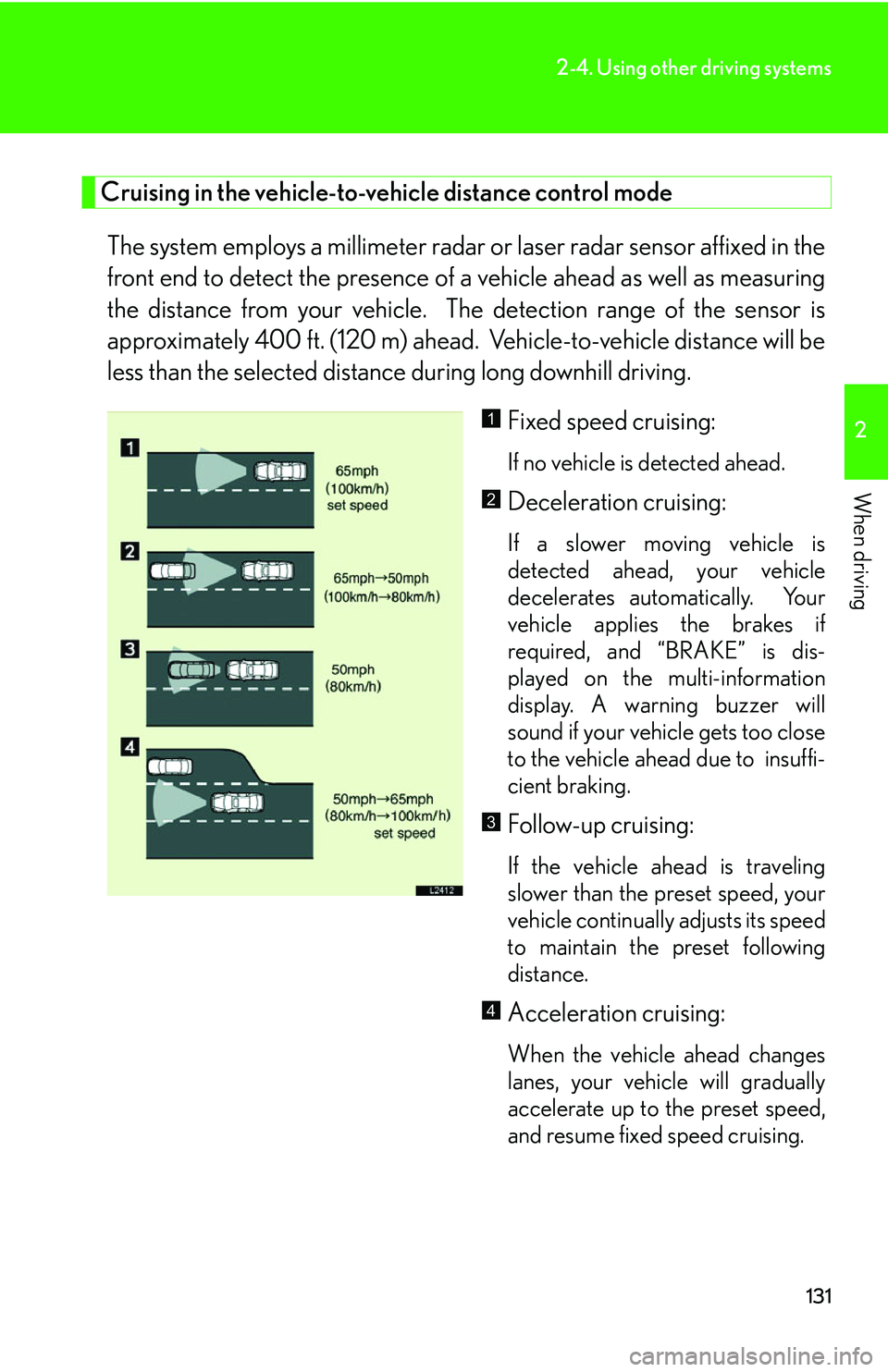
Cruising in the vehicle-to-vehicle distance control mode
The system employs a millimeter radar or laser radar sensor affixed in the
front end to detect the pr esence of a vehicle ahead as well as measuring
the distance from your vehicle. The detection range of the sensor is
approximately 400 ft. (120 m) ahead. Vehicle-to-vehicle distance will be
less than the selected distance during long downhill driving.
Fixed speed cruising:
If no vehicle is detected ahead.
Deceleration cruising:
If a slower moving vehicle is
detected ahead, your vehicle
decelerates automatically. Your
vehicle applies the brakes if
required, and “BRAKE” is dis -
played on the multi-information
displa
y. A warning buzzer will
sound if your vehicle gets too close
to the vehicle ahead due to insuffi -
cient braking.
Follow-up cruising:
If the vehicle ahead is traveling
slower than the preset speed, your
vehicle continually adjusts its speed
to maintain the preset following
distance.
Acceleration cruising:
When the vehicle ahead changes
lanes, your vehicle will gradually
accelerate up to the preset speed,
and resume fixed speed cruising.
1
2
3
4
Page 148 of 419
132
2-4. Using other driving systems
■Setting vehicle speed
Settings can be made when the vehicle
is traveling above 28 mph (45 km/h).
■Unsuitable conditions
You cannot set the speed in the following conditions:
• When the selector lever is in a position other than D, 4, 5, or 6.
• When driving in adverse weather conditions.
■Automatic cruise control cancellation
In the following cases, the preset speed is can ce
lled. If the system is restored, cruise
control enters the ready mode.
• The slip indicator light blinks and a warning tone sounds.
• The anti-lock braking system activates.
• Foreign matter adheres to the sensor.
• The driving pattern selector sw it
ch is set to “SNOW” mode.
• The wipers are operated at high speed (radar), or either high or low speeds (l
aser). This includes high and low speed operation with the wiper lever in the
AUTO position.
• The vehicle’s speed falls below 25 mph (40 km/h). In this case, you must apply th
e brakes manually to slow the vehicle.
If the preset speed automatically cancels out for other than the above reasons, the
sy
stem may have malfunctioned. Do not operate the dynamic radar/laser cruise
control. You may continue driving, howe ver have your vehicle checked by your
Lexus dealer at the earliest opportunity.
Page 150 of 419
134
2-4. Using other driving systems
■Certifications for the millimeter wave radar laser sensor/ laser radar sensor
(U.S.A.)
●Millimeter wave radar sensor
FCC WARNING:
Changes or modifications not expressly approved by the party responsible for
com
pliance could void the user’s authority to operate the equipment.
FCC RF exposure information:
This device complies with the FCC RF exposure requirements.
●Laser radar sensor
This product is a class I laser product complied with 21 C.F.R part 1040.10 and
10
40.11.
■Certifications for the millimeter wave radar laser sensor/ laser radar sensor
(Canada)
Millimeter wave radar sensor
Operation is subject to the following two conditions;
1. this device may not c
ause interference, and
2. this device must accept any interference r
eceived, including interference that
may cause undesired operation of the device.
■If the master warning light comes on and a warning message appears on the
multi-information display
If a system malfunction occurs when the dyn
amic radar/laser cruise control is on or
in the “RADAR READY” mode, the master warning light comes on, the “CRUISE”
indicator light flashes, a warning tone so unds, and “Check Cruise System” is dis-
played. ( P.334 )
Page 151 of 419
135
2-4. Using other driving systems
2
When driving
CAUTION
■To avoid accidentally engaging the cruise control
Keep the ON-OFF switch OFF when not in use.
■To avoid death or serious injury
The following conditions are unsuitable for cruise control use:
• In bad weather (rain, fog, sno
w, sandstorms, etc.)
• If the wipers are operated at high speed (radar cruise control), or at high or low spe
eds (laser cruise control.) This includes when the wiper lever is set to the
“AUTO” position.
• In heavy traffic.
• On roads with sharp bends.
• On slippery road surfaces.
• On steep downhill slopes.
• When the warning tone sounds frequently.
• On roads with steep, short inclines and declines.
• When exiting from, or when ente ri
ng or merging onto a freeway.
■When using the dynamic radar/laser cruise control
Always drive carefully and attentively.
Do not rely on the system to avoid accidents or control the vehicle’s speed in emer -
gency situations. The cruise control is not a collision-av
oidance system.
■Conditions which hinder the radar cruise control's vehicle detection capability
●The rear section of the vehicle ahead is extremely small (unloaded trailer etc.)
●The vehicle ahead or other vehicles are flinging up water or snow.
●Heavy luggage in your trunk or on your rear seats causes the nose of your vehicle
to rise.
Page 153 of 419
137
2-4. Using other driving systems
2
When driving
CAUTION
■Approach warning
The system warns you to apply the brakes manuall
y to slow down, helping to ensure
that sufficient vehicle-to-vehicle distance is maintained.
Be careful of slow moving or stationary ve hi
cles or objects when traveling at high
speeds, e.g. vehicles at the end of the line in heavy traffic or at tollgates.
■The approach warning may not activate in the following situations
●Your vehicle and the vehicle ahead are cruising at almost the same speed.
●The vehicle ahead is cruising at a faster speed than yours.
●Immediately after setting the speed.
●The accelerator pedal is depressed, or immediately after release of the accelera -
tor pedal.
Page 157 of 419

141
2-4. Using other driving systems
2
When driving
To disable VSC and TRAC
If the vehicle gets stuck in fresh snow or mud, VSC and TRAC may
reduce power from the engine to the wheels. You may need to turn VSC
and TRAC off to enable you to rock the vehicle in order to free the vehi-
cle.
Push the button to turn off VSC
and TRAC.
The TRAC OFF indicator light
turns on.
Push the button again to turn the
sy
stem back on.
1
■Operating sounds and vibrations caus ed by the ABS, VSC & TRAC systems
●A sound may be heard from the engine compartment when the engine is
started or just after the vehicle begins to move. This sound does not indicate that
a malfunction has occurred in any of these systems.
●Any of the following conditions may occur when the ABS, VSC and TRAC sys -
tems are operating. None of these indicates that a malfunction has occurred.
• A sound may be heard.
• Vibrations may be felt through the vehicle body and steering.
• A motor sound may be heard after the vehicle comes to a stop.
• The brake pedal may pulsate slightly while the ABS is activated.
• The brake pedal may move forward slightly after the ABS is activated.
■Failure warning for VSC or TRAC system
If an error in the VSC or TRAC systems is
detected, the master warning light and
TRAC OFF indicator light comes on, a warning tone sounds. (P.334 )