reset LEXUS LS430 2006 Owners Manual
[x] Cancel search | Manufacturer: LEXUS, Model Year: 2006, Model line: LS430, Model: LEXUS LS430 2006Pages: 419, PDF Size: 11.19 MB
Page 11 of 419
A
B
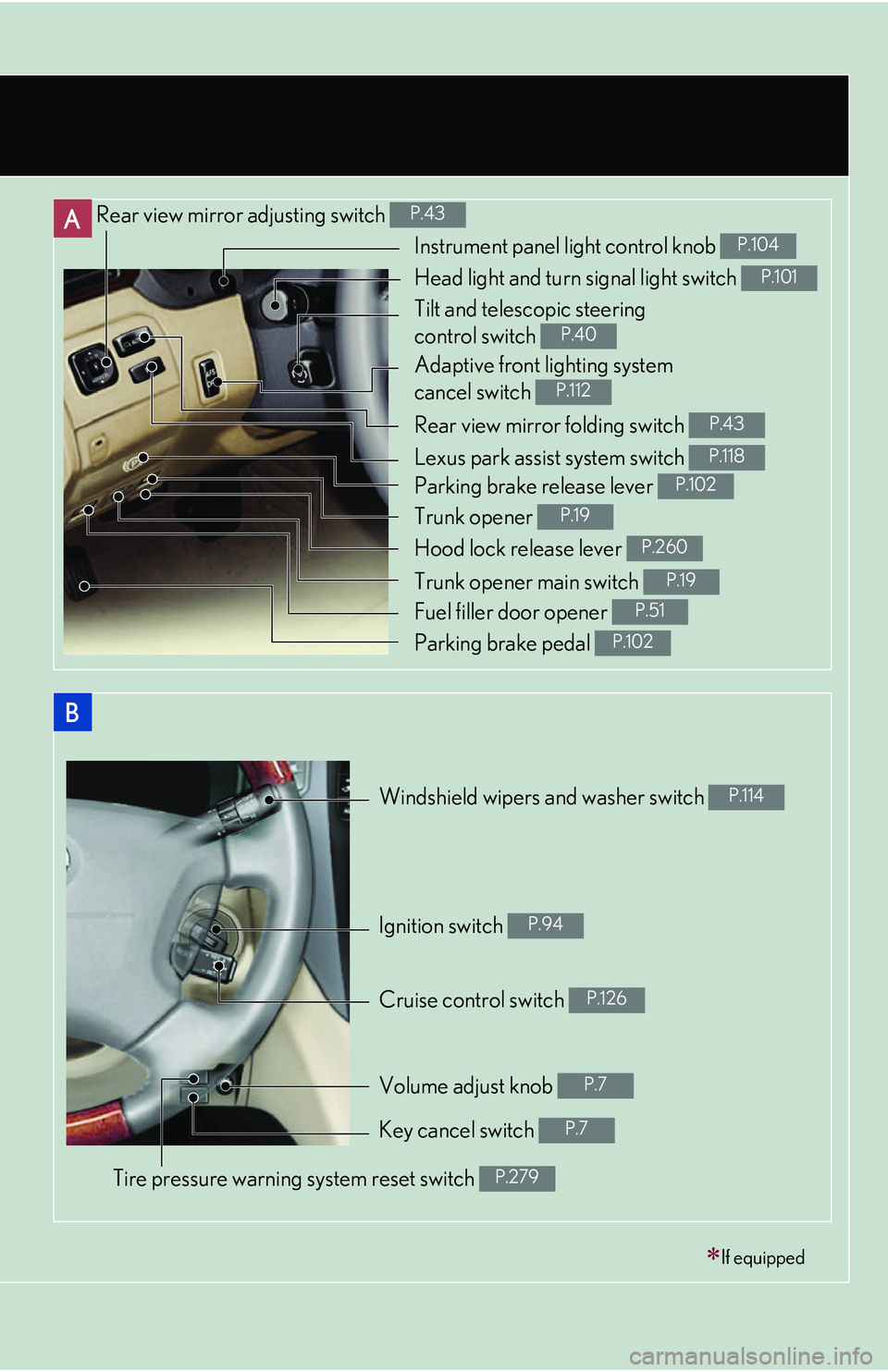
Rear view mirror adjusting switch P.43
Rear view mirror folding switch P.43
Windshield wipers and washer switch P.114
Cruise control switch P.126
If equipped
Instrument panel light control knob P.104
Head light and turn signal light switch P.101
Tilt and telescopic steering
control switch
P.40
Adaptive front lighting system
cancel switch
P.112
Lexus park assist system switch P.118
Parking brake release lever P.102
Trunk opener P.19
Hood lock release lever P.260
Trunk opener main switch P.19
Fuel filler door opener P.51
Parking brake pedal P.102
Ignition switch P.94
Volume adjust knob P.7
Key cancel switch P.7
Tire pressure warning system reset switch P.279
Page 119 of 419
103
2
When driving
2-2. Instrument cluster
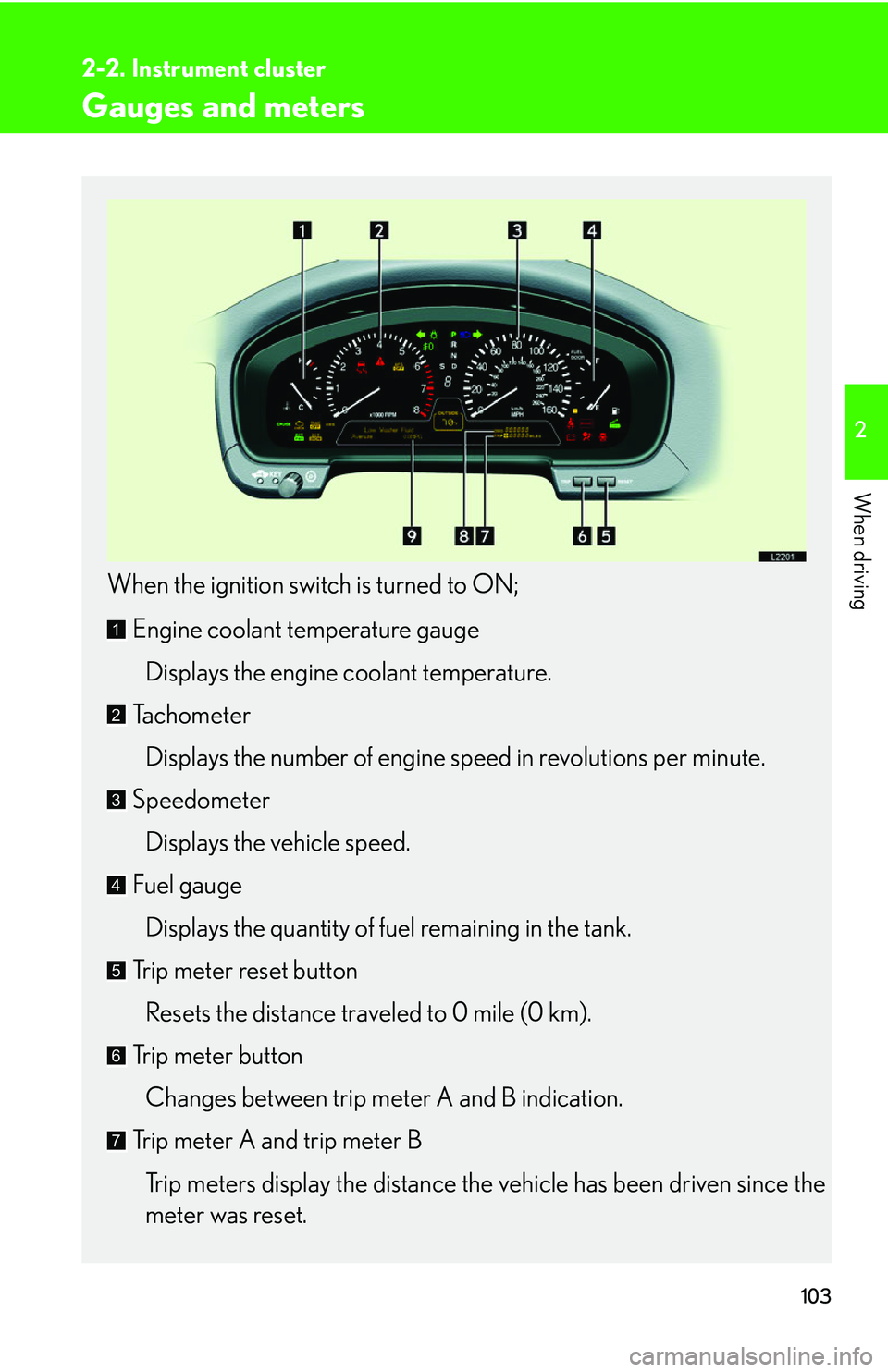
Gauges and meters
When the ignition switch is turned to ON;
Engine coolant temperature gaugeDisplays the engine coolant temperature.
Tachometer
Displays the number of engine speed in revolutions per minute.
Speedometer Displays the vehicle speed.
Fuel gauge Displays the quantity of fuel remaining in the tank.
Trip meter reset button
Resets the distance traveled to 0 mile (0 km).
Trip meter button Changes between trip meter A and B indication.
Trip meter A and trip meter B Trip meters display the distance the v
ehicle has been driven since the
meter was reset.
1
2
3
4
5
6
7
Page 123 of 419
107
2-2. Instrument cluster
2
When driving
Multi-information display
Cruise information
■Changing the cruise information displayed
Push . Pushing the button changes the cruise information in the fol-
lowing order
• Available driving distance
• Average fuel consumption
• Current fuel consumption
• Average fuel consumption after being refueling
• Driving distance after being refueled
• Elapsed time
• Average vehicle speed
• No display
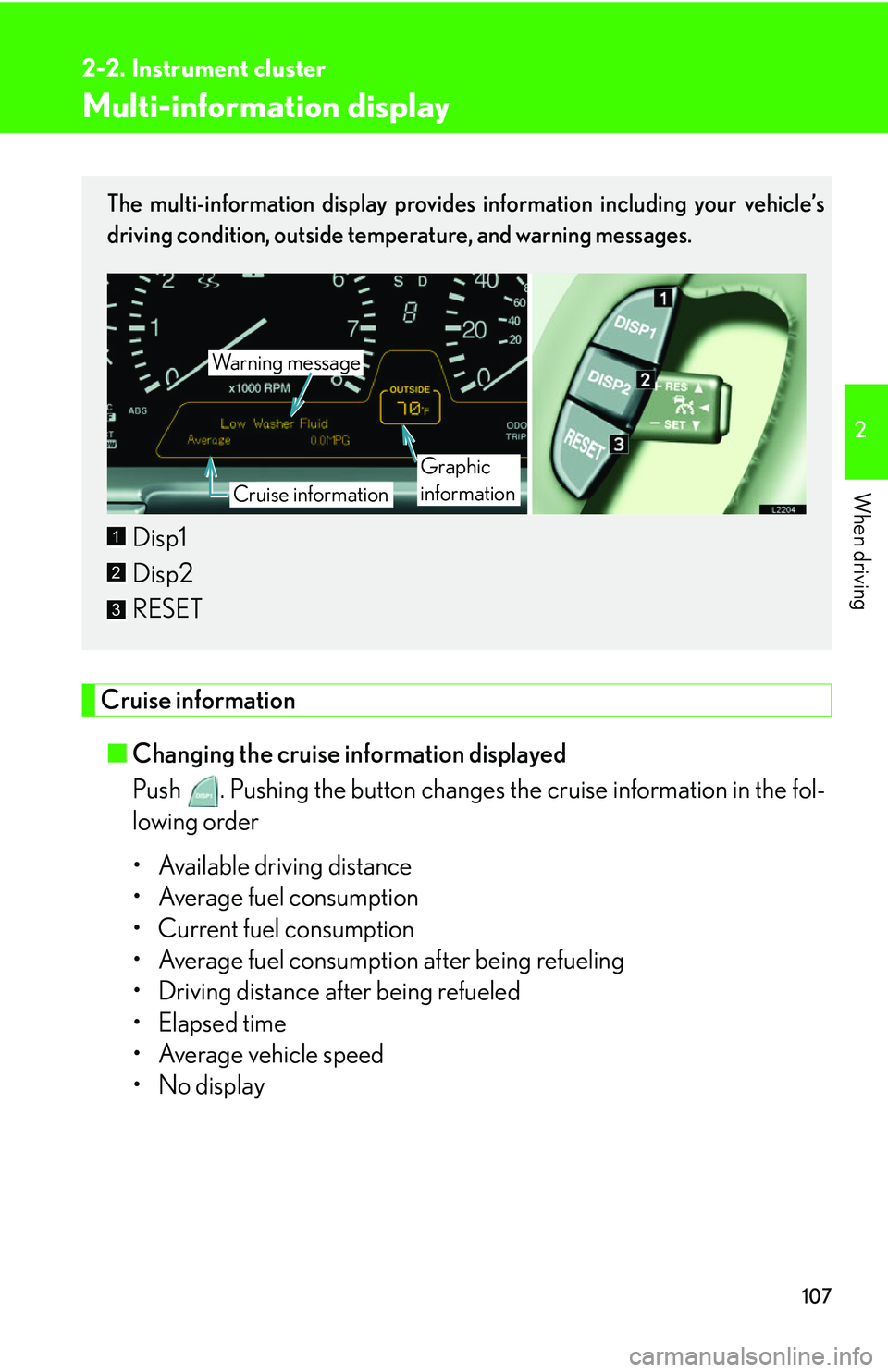
The multi-information display provides information including your vehicle’s
driving condition, outside temperature, and warning messages.
Disp1
Disp2
RESET
Wa r n i n g m e s s a g e
Cruise information
Graphic
information
1
2
3
Page 124 of 419
108
2-2. Instrument cluster
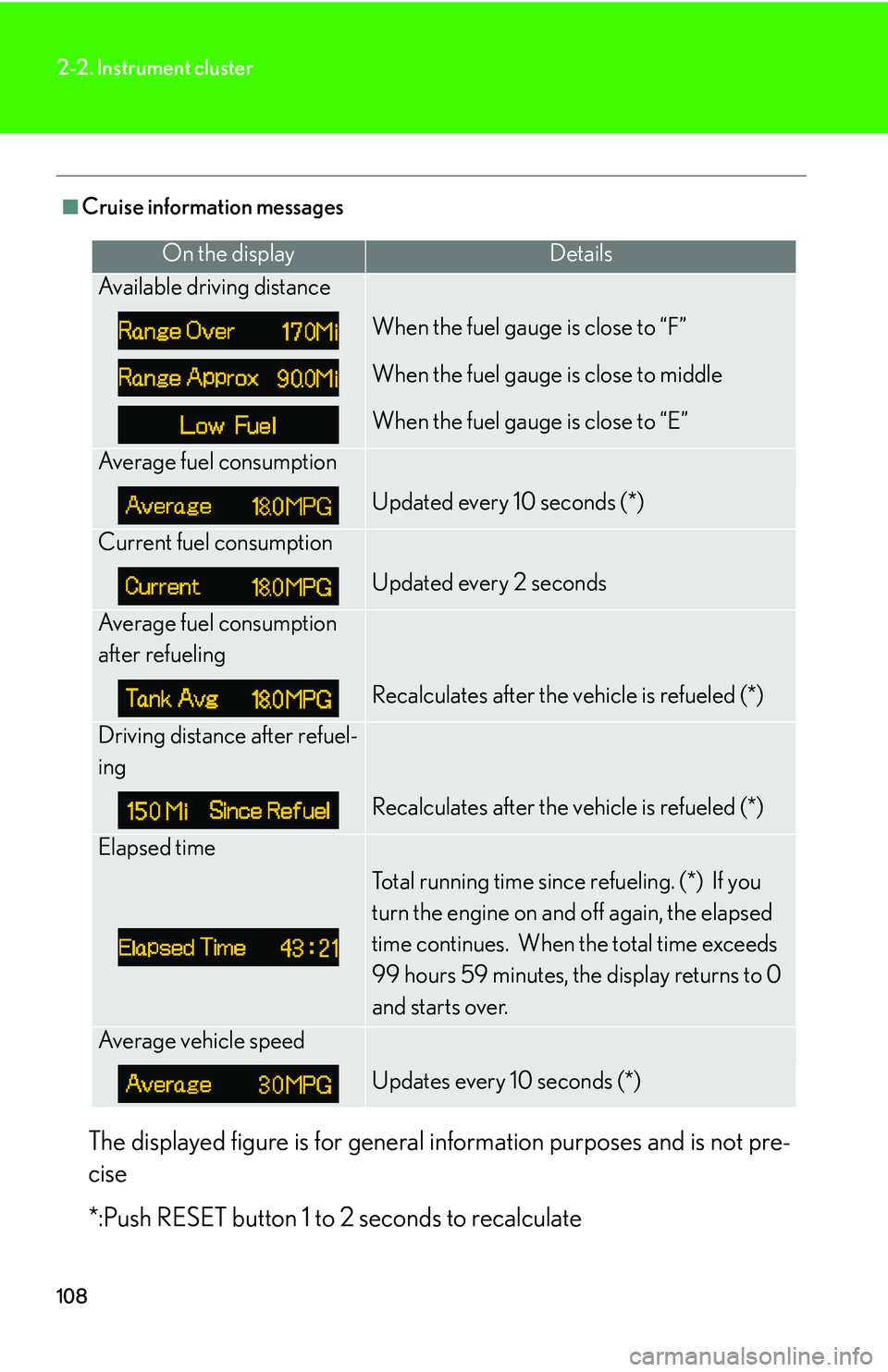
■Cruise information messages
The displayed figure is for general information purposes and is not pre -
cise
*:Push RESET button 1 to 2 se
conds to recalculate
On the displayDetails
Available driving distance
When the fuel gauge is close to “F”
When the fuel gauge is close to middle
When the fuel gauge is close to “E”
Average fuel consumption
Updated every 10 seconds (*)
Current fuel consumption
Updated every 2 seconds
Average fuel consumption
after refueling
Recalculates after the vehicle is refueled (*)
Driving distance after refuel-
ing
Recalculates after the vehicle is refueled (*)
Elapsed time
Total running time since refueling. (*) If you
turn the engine on and off again, the elapsed
time continues. When the total time exceeds
99 hours 59 minutes, the display returns to 0
and starts over.
Average vehicle speed
Updates every 10 seconds (*)
Page 143 of 419
127
2-4. Using other driving systems
2
When driving
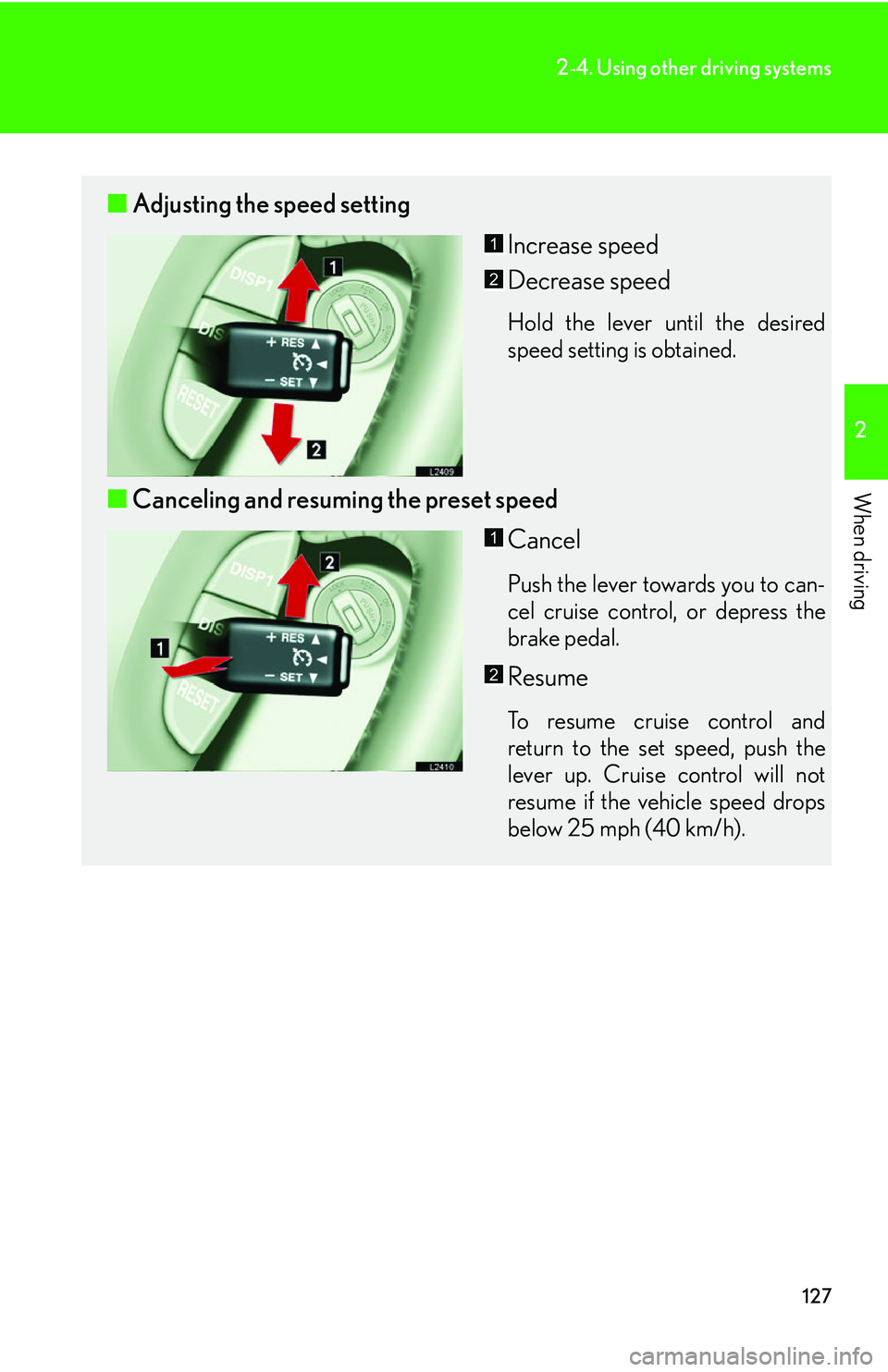
■Adjusting the speed setting
Increase speed
Decrease speed
Hold the lever until the desired
speed setting is obtained.
■Canceling and resuming the preset speed
Cancel
Push the lever towards you to can-
cel cruise control, or depress the
br
ake pedal.
Resume
To resume cruise control and
return to the set speed, push the
lever up. Cruise control will not
resume if the vehicle speed drops
below 25 mph (40 km/h).
1
2
1
2
Page 144 of 419
128
2-4. Using other driving systems
■Automatic cruise control cancellation
Cruise control is automatically cancelled
in any of the following situations.
• Actual vehicle speed is more than 10 mph
(16 km/h) below the preset vehicle
speed.
• Vehicle speed is less than 25 mph (40 km/h).
• The slip indicator light blinks and a warning tone sounds.
■If the cruise control indicator light flashes
Turn the ON-OFF switch off once, and then reactivate the system. There may be a
malfunction in the cruise control system if the indicator light does not come on,
flashes again or goes out after it comes on. Have the vehicle inspected by your
Lexus dealer.
CAUTION
■To avoid inadvertent cruise control activation
Keep the ON-OFF switch off when not in use.
■Locations unsuitable for cruise control
●Do not use cruise control in any of the following situations.
Doing so may result in control of the v
ehicle being lost and may cause an acci -
dent.
• In heavy traffic.
• On roads with sharp bends.
• On slippery roads, such as th o
se covered with ice or snow.
• On steep hills.
• On winding roads.
Page 145 of 419
129
2-4. Using other driving systems
2
When driving
Dynamic radar/ laser cruise control
The vehicle-to-vehicle distance control mode allows the vehicle to follow
another vehicle, adjusting to the leading vehicle’s speed variations, and the
conventional cruise control mode allows for driving at a preset speed, both
without the need to press the accelerator pedal.
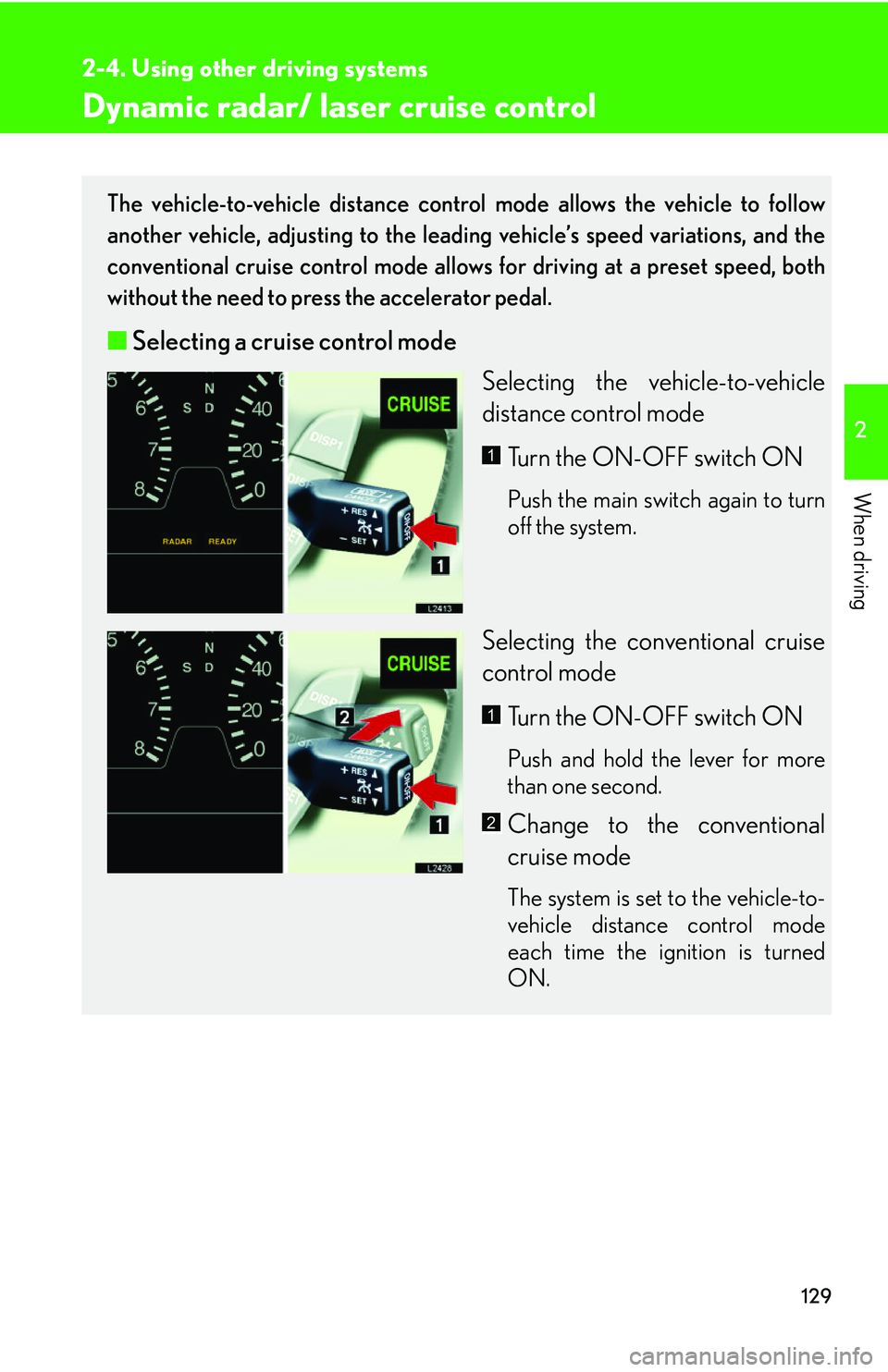
■ Selecting a cruise control mode
Selecting the vehicle-to-vehicle
distance contr
ol mode
Turn the ON-OFF switch ON
Push the main switch again to turn
off the system.
Selecting the conventional cruise
control mode Turn the ON-OFF switch ON
Push and hold the lever for more
than one second.
Change to the conventional
cruise mode
The system is set to the vehicle-to-
vehicle distance control mode
each time the ignition is turned
ON.
1
1
2
Page 146 of 419
130
2-4. Using other driving systems
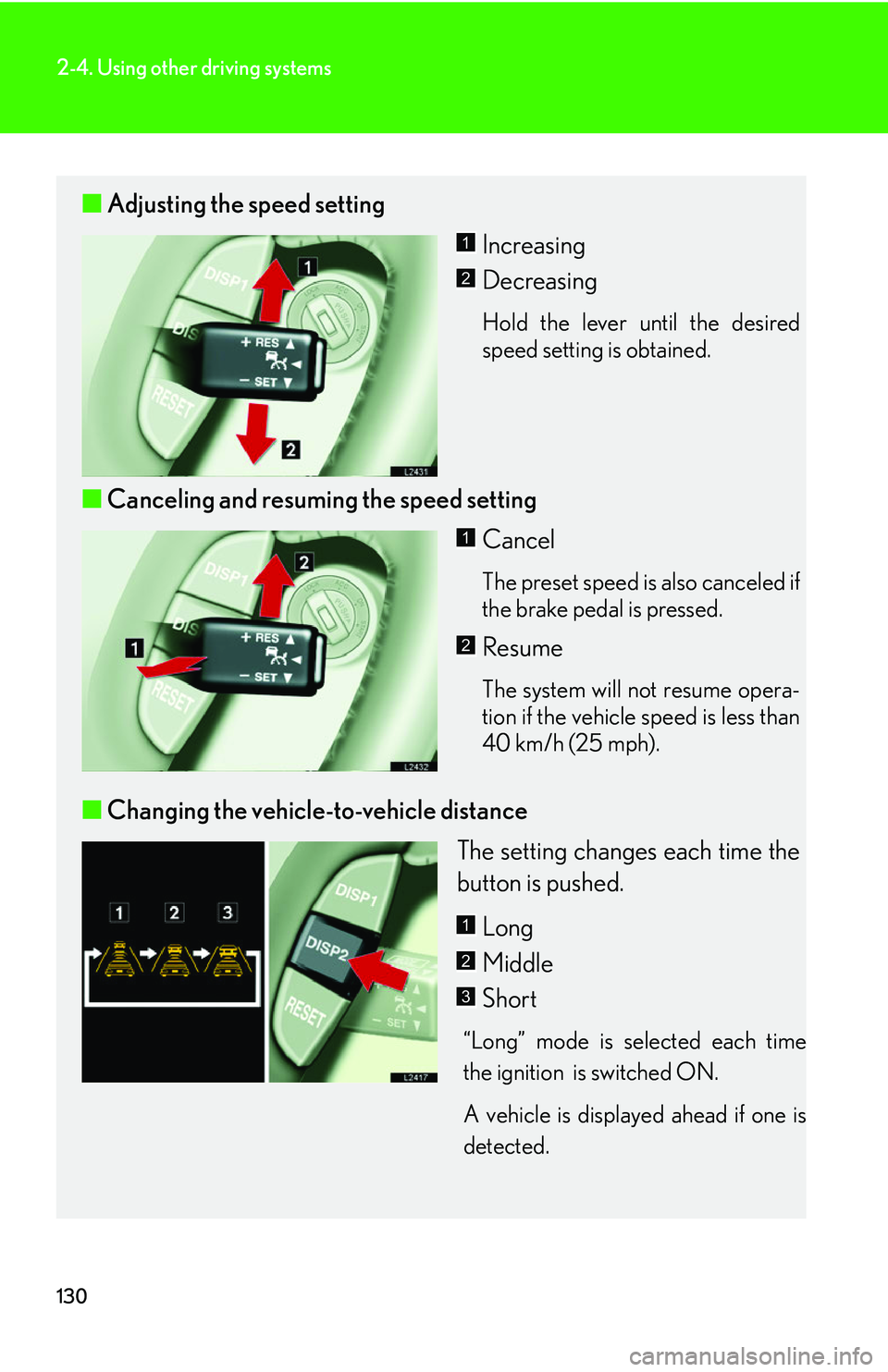
■Adjusting the speed setting
Increasing
Decreasing
Hold the lever until the desired
speed setting is obtained.
■Canceling and resuming the speed setting
Cancel
The preset speed is also canceled if
the brake pedal is pressed.
Resume
The system will not resume opera-
tion if the vehicle speed is less than
40 km/h (25 mph).
■ Changing the vehicle-to-vehicle distance
The setting changes each time the
button is pushed.
Long
Middle
Short
“Long” mode is selected each time
the ignition is switched ON.
A vehicle is displayed ahead if one is
detected
.
1
2
1
2
1
2
3
Page 147 of 419
131
2-4. Using other driving systems
2
When driving
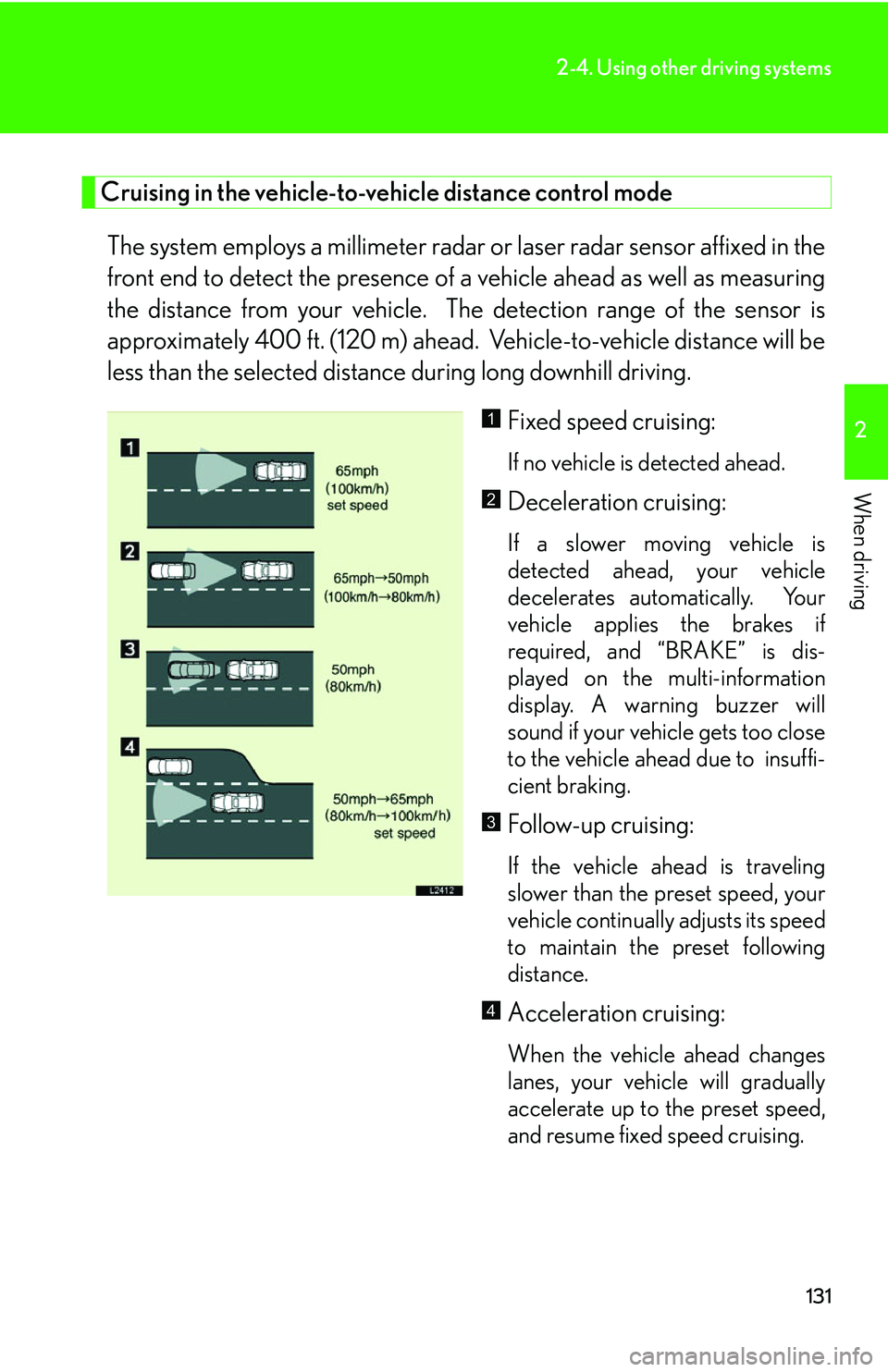
Cruising in the vehicle-to-vehicle distance control mode
The system employs a millimeter radar or laser radar sensor affixed in the
front end to detect the pr esence of a vehicle ahead as well as measuring
the distance from your vehicle. The detection range of the sensor is
approximately 400 ft. (120 m) ahead. Vehicle-to-vehicle distance will be
less than the selected distance during long downhill driving.
Fixed speed cruising:
If no vehicle is detected ahead.
Deceleration cruising:
If a slower moving vehicle is
detected ahead, your vehicle
decelerates automatically. Your
vehicle applies the brakes if
required, and “BRAKE” is dis -
played on the multi-information
displa
y. A warning buzzer will
sound if your vehicle gets too close
to the vehicle ahead due to insuffi -
cient braking.
Follow-up cruising:
If the vehicle ahead is traveling
slower than the preset speed, your
vehicle continually adjusts its speed
to maintain the preset following
distance.
Acceleration cruising:
When the vehicle ahead changes
lanes, your vehicle will gradually
accelerate up to the preset speed,
and resume fixed speed cruising.
1
2
3
4
Page 148 of 419
132
2-4. Using other driving systems
■Setting vehicle speed
Settings can be made when the vehicle
is traveling above 28 mph (45 km/h).
■Unsuitable conditions
You cannot set the speed in the following conditions:
• When the selector lever is in a position other than D, 4, 5, or 6.
• When driving in adverse weather conditions.
■Automatic cruise control cancellation
In the following cases, the preset speed is can ce
lled. If the system is restored, cruise
control enters the ready mode.
• The slip indicator light blinks and a warning tone sounds.
• The anti-lock braking system activates.
• Foreign matter adheres to the sensor.
• The driving pattern selector sw it
ch is set to “SNOW” mode.
• The wipers are operated at high speed (radar), or either high or low speeds (l
aser). This includes high and low speed operation with the wiper lever in the
AUTO position.
• The vehicle’s speed falls below 25 mph (40 km/h). In this case, you must apply th
e brakes manually to slow the vehicle.
If the preset speed automatically cancels out for other than the above reasons, the
sy
stem may have malfunctioned. Do not operate the dynamic radar/laser cruise
control. You may continue driving, howe ver have your vehicle checked by your
Lexus dealer at the earliest opportunity.