brake light LEXUS LS460L 2016 User Guide
[x] Cancel search | Manufacturer: LEXUS, Model Year: 2016, Model line: LS460L, Model: LEXUS LS460L 2016Pages: 708, PDF Size: 36.57 MB
Page 279 of 708
2794-2. Driving procedures
4
Driving
LS460/LS460L_GE (OM50G06E)
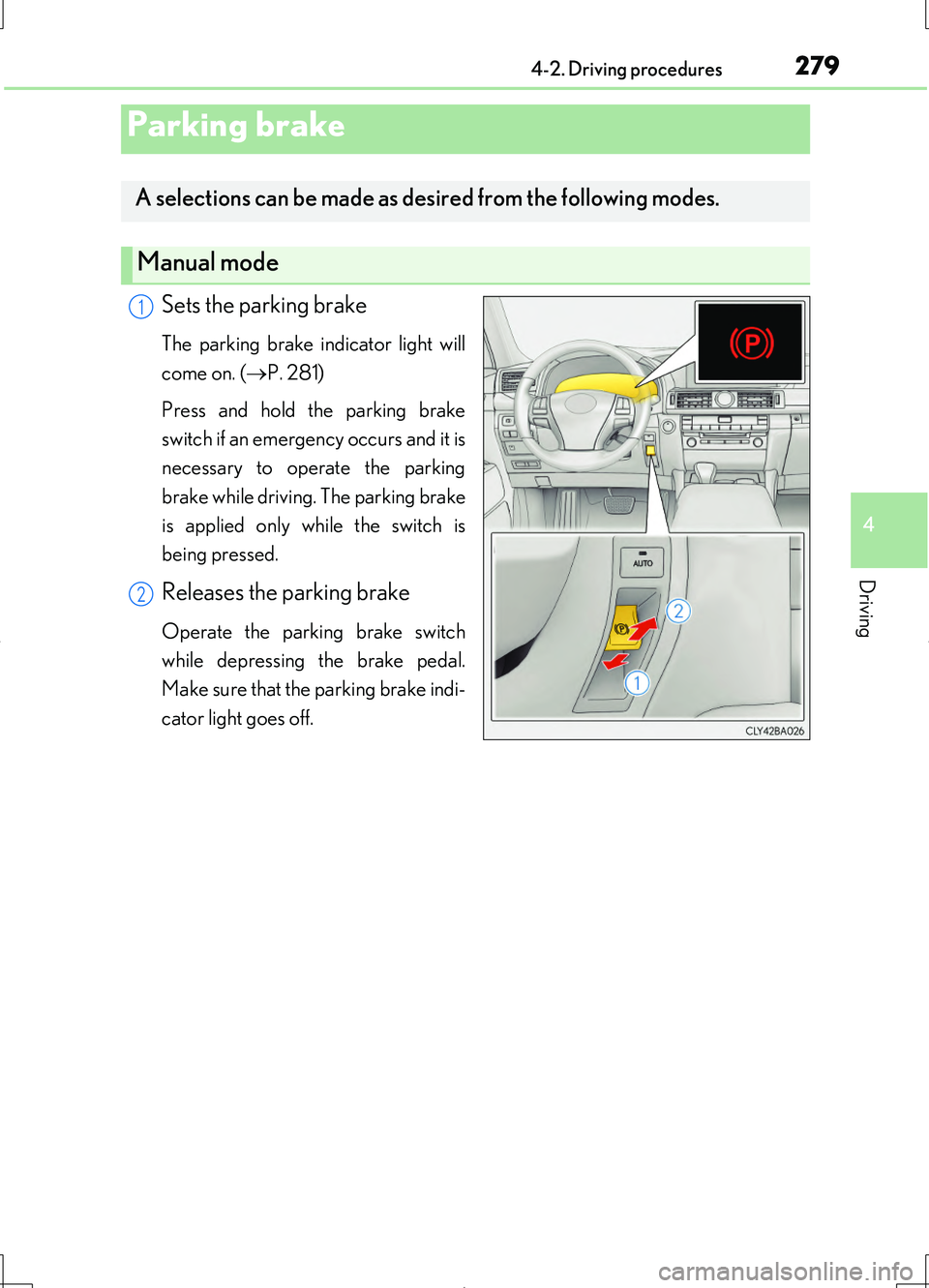
Sets the parking brake
The parking brake indicator light will
come on. ( P. 281)
Press and hold the parking brake
switch if an emergency occurs and it is
necessary to operate the parking
brake while driving. The parking brake
is applied only while the switch is
being pressed.
Releases the parking brake
Operate the parking brake switch
while depressing the brake pedal.
Make sure that the parking brake indi-
cator light goes off.
Parking brake
A selections can be made as desired from the following modes.
Manual mode
1
2
Page 281 of 708
2814-2. Driving procedures
4
Driving
LS460/LS460L_GE (OM50G06E)
■Parking brake indicator light
●Depending on the engine switch mode, the parking brake indicator light will come
on and stay on as described below:
IGNITION ON mode: Comes on until the parking brake is released.
Not in IGNITION ON mode: Stays on for approximately 15 seconds.
●When the engine switch is turned off with the parking brake set, the parking brake
indicator light will stay on for about 15 seconds. This does not indicate a malfunc-
tion.
■Parking brake engaged warning buzzer
A buzzer will sound if the vehicle is driven at a speed of approximately 5 km/h (3
mph) or more with the parking brake engaged.
■When there is a malfunction in the system
Warning lights and/or warning message will turn on or flash. ( P. 607, 614)
Depending on the condition, the parking brake indicator light may flash.
■Usage in winter time
P. 399
NOTICE
■When parking the vehicle
Before you leave the vehicle, set the parking brake, shift the shift lever to P and
make sure that the vehicle does not move.
■When the system malfunctions
Stop the vehicle in a safe place and check the warning messages.
■When the parking brake cannot be released due to a malfunction
Use the parking brake release tool to manually release the parking brake.
( P. 629)
Driving the vehicle with the parking brake set will lead to brake components over-
heating, which may affect braking performance and increase brake wear.
Page 282 of 708
2824-2. Driving procedures
LS460/LS460L_GE (OM50G06E)
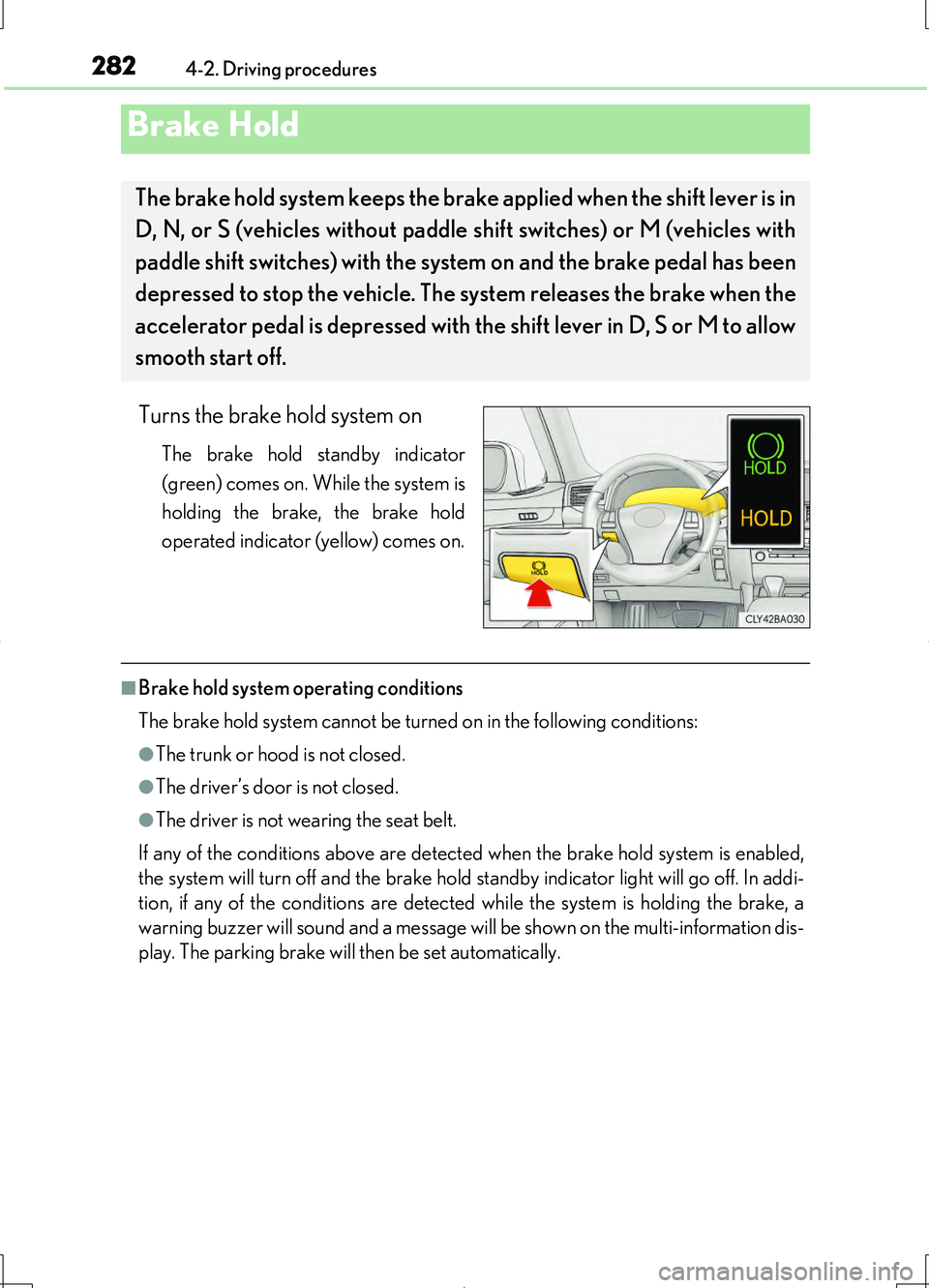
Turns the brake hold system on
The brake hold standby indicator
(green) comes on. While the system is
holding the brake, the brake hold
operated indicator (yellow) comes on.
■Brake hold system operating conditions
The brake hold system cannot be turned on in the following conditions:
●The trunk or hood is not closed.
●The driver’s door is not closed.
●The driver is not wearing the seat belt.
If any of the conditions above are detected when the brake hold system is enabled,
the system will turn off and the brake hold standby indicator light will go off. In addi-
tion, if any of the conditions are detected while the system is holding the brake, a
warning buzzer will sound and a message will be shown on the multi-information dis-
play. The parking brake will then be set automatically.
Brake Hold
The brake hold system keeps the brake applied when the shift lever is in
D, N, or S (vehicles without paddle shift switches) or M (vehicles with
paddle shift switches) with the syst em on and the brake pedal has been
depressed to stop the vehicle. The system releases the brake when the
accelerator pedal is depressed with th e shift lever in D, S or M to allow
smooth start off.
Page 283 of 708
2834-2. Driving procedures
4
Driving
LS460/LS460L_GE (OM50G06E)
■Brake hold function
●If the brake pedal is left released for a period of about 3 minutes after the system
has started holding the brake, the parking brake will be set automatically. In this
case, a warning buzzer sounds and a message is shown on the multi-information
display.
●To turn the system off while the system is holding the brake, firmly depress the
brake pedal and press the switch again.
●The brake hold function may not hold the vehicle when the vehicle is on a steep
incline. In this situation, it may be necessary for the driver to apply the brakes. The
multi-information display will inform the driver of this situation.
■When the parking brake is set automatically while the system is holding the brakes
The parking brake will not be released automatically. Release the parking brake by
operating the parking brake switch, making sure that the parking brake indicator
light goes off. ( P. 279)
■When there is a malfunction in the system
Warning lights and/or warning messages will turn on or flash. ( P. 607, 614)
CAUTION
■When the vehicle is on a steep incline
When using the brake hold system on a steep incline exercise caution. The brake
hold function may not hold the vehicle in such a situation.
■When stopped on a slippery road
The system cannot stop the vehicle when the gripping ability of the tires has been
exceeded. Do not use the system when stopped on a slippery road.
NOTICE
■When parking the vehicle
The brake hold system is not designed for use when parking the vehicle for a long
period of time. Turning the engine switch off while the system is holding the brake
may release the brake, which would cause the vehicle to move. When operating
the engine switch, depress the brake pedal, set the parking brake and shift the shift
lever to P.
Page 288 of 708
2884-3. Operating the lights and wipers
LS460/LS460L_GE (OM50G06E)
AFS (Adaptive Front-lighting System) secures excellent visibility at inter-
sections and on curves by automatically adjusting the direction of the light
axis of the headlights according to vehicle speed and the degree of the
tire’s angle as controlled by steering input.
AFS operates at speeds of 10 km/h (6 mph) or higher.
■Daytime running light system
To make your vehicle more visible to othe r drivers during daytime driving, the day-
time running lights turn on automatically whenever the engine is started and the
parking brake is released with the headlight switch off or in the position. (Illumi-
nate brighter than the front position ligh ts.) Daytime running lights are not designed
for use at night.
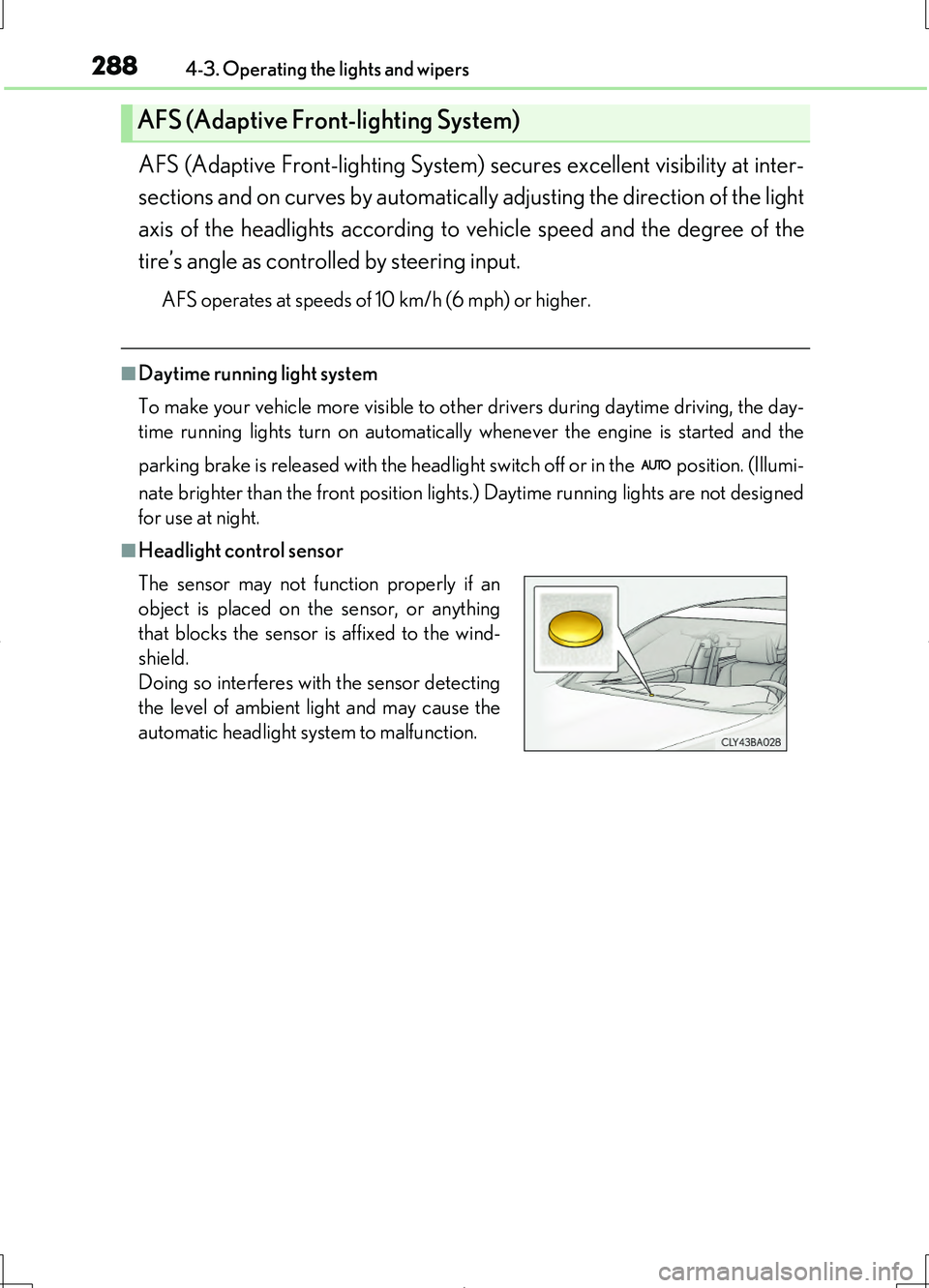
■Headlight control sensor
AFS (Adaptive Front-lighting System)
The sensor may not function properly if an
object is placed on the sensor, or anything
that blocks the sensor is affixed to the wind-
shield.
Doing so interferes with the sensor detecting
the level of ambient light and may cause the
automatic headlight system to malfunction.
Page 361 of 708
3614-5. Using the driving support systems
4
Driving
LS460/LS460L_GE (OM50G06E)
◆VGRS (Variable Gear Ratio Steering) (if equipped)
Adjusts the wheel turning angle in accordance with the vehicle speed
and steering wheel movement
◆EPS (Electric Power Steering)
Employs an electric motor to reduce the amount of effort needed to
turn the steering wheel
◆VDIM (Vehicle Dynamics Integrated Management)
Provides integrated control of the ABS, brake assist, TRC, VSC, hill-
start assist control, EPS and VGRS (if equipped) systems
Helps to maintain vehicle stability when swerving on slippery road sur-
faces by controlling the brakes, engine output, steering assist, and if
equipped with VGRS, steering ratio
◆PCS (Pre-Crash Safety system) (if equipped)
P. 368
◆Emergency brake signal (if equipped)
When the brakes are applied suddenly, the stop lights automatically
flash to alert the vehicle behind
◆BSM (Blind Spot Monitor) (if equipped)
P. 381
Page 363 of 708
3634-5. Using the driving support systems
4
Driving
LS460/LS460L_GE (OM50G06E)
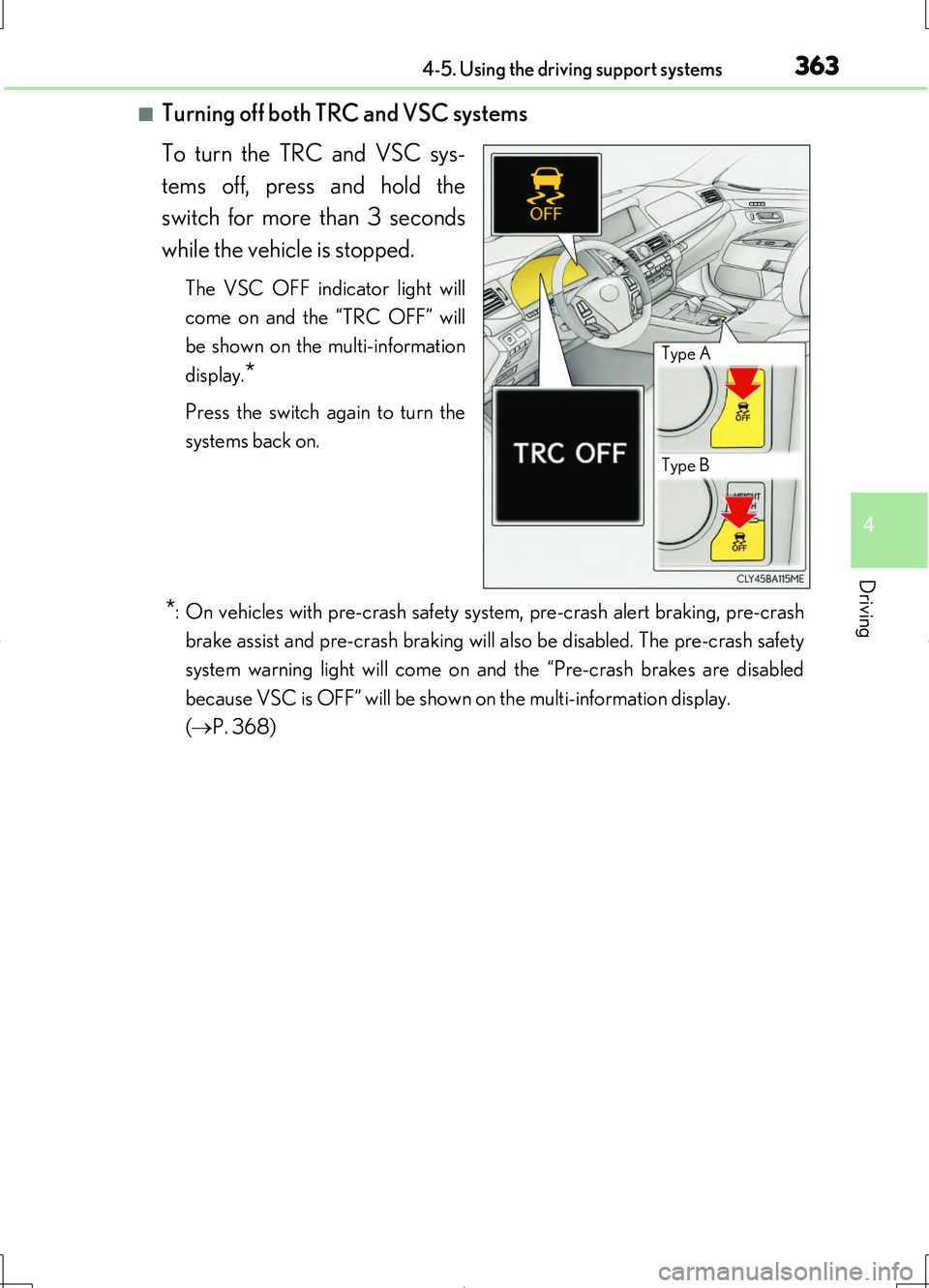
■Turning off both TRC and VSC systems
To turn the TRC and VSC sys-
tems off, press and hold the
switch for more than 3 seconds
while the vehicle is stopped.
The VSC OFF indicator light will
come on and the “TRC OFF” will
be shown on the multi-information
display.*
Press the switch again to turn the
systems back on.
*: On vehicles with pre-crash safety system, pre-crash alert braking, pre-crash
brake assist and pre-crash braking will also be disabled. The pre-crash safety
system warning light will come on and the “Pre-crash brakes are disabled
because VSC is OFF” will be shown on the multi-information display.
( P. 368)
Type A
Type B
Page 364 of 708
3644-5. Using the driving support systems
LS460/LS460L_GE (OM50G06E)
■When the message is displayed on the multi-information display showing that TRC
has been disabled even if the VSC OFF switch has not been pressed
TRC and hill-start assist control cannot be operated. Contact your Lexus dealer.
■Hill-start assist control is operational when
●The system has detected that the vehicle is moving backward.
●Vehicles without paddle shift switches: The shift lever is in the D or S position.
Vehicles with paddle shift switches: The shift lever is in the D or M position.
●The brake pedal is not depressed.
■VGRS is disabled when
VGRS may stop operating in the following situations.
In this event, the steering wheel may move from its straight forward position, but it
will return when the system restarts.
●When the steering wheel is operated for an extended period of time while the vehi-
cle is stopped or is moving very slowly
●When the steering wheel has been held fully to the left or right
●When the battery is low or the voltage temporarily drops
The center position of the steering wheel may change when VGRS is disabled. How-
ever, the position will return to normal after VGRS is reactivated.
■Sounds and vibrations caused by the ABS, brake assist, TRC, VSC, hill-start assist
control and VGRS systems
●A sound may be heard from the engine compartment when the brake pedal is
depressed repeatedly, when the engine is started or just after the vehicle begins to
move. This sound does not indicate that a malfunction has occurred in any of these
systems.
●Any of the following conditions may occur when the above systems are operating.
None of these indicates that a malfunction has occurred.
• Vibrations may be felt through the vehicle body and steering.
• A motor sound may be heard after the vehicle comes to a stop.
●The steering wheel may be moved slightly or a sound may be heard when the
engine is started or stopped. None of these indicate that a malfunction has
occurred.
■EPS operation sound
When the steering wheel is operated, a motor sound (whirring sound) may be heard.
This does not indicate a malfunction.
Page 368 of 708
3684-5. Using the driving support systems
LS460/LS460L_GE (OM50G06E)
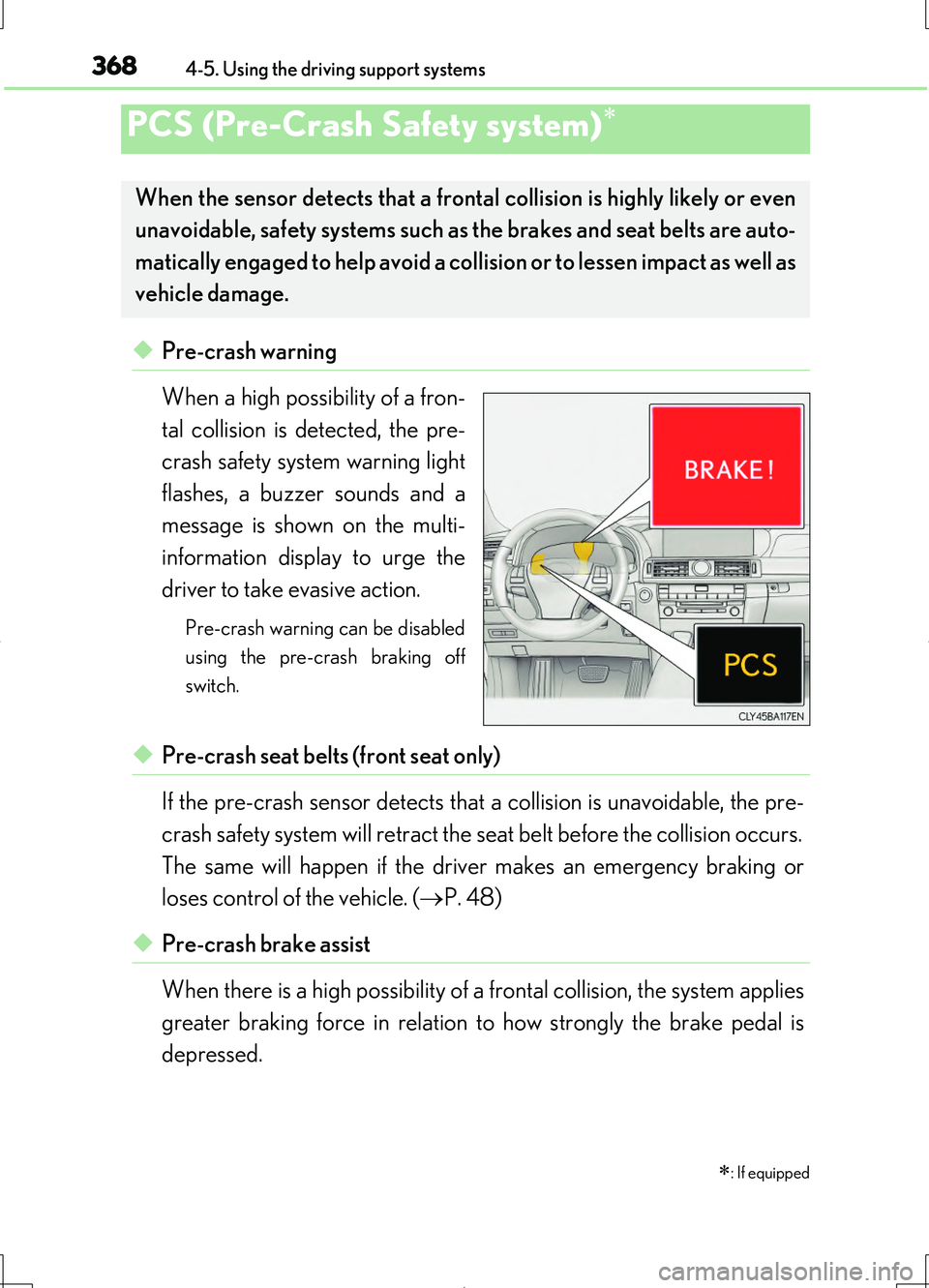
◆Pre-crash warning
When a high possibility of a fron-
tal collision is detected, the pre-
crash safety system warning light
flashes, a buzzer sounds and a
message is shown on the multi-
information display to urge the
driver to take evasive action.
Pre-crash warning can be disabled
using the pre-crash braking off
switch.
◆Pre-crash seat belts (front seat only)
If the pre-crash sensor detects that a collision is unavoidable, the pre-
crash safety system will retract the seat belt before the collision occurs.
The same will happen if the driver makes an emergency braking or
loses control of the vehicle. ( P. 48)
◆Pre-crash brake assist
When there is a high possibility of a frontal collision, the system applies
greater braking force in relation to how strongly the brake pedal is
depressed.
PCS (Pre-Crash Safety system)
: If equipped
When the sensor detects that a frontal collision is highly likely or even
unavoidable, safety systems such as the brakes and seat belts are auto-
matically engaged to help avoid a collision or to lessen impact as well as
vehicle damage.
Page 369 of 708
3694-5. Using the driving support systems
4
Driving
LS460/LS460L_GE (OM50G06E)
◆Pre-crash braking (if equipped)
When there is a high possibility of a frontal collision, the system warns
the driver using a warning light, warning display and buzzer. If the sys-
tem determines that a collision is unavoidable, the brakes are automati-
cally applied to help avoid a collision or to reduce the collision speed.
When the vehicle is being stopped by pre-crash braking, the brake will
be engaged for a maximum of 2 seconds and then released automati-
cally. This pre-crash braking can be canceled by depressing the accel-
erator pedal or brake pedal.
Pre-crash braking can be disabled using the pre-crash braking off switch.
◆Suspension control
When there is a high possibility of a frontal collision, the operation of
suspension control helps prevent the front of the vehicle from dropping
when the brakes are applied suddenly.
◆Steering gear control (VGRS) (vehicles with camera sensors)
When the system determines that a collision is unavoidable, the steer-
ing gear ratio is changed to help improve the response to steering
input.
◆Driver monitor system (if equipped)
When the system determines that there is a possibility of a collision, and
either the driver is not facing forward or the driver’s eyes are closed,
pre-crash warnings are given in adva nce to warn the driver. If the sys-
tem determines that the conditions to operate pre-crash alert braking
have been met even when the possibility of a collision increases further,
pre-crash alert braking will operate.
Pre-crash alert braking can be disabled using the pre-crash braking off switch.