stop start LEXUS LS460L 2016 Owner's Manual
[x] Cancel search | Manufacturer: LEXUS, Model Year: 2016, Model line: LS460L, Model: LEXUS LS460L 2016Pages: 708, PDF Size: 36.57 MB
Page 264 of 708
2644-2. Driving procedures
LS460/LS460L_GE (OM50G06E)
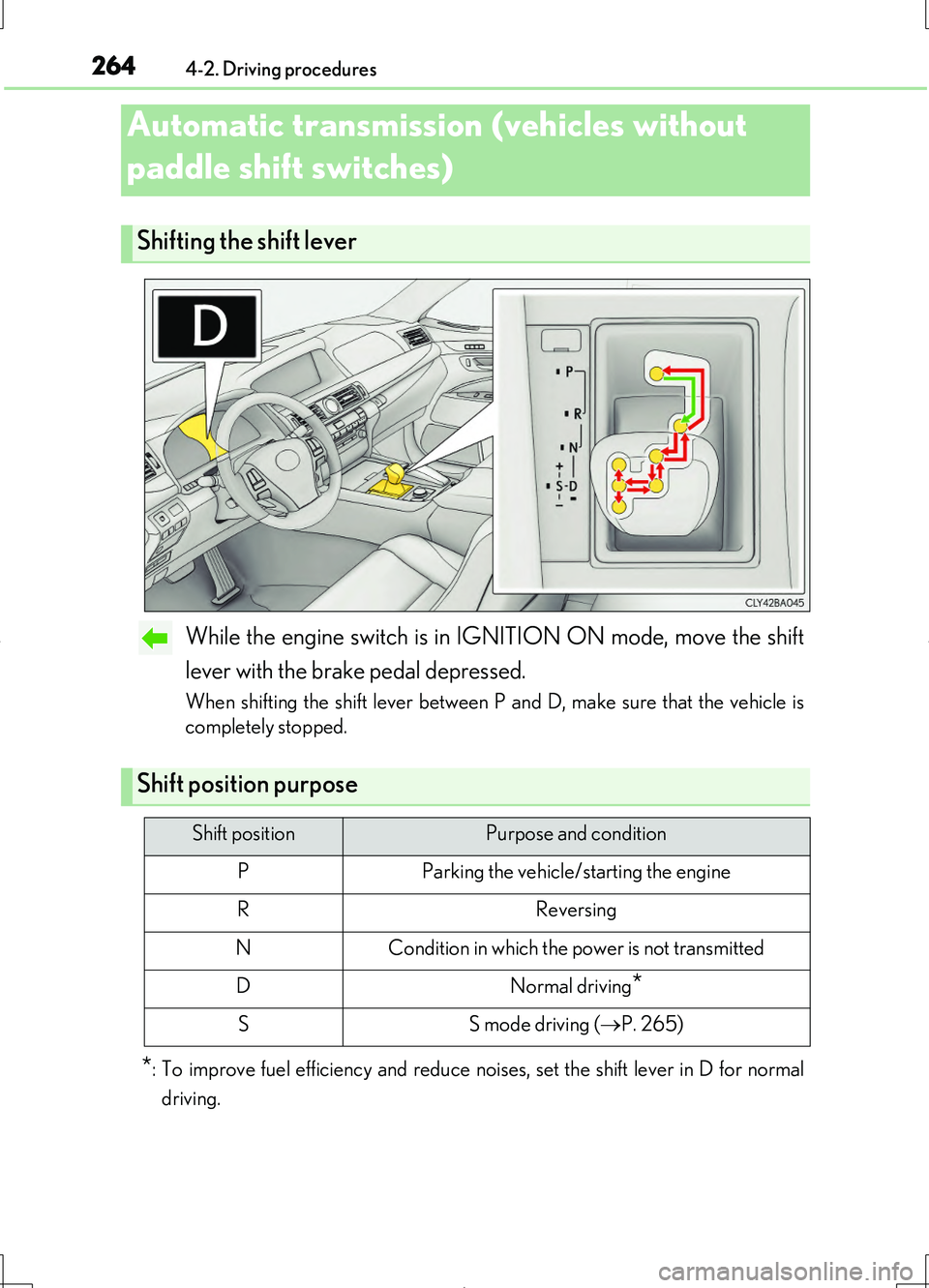
While the engine switch is in IGNITION ON mode, move the shift
lever with the brake pedal depressed.
When shifting the shift lever between P and D, make sure that the vehicle is
completely stopped.
*: To improve fuel efficiency and reduce noises, set the shift lever in D for normal
driving.
Automatic transmission (vehicles without
paddle shift switches)
Shifting the shift lever
Shift position purpose
Shift positionPurpose and condition
PParking the vehicle/starting the engine
RReversing
NCondition in which the power is not transmitted
DNormal driving*
SS mode driving ( P. 265)
Page 282 of 708
2824-2. Driving procedures
LS460/LS460L_GE (OM50G06E)
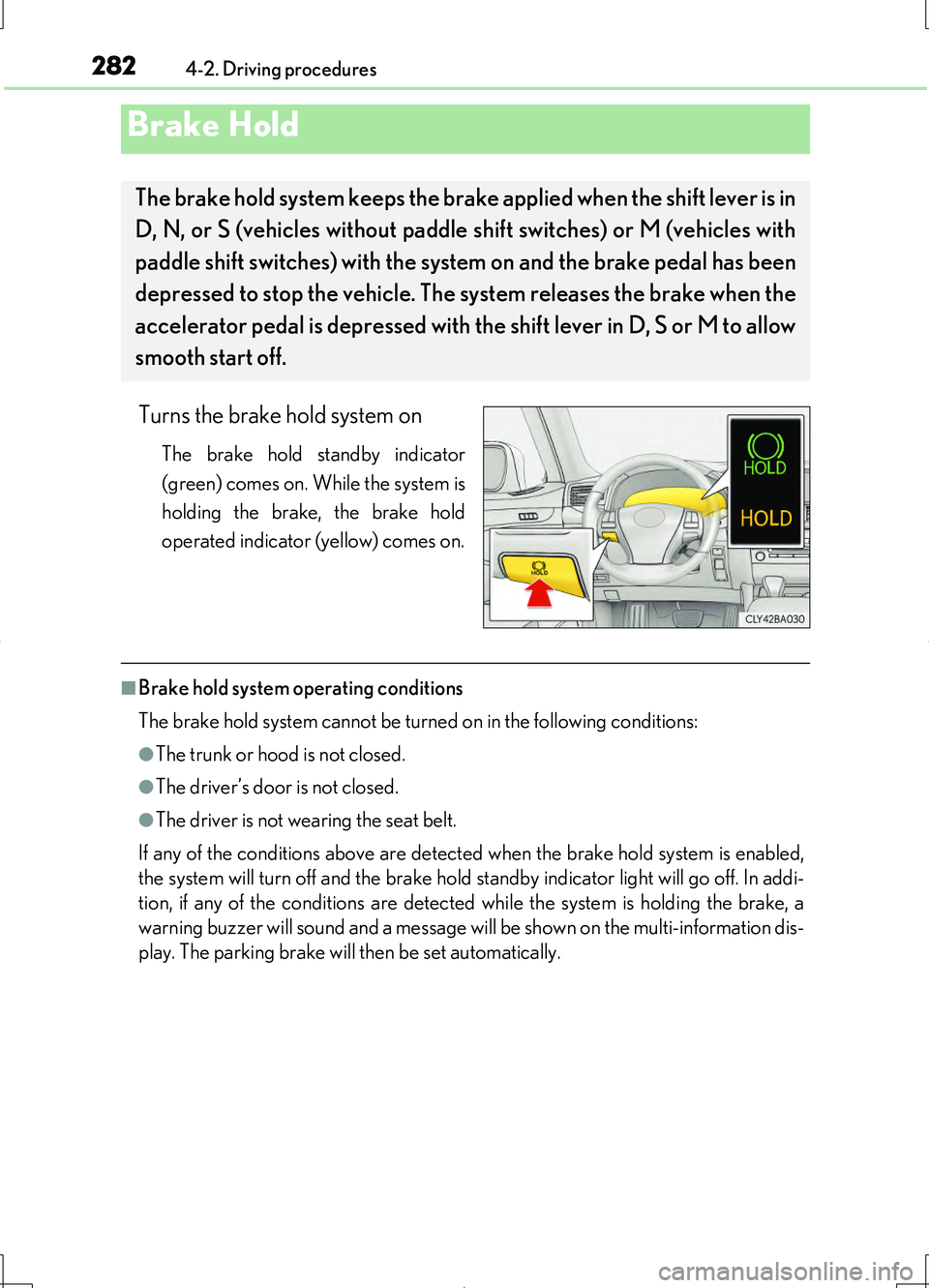
Turns the brake hold system on
The brake hold standby indicator
(green) comes on. While the system is
holding the brake, the brake hold
operated indicator (yellow) comes on.
■Brake hold system operating conditions
The brake hold system cannot be turned on in the following conditions:
●The trunk or hood is not closed.
●The driver’s door is not closed.
●The driver is not wearing the seat belt.
If any of the conditions above are detected when the brake hold system is enabled,
the system will turn off and the brake hold standby indicator light will go off. In addi-
tion, if any of the conditions are detected while the system is holding the brake, a
warning buzzer will sound and a message will be shown on the multi-information dis-
play. The parking brake will then be set automatically.
Brake Hold
The brake hold system keeps the brake applied when the shift lever is in
D, N, or S (vehicles without paddle shift switches) or M (vehicles with
paddle shift switches) with the syst em on and the brake pedal has been
depressed to stop the vehicle. The system releases the brake when the
accelerator pedal is depressed with th e shift lever in D, S or M to allow
smooth start off.
Page 283 of 708
2834-2. Driving procedures
4
Driving
LS460/LS460L_GE (OM50G06E)
■Brake hold function
●If the brake pedal is left released for a period of about 3 minutes after the system
has started holding the brake, the parking brake will be set automatically. In this
case, a warning buzzer sounds and a message is shown on the multi-information
display.
●To turn the system off while the system is holding the brake, firmly depress the
brake pedal and press the switch again.
●The brake hold function may not hold the vehicle when the vehicle is on a steep
incline. In this situation, it may be necessary for the driver to apply the brakes. The
multi-information display will inform the driver of this situation.
■When the parking brake is set automatically while the system is holding the brakes
The parking brake will not be released automatically. Release the parking brake by
operating the parking brake switch, making sure that the parking brake indicator
light goes off. ( P. 279)
■When there is a malfunction in the system
Warning lights and/or warning messages will turn on or flash. ( P. 607, 614)
CAUTION
■When the vehicle is on a steep incline
When using the brake hold system on a steep incline exercise caution. The brake
hold function may not hold the vehicle in such a situation.
■When stopped on a slippery road
The system cannot stop the vehicle when the gripping ability of the tires has been
exceeded. Do not use the system when stopped on a slippery road.
NOTICE
■When parking the vehicle
The brake hold system is not designed for use when parking the vehicle for a long
period of time. Turning the engine switch off while the system is holding the brake
may release the brake, which would cause the vehicle to move. When operating
the engine switch, depress the brake pedal, set the parking brake and shift the shift
lever to P.
Page 332 of 708
3324-5. Using the driving support systems
LS460/LS460L_GE (OM50G06E)
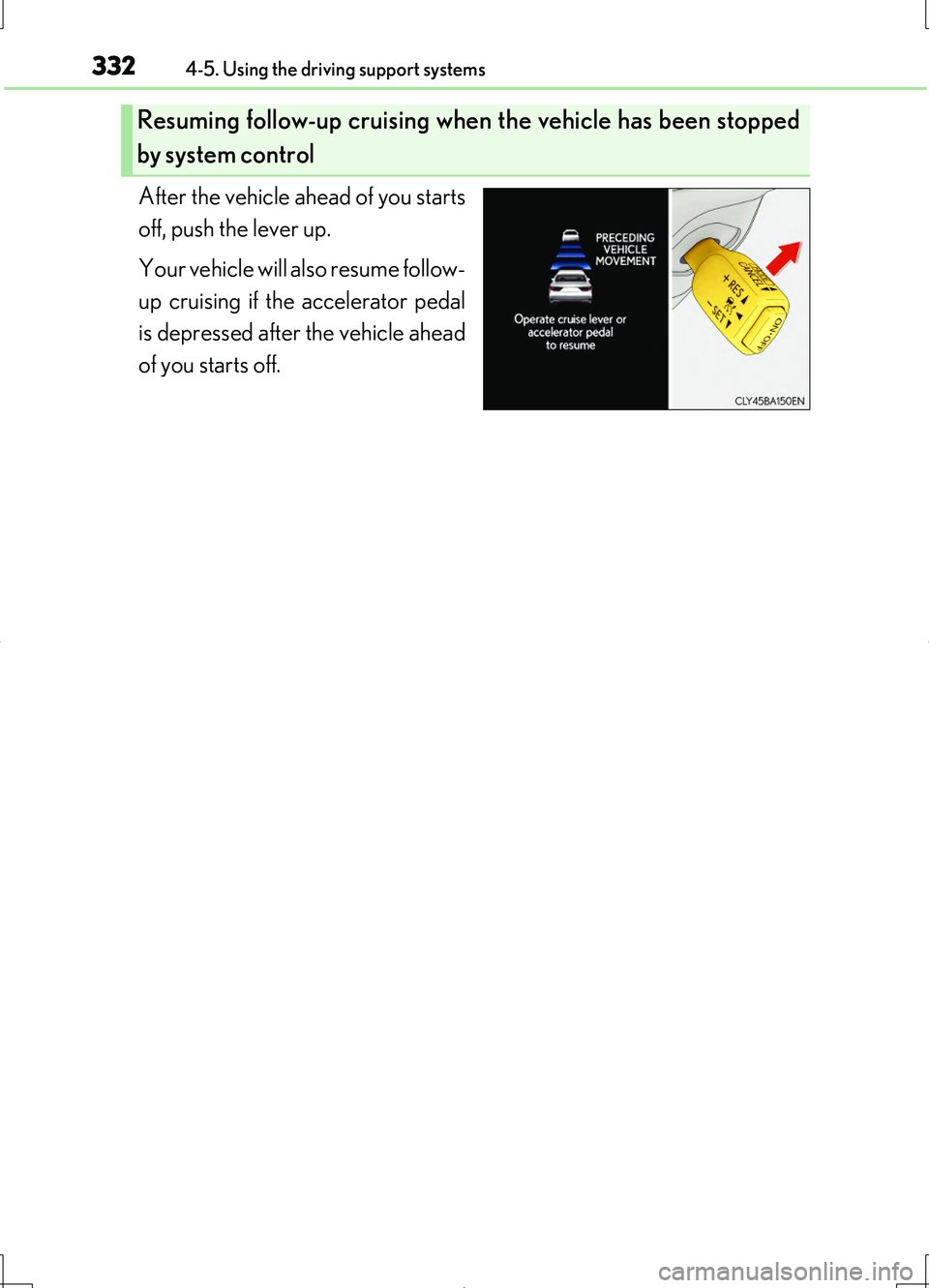
After the vehicle ahead of you starts
off, push the lever up.
Your vehicle will also resume follow-
up cruising if the accelerator pedal
is depressed after the vehicle ahead
of you starts off.
Resuming follow-up cruising when the vehicle has been stopped
by system control
Page 334 of 708
3344-5. Using the driving support systems
LS460/LS460L_GE (OM50G06E)
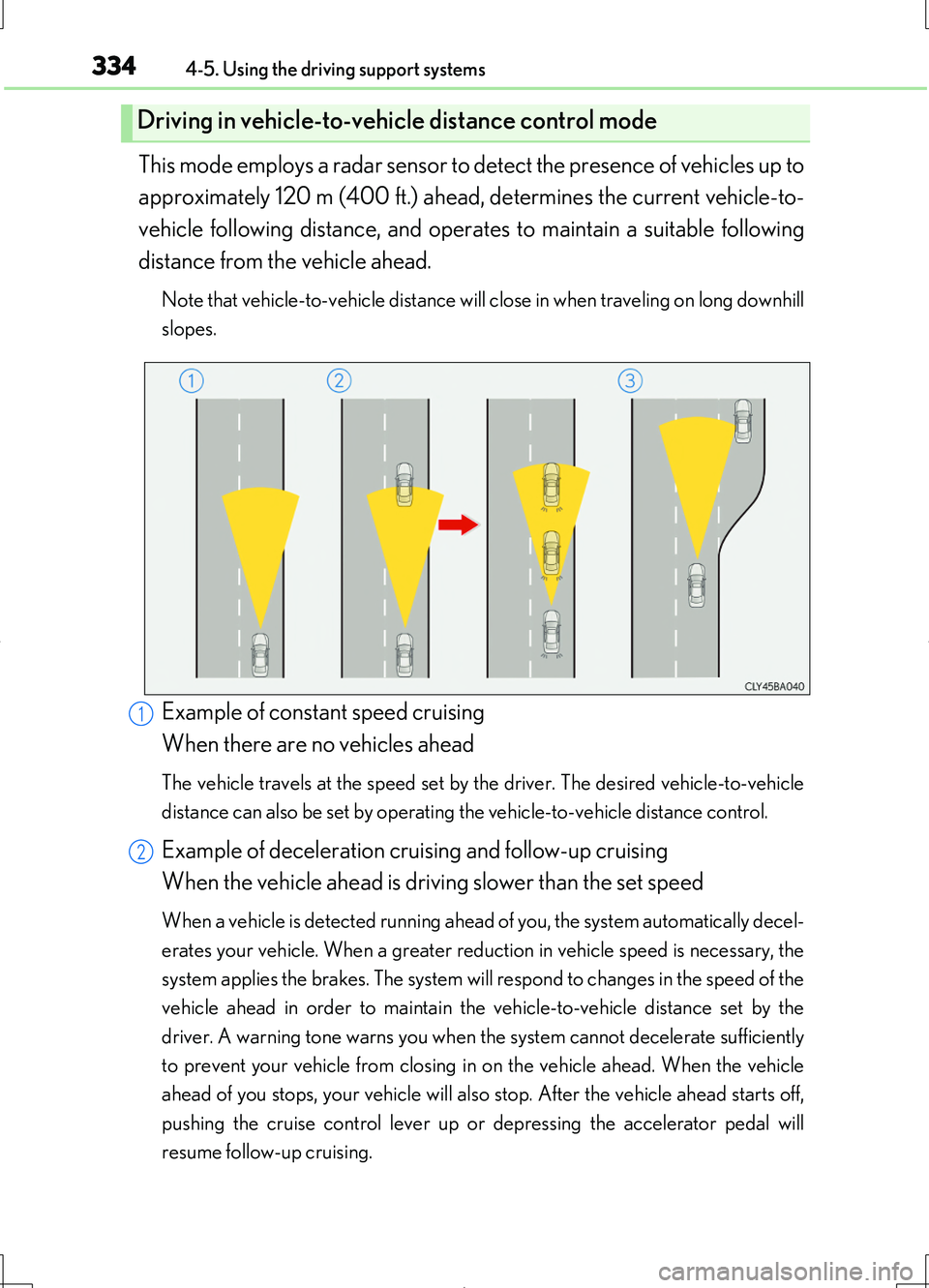
This mode employs a radar sensor to detect the presence of vehicles up to
approximately 120 m (400 ft.) ahead, determines the current vehicle-to-
vehicle following distance, and operates to maintain a suitable following
distance from the vehicle ahead.
Note that vehicle-to-vehicle distance will close in when traveling on long downhill
slopes.
Example of constant speed cruising
When there are no vehicles ahead
The vehicle travels at the speed set by the driver. The desired vehicle-to-vehicle
distance can also be set by operating the vehicle-to-vehicle distance control.
Example of deceleration cruising and follow-up cruising
When the vehicle ahead is driving slower than the set speed
When a vehicle is detected running ahead of you, the system automatically decel-
erates your vehicle. When a greater reduction in vehicle speed is necessary, the
system applies the brakes. The system will respond to changes in the speed of the
vehicle ahead in order to maintain the vehicle-to-vehicle distance set by the
driver. A warning tone warns you when the system cannot decelerate sufficiently
to prevent your vehicle from closing in on the vehicle ahead. When the vehicle
ahead of you stops, your vehicle will also stop. After the vehicle ahead starts off,
pushing the cruise control lever up or depressing the accelerator pedal will
resume follow-up cruising.
Driving in vehicle-to-vehicle distance control mode
1
2
Page 360 of 708
3604-5. Using the driving support systems
LS460/LS460L_GE (OM50G06E)
◆ABS (Anti-lock Brake System)
Helps to prevent wheel lock when the brakes are applied suddenly, or if
the brakes are applied while driv ing on a slippery road surface
◆Brake assist
Generates an increased level of braking force after the brake pedal is
depressed when the system detects a panic stop situation
◆VSC (Vehicle Stability Control)
Helps the driver to control skidding when swerving suddenly or turning
on slippery road surfaces
◆TRC (Traction Control)
Helps to maintain drive power and prevent the drive wheels from spin-
ning when starting the vehicle or accelerating on slippery roads
◆Hill-start assist control
Helps to prevent the vehicle from rolling backward when starting on an
incline or slippery slope
Driving assist systems
To help enhance driving safety and performance, the following systems
operate automatically in response to various driving situations. Be
aware, however, that these system s are supplementary and should not
be relied upon too heavily when operating the vehicle.
Page 361 of 708
3614-5. Using the driving support systems
4
Driving
LS460/LS460L_GE (OM50G06E)
◆VGRS (Variable Gear Ratio Steering) (if equipped)
Adjusts the wheel turning angle in accordance with the vehicle speed
and steering wheel movement
◆EPS (Electric Power Steering)
Employs an electric motor to reduce the amount of effort needed to
turn the steering wheel
◆VDIM (Vehicle Dynamics Integrated Management)
Provides integrated control of the ABS, brake assist, TRC, VSC, hill-
start assist control, EPS and VGRS (if equipped) systems
Helps to maintain vehicle stability when swerving on slippery road sur-
faces by controlling the brakes, engine output, steering assist, and if
equipped with VGRS, steering ratio
◆PCS (Pre-Crash Safety system) (if equipped)
P. 368
◆Emergency brake signal (if equipped)
When the brakes are applied suddenly, the stop lights automatically
flash to alert the vehicle behind
◆BSM (Blind Spot Monitor) (if equipped)
P. 381
Page 362 of 708
3624-5. Using the driving support systems
LS460/LS460L_GE (OM50G06E)
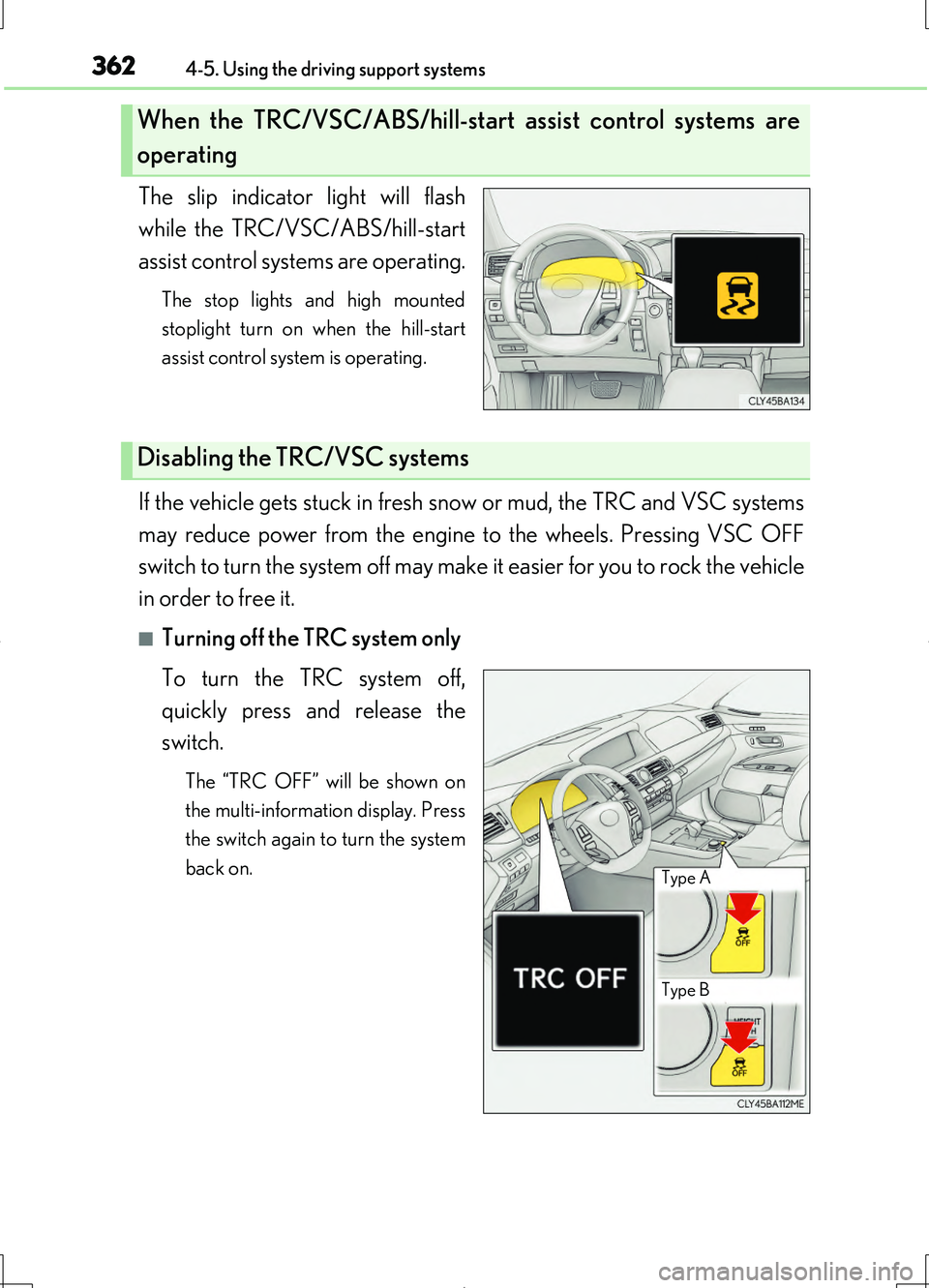
The slip indicator light will flash
while the TRC/VSC/ABS/hill-start
assist control systems are operating.
The stop lights and high mounted
stoplight turn on when the hill-start
assist control system is operating.
If the vehicle gets stuck in fresh snow or mud, the TRC and VSC systems
may reduce power from the engine to the wheels. Pressing VSC OFF
switch to turn the system off may make it easier for you to rock the vehicle
in order to free it.
■Turning off the TRC system only
To turn the TRC system off,
quickly press and release the
switch.
The “TRC OFF” will be shown on
the multi-information display. Press
the switch again to turn the system
back on.
When the TRC/VSC/ABS/hill-start assist control systems are
operating
Disabling the TRC/VSC systems
Type B
Type A
Page 364 of 708
3644-5. Using the driving support systems
LS460/LS460L_GE (OM50G06E)
■When the message is displayed on the multi-information display showing that TRC
has been disabled even if the VSC OFF switch has not been pressed
TRC and hill-start assist control cannot be operated. Contact your Lexus dealer.
■Hill-start assist control is operational when
●The system has detected that the vehicle is moving backward.
●Vehicles without paddle shift switches: The shift lever is in the D or S position.
Vehicles with paddle shift switches: The shift lever is in the D or M position.
●The brake pedal is not depressed.
■VGRS is disabled when
VGRS may stop operating in the following situations.
In this event, the steering wheel may move from its straight forward position, but it
will return when the system restarts.
●When the steering wheel is operated for an extended period of time while the vehi-
cle is stopped or is moving very slowly
●When the steering wheel has been held fully to the left or right
●When the battery is low or the voltage temporarily drops
The center position of the steering wheel may change when VGRS is disabled. How-
ever, the position will return to normal after VGRS is reactivated.
■Sounds and vibrations caused by the ABS, brake assist, TRC, VSC, hill-start assist
control and VGRS systems
●A sound may be heard from the engine compartment when the brake pedal is
depressed repeatedly, when the engine is started or just after the vehicle begins to
move. This sound does not indicate that a malfunction has occurred in any of these
systems.
●Any of the following conditions may occur when the above systems are operating.
None of these indicates that a malfunction has occurred.
• Vibrations may be felt through the vehicle body and steering.
• A motor sound may be heard after the vehicle comes to a stop.
●The steering wheel may be moved slightly or a sound may be heard when the
engine is started or stopped. None of these indicate that a malfunction has
occurred.
■EPS operation sound
When the steering wheel is operated, a motor sound (whirring sound) may be heard.
This does not indicate a malfunction.
Page 366 of 708
3664-5. Using the driving support systems
LS460/LS460L_GE (OM50G06E)
CAUTION
■The ABS does not operate effectively when
●The limits of tire gripping performance have been exceeded (such as excessively
worn tires on a snow covered road).
●The vehicle hydroplanes while driving at high speed on wet or slick roads.
■Stopping distance when the ABS is operating may exceed that of normal condi-
tions
The ABS is not designed to shorten the vehicle’s stopping distance. Always main-
tain a safe distance from the vehicle in front of you, especially in the following situa-
tions:
●When driving on dirt, gravel or snow-covered roads
●When driving with tire chains
●When driving over bumps in the road
●When driving over roads with potholes or uneven surfaces
■TRC may not operate effectively when
Directional control and power may not be achievable while driving on slippery
road surfaces, even if the TRC system is operating.
Do not drive the vehicle in conditions where stability and power may be lost.
■Hill- start assist control does not operate effectively when
Do not overly rely on the hill-start assist control. The hill-start assist control may not
operate effectively on steep inclines and roads covered with ice.
■When the VSC is activated
The slip indicator light flashes. Always drive carefully. Reckless driving may cause
an accident. Exercise particular care when the indicator light flashes.
■When the TRC/VSC systems are turned off
Be especially careful and drive at a speed appropriate to the road conditions. As
these are the systems to help ensure vehicle stability and driving force, do not turn
the TRC/VSC systems off unless necessary.