warning light LEXUS LS460L 2016 Owner's Manual
[x] Cancel search | Manufacturer: LEXUS, Model Year: 2016, Model line: LS460L, Model: LEXUS LS460L 2016Pages: 708, PDF Size: 36.57 MB
Page 266 of 708
2664-2. Driving procedures
LS460/LS460L_GE (OM50G06E)
■Sport mode/Comfort mode/Eco drive mode
P. 354
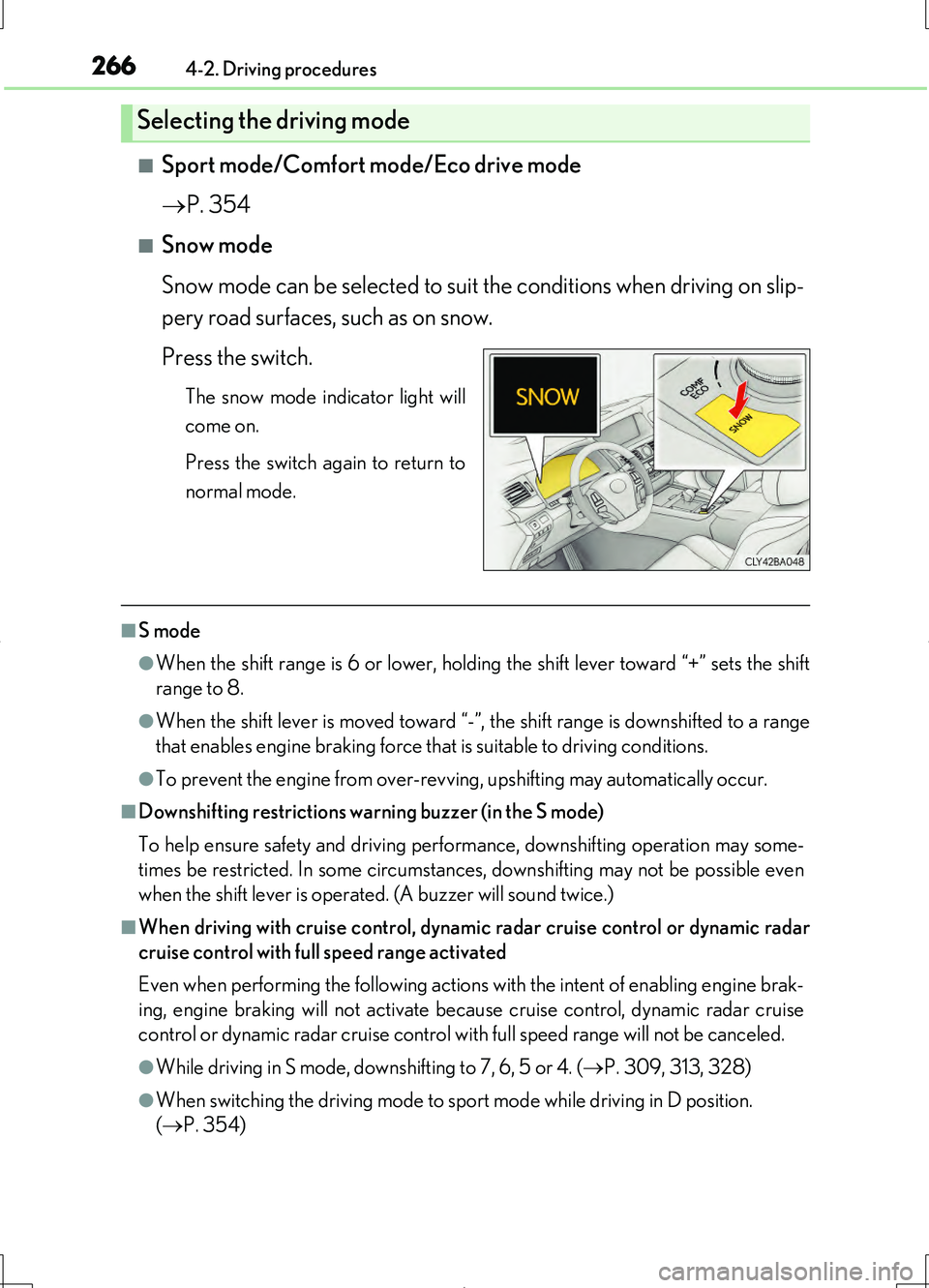
■Snow mode
Snow mode can be selected to suit the conditions when driving on slip-
pery road surfaces, such as on snow.
Press the switch.
The snow mode indicator light will
come on.
Press the switch again to return to
normal mode.
■S mode
●When the shift range is 6 or lower, holdin g the shift lever toward “+” sets the shift
range to 8.
●When the shift lever is moved toward “-”, the shift range is downshifted to a range
that enables engine braking force that is suitable to driving conditions.
●To prevent the engine from over-revving, upshifting may automatically occur.
■Downshifting restrictions warning buzzer (in the S mode)
To help ensure safety and driving performance, downshifting operation may some-
times be restricted. In some circumstances, downshifting may not be possible even
when the shift lever is operated. (A buzzer will sound twice.)
■When driving with cruise control, dynamic radar cruise control or dynamic radar
cruise control with full speed range activated
Even when performing the following actions with the intent of enabling engine brak-
ing, engine braking will not activate because cruise control, dynamic radar cruise
control or dynamic radar cruise control with full speed range will not be canceled.
●While driving in S mode, downshifting to 7, 6, 5 or 4. ( P. 309, 313, 328)
●When switching the driving mode to sport mode while driving in D position.
( P. 354)
Selecting the driving mode
Page 274 of 708
2744-2. Driving procedures
LS460/LS460L_GE (OM50G06E)
■Sport mode/Comfort mode/Eco drive mode
P. 354
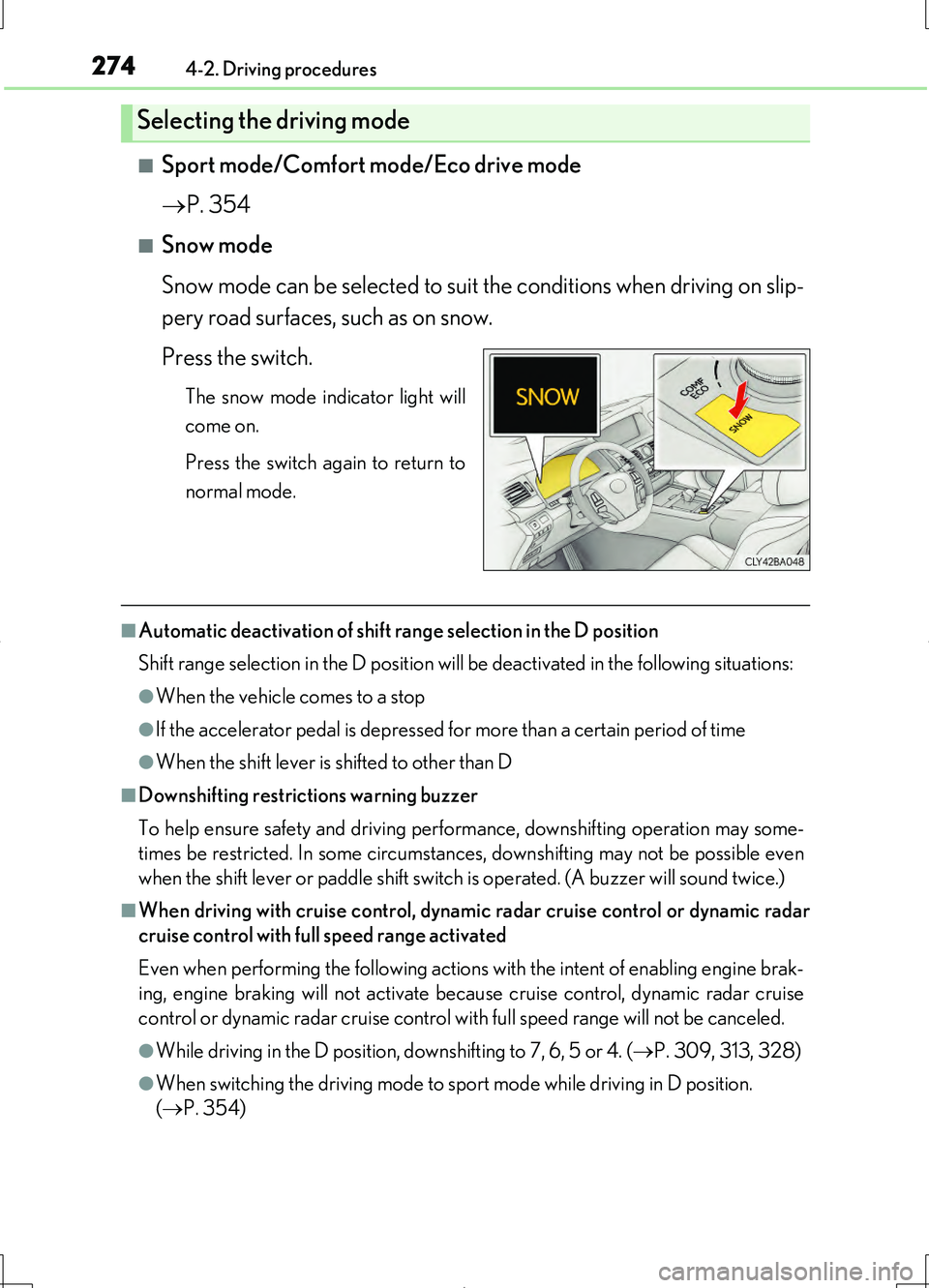
■Snow mode
Snow mode can be selected to suit the conditions when driving on slip-
pery road surfaces, such as on snow.
Press the switch.
The snow mode indicator light will
come on.
Press the switch again to return to
normal mode.
■Automatic deactivation of shift range selection in the D position
Shift range selection in the D position will be deactivated in the following situations:
●When the vehicle comes to a stop
●If the accelerator pedal is depressed for more than a certain period of time
●When the shift lever is shifted to other than D
■Downshifting restrictions warning buzzer
To help ensure safety and driving performance, downshifting operation may some-
times be restricted. In some circumstances, downshifting may not be possible even
when the shift lever or paddle shift switch is operated. (A buzzer will sound twice.)
■When driving with cruise control, dynamic radar cruise control or dynamic radar
cruise control with full speed range activated
Even when performing the following actions with the intent of enabling engine brak-
ing, engine braking will not activate because cruise control, dynamic radar cruise
control or dynamic radar cruise control with full speed range will not be canceled.
●While driving in the D position, downshifting to 7, 6, 5 or 4. ( P. 309, 313, 328)
●When switching the driving mode to sp ort mode while driving in D position.
( P. 354)
Selecting the driving mode
Page 281 of 708
2814-2. Driving procedures
4
Driving
LS460/LS460L_GE (OM50G06E)
■Parking brake indicator light
●Depending on the engine switch mode, the parking brake indicator light will come
on and stay on as described below:
IGNITION ON mode: Comes on until the parking brake is released.
Not in IGNITION ON mode: Stays on for approximately 15 seconds.
●When the engine switch is turned off with the parking brake set, the parking brake
indicator light will stay on for about 15 seconds. This does not indicate a malfunc-
tion.
■Parking brake engaged warning buzzer
A buzzer will sound if the vehicle is driven at a speed of approximately 5 km/h (3
mph) or more with the parking brake engaged.
■When there is a malfunction in the system
Warning lights and/or warning message will turn on or flash. ( P. 607, 614)
Depending on the condition, the parking brake indicator light may flash.
■Usage in winter time
P. 399
NOTICE
■When parking the vehicle
Before you leave the vehicle, set the parking brake, shift the shift lever to P and
make sure that the vehicle does not move.
■When the system malfunctions
Stop the vehicle in a safe place and check the warning messages.
■When the parking brake cannot be released due to a malfunction
Use the parking brake release tool to manually release the parking brake.
( P. 629)
Driving the vehicle with the parking brake set will lead to brake components over-
heating, which may affect braking performance and increase brake wear.
Page 282 of 708
2824-2. Driving procedures
LS460/LS460L_GE (OM50G06E)
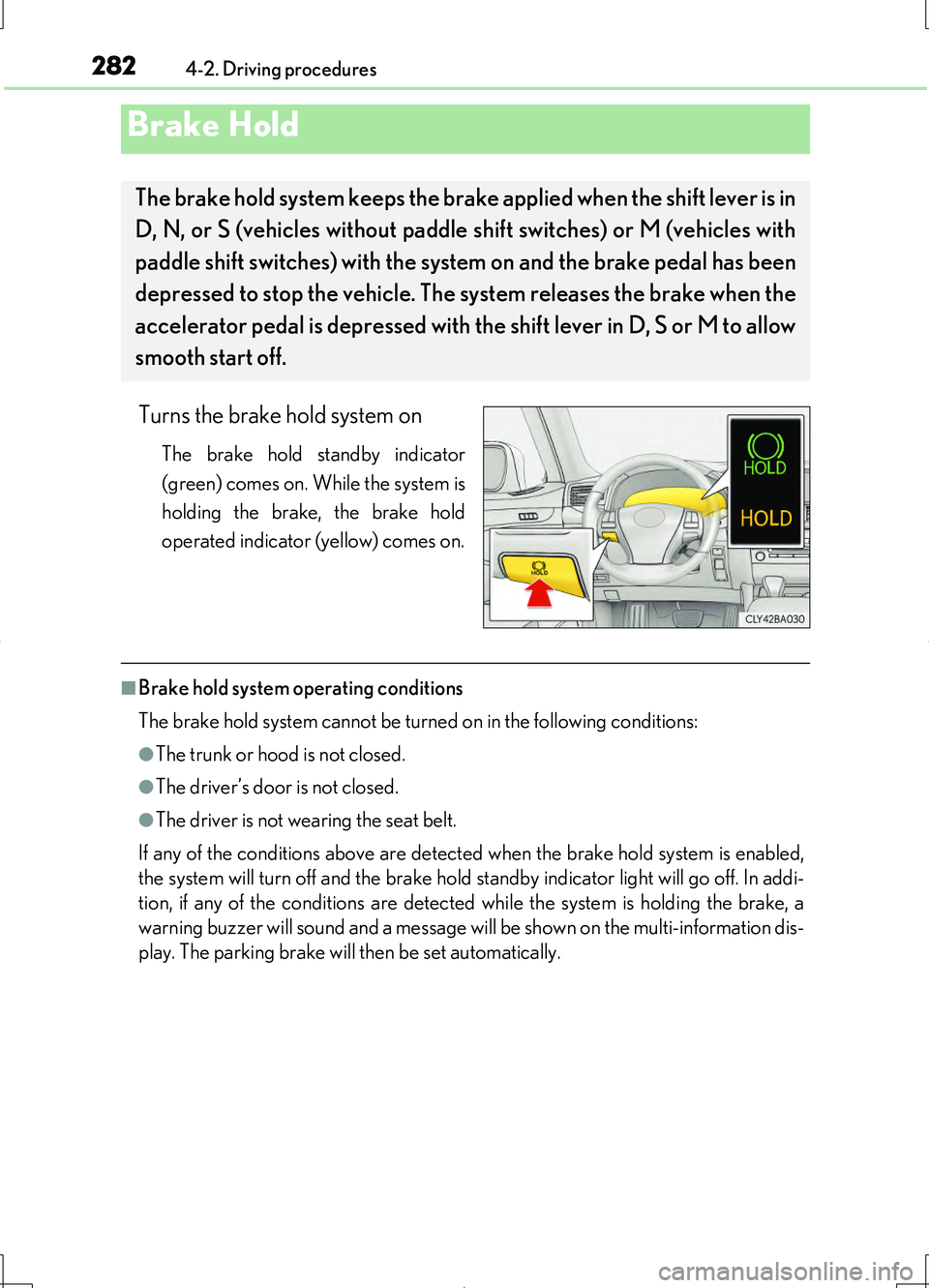
Turns the brake hold system on
The brake hold standby indicator
(green) comes on. While the system is
holding the brake, the brake hold
operated indicator (yellow) comes on.
■Brake hold system operating conditions
The brake hold system cannot be turned on in the following conditions:
●The trunk or hood is not closed.
●The driver’s door is not closed.
●The driver is not wearing the seat belt.
If any of the conditions above are detected when the brake hold system is enabled,
the system will turn off and the brake hold standby indicator light will go off. In addi-
tion, if any of the conditions are detected while the system is holding the brake, a
warning buzzer will sound and a message will be shown on the multi-information dis-
play. The parking brake will then be set automatically.
Brake Hold
The brake hold system keeps the brake applied when the shift lever is in
D, N, or S (vehicles without paddle shift switches) or M (vehicles with
paddle shift switches) with the syst em on and the brake pedal has been
depressed to stop the vehicle. The system releases the brake when the
accelerator pedal is depressed with th e shift lever in D, S or M to allow
smooth start off.
Page 283 of 708
2834-2. Driving procedures
4
Driving
LS460/LS460L_GE (OM50G06E)
■Brake hold function
●If the brake pedal is left released for a period of about 3 minutes after the system
has started holding the brake, the parking brake will be set automatically. In this
case, a warning buzzer sounds and a message is shown on the multi-information
display.
●To turn the system off while the system is holding the brake, firmly depress the
brake pedal and press the switch again.
●The brake hold function may not hold the vehicle when the vehicle is on a steep
incline. In this situation, it may be necessary for the driver to apply the brakes. The
multi-information display will inform the driver of this situation.
■When the parking brake is set automatically while the system is holding the brakes
The parking brake will not be released automatically. Release the parking brake by
operating the parking brake switch, making sure that the parking brake indicator
light goes off. ( P. 279)
■When there is a malfunction in the system
Warning lights and/or warning messages will turn on or flash. ( P. 607, 614)
CAUTION
■When the vehicle is on a steep incline
When using the brake hold system on a steep incline exercise caution. The brake
hold function may not hold the vehicle in such a situation.
■When stopped on a slippery road
The system cannot stop the vehicle when the gripping ability of the tires has been
exceeded. Do not use the system when stopped on a slippery road.
NOTICE
■When parking the vehicle
The brake hold system is not designed for use when parking the vehicle for a long
period of time. Turning the engine switch off while the system is holding the brake
may release the brake, which would cause the vehicle to move. When operating
the engine switch, depress the brake pedal, set the parking brake and shift the shift
lever to P.
Page 345 of 708
3454-5. Using the driving support systems
4
Driving
LS460/LS460L_GE (OM50G06E)
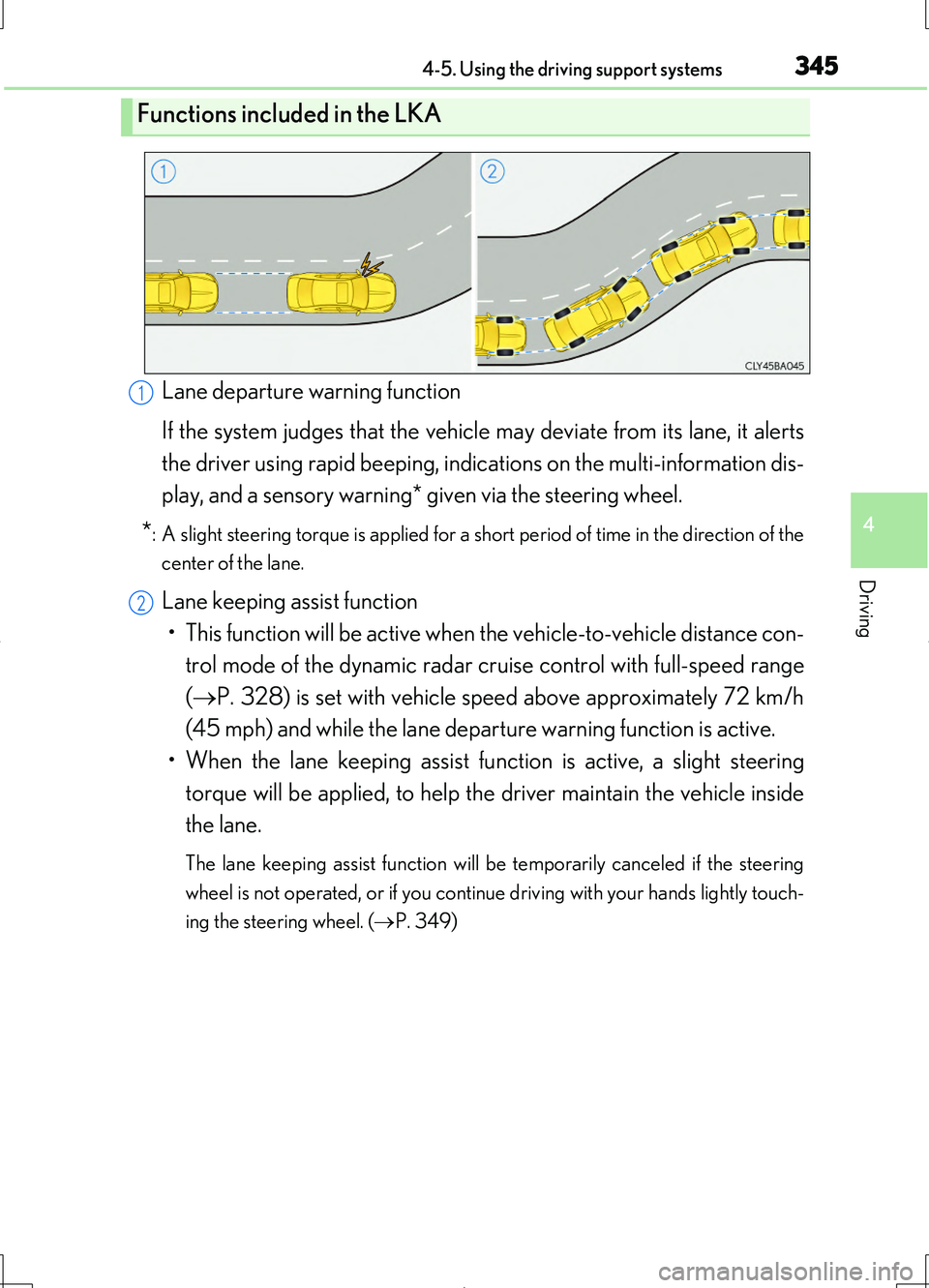
Lane departure warning function
If the system judges that the vehicle may deviate from its lane, it alerts
the driver using rapid beeping, indications on the multi-information dis-
play, and a sensory warning* given via the steering wheel.
*: A slight steering torque is applied for a short period of time in the direction of the
center of the lane.
Lane keeping assist function
• This function will be active when the vehicle-to-vehicle distance con-
trol mode of the dynamic radar crui se control with full-speed range
( P. 328) is set with vehicle speed above approximately 72 km/h
(45 mph) and while the lane departure warning function is active.
• When the lane keeping assist function is active, a slight steering
torque will be applied, to help th e driver maintain the vehicle inside
the lane.
The lane keeping assist function will be temporarily canceled if the steering
wheel is not operated, or if you continue driving with your hands lightly touch-
ing the steering wheel. ( P. 349)
Functions included in the LKA
1
2
Page 349 of 708
3494-5. Using the driving support systems
4
Driving
LS460/LS460L_GE (OM50G06E)
■Temporary cancelation of the LKA system functions
If any of the following occurs, the LKA system functions will be temporarily canceled.
The functions will resume after the necessary operating conditions have returned.
●The steering wheel is turned as far as necessary to cause the vehicle to change
lanes.
●When the system detects no-handed driving. (The lane keeping assist function will
be temporarily canceled, but the lane departure warning function will continue.)
●The turn signal lever is operated.
●The vehicle speed deviates from the operating range of the LKA system functions.
(The buzzer will beep twice when the lane keeping assist function is being can-
celed.)
●When the lane lines cannot be recognized while driving. (The buzzer will beep
twice when the lane keeping assist function is being canceled.)
●When the wiper switch is in the high spee d position or is set to “AUTO” mode with
the wipers operating at high speed. (The lane keeping assist function will be tempo-
rarily canceled, but the lane departure warning function will continue.)
●If the vehicle crosses a line for approximately half a minute or more. (The lane keep-
ing assist function will be temporarily canceled, but the lane departure warning
function will continue.)
●When the lane departure warning function is activated.
The lane departure warning function will not operate again for several seconds
after it has been activated, even if the vehicle leaves the lane again.
■The lane departure warning
It may be difficult to feel the sensory warning depending on the road conditions.
■No-handed driving warning
If the steering wheel is not operated for approximately 15 seconds on a straight road
or approximately 5 seconds on a curve, the buzzer will beep twice, indicators on the
multi-information display will flash, and the lane keeping assist function will be tem-
porarily canceled. If you drive the vehicle with your hands lightly touching the steer-
ing wheel, this may also be detected as no-handed driving.
Page 350 of 708
3504-5. Using the driving support systems
LS460/LS460L_GE (OM50G06E)
■After the vehicle has been parked in the sun
The LKA system functions may not be available and a warning message ( P. 614)
will be displayed for a while after driving has started. In such cases, turn the LKA sys-
tem off and turn it on again after normal temperature returns. When the temperature
in the cabin decreases and the temperature around the camera sensor ( P. 344)
becomes suitable for its operation, the functions will begin to operate.
■If there are lane markers on only one side of the vehicle
The lane keeping assist function will not operate. Also, the lane departure warning
will not operate for the side on which lane markers could not be recognized.
■Conditions in which the function may not operate correctly
In the following conditions, the LKA system functions may not operate, or it may not
be possible to ensure adequate performance. Also, the camera sensor may be
unable to recognize lane lines causing the lane departure warning function to oper-
ate incorrectly, or the lane keeping assist function may not operate properly. How-
ever, this does not indicate a malfunction.
●When driving through an area with no lane markers, such as a tollbooth, a crossing
or before a ticket checkpoint
●When driving on a sharp curve
●When lanes are extremely narrow or extremely wide
●When the vehicle leans to one side an unusual amount due to a heavy load or
improper tire inflation pressure
●When the following distance between your vehicle and the vehicle ahead is
extremely short
●When the lane markers are yellow (These may be more difficult for the system to
recognize compared to white markers.)
●When the lane markers are broken, “Raised pavement marker” or stones
●When lane markers are obscured or partially obscured by sand, dirt, etc.
●When there are shadows on the road running parallel with lane markers, or if a
shadow covers the lane markers
●When driving on a particularly bright road surface, such as concrete
●When driving on a road surface that is bright due to reflected light
●When driving in a location where the li ght level changes rapidly, such as the
entrance to or exit from a tunnel
●When sunlight or the headlights of oncoming vehicles are shining directly into the
camera lens
●When driving on roads that are branching or merging
Page 351 of 708
3514-5. Using the driving support systems
4
Driving
LS460/LS460L_GE (OM50G06E)
●When driving on a road surface that is wet due to rain, previous rainfall, standing
water, etc.
●When the vehicle experiences strong up-and-down motion such as when driving
on an extremely rough road or on a seam in the pavement
●When headlight brightness at nighttime is reduced due to dirt on the lenses, or
when the headlights are misaligned
●When driving with a strong crosswind
●When driving on winding roads or roads that are uneven
●When driving on rough or unpaved roads
■When changing the tires
Depending on the tires used, such as snow tires, etc., sufficient performance may not
be maintainable.
■Warning messages for LKA
Warning messages are used to indicate a system malfunction or to inform the driver
of the need for caution while driving. ( P. 614)
CAUTION
■Before using the LKA system
Do not rely solely on the LKA system. The LKA system does not drive the vehicle
automatically, nor does it reduce the amount of care you need to take. As such, the
driver must always assume full responsibility for understanding his/her surround-
ings, for operating the steering wheel to correct the driving line, and for driving
safely.
Inappropriate or negligent driving could lead to an accident.
■To avoid operating the LKA by mistake
Switch the LKA off using the LKA switch when not in use.
Page 363 of 708
3634-5. Using the driving support systems
4
Driving
LS460/LS460L_GE (OM50G06E)
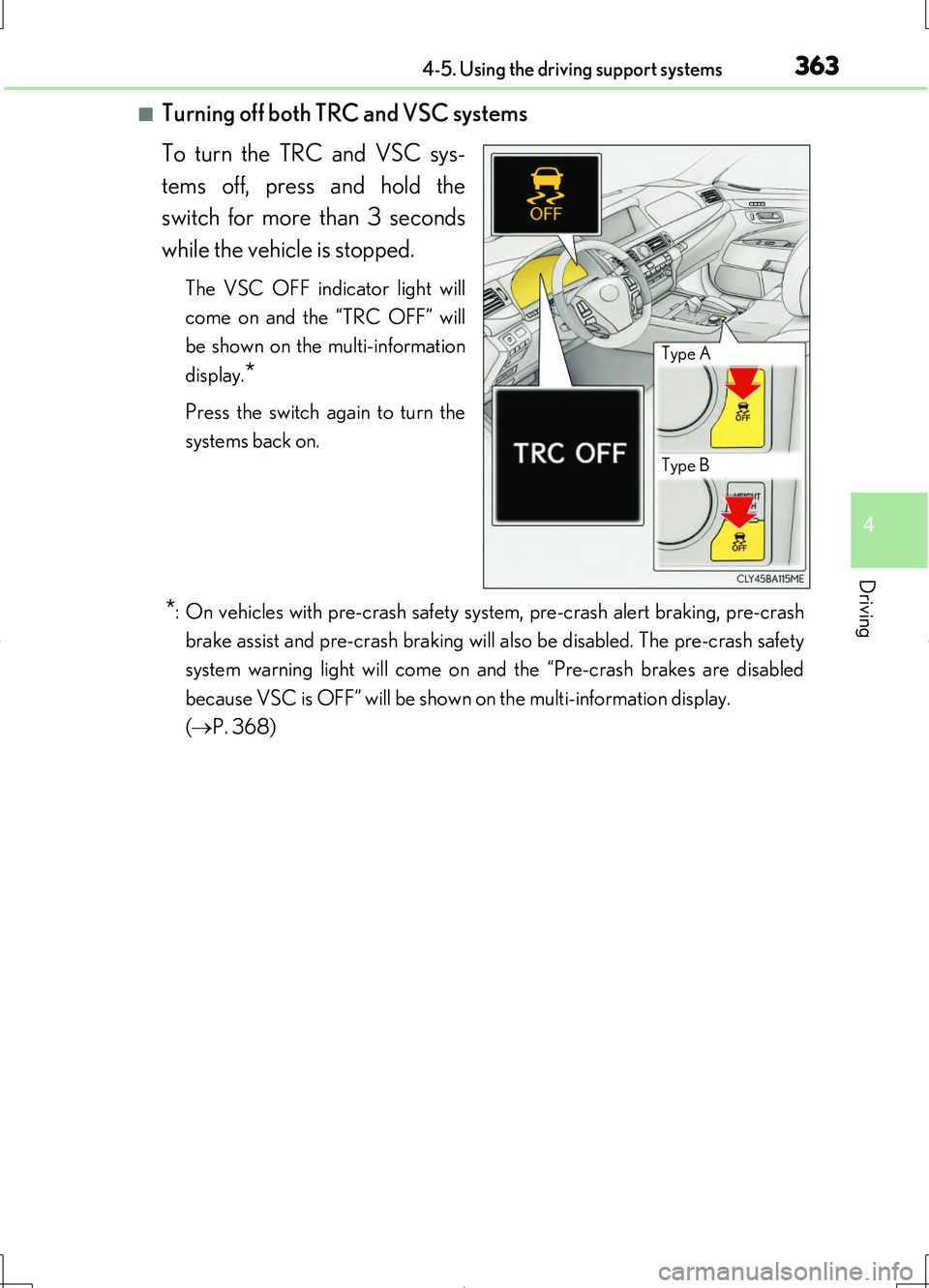
■Turning off both TRC and VSC systems
To turn the TRC and VSC sys-
tems off, press and hold the
switch for more than 3 seconds
while the vehicle is stopped.
The VSC OFF indicator light will
come on and the “TRC OFF” will
be shown on the multi-information
display.*
Press the switch again to turn the
systems back on.
*: On vehicles with pre-crash safety system, pre-crash alert braking, pre-crash
brake assist and pre-crash braking will also be disabled. The pre-crash safety
system warning light will come on and the “Pre-crash brakes are disabled
because VSC is OFF” will be shown on the multi-information display.
( P. 368)
Type A
Type B