lights LEXUS LS460L 2016 Workshop Manual
[x] Cancel search | Manufacturer: LEXUS, Model Year: 2016, Model line: LS460L, Model: LEXUS LS460L 2016Pages: 708, PDF Size: 36.57 MB
Page 351 of 708
3514-5. Using the driving support systems
4
Driving
LS460/LS460L_GE (OM50G06E)
●When driving on a road surface that is wet due to rain, previous rainfall, standing
water, etc.
●When the vehicle experiences strong up-and-down motion such as when driving
on an extremely rough road or on a seam in the pavement
●When headlight brightness at nighttime is reduced due to dirt on the lenses, or
when the headlights are misaligned
●When driving with a strong crosswind
●When driving on winding roads or roads that are uneven
●When driving on rough or unpaved roads
■When changing the tires
Depending on the tires used, such as snow tires, etc., sufficient performance may not
be maintainable.
■Warning messages for LKA
Warning messages are used to indicate a system malfunction or to inform the driver
of the need for caution while driving. ( P. 614)
CAUTION
■Before using the LKA system
Do not rely solely on the LKA system. The LKA system does not drive the vehicle
automatically, nor does it reduce the amount of care you need to take. As such, the
driver must always assume full responsibility for understanding his/her surround-
ings, for operating the steering wheel to correct the driving line, and for driving
safely.
Inappropriate or negligent driving could lead to an accident.
■To avoid operating the LKA by mistake
Switch the LKA off using the LKA switch when not in use.
Page 352 of 708
3524-5. Using the driving support systems
LS460/LS460L_GE (OM50G06E)
CAUTION
■Situations unsuitable for LKA
Do not use LKA in any of the following situations.
Otherwise, the system may not function correctly and could result in an accident.
●When driving with tire chains or similar equipment
●When the tires have been excessively worn, or when the tire inflation pressure is
low
●When there are objects or structures along the roadside that might be misinter-
preted as lane markers (such as guardrails, curb, reflector posts, etc.)
●When driving on snowy roads
●When pavement lane markers are difficult to see due to rain, snow, fog, sand, dirt,
etc.
●When there are visible lines on the pavement from road repairs, or if the remains
of old lane markers are still visible on the road
●When driving on slippery roads, such as those covered with rain, ice or snow
●When driving in a lane other than the driving or passing lanes on a freeway or
highway
●When driving on a road with lane closures due to maintenance, or when driving
in a temporary lane
NOTICE
■To prevent damage to or incorrect operation of the LKA system
●Do not modify the headlights or attach stickers to the surface of the lights.
●Do not modify the suspension.
If any suspension parts need to be replaced, contact your Lexus dealer.
●Do not install or place anything on the hood or the grille. Also, do not install a
grille guard (bull bars, kangaroo bar etc.).
●Do not modify the sun visor.
If the sun visor needs to be replaced, contact your Lexus dealer.
●If the windshield needs to be replaced, contact your Lexus dealer.
Page 361 of 708
3614-5. Using the driving support systems
4
Driving
LS460/LS460L_GE (OM50G06E)
◆VGRS (Variable Gear Ratio Steering) (if equipped)
Adjusts the wheel turning angle in accordance with the vehicle speed
and steering wheel movement
◆EPS (Electric Power Steering)
Employs an electric motor to reduce the amount of effort needed to
turn the steering wheel
◆VDIM (Vehicle Dynamics Integrated Management)
Provides integrated control of the ABS, brake assist, TRC, VSC, hill-
start assist control, EPS and VGRS (if equipped) systems
Helps to maintain vehicle stability when swerving on slippery road sur-
faces by controlling the brakes, engine output, steering assist, and if
equipped with VGRS, steering ratio
◆PCS (Pre-Crash Safety system) (if equipped)
P. 368
◆Emergency brake signal (if equipped)
When the brakes are applied suddenly, the stop lights automatically
flash to alert the vehicle behind
◆BSM (Blind Spot Monitor) (if equipped)
P. 381
Page 362 of 708
3624-5. Using the driving support systems
LS460/LS460L_GE (OM50G06E)
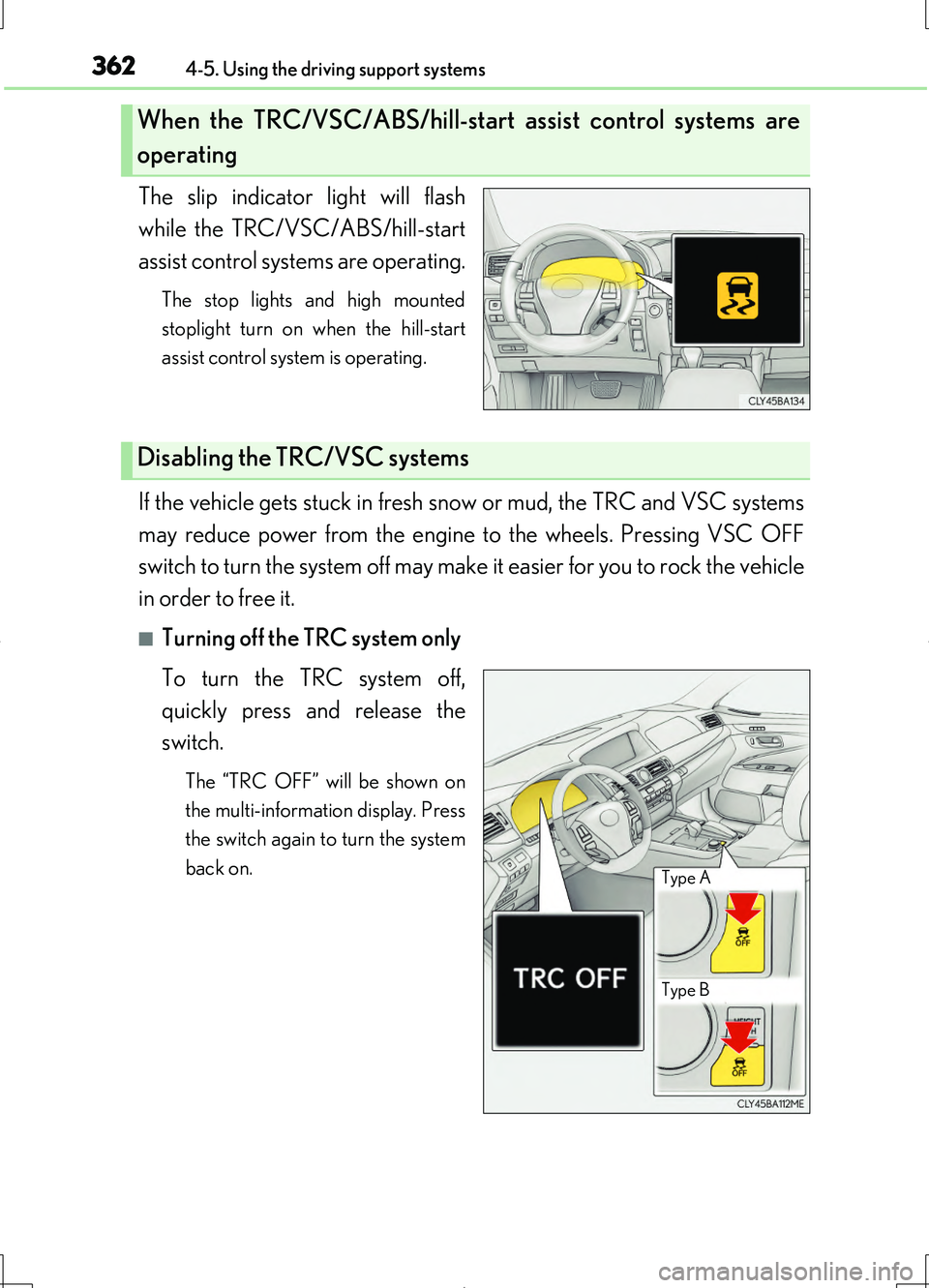
The slip indicator light will flash
while the TRC/VSC/ABS/hill-start
assist control systems are operating.
The stop lights and high mounted
stoplight turn on when the hill-start
assist control system is operating.
If the vehicle gets stuck in fresh snow or mud, the TRC and VSC systems
may reduce power from the engine to the wheels. Pressing VSC OFF
switch to turn the system off may make it easier for you to rock the vehicle
in order to free it.
■Turning off the TRC system only
To turn the TRC system off,
quickly press and release the
switch.
The “TRC OFF” will be shown on
the multi-information display. Press
the switch again to turn the system
back on.
When the TRC/VSC/ABS/hill-start assist control systems are
operating
Disabling the TRC/VSC systems
Type B
Type A
Page 371 of 708
3714-5. Using the driving support systems
4
Driving
LS460/LS460L_GE (OM50G06E)
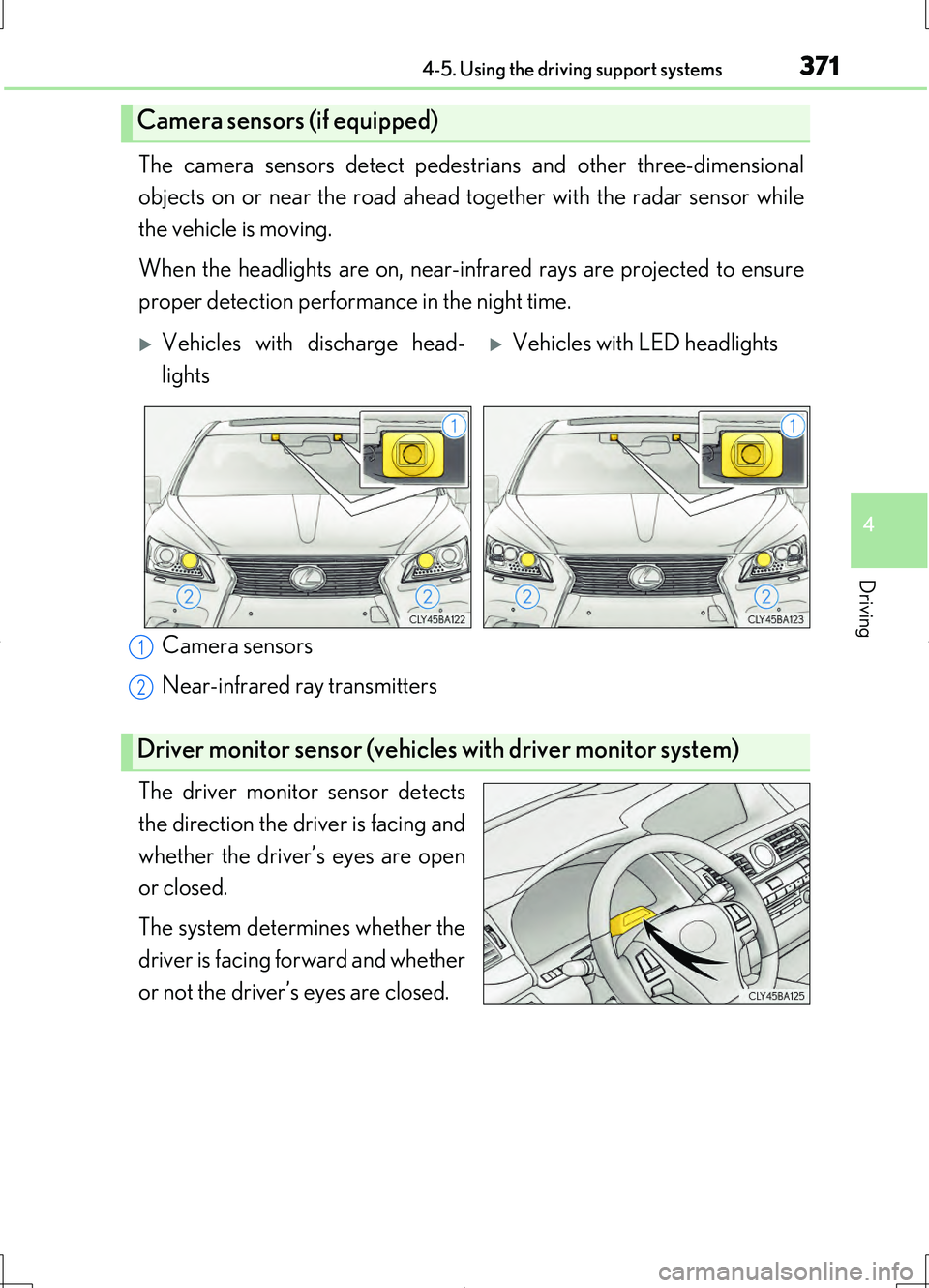
The camera sensors detect pedestrians and other three-dimensional
objects on or near the road ahead to gether with the radar sensor while
the vehicle is moving.
When the headlights are on, near-inf rared rays are projected to ensure
proper detection performance in the night time.
Camera sensors
Near-infrared ray transmitters
The driver monitor sensor detects
the direction the driver is facing and
whether the driver’s eyes are open
or closed.
The system determines whether the
driver is facing forward and whether
or not the driver’s eyes are closed.
Camera sensors (if equipped)
Vehicles with discharge head-
lights
Vehicles with LED headlights
Driver monitor sensor (vehicles with driver monitor system)
1
2
Page 374 of 708
3744-5. Using the driving support systems
LS460/LS460L_GE (OM50G06E)
■Conditions that may trigger the system even if there is no danger of a collision
In any of the following situations where the frontal area of the radar sensor is inter-
rupted, the radar sensor may detect possibility of a frontal collision and the system
may be activated.
●When passing by an oncoming vehicle in a curve or a turn to the right or the left.
●When rapidly approaching an obstacle ahead (e.g. preceding vehicle, toll gate bar-
rier, etc.)
●When there is a structural object (billboard, low ceiling, fluorescent light, etc.)
above the uphill road ahead
●When driving on a narrow road or through under a low overhead structure (bridge,
tunnel, fly-under, etc.)
●When driving on an uneven road surface
●When there is a metal object, bump, or protrusion on the road surface
●When vehicle front part is raised or lowered depending on loading conditions
●When the direction of radar sensor is misaligned by strong impact applied on an
area around the radar sensor, etc.
●When there is an obstacle (guard rail, etc.) by the roadside at the entrance to a
curve
●When the front of your vehicle is pointing upwards (caused by putting a heavy load
in the trunk etc.)
●When driving through an area filled with steam or smoke
When the system is activated in the situatio ns described above, there is also a possi-
bility that the seat belts will retract quickly and the brakes may be applied with a force
greater than normal. When the seat belt is locked in the retracted position, stop the
vehicle in a safe place, release the seat belt and refasten it.
■Obstacles not detected
The radar sensor cannot detect plastic obstacles such as traffic cones. There may
also be occasions when the sensor cannot detect pedestrians, animals, bicycles,
motorcycles, trees, or snowdrifts.
■A camera sensor cannot detect obstacles in the following situations:
●A camera sensor is directly receiving intense light, such as sunlight.
●Visibility is poor because of bad weather or other reasons.
●The sensor temperature is extremely high.
●The headlights are not turned on in darkness such as at night or in a tunnel.
Page 378 of 708
3784-5. Using the driving support systems
LS460/LS460L_GE (OM50G06E)
CAUTION
■Handling the camera sensors (if equipped)
Observe the following to ensure that the PCS functions effectively:
●Keep the windshield clean at all times.
PCS effectiveness may be reduced due to the presence of raindrops, condensa-
tion, ice or snow on the windshield.
●Do not subject the camera sensor to a st rong impact or force, and do not disas-
semble the camera sensor.
●Do not change the installation position of the camera sensor, or remove and rein-
stall it. The direction of the camera sensor is precisely adjusted.
●When the windshield fogs up, use the wi ndshield defogger to dry the windshield.
During cold weather, using the heater with air blowing to the feet may allow the
upper part of the windshield to fog up, having a negative effect on the images.
●Do not place anything on the dashboard.
Images reflected on the windshield may reduce the effectiveness of the camera
sensor.
●Do not scratch the camera lens, or let it get dirty.
●Do not attach a sticker or other items to the windshield near the camera sensor.
■Headlights (vehicles with camera sensors)
●Observe the following to ensure proper near-infrared ray projection:
• Keep the headlights clean at all times.
• The detection performance may deteriorate if the high beams are misaligned
or inoperative.
●The near-infrared ray transmitters project strong energy that is not visible.
Although the transmitters normally turn off when the vehicle is stopped, never
look into the headlights for your safety.
Page 393 of 708
3934-5. Using the driving support systems
4
Driving
LS460/LS460L_GE (OM50G06E)
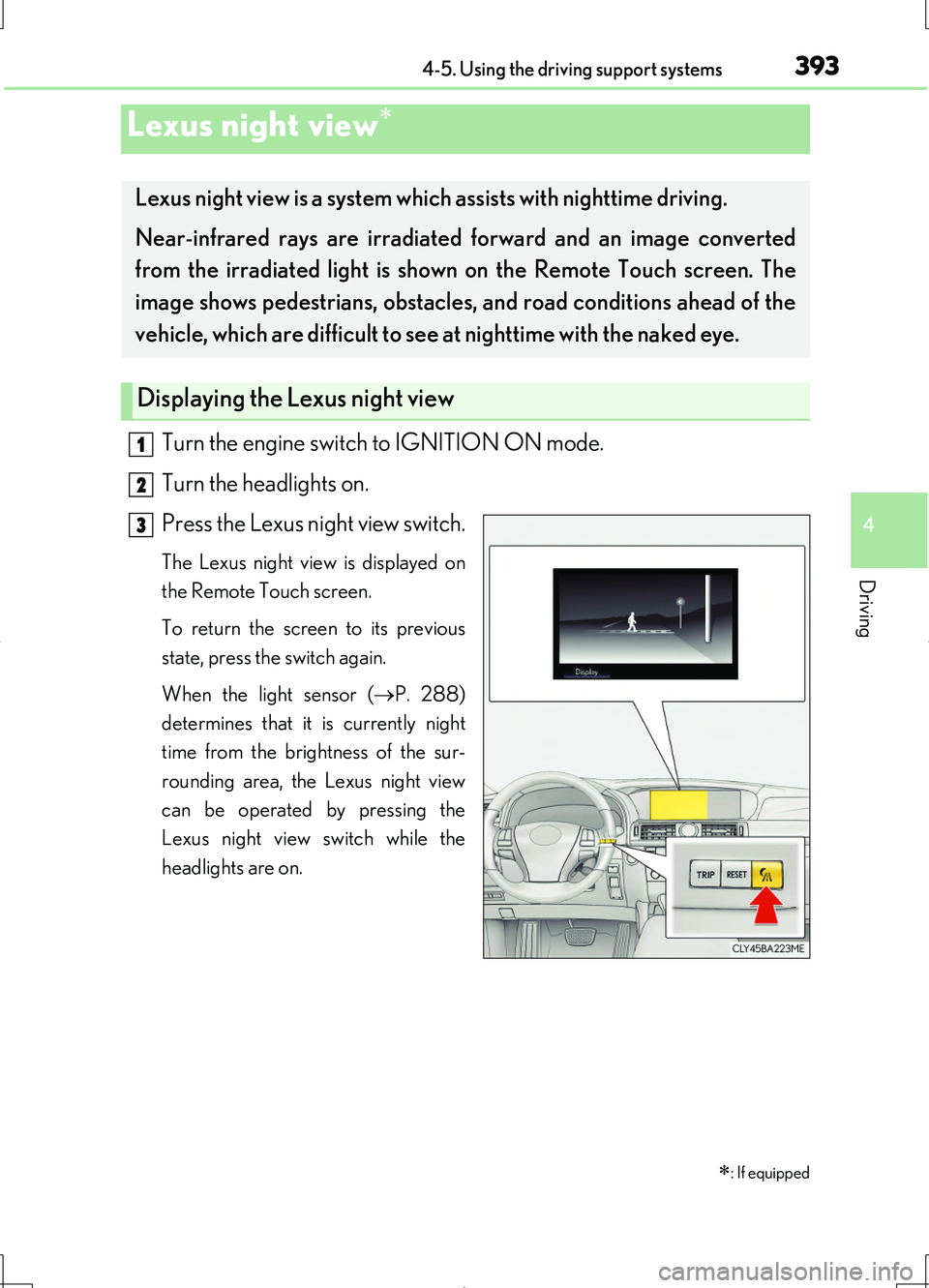
Turn the engine switch to IGNITION ON mode.
Turn the headlights on.
Press the Lexus night view switch.
The Lexus night view is displayed on
the Remote Touch screen.
To return the screen to its previous
state, press the switch again.
When the light sensor ( P. 288)
determines that it is currently night
time from the brightness of the sur-
rounding area, the Lexus night view
can be operated by pressing the
Lexus night view switch while the
headlights are on.
Lexus night view
: If equipped
Lexus night view is a system which assists with nighttime driving.
Near-infrared rays are irradiated forward and an image converted
from the irradiated light is show n on the Remote Touch screen. The
image shows pedestrians, obstacles, and road conditions ahead of the
vehicle, which are difficult to see at nighttime with the naked eye.
Displaying the Lexus night view
1
2
3
Page 396 of 708
3964-5. Using the driving support systems
LS460/LS460L_GE (OM50G06E)
CAUTION
■Before using the Lexus night view
Never depend on this system only.
Lexus night view is intended as a supplemental aid to help you see pedestrians and
road conditions ahead of the vehicle. As there are limits to the system, do not rely
solely on the system while in use, and drive safely while observing the following
precautions.
■When using the Lexus night view
Observe the following precautions.
Failure to do so may cause an accident resulting in death or serious injury.
●Never drive while looking at the Lexus night view screen only.
●Do not look continuously at the Lexus ni ght view screen while driving. Pedestri-
ans, objects etc. ahead of the vehicle may be overlooked by the system. The sys-
tem should always be used as a supplemental aid only.
●Lexus night view is designed to help you see objects better when driving in dark-
ness on a road with few curves. Do not use the Lexus night view in well-lit areas or
on roads with many curves or slopes. There may be areas that cannot be dis-
played by the system due to the road conditions (curve size, gradient, etc.)
●Lexus night view may be unable to project some features at an appropriate level
of brightness. Some or all parts of certain features may be dark or difficult to see.
Do not rely solely on the Lexus night view, and drive carefully while checking the
surroundings for safety, as you would with a normal vehicle. Also, the following
features and conditions may not be displayed clearly.
Features that are difficult to display:
• Clothing of a pedestrian made of a certain kind of material (ex. leather jackets)
• The characters on signs and billboards
• The information on road signs
Conditions in which display is difficult:
• Unfavorable weather conditions such as rain, fog, snowfall, snow storms etc.
• There are large puddles of water on the road surface following rainfall
• The area of the windshield in front of the camera is fogged up, dirty or icy
• The areas around the headlights are covered with ice, snow, mud etc.
• The battery voltage is remarkably low
• There are bright lights ahead of the vehicle
Page 397 of 708
3974-5. Using the driving support systems
4
Driving
LS460/LS460L_GE (OM50G06E)
CAUTION
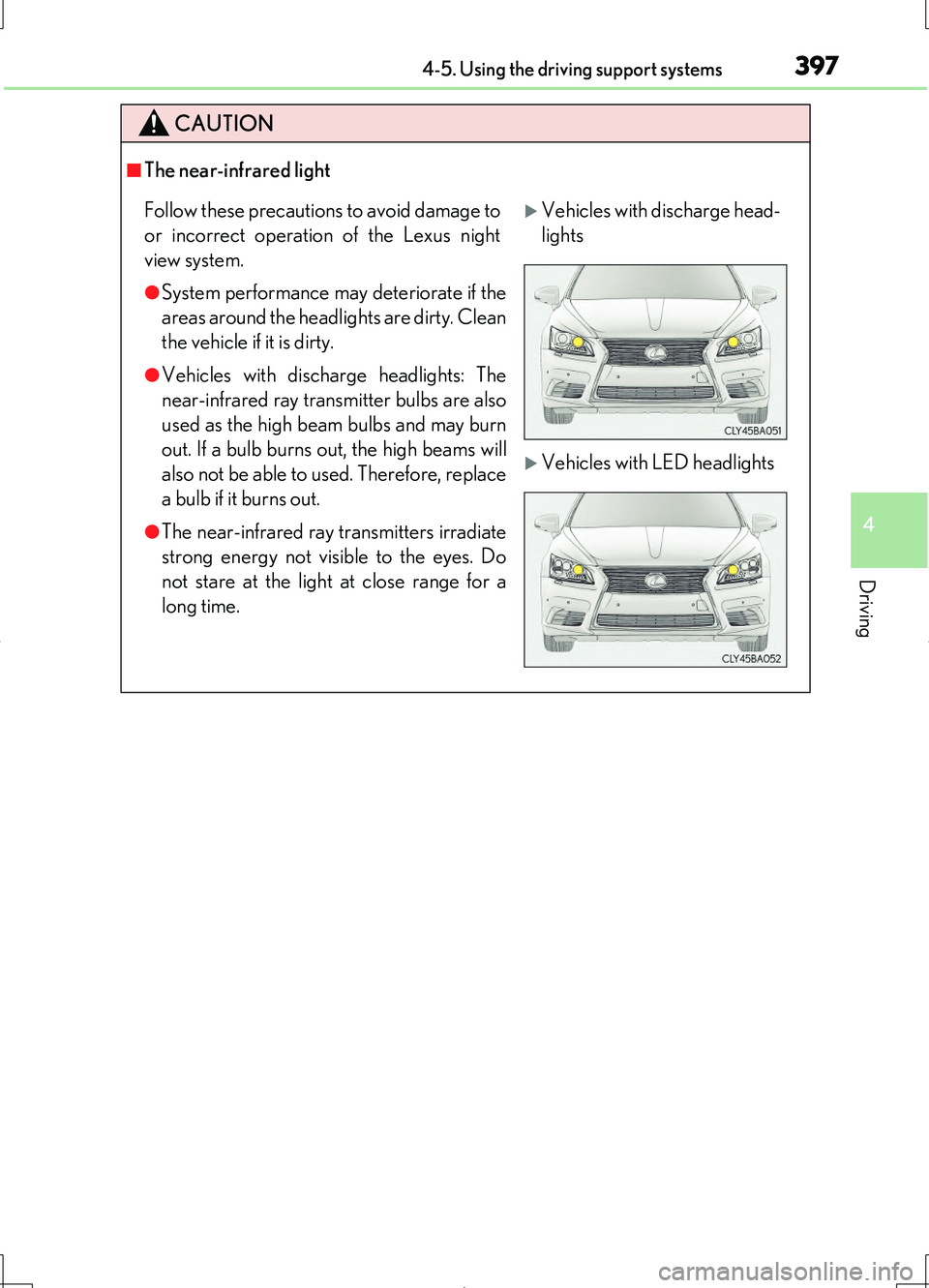
■The near-infrared light
Follow these precautions to avoid damage to
or incorrect operation of the Lexus night
view system.
●System performance may deteriorate if the
areas around the headlights are dirty. Clean
the vehicle if it is dirty.
●Vehicles with discharge headlights: The
near-infrared ray transmitter bulbs are also
used as the high beam bulbs and may burn
out. If a bulb burns out, the high beams will
also not be able to used. Therefore, replace
a bulb if it burns out.
●The near-infrared ray transmitters irradiate
strong energy not visible to the eyes. Do
not stare at the light at close range for a
long time.
Vehicles with discharge head-
lights
Vehicles with LED headlights