air condition LEXUS LS500 2018 User Guide
[x] Cancel search | Manufacturer: LEXUS, Model Year: 2018, Model line: LS500, Model: LEXUS LS500 2018Pages: 514, PDF Size: 10.62 MB
Page 217 of 514

2174-5. Using the driving support systems
LS500_OM_OM50F54U_(U) 4
Driving • The vehicle is wobbling.
• The vehicle is being driven at extremely
high speeds.
• When driving on a hill
• If the radar sensor or camera sensor is
misaligned●
In some situations such as the following,
sufficient braking force may not be
obtained, preventing the system from
performing properly:
• If the braking functions cannot operate to
their full extent, such as when the brake
parts are extremely cold, extremely hot,
or wet
• If the vehicle is not properly maintained
(brakes or tires are excessively worn,
improper tire inflation pressure, etc.)
• When the vehicle is being driven on a
gravel road or other slippery surface●
Some pedestrians such as the following
may not be detected by the radar sensor
and camera sensor, preventing the sys-
tem from operating properly:
• Pedestrians shorter than approximately
3.2 ft. (1 m) or tall er than approximately
6.5 ft. (2 m)
• Pedestrians wearing oversized clothing
(a rain coat, long skir t, etc.), making their
silhouette obscure
• Pedestrians who are carrying large bag-
gage, holding an umbrella, etc., hiding
part of their body
• Pedestrians who are bending forward or
squatting
• Pedestrians who are pushing a stroller,
wheelchair, bicycle or other vehicle
• Groups of pedestrians which are close
together
• Pedestrians who are wearing white and
look extremely bright
• Pedestrians in the dark, such as at night
or while in a tunnel
• Pedestrians whose clothing appears to
be nearly the same co lor or brightness as
their surroundings
• Pedestrians near walls , fences, guardrails,
or large objects
• Pedestrians who are on a metal object
(manhole cover, steel plate, etc.) on the
road
• Pedestrians who are walking fast
• Pedestrians who are changing speed
abruptly • Pedestrians running out from behind a
vehicle or a large object
• Pedestrians who are extremely close to
the side of the vehicle (outside rear view
mirror, etc.) ■
If the PCS warning light flashes or illumi-
nates and a warning message is dis-
played on the multi-information display
The pre-collision system may be temporar-
ily unavailable or there may be a malfunc-
tion in the system. ●
In the following situations, the warning
light will turn off, the message will disap-
pear and the system will become opera-
tional when normal operating conditions
return:
• When the radar sensor or camera sensor
or the area around either sensor is hot,
such as in the sun
• When the radar sensor or camera sensor
or the area around either sensor is cold,
such as in an extremely cold environment
• When a front sensor is dirty or covered
with snow, etc.
• When the part of the windshield in front
of the camera sensor is fogged up or cov-
ered with condensation or ice (Defog-
ging the windshield: → P.314)
• If the camera sensor is obstructed, such
as when the hood is open or a sticker is
attached to the windshield near the cam-
era sensor ●
If the PCS warning light continues to flash
or remains illuminated or the warning
message does not disappear even
though the vehicle has returned to nor-
mal, the system may be malfunctioning.
Have the vehicle inspected by your Lexus
dealer immediately.
■
If VSC is disabled
●
If VSC is disabled ( → P.294), the pre-col-
lision brake assist and pre-collision brak-
ing functions are also disabled.
●
The PCS warning light will turn on and
“VSC Turned Off Pre-Collision Brake
System Unavailable” will be displayed on
the multi-information display.
Page 225 of 514
2254-5. Using the driving support systems
LS500_OM_OM50F54U_(U) 4
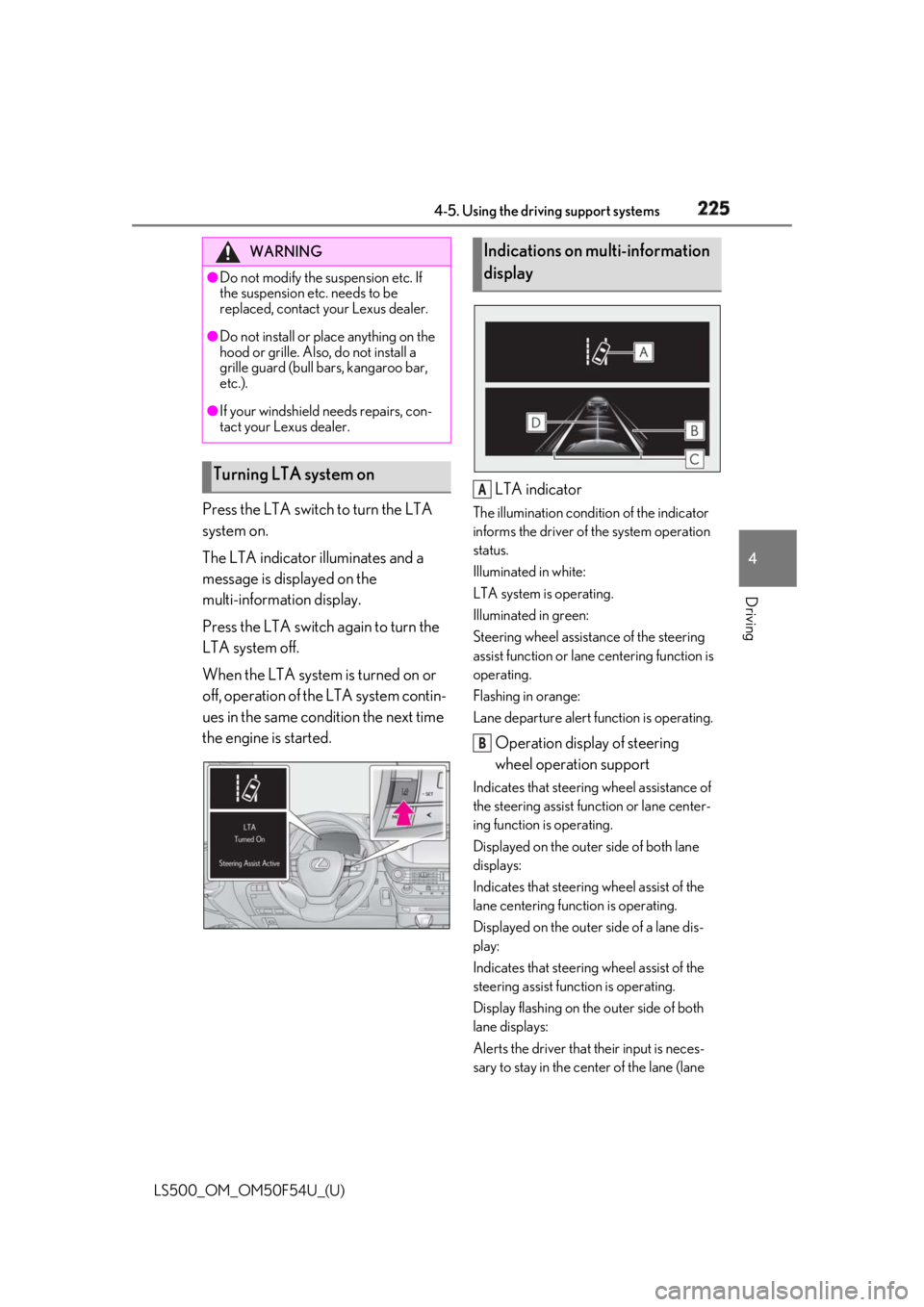
Driving Press the LTA switch to turn the LTA
system on.
The LTA indicator illuminates and a
message is displayed on the
multi-information display.
Press the LTA switch again to turn the
LTA system off.
When the LTA system is turned on or
off, operation of the LTA system contin-
ues in the same condition the next time
the engine is started. LTA indicator The illumination condition of the indicator
informs the driver of the system operation
status.
Illuminated in white:
LTA system is operating.
Illuminated in green:
Steering wheel assistan ce of the steering
assist function or lane centering function is
operating.
Flashing in orange:
Lane departure alert function is operating.
Operation display of steering
wheel operation support Indicates that steering wheel assistance of
the steering assist function or lane center-
ing function is operating.
Displayed on the outer side of both lane
displays:
Indicates that steering wheel assist of the
lane centering function is operating.
Displayed on the outer side of a lane dis-
play:
Indicates that steering wheel assist of the
steering assist func tion is operating.
Display flashing on the outer side of both
lane displays:
Alerts the driver that their input is neces-
sary to stay in the center of the lane (lane WARNING●
Do not modify the suspension etc. If
the suspension etc. needs to be
replaced, contact your Lexus dealer.●
Do not install or place anything on the
hood or grille. Also, do not install a
grille guard (bull bars, kangaroo bar,
etc.).●
If your windshield needs repairs, con-
tact your Lexus dealer.
Turning LTA system on Indications on multi-information
display
A
B
Page 233 of 514
2334-5. Using the driving support systems
LS500_OM_OM50F54U_(U) 4
Driving
Press the LKA switch to turn the LKA
system on.WARNING■
Before using LKA system
Do not rely solely upon the LKA system.
The LKA system does not automatically
drive the vehicle or reduce the amount of
attention that must be paid to the area in
front of the vehicle. The driver must
always assume full responsibility for driv-
ing safely by paying careful attention to
the surrounding conditions and operat-
ing the steering wheel to correct the path
of the vehicle. Also, the driver must take
adequate breaks when fatigued, such as
from driving for a long period of time.
Failure to perform appropriate driving
operations and pay careful attention may
lead to an accident, resulting in death or
serious injury. ■
To avoid operating LKA system by
mistake
When not using the LKA system, use the
LKA switch to turn the system off. ■
Situations unsuitab le for LKA system
Do not use the LKA system in the follow-
ing situations.
The system may not operate properly
and lead to an accident, resulting in
death or serious injury.
●
A spare tire, tire chains, etc. are
equipped.
●
When the tires have been excessively
worn, or when the tire inflation pres-
sure is low.
●
Tires which differ by structure, manu-
facturer, brand or tread pattern are
used.
●
Objects or patterns that could be mis-
taken for white (yellow) lines are pres-
ent on the side of th e road (guardrails,
curbs, reflective poles, etc.).
●
Vehicle is driven on a snow-covered
road.
●
White (yellow) lines are difficult to see
due to rain, snow, fog, dust, etc. ●
Asphalt repair marks, white (yellow)
line marks, etc. are present due to road
repair. ●
Vehicle is driven in a temporary lane or
restricted lane due to construction
work. ●
Vehicle is driven on a road surface
which is slippery due to rainy weather,
fallen snow, freezing, etc. ●
Vehicle is driven in traffic lanes other
than on highways and freeways. ●
Vehicle is driven in a construction
zone. ■
Preventing LKA system malfunctions
and operations performed by mistake ●
Do not modify the headlights or place
stickers, etc. on the surface of the
lights. ●
Do not modify the suspension etc. If
the suspension etc. needs to be
replaced, contact your Lexus dealer. ●
Do not install or place anything on the
hood or grille. Also, do not install a
grille guard (bull bars, kangaroo bar,
etc.). ●
If your windshield needs repairs, con-
tact your Lexus dealer.
Turning LKA system on
Page 260 of 514

260 4-5. Using the driving support systems
LS500_OM_OM50F54U_(U) ●
A shift position other than P is selected.■
Setting the buzzer volume
The buzzer volume can be adjusted on the
multi-information display. ( → P.257)■
If “Parking Assist Unavailable Clean
Parking Assist Sensor” is displayed on
the multi-inform ation display
A sensor may be covered with ice, snow,
dirt, etc. Remove the ice, snow, dirt, etc.,
from the sensor to return the system to nor-
mal.
Also, due to ice forming on a sensor at low
temperatures, a warning message may be
displayed or the sensor may not be able to
detect an object. Once the ice melts, the
system will return to normal. ■
Sensor detectio n information●
The following situations may occur
during use.
• Depending on the shape of the object
and other factors, the detection distance
may shorten, or detection may be impos-
sible.
• There will be a short delay between
object detection and display. Even at low
speeds, there is a possibility that the
object will come within the sensor’s
detection areas before the display is
shown and the warning beep sounds.
• It might be difficult to hear the buzzer due
to the volume of the audio system or air
flow noise of the air conditioning system.■
Conditions under which the function
may not function correctly
Certain vehicle conditions and the sur-
rounding environment may affect the ability
of a sensor to correctly detect objects. Par-
ticular instances where this may occur are
listed below.
●
There is dirt, snow or ice on a sensor.
(Cleaning the sensors will resolve this
problem.)
●
A sensor is frozen. (Thawing the area will
resolve this problem.)
In especially cold weather, if a sensor is
frozen the sensor display may be dis-
played abnormally, or objects, such as a
wall, may not be detected.
●
A sensor is covered in any way. ●
When a sensor or the area around a sen-
sor is extremely hot or cold. ●
On an extremely bumpy road, on an
incline, on gravel, or on grass. ●
The vicinity of the vehicle is noisy due to
vehicle horns, motorcycle engines, air
brakes of large vehicles, or other loud
noises producing ultrasonic waves. ●
There is another vehicle equipped with
parking assist sensors in the vicinity. ●
A sensor is coated with a sheet of spray
or heavy rain. ●
If a sensor is hit by a large amount of
water, such as when driving on a flooded
road. ●
If the vehicle is significantly tilted. ●
The vehicle is approaching a tall or
curved curb. ●
If objects draw too close to the sensor. ■
Objects which may not be properly
detected
The shape of the object may prevent the
sensor from detectin g it. Pay particular
attention to the following objects: ●
Wires, fences, ropes, etc. ●
Cotton, snow and other materials that
absorb sound waves ●
Sharply-angled objects ●
Low objects ●
Tall objects with upper sections project-
ing outwards in the direction of your vehi-
cle
People may not be de tected if they are
wearing certain types of clothing.
Page 270 of 514

270 4-5. Using the driving support systems
LS500_OM_OM50F54U_(U) • Pedestrians who are bending forward or
squatting
• Pedestrians who are lying down
• Pedestrians who are running
• Pedestrians who suddenly enter the
detection area
• Pedestrians riding a bicycle, skateboard,
or other light vehicle
• Pedestrians wearing oversized clothing
such as a rain coat, long skirt, etc., making
their silhouette obscure
• Pedestrians whose body is partially hid-
den by an object, such as a cart or
umbrella
• Pedestrians which are obscured by dark-
ness, such as at night●
In some situations, such as the following,
pedestrians may not be detected by the
rear camera detection function, prevent-
ing the function from operating properly:
• When backing up in inclement weather
(rain, snow, fog, etc.)
• When the rear camera is obscured (dirt,
snow, ice, etc. are attached) or scratched
• When a very bright light, such as the sun,
or the headlights of another vehicle,
shines directly into the rear camera
• When backing up in a place where the
surrounding brightness changes sud-
denly, such as at the entrance or exit of a
garage or underground parking lot
• When backing up in a dim environment
such as during dusk or in an underground
parking lot●
Even though there are no pedestrians in
the detection area, some objects, such as
the following, may be detected, possibly
causing the rear camera detection func-
tion to operate.
• Three dimensional objects, such as a
pole, traffic cone, fence, or parked vehi-
cle
• Moving objects, such as a car or motor-
cycle
• Objects moving toward your vehicle
when backing up, such as flags or pud-
dles (or airborne matter, such as smoke,
steam, rain, or snow)
• Cobblestone or gravel roads, tram rails,
road repairs, white lines, pedestrian
crossings or fallen leaves on the road
• Metal covers (gratings), such as those
used for drainage ditches • Objects reflected in a puddle or on a wet
road surface
• The roadside or bumps on the road
•Shadows on the road ●
In some situations, such as the following,
the rear camera detection function may
operate even though there are no pedes-
trians in the detection area.
• When backing up toward the roadside or
a bump on the road
• If the vehicle is signif icantly tilted, such as
when carrying a heavy load
• When backing up toward an
incline/decline
• If the suspension has been modified or
tires of a size othe r than specified are
installed
• If the rear of the vehicle is raised or low-
ered due to the carried load
• If an electronic component, such as a
backlit license plate or rear fog light, is
installed near the rear camera
• If a bumper protector, such as an addi-
tional trim strip, is installed to the rear
bumper
• If the orientation of the rear camera has
been changed due to a collision or other
impact, or removal and installation
• If a towing eyelet is in stalled to the rear of
the vehicle
• When water is flowing over the rear cam-
era lens
• When the rear camera is obscured (dirt,
snow, ice, etc. are at tached) or scratched
• If there is a flashing light in the detection
area, such as the emergency flashers of
another vehicle ●
Situations in which the rear camera
detection function may be difficult to
notice
• If buzzer may be difficult to hear if the
surrounding area is noisy, the volume of
the audio system volume is high, the air
conditioning system is being used, etc.
• If the temperature in the cabin is
extremely high or low, the audio system
screen may not operate correctly.
Page 289 of 514
2894-5. Using the driving support systems
LS500_OM_OM50F54U_(U) 4
Driving
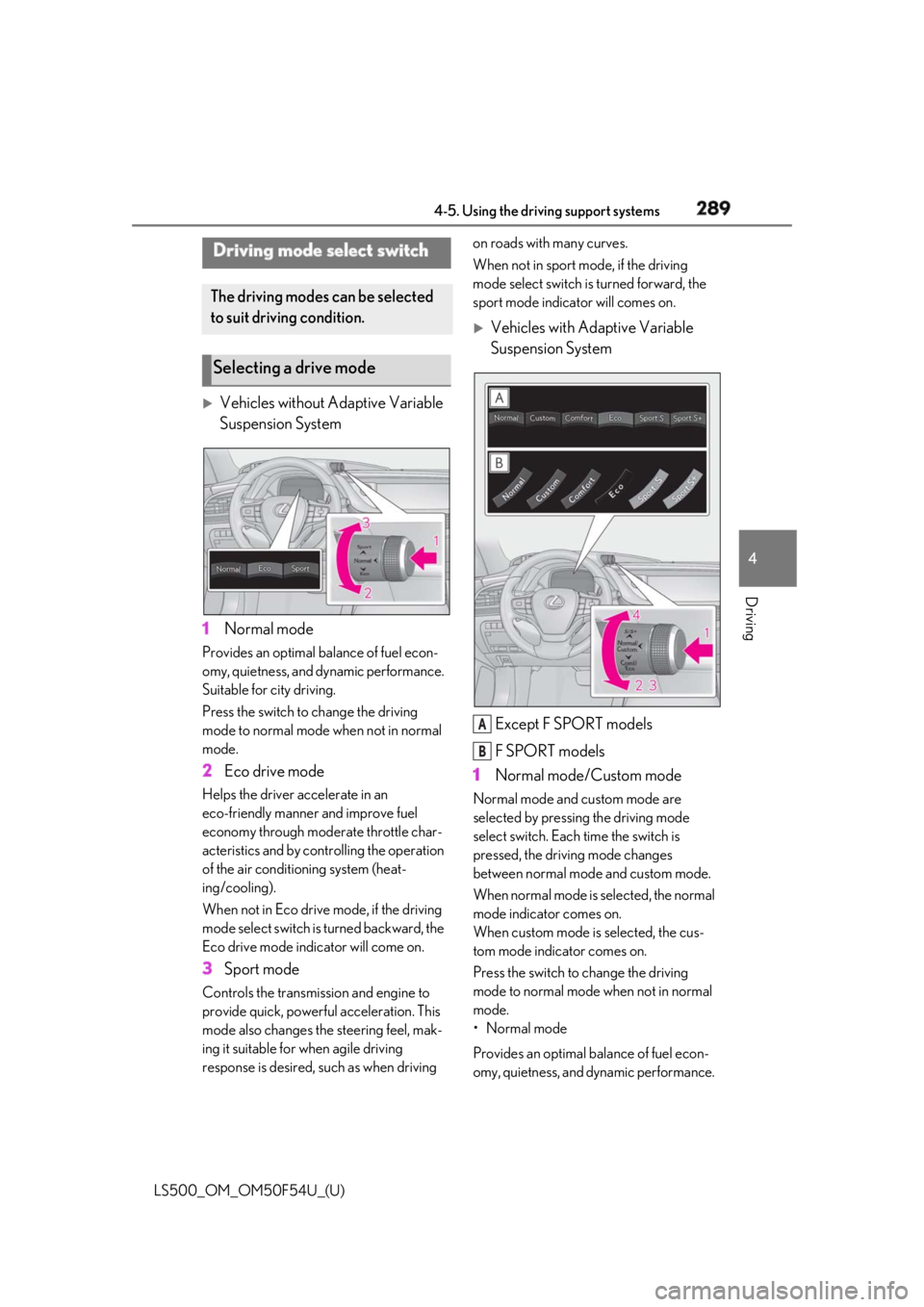
Vehicles without Adaptive Variable
Suspension System
1 Normal modeProvides an optimal ba lance of fuel econ-
omy, quietness, and dynamic performance.
Suitable for city driving.
Press the switch to change the driving
mode to normal mode when not in normal
mode.
2 Eco drive modeHelps the driver accelerate in an
eco-friendly manner and improve fuel
economy through modera te throttle char-
acteristics and by controlling the operation
of the air conditioning system (heat-
ing/cooling).
When not in Eco drive mode, if the driving
mode select switch is turned backward, the
Eco drive mode indicator will come on.
3 Sport modeControls the transmission and engine to
provide quick, powerful acceleration. This
mode also changes the steering feel, mak-
ing it suitable for when agile driving
response is desired, such as when driving on roads with many curves.
When not in sport mode, if the driving
mode select switch is turned forward, the
sport mode indicator will comes on.
Vehicles with Adaptive Variable
Suspension System
Except F SPORT models
F SPORT models
1 Normal mode/Custom mode Normal mode and custom mode are
selected by pressing the driving mode
select switch. Each time the switch is
pressed, the driving mode changes
between normal mode and custom mode.
When normal mode is selected, the normal
mode indicator comes on.
When custom mode is selected, the cus-
tom mode indicator comes on.
Press the switch to change the driving
mode to normal mode when not in normal
mode.
• Normal mode
Provides an optimal ba lance of fuel econ-
omy, quietness, and dynamic performance. Driving mode select switch The driving modes can be selected
to suit driving condition.
Selecting a drive mode
A
B
Page 290 of 514

290 4-5. Using the driving support systems
LS500_OM_OM50F54U_(U) Suitable for city driving.
When the shift position is in D, an appropri-
ate gear for sporty driving may automati-
cally be selected according to driver
performance and dr iving conditions.
•Custom mode
Allows you to drive with the powertrain,
chassis and air condit ioning system func-
tions set to your preferred settings. Cus-
tom mode settings can only be changed on
the drive mode customization display of
the Center Display. ( → P.306)
2 Comfort modeBy controlling the suspension, riding com-
fort is further enhanc ed. Suitable for city
driving.
When not in comfort mode and the driving
mode select switch is turned backward, the
comfort mode indicator comes on.
3 Eco drive modeHelps the driver accelerate in an
eco-friendly manner and improve fuel
economy through modera te throttle char-
acteristics and by controlling the operation
of the air conditioning system (heat-
ing/cooling).
When in comfort mode, if the driving mode
select switch is turned backward, the Eco
drive mode indicator comes on.
4 Sport mode•Sport S mode
Controls the transmission and engine to
provide quick, powerful acceleration. This
mode is suitable for when agile driving
response is desired, such as when driving
on roads with many curves.
When not in Sport S mode, if the driving
mode select switch is turned forward, the
Sport S mode indicator comes on.
•Sport S+ mode
Helps to ensure stee ring performance and
driving stability by simultaneously con- trolling the steering and suspension in
addition to the transmission and engine.
Suitable for sportier driving.
When in Sport S mode, if the driving mode
select switch is turned forward, the Sport
S+ mode indicator comes on. ■
If the driving mode select switch is oper-
ated while the opening screen is being
displayed
If the driving mode sele ct switch is operated
while the opening screen is being displayed,
the driving mode will be changed and the
meter display will chan ge accordingly after
the opening screen operation has com-
pleted. ■
Operation of the air conditioning sys-
tem in Eco drive mode
Eco drive mode controls the heating/cool-
ing operations and fan speed of the air con-
ditioning system to en hance fuel efficiency.
To improve air condit ioning performance,
perform the following operations: ●
Turn off eco air conditioning mode
( → P.317)●
Adjust the fan speed ( → P.313)●
Turn off Eco drive mode ■
Automatic deactivation of sport mode
and custom mode
If the engine switch is turned off after driv-
ing in sport mode or custom mode, the
drive mode will be changed to normal
mode.
■
Driving mode pop-up display
When the driving mode is changed, the
selected driving mode will be temporarily
displayed on the side display. ( → P.307)
Page 297 of 514
2974-5. Using the driving support systems
LS500_OM_OM50F54U_(U) 4
Driving • Vehicles without Lexus Safety Sys-
tem+A: The brake pedal may move down
slightly after the ABS is activated.■
ECB operating sound
ECB operating sound may be heard in the
following cases, but it does not indicate that
a malfunction has occurred. ●
Operating sound heard from the engine
compartment when the brake pedal is
operated.●
Motor sound of the brake system heard
from the front part of the vehicle when
the driver’s door is opened.●
Operating sound heard from the engine
compartment when one or two minutes
passed after the stop of the engine.■
EPS, VGRS and DRS operation sound
When the steering wheel is operated, a
motor sound (whirring sound) may be
heard. This does not indicate a malfunction. ■
Automatic reactivation of TRAC and
VSC systems
After turning the TRAC and VSC systems
off, the systems will be automatically
re-enabled in the following situations: ●
When the engine switch is turned off●
If only the TRAC system is turned off, the
TRAC will turn on when vehicle speed
increases
If both the TRAC and VSC systems are
turned off, automatic re-enabling will not
occur when vehicle speed increases.■
Reduced effectiveness of the EPS sys-
tem
The effectiveness of the EPS system is
reduced to prevent the system from over-
heating when there is frequent steering
input over an extended period of time. The
steering wheel may feel heavy as a result.
Should this occur, re frain from excessive
steering input or stop the vehicle and turn
the engine off. The EPS system should
return to normal within 10 minutes.
■
Secondary Collision Brake operating
conditions
The vehicle speed is approximately 6 mph
(10 km/h) or more and the airbag sensor detects a collision. (The Secondary Colli-
sion Brake will not operate when the vehicle
speed is below approximately 6 mph [10
km/h].) ■
Secondary Collision Brake automatic
cancellation
The Secondary Collision Brake is automati-
cally canceled in the following situations: ●
The vehicle speed drops below approxi-
mately 6 mph (10 km/h) ●
A certain amount of time elapses during
operation ●
The accelerator pedal is depressed a
large amount ■
When “Check VGRS System” or
“CHECK DRS” is displayed on the
multi-information display
The VGRS or DRS may not operate prop-
erly. Have the vehicle inspected by your
Lexus dealer.
WARNING■
The ABS does not operate effectively
when ●
The limits of tire gripping performance
have been exceeded (such as exces-
sively worn tires on a snow covered
road).
●
The vehicle hydroplanes while driving
at high speed on wet or slick roads.
■
Stopping distance when the ABS is
operating may exceed that of normal
conditions
The ABS is not designed to shorten the
vehicle’s stopping di stance. Always main-
tain a safe distance from the vehicle in
front of you, especially in the following
situations:
●
When driving on dirt, gravel or
snow-covered roads
●
When driving with tire chains
●
When driving over bumps in the road
●
When driving over roads with potholes
or uneven surfaces
Page 299 of 514
2994-6. Driving tips
LS500_OM_OM50F54U_(U) 4
Driving 4-6.Driving tips
Use fluids that are appropriate to
the prevailing outside temperatures. •Engine oil
• Engine coolant
•Washer fluid
Have a service technician inspect
the condition of the battery.
Have the vehicle fitted with four
snow tires or purchase a set of tire
chains for the rear tires. *
Ensure that all tires are the specified size
and brand, and that chains match the size
of the tires. *
: Tire chains cannot be mounted on vehi-
cles with front and rear tires of differing
sizes.Winter driving tips Carry out the necessary prepara-
tions and inspections before driving
the vehicle in winter. Always drive
the vehicle in a manner appropriate
to the prevailing weather condi-
tions.
Preparation for winter
WARNING
■
Driving with snow tires
Observe the following precautions to
reduce the risk of accidents.
Failure to do so may result in a loss of
vehicle control and cause death or seri-
ous injury.
●
Use tires of the specified size.
●
Maintain the recommended level of air
pressure. ●
Do not drive in excess of 75 mph (120
km/h), regardless of the type of snow
tires being used. ●
Use snow tires on all, not just some
wheels. ■
When installing tire chains
Before installing tire chains, make sure to
disable all functions of the vehicle height
control of the electronically modulated
air suspension. Otherwise, the vehicle
height may change while installing the
tire chains and part or your body may be
caught under the vehicle, possibly caus-
ing injury. ( → P.293)■
Driving with tire chains
Observe the following precautions to
reduce the risk of accidents.
Failure to do so may result in the vehicle
being unable to be driven safely, and may
cause death or serious injury. ●
Do not drive in excess of the speed
limit specified for the tire chains being
used, or 30 mph (50 km/h), which-
ever is lower. ●
Avoid driving on bumpy road surfaces
or over potholes. ●
Avoid sudden acceleration, abrupt
steering, sudden br aking and shifting
operations that cause sudden engine
braking.
●
Slow down sufficiently before entering
a curve to ensure that vehicle control is
maintained.
●
Do not use LTA (Lane Tracing Assist)
system. (if equipped)
●
Do not use LKA (Lane-Keeping
Assist) system. (if equipped)
Page 300 of 514
300 4-6. Driving tips
LS500_OM_OM50F54U_(U) Perform the following according to the
driving conditions:
Do not try to forcib ly open a window
or move a wiper that is frozen. Pour
warm water over the frozen area to
melt the ice. Wipe away the water
immediately to prevent it from
freezing.
To ensure proper operation of the
climate control system fan, remove
any snow that has accumulated on
the air inlet vents in front of the
windshield.
Check for and remove any excess
ice or snow that may have accumu-
lated on the exterior lights, vehicle’s
roof, chassis, around the tires or on
the brakes.
Remove any snow or mud from the
bottom of your shoes before getting
in the vehicle.
Accelerate the vehicle slowly, keep a
safe distance between you and the
vehicle ahead, and drive at a reduced
speed suitable to road conditions. Park the vehicle and shift the shift posi-
tion to P without setting the parking
brake. The parking brake may freeze
up, preventing it from being released. If
the vehicle is parked without setting
the parking brake, make sure to block
the wheels.
Failure to do so may be dangerous
because it may cause the vehicle to
move unexpectedly, possibly leading to
an accident.
Vehicles with front and rear tires of
the same size
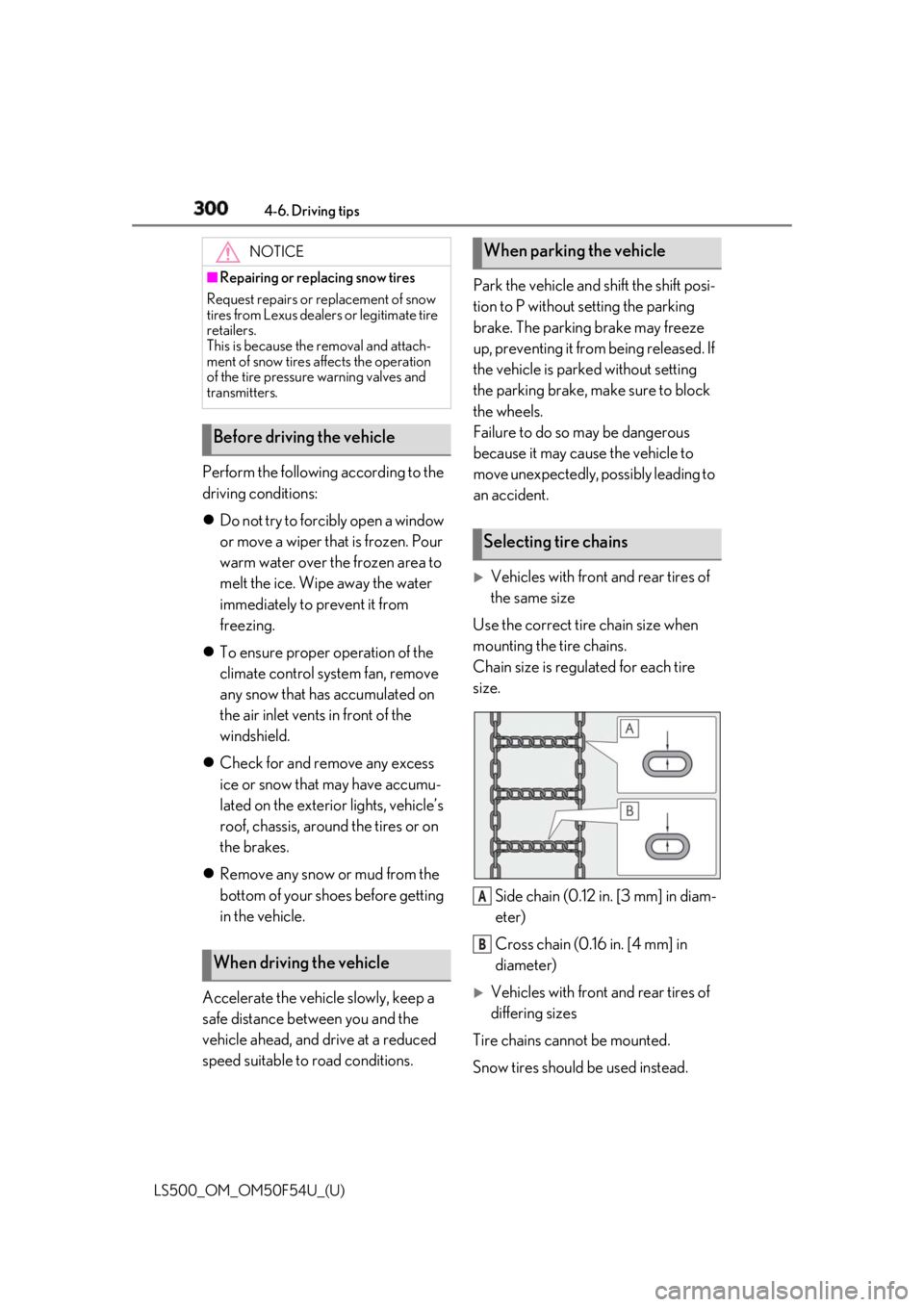
Use the correct tire chain size when
mounting the tire chains.
Chain size is regulated for each tire
size.
Side chain (0.12 in. [3 mm] in diam-
eter)
Cross chain (0.16 in. [4 mm] in
diameter)
Vehicles with front and rear tires of
differing sizes
Tire chains cannot be mounted.
Snow tires should be used instead.NOTICE■
Repairing or replacing snow tires
Request repairs or replacement of snow
tires from Lexus dealers or legitimate tire
retailers.
This is because the removal and attach-
ment of snow tires affects the operation
of the tire pressure warning valves and
transmitters.
Before driving the vehicle
When driving the vehicle When parking the vehicle
Selecting tire chains
A
B