towing LEXUS LS500 2018 User Guide
[x] Cancel search | Manufacturer: LEXUS, Model Year: 2018, Model line: LS500, Model: LEXUS LS500 2018Pages: 514, PDF Size: 10.62 MB
Page 259 of 514
2594-5. Using the driving support systems
LS500_OM_OM50F54U_(U) 4
Driving disabled, select on the multi-infor-
mation display, select and then On.
If disabled using this method, the sys-
tem will not be re-enabled by turning
the engine switch off and then to IGNI-
TION ON mode.
■
The system can be operated when
●
The engine switch is in IGNITION ON
mode.
●
Intuitive parking assist function is on.
●
The vehicle speed is less than about 6
mph (10 km/h).WARNING■
When using the intuitive parking
assist
Observe the following precautions.
Failing to do so may result in the vehicle
being unable to be driven safely and pos-
sibly cause an accident. ●
Do not use the sensor at speeds in
excess of 6 mph (10 km/h).●
The sensors’ detection areas and reac-
tion times are limited. When moving
forward or reversing, check the areas
surrounding the vehicle (especially the
sides of the vehicle) for safety, and
drive slowly, using the brake to control
the vehicle’s speed.●
Do not install accessories within the
sensors’ detection areas.●
The area directly under the bumpers is
not detected.
■
When to disable the function
In the following situations, disable the
function as it may operate even though
there is no possibility of a collision. ●
The vehicle is equipped with a fender
pole or wireless antenna.
●
The front or rear bu mper or a sensor
receives a strong impact.
●
A non-genuine Lexus suspension
(lowered suspension, etc.) is installed.
●
Towing eyelets are installed.
●
A backlit licence pl ate is installed. ■
When using intuitive parking assist
In the following situations, the system
may not function correctly due to a sen-
sor malfunction, etc. Have the vehicle
checked by your Lexus dealer. ●
The intuitive parking assist operation
display flashes or shows continuously,
and a buzzer sounds when no objects
are detected. ●
If the area around a sensor collides
with something, or is subjected to
strong impact. ●
If the bumper or grille collides with
something. ●
If the display flashes or is displayed
continuously and a buzzer does not
sound, except when the mute function
has been turned on. ●
If a display error oc curs, first check the
sensor.
If the error occurs even when there is
no ice, snow or mud on the sensor, it is
likely that the sensor is malfunctioning.■
Notes when washing the vehicle
Do not apply intensive bursts of water or
steam to the sensor area.
Doing so may result in the sensor mal-
functioning.
●
When using a high pressure washer to
wash the vehicle, do not spray the sen-
sors directly, as doing so may cause a
sensor to malfunction.
●
When using steam to clean the vehicle,
do not direct steam too close to the
sensors as doing so may cause a sen-
sor to malfunction.
Page 267 of 514
2674-5. Using the driving support systems
LS500_OM_OM50F54U_(U) 4
Driving ●
Guardrails, walls, signs, parked vehicles
and similar stationary objects●
Small motorcycles, bicycles, pedestrians,
etc.●
Vehicles moving away from your vehicle●
Vehicles approaching from the parking
spaces next to your vehicle■
Conditions under which the RCTA func-
tion may not function correctly●
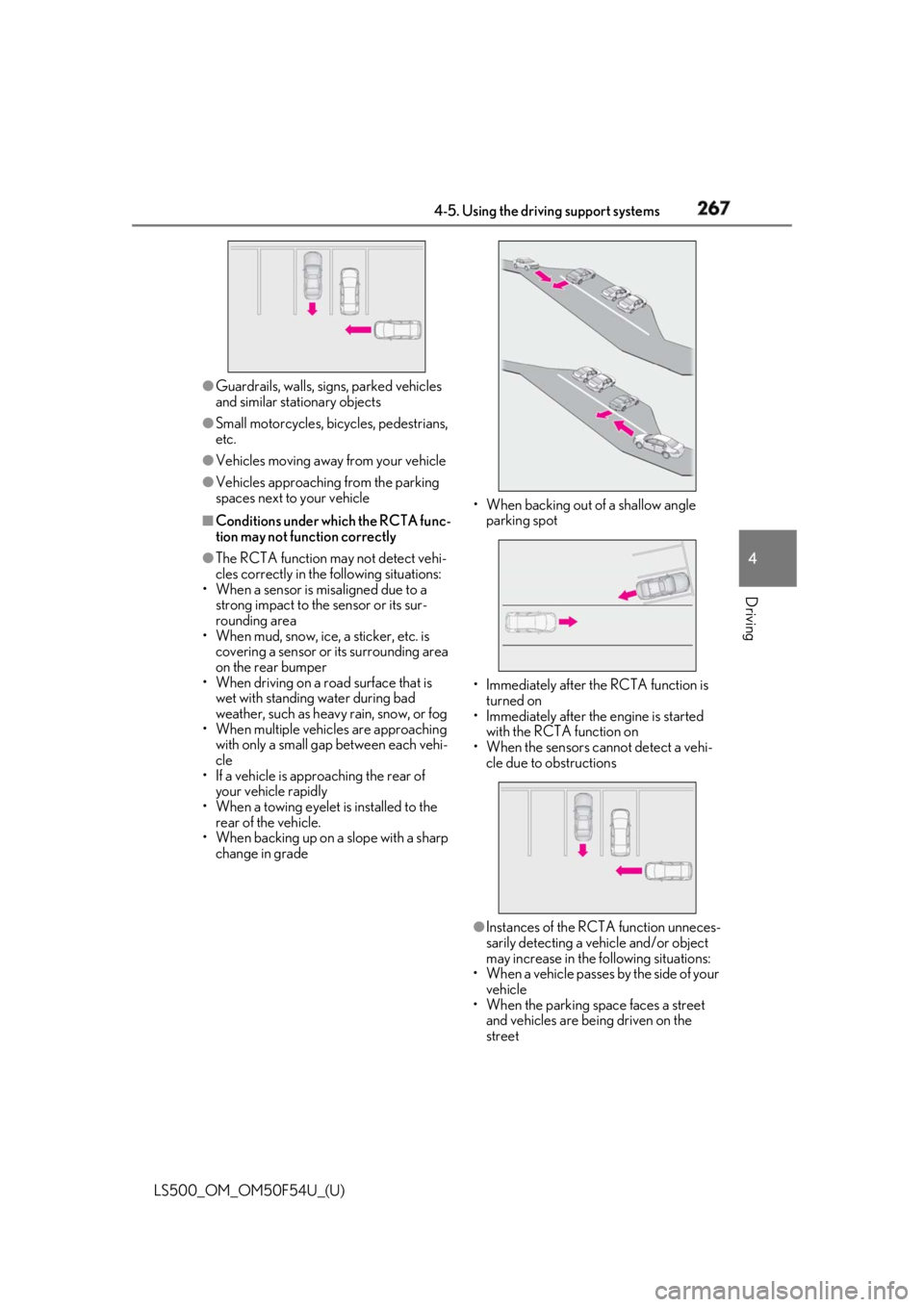
The RCTA function may not detect vehi-
cles correctly in the following situations:
• When a sensor is misaligned due to a
strong impact to the sensor or its sur-
rounding area
• When mud, snow, ice, a sticker, etc. is
covering a sensor or its surrounding area
on the rear bumper
• When driving on a road surface that is
wet with standing water during bad
weather, such as heavy rain, snow, or fog
• When multiple vehicles are approaching
with only a small gap between each vehi-
cle
• If a vehicle is approaching the rear of
your vehicle rapidly
• When a towing eyelet is installed to the
rear of the vehicle.
• When backing up on a slope with a sharp
change in grade • When backing out of a shallow angle
parking spot
• Immediately after the RCTA function is
turned on
• Immediately after the engine is started
with the RCTA function on
• When the sensors cannot detect a vehi-
cle due to obstructions
●
Instances of the RCTA function unneces-
sarily detecting a vehicle and/or object
may increase in the following situations:
• When a vehicle passes by the side of your
vehicle
• When the parking space faces a street
and vehicles are being driven on the
street
Page 268 of 514
268 4-5. Using the driving support systems
LS500_OM_OM50F54U_(U) • When the distance between your vehicle
and metal objects, such as a guardrail,
wall, sign, or parked vehicle, which may
reflect electrical waves toward the rear of
the vehicle, is short
• When a towing eyelet is installed to the
rear of the vehicle *
: If equipped
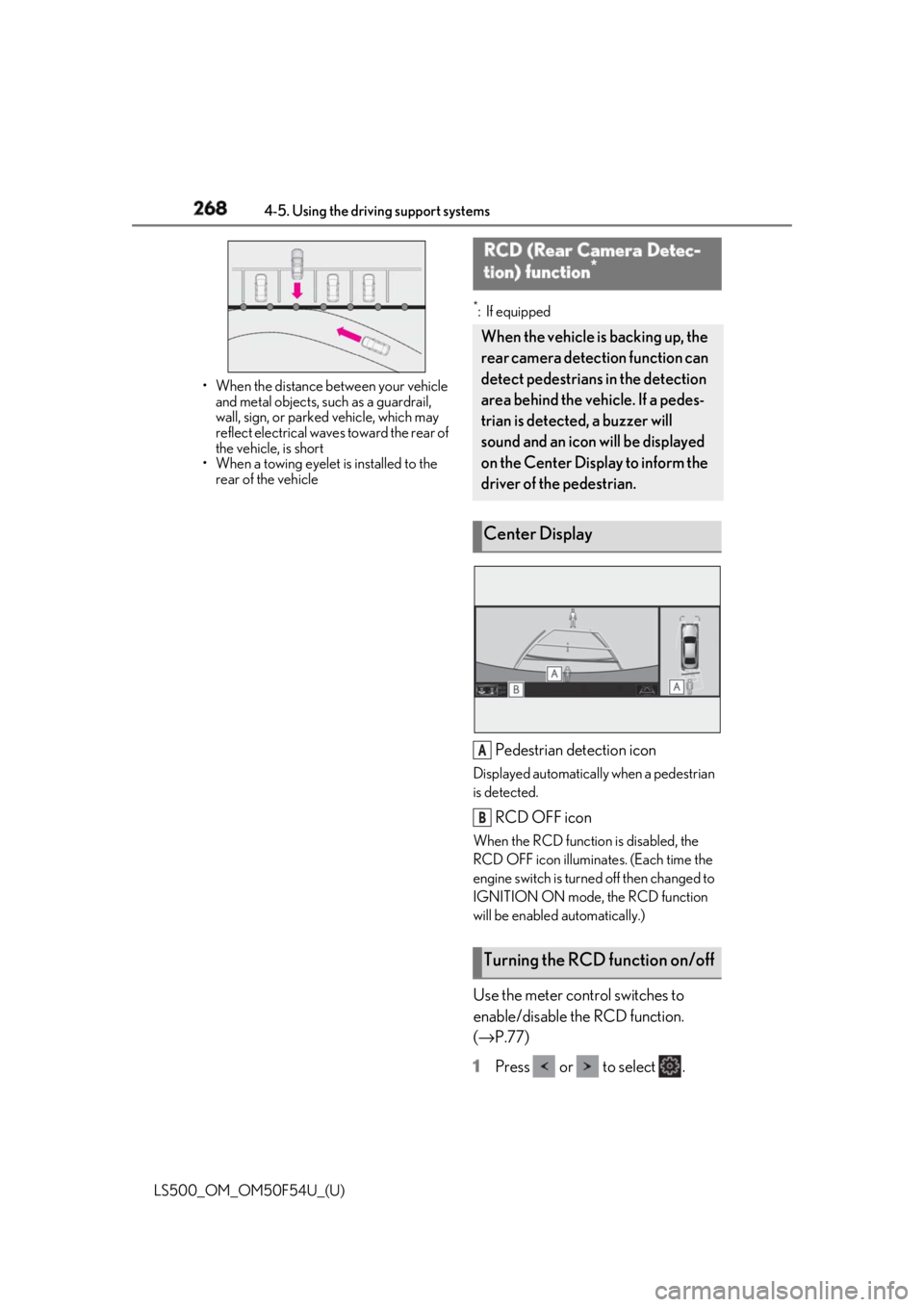
Pedestrian detection icon Displayed automatically when a pedestrian
is detected.
RCD OFF icon When the RCD function is disabled, the
RCD OFF icon illuminates. (Each time the
engine switch is turned off then changed to
IGNITION ON mode, the RCD function
will be enabled automatically.)
Use the meter control switches to
enable/disable the RCD function.
( → P.77)
1 Press or to select .RCD (Rear Camera Detec-
tion) function *
When the vehicle is backing up, the
rear camera detection function can
detect pedestrians in the detection
area behind the vehicle. If a pedes-
trian is detected, a buzzer will
sound and an icon will be displayed
on the Center Display to inform the
driver of the pedestrian.
Center Display
Turning the RCD function on/off A
B
Page 270 of 514

270 4-5. Using the driving support systems
LS500_OM_OM50F54U_(U) • Pedestrians who are bending forward or
squatting
• Pedestrians who are lying down
• Pedestrians who are running
• Pedestrians who suddenly enter the
detection area
• Pedestrians riding a bicycle, skateboard,
or other light vehicle
• Pedestrians wearing oversized clothing
such as a rain coat, long skirt, etc., making
their silhouette obscure
• Pedestrians whose body is partially hid-
den by an object, such as a cart or
umbrella
• Pedestrians which are obscured by dark-
ness, such as at night●
In some situations, such as the following,
pedestrians may not be detected by the
rear camera detection function, prevent-
ing the function from operating properly:
• When backing up in inclement weather
(rain, snow, fog, etc.)
• When the rear camera is obscured (dirt,
snow, ice, etc. are attached) or scratched
• When a very bright light, such as the sun,
or the headlights of another vehicle,
shines directly into the rear camera
• When backing up in a place where the
surrounding brightness changes sud-
denly, such as at the entrance or exit of a
garage or underground parking lot
• When backing up in a dim environment
such as during dusk or in an underground
parking lot●
Even though there are no pedestrians in
the detection area, some objects, such as
the following, may be detected, possibly
causing the rear camera detection func-
tion to operate.
• Three dimensional objects, such as a
pole, traffic cone, fence, or parked vehi-
cle
• Moving objects, such as a car or motor-
cycle
• Objects moving toward your vehicle
when backing up, such as flags or pud-
dles (or airborne matter, such as smoke,
steam, rain, or snow)
• Cobblestone or gravel roads, tram rails,
road repairs, white lines, pedestrian
crossings or fallen leaves on the road
• Metal covers (gratings), such as those
used for drainage ditches • Objects reflected in a puddle or on a wet
road surface
• The roadside or bumps on the road
•Shadows on the road ●
In some situations, such as the following,
the rear camera detection function may
operate even though there are no pedes-
trians in the detection area.
• When backing up toward the roadside or
a bump on the road
• If the vehicle is signif icantly tilted, such as
when carrying a heavy load
• When backing up toward an
incline/decline
• If the suspension has been modified or
tires of a size othe r than specified are
installed
• If the rear of the vehicle is raised or low-
ered due to the carried load
• If an electronic component, such as a
backlit license plate or rear fog light, is
installed near the rear camera
• If a bumper protector, such as an addi-
tional trim strip, is installed to the rear
bumper
• If the orientation of the rear camera has
been changed due to a collision or other
impact, or removal and installation
• If a towing eyelet is in stalled to the rear of
the vehicle
• When water is flowing over the rear cam-
era lens
• When the rear camera is obscured (dirt,
snow, ice, etc. are at tached) or scratched
• If there is a flashing light in the detection
area, such as the emergency flashers of
another vehicle ●
Situations in which the rear camera
detection function may be difficult to
notice
• If buzzer may be difficult to hear if the
surrounding area is noisy, the volume of
the audio system volume is high, the air
conditioning system is being used, etc.
• If the temperature in the cabin is
extremely high or low, the audio system
screen may not operate correctly.
Page 279 of 514
2794-5. Using the driving support systems
LS500_OM_OM50F54U_(U) 4
Driving ■
The Parking Support Brake function
(static object) will operate when
The function will operate when the PKSB
OFF indicator is not illuminated or flashing
( → P.65, 66) and all of the following condi-
tions are met: ●
Engine output restriction control
• The Parking Support Brake is enabled.
• The vehicle speed is 10 mph (15 km/h) or
less.
• There is a static ob ject in the traveling
direction of the vehicle and 6 to 13 ft. (2
to 4 m) away.
• The Parking Support Brake determines
that a stronger-than-normal brake opera-
tion is necessary to avoid a collision. ●
Brake control
• Engine output restriction control is oper-
ating
• The Parking Support Brake determines
that an immediate brake operation is nec-
essary to avoid a collision.
■
The Parking Support Brake function
(static objects) will stop operating when
The function will stop operating if any of the
following conditions are met:
●
Engine output restriction control
• The Parking Support Brake is disabled.
• The system determines that the collision
has become avoidable with normal brake
operation.WARNING●
If the area around a radar sensor is
subjected to an impact, the system
may not operate properly due to a
sensor malfunction. Have the vehicle
inspected by your Lexus dealer.■
Handling the suspension
Do not modify the suspension, as
changes to the height or inclination of the
vehicle may prevent the sensors from
detecting objects correctly or cause the
system to not operate or operate unnec-
essarily. ■
If the Parking Support Brake function
(static objects) operates unnecessar-
ily, such as at a railroad crossing
In the event that the Parking Support
Brake function (static objects) operates
unnecessarily, such as at a railroad cross-
ing, brake control w ill be canceled after
approximately 2 seconds, allowing you
to proceed forward and leave the area,
brake control can also be canceled by
depressing the brake pedal. Depressing
the accelerator pedal after brake control
is canceled will allow you to proceed for-
ward and leave the area. ■
Notes when washing the vehicle
Do not apply intensive bursts of water or
steam to the sensor area.
Doing so may result in the sensor mal-
functioning.
●
When using a high pressure washer to
wash the vehicle, do not spray the sen-
sors directly, as doing so may cause a
sensor to malfunction.
●
When using steam to clean the vehicle,
do not direct steam too close to the
sensors as doing so may cause a sen-
sor to malfunction.
■
When to disable the Parking Support
Brake
In the following situations, disable the
Parking Support Brake as the system
may operate even though there is no
possibility of a collision. ●
When inspecting the vehicle using a
chassis roller, chassis dynamo or free
roller ●
When loading the vehicle onto a boat,
truck or other transport vessel ●
If the suspension has been modified or
tires of a size othe r than specified are
installed ●
If the front of the vehicle is raised or
lowered due to the carried load ●
When equipment that may obstruct a
sensor is installed, such as a towing
eyelet, bumper protector (an addi-
tional trim strip, etc.), bicycle carrier, or
snow plow
Page 284 of 514
284 4-5. Using the driving support systems
LS500_OM_OM50F54U_(U) right or left at the re ar of the vehicle at a
traveling speed of less than approxi-
mately 5 mph (8 km/h)●
Vehicles which are approaching from the
right or left at the re ar of the vehicle at a
traveling speed of more than approxi-
mately 15 mph (24 km/h)■
PKSB buzzer
If the Parking Support Brake is enabled and
brake control is performed, a buzzer will
sound to notify the driver. ■
Situations in which the system may
operate even though there is no possi-
bility of a collision
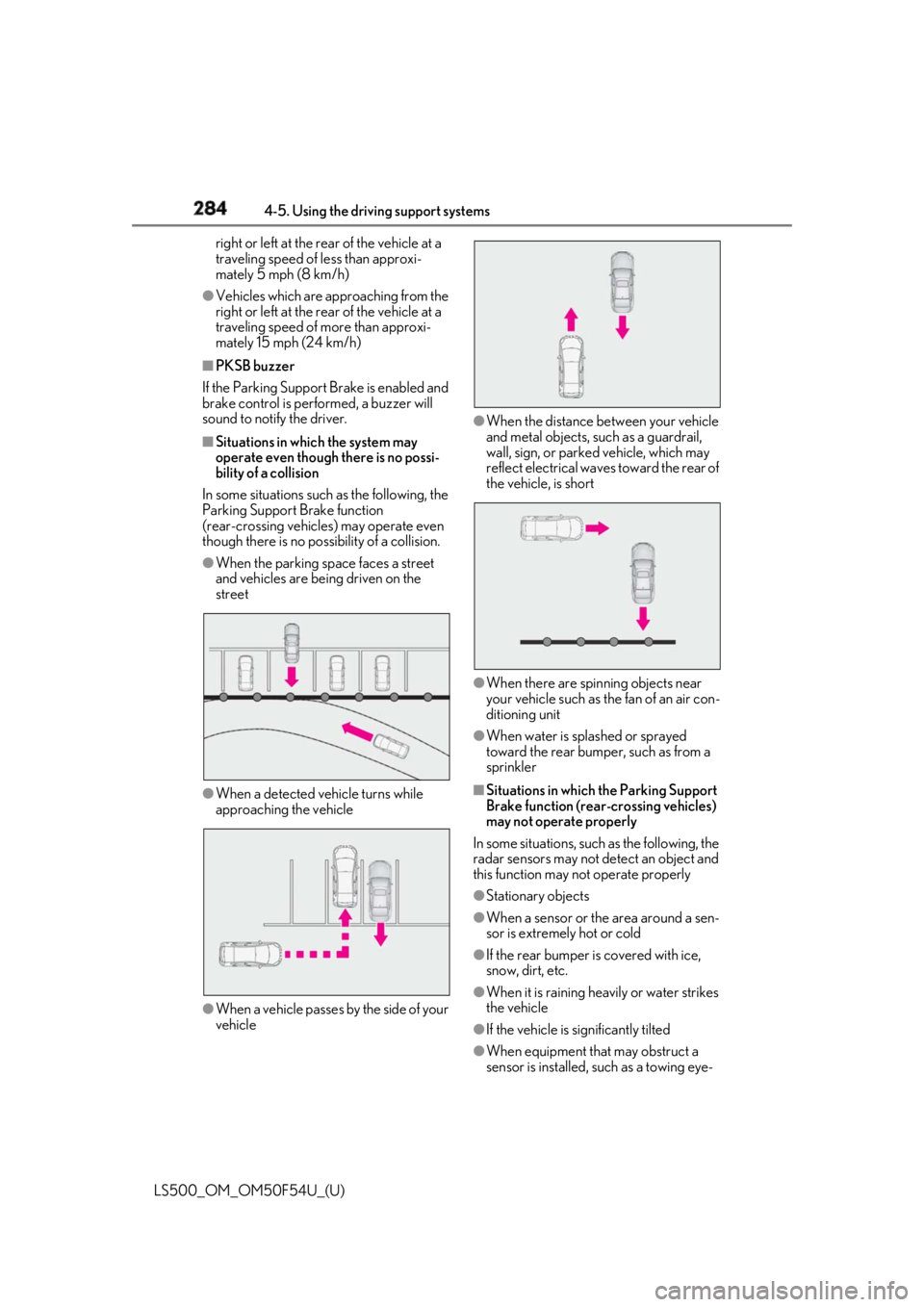
In some situations such as the following, the
Parking Support Brake function
(rear-crossing vehicles) may operate even
though there is no possibility of a collision. ●
When the parking space faces a street
and vehicles are being driven on the
street
●
When a detected vehicle turns while
approaching the vehicle
●
When a vehicle passes by the side of your
vehicle ●
When the distance between your vehicle
and metal objects, such as a guardrail,
wall, sign, or parked vehicle, which may
reflect electrical waves toward the rear of
the vehicle, is short
●
When there are spinning objects near
your vehicle such as the fan of an air con-
ditioning unit ●
When water is spla shed or sprayed
toward the rear bumper, such as from a
sprinkler ■
Situations in which the Parking Support
Brake function (rear-crossing vehicles)
may not operate properly
In some situations, such as the following, the
radar sensors may not detect an object and
this function may not operate properly
●
Stationary objects
●
When a sensor or the area around a sen-
sor is extremely hot or cold
●
If the rear bumper is covered with ice,
snow, dirt, etc.
●
When it is raining he avily or water strikes
the vehicle
●
If the vehicle is significantly tilted
●
When equipment that may obstruct a
sensor is installed, such as a towing eye-
Page 288 of 514

288 4-5. Using the driving support systems
LS500_OM_OM50F54U_(U) denly, such as at the entrance or exit of a
garage or underground parking lot
• When backing up in a dim environment
such as during dusk or in an underground
parking lot●
Even though there are no pedestrians in
the detection area, some objects, such as
the following, may be detected, possibly
causing the Parking Support Brake func-
tion (rear pedestri ans) to operate.
• Three dimensional objects, such as a
pole, traffic cone, fence, or parked vehi-
cle
• Moving objects, such as a car or motor-
cycle
• Objects moving toward your vehicle
when backing up, such as flags or pud-
dles (or airborne matter, such as smoke,
steam, rain, or snow)
• Cobblestone or gravel roads, tram rails,
road repairs, white lines, pedestrian
crossings or fallen leaves on the road
• Metal covers (gratings), such as those
used for drainage ditches
• Objects reflected in a puddle or on a wet
road surface
• The roadside or bumps on the road
•Shadows on the road ●
In some situations, such as the following,
the Parking Support Brake function (rear
pedestrians) may operate even though
there are no pedestrians in the detection
area.
• When backing up toward the roadside or
a bump on the road
• If the vehicle is significantly tilted, such as
when carrying a heavy load
• When backing up toward an
incline/decline
• If the suspension has been modified or
tires of a size other than specified are
installed
• If the rear of the vehicle is raised or low-
ered due to the carried load
• If an electronic component, such as a
backlit license plate or rear fog light, is
installed near the rear camera
• If a bumper protector, such as an addi-
tional trim strip, is installed to the rear
bumper
• If the orientation of the rear camera has
been changed due to a collision or other
impact, or remova l and installation • If a towing eyelet is in stalled to the rear of
the vehicle
• When water is flowing over the rear cam-
era lens
• When the rear camera is obscured (dirt,
snow, ice, etc. are at tached) or scratched
• If there is a flashing light in the detection
area, such as the emergency flashers of
another vehicle
Page 337 of 514
3375-5. Using the storage features
LS500_OM_OM50F54U_(U) 5
Interior features ■
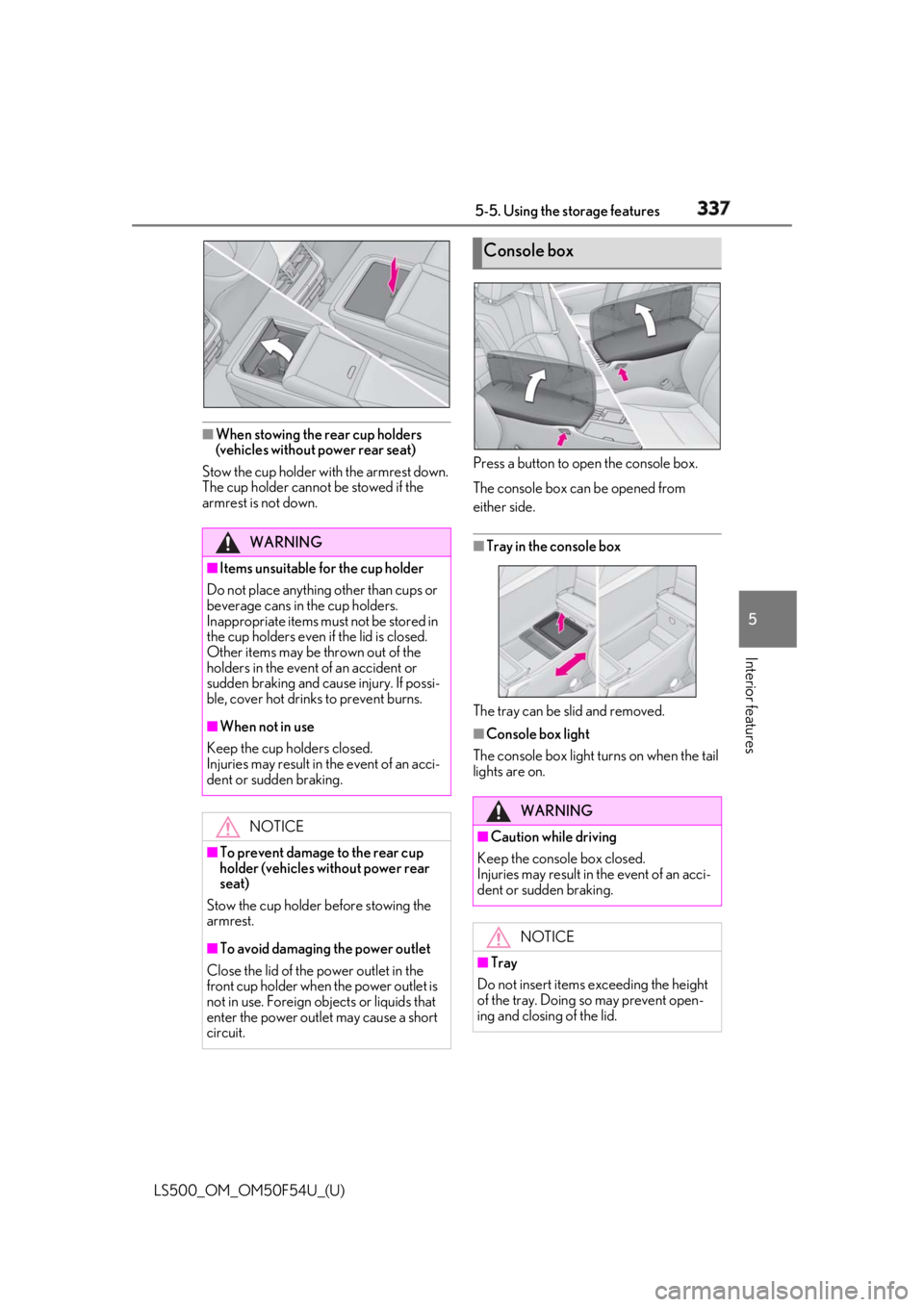
When stowing the rear cup holders
(vehicles without power rear seat)
Stow the cup holder with the armrest down.
The cup holder cannot be stowed if the
armrest is not down. Press a button to open the console box.
The console box can be opened from
either side.
■
Tray in the console box
The tray can be slid and removed. ■
Console box light
The console box light turns on when the tail
lights are on.WARNING■
Items unsuitable for the cup holder
Do not place anything other than cups or
beverage cans in the cup holders.
Inappropriate items must not be stored in
the cup holders even if the lid is closed.
Other items may be thrown out of the
holders in the event of an accident or
sudden braking and cause injury. If possi-
ble, cover hot drinks to prevent burns. ■
When not in use
Keep the cup holders closed.
Injuries may result in the event of an acci-
dent or sudden braking.
NOTICE
■
To prevent damage to the rear cup
holder (vehicles without power rear
seat)
Stow the cup holder before stowing the
armrest.
■
To avoid damaging the power outlet
Close the lid of the power outlet in the
front cup holder when the power outlet is
not in use. Foreign ob jects or liquids that
enter the power outlet may cause a short
circuit. Console box
WARNING
■
Caution while driving
Keep the console box closed.
Injuries may result in the event of an acci-
dent or sudden braking.
NOTICE
■
Tray
Do not insert items exceeding the height
of the tray. Doing so may prevent open-
ing and closing of the lid.
Page 341 of 514
3415-5. Using the storage features
LS500_OM_OM50F54U_(U) 5
Interior features 2 Pass the belt through the clip
3 Tighten the beltDepending on the size and shape of an
object, such as the case of a warning
reflector, the object may not be able to be
secured with the belts or stowed in an aux-
iliary box. ■
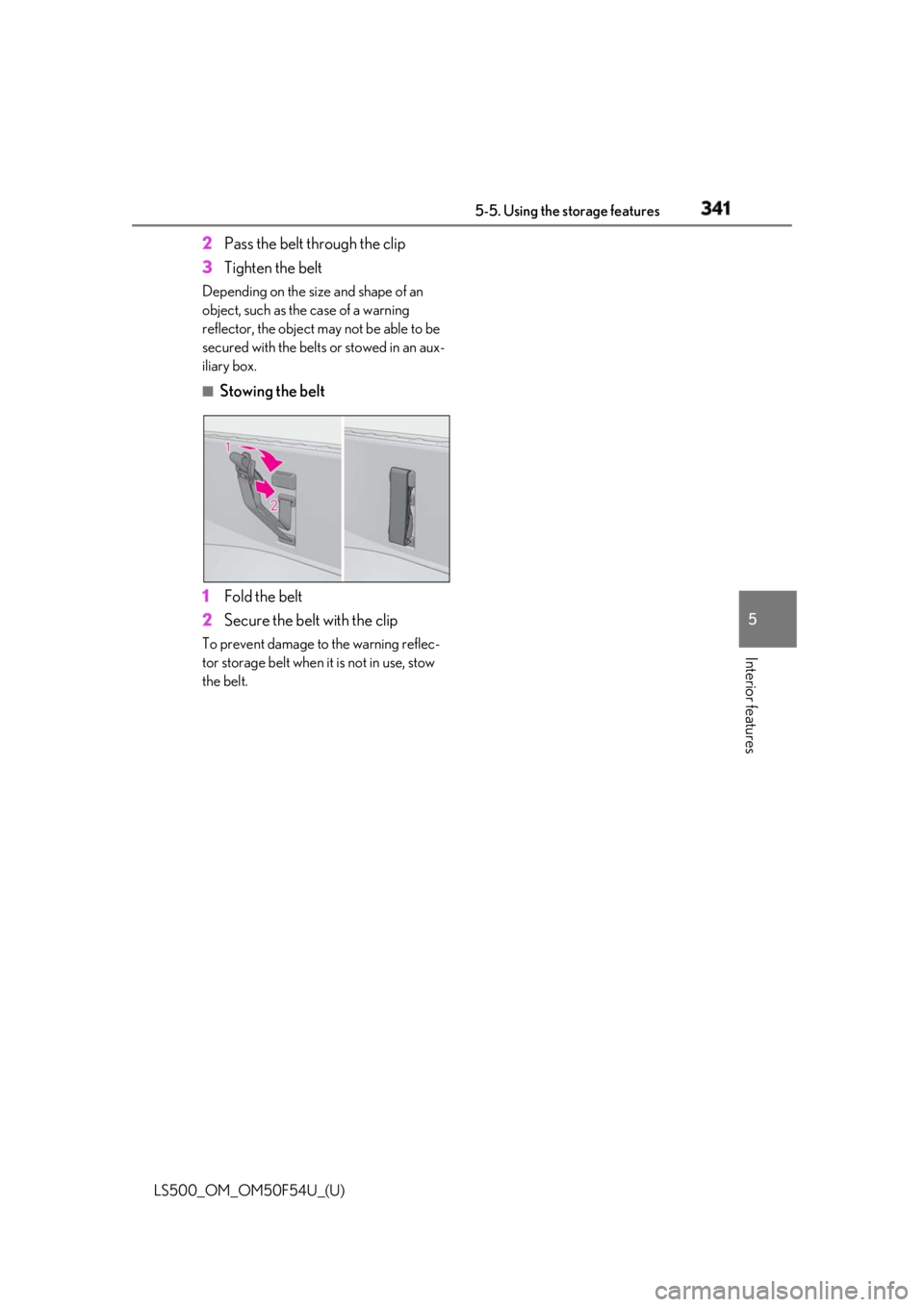
Stowing the belt
1 Fold the belt
2 Secure the belt with the clipTo prevent damage to the warning reflec-
tor storage belt when it is not in use, stow
the belt.
Page 358 of 514
358 5-6. Using the other interior features
LS500_OM_OM50F54U_(U) The following indicator light patterns
indicate specific system usage condi-
tions:
Green indicator light on = Active
service
Green indicator light flashing =
Safety Connect call in process
Red indicator light (except at vehi-
cle start-up) = System malfunction
(contact your Lexus dealer)
No indicator light (off) = Safety
Connect service not active ■
Automatic Collision Notification
In case of either airbag deployment or
severe rear-end collision, the system is
designed to automatically call the
response center. The responding agent
receives the vehicle’s location and
attempts to speak with the vehicle
occupants to assess the level of emer-
gency. If the occupants are unable to
communicate, the ag ent automatically
treats the call as an emergency, con-
tacts the nearest emergency services
provider to describe the situation, and
requests that assistance be sent to the
location. ■
Stolen Vehicle Location
If your vehicle is stolen, Safety Connect
can work with local authorities to assist
them in locating and recovering the
vehicle. After filing a police report, call
the Safety Connect response center at
1-800-25-LEXUS
(1-800-255-3987) and follow the prompts for Safety Connect to initiate
this service.
In addition to assisting law enforce-
ment with recovery of a stolen vehicle,
Safety-Connect-equipped vehicle
location data may, under certain cir-
cumstances, be shared with third par-
ties to locate your vehicle. Further
information is available at Lexus.com. ■
Emergency Assistance Button
(“SOS”)
In the event of an emergency on the
road, push the “SOS” button to reach
the Safety Connect response center.
The answering agent will determine
your vehicle’s location, assess the
emergency, and dispatch the neces-
sary assistance required. If you accidentally press the “SOS” button,
tell the response-center agent that you are
not experiencing an emergency. ■
Enhanced Roadside Assistance
Enhanced Roadside Assistance adds
GPS data to the already included war-
ranty-based Lexus roadside service.
Subscribers can press the “SOS” but-
ton to reach a Safety Connect
response-center agent, who can help
with a wide range of needs, such as:
towing, flat tire, fuel delivery, etc. For a
description of the Roadside Assistance
services and their limitations, please
see the Safety Connect Terms and
Conditions, which are available at
Lexus.com.Safety Connect services