steering LEXUS LS500 2018 Owner's Manual
[x] Cancel search | Manufacturer: LEXUS, Model Year: 2018, Model line: LS500, Model: LEXUS LS500 2018Pages: 514, PDF Size: 10.62 MB
Page 137 of 514
1373-4. Adjusting the steering wheel and mirrors
LS500_OM_OM50F54U_(U) 3
Before driving
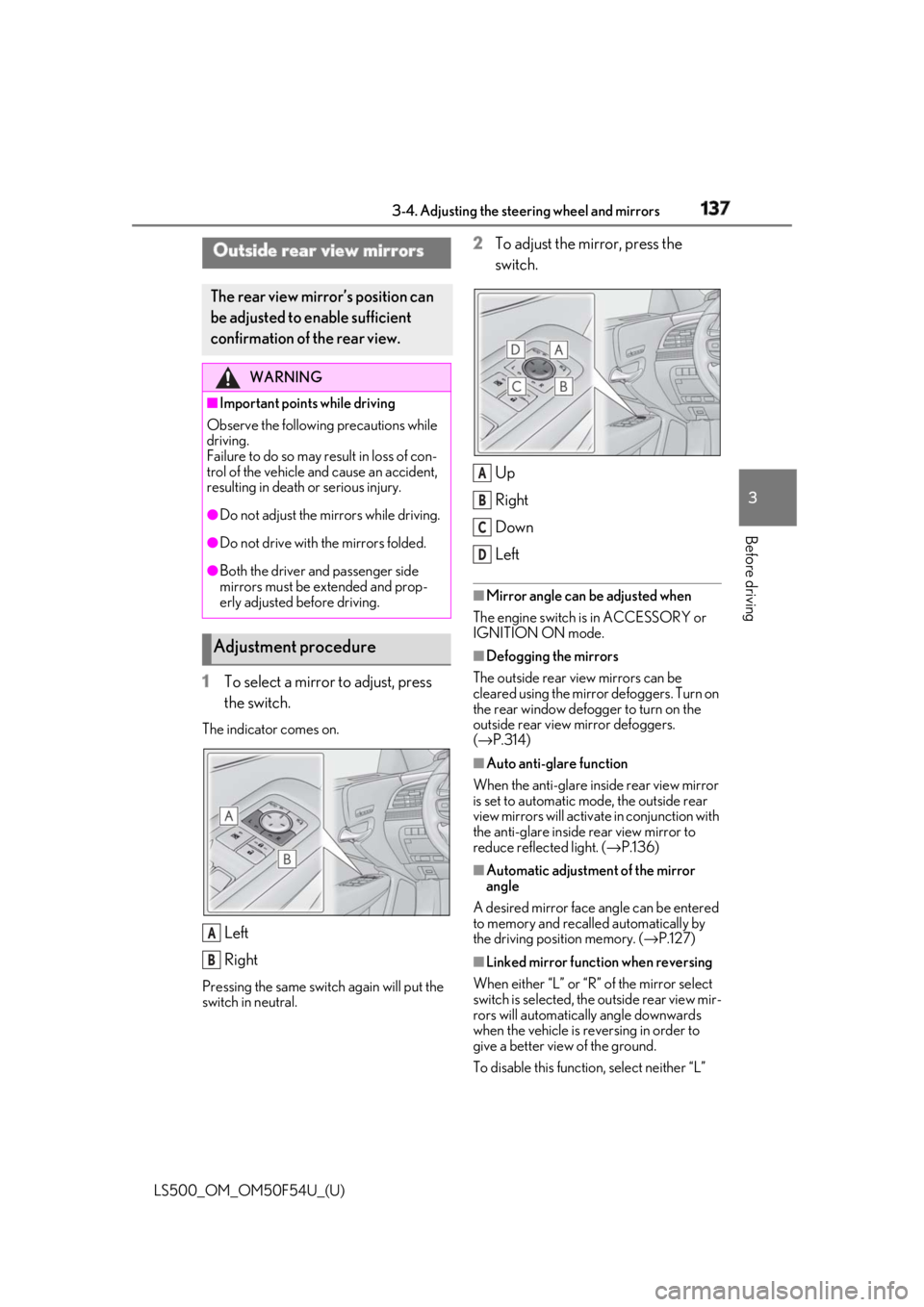
1 To select a mirror to adjust, press
the switch.The indicator comes on.
Left
RightPressing the same switch again will put the
switch in neutral. 2 To adjust the mirror, press the
switch.
Up
Right
Down
Left ■
Mirror angle can be adjusted when
The engine switch is in ACCESSORY or
IGNITION ON mode. ■
Defogging the mirrors
The outside rear view mirrors can be
cleared using the mirror defoggers. Turn on
the rear window defogger to turn on the
outside rear view mirror defoggers.
( → P.314) ■
Auto anti-glare function
When the anti-glare inside rear view mirror
is set to automatic mode, the outside rear
view mirrors will activate in conjunction with
the anti-glare inside rear view mirror to
reduce reflec ted light. ( → P.136)
■
Automatic adjustment of the mirror
angle
A desired mirror face angle can be entered
to memory and recalled automatically by
the driving position memory. ( → P.127)
■
Linked mirror function when reversing
When either “L” or “R” of the mirror select
switch is selected, the outside rear view mir-
rors will automatically angle downwards
when the vehicle is re versing in order to
give a better view of the ground.
To disable this function, select neither “L” Outside rear view mirrors The rear view mirror’s position can
be adjusted to enable sufficient
confirmation of the rear view. WARNING■
Important points while driving
Observe the following precautions while
driving.
Failure to do so may result in loss of con-
trol of the vehicle and cause an accident,
resulting in death or serious injury. ●
Do not adjust the mirrors while driving.●
Do not drive with the mirrors folded.●
Both the driver and passenger side
mirrors must be extended and prop-
erly adjusted before driving.
Adjustment procedure
A
B A
B
C
D
Page 138 of 514
138 3-4. Adjusting the steering wheel and mirrors
LS500_OM_OM50F54U_(U) nor “R”.
To set the mirror angle used when the vehi-
cle is reversing, adjust the mirror angle at a
desired position with the shift position in R.
The adjusted angle will be memorized and
the mirror will automatically tilt to the mem-
orized angle whenever the shift position is
shifted to R from next time.
The memorized downward tilt position of
the mirror is linked to the normal position
(angle adjusted with the shift position in
other than R). Therefore, if the normal posi-
tion is changed after adjustment, the tilt
position will also change.
When the normal position is changed, read-
just the angle in reversing.
■
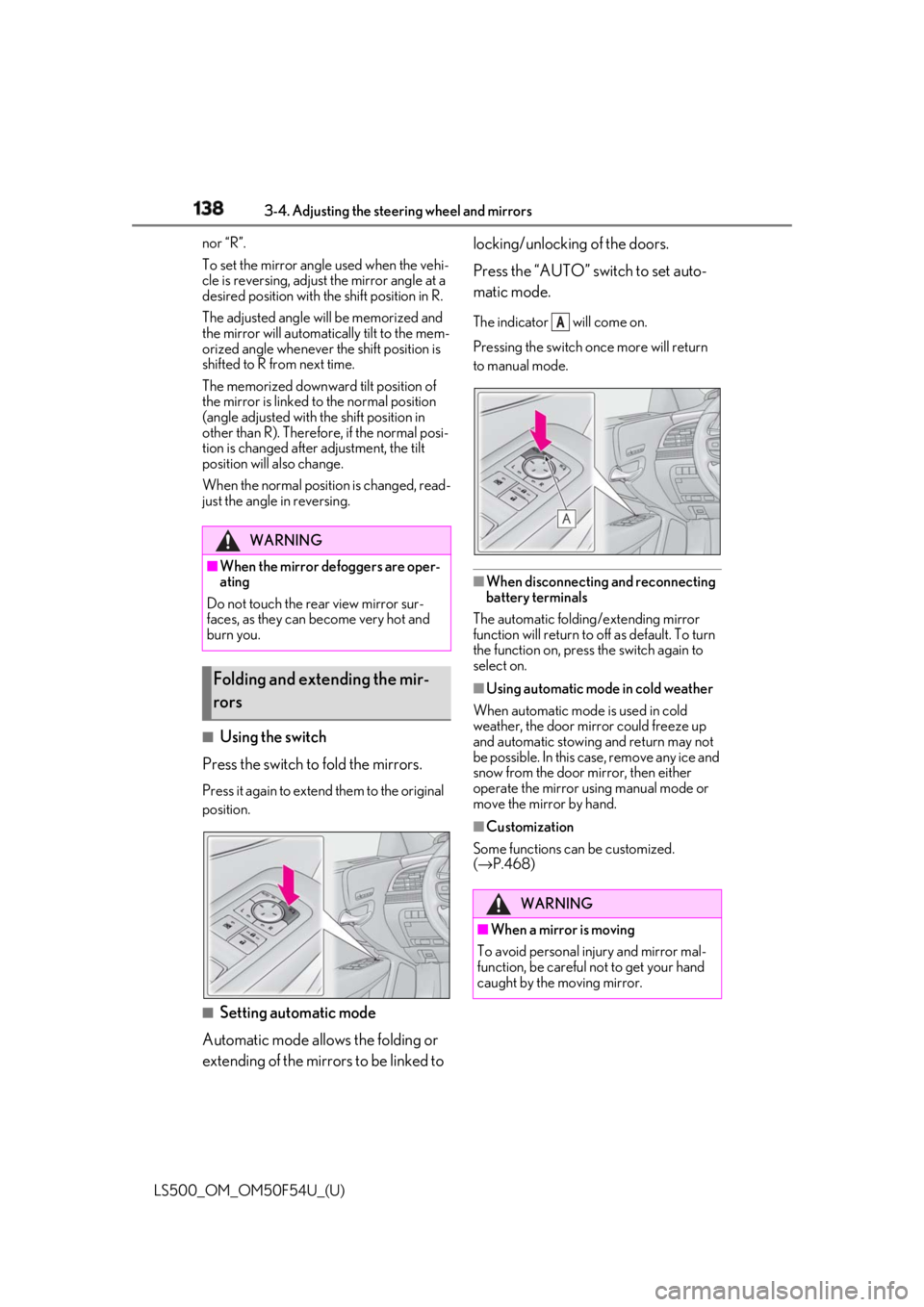
Using the switch
Press the switch to fold the mirrors. Press it again to extend them to the original
position.
■
Setting automatic mode
Automatic mode allows the folding or
extending of the mirrors to be linked to locking/unlocking of the doors.
Press the “AUTO” switch to set auto-
matic mode. The indicator will come on.
Pressing the switch on ce more will return
to manual mode.
■
When disconnecting and reconnecting
battery terminals
The automatic folding/extending mirror
function will return to off as default. To turn
the function on, press the switch again to
select on. ■
Using automatic mode in cold weather
When automatic mode is used in cold
weather, the door mirror could freeze up
and automatic stowing and return may not
be possible. In this case, remove any ice and
snow from the door mirror, then either
operate the mirror using manual mode or
move the mirror by hand. ■
Customization
Some functions can be customized.
( → P.468)WARNING■
When the mirror defoggers are oper-
ating
Do not touch the rear view mirror sur-
faces, as they can become very hot and
burn you.
Folding and extending the mir-
rors
WARNING
■
When a mirror is moving
To avoid personal injury and mirror mal-
function, be careful not to get your hand
caught by the moving mirror. A
Page 150 of 514
150 4-1. Before driving
LS500_OM_OM50F54U_(U) 4-1.Before driving
■
Starting the engine
→ P.160 ■
Driving
1 With the brake pedal depressed,
shift the shift position to D.
( → P.163)Check that the shift position indicator
shows D.
2 If the parking brake is in manual
mode, release the parking brake.
( → P.170)
3 Gradually release the brake pedal
and gently depress the accelerator
pedal to accelerate the vehicle. ■
Stopping
1 With the shift position in D, depress
the brake pedal.
2 If necessary, set the parking brake.If the vehicle is to be stopped for an
extended period of time, shift the shift posi-
tion to P. ( → P.166)
■
Parking the vehicle
1 With the shift position in D, depress
the brake pedal to stop the vehicle
completely.
2 If the parking brake is in manual
mode, set the parking brake.
( → P.170)
3 Shift the shift position to P.
( → P.166) 4 Press the engine switch to stop the
engine.
5 Slowly release the brake pedal.
6 Lock the door, making sure that you
have the electronic key on your
person. If parking on a hill, block the wheels as
needed. ■
Starting off on a steep uphill
1 Make sure that the parking brake is
set and shift the shift position to D. Hill-start assist control will operate.
( → P.294)
2 Gently depress the accelerator
pedal.
3 Release the parking brake. ■
Driving in the rain ●
Drive carefully when it is raining, because
visibility will be reduced, the windows
may become fogged-up, and the road
will be slippery. ●
Drive carefully when it starts to rain,
because the road surface will be espe-
cially slippery. ●
Refrain from high speeds when driving on
an expressway in the rain, because there
may be a layer of wa ter between the tires
and the road surface, preventing the
steering and brakes from operating prop-
erly.
■
Engine speed while driving
In the following conditions, the engine
speed may become high while driving. This
is due to automatic up-shifting control or
down-shifting implementation to meet driv-
ing conditions. It does not indicate sudden
acceleration.
●
The vehicle is judged to be driving uphill
or downhill
●
When the accelerato r pedal is released
●
When the brake pedal is depressedDriving the vehicle The following procedures should be
observed to ensure safe driving:
Driving procedure
Page 152 of 514
152 4-1. Before driving
LS500_OM_OM50F54U_(U) WARNING■
When driving the vehicle●
Do not drive if you are unfamiliar with
the location of the brake and accelera-
tor pedals to avoid depressing the
wrong pedal.
• Accidentally depressing the accelera-
tor pedal instead of the brake pedal
will result in sudden acceleration that
may lead to an accident.
• When backing up, you may twist your
body around, leading to a difficulty in
operating the pedals. Make sure to
operate the pedals properly.
• Make sure to keep a correct driving
posture even when moving the vehicle
only slightly. This allows you to depress
the brake and accelerator pedals
properly.
• Depress the brake pedal using your
right foot. Depressing the brake pedal
using your left foot may delay
response in an emergency, resulting in
an accident.●
Do not drive the vehicle over or stop
the vehicle near flammable materials.
The exhaust system and exhaust gases
can be extremely hot. These hot parts
may cause a fire if there is any flamma-
ble material nearby.
●
Vehicles without Lexus Safety Sys-
tem+A: During normal driving, do not
turn off the engine. Turning the engine
off while driving will not cause loss of
steering or braking control, but the
power assist to these systems will be
lost. This will make it more difficult to
steer and brake, so you should putt
over and stop the vehicle as soon as it
is safe to do so.
However, in the event of an emer-
gency, such as if it becomes impossible
to stop the vehicle in the normal way:
→ P.410 ●
Vehicles with Lexus Safety System+A:
During normal driving, do not turn off
the engine. Turning the engine off
while driving will not cause loss of
steering or braking control, however,
power assist to the st eering will be lost.
This will make it more difficult to steer
smoothly, so you should pull over and
stop the vehicle as soon as it is safe to
do so.
In the event of an emergency, such as if
it becomes impossible to stop the vehi-
cle in the normal way: → P.410●
Use engine braking (downshift) to
maintain a safe speed when driving
down a steep hill.
Using the brakes continuously may
cause the brakes to overheat and lose
effectiveness. ( → P.163)●
Do not adjust the positions of the
steering wheel, the seat, or the inside
or outside rear view mirrors while driv-
ing.
Doing so may result in a loss of vehicle
control. ●
Always check that all passengers’
arms, heads or other parts of their
body are not outside the vehicle. ●
Do not drive in excess of the speed
limit. Even if the legal speed limit per-
mits it, do not drive over 85 mph (140
km/h) unless your vehicle has
high-speed capability tires. Driving
over 85 mph (140 km /h) may result in
tire failure, loss of control and possible
injury. Be sure to consult a tire dealer
to determine whether the tires on your
vehicle are high-speed capability tires
or not before driving at such speeds.
■
When driving on slippery road sur-
faces
●
Sudden braking, acceleration and
steering may cause tire slippage and
reduce your ability to control the vehi-
cle.
●
Sudden acceleration, engine braking
due to shifting, or changes in engine
speed could cause the vehicle to skid.
Page 153 of 514
1534-1. Before driving
LS500_OM_OM50F54U_(U) 4
Driving WARNING●
After driving through a puddle, lightly
depress the brake pedal to make sure
that the brakes are functioning prop-
erly. Wet brake pads may prevent the
brakes from functioning properly. If the
brakes on only one side are wet and
not functioning properly, steering con-
trol may be affected.■
When shifting the shift position●
Do not let the vehicle roll backward
while a forward driving position is
selected, or roll forward while the shift
position is in R.
Doing so may cause the engine to stall
or lead to poor brake and steering
performance, resulting in an accident
or damage to the vehicle.●
Do not shift the shift position to P while
the vehicle is moving.
Doing so can damage the transmission
and may result in a loss of vehicle con-
trol.●
Do not shift the shift position to R while
the vehicle is moving forward.
Doing so can damage the transmission
and may result in a loss of vehicle con-
trol.
●
Do not shift the shift position to a driv-
ing position while the vehicle is moving
backward.
Doing so can damage the transmission
and may result in a loss of vehicle con-
trol.
●
Changing the shift position to N while
the vehicle is moving will disengage
the engine from the transmission.
Engine braking is not available when N
is selected. ●
Be careful not to change the shift posi-
tion with the accelerator pedal
depressed. Changing the shift posi-
tion to any positions other than P or N
may lead to unexpected rapid acceler-
ation of the vehicle that may cause an
accident and result in death or serious
injury.
After changing the shift position, make
sure to confirm the current shift posi-
tion displayed on the shift position indi-
cator inside the meter. ■
Brake pad wear
If any of the following situations occurs,
have the brake pads visually checked and
replaced by your Lexus dealer as soon as
possible. ●
If the thickness of the brake pads
exceeds the brake pad wear limit when
visually checking all four brake pads
(for the brake pad wear limit, refer to
P.453) ●
If a warning message is displayed on
the multi-information display (only the
right-side pads can be detected)
Rotor damage may result if the pads are
not replaced when needed.
F SPORT models: Moderate levels of the
brake pad and disc wear allow enhanced
braking power. As a result, the discs may
wear more quickly than conventional
brake discs. Therefore, when replacing
the brake pads, Lexus recommends that
you also have the thickness of the discs
measured.
It is dangerous to drive the vehicle when
the wear limits of the brake pads and/or
those of the brake discs are exceeded.
■
When the vehicle is stopped
●
Do not race the engine.
If the vehicle is in any gear other than P
or N, the vehicle may accelerate sud-
denly and unexpectedly, causing an
accident.
Page 155 of 514
1554-1. Before driving
LS500_OM_OM50F54U_(U) 4
Driving WARNING●
Vehicles with Lexus Safety System+A:
If the electronically controlled brake
system does not operate, do not follow
other vehicles closely and avoid hills or
sharp turns that require braking.
In this case, braking is still possible, but
the brake pedal should be depressed
more firmly than usual. Also, the brak-
ing distance will increase. Have your
brakes fixed immediately.●
Vehicles without Lexus Safety Sys-
tem+A: Do not pump the brake pedal
if the engine stalls.
Each push on the brake pedal uses up
the reserve for the power-assisted
brakes.●
Vehicles without Lexus Safety Sys-
tem+A: The brake system consists of 2
individual hydraulic systems; if one of
the systems fails, the other will still
operate. In this case, the brake pedal
should be depressed more firmly than
usual and the braking distance will
increase. Have your brakes fixed
immediately.●
Vehicles with Lexus Safety System+A:
The brake system consists of 2 or more
individual hydraulic systems; if one of
the systems fails, the other(s) will still
operate. In this case, the brake pedal
should be depressed more firmly than
usual and the braking distance will
increase. Have your brakes fixed
immediately.
■
If the vehicle becomes stuck
Do not spin the wheels excessively when
a driven wheel is up in the air, or the vehi-
cle is stuck in sand, mud, etc. This may
damage the driveline components or
propel the vehicle forward or backward,
causing an accident. NOTICE■
When driving the vehicle ●
Do not depress the accelerator and
brake pedals at the same time during
driving, as this may restrain the engine
output. ●
Do not use the accelerator pedal or
depress the accelerator and brake
pedals at the same time to hold the
vehicle on a hill. ■
When parking the vehicle
Always set the parking brake, and shift
the shift position to P. Failure to do so
may cause the vehicle to move or the
vehicle may accelerate suddenly if the
accelerator pedal is accidentally
depressed. ■
Avoiding damage to vehicle parts ●
Do not turn the steering wheel fully in
either direction and hold it there for an
extended period of time.
Doing so may damage the power
steering motor. ●
When driving over bumps in the road,
drive as slowly as possible to avoid
damaging the wheels, underside of the
vehicle, etc.
●
Make sure to idle the engine immedi-
ately after high-load driving. Stop the
engine only after the turbocharger has
cooled down.
Failure to do so may cause damage to
the turbocharger.
■
If you get a flat tire while driving
A flat or damaged tire may cause the fol-
lowing situations. Hold the steering
wheel firmly and gradually depress the
brake pedal to slow down the vehicle.
●
It may be difficult to control your vehi-
cle.
●
The vehicle will make abnormal
sounds or vibrations.
●
The vehicle will lean abnormally.
Page 158 of 514
158 4-1. Before driving
LS500_OM_OM50F54U_(U) ■
Total load capacity and seating capacity
These details are also described on the tire
and loading information label. ( → P.399)WARNING●
Do not place cargo or luggage in or on
the following locations.
• At the feet of the driver
• On the front passenger or rear seats
(when stacking items)
• On the package tray
• On the instrument panel
•On the dashboard
• In front of the Center Display ●
Secure all items in the occupant com-
partment.■
Capacity and distribution●
Do not exceed the maximum axle
weight rating or the total vehicle
weight rating.●
Even if the total load of occupant’s
weight and the cargo load is less than
the total load capacity, do not apply the
load unevenly. Improper loading may
cause deterioration of steering or
braking control which may cause
death or serious injury. Vehicle load limits Vehicle load limits include total
load capacity, seating capacity,
towing capacity and cargo capac-
ity.
Total load capacity (vehicle
capacity weight): → P.448Total load capacity means the combined
weight of occupants, cargo and lug-
gage.
Seating capacity:5 occupants
(Front 2, Rear 3) Seating capacity means the maximum
number of occupants whose estimated
average weight is 150 lb. (68 kg) per
person.
Towing capacity Lexus does not recommend towing a
trailer with your vehicle.
Cargo capacity Cargo capacity may increase or
decrease depending on the weight and
the number of occupants.
WARNING
■
Overloading the vehicle
Do not overload the vehicle.
It may not only cause damage to the tires,
but also degrade steering and braking
ability, resulting in an accident.
Page 160 of 514
160 4-2. Driving procedures
LS500_OM_OM50F54U_(U) 4-2.Driving procedures
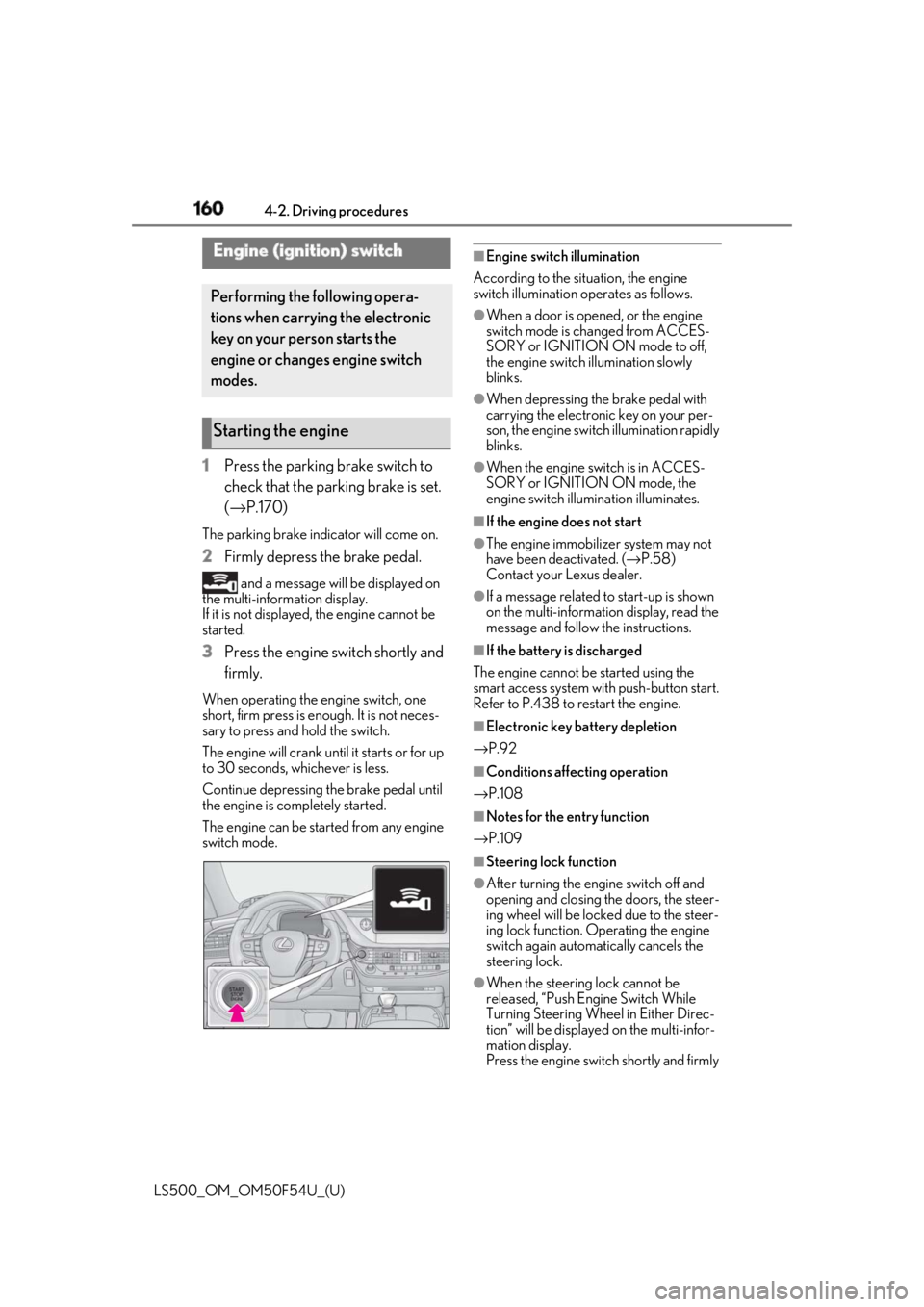
1 Press the parking brake switch to
check that the parking brake is set.
( → P.170)The parking brake indicator will come on.
2 Firmly depress the brake pedal. and a message will be displayed on
the multi-information display.
If it is not displayed, the engine cannot be
started.
3 Press the engine switch shortly and
firmly.When operating the engine switch, one
short, firm press is enough. It is not neces-
sary to press and hold the switch.
The engine will crank until it starts or for up
to 30 seconds, whichever is less.
Continue depressing the brake pedal until
the engine is completely started.
The engine can be started from any engine
switch mode. ■
Engine switch illumination
According to the situation, the engine
switch illumination operates as follows. ●
When a door is opened, or the engine
switch mode is changed from ACCES-
SORY or IGNITION ON mode to off,
the engine switch illumination slowly
blinks. ●
When depressing the brake pedal with
carrying the electronic key on your per-
son, the engine switch illumination rapidly
blinks. ●
When the engine sw itch is in ACCES-
SORY or IGNITION ON mode, the
engine switch illumination illuminates. ■
If the engine does not start ●
The engine immobilizer system may not
have been deactivated. ( → P.58)
Contact your Lexus dealer. ●
If a message related to start-up is shown
on the multi-information display, read the
message and follow the instructions. ■
If the battery is discharged
The engine cannot be started using the
smart access system with push-button start.
Refer to P.438 to restart the engine. ■
Electronic key battery depletion
→ P.92 ■
Conditions affecting operation
→ P.108 ■
Notes for the entry function
→ P.109
■
Steering lock function
●
After turning the engine switch off and
opening and closing the doors, the steer-
ing wheel will be lock ed due to the steer-
ing lock function. Operating the engine
switch again automatically cancels the
steering lock.
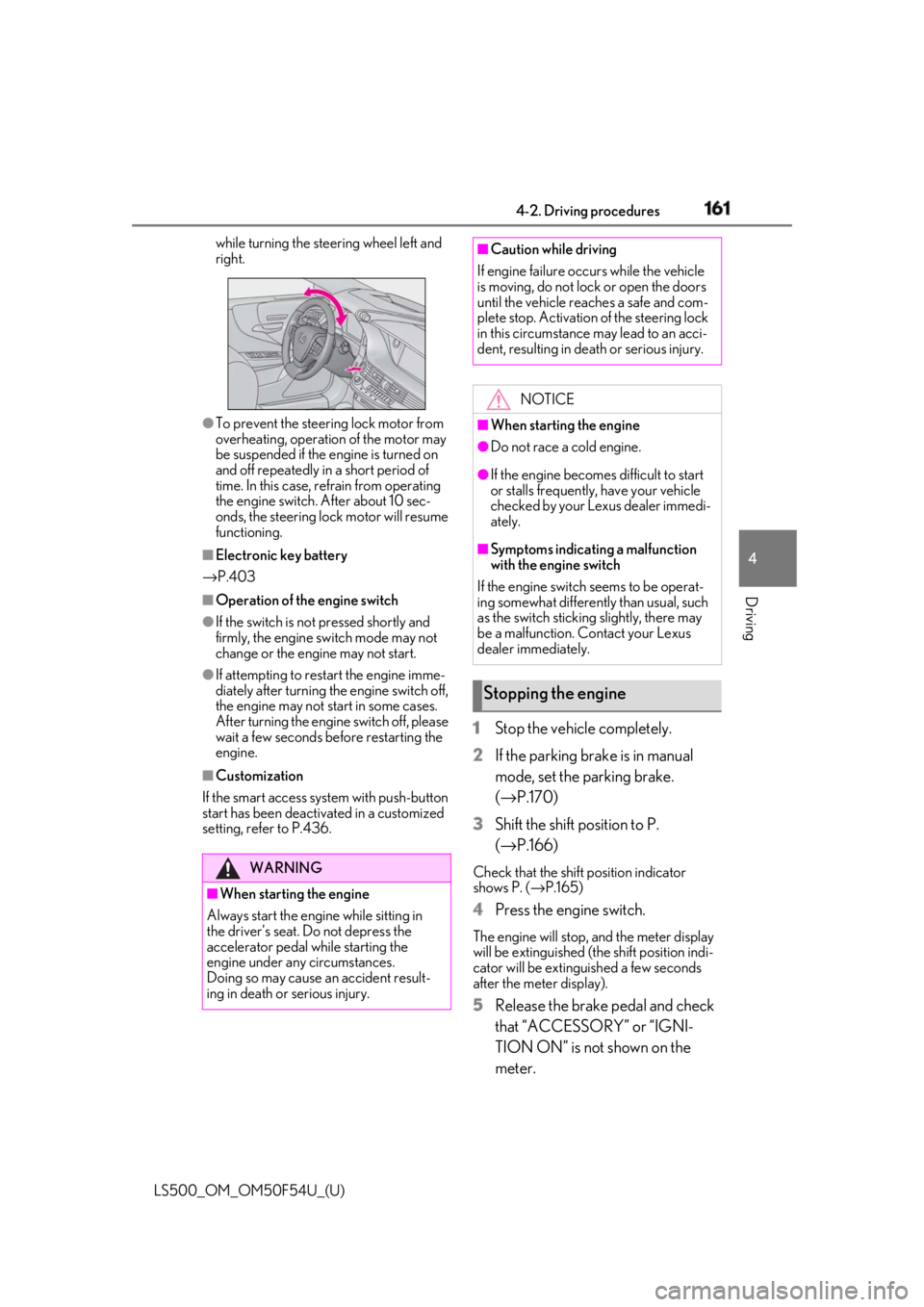
●
When the steering lock cannot be
released, “Push Engine Switch While
Turning Steering Whee l in Either Direc-
tion” will be displayed on the multi-infor-
mation display.
Press the engine switch shortly and firmly Engine (ignition) switch Performing the following opera-
tions when carryin g the electronic
key on your person starts the
engine or changes engine switch
modes.
Starting the engine
Page 161 of 514
1614-2. Driving procedures
LS500_OM_OM50F54U_(U) 4
Driving while turning the steering wheel left and
right.
●
To prevent the steering lock motor from
overheating, operation of the motor may
be suspended if the engine is turned on
and off repeatedly in a short period of
time. In this case, refrain from operating
the engine switch. After about 10 sec-
onds, the steering lock motor will resume
functioning.■
Electronic key battery
→ P.403■
Operation of the engine switch●
If the switch is not pressed shortly and
firmly, the engine switch mode may not
change or the engine may not start.●
If attempting to restart the engine imme-
diately after turning the engine switch off,
the engine may not start in some cases.
After turning the engine switch off, please
wait a few seconds before restarting the
engine.■
Customization
If the smart access sy stem with push-button
start has been deactivated in a customized
setting, refer to P.436. 1 Stop the vehicle completely.
2 If the parking brake is in manual
mode, set the parking brake.
( → P.170)
3 Shift the shift position to P.
( → P.166) Check that the shift position indicator
shows P. ( → P.165)
4 Press the engine switch. The engine will stop, and the meter display
will be extinguished (the shift position indi-
cator will be extinguished a few seconds
after the meter display).
5 Release the brake pedal and check
that “ACCESSORY” or “IGNI-
TION ON” is not shown on the
meter.WARNING
■
When starting the engine
Always start the engine while sitting in
the driver’s seat. Do not depress the
accelerator pedal while starting the
engine under any circumstances.
Doing so may cause an accident result-
ing in death or serious injury. ■
Caution while driving
If engine failure occurs while the vehicle
is moving, do not lock or open the doors
until the vehicle reaches a safe and com-
plete stop. Activation of the steering lock
in this circumstance may lead to an acci-
dent, resulting in death or serious injury.
NOTICE■
When starting the engine ●
Do not race a cold engine. ●
If the engine becomes difficult to start
or stalls frequently, have your vehicle
checked by your Lexus dealer immedi-
ately. ■
Symptoms indicating a malfunction
with the engine switch
If the engine switch seems to be operat-
ing somewhat differently than usual, such
as the switch sticking slightly, there may
be a malfunction. Contact your Lexus
dealer immediately.
Stopping the engine
Page 162 of 514
162 4-2. Driving procedures
LS500_OM_OM50F54U_(U) ■
Automatic P position selection function
→ P.166
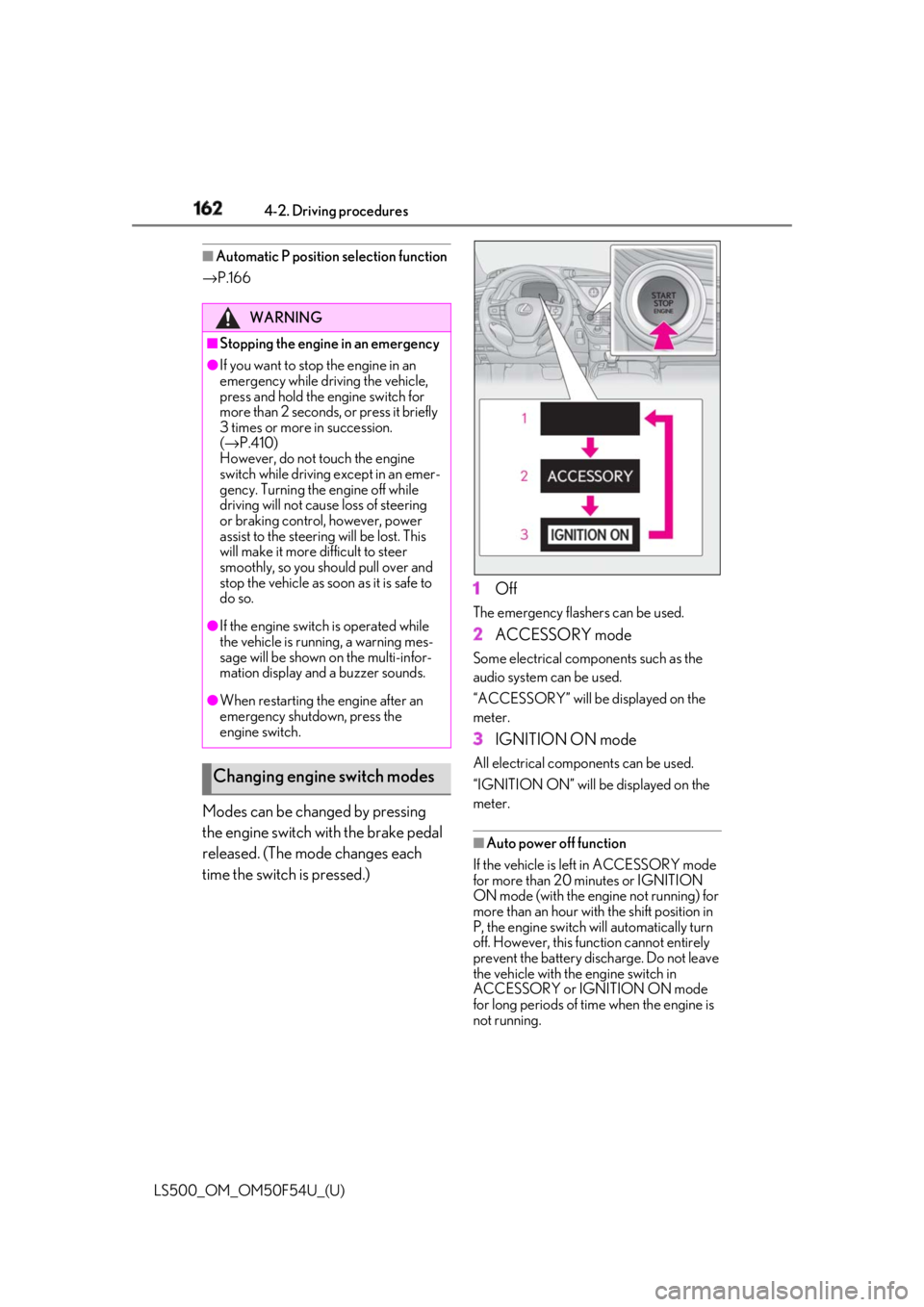
Modes can be changed by pressing
the engine switch with the brake pedal
released. (The mode changes each
time the switch is pressed.) 1 Off The emergency flashers can be used.
2 ACCESSORY mode Some electrical components such as the
audio system can be used.
“ACCESSORY” will be displayed on the
meter.
3 IGNITION ON mode All electrical components can be used.
“IGNITION ON” will be displayed on the
meter.
■
Auto power off function
If the vehicle is left in ACCESSORY mode
for more than 20 minutes or IGNITION
ON mode (with the engine not running) for
more than an hour with the shift position in
P, the engine switch will automatically turn
off. However, this function cannot entirely
prevent the battery discharge. Do not leave
the vehicle with the engine switch in
ACCESSORY or IGNITION ON mode
for long periods of time when the engine is
not running.WARNING■
Stopping the engine in an emergency●
If you want to stop the engine in an
emergency while driving the vehicle,
press and hold the engine switch for
more than 2 seconds, or press it briefly
3 times or more in succession.
( → P.410)
However, do not touch the engine
switch while driving except in an emer-
gency. Turning the engine off while
driving will not cause loss of steering
or braking control, however, power
assist to the steering will be lost. This
will make it more difficult to steer
smoothly, so you should pull over and
stop the vehicle as soon as it is safe to
do so.●
If the engine switch is operated while
the vehicle is running, a warning mes-
sage will be shown on the multi-infor-
mation display and a buzzer sounds.●
When restarting the engine after an
emergency shutdown, press the
engine switch.
Changing engine switch modes