fog light LEXUS LS500 2018 Owners Manual
[x] Cancel search | Manufacturer: LEXUS, Model Year: 2018, Model line: LS500, Model: LEXUS LS500 2018Pages: 514, PDF Size: 10.62 MB
Page 3 of 514
3TABLE OF CONTENTS
LS500_OM_OM50F54U_(U) 1
2
3
4
5
6
7
8
94-2. Driving procedures
Engine (ignition) switch .............. 160
Automatic transmission.............. 163
Turn signal lever............................. 169
Parking brake ................................. 170
Brake Hold....................................... 173
4-3. Operating the lights and wipers
Headlight switch ............................ 175
AHB (Automatic High Beam)
............................................................ 178
Windshield wipers and washer
............................................................ 180
4-4. Refueling
Opening the fuel tank cap......... 185
4-5. Using the driving support systems
Lexus Safety System+A.............. 187
Lexus Safety System+ ................. 194
PCS (Pre-Collision System) (vehi-
cles with Lexus Safety System+A)
........................................................... 200
PCS (Pre-Collision System) (vehi-
cles with Lexus Safety System+)
............................................................ 210
FCTA (Front Cross Traffic Alert)
............................................................ 218
LTA (Lane Tracing Assist)......... 221
LKA (Lane-Keeping Assist) ..... 231
RSA (Road Sign Assist) ............. 238
Dynamic radar crui se control with
full-speed range.......................... 241
BSM (Blind Spot Monitor) ........ 251
PKSA (Parking Support Alert)
........................................................... 256
Intuitive parking assist ................ 257
RCTA (Rear cross traffic alert)
function .......................................... 264 RCD (Rear Camera Detection)
function.......................................... 268
PKSB (Parking Support Brake)
............................................................ 271
Parking Support Brake function
(static objects) ............................. 277
Parking Support Brake function
(rear-crossing vehicles) ......... 282
Parking Support Brake function
(rear pedestrians) ..................... 286
Driving mode select switch ..... 289
Electronically modulated air sus-
pension ............................................ 291
Driving assist systems ................ 294
4-6. Driving tips
Winter driving tips ....................... 299
5-1. Remote Touch/Display
Remote Touch............................... 304
Center Display.............................. 306
Rear Multi Operation Panel ... 308
5-2. Lexus Climate Concierge
Lexus Climate Concierge........... 311
5-3. Using the air conditioning system
and defogger
Front automatic air conditioning
system ............................................. 313
Rear air conditioning system... 323
Heated steering wheel/seat heat-
ers/seat ventilators
......
............. 326
5-4. Using the interior lights
Interior lights list ........................... 330
5-5. Using the storage features
List of storag e features .............. 334
Trunk features ............................... 3395
Interior features
Page 12 of 514
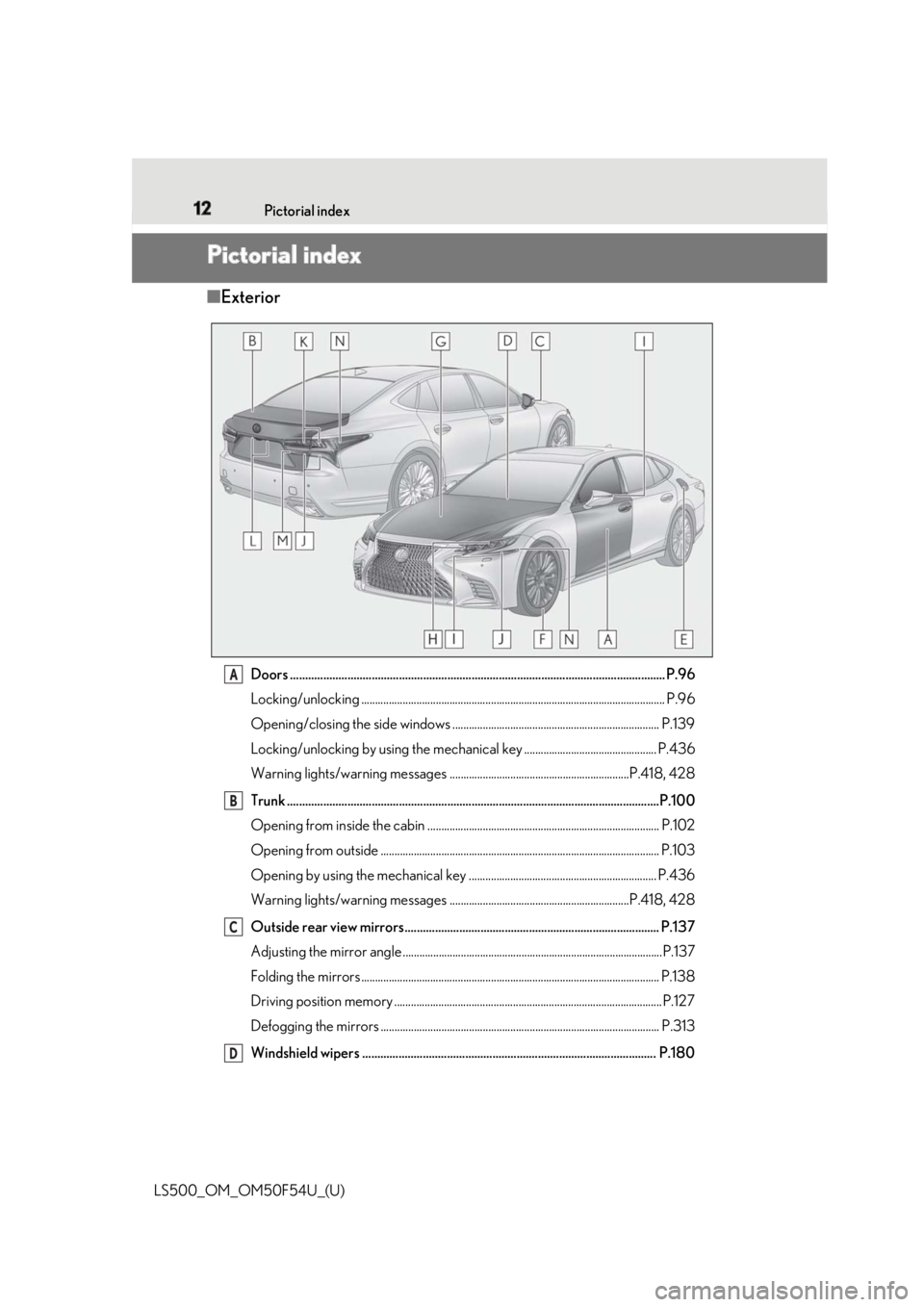
12 Pictorial index
LS500_OM_OM50F54U_(U)Pictorial index ■ Exterior
Doors .......................................................................................................................... .. P.96
Locking/unlocking .............................................................................................................. P.96
Opening/closing the side windows ........................................................................... P.139
Locking/unlocking by using th e mechanical key ................................................ P.436
Warning lights/warning messages .................................................................P.418, 428
Trunk .......................................................................................................................... .P.100
Opening from inside the cabin .................................................................................... P.102
Opening from outside ..................................................................................................... P.103
Opening by using the mechanical key .................................................................... P.436
Warning lights/warning messages .................................................................P.418, 428
Outside rear view mirrors.................................................................................... P.137
Adjusting the mirror angle ..............................................................................................P.137
Folding the mirrors ............................................................................................................ P.138
Driving position memory ................................................................................................. P.127
Defogging the mirrors ..................................................................................................... P.313
Windshield wipers ................................................................................................. P.180 A
B
C
D
Page 15 of 514
15Pictorial index
LS500_OM_OM50F54U_(U) Applying/releasing the parking brake............ .......................................................... P.170
Precautions for winter season .. .................................................................................. P.300
Warning buzzer/messages.......................................................................................... P.428
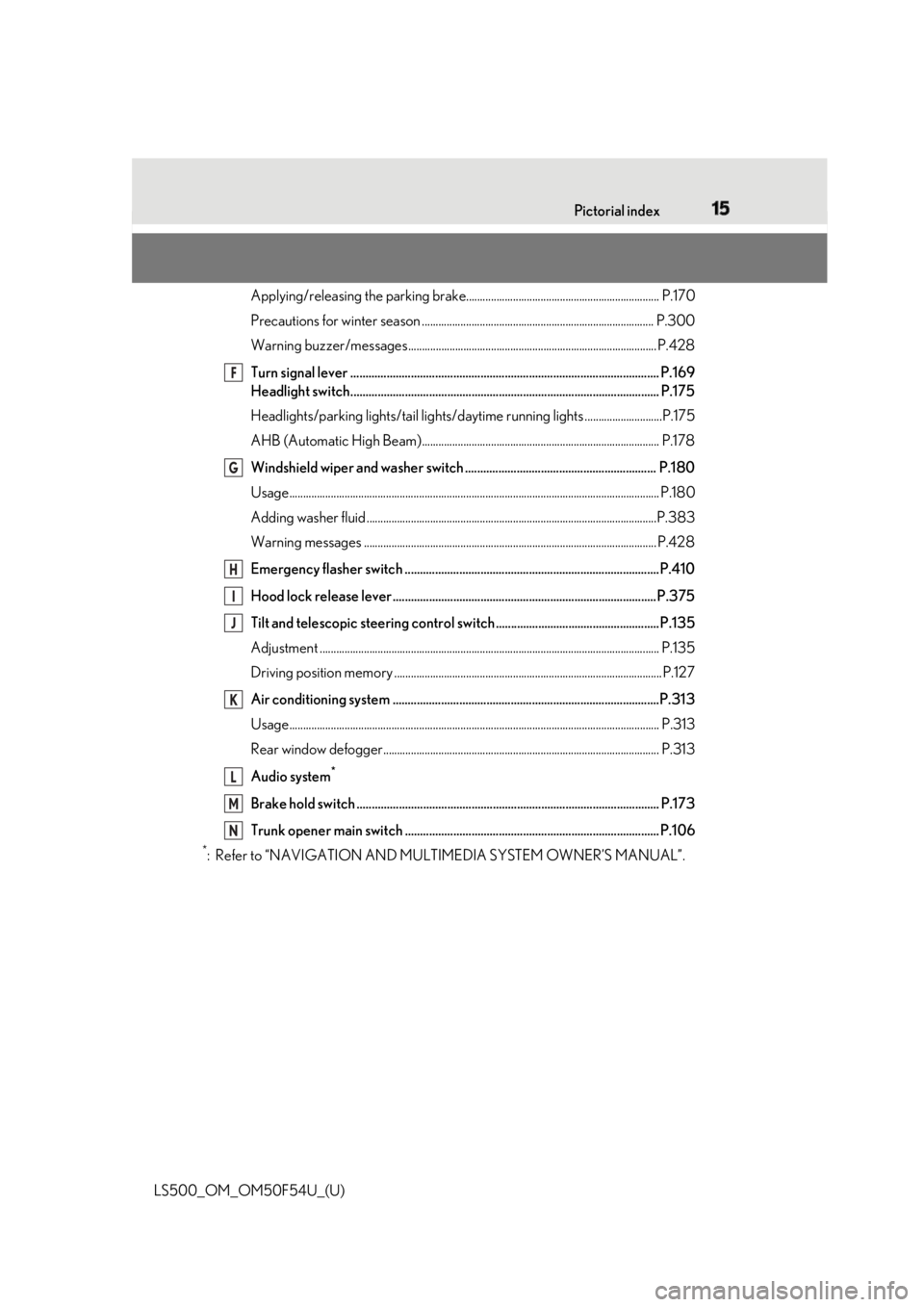
Turn signal lever ...................................................................................................... P.169
Headlight switch...................................................................................................... P.175
Headlights/parking lights/tail lights/daytime runn ing lights ............................P.175
AHB (Automatic High Beam)...................................................................................... P.178
Windshield wiper and washer switch ............................................................... P.180
Usage.......................................................................................................................... ............ P.180
Adding washer fluid .........................................................................................................P.3 83
Warning messages .......................................................................................................... P.428
Emergency flasher switch ....................................................................................P.410
Hood lock release lever ....................................................................................... P.375
Tilt and telescopic steering contro l switch...... ............ .............. .................... ..P.135
Adjustment ..................................................................................................................... ...... P.135
Driving position memory ................................................................................................. P.127
Air conditioning system ........................................................................................P.313
Usage.......................................................................................................................... ............ P.313
Rear window defogger.................................................................................................... P.313
Audio system *
Brake hold switch .................................................................................................... P.173
Trunk opener main switch .................................................................................... P.106 *
: Refer to “NAVIGATION AND MULTIMEDIA SYSTEM OWNER’S MANUAL”. F
G
H
I
J
K
L
M
N
Page 137 of 514
1373-4. Adjusting the steering wheel and mirrors
LS500_OM_OM50F54U_(U) 3
Before driving
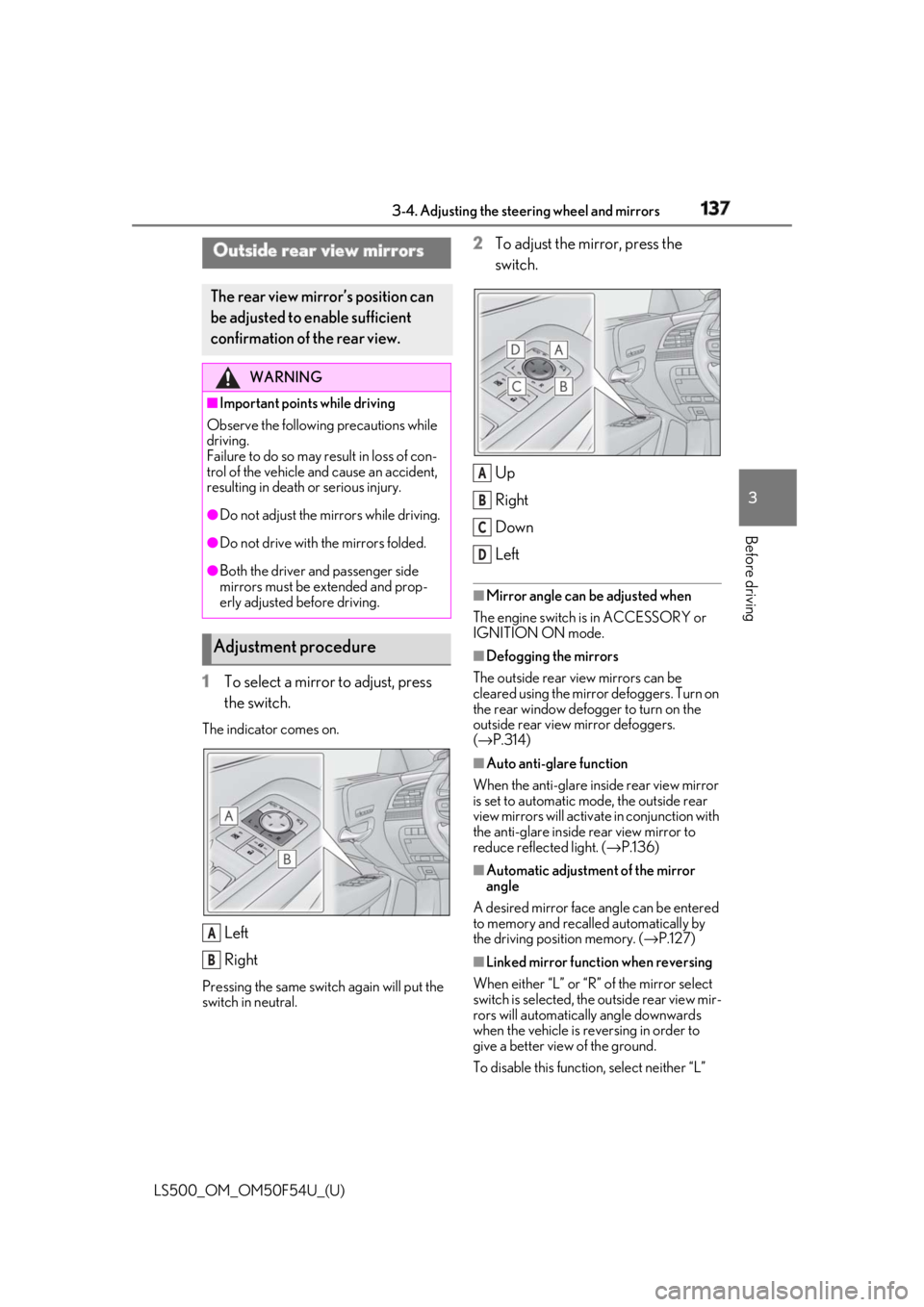
1 To select a mirror to adjust, press
the switch.The indicator comes on.
Left
RightPressing the same switch again will put the
switch in neutral. 2 To adjust the mirror, press the
switch.
Up
Right
Down
Left ■
Mirror angle can be adjusted when
The engine switch is in ACCESSORY or
IGNITION ON mode. ■
Defogging the mirrors
The outside rear view mirrors can be
cleared using the mirror defoggers. Turn on
the rear window defogger to turn on the
outside rear view mirror defoggers.
( → P.314) ■
Auto anti-glare function
When the anti-glare inside rear view mirror
is set to automatic mode, the outside rear
view mirrors will activate in conjunction with
the anti-glare inside rear view mirror to
reduce reflec ted light. ( → P.136)
■
Automatic adjustment of the mirror
angle
A desired mirror face angle can be entered
to memory and recalled automatically by
the driving position memory. ( → P.127)
■
Linked mirror function when reversing
When either “L” or “R” of the mirror select
switch is selected, the outside rear view mir-
rors will automatically angle downwards
when the vehicle is re versing in order to
give a better view of the ground.
To disable this function, select neither “L” Outside rear view mirrors The rear view mirror’s position can
be adjusted to enable sufficient
confirmation of the rear view. WARNING■
Important points while driving
Observe the following precautions while
driving.
Failure to do so may result in loss of con-
trol of the vehicle and cause an accident,
resulting in death or serious injury. ●
Do not adjust the mirrors while driving.●
Do not drive with the mirrors folded.●
Both the driver and passenger side
mirrors must be extended and prop-
erly adjusted before driving.
Adjustment procedure
A
B A
B
C
D
Page 179 of 514
1794-3. Operating the lights and wipers
LS500_OM_OM50F54U_(U) 4
Driving vehicle ahead that is using fog lights with-
out its headlights turned on is detected.●
House lights, street lig hts, traffic signals,
and illuminated billboards or signs and
other reflective objects may cause the
high beams to change to the low beams,
or the low beams to remain on.●
The following factors may affect the
amount of time taken for the high beams
to turn on or off:
• The brightness of the headlights, fog
lights, and tail lights of vehicles ahead
• The movement and direction of vehicles
ahead
• When a vehicle ahead only has opera-
tional lights on one side
• When a vehicle ahead is a two-wheeled
vehicle
• The condition of the road (gradient,
curve, condition of th e road surface, etc.)
• The number of passengers and amount of
luggage in the vehicle●
The high beams may turn on or off unex-
pectedly.●
Bicycles or similar vehicles may not be
detected.●
In the following situations the system may
not be able to correctly detect the sur-
rounding brightness le vel. This may cause
the low beams to remain on or the high
beams to flash or dazzle pedestrians or
vehicles ahead. In such a case, it is neces-
sary to manually switch between the high
and low beams.
• When driving in inclement weather
(heavy rain, snow, fog, sandstorms, etc.)
• When the windshield is obscured by fog,
mist, ice, dirt, etc.
• When the windshield is cracked or dam-
aged
• When the camera sensor is deformed or
dirty
• When the temperature of the camera
sensor is extremely high
• When the surrounding brightness level is
equal to that of head lights, tail lights or
fog lights
• When headlights or tail lights of vehicles
ahead are turned off, dirty, changing
color, or not aimed properly
• When the vehicle is hit by water, snow,
dust, etc. from a preceding vehicle • When driving through an area of inter-
mittently changing brightness and dark-
ness
• When frequently and repeatedly driving
ascending/descending roads, or roads
with rough, bumpy or uneven surfaces
(such as stone-paved roads, gravel roads,
etc.)
• When frequently and repeatedly taking
curves or driving on a winding road
• When there is a highly reflective object
ahead of the vehicle, such as a sign or
mirror
• When the back of a preceding vehicle is
highly reflective, such as a container on a
truck
• When the vehicle’s headlights are dam-
aged or dirty, or are not aimed properly
• When the vehicle is listing or titling due to
a flat tire, a trailer being towed, etc.
• When the headlights are changed
between the high beams and low beams
repeatedly in an abnormal manner
• When the driver believes that the high
beams may be flashing or dazzling
pedestrians or other drivers ■
Temporarily lowering sensor sensitivity
The sensitivity of the sensor can be tempo-
rarily lowered.
1 Turn the engine switch off while the fol-
lowing conditions are met.
●
The headlight switch is in or . ●
The headlight switch lever is in high beam
position. ●
Automatic High Beam switch is on.
2 Turn the engine switch to IGNITION
ON mode.
3 Within 30 seconds after step 2 , repeat
pulling the headlight switch lever to the
original position then pushing it to the
high beam position quickly 10 times,
then leave the lever in high beam posi-
tion.
4 If the sensitivity is changed, the AHB
indicator is turn on and off 3 times.
Automatic High Beam (headlights) may
turn on even when the vehicle is stopped.
Page 182 of 514
182 4-3. Operating the lights and wipers
LS500_OM_OM50F54U_(U) ●
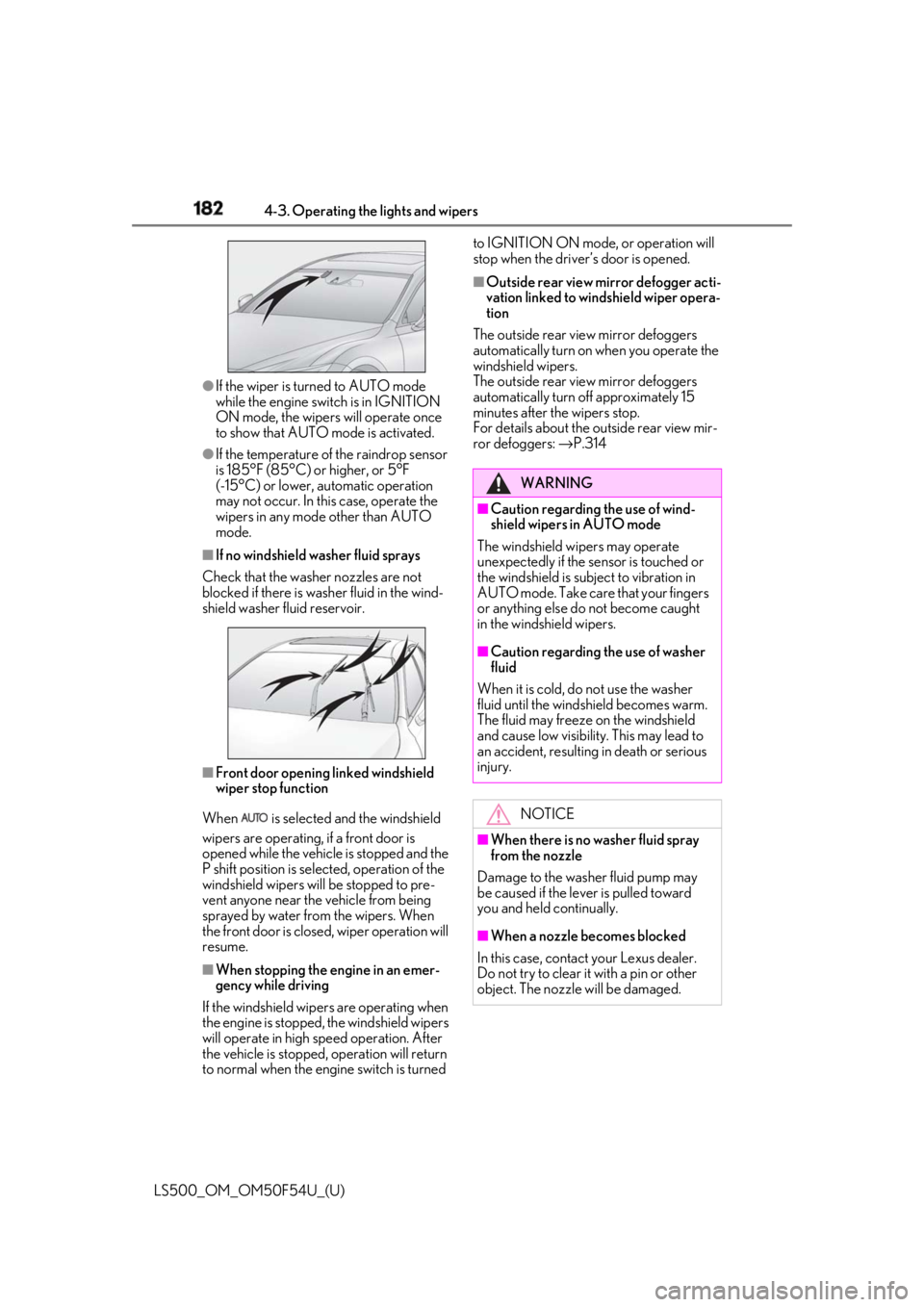
If the wiper is turned to AUTO mode
while the engine switch is in IGNITION
ON mode, the wipers will operate once
to show that AUTO mode is activated.●
If the temperature of the raindrop sensor
is 185°F (85°C) or higher, or 5°F
(-15°C) or lower, automatic operation
may not occur. In this case, operate the
wipers in any mode other than AUTO
mode.■
If no windshield washer fluid sprays
Check that the washer nozzles are not
blocked if there is wash er fluid in the wind-
shield washer fluid reservoir.
■
Front door opening linked windshield
wiper stop function
When is selected and the windshield
wipers are operating, if a front door is
opened while the vehicle is stopped and the
P shift position is sele cted, operation of the
windshield wipers w ill be stopped to pre-
vent anyone near the vehicle from being
sprayed by water from the wipers. When
the front door is closed, wiper operation will
resume.
■
When stopping the engine in an emer-
gency while driving
If the windshield wipers are operating when
the engine is stopped, the windshield wipers
will operate in high speed operation. After
the vehicle is stopped, operation will return
to normal when the engi ne switch is turned to IGNITION ON mode, or operation will
stop when the driver’s door is opened. ■
Outside rear view mirror defogger acti-
vation linked to windshield wiper opera-
tion
The outside rear view mirror defoggers
automatically turn on when you operate the
windshield wipers.
The outside rear view mirror defoggers
automatically turn off approximately 15
minutes after the wipers stop.
For details about the outside rear view mir-
ror defoggers: → P.314
WARNING■
Caution regarding the use of wind-
shield wipers in AUTO mode
The windshield wipers may operate
unexpectedly if the sensor is touched or
the windshield is subj ect to vibration in
AUTO mode. Take care that your fingers
or anything else do not become caught
in the windshield wipers. ■
Caution regarding the use of washer
fluid
When it is cold, do not use the washer
fluid until the windshield becomes warm.
The fluid may freeze on the windshield
and cause low visibility. This may lead to
an accident, resulting in death or serious
injury.
NOTICE
■
When there is no washer fluid spray
from the nozzle
Damage to the washer fluid pump may
be caused if the lever is pulled toward
you and held continually.
■
When a nozzle becomes blocked
In this case, contact your Lexus dealer.
Do not try to clear it with a pin or other
object. The nozzle will be damaged.
Page 192 of 514
192 4-5. Using the driving support systems
LS500_OM_OM50F54U_(U) WARNING●
Do not subject a radar sensor or its
surrounding area on the front bumper
to a strong impact.
If a radar sensor is moved even slightly
off position, the system may malfunction
and vehicles may not be detected cor-
rectly.
In the following situations, have your
vehicle inspected by your Lexus dealer.
• If a radar sensor or its surrounding
area is subject to a strong impact
• If the area on the front bumper around
a radar sensor is scratched or dented,
or the front bumper has become par-
tially disengaged ●
Do not disassemble the radar sensors.●
Do not modify the radar sensors or
their surrounding area on the front
bumper.●
If a radar sensor or the front bumper
needs to be removed and installed, or
replaced, contact your Lexus dealer.●
Do not paint the front bumper any
color other than an official Lexus color.
■
To avoid malfunction of the camera
sensor
Observe the following precautions.
Otherwise, the camera sensor may not
operate properly, possibly leading to an
accident resulting in death or serious
injury. ●
Keep the windshield clean at all times.
• If the windshield is dirty or covered
with an oily film, water droplets, snow,
etc., clear the windshield.
• As some glass coating agents may
affect the detection performance of
the camera sensor, consult your Lexus
dealer when using a glass coating
agent.
• If a glass coating agent is applied to the
windshield, it will still be necessary to
use the windshield wipers to remove
water droplets, etc. from the area of
the windshield in front of the camera
sensor.
• If the inner side of the windshield
where the camera sens or is installed is
dirty, contact your Lexus dealer. ●
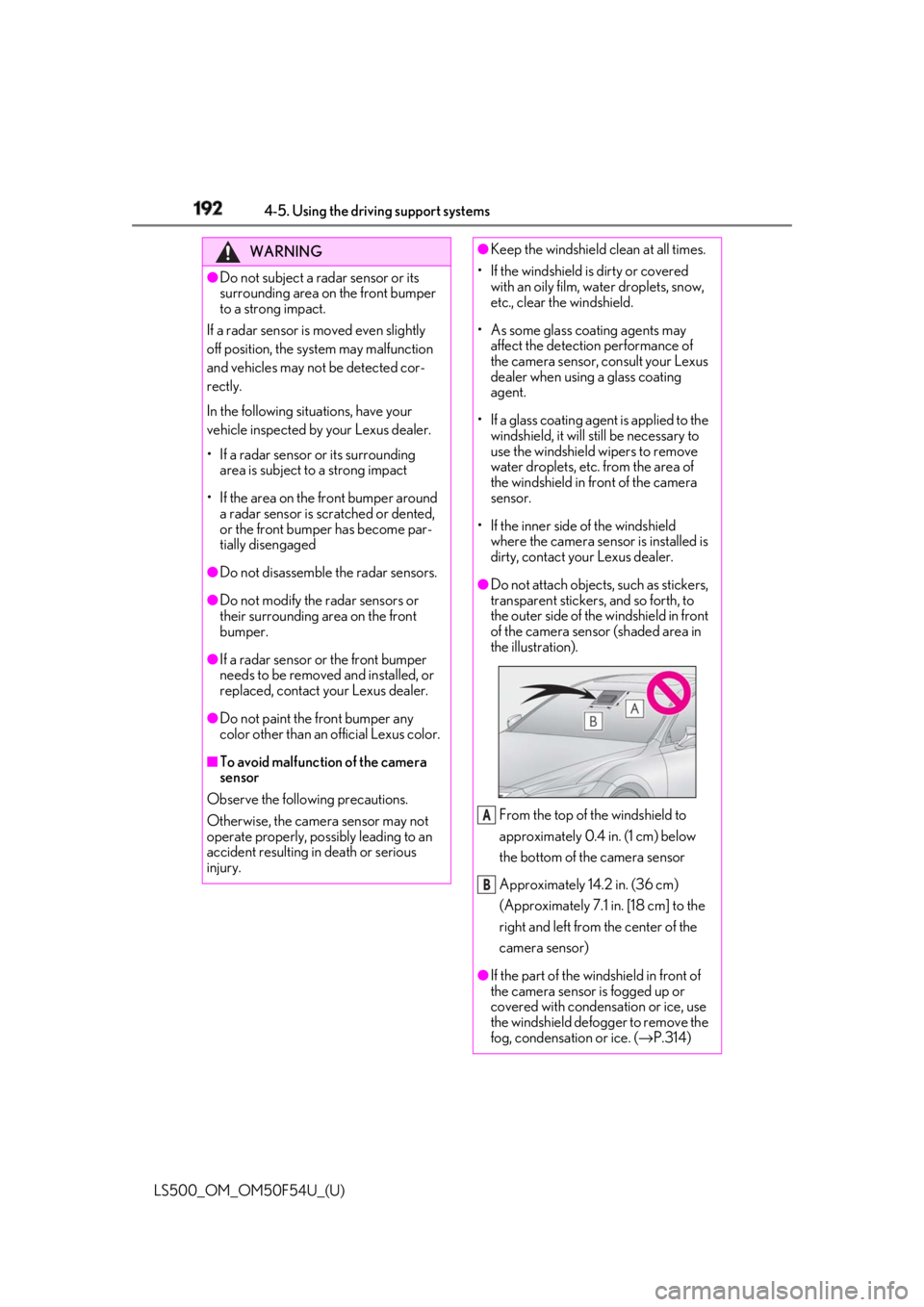
Do not attach objects, such as stickers,
transparent stickers, and so forth, to
the outer side of the windshield in front
of the camera sensor (shaded area in
the illustration).
From the top of the windshield to
approximately 0.4 in. (1 cm) below
the bottom of the camera sensor
Approximately 14.2 in. (36 cm)
(Approximately 7.1 in. [18 cm] to the
right and left from the center of the
camera sensor)
●
If the part of the wi ndshield in front of
the camera sensor is fogged up or
covered with condensation or ice, use
the windshield defogger to remove the
fog, condensation or ice. ( → P.314)A
B
Page 199 of 514
1994-5. Using the driving support systems
LS500_OM_OM50F54U_(U) 4
Driving WARNING●
If the part of the windshield in front of
the camera sensor is fogged up or
covered with condensation or ice, use
the windshield defogger to remove the
fog, condensation or ice. ( → P.314)●
If water droplets cannot be properly
removed from the area of the wind-
shield in front of the camera sensor by
the windshield wipers, replace the
wiper insert or wiper blade.
If the wiper inserts or wiper blades need
to be replaced, contact your Lexus
dealer. ●
Do not attach window tinting to the
windshield.●
Replace the windshield if it is damaged
or cracked.
If the windshield needs to be replaced,
contact your Lexus dealer.●
Do not get the camera sensor wet.●
Do not allow bright lights to shine into
the camera sensor.●
Do not dirty or damage the camera
sensor.
When cleaning the inside of the wind-
shield, do not allow glass cleaner to
contact the lens. Also, do not touch the
lens.
If the lens is dirty or damaged, contact
your Lexus dealer.
●
Do not subject the camera sensor to a
strong impact.
●
Do not change the installation position
or direction of the camera sensor or
remove it.
●
Do not disassemble the camera sen-
sor.
●
Do not modify any components of the
vehicle around the camera sensor
(inside rear view mirror, etc.) or ceiling. ●
Do not attach any accessories that
may obstruct the camera sensor to the
hood, front grille or front bumper.
Contact your Lexus dealer. ●
If a surfboard or other long object is to
be mounted on the roof, make sure
that it will not obstruct the camera sen-
sor. ●
Do not modify the headlights or other
lights.
Page 208 of 514
208 4-5. Using the driving support systems
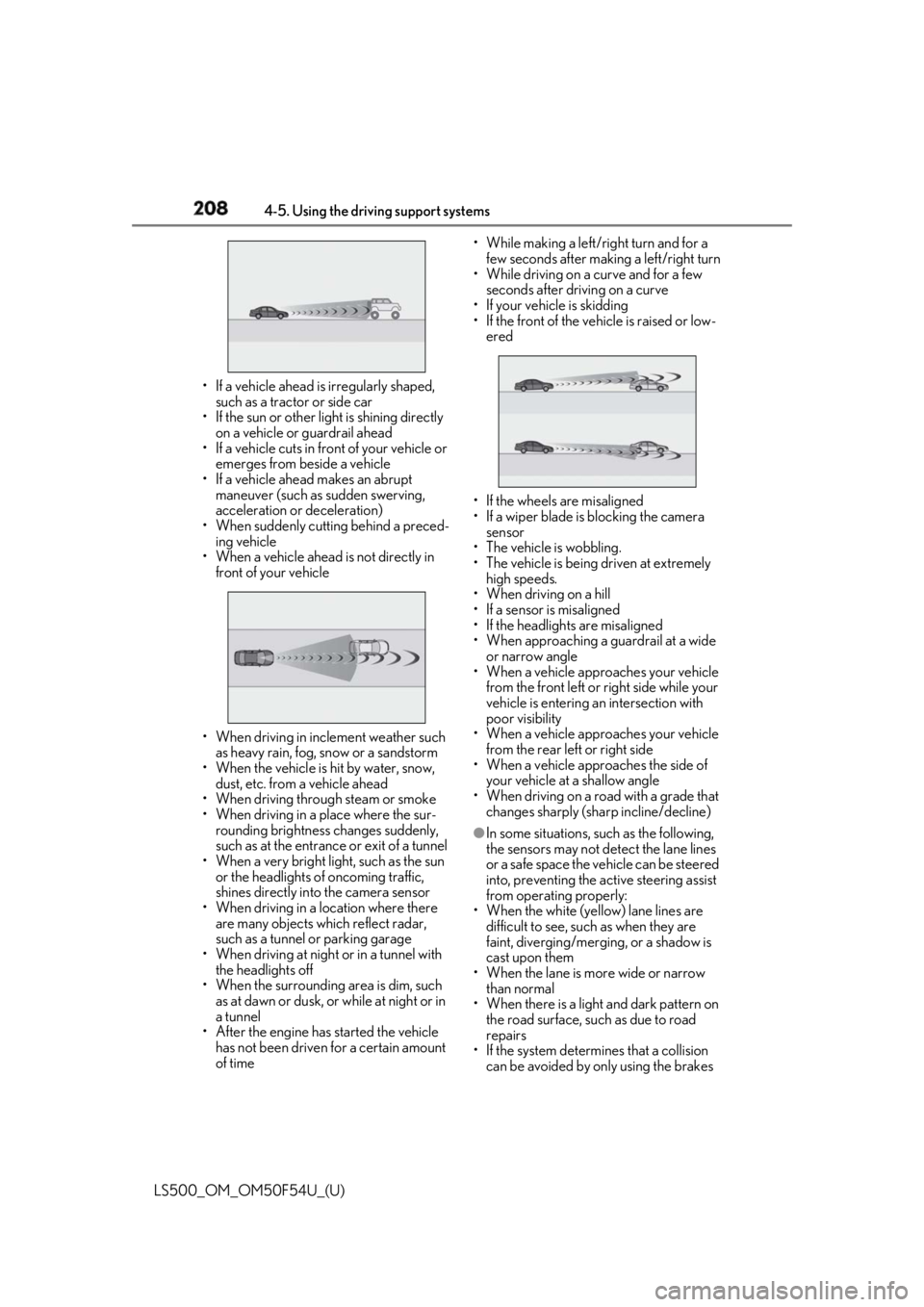
LS500_OM_OM50F54U_(U) • If a vehicle ahead is irregularly shaped,
such as a tractor or side car
• If the sun or other light is shining directly
on a vehicle or guardrail ahead
• If a vehicle cuts in front of your vehicle or
emerges from beside a vehicle
• If a vehicle ahead makes an abrupt
maneuver (such as sudden swerving,
acceleration or deceleration)
• When suddenly cutting behind a preced-
ing vehicle
• When a vehicle ahead is not directly in
front of your vehicle
• When driving in incl ement weather such
as heavy rain, fog, snow or a sandstorm
• When the vehicle is hit by water, snow,
dust, etc. from a vehicle ahead
• When driving through steam or smoke
• When driving in a place where the sur-
rounding brightness changes suddenly,
such as at the entrance or exit of a tunnel
• When a very bright light, such as the sun
or the headlights of oncoming traffic,
shines directly in to the camera sensor
• When driving in a lo cation where there
are many objects which reflect radar,
such as a tunnel or parking garage
• When driving at night or in a tunnel with
the headlights off
• When the surrounding area is dim, such
as at dawn or dusk, or while at night or in
a tunnel
• After the engine has started the vehicle
has not been driven for a certain amount
of time • While making a left/r ight turn and for a
few seconds after making a left/right turn
• While driving on a curve and for a few
seconds after driving on a curve
• If your vehicle is skidding
• If the front of the vehicle is raised or low-
ered
• If the wheels are misaligned
• If a wiper blade is blocking the camera
sensor
• The vehicle is wobbling.
• The vehicle is being driven at extremely
high speeds.
• When driving on a hill
• If a sensor is misaligned
• If the headlights are misaligned
• When approaching a guardrail at a wide
or narrow angle
• When a vehicle approaches your vehicle
from the front left or right side while your
vehicle is entering an intersection with
poor visibility
• When a vehicle approaches your vehicle
from the rear left or right side
• When a vehicle approaches the side of
your vehicle at a shallow angle
• When driving on a road with a grade that
changes sharply (sha rp incline/decline)●
In some situations, such as the following,
the sensors may not detect the lane lines
or a safe space the vehicle can be steered
into, preventing the active steering assist
from operating properly:
• When the white (yellow) lane lines are
difficult to see, such as when they are
faint, diverging/merging, or a shadow is
cast upon them
• When the lane is more wide or narrow
than normal
• When there is a light and dark pattern on
the road surface, such as due to road
repairs
• If the system determines that a collision
can be avoided by only using the brakes
Page 210 of 514
210 4-5. Using the driving support systems
LS500_OM_OM50F54U_(U) reclined
• If the head-up display position is set
extremely high■
If the PCS warning light flashes or illumi-
nates and a warning message is dis-
played on the multi-information display
The pre-collision system may be temporar-
ily unavailable or there may be a malfunc-
tion in the system. ●
In the following situations, the warning
light will turn off, the message will disap-
pear and the system will become opera-
tional when normal operating conditions
return:
• When a sensor or the area around a sen-
sor is hot, such as in the sun
• When a sensor or the area around a sen-
sor is cold, such as in an extremely cold
environment
• When a sensor is dirty or covered with
snow, etc.
• When the part of the windshield in front
of the camera sensor is fogged up or cov-
ered with condensation or ice (Defog-
ging the windshield: → P.314)
• If the camera sensor is obstructed, such
as when the hood is open or a sticker is
attached to the windshield near the cam-
era sensor●
If the PCS warning ligh t continues to flash
or remains illuminated or the warning
message does not disappear even
though the vehicle has returned to nor-
mal, the system may be malfunctioning.
Have the vehicle inspected by your Lexus
dealer immediately.■
If VSC is disabled●
If VSC is disabled ( → P.294), the pre-col-
lision brake assist and pre-collision brak-
ing functions are also disabled.
●
The PCS warning light will turn on and
“VSC Turned Off Pre-Collision Brake
System Unavailable” will be displayed on
the multi-information display. PCS (Pre-Collision System)
(vehicles with Lexus Safety
System+) The pre-collision system uses a
radar sensor and camera sensor to
detect vehicles and pedestrians in
front of your vehi cle. When the sys-
tem determines that the possibility
of a frontal collision with a vehicle
or pedestrian is high, a warning
operates to urge the driver to take
evasive action and the potential
brake pressure is increased to help
the driver avoid the collision. If the
system determines that the possi-
bility of a frontal collision with a
vehicle or pedestrian is extremely
high, the brakes are automatically
applied to help avoi d the collision or
help reduce the impact of the colli-
sion.
The pre-collision system can be dis-
abled/enabled and the warning tim-
ing can be changed. ( → P.213)