engine LEXUS LS500 2019 Owners Manual
[x] Cancel search | Manufacturer: LEXUS, Model Year: 2019, Model line: LS500, Model: LEXUS LS500 2019Pages: 512, PDF Size: 9.71 MB
Page 321 of 512
3215-3. Using the air conditio ning system and defogger
LS500_OM_(U)_1810 5
Interior features in a rear seat when in automatic
S-FLOW mode. Depending on the set temperature, opera-
tion in S-FLOW mode may not change as
described above.
When certain conditions are met and pri-
ority is given to the driver’s seat only, the
temperature indicator for the front passen-
ger side will turn off.
How the system judges if a passenger is in
the vehicle: P.321
The following S-FLOW modes are
available:
Automatic S-FLOW mode
In this mode, when a passenger is
judged to be in a rear seat, S-FLOW
mode will be automatically disabled.
( P.321)The indicator will illuminate on the air con-
ditioning control screen when S-FLOW
mode is enabled.
To enable/disable S-FLOW mode and
enter manual S-FLOW mode, select the
S-FLOW mode switch.
How the system judges if a passenger is in
the vehicle: P.321
Manual S-FLOW mode
When the S-FLOW mode switch is
selected, S-FLOW mode will be manu-
ally enabled/ disabled. The indicator will illuminate on the air con-
ditioning control screen when S-FLOW
mode is enabled.
In manual S-FLOW mode, as the system
does not judge if a pa ssenger is in a rear
seat.
If the rear air conditioning control screen
on the Rear Multi Operation Panel (if
equipped) is operated , S-FLOW mode will automatically be disabled ■
How the system judges if a passenger is
in the vehicle when in S-FLOW mode
In S-FLOW mode, the system judges if a
passenger is in the vehicle as follows: ●
Front passenger seat: A passenger is
judged to be in the front passenger seat
when the system detect s an object on the
front passenger seat, fastening of the
front passenger seat belt, changing of the
set temperature for the front passenger
seat, changing of the air outlets for the
front passenger seat or the opening and
closing of the front passenger door.
(However, when only opening and clos-
ing of the front passenger door is
detected, the system will judge that a pas-
senger is not in the front passenger seat
after the vehicle speed reaches approxi-
mately 12 mph (20 km/h) or more.) ●
Rear seats: A passenger is judged to be in
a rear seat when th e system detects the
opening and closing of a rear door (auto-
matic S-FLOW mode only) or the opera-
tion of the rear air conditioning control
screen on the Rear Multi Operation
Panel. ■
Operation of automatic S-FLOW mode
When the system is operating in automatic
S-FLOW mode, if the system detects the
opening and closing of a rear door or the
operation of the rear air conditioning con-
trol screen on the Rear Multi Operation
Panel, S-FLOW mode will be disabled. To
enable S-FLOW mode, select the S-FLOW
mode switch. (In this case, the system will
operate in manual S-FLOW mode.)
■
Changing from manual S-FLOW mode
to automatic S-FLOW mode
1 Select the S-FLOW mode switch to dis-
able S-FLOW mode.
2 Turn the engine switch off.
3 After 60 minutes have elapsed, change
the engine switch to ON mode.
Page 326 of 512
326 5-3. Using the air conditioning system and defogger
LS500_OM_(U)_1810 Adjust the temperature setting of each
rear seat using the Center Display or Rear
Multi Operation Panel.
Adjust the temperature setting of
each rear seat using the Center Dis-
play (rear air conditioning control
screen) or Rear Multi Operation
Panel. The temperature setting of each rear seat
can be changed independently.
■
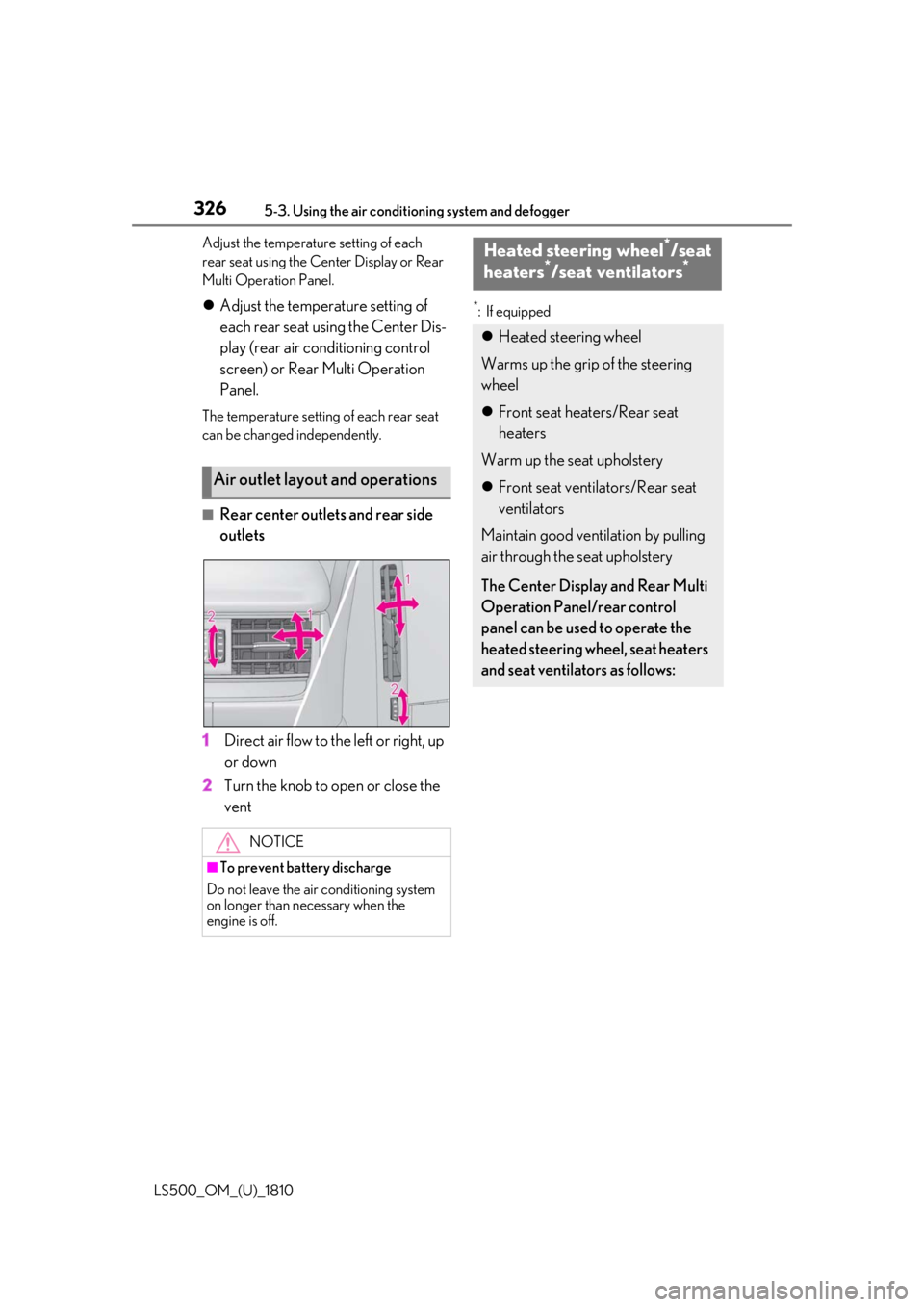
Rear center outlets and rear side
outlets
1 Direct air flow to the left or right, up
or down
2 Turn the knob to open or close the
vent *
: If equipped
Air outlet layout and operations
NOTICE
■
To prevent battery discharge
Do not leave the air conditioning system
on longer than necessary when the
engine is off. Heated steering wheel *
/seat
heaters *
/seat ventilators *
Heated steering wheel
Warms up the grip of the steering
wheel
Front seat heaters/Rear seat
heaters
Warm up the seat upholstery
Front seat ventilators/Rear seat
ventilators
Maintain good ventilation by pulling
air through the seat upholstery
The Center Display and Rear Multi
Operation Panel/rear control
panel can be used to operate the
heated steering wheel, seat heaters
and seat ventilators as follows:
Page 327 of 512
3275-3. Using the air conditio ning system and defogger
LS500_OM_(U)_1810 5
Interior features ■
Center Display
Main screen
Using the touchpad of the Remote
Touch, select the button on the screen.
to can be adjusted by perform-
ing the following operations.
Flick operation: Move the pointer to
the desired item and flick the touchpad
up or down. The item can be adjusted by one level.
Trace operation: After selecting the
desired item, trace the touchpad sur-
face. The item can be adjusted by the amount
that you trace.
Trace operation cannot be used while driv-
ing. Center Display
Press the “MENU” button on the
Remote Touch to display the main
menu and move the cursor to to
display the shortcut buttons. Then,
select to display the heated
steering wheel/front seat
heater/front seat ventilator control
screen.
To display the rear seat heater/rear
seat ventilator control screen, select
. (if equipped)
Rear Multi Operation Panel
Touch “Climate” on the home screen
to display the air conditioning con-
trol screen.( P.308)
Touching the shortcut button on the
home screen will display operation
buttons for the rear seat heaters and
rear seat ventilators.
Rear control panel
The rear seat heaters can be oper-
ated. WARNING
■
To prevent minor burn injuries
Care should be taken if anyone in the fol-
lowing categories comes in contact with
the steering wheel or seats when the
heater is on:
●
Babies, small children, the elderly, the
sick and the phys ically challenged
●
Persons with sensitive skin
●
Persons who are fatigued ●
Persons who have taken alcohol or
drugs that induce sleep (sleeping
drugs, cold remedies, etc.)
NOTICE■
To prevent damage to the seat heat-
ers and seat ventilators
Do not put heavy objects that have an
uneven surface on the seat and do not
stick sharp objects (n eedles, nails, etc.)
into the seat. ■
To prevent battery discharge
Do not use the functions when the
engine is off.
Control screen
A C
Page 329 of 512
3295-3. Using the air conditio ning system and defogger
LS500_OM_(U)_1810 5
Interior features ■
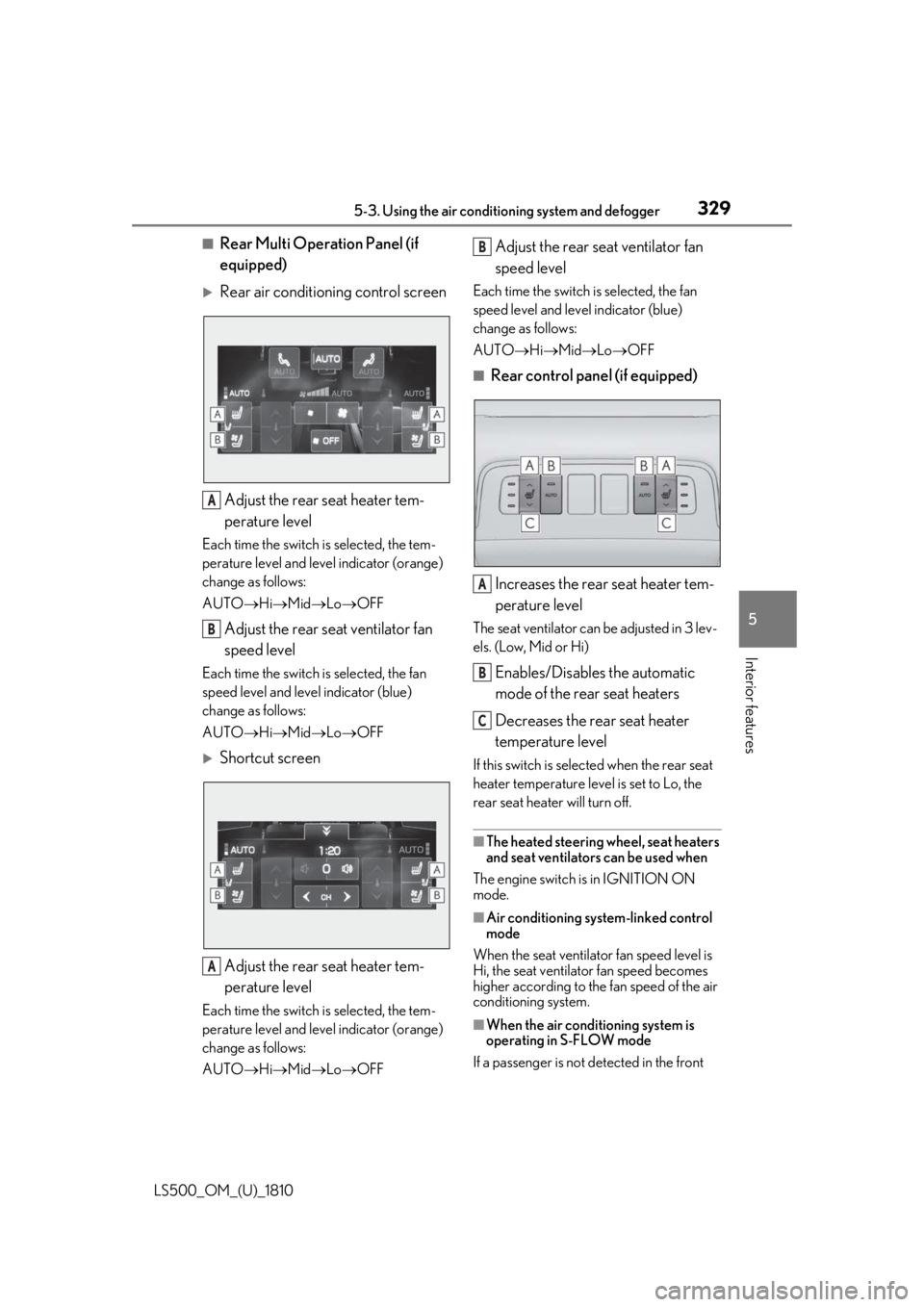
Rear Multi Operation Panel (if
equipped)
Rear air conditioning control screen
Adjust the rear seat heater tem-
perature levelEach time the switch is selected, the tem-
perature level and leve l indicator (orange)
change as follows:
AUTO Hi Mid Lo OFF
Adjust the rear seat ventilator fan
speed levelEach time the switch is selected, the fan
speed level and leve l indicator (blue)
change as follows:
AUTO Hi Mid Lo OFF
Shortcut screen
Adjust the rear seat heater tem-
perature levelEach time the switch is selected, the tem-
perature level and leve l indicator (orange)
change as follows:
AUTO Hi Mid Lo OFF Adjust the rear seat ventilator fan
speed level Each time the switch is selected, the fan
speed level and level indicator (blue)
change as follows:
AUTO Hi Mid Lo OFF■
Rear control panel (if equipped)
Increases the rear seat heater tem-
perature level The seat ventilator can be adjusted in 3 lev-
els. (Low, Mid or Hi)
Enables/Disables the automatic
mode of the rear seat heaters
Decreases the rear seat heater
temperature level If this switch is select ed when the rear seat
heater temperature level is set to Lo, the
rear seat heater will turn off.
■
The heated steering wheel, seat heaters
and seat ventilators can be used when
The engine switch is in IGNITION ON
mode.
■
Air conditioning system-linked control
mode
When the seat ventilator fan speed level is
Hi, the seat ventilato r fan speed becomes
higher according to the fan speed of the air
conditioning system.
■
When the air conditioning system is
operating in S-FLOW mode
If a passenger is not detected in the front A
B
A B
A
B
C
Page 331 of 512
3315-4. Using the interior lights
LS500_OM_(U)_1810 5
Interior features 5-4.Using the interior lights
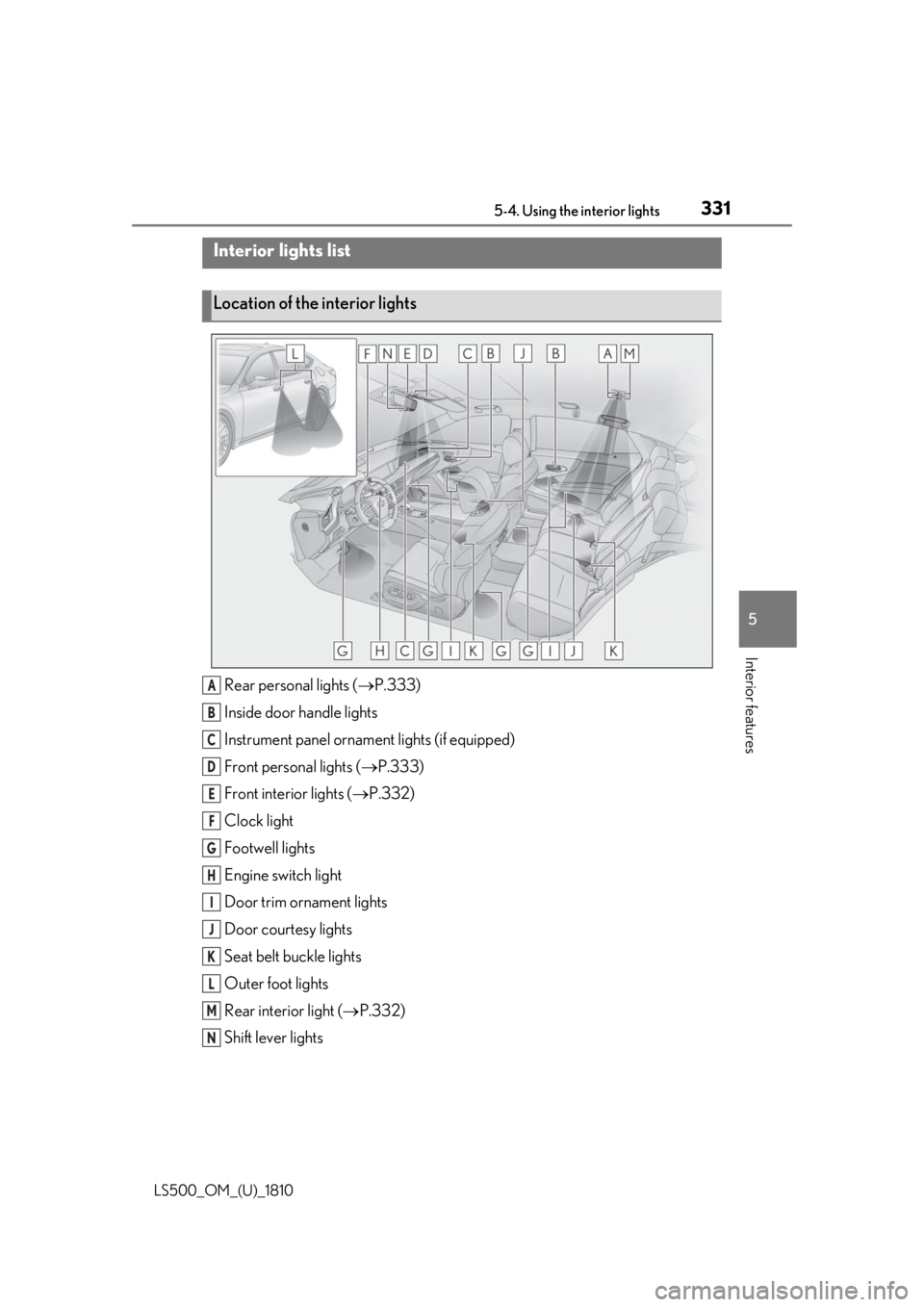
Rear personal lights ( P.333)
Inside door handle lights
Instrument panel orname nt lights (if equipped)
Front personal lights ( P.333)
Front interi or lights ( P.332)
Clock light
Footwell lights
Engine switch light
Door trim ornament lights
Door courtesy lights
Seat belt buckle lights
Outer foot lights
Rear interior light ( P.332)
Shift lever lightsInterior lights list
Location of the interior lights
A
B
C
D
E
F
G
H
I
J
K
L
M
N
Page 334 of 512
334 5-4. Using the interior lights
LS500_OM_(U)_1810 ■
Illuminated entry system
The lights automatically turn on/off accord-
ing to the engine switch mode, the pres-
ence of the electronic key, whether the
doors are locked/unlocked, and whether
the doors are opened/closed. ■
To prevent the battery from being dis-
charged
If the interior lights remain on when the
engine switch is turned off, the lights will go
off automatically after 20 minutes. ■
When front interior light or front per-
sonal lights do not respond as normal●
When water, dirt, et c., have adhered to
the lens surface●
When operated with a wet hand●
When wearing gloves, etc.■
The interior lights may turn on automati-
cally when
If any of the SRS airbags deploy (inflate) or
in the event of a strong rear impact, the inte-
rior lights will turn on automatically.
The interior lights will turn off automatically
after approximately 20minutes.
The interior lights can be turned off manu-
ally. However, in order to help prevent fur-
ther collisions, it is recommended that they
be left on until sa fety can be ensured.
(The interior lights may not turn on auto-
matically depending on the force of the
impact and conditions of the collision.) ■
Customization
Some functions can be customized.
( P.466)
NOTICE
■
To prevent battery discharge
Do not leave the lights on longer than
necessary when the engine is not run-
ning. ■
Removing light lenses
Never remove th e lens for the front inte-
rior light and front personal lights. Other-
wise, the lights will be damaged. If a lens
needs to be removed, contact your Lexus
dealer.
Page 343 of 512
3435-6. Using the other interior features
LS500_OM_(U)_1810 5
Interior features 5-6.Using the other interior features
The USB charging ports are used to
supply 2.1 A of electricity at 5 V to
external devices.
The USB charging ports are for
charging only. They are not designed
for data transfer or other purposes.
Depending on the external device, it
may not charge properly. Refer to the
manual included with the device
before using a USB charging port. ■
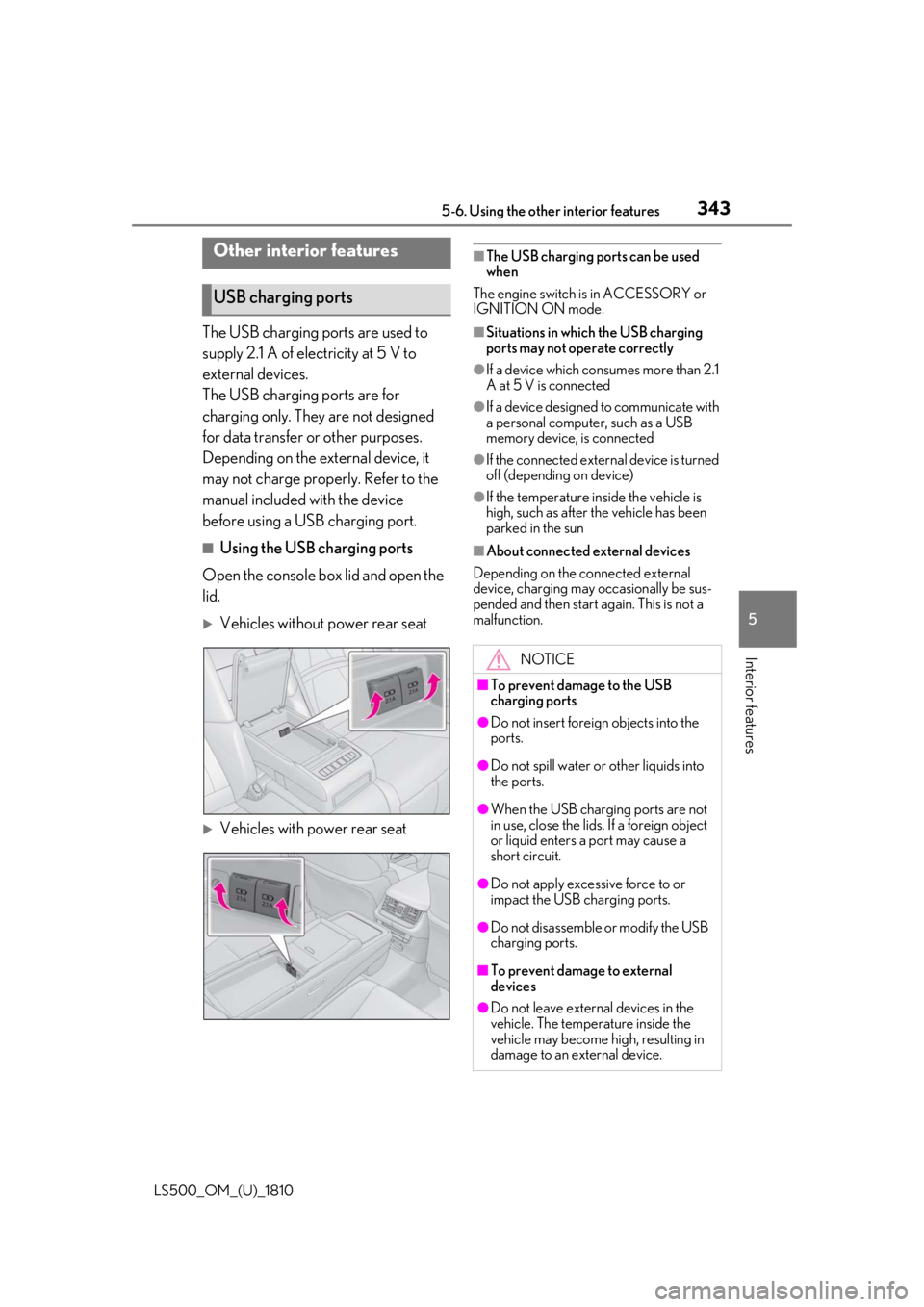
Using the USB charging ports
Open the console box lid and open the
lid.
Vehicles without power rear seat
Vehicles with power rear seat ■
The USB charging ports can be used
when
The engine switch is in ACCESSORY or
IGNITION ON mode. ■
Situations in whic h the USB charging
ports may not operate correctly ●
If a device which consumes more than 2.1
A at 5 V is connected ●
If a device designed to communicate with
a personal computer, such as a USB
memory device, is connected ●
If the connected external device is turned
off (depending on device) ●
If the temperature inside the vehicle is
high, such as after the vehicle has been
parked in the sun ■
About connected external devices
Depending on the connected external
device, charging may occasionally be sus-
pended and then start again. This is not a
malfunction.Other interior features
USB charging ports
NOTICE■
To prevent damage to the USB
charging ports ●
Do not insert foreign objects into the
ports.
●
Do not spill water or other liquids into
the ports.
●
When the USB charging ports are not
in use, close the lids. If a foreign object
or liquid enters a port may cause a
short circuit.
●
Do not apply excessive force to or
impact the USB charging ports.
●
Do not disassemble or modify the USB
charging ports.
■
To prevent damage to external
devices
●
Do not leave external devices in the
vehicle. The temperature inside the
vehicle may become high, resulting in
damage to an external device.
Page 344 of 512
344 5-6. Using the other interior features
LS500_OM_(U)_1810
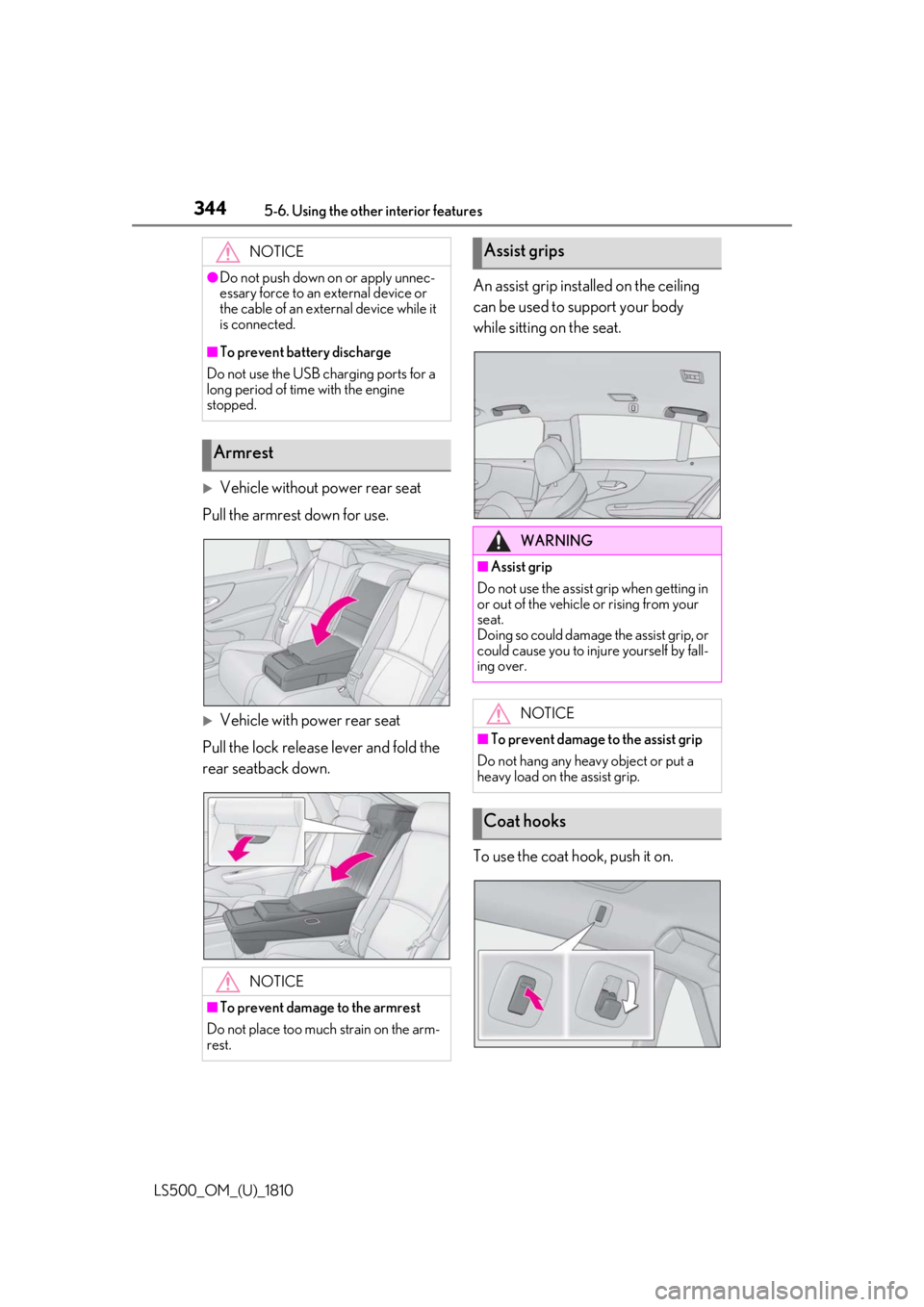
Vehicle without power rear seat
Pull the armrest down for use.
Vehicle with power rear seat
Pull the lock release lever and fold the
rear seatback down. An assist grip installed on the ceiling
can be used to support your body
while sitting on the seat.
To use the coat hook, push it on.NOTICE●
Do not push down on or apply unnec-
essary force to an external device or
the cable of an external device while it
is connected.■
To prevent battery discharge
Do not use the USB charging ports for a
long period of time with the engine
stopped.
Armrest
NOTICE
■
To prevent damage to the armrest
Do not place too much strain on the arm-
rest. Assist grips
WARNING■
Assist grip
Do not use the assist grip when getting in
or out of the vehicle or rising from your
seat.
Doing so could damage the assist grip, or
could cause you to injure yourself by fall-
ing over.
NOTICE■
To prevent damage to the assist grip
Do not hang any heavy object or put a
heavy load on the assist grip.
Coat hooks
Page 346 of 512
346 5-6. Using the other interior features
LS500_OM_(U)_1810 ■
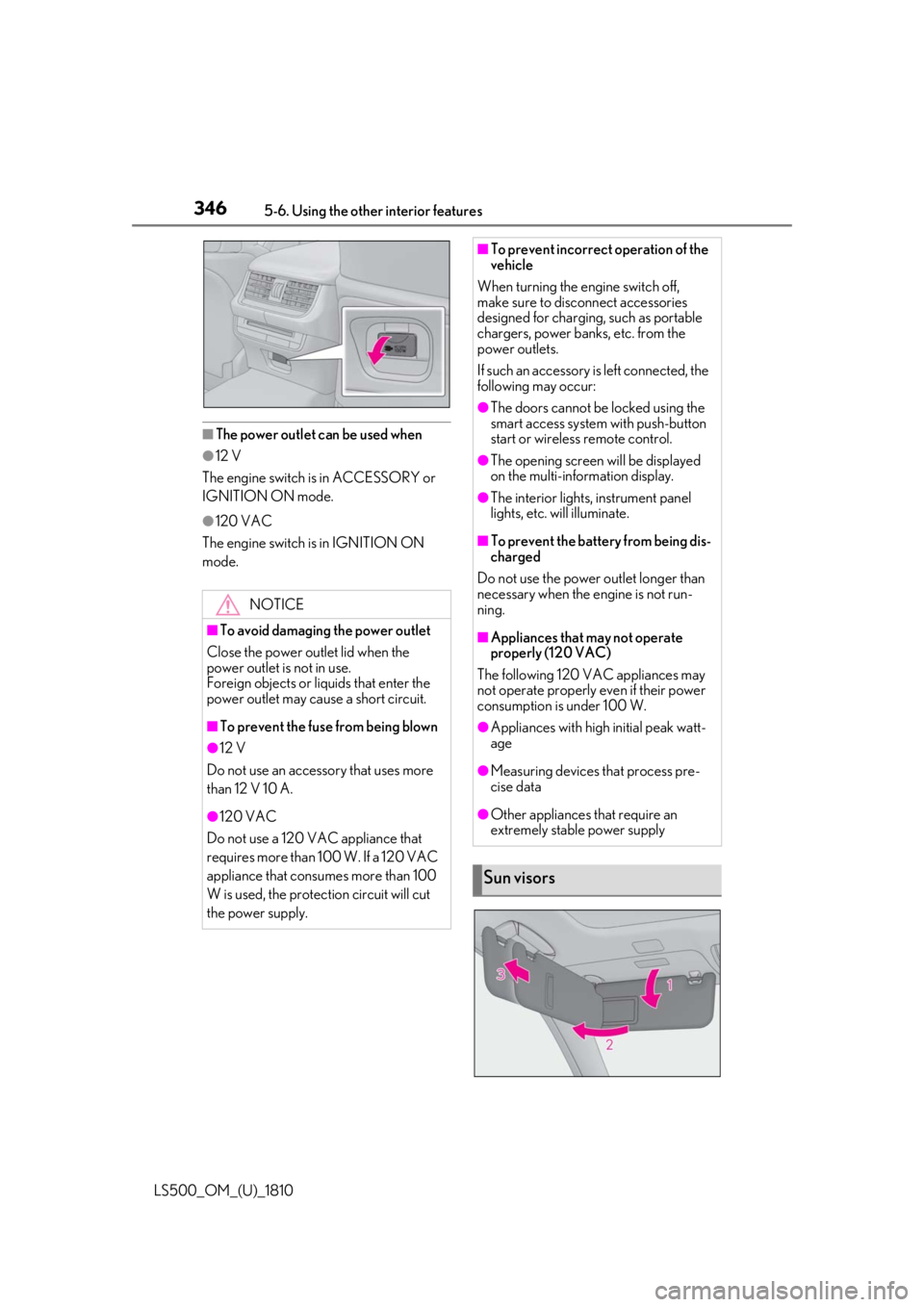
The power outlet can be used when●
12 V
The engine switch is in ACCESSORY or
IGNITION ON mode. ●
120 VAC
The engine switch is in IGNITION ON
mode.
NOTICE■
To avoid damaging the power outlet
Close the power outlet lid when the
power outlet is not in use.
Foreign objects or liquids that enter the
power outlet may cause a short circuit. ■
To prevent the fuse from being blown●
12 V
Do not use an accessory that uses more
than 12 V 10 A.
●
120 VAC
Do not use a 120 VAC appliance that
requires more than 100 W. If a 120 VAC
appliance that consumes more than 100
W is used, the protection circuit will cut
the power supply. ■
To prevent incorrect operation of the
vehicle
When turning the engine switch off,
make sure to disc onnect accessories
designed for charging , such as portable
chargers, power banks, etc. from the
power outlets.
If such an accessory is left connected, the
following may occur: ●
The doors cannot be locked using the
smart access system with push-button
start or wireless remote control. ●
The opening screen will be displayed
on the multi-information display. ●
The interior lights, instrument panel
lights, etc. will illuminate. ■
To prevent the battery from being dis-
charged
Do not use the power outlet longer than
necessary when the engine is not run-
ning. ■
Appliances that may not operate
properly (120 VAC)
The following 120 VAC appliances may
not operate properly even if their power
consumption is under 100 W. ●
Appliances with high initial peak watt-
age
●
Measuring devices that process pre-
cise data
●
Other appliances that require an
extremely stable power supply
Sun visors
Page 347 of 512
3475-6. Using the other interior features
LS500_OM_(U)_1810 5
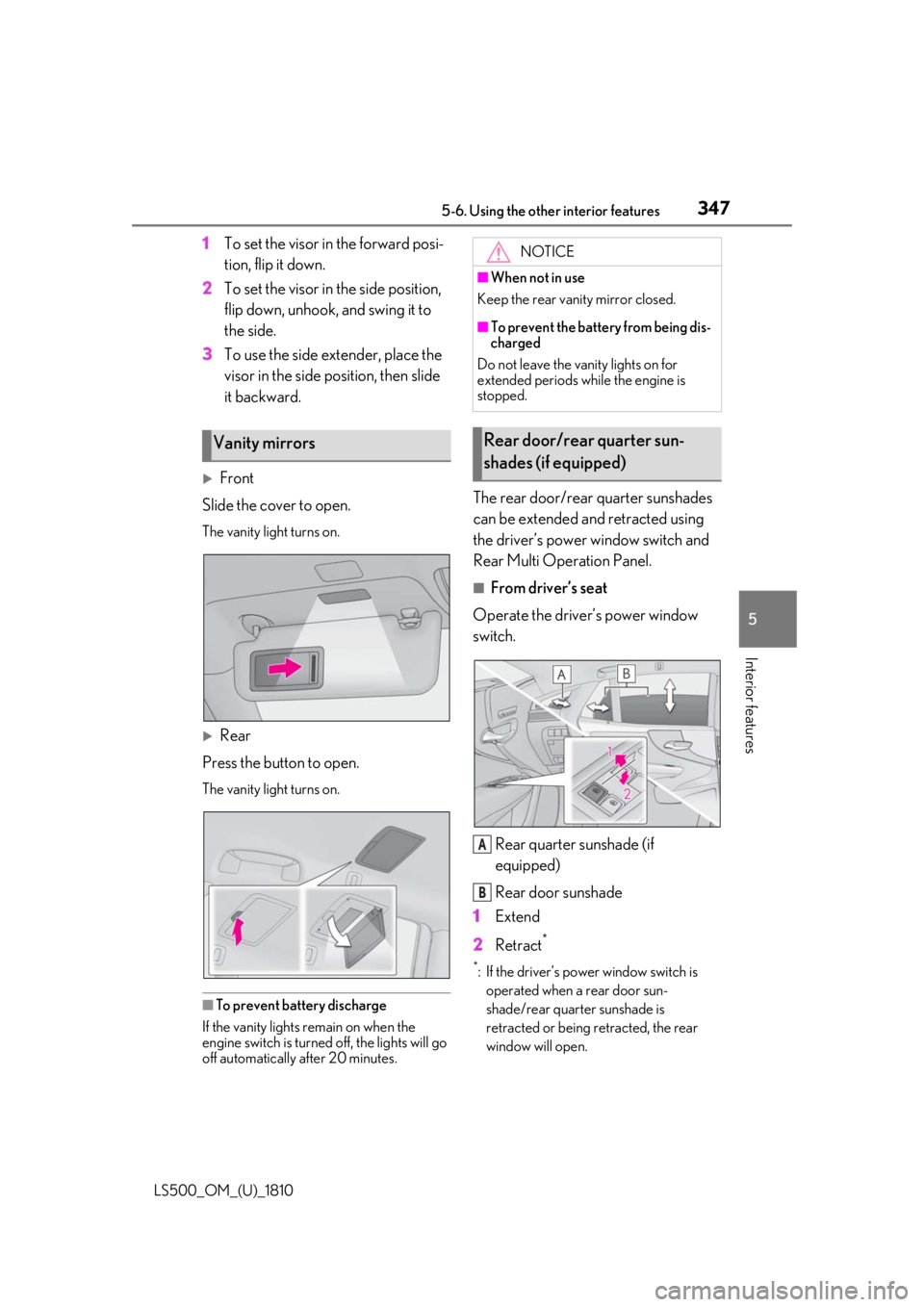
Interior features 1 To set the visor in the forward posi-
tion, flip it down.
2 To set the visor in the side position,
flip down, unhook, and swing it to
the side.
3 To use the side extender, place the
visor in the side position, then slide
it backward.
Front
Slide the cover to open. The vanity light turns on.
Rear
Press the button to open. The vanity light turns on.
■
To prevent battery discharge
If the vanity lights remain on when the
engine switch is turned off, the lights will go
off automatically after 20 minutes. The rear door/rear quarter sunshades
can be extended and retracted using
the driver’s power window switch and
Rear Multi Operation Panel. ■
From driver’s seat
Operate the driver’s power window
switch.
Rear quarter sunshade (if
equipped)
Rear door sunshade
1 Extend
2 Retract **
: If the driver’s power window switch is
operated when a rear door sun-
shade/rear quarter sunshade is
retracted or being retracted, the rear
window will open.Vanity mirrors NOTICE■
When not in use
Keep the rear vanity mirror closed. ■
To prevent the battery from being dis-
charged
Do not leave the vanity lights on for
extended periods while the engine is
stopped.
Rear door/rear quarter sun-
shades (if equipped)
A
B