water LEXUS LS500 2019 User Guide
[x] Cancel search | Manufacturer: LEXUS, Model Year: 2019, Model line: LS500, Model: LEXUS LS500 2019Pages: 512, PDF Size: 9.71 MB
Page 193 of 512
1934-5. Using the driving support systems
LS500_OM_(U)_1810 4
Driving WARNING●
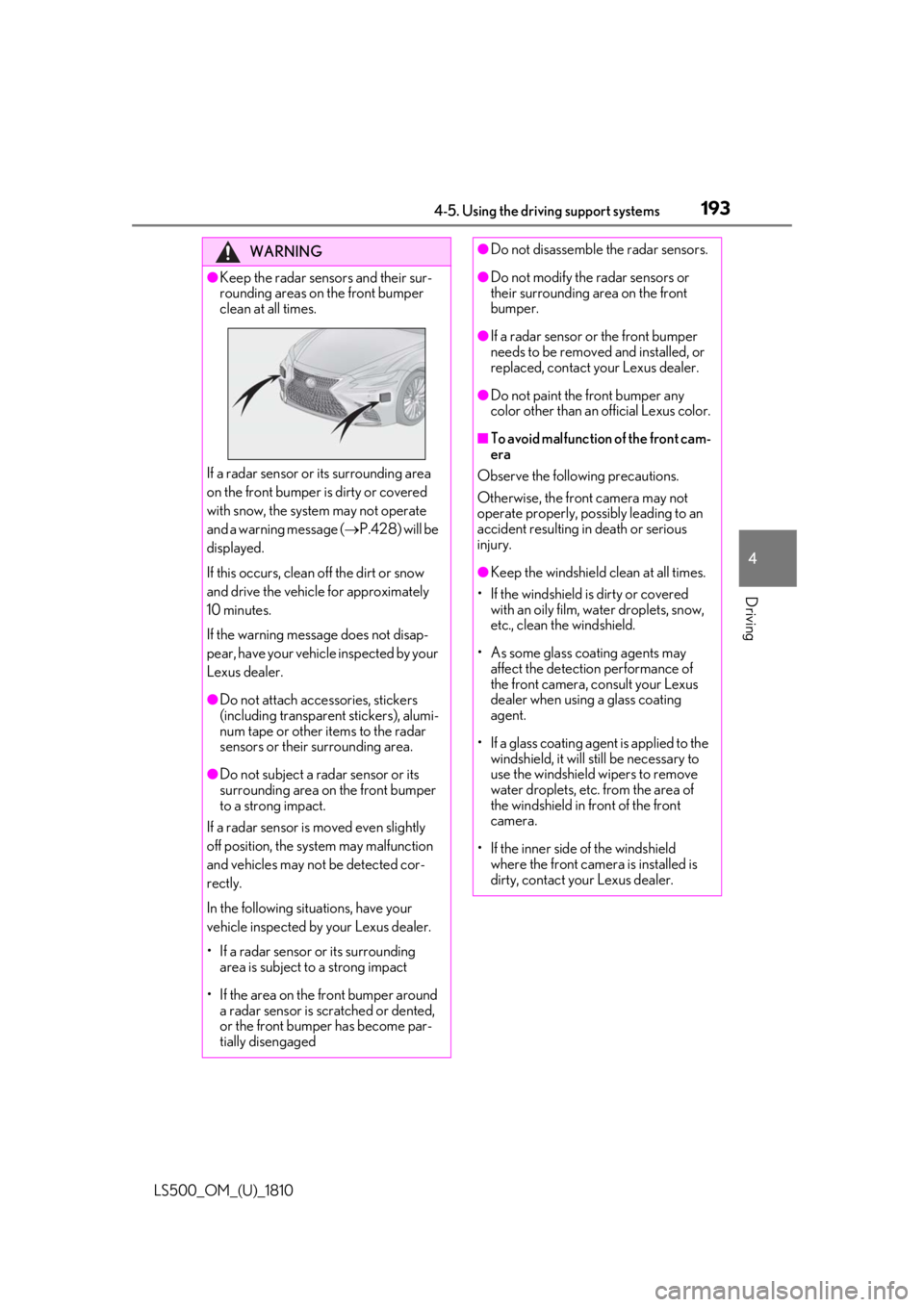
Keep the radar sensors and their sur-
rounding areas on the front bumper
clean at all times.
If a radar sensor or its surrounding area
on the front bumper is dirty or covered
with snow, the system may not operate
and a warning message ( P.428) will be
displayed.
If this occurs, clean off the dirt or snow
and drive the vehicle for approximately
10 minutes.
If the warning message does not disap-
pear, have your vehicle inspected by your
Lexus dealer. ●
Do not attach accessories, stickers
(including transparen t stickers), alumi-
num tape or other items to the radar
sensors or their surrounding area.
●
Do not subject a radar sensor or its
surrounding area on the front bumper
to a strong impact.
If a radar sensor is moved even slightly
off position, the system may malfunction
and vehicles may not be detected cor-
rectly.
In the following situations, have your
vehicle inspected by your Lexus dealer.
• If a radar sensor or its surrounding
area is subject to a strong impact
• If the area on the front bumper around
a radar sensor is scratched or dented,
or the front bumper has become par-
tially disengaged ●
Do not disassemble the radar sensors. ●
Do not modify the radar sensors or
their surrounding area on the front
bumper. ●
If a radar sensor or the front bumper
needs to be removed and installed, or
replaced, contact your Lexus dealer. ●
Do not paint the front bumper any
color other than an official Lexus color. ■
To avoid malfunction of the front cam-
era
Observe the following precautions.
Otherwise, the front camera may not
operate properly, possibly leading to an
accident resulting in death or serious
injury. ●
Keep the windshield clean at all times.
• If the windshield is dirty or covered
with an oily film, water droplets, snow,
etc., clean the windshield.
• As some glass coating agents may
affect the detection performance of
the front camera, consult your Lexus
dealer when using a glass coating
agent.
• If a glass coating agent is applied to the
windshield, it will still be necessary to
use the windshield wipers to remove
water droplets, etc. from the area of
the windshield in front of the front
camera.
• If the inner side of the windshield
where the front camera is installed is
dirty, contact your Lexus dealer.
Page 194 of 512
194 4-5. Using the driving support systems
LS500_OM_(U)_1810 WARNING●
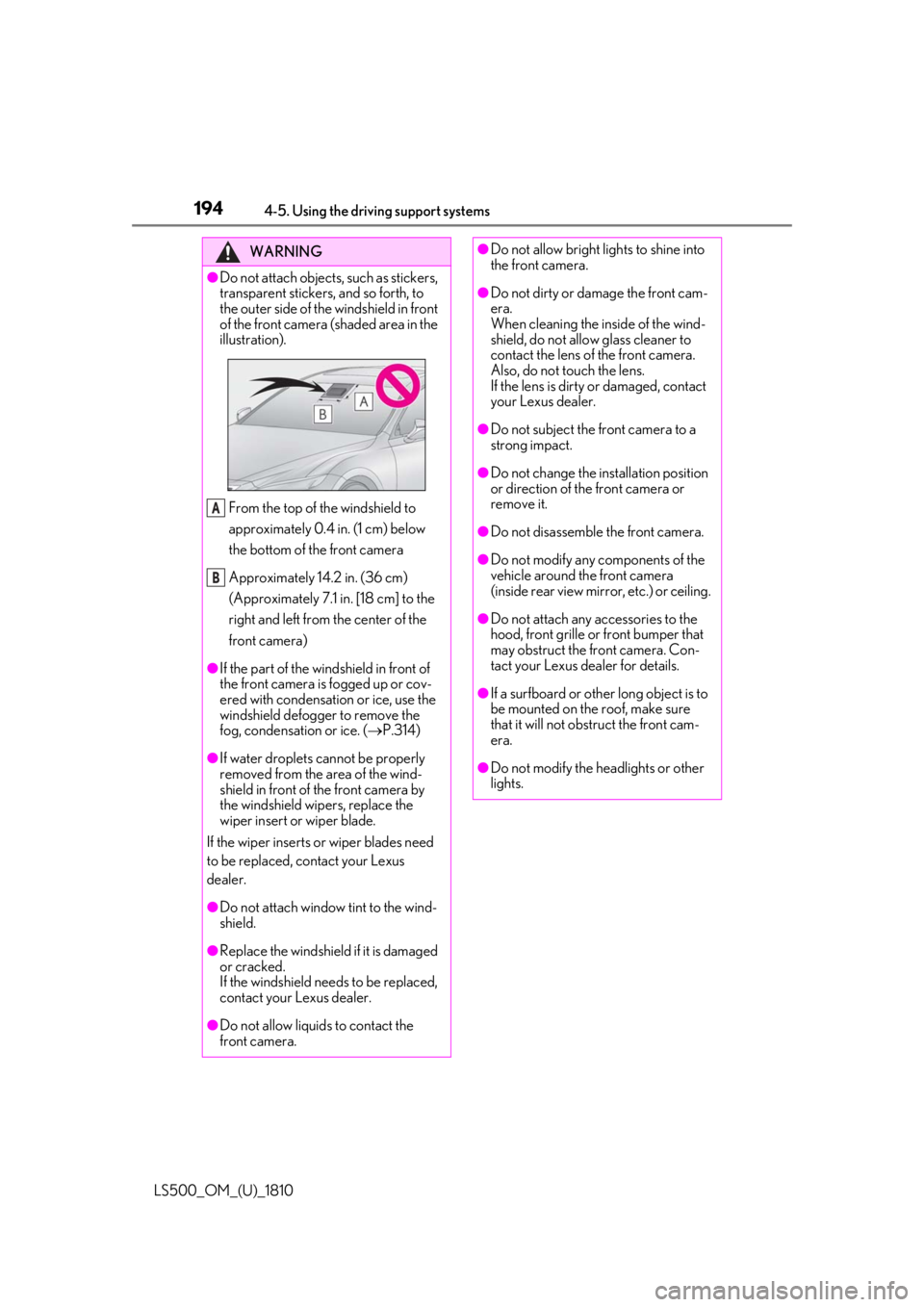
Do not attach objects, such as stickers,
transparent stickers, and so forth, to
the outer side of the windshield in front
of the front camera (shaded area in the
illustration).
From the top of the windshield to
approximately 0.4 in. (1 cm) below
the bottom of the front camera
Approximately 14.2 in. (36 cm)
(Approximately 7.1 in. [18 cm] to the
right and left from the center of the
front camera)●
If the part of the windshield in front of
the front camera is fogged up or cov-
ered with condensation or ice, use the
windshield defogger to remove the
fog, condensation or ice. ( P.314)
●
If water droplets cannot be properly
removed from the area of the wind-
shield in front of the front camera by
the windshield wipers, replace the
wiper insert or wiper blade.
If the wiper inserts or wiper blades need
to be replaced, contact your Lexus
dealer.
●
Do not attach window tint to the wind-
shield.
●
Replace the windshield if it is damaged
or cracked.
If the windshield needs to be replaced,
contact your Lexus dealer.
●
Do not allow liquids to contact the
front camera. A
B ●
Do not allow bright lights to shine into
the front camera. ●
Do not dirty or damage the front cam-
era.
When cleaning the inside of the wind-
shield, do not allow glass cleaner to
contact the lens of the front camera.
Also, do not touch the lens.
If the lens is dirty or damaged, contact
your Lexus dealer. ●
Do not subject the front camera to a
strong impact. ●
Do not change the installation position
or direction of the front camera or
remove it. ●
Do not disassemble the front camera. ●
Do not modify any components of the
vehicle around the front camera
(inside rear view mirror, etc.) or ceiling. ●
Do not attach any accessories to the
hood, front grille or front bumper that
may obstruct the front camera. Con-
tact your Lexus dealer for details. ●
If a surfboard or other long object is to
be mounted on the roof, make sure
that it will not obstruct the front cam-
era.
●
Do not modify the headlights or other
lights.
Page 199 of 512
1994-5. Using the driving support systems
LS500_OM_(U)_1810 4
Driving WARNING●
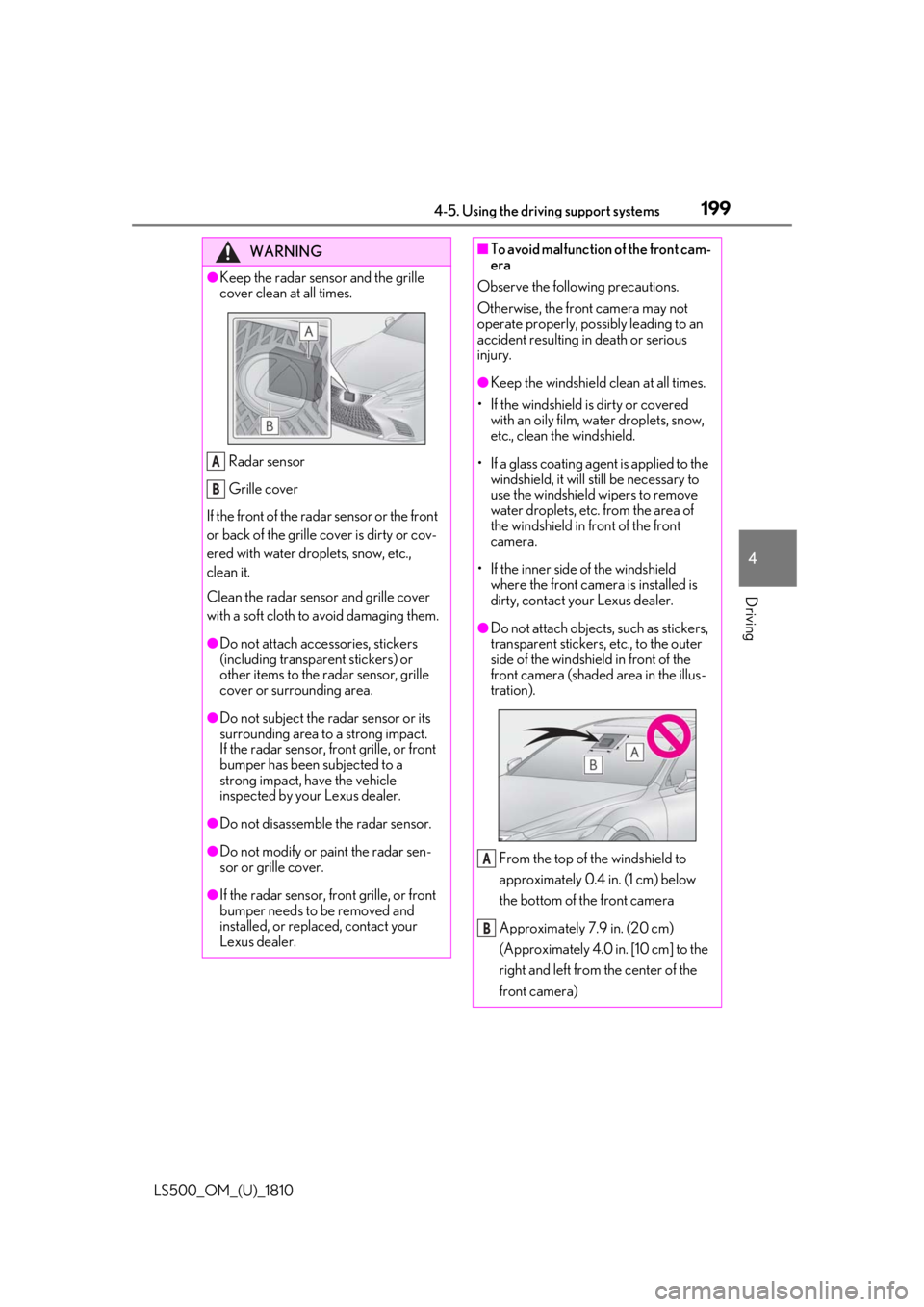
Keep the radar sensor and the grille
cover clean at all times.
Radar sensor
Grille cover
If the front of the rada r sensor or the front
or back of the grille cover is dirty or cov-
ered with water droplets, snow, etc.,
clean it.
Clean the radar sensor and grille cover
with a soft cloth to avoid damaging them. ●
Do not attach accessories, stickers
(including transpar ent stickers) or
other items to the radar sensor, grille
cover or surrounding area.●
Do not subject the radar sensor or its
surrounding area to a strong impact.
If the radar sensor, front grille, or front
bumper has been subjected to a
strong impact, have the vehicle
inspected by your Lexus dealer.
●
Do not disassemble the radar sensor.
●
Do not modify or paint the radar sen-
sor or grille cover.
●
If the radar sensor, front grille, or front
bumper needs to be removed and
installed, or replaced, contact your
Lexus dealer. A
B ■
To avoid malfunction of the front cam-
era
Observe the following precautions.
Otherwise, the front camera may not
operate properly, possibly leading to an
accident resulting in death or serious
injury. ●
Keep the windshield clean at all times.
• If the windshield is dirty or covered
with an oily film, water droplets, snow,
etc., clean the windshield.
• If a glass coating agent is applied to the
windshield, it will still be necessary to
use the windshield wipers to remove
water droplets, etc. from the area of
the windshield in front of the front
camera.
• If the inner side of the windshield
where the front camera is installed is
dirty, contact your Lexus dealer. ●
Do not attach objects, such as stickers,
transparent stickers, etc., to the outer
side of the windshield in front of the
front camera (shaded area in the illus-
tration).
From the top of the windshield to
approximately 0.4 in. (1 cm) below
the bottom of the front camera
Approximately 7.9 in. (20 cm)
(Approximately 4.0 in. [10 cm] to the
right and left from the center of the
front camera) A
B
Page 200 of 512
200 4-5. Using the driving support systems
LS500_OM_(U)_1810 WARNING●
If the part of the windshield in front of
the front camera is fogged up or cov-
ered with condensation, or ice, use the
windshield defogger to remove the
fog, condensation, or ice. ( P.314)●
If water droplets cannot be properly
removed from the area of the wind-
shield in front of the front camera by
the windshield wipers, replace the
wiper insert or wiper blade.
If the wiper inserts or wiper blades need
to be replaced, contact your Lexus
dealer. ●
Do not attach window tint to the wind-
shield.●
Replace the windshield if it is damaged
or cracked.
If the windshield needs to be replaced,
contact your Lexus dealer.●
Do not allow liquids to contact the
front camera.●
Do not allow bright lights to shine into
the front camera.●
Do not dirty or damage the front cam-
era.
When cleaning the inside of the wind-
shield, do not allow glass cleaner to
contact the lens of the front camera.
Also, do not touch the lens.
If the lens is dirty or damaged, contact
your Lexus dealer.
●
Do not subject the front camera to a
strong impact.
●
Do not change the installation position
or direction of the front camera or
remove it.
●
Do not disassemble the front camera.
●
Do not modify any components of the
vehicle around the front camera
(inside rear view mirror, etc.) or ceiling. ●
Do not attach any accessories to the
hood, front grille or front bumper that
may obstruct the front camera. Con-
tact your Lexus dealer. ●
If a surfboard or other long object is to
be mounted on the roof, make sure
that it will not obstruct the front cam-
era. ●
Do not modify the headlights or other
lights.
Page 210 of 512
210 4-5. Using the driving support systems
LS500_OM_(U)_1810 a vehicle, pedestrian or bicyclist may not be
detected depending on the surrounding
brightness and the motion, posture, and
angle of the person, preventing the system
from operating properly. ( P.212)
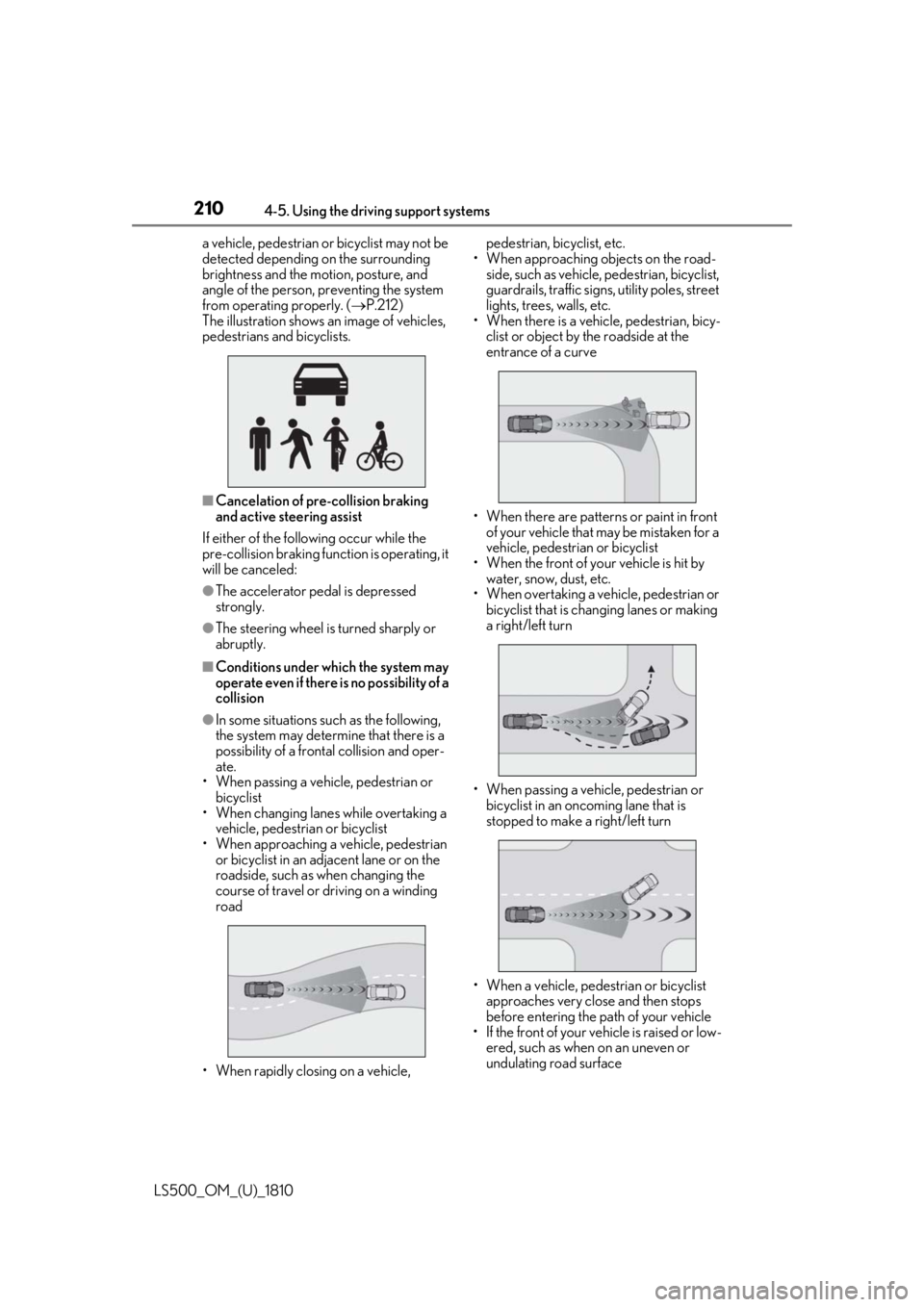
The illustration shows an image of vehicles,
pedestrians and bicyclists.
■
Cancelation of pre-collision braking
and active steering assist
If either of the following occur while the
pre-collision braking function is operating, it
will be canceled: ●
The accelerator pedal is depressed
strongly.●
The steering wheel is turned sharply or
abruptly.■
Conditions under which the system may
operate even if there is no possibility of a
collision●
In some situations such as the following,
the system may determine that there is a
possibility of a frontal collision and oper-
ate.
• When passing a vehicle, pedestrian or
bicyclist
• When changing lane s while overtaking a
vehicle, pedestrian or bicyclist
• When approaching a vehicle, pedestrian
or bicyclist in an adjacent lane or on the
roadside, such as when changing the
course of travel or driving on a winding
road
• When rapidly closing on a vehicle, pedestrian, bicyclist, etc.
• When approaching objects on the road-
side, such as vehicle, pedestrian, bicyclist,
guardrails, traffic signs, utility poles, street
lights, trees, walls, etc.
• When there is a vehicle, pedestrian, bicy-
clist or object by the roadside at the
entrance of a curve
• When there are patterns or paint in front
of your vehicle that may be mistaken for a
vehicle, pedestrian or bicyclist
• When the front of your vehicle is hit by
water, snow, dust, etc.
• When overtaking a vehicle, pedestrian or
bicyclist that is changing lanes or making
a right/left turn
• When passing a vehicle, pedestrian or
bicyclist in an onco ming lane that is
stopped to make a right/left turn
• When a vehicle, pedestrian or bicyclist
approaches very close and then stops
before entering the pa th of your vehicle
• If the front of your vehicle is raised or low-
ered, such as when on an uneven or
undulating road surface
Page 212 of 512
212 4-5. Using the driving support systems
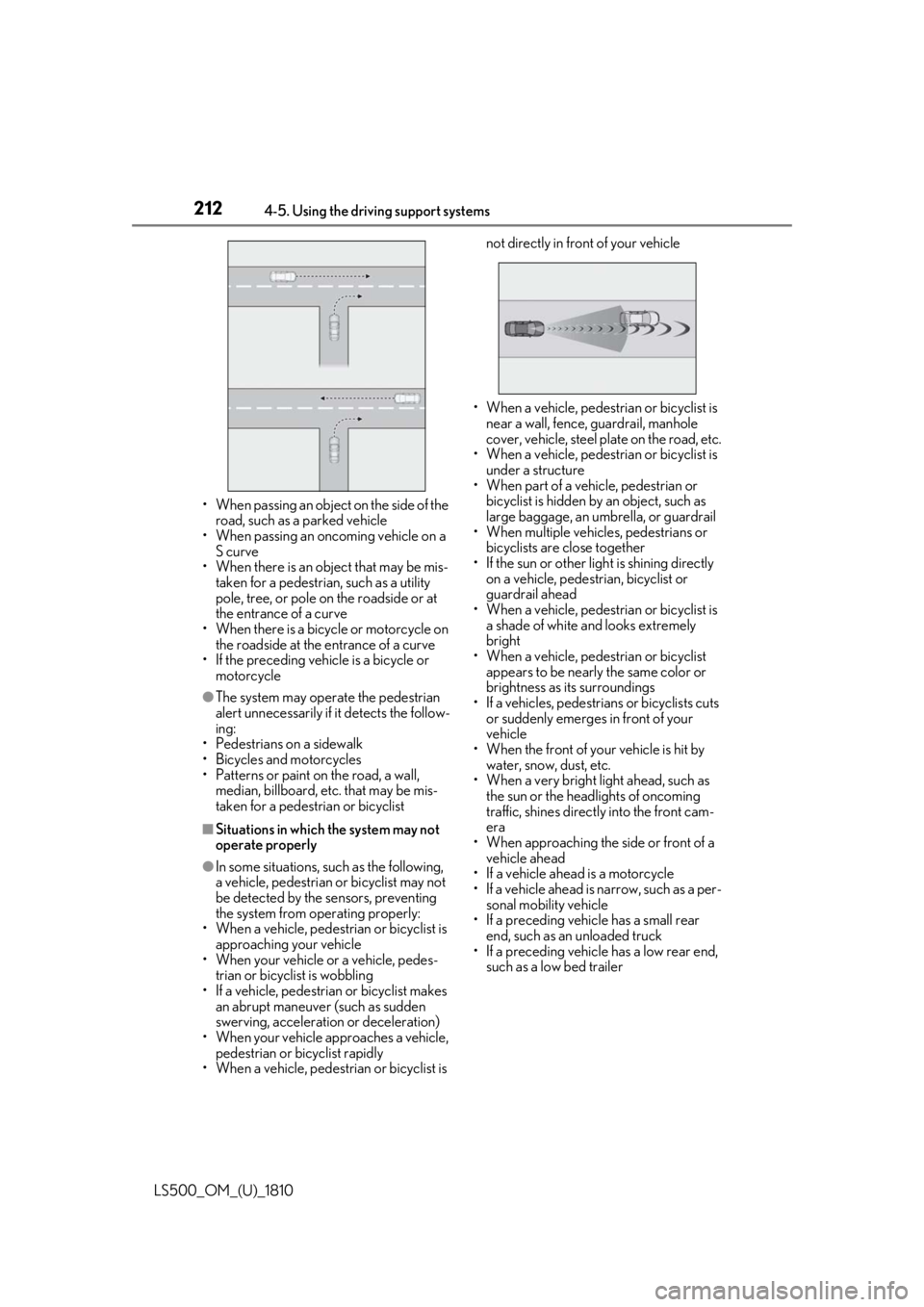
LS500_OM_(U)_1810 • When passing an object on the side of the
road, such as a parked vehicle
• When passing an oncoming vehicle on a
S curve
• When there is an object that may be mis-
taken for a pedestrian, such as a utility
pole, tree, or pole on the roadside or at
the entrance of a curve
• When there is a bicycle or motorcycle on
the roadside at the entrance of a curve
• If the preceding vehicle is a bicycle or
motorcycle●
The system may operate the pedestrian
alert unnecessarily if it detects the follow-
ing:
• Pedestrians on a sidewalk
• Bicycles and motorcycles
• Patterns or paint on the road, a wall,
median, billboard, etc. that may be mis-
taken for a pedestrian or bicyclist■
Situations in which the system may not
operate properly●
In some situations, such as the following,
a vehicle, pedestrian or bicyclist may not
be detected by the sensors, preventing
the system from operating properly:
• When a vehicle, pedestrian or bicyclist is
approaching your vehicle
• When your vehicle or a vehicle, pedes-
trian or bicyclist is wobbling
• If a vehicle, pedestrian or bicyclist makes
an abrupt maneuver (such as sudden
swerving, acceleration or deceleration)
• When your vehicle approaches a vehicle,
pedestrian or bicyclist rapidly
• When a vehicle, pedestrian or bicyclist is not directly in front of your vehicle
• When a vehicle, pedestrian or bicyclist is
near a wall, fence, guardrail, manhole
cover, vehicle, steel plate on the road, etc.
• When a vehicle, pedestrian or bicyclist is
under a structure
• When part of a vehicle, pedestrian or
bicyclist is hidden by an object, such as
large baggage, an umbrella, or guardrail
• When multiple vehicl es, pedestrians or
bicyclists are close together
• If the sun or other light is shining directly
on a vehicle, pedestrian, bicyclist or
guardrail ahead
• When a vehicle, pedestrian or bicyclist is
a shade of white and looks extremely
bright
• When a vehicle, pedestrian or bicyclist
appears to be nearly the same color or
brightness as its surroundings
• If a vehicles, pedestrians or bicyclists cuts
or suddenly emerges in front of your
vehicle
• When the front of your vehicle is hit by
water, snow, dust, etc.
• When a very bright light ahead, such as
the sun or the head lights of oncoming
traffic, shines direct ly into the front cam-
era
• When approaching the side or front of a
vehicle ahead
• If a vehicle ahead is a motorcycle
• If a vehicle ahead is narrow, such as a per-
sonal mobility vehicle
• If a preceding vehicle has a small rear
end, such as an unloaded truck
• If a preceding vehicle has a low rear end,
such as a low bed trailer
Page 220 of 512
220 4-5. Using the driving support systems
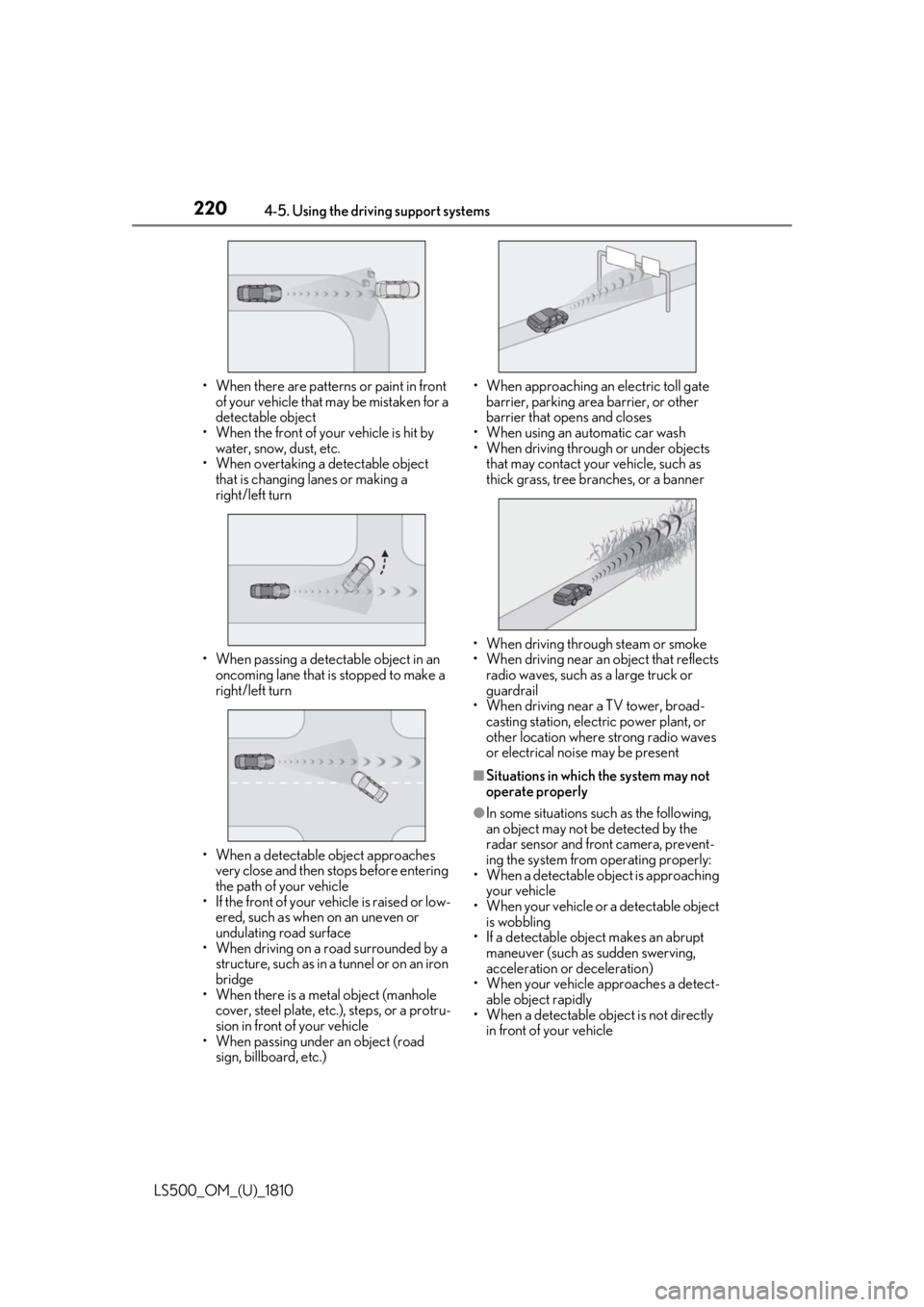
LS500_OM_(U)_1810 • When there are patterns or paint in front
of your vehicle that may be mistaken for a
detectable object
• When the front of your vehicle is hit by
water, snow, dust, etc.
• When overtaking a detectable object
that is changing lanes or making a
right/left turn
• When passing a detect able object in an
oncoming lane that is stopped to make a
right/left turn
• When a detectable object approaches
very close and then stops before entering
the path of your vehicle
• If the front of your vehicle is raised or low-
ered, such as when on an uneven or
undulating road surface
• When driving on a road surrounded by a
structure, such as in a tunnel or on an iron
bridge
• When there is a metal object (manhole
cover, steel plate, etc.), steps, or a protru-
sion in front of your vehicle
• When passing under an object (road
sign, billboard, etc.) • When approaching an electric toll gate
barrier, parking area barrier, or other
barrier that opens and closes
• When using an automatic car wash
• When driving through or under objects
that may contact your vehicle, such as
thick grass, tree br anches, or a banner
• When driving through steam or smoke
• When driving near an object that reflects
radio waves, such as a large truck or
guardrail
• When driving near a TV tower, broad-
casting station, electr ic power plant, or
other location where strong radio waves
or electrical noise may be present ■
Situations in which the system may not
operate properly ●
In some situations su ch as the following,
an object may not be detected by the
radar sensor and front camera, prevent-
ing the system from operating properly:
• When a detectable object is approaching
your vehicle
• When your vehicle or a detectable object
is wobbling
• If a detectable object makes an abrupt
maneuver (such as sudden swerving,
acceleration or deceleration)
• When your vehicle approaches a detect-
able object rapidly
• When a detectable object is not directly
in front of your vehicle
Page 221 of 512
2214-5. Using the driving support systems
LS500_OM_(U)_1810 4
Driving • When a detectable object is near a wall,
fence, guardrail, manhole cover, vehicle,
steel plate on the road, etc.
• When a detectable object is under a
structure
•When part of a detect able object is hid-
den by an object, such as large baggage,
an umbrella, or guardrail
• When multiple dete ctable objects are
close together
• If the sun or other light is shining directly
on a detectable object
• When a detectable object is a shade of
white and looks extremely bright
• When a detectable object appears to be
nearly the same color or brightness as its
surroundings
• If a detectable object cuts or suddenly
emerges in front of your vehicle
• When the front of your vehicle is hit by
water, snow, dust, etc.
• When a very bright light ahead, such as
the sun or the headlights of oncoming
traffic, shines directly into the front cam-
era
• When approaching the side or front of a
vehicle ahead
• If a vehicle ahead is a motorcycle
• If a vehicle ahead is narrow, such as a per-
sonal mobility vehicle
• If a preceding vehicle has a small rear
end, such as an unloaded truck
• If a preceding vehicle has a low rear end,
such as a low bed trailer
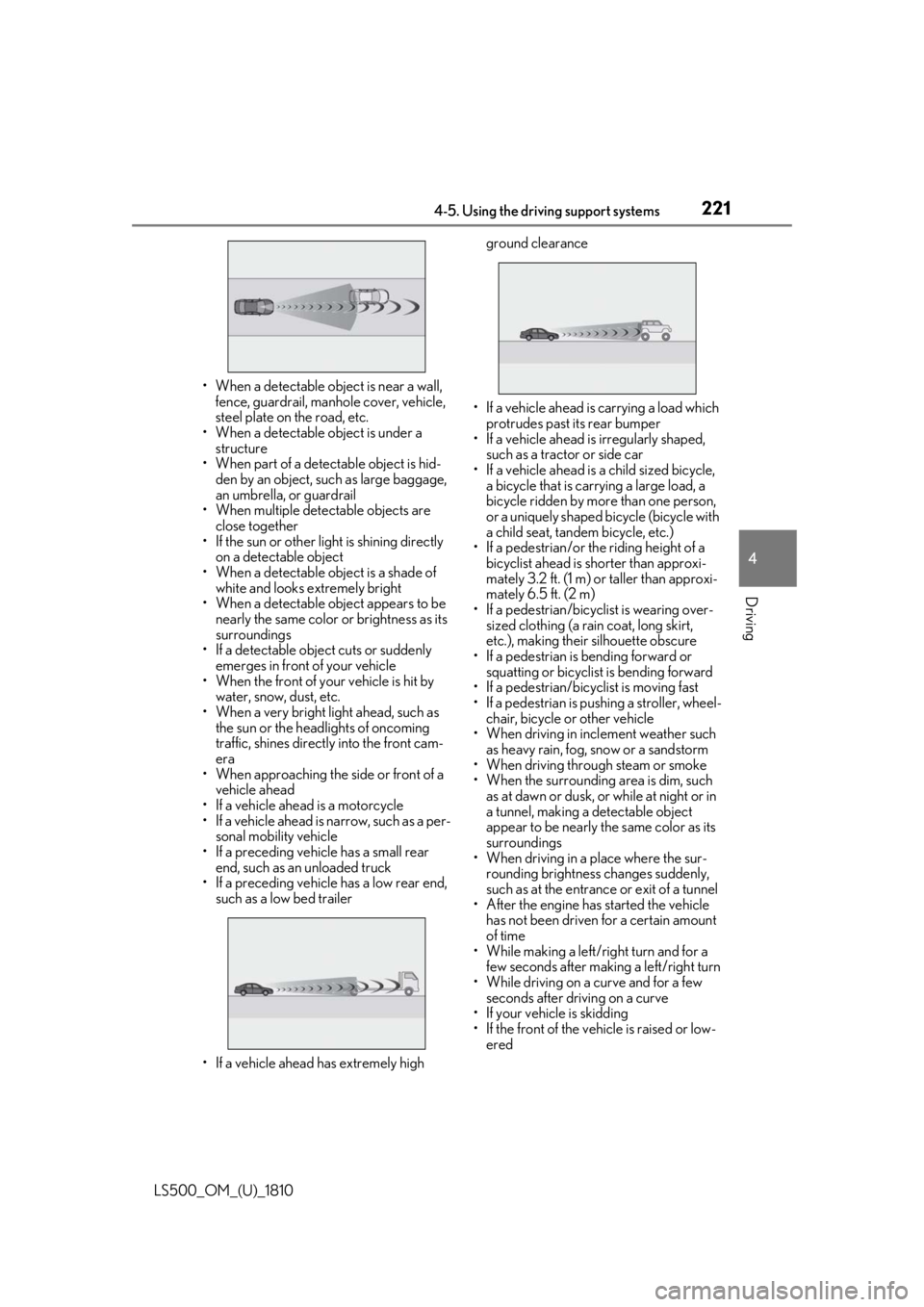
• If a vehicle ahead has extremely high ground clearance
• If a vehicle ahead is carrying a load which
protrudes past its rear bumper
• If a vehicle ahead is irregularly shaped,
such as a tractor or side car
• If a vehicle ahead is a child sized bicycle,
a bicycle that is carrying a large load, a
bicycle ridden by more than one person,
or a uniquely shaped bicycle (bicycle with
a child seat, tandem bicycle, etc.)
• If a pedestrian/or the riding height of a
bicyclist ahead is shorter than approxi-
mately 3.2 ft. (1 m) or taller than approxi-
mately 6.5 ft. (2 m)
• If a pedestrian/bicyclist is wearing over-
sized clothing (a rain coat, long skirt,
etc.), making their silhouette obscure
• If a pedestrian is bending forward or
squatting or bicyclist is bending forward
• If a pedestrian/bicyclist is moving fast
• If a pedestrian is pushing a stroller, wheel-
chair, bicycle or other vehicle
• When driving in incl ement weather such
as heavy rain, fog, snow or a sandstorm
• When driving through steam or smoke
• When the surrounding area is dim, such
as at dawn or dusk, or while at night or in
a tunnel, making a de tectable object
appear to be nearly the same color as its
surroundings
• When driving in a place where the sur-
rounding brightness changes suddenly,
such as at the entrance or exit of a tunnel
• After the engine has started the vehicle
has not been driven for a certain amount
of time
• While making a left/r ight turn and for a
few seconds after making a left/right turn
• While driving on a curve and for a few
seconds after driving on a curve
• If your vehicle is skidding
• If the front of the vehicle is raised or low-
ered
Page 246 of 512
246 4-5. Using the driving support systems
LS500_OM_(U)_1810 ●
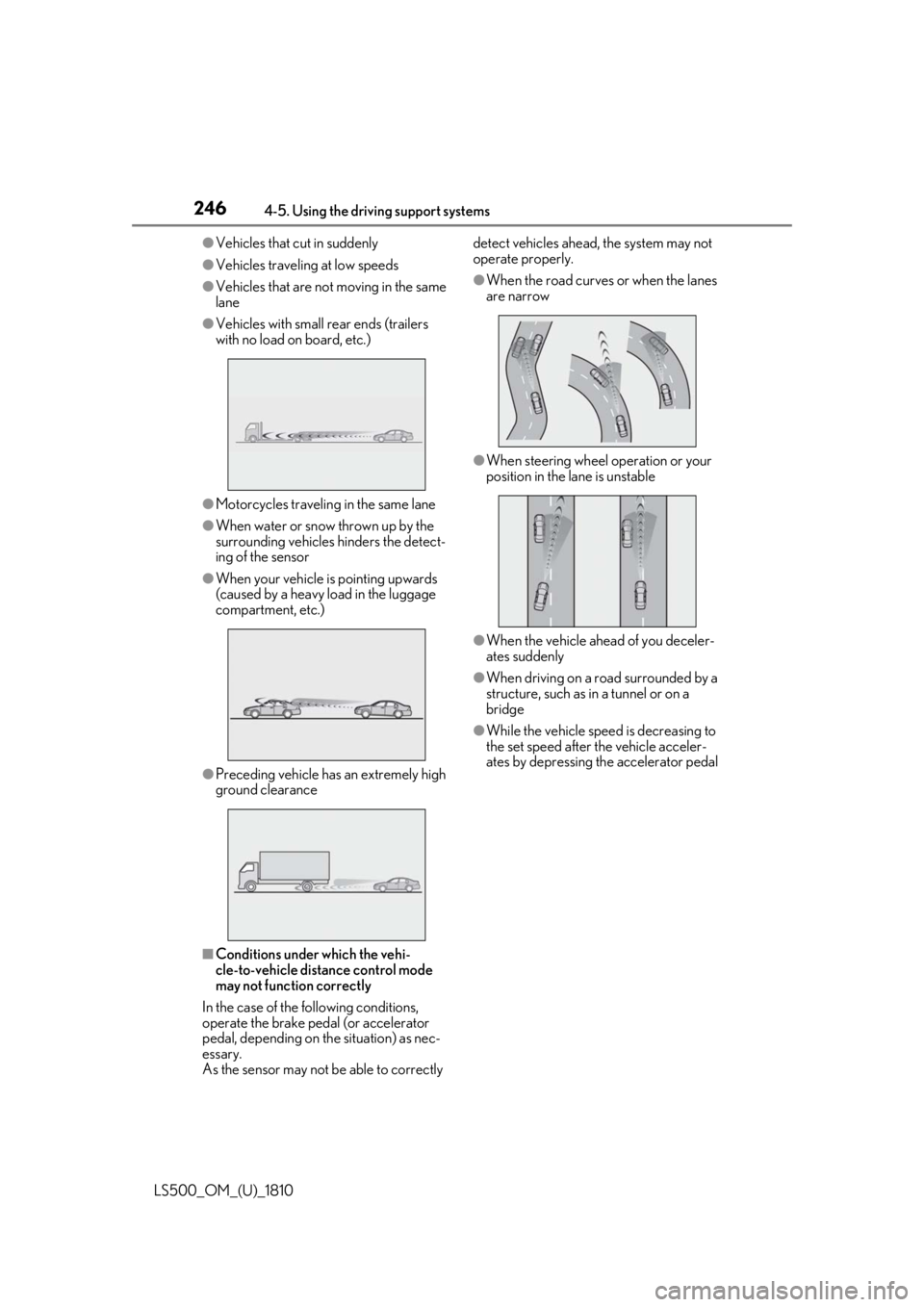
Vehicles that cut in suddenly●
Vehicles traveling at low speeds●
Vehicles that are not moving in the same
lane●
Vehicles with small rear ends (trailers
with no load on board, etc.)
●
Motorcycles travelin g in the same lane●
When water or snow thrown up by the
surrounding vehicles hinders the detect-
ing of the sensor●
When your vehicle is pointing upwards
(caused by a heavy load in the luggage
compartment, etc.)
●
Preceding vehicle has an extremely high
ground clearance
■
Conditions under which the vehi-
cle-to-vehicle distance control mode
may not function correctly
In the case of the following conditions,
operate the brake pedal (or accelerator
pedal, depending on the situation) as nec-
essary.
As the sensor may not be able to correctly detect vehicles ahead, the system may not
operate properly. ●
When the road curves or when the lanes
are narrow
●
When steering wheel operation or your
position in the lane is unstable
●
When the vehicle ahead of you deceler-
ates suddenly ●
When driving on a road surrounded by a
structure, such as in a tunnel or on a
bridge ●
While the vehicle speed is decreasing to
the set speed after the vehicle acceler-
ates by depressing the accelerator pedal
Page 254 of 512

254 4-5. Using the driving support systems
LS500_OM_(U)_1810 the farther away the vehicle will be detected, caus ing the outside rear view mirror indi-
cator to illuminate or flash.■
The Blind Spot Monitor is operational
when
The Blind Spot Monitor is operational when
all of the following conditions are met: ●
The Blind Spot Monitor is on.●
The shift position is in a position other
than R.●
The vehicle speed is greater than approx-
imately 10 mph (16 km/h).■
The Blind Spot Monitor will detect a
vehicle when
The Blind Spot Monitor will detect a vehicle
present in the detection area in the follow-
ing situations: ●
A vehicle in an adj acent lane overtakes
your vehicle.●
You overtake a vehicle in an adjacent lane
slowly.●
Another vehicle enters the detection
area when it changes lanes.■
Conditions under wh ich the Blind Spot
Monitor will not detect a vehicle
The Blind Spot Monitor is not designed to
detect the following types of vehicles and/or
objects: ●
Small motorcycles, bicycles, pedestrians,
etc. *
●
Vehicles traveling in the opposite direc-
tion●
Guardrails, walls, signs, parked vehicles
and similar stationary objects *
●
Following vehicles th at are in the same
lane *
●
Vehicles traveling 2 lanes away from your
vehicle *
●
Vehicles which are being overtaken rap-
idly by your vehicle *
*
: Depending on the conditions, detection
of a vehicle and/or object may occur. ■
Conditions under which the Blind Spot
Monitor may not function correctly ●
The Blind Spot Monitor may not detect
vehicles correctly in the following situa-
tions:
• When the sensor is misaligned due to a
strong impact to the sensor or its sur-
rounding area
• When mud, snow, ice, a sticker, etc. is
covering the sensor or surrounding area
on the rear bumper
• When driving on a road surface that is
wet with standing water during bad
weather, such as heavy rain, snow, or fog
• When multiple vehicles are approaching
with only a small gap between each vehi-
cle
• When the distance between your vehicle
and a following vehicle is short
• When there is a significant difference in
speed between your vehicle and the vehi-
cle that enters the detection area
• When the difference in speed between
your vehicle and another vehicle is
changing
• When a vehicle enters a detection area
traveling at about the same speed as your
vehicle
• As your vehicle starts from a stop, a vehi-
cle remains in the detection area
• When driving up and down consecutive
steep inclines, such as hills, dips in the
road, etc.
• When driving on roads with sharp bends,
consecutive curves, or uneven surfaces
• When vehicle lanes are wide, or when
driving on the edge of a lane, and the
vehicle in an adjacent lane is far away
from your vehicle
• When an accessory (such as a bicycle
carrier) is installed to the rear of the vehi-
cle
• When there is a significant difference in
height between your vehicle and the
vehicle that enters the detection area
• Immediately after the Blind Spot Monitor
is turned on
●
Instances of the Blind Spot Monitor
unnecessarily detecting a vehicle and/or
object may increase in the following situ-