water LEXUS LS500 2019 Owners Manual
[x] Cancel search | Manufacturer: LEXUS, Model Year: 2019, Model line: LS500, Model: LEXUS LS500 2019Pages: 512, PDF Size: 9.71 MB
Page 4 of 512
4 TABLE OF CONTENTS
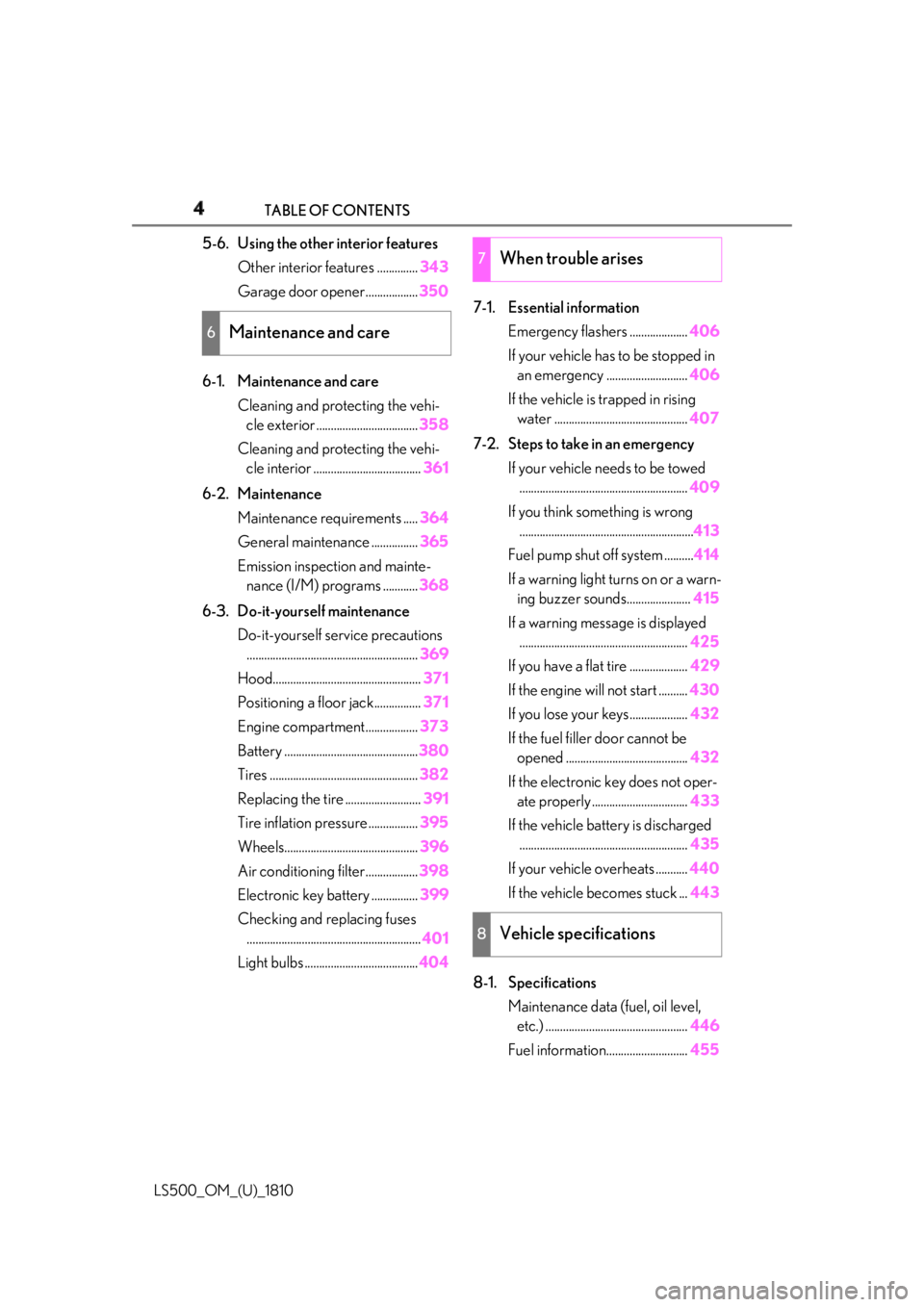
LS500_OM_(U)_1810 5-6. Using the other interior features
Other interior features .............. 343
Garage door opener.................. 350
6-1. Maintenance and care
Cleaning and protecting the vehi-
cle exterior ................................... 358
Cleaning and protecting the vehi-
cle interior ..................................... 361
6-2. Maintenance
Maintenance requirements ..... 364
General maintenance ................ 365
Emission inspection and mainte-
nance (I/M) programs ............ 368
6-3. Do-it-yourself maintenance
Do-it-yourself service precautions
........................................................... 369
Hood................................................... 371
Positioning a floor jack................ 371
Engine compartment.................. 373
Battery .............................................. 380
Tires ................................................... 382
Replacing the tire .......................... 391
Tire inflation pressure ................. 395
Wheels.............................................. 396
Air conditioning filter.................. 398
Electronic key battery ................ 399
Checking and replacing fuses
............................................................ 401
Light bulbs ....................................... 404 7-1. Essential information
Emergency flashers .................... 406
If your vehicle has to be stopped in
an emergency ............................ 406
If the vehicle is trapped in rising
water .............................................. 407
7-2. Steps to take in an emergency
If your vehicle needs to be towed
.......................................................... 409
If you think something is wrong
............................................................ 413
Fuel pump shut off system .......... 414
If a warning light turns on or a warn-
ing buzzer sounds...................... 415
If a warning messa ge is displayed
.......................................................... 425
If you have a flat tire .................... 429
If the engine will not start .......... 430
If you lose your keys.................... 432
If the fuel filler door cannot be
opened .......................................... 432
If the electronic key does not oper-
ate properly ................................. 433
If the vehicle battery is discharged
.......................................................... 435
If your vehicle overheats ........... 440
If the vehicle becomes stuck ... 443
8-1. Specifications
Maintenance data (fuel, oil level,
etc.) ................................................. 446
Fuel information............................ 4556
Maintenance and care 7
When trouble arises
8
Vehicle specifications
Page 96 of 512
96 3-1. Key information
LS500_OM_(U)_1810 3-1.Key information
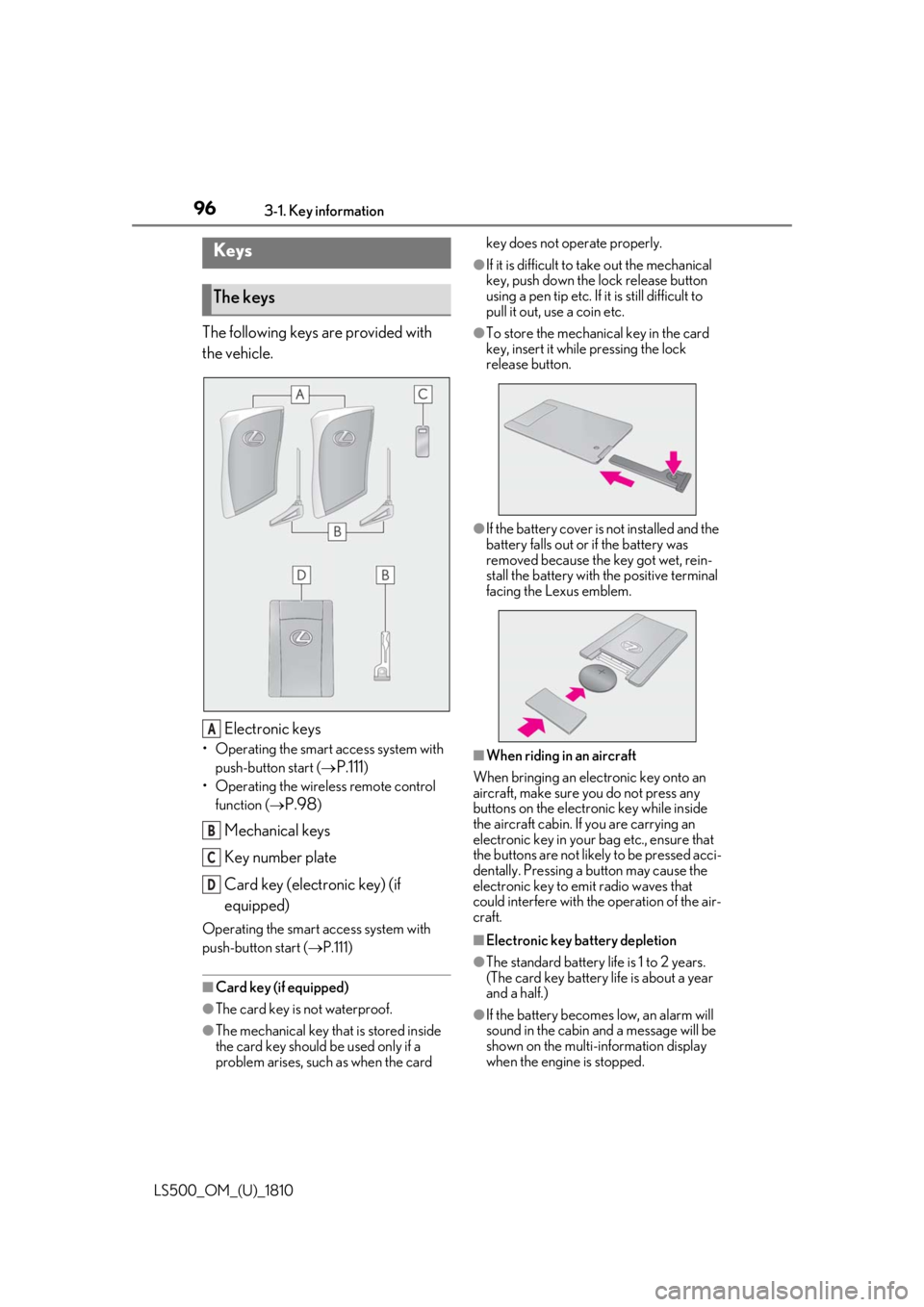
The following keys are provided with
the vehicle.
Electronic keys• Operating the smart access system with
push-button start (
P.111 )
• Operating the wireless remote control
function (
P.98 )
Mechanical keys
Key number plate
Card key (electronic key) (if
equipped)Operating the smart access system with
push-button start ( P.111)
■
Card key (if equipped)
●
The card key is not waterproof.
●
The mechanical key that is stored inside
the card key should be used only if a
problem arises, such as when the card key does not operate properly. ●
If it is difficult to take out the mechanical
key, push down the lock release button
using a pen tip etc. If it is still difficult to
pull it out, use a coin etc. ●
To store the mechanical key in the card
key, insert it while pressing the lock
release button.
●
If the battery cover is not installed and the
battery falls out or if the battery was
removed because the key got wet, rein-
stall the battery with the positive terminal
facing the Lexus emblem.
■
When riding in an aircraft
When bringing an electronic key onto an
aircraft, make sure you do not press any
buttons on the electronic key while inside
the aircraft cabin. If you are carrying an
electronic key in your bag etc., ensure that
the buttons are not likely to be pressed acci-
dentally. Pressing a button may cause the
electronic key to em it radio waves that
could interfere with the operation of the air-
craft.
■
Electronic key battery depletion
●
The standard battery life is 1 to 2 years.
(The card key battery life is about a year
and a half.)
●
If the battery becomes low, an alarm will
sound in the cabin and a message will be
shown on the multi-information display
when the engine is stopped.Keys
The keys
A
B
C
D
Page 98 of 512
98 3-1. Key information
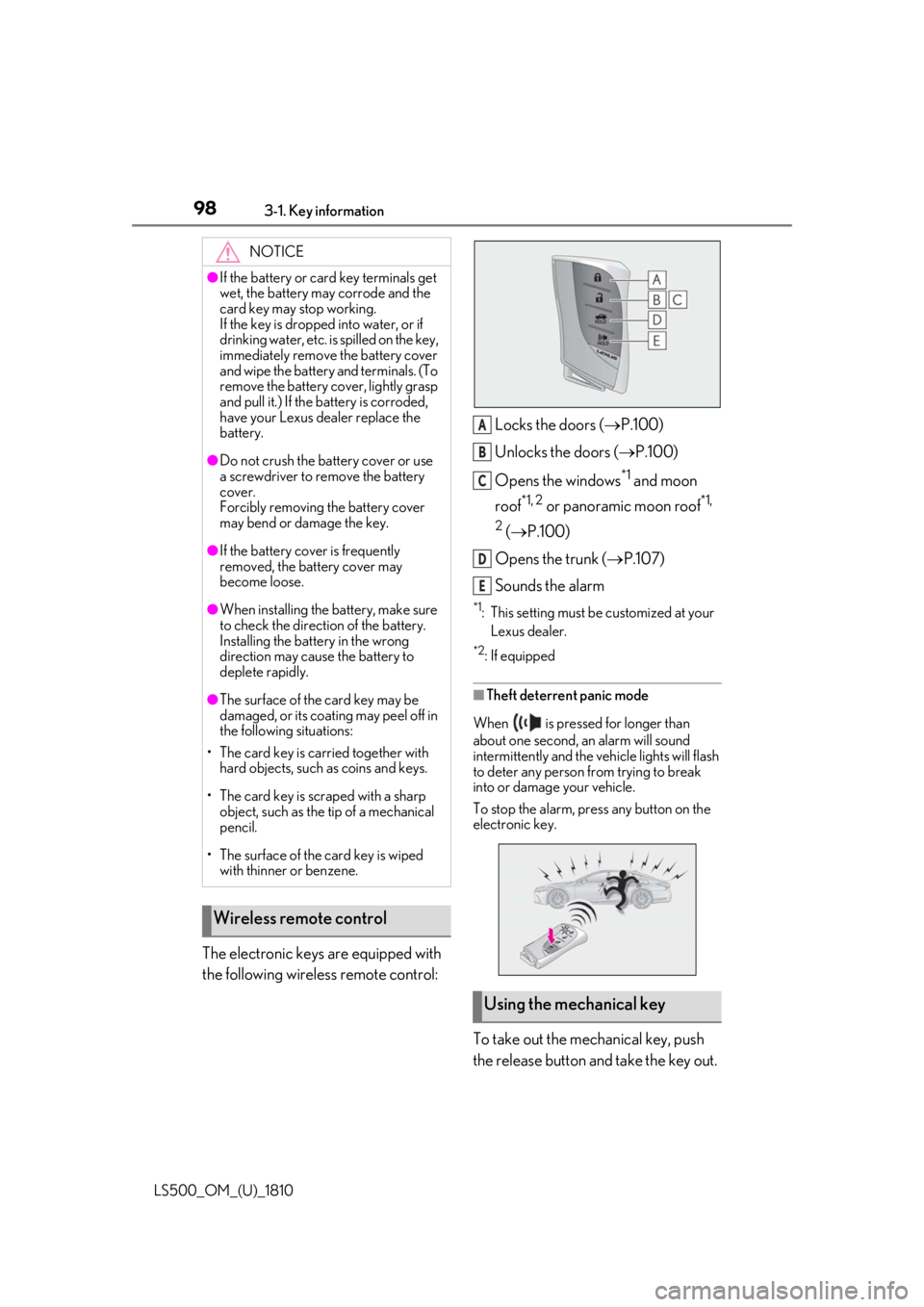
LS500_OM_(U)_1810 The electronic keys are equipped with
the following wireless remote control: Locks the doors ( P.100)
Unlocks the doors ( P.100)
Opens the windows *1
and moon
roof *1, 2
or panoramic moon roof *1,
2
( P.100)
Opens the trunk ( P.107)
Sounds the alarm *1
: This setting must be customized at your
Lexus dealer. *2
: If equipped
■
Theft deterrent panic mode
When is pressed for longer than
about one second, an alarm will sound
intermittently and the vehicle lights will flash
to deter any person from trying to break
into or damage your vehicle.
To stop the alarm, press any button on the
electronic key.
To take out the mechanical key, push
the release button and take the key out.NOTICE●
If the battery or card key terminals get
wet, the battery may corrode and the
card key may stop working.
If the key is dropped into water, or if
drinking water, etc. is spilled on the key,
immediately remove the battery cover
and wipe the battery and terminals. (To
remove the battery co ver, lightly grasp
and pull it.) If the battery is corroded,
have your Lexus dealer replace the
battery.●
Do not crush the battery cover or use
a screwdriver to remove the battery
cover.
Forcibly removing the battery cover
may bend or damage the key.●
If the battery cover is frequently
removed, the battery cover may
become loose.●
When installing the ba ttery, make sure
to check the direction of the battery.
Installing the battery in the wrong
direction may cause the battery to
deplete rapidly.●
The surface of the card key may be
damaged, or its coating may peel off in
the following situations:
• The card key is carried together with
hard objects, such as coins and keys.
• The card key is scraped with a sharp
object, such as the tip of a mechanical
pencil.
• The surface of the card key is wiped
with thinner or benzene.
Wireless remote control
Using the mechanical key A
B
C
D
E
Page 110 of 512

110 3-2. Opening, closing and locking the doors and trunk
LS500_OM_(U)_1810 If the rear bumper has been touched for a
while, wait for a short time before
attempting to operate the Hands Free
Power Trunk Lid again.●
When standing excessively close to the
rear bumper●
When an external radio wave source
interferes with the communication
between the electronic key and the vehi-
cle ( P.113)●
When the vehicle is parked near an elec-
trical noise source which affects the sen-
sitivity of the Hands Free Power Trunk Lid,
such as a pay parking spot, gas station,
electrically heated road, or fluorescent
light●
When the vehicle is near a TV tower,
electric power plant, radio station, large
display, airport or other facility that gen-
erates strong radio waves or electrical
noise●
When a large amount of water is applied
to the rear bumper, such as when the
vehicle is being washed or in heavy rain●
When mud, snow, ice, etc. is attached to
the rear bumper●
When the vehicle has been parked for a
while near objects that may move and
contact the rear bumper, such as plants●
When an accessory is installed to the rear
bumper
If an accessory has been installed, turn the
Hands Free Power Trunk Lid (kick sensor)
operation setting off.
■
Preventing unintentional operation of
the Hands Free Power Trunk Lid (if
equipped)
When an electronic ke y is in the operation
detection area, the Ha nds Free Power Trunk
Lid may operate unintentionally, so be care-
ful in the following situations:
●
When a large amount of water is applied
to the rear bumper, such as when the
vehicle is being washed or in heavy rain
●
When dirt is wiped off the rear bumper
●
When a small animal or small object, such
as a ball, moves under the rear bumper ●
When an object is moved from under the
rear bumper ●
If someone is swinging their legs while sit-
ting on the rear bumper ●
If the legs or another part of someone’s
body contacts the rear bumper while
passing by the vehicle ●
When the vehicle is parked near an elec-
trical noise source which affects the sen-
sitivity of the Hands Free Power Trunk Lid,
such as a pay parking spot, gas station,
electrically heated road, or fluorescent
light ●
When the vehicle is near a TV tower,
electric power plant, radio station, large
display, airport or ot her facility that gen-
erates strong radio waves or electrical
noise ●
When the vehicle is parked in a place
where objects such as plants are near the
rear bumper ●
If luggage, etc. is set near the rear
bumper ●
If accessories or a vehicle cover is
installed/removed ne ar the rear bumper●
When the vehicle is being towed
To prevent unintentiona l operation, turn the
Hands Free Power Trunk Lid (kick sensor)
operation setting off. ■
Open door warning buzzer
P.103 ■
Customization
Some functions can be customized.
( P.466)
The trunk opener switch can be tem-
porarily disabled to protect luggage
stored in the trunk against theft.
Turn the main switch in the glove box
off to disable the trunk opener.Luggage security system
Page 114 of 512

114 3-2. Opening, closing and locking the doors and trunk
LS500_OM_(U)_1810 engine is started or engine switch modes
are changed.●
Do not leave the electronic key on top of
the instrument panel or near the door
pockets when exiting the vehicle.
Depending on the radio wave reception
conditions, it may be detected by the
antenna outside the cabin and the doors
will become lockable from the outside,
possibly trapping the electronic key
inside the vehicle.●
As long as the electron ic key is within the
effective range, the doors may be locked
or unlocked by anyone. However, only
the doors detecting the electronic key
can be used to unlock the vehicle.●
Even if the electronic key is not inside the
vehicle, it may be possible to start the
engine if the electronic key is near the
window.●
The doors may unlock or lock if a large
amount of water spla shes on the door
handle, such as in the rain or in a car
wash, when the electronic key is within
the effective range. (The doors will auto-
matically be locked after approximately
60 seconds if the d oors are not opened
and closed.)●
If the wireless remote control is used to
lock the doors when the electronic key is
near the vehicle, there is a possibility that
the door may not be unlocked by the
entry function. (Use the wireless remote
control to unlock the doors.)●
Touching the door lock sensor while
wearing gloves may delay or prevent lock
operation.●
When the lock operation is performed
using the lock sensor, recognition signals
will be shown up to two consecutive
times. After this, no recognition signals
will be given.
●
If the door handle becomes wet while the
electronic key is within the effective
range, the door may lock and unlock
repeatedly. In this case, follow the follow-
ing correction procedures to wash the
vehicle:
• Place the electronic key in a location 6 ft.
(2 m) or more away from the vehicle.
(Take care to ensure that the key is not stolen.)
• Set the electronic key to battery-saving
mode to disable the smart access system
with push-button start. ( P.113)●
If the electronic key is inside the vehicle
and a door handle becomes wet during a
car wash, a message may be shown on
the multi-information display and a
buzzer will sound outside the vehicle. To
turn off the alarm, lock all the doors. ●
The lock sensor may not work properly if
it comes into contact with ice, snow, mud,
etc. Clean the lock sensor and attempt to
operate it again. ●
A sudden approach to the effective
range or door handle may prevent the
doors from being unlocked. In this case,
return the door handle to the original
position and check that the doors unlock
before pulling the door handle again. ●
If there is another electronic key in the
detection area, it may take slightly longer
to unlock the doors after the door handle
is gripped. ■
When the vehicle is not driven for
extended periods ●
To prevent theft of the vehicle, do not
leave the electronic key within 6 ft. (2 m)
of the vehicle. ●
The smart access system with push-but-
ton start can be deactivated in advance. ●
Setting the electronic key to battery-sav-
ing mode helps to reduce key battery
depletion. ( P.113)■
To operate the system properly ●
Make sure to carry the electronic key
when operating the system. Do not get
the electronic key too close to the vehicle
when operating the system from the out-
side of the vehicle.
Depending on the position and holding
condition of the electr onic key, the key may
not be detected correctly and the system
may not operate properly. (The alarm may
go off accidentally, or the door lock pre-
vention function may not operate.)
●
Do not leave the electr onic key inside the
trunk.
Page 151 of 512
1513-5. Opening, closing the windows and moon roof
LS500_OM_(U)_1810 3
Before driving WARNING●
Do not sit on top of the panoramic
moon roof.■
Opening and closing the panoramic
moon roof●
The driver is responsible for pan-
oramic moon roof opening and closing
operations. In order to prevent acci-
dental operation, especially by a child,
do not let a child operate the pan-
oramic moon roof. It is possible for
children and other passengers to have
body parts caught in the panoramic
moon roof.●
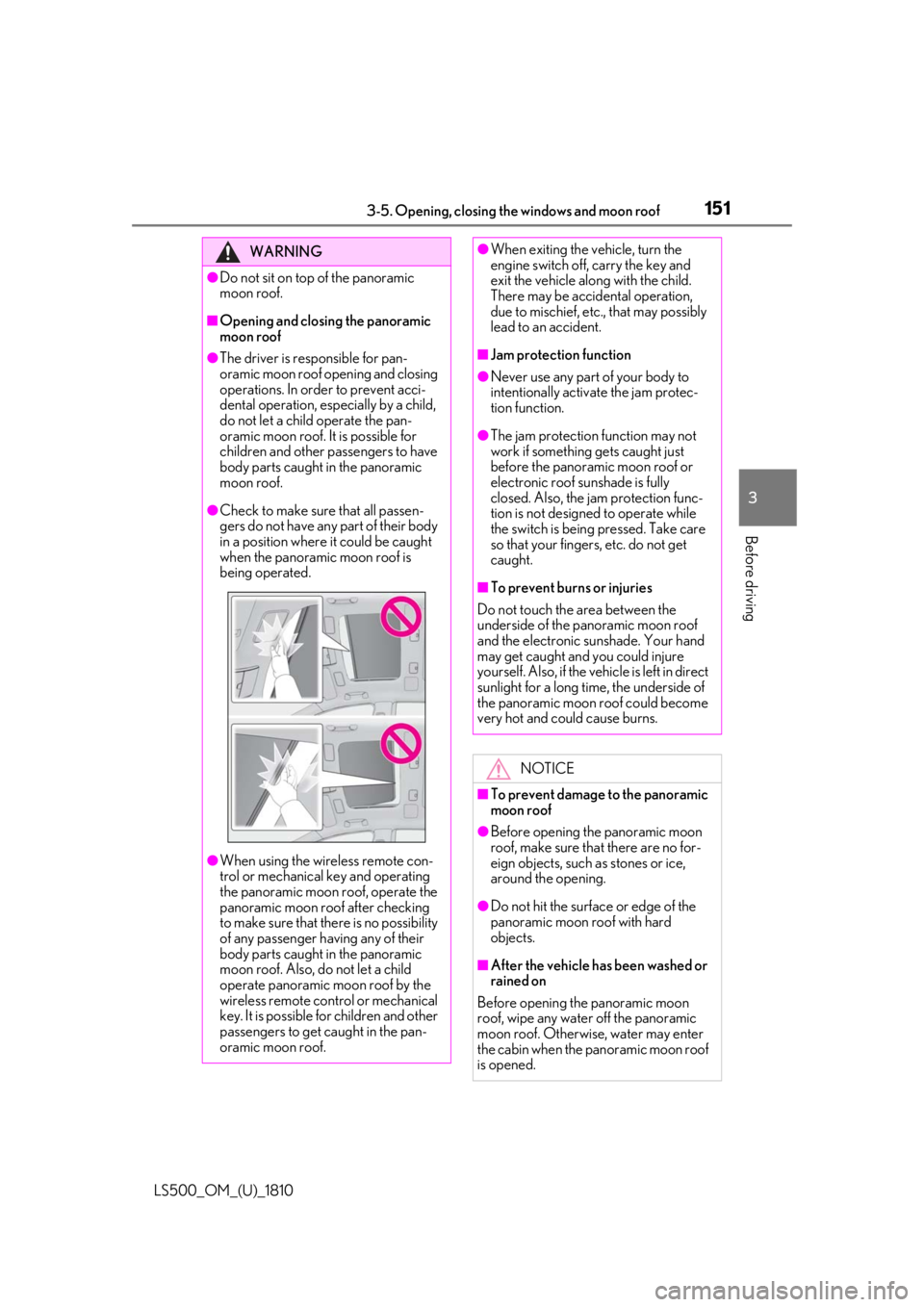
Check to make sure that all passen-
gers do not have any part of their body
in a position where it could be caught
when the panoramic moon roof is
being operated.
●
When using the wireless remote con-
trol or mechanical key and operating
the panoramic moon roof, operate the
panoramic moon roof after checking
to make sure that there is no possibility
of any passenger having any of their
body parts caught in the panoramic
moon roof. Also, do not let a child
operate panoramic moon roof by the
wireless remote control or mechanical
key. It is possible for children and other
passengers to get caught in the pan-
oramic moon roof. ●
When exiting the vehicle, turn the
engine switch off, carry the key and
exit the vehicle along with the child.
There may be accidental operation,
due to mischief, etc., that may possibly
lead to an accident. ■
Jam protection function ●
Never use any part of your body to
intentionally activa te the jam protec-
tion function. ●
The jam protection function may not
work if something gets caught just
before the panoramic moon roof or
electronic roof sunshade is fully
closed. Also, the jam protection func-
tion is not designed to operate while
the switch is being pressed. Take care
so that your fingers, etc. do not get
caught. ■
To prevent burns or injuries
Do not touch the area between the
underside of the panoramic moon roof
and the electronic sunshade. Your hand
may get caught and you could injure
yourself. Also, if the vehicle is left in direct
sunlight for a long time, the underside of
the panoramic moon roof could become
very hot and could cause burns.
NOTICE
■
To prevent damage to the panoramic
moon roof ●
Before opening the panoramic moon
roof, make sure that there are no for-
eign objects, such as stones or ice,
around the opening.
●
Do not hit the surface or edge of the
panoramic moon roof with hard
objects.
■
After the vehicle has been washed or
rained on
Before opening the panoramic moon
roof, wipe any water off the panoramic
moon roof. Otherwise, water may enter
the cabin when the panoramic moon roof
is opened.
Page 160 of 512

160 4-1. Before driving
LS500_OM_(U)_1810 Cargo capacity depends on the total
weight of the occupants.
(Cargo capacity) = (Total load capac-
ity) — (Total weight of occupants)
Steps for Determining Correct Load
Limit —
(1) Locate the statement “The com-
bined weight of occupants and cargo
should never exceed XXX kg or XXX
lbs.” on your vehicle’s placard.
(2) Determine the combined weight of
the driver and passengers that will be
riding in your vehicle.
(3) Subtract the combined weight of
the driver and passengers from XXX
kg or XXX lbs.
(4) The resulting figure equals the
available amount of cargo and luggage
load capacity.
For example, if the “XXX” amount
equals 1400 lbs. and there will be five
150 lb passengers in your vehicle, the
amount of available cargo and luggage
load capacity is 650 lbs. (1400 − 750
(5 150) = 650 lbs.)
(5) Determine the combined weight of
luggage and cargo being loaded on
the vehicle. That weight may not safely
exceed the available cargo and lug-NOTICE
Information on what to do in case of a flat
tire ( P.429)■
When encountering flooded roads
Do not drive on a road that has flooded
after heavy rain etc. Doing so may cause
the following serious damage to the vehi-
cle: ●
Engine stalling●
Short in electrical components●
Engine damage caused by water
immersion
In the event that you drive on a flooded
road and the vehicle is flooded, be sure
to have your Lexus dealer check the fol-
lowing: ●
Brake function●
Changes in quantity and quality of oil
and fluid used for the engine, transmis-
sion, transfer (AWD models), differen-
tial, etc.●
Lubricant condition for the propeller
shaft, bearings and suspension joints
(where possible), and the function of
all joints, bearings, etc.
If the shift control system is damaged by
flooding, it may not be possible to shift
the shift position to P, or from P to other
positions. In this case, contact your Lexus
dealer.
■
When parking the vehicle
Always set the parking brake, and shift
the shift position to P. Failure to do so
may cause the vehicle to move or the
vehicle may accelerate suddenly if the
accelerator pedal is accidentally
depressed. Cargo and luggage Take notice of the following infor-
mation about storage precautions,
cargo capacity and load:
Capacity and distribution
Page 183 of 512
1834-3. Operating the lights and wipers
LS500_OM_(U)_1810 4
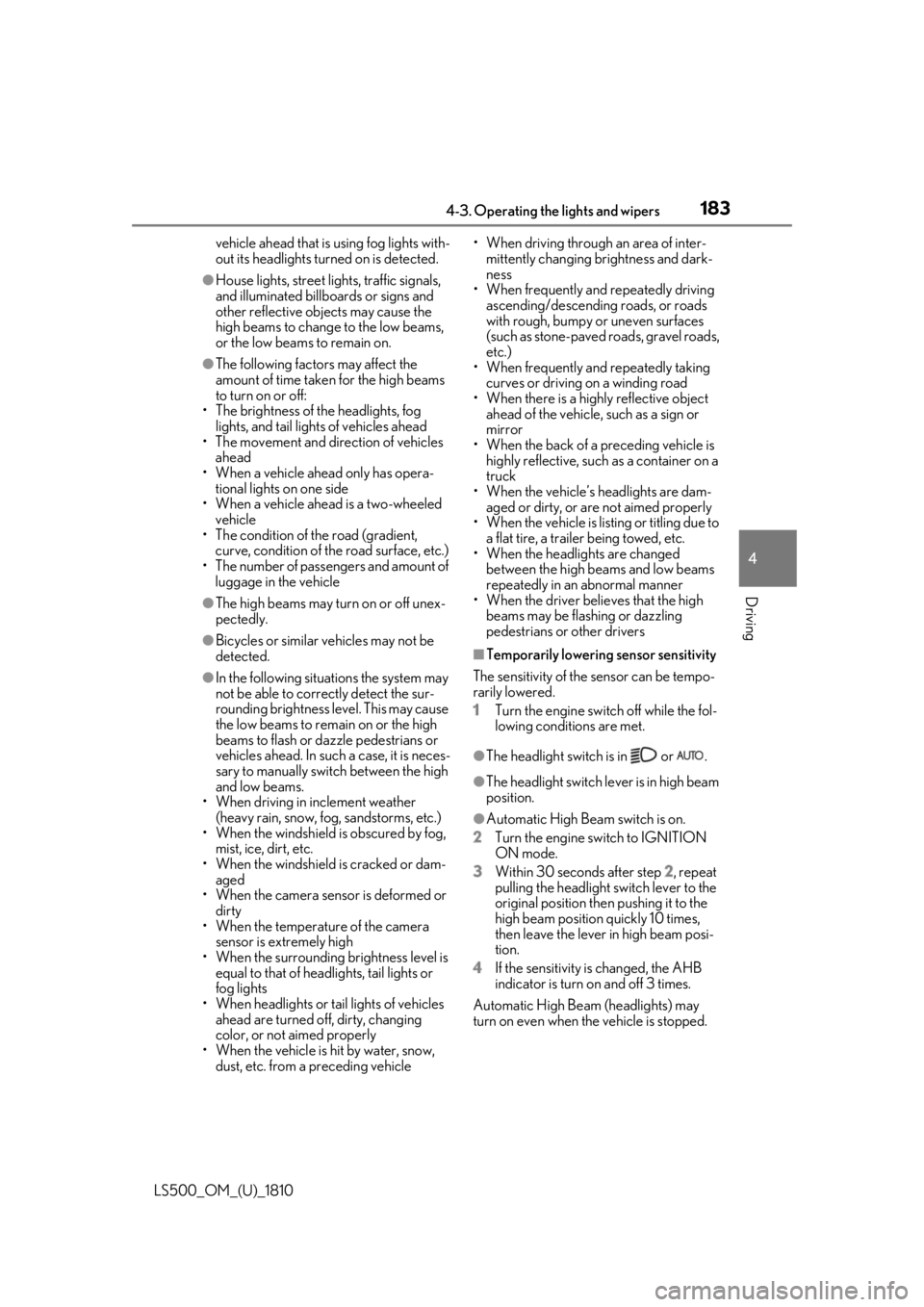
Driving vehicle ahead that is using fog lights with-
out its headlights turned on is detected.●
House lights, street lig hts, traffic signals,
and illuminated billboards or signs and
other reflective objects may cause the
high beams to change to the low beams,
or the low beams to remain on.●
The following factors may affect the
amount of time taken for the high beams
to turn on or off:
• The brightness of the headlights, fog
lights, and tail lights of vehicles ahead
• The movement and direction of vehicles
ahead
• When a vehicle ahead only has opera-
tional lights on one side
• When a vehicle ahead is a two-wheeled
vehicle
• The condition of the road (gradient,
curve, condition of th e road surface, etc.)
• The number of passengers and amount of
luggage in the vehicle●
The high beams may turn on or off unex-
pectedly.●
Bicycles or similar vehicles may not be
detected.●
In the following situations the system may
not be able to correctly detect the sur-
rounding brightness le vel. This may cause
the low beams to remain on or the high
beams to flash or dazzle pedestrians or
vehicles ahead. In such a case, it is neces-
sary to manually switch between the high
and low beams.
• When driving in inclement weather
(heavy rain, snow, fog, sandstorms, etc.)
• When the windshield is obscured by fog,
mist, ice, dirt, etc.
• When the windshield is cracked or dam-
aged
• When the camera sensor is deformed or
dirty
• When the temperature of the camera
sensor is extremely high
• When the surrounding brightness level is
equal to that of head lights, tail lights or
fog lights
• When headlights or tail lights of vehicles
ahead are turned off, dirty, changing
color, or not aimed properly
• When the vehicle is hit by water, snow,
dust, etc. from a preceding vehicle • When driving through an area of inter-
mittently changing brightness and dark-
ness
• When frequently and repeatedly driving
ascending/descending roads, or roads
with rough, bumpy or uneven surfaces
(such as stone-paved roads, gravel roads,
etc.)
• When frequently and repeatedly taking
curves or driving on a winding road
• When there is a highly reflective object
ahead of the vehicle, such as a sign or
mirror
• When the back of a preceding vehicle is
highly reflective, such as a container on a
truck
• When the vehicle’s headlights are dam-
aged or dirty, or are not aimed properly
• When the vehicle is listing or titling due to
a flat tire, a trailer being towed, etc.
• When the headlights are changed
between the high beams and low beams
repeatedly in an abnormal manner
• When the driver believes that the high
beams may be flashing or dazzling
pedestrians or other drivers ■
Temporarily lowering sensor sensitivity
The sensitivity of the sensor can be tempo-
rarily lowered.
1 Turn the engine switch off while the fol-
lowing conditions are met.
●
The headlight switch is in or . ●
The headlight switch lever is in high beam
position. ●
Automatic High Beam switch is on.
2 Turn the engine switch to IGNITION
ON mode.
3 Within 30 seconds after step 2 , repeat
pulling the headlight switch lever to the
original position then pushing it to the
high beam position quickly 10 times,
then leave the lever in high beam posi-
tion.
4 If the sensitivity is changed, the AHB
indicator is turn on and off 3 times.
Automatic High Beam (headlights) may
turn on even when the vehicle is stopped.
Page 186 of 512
186 4-3. Operating the lights and wipers
LS500_OM_(U)_1810 ●
If the wiper is turned to AUTO mode
while the engine switch is in IGNITION
ON mode, the wipers will operate once
to show that AUTO mode is activated.●
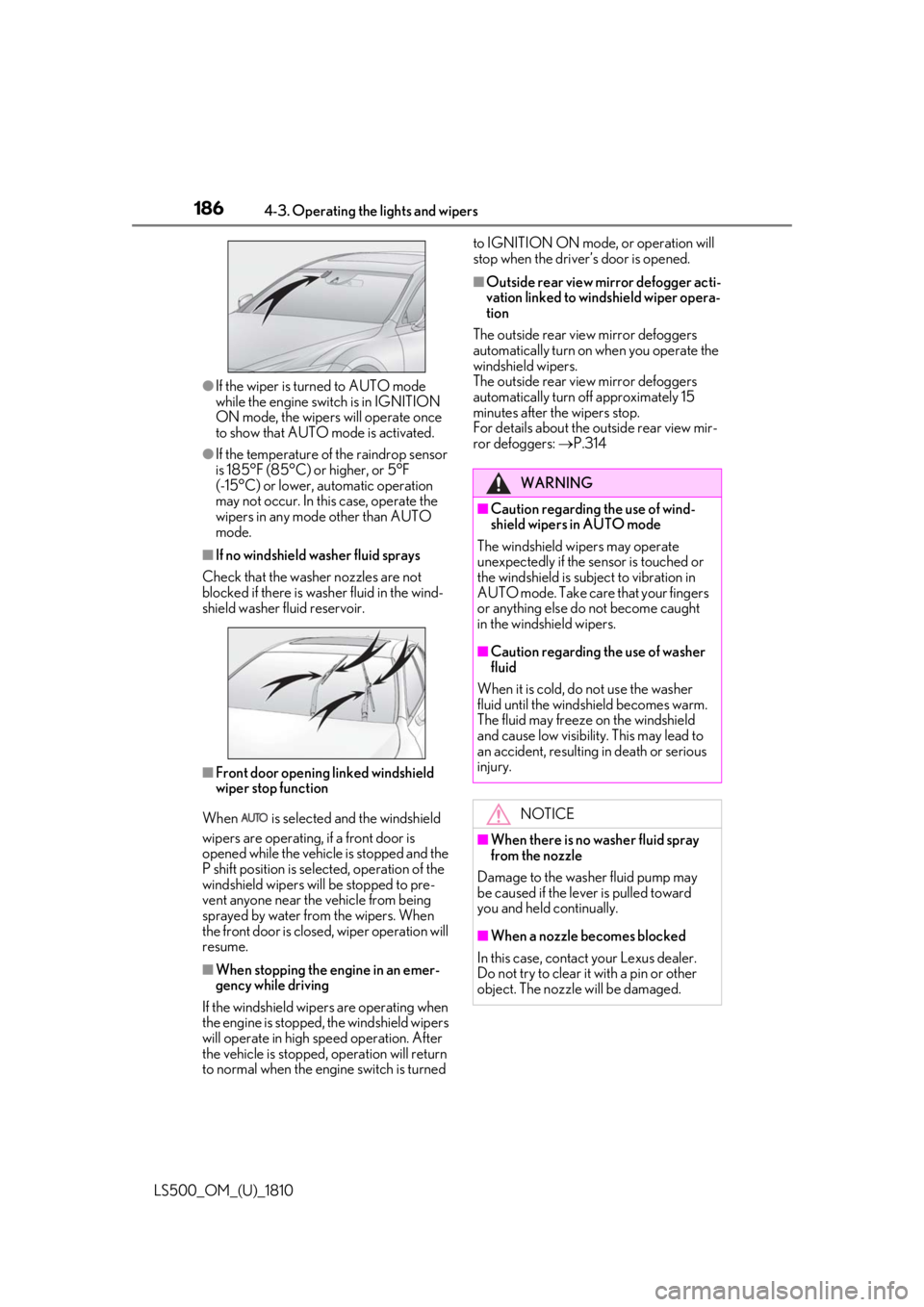
If the temperature of the raindrop sensor
is 185°F (85°C) or higher, or 5°F
(-15°C) or lower, automatic operation
may not occur. In this case, operate the
wipers in any mode other than AUTO
mode.■
If no windshield washer fluid sprays
Check that the washer nozzles are not
blocked if there is wash er fluid in the wind-
shield washer fluid reservoir.
■
Front door opening linked windshield
wiper stop function
When is selected and the windshield
wipers are operating, if a front door is
opened while the vehicle is stopped and the
P shift position is sele cted, operation of the
windshield wipers w ill be stopped to pre-
vent anyone near the vehicle from being
sprayed by water from the wipers. When
the front door is closed, wiper operation will
resume.
■
When stopping the engine in an emer-
gency while driving
If the windshield wipers are operating when
the engine is stopped, the windshield wipers
will operate in high speed operation. After
the vehicle is stopped, operation will return
to normal when the engi ne switch is turned to IGNITION ON mode, or operation will
stop when the driver’s door is opened. ■
Outside rear view mirror defogger acti-
vation linked to windshield wiper opera-
tion
The outside rear view mirror defoggers
automatically turn on when you operate the
windshield wipers.
The outside rear view mirror defoggers
automatically turn off approximately 15
minutes after the wipers stop.
For details about the outside rear view mir-
ror defoggers: P.314
WARNING■
Caution regarding the use of wind-
shield wipers in AUTO mode
The windshield wipers may operate
unexpectedly if the sensor is touched or
the windshield is subj ect to vibration in
AUTO mode. Take care that your fingers
or anything else do not become caught
in the windshield wipers. ■
Caution regarding the use of washer
fluid
When it is cold, do not use the washer
fluid until the windshield becomes warm.
The fluid may freeze on the windshield
and cause low visibility. This may lead to
an accident, resulting in death or serious
injury.
NOTICE
■
When there is no washer fluid spray
from the nozzle
Damage to the washer fluid pump may
be caused if the lever is pulled toward
you and held continually.
■
When a nozzle becomes blocked
In this case, contact your Lexus dealer.
Do not try to clear it with a pin or other
object. The nozzle will be damaged.
Page 192 of 512
192 4-5. Using the driving support systems
LS500_OM_(U)_1810 WARNING■
To avoid malfunction of the front
radar sensor
Observe the following precautions.
Otherwise, the radar sensor may not
operate properly, possibly leading to an
accident resulting in death or serious
injury. ●
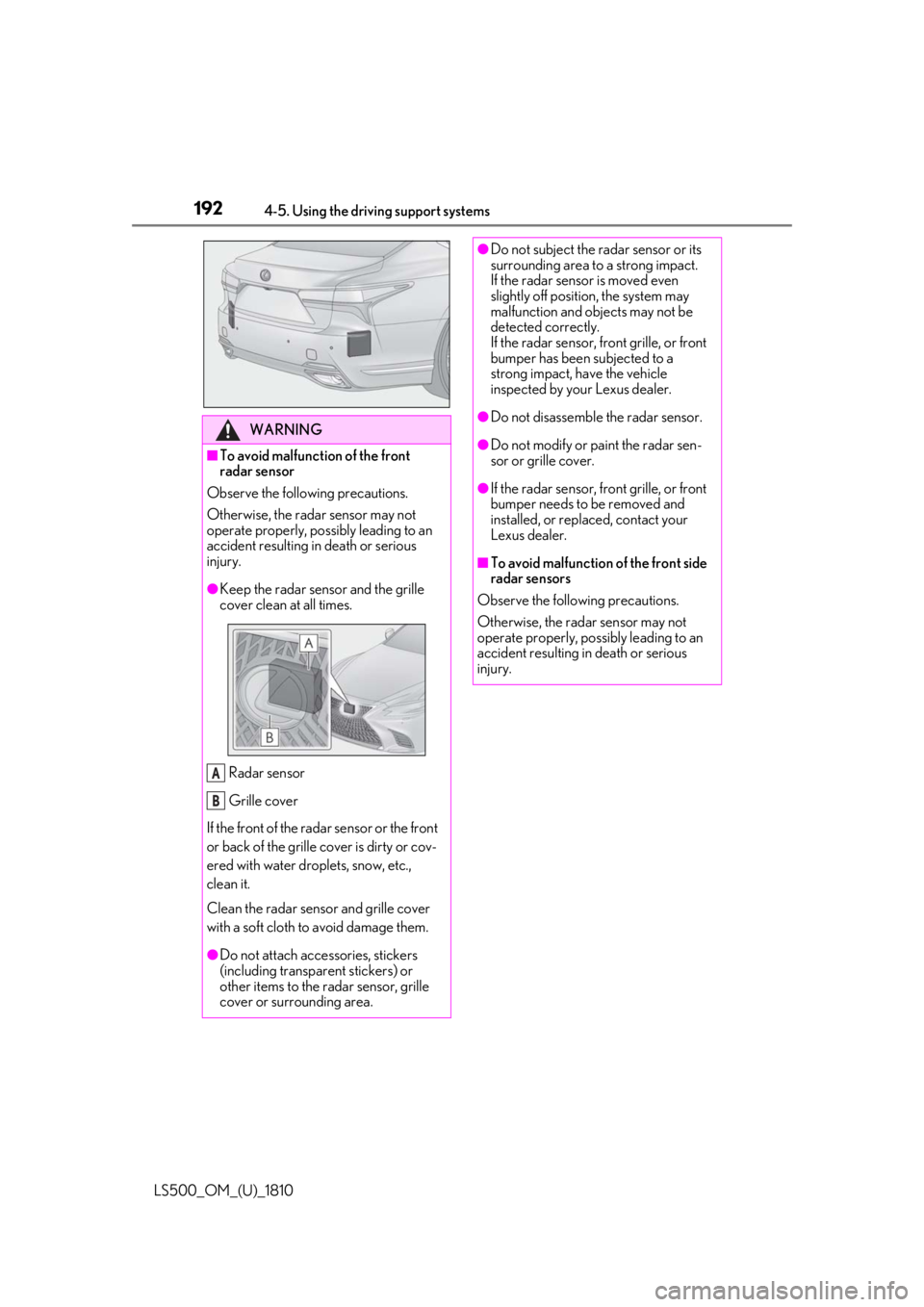
Keep the radar sensor and the grille
cover clean at all times.
Radar sensor
Grille cover
If the front of the rada r sensor or the front
or back of the grille cover is dirty or cov-
ered with water droplets, snow, etc.,
clean it.
Clean the radar sensor and grille cover
with a soft cloth to avoid damage them.
●
Do not attach accessories, stickers
(including transpar ent stickers) or
other items to the radar sensor, grille
cover or surrounding area. A
B ●
Do not subject the radar sensor or its
surrounding area to a strong impact.
If the radar sensor is moved even
slightly off position, the system may
malfunction and objects may not be
detected correctly.
If the radar sensor, front grille, or front
bumper has been subjected to a
strong impact, have the vehicle
inspected by your Lexus dealer. ●
Do not disassemble the radar sensor. ●
Do not modify or paint the radar sen-
sor or grille cover. ●
If the radar sensor, front grille, or front
bumper needs to be removed and
installed, or replaced, contact your
Lexus dealer. ■
To avoid malfunction of the front side
radar sensors
Observe the following precautions.
Otherwise, the radar sensor may not
operate properly, possibly leading to an
accident resulting in death or serious
injury.