high LEXUS LS500 2019 Manual PDF
[x] Cancel search | Manufacturer: LEXUS, Model Year: 2019, Model line: LS500, Model: LEXUS LS500 2019Pages: 512, PDF Size: 9.71 MB
Page 286 of 512
286 4-5. Using the driving support systems
LS500_OM_(U)_1810 *
:If equipped
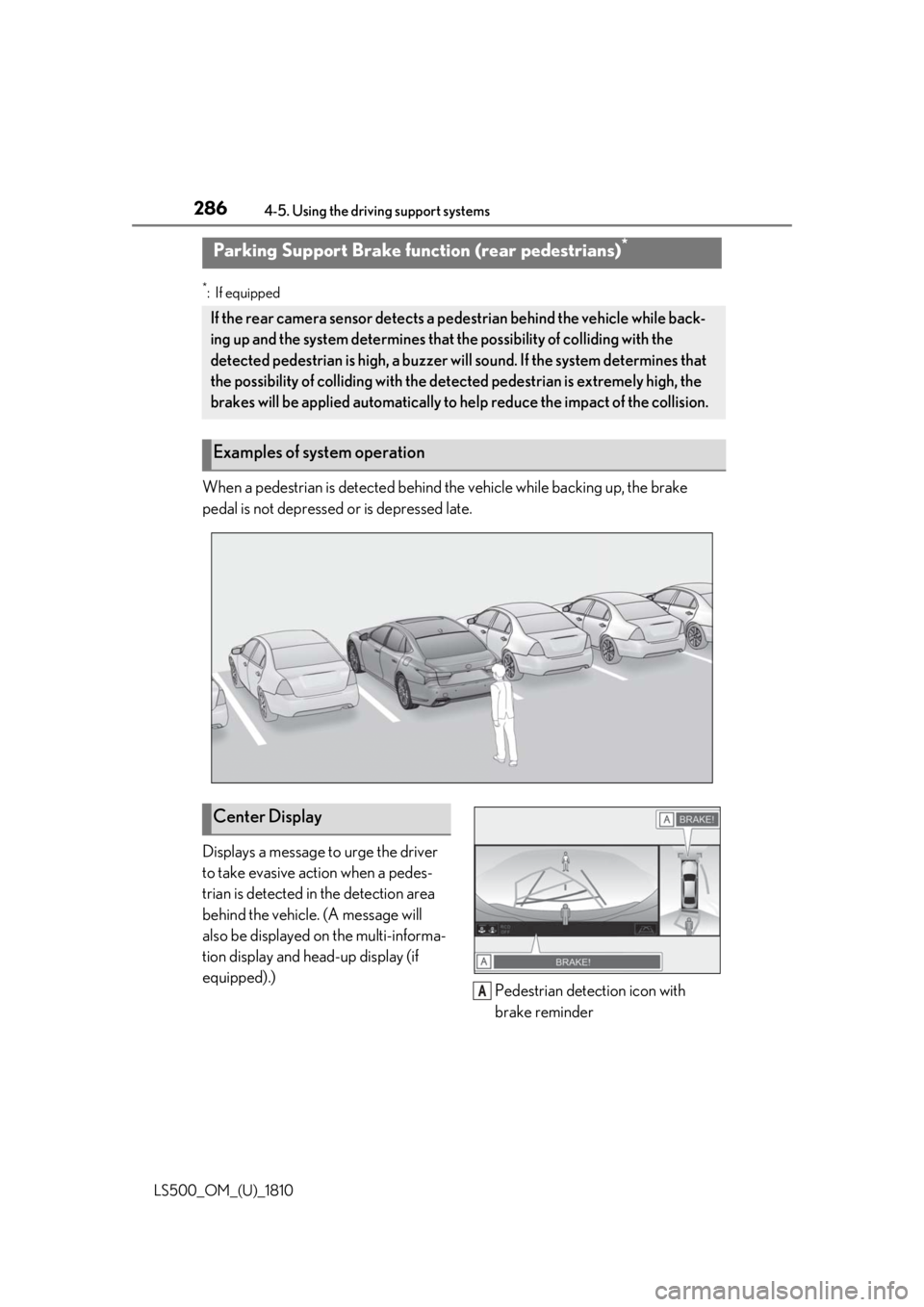
When a pedestrian is detected behind the vehicle while backing up, the brake
pedal is not depressed or is depressed late.
Displays a message to urge the driver
to take evasive action when a pedes-
trian is detected in the detection area
behind the vehicle. (A message will
also be displayed on the multi-informa-
tion display and head-up display (if
equipped).)
Pedestrian detection icon with
brake reminderParking Support Brake func tion (rear pedestrians) *
If the rear camera sensor detects a pe destrian behind the vehicle while back-
ing up and the system determines that the possibility of colliding with the
detected pedestrian is high, a buzzer will sound. If the system determines that
the possibility of colliding with the dete cted pedestrian is extremely high, the
brakes will be applied automatically to he lp reduce the impact of the collision.
Examples of system operation
Center Display
A
Page 287 of 512
2874-5. Using the driving support systems
LS500_OM_(U)_1810 4
Driving
■
Parking Support Brake function (rear
pedestrians) will operate when
The function will oper ate when the PKSB
OFF indicator is not illuminated or flashing
( P.69, 70) and all of the following condi-
tions are met:
●
Engine output restriction control
• The Parking Support Brake is enabled.
• The vehicle speed is 9 mph (15 km/h) or
less.
• The shift position is in R.
• The rear camera sensor detects a pedes-
trian behind the vehicle while backing up
and the system determines that the possi-
bility of colliding with the detected
pedestrian is high.
●
Brake control
• Engine output restriction control is oper-
ating. • The Parking Support Brake determines
that an emergency brake operation is
necessary to avoid a collision with a
pedestrians. ■
The Parking Support Brake function
(rear pedestrians) will stop operating
when
The function will stop operating if any of the
following conditions are met: ●
Engine output restriction control
• The Parking Support Brake is disabled.
• The collision becomes avoidable with
normal brake operation.
• The pedestrian is no longer detected
behind your vehicle. ●
Brake control
• The Parking Support Brake is disabled.
• Approximately 2 seconds have elapsed
since the vehicle was stopped by brake
control.
• The brake pedal is depressed after the
vehicle is stopped by brake control.
• The pedestrian is no longer detected
behind your vehicle. ■
Re-enabling the Parking Support Brake
function (rear pedestrians)
P.275 ■
Detection area of the Parking Support
Brake function (rear pedestrians)
The detection area of the Parking Support
Brake function (rear pedestrians) differs
from the detection area of the RCD func-
tion ( P.268). Therefore, even if the RCD
function detects a vehicle and provides an
alert, the Parking Support Brake function
(rear-crossing vehicles) may not start oper-
ating.
■
Situations in which the system may not
operate properly
●
Some pedestrians, such as the following,
may not be detected by the Parking Sup-
port Brake function (rear pedestrians),
preventing the function from operating
properly:
• Pedestrians who are bending forward or
squatting
• Pedestrians who are lying down
• Pedestrians who are running
• Pedestrians who suddenly enter the
detection areaWARNING■
If the Parking Support Brake function
(rear pedestrians) operates unneces-
sarily
Depress the brake pedal immediately
after the Parking Support Brake function
(rear pedestrians) operates. (Operation
of the function is canceled by depressing
the brake pedal.) ■
Correct use of the Parking Support
Brake function (rear pedestrians)
Do not overly rely on the Parking Sup-
port Brake function (rear pedestrians).
Depending on the road conditions, vehi-
cle conditions and weather, this function
may not operate correctly. As the detec-
tion performance of the rear camera is
limited, always drive safely, taking care to
observe your surroundings.
Additionally, if the PKSB OFF indictor is
flashing or a warning message is dis-
played on the center display indicating
that the Parking Support Brake function
(rear pedestrians) is unavailable, the
function cannot be used. Even if these
warnings are not output, the driver is
always responsible for paying attention
to the vehicle’s surro undings and driving
safely.
Page 292 of 512
292 4-5. Using the driving support systems
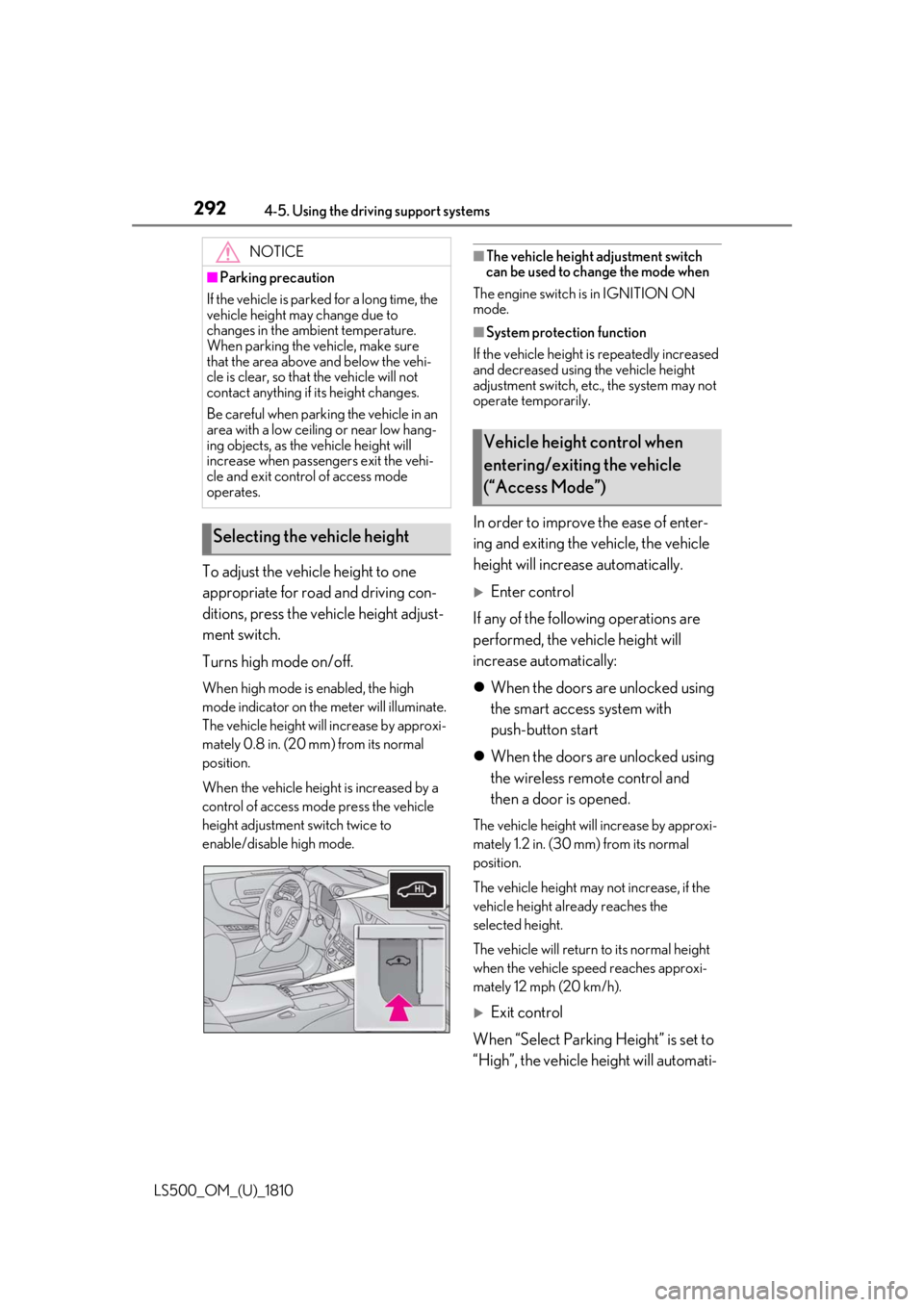
LS500_OM_(U)_1810 To adjust the vehicle height to one
appropriate for road and driving con-
ditions, press the vehicle height adjust-
ment switch.
Turns high mode on/off. When high mode is enabled, the high
mode indicator on the meter will illuminate.
The vehicle height will increase by approxi-
mately 0.8 in. (20 mm) from its normal
position.
When the vehicle height is increased by a
control of access mo de press the vehicle
height adjustment switch twice to
enable/disable high mode. ■
The vehicle height adjustment switch
can be used to change the mode when
The engine switch is in IGNITION ON
mode. ■
System protection function
If the vehicle height is repeatedly increased
and decreased using the vehicle height
adjustment switch, etc ., the system may not
operate temporarily.
In order to improve the ease of enter-
ing and exiting the vehicle, the vehicle
height will increase automatically.
Enter control
If any of the following operations are
performed, the vehicle height will
increase automatically:
When the doors are unlocked using
the smart access system with
push-button start
When the doors are unlocked using
the wireless remote control and
then a door is opened. The vehicle height will increase by approxi-
mately 1.2 in. (30 mm) from its normal
position.
The vehicle height may not increase, if the
vehicle height al ready reaches the
selected height.
The vehicle will return to its normal height
when the vehicle speed reaches approxi-
mately 12 mph (20 km/h).
Exit control
When “Select Parking Height” is set to
“High”, the vehicle height will automati-NOTICE■
Parking precaution
If the vehicle is parked for a long time, the
vehicle height may change due to
changes in the ambient temperature.
When parking the vehicle, make sure
that the area above and below the vehi-
cle is clear, so that the vehicle will not
contact anything if its height changes.
Be careful when parking the vehicle in an
area with a low ceiling or near low hang-
ing objects, as the vehicle height will
increase when passengers exit the vehi-
cle and exit control of access mode
operates.
Selecting the vehicle height Vehicle height control when
entering/exiting the vehicle
(“Access Mode”)
Page 295 of 512

2954-5. Using the driving support systems
LS500_OM_(U)_1810 4
Driving automatically controlled to reduce the
vehicle speed and that helps reduce
the possibility of further damage due to
a secondary collision. ■
TRAC (Traction Control)
Helps to maintain drive power and pre-
vent the drive wheels from spinning
when starting the vehicle or accelerat-
ing on slippery roads ■
Hill-start assist control
Helps to reduce the backward move-
ment of the vehicle when starting on an
uphill ■
VGRS (Variable Gear Ratio Steer-
ing) (if equipped)
Adjusts the front wheel turning angle in
accordance with the vehicle speed and
steering wheel movement ■
DRS (Dynamic Rear Steering) (if
equipped)
Contributes to the turning characteris-
tics and responsiveness of the vehicle
by adjusting the rear wheel angle of the
vehicle in accordance with steering
wheel movement. ■
EPS (Electric Power Steering)
Employs an electric motor to reduce
the amount of effort needed to turn the
steering wheel. ■
Active stabilizer suspension sys-
tem (if equipped)
Reduces sway when cornering accord-
ing to steering wheel movement in
order to maintain a stable vehicle pos-
ture. ■
Adaptive Variable Suspension Sys-
tem (if equipped)
By independently controlling the
damping force of th e shock absorbers
for each of the 4 wheels according to
the road and driving conditions, this
system helps riding comfort with supe-
rior vehicle stability, and helps good
vehicle posture.
Also, the damping force changes
depending on the selected driving
mode. ( P.289) ■
LDH (Lexus Dynamic Handling
system) (if equipped)
Provides integrated control of the
VGRS, DRS and EPS. Contributes to
turning characteristics at low speeds,
responsiveness at medium speeds and
safety at high speeds by controlling the
steering angle of the front and rear
wheels in accordance with the steering
wheel operation and vehicle speed. ■
VDIM (Vehicle Dynamics Inte-
grated Management)
Provides integrated control of the
ABS, brake assist, TRAC, VSC,
hill-start assist control, EPS, VGRS (if
equipped), DRS (if equipped), active
stabilizer suspension system (if
equipped) and Adaptive Variable Sus-
pension System (if equipped)
Helps to maintain vehicle stability when
swerving on slippery road surfaces by
controlling the brakes, engine output,
steering assist, and steering ratio
Page 298 of 512
298 4-5. Using the driving support systems
LS500_OM_(U)_1810 (10 km/h) or more and the airbag sensor
detects a collision. (The Secondary Colli-
sion Brake will not operate when the vehicle
speed is below approximately 6 mph [10
km/h].) ■
Secondary Collision Brake automatic
cancellation
The Secondary Collision Brake is automati-
cally canceled in the following situations: ●
The vehicle speed drops below approxi-
mately 6 mph (10 km/h)●
A certain amount of time elapses during
operation●
The accelerator pedal is depressed a
large amount■
When “Check VGRS System” or
“CHECK DRS” is displayed on the
multi-information display
The VGRS or DRS may not operate prop-
erly. Have the vehicle inspected by your
Lexus dealer.
WARNING■
The ABS does not operate effectively
when●
The limits of tire gripping performance
have been exceeded (such as exces-
sively worn tires on a snow covered
road).
●
The vehicle hydroplanes while driving
at high speed on wet or slick roads.
■
Stopping distance when the ABS is
operating may exceed that of normal
conditions
The ABS is not designed to shorten the
vehicle’s stopping di stance. Always main-
tain a safe distance from the vehicle in
front of you, especially in the following
situations:
●
When driving on dirt, gravel or
snow-covered roads
●
When driving with tire chains
●
When driving over bumps in the road ●
When driving over roads with potholes
or uneven surfaces ■
TRAC/VSC may not operate effec-
tively when
Directional control and power may not
be achievable while driving on slippery
road surfaces, even if the TRAC/VSC
system is operating. Drive the vehicle
carefully in conditions where stability and
power may be lost. ■
Hill-start assist control does not oper-
ate effectively when ●
Do not overly rely on hill-start assist
control. Hill-start assist control may
not operate effectively on steep
inclines and roads covered with ice. ●
Unlike the parking brake, hill-start
assist control is not intended to hold
the vehicle stationary for an extended
period of time. Do not attempt to use
hill-start assist control to hold the vehi-
cle on an incline, as doing so may lead
to an accident. ■
When the TRAC/VSC is activated
(vehicles without Lexus Safety Sys-
tem + A)
The slip indicator light flashes. Always
drive carefully. Reckless driving may
cause an accident. Exercise particular
care when the indicator light flashes.
■
When the TRAC/ABS/VSC is acti-
vated (vehicles with Lexus Safety Sys-
tem + A)
The slip indicator light flashes. Always
drive carefully. Reckless driving may
cause an accident. Exercise particular
care when the indicator light flashes.
■
When the TRAC/VSC systems are
turned off
Be especially careful and drive at a speed
appropriate to the road conditions. As
these are the systems to help ensure
vehicle stability and driving force, do not
turn the TRAC/VSC systems off unless
necessary.
Page 314 of 512
314 5-3. Using the air conditioning system and defogger
LS500_OM_(U)_1810 ■
Changing the air flow mode
P.316 ■
Switching between outside air and
recirculated air modes
Press the outside/recirculated air
mode switch. The mode changes as follows each time
the switch is pressed.
automatic mode (outside air
mode) (recirculated air mode)
automatic mode
When the system is switched to automatic
mode, the air conditioning system operates
automatically. ■
Defogging the windshield
Defoggers are used to defog the wind-
shield and front side windows.
Press the windshield defogger switch. Set the outside/reci rculated air mode
switch to outside air mode if the recircu-
lated air mode is used. (It may switch auto-
matically.)
To defog the windshield and the side win-
dows quickly, turn the air flow and tem-
perature up.
To return to the previous mode, press the
windshield defogger switch again when the
windshield is defogged.
■
Defogging the rear window and
outside rear view mirrors
Defoggers are used to defog the rear
window, and to remove raindrops, dew
and frost from the outside rear view
mirrors.
Press the rear window and outside rear
view mirror defoggers switch.
The defoggers will automatically turn off after a while. The operation time changes
according to the ambient temperature and
vehicle speed. ■
Windshield wiper de-icer (if
equipped)
P.319 ■
When the outside temperature exceeds
75°F (24°C) and the air conditioning
system is on ●
In order to reduce the air conditioning
power consumption, the air conditioning
system may switch to recirculated air
mode automatically. This may also
reduce fuel consumption. ●
It is possible to switch to outside air mode
at any time by pressing the outside/recir-
culated air mode switch. ■
Fogging up of the windows
The windows will easily fog up when the
humidity in the vehicle is high. Turning
“A/C” on will dehumidify the air from the
outlets and defog the windshield effectively. ●
If you turn “A/C” off, the windows may
fog up more easily. ●
The windows may fog up if the recircu-
lated air mode is used. ■
Outside/recirculated air mode ●
When driving on dusty roads such as tun-
nels or in heavy traffic, set the out-
side/recirculated air mode switch to the
recirculated air mode. This is effective in
preventing outside air from entering the
vehicle interior. During cooling opera-
tion, setting the recirc ulated air mode will
also cool the vehicle interior effectively.
●
Outside/recirculated air mode may auto-
matically switch depending on the tem-
perature setting or the inside
temperature.
■
Registering air conditioning settings to
electronic keys
●
Unlocking the vehicle using an electronic
key and turning the engine switch to
IGNITION ON mode will recall that
key’s registered air conditioning settings.
Page 329 of 512
3295-3. Using the air conditio ning system and defogger
LS500_OM_(U)_1810 5
Interior features ■
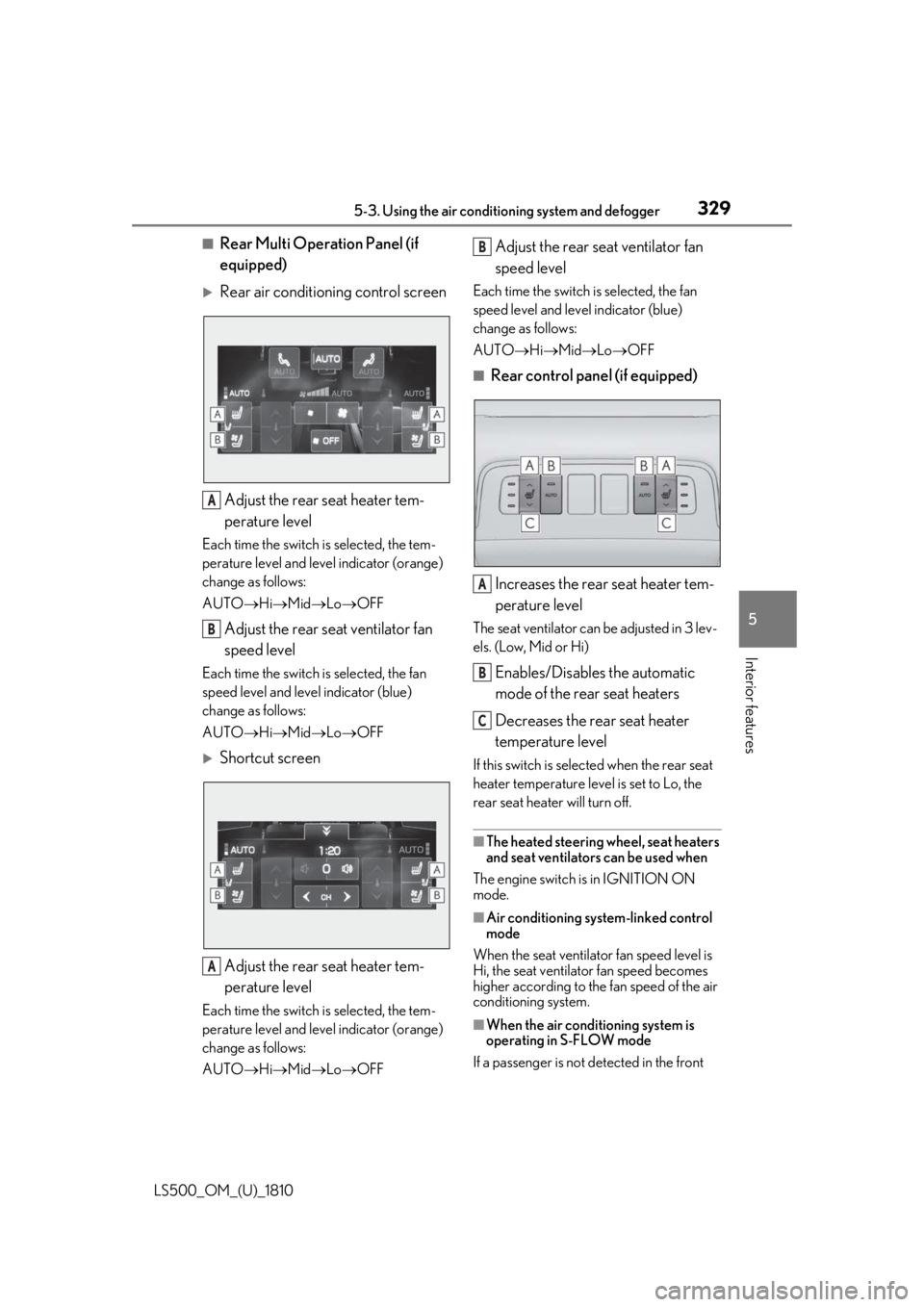
Rear Multi Operation Panel (if
equipped)
Rear air conditioning control screen
Adjust the rear seat heater tem-
perature levelEach time the switch is selected, the tem-
perature level and leve l indicator (orange)
change as follows:
AUTO Hi Mid Lo OFF
Adjust the rear seat ventilator fan
speed levelEach time the switch is selected, the fan
speed level and leve l indicator (blue)
change as follows:
AUTO Hi Mid Lo OFF
Shortcut screen
Adjust the rear seat heater tem-
perature levelEach time the switch is selected, the tem-
perature level and leve l indicator (orange)
change as follows:
AUTO Hi Mid Lo OFF Adjust the rear seat ventilator fan
speed level Each time the switch is selected, the fan
speed level and level indicator (blue)
change as follows:
AUTO Hi Mid Lo OFF■
Rear control panel (if equipped)
Increases the rear seat heater tem-
perature level The seat ventilator can be adjusted in 3 lev-
els. (Low, Mid or Hi)
Enables/Disables the automatic
mode of the rear seat heaters
Decreases the rear seat heater
temperature level If this switch is select ed when the rear seat
heater temperature level is set to Lo, the
rear seat heater will turn off.
■
The heated steering wheel, seat heaters
and seat ventilators can be used when
The engine switch is in IGNITION ON
mode.
■
Air conditioning system-linked control
mode
When the seat ventilator fan speed level is
Hi, the seat ventilato r fan speed becomes
higher according to the fan speed of the air
conditioning system.
■
When the air conditioning system is
operating in S-FLOW mode
If a passenger is not detected in the front A
B
A B
A
B
C
Page 336 of 512
336 5-5. Using the storage features
LS500_OM_(U)_1810
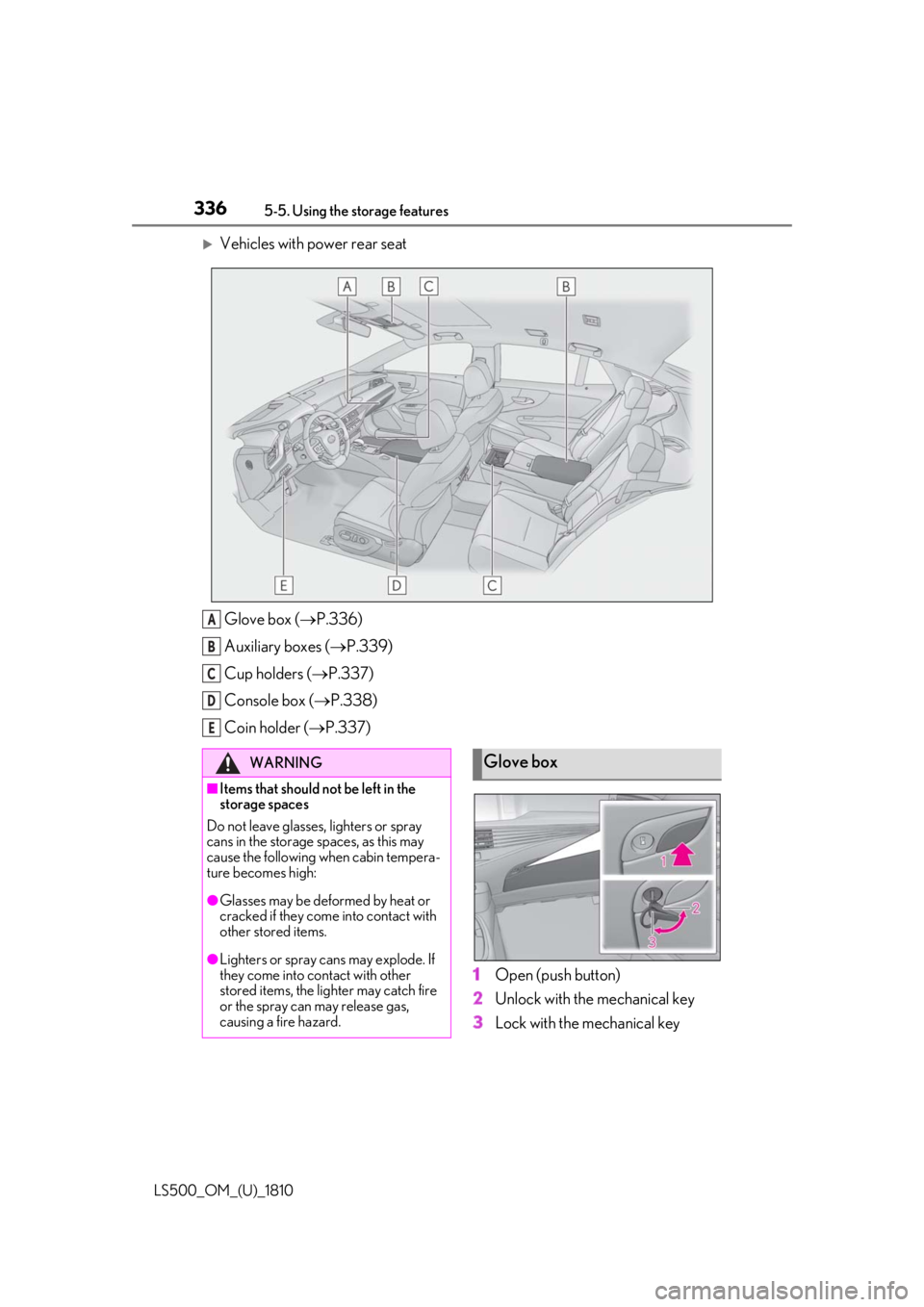
Vehicles with power rear seat
Glove box ( P.336)
Auxiliary boxes ( P.339)
Cup holders ( P.337)
Console box ( P.338)
Coin holder ( P.337)
1 Open (push button)
2 Unlock with the mechanical key
3 Lock with the mechanical keyA
B
C
D
E
WARNING■
Items that should not be left in the
storage spaces
Do not leave glasses, lighters or spray
cans in the storage spaces, as this may
cause the following when cabin tempera-
ture becomes high:
●
Glasses may be deformed by heat or
cracked if they come into contact with
other stored items.
●
Lighters or spray cans may explode. If
they come into contact with other
stored items, the lighter may catch fire
or the spray can may release gas,
causing a fire hazard. Glove box
Page 343 of 512
3435-6. Using the other interior features
LS500_OM_(U)_1810 5
Interior features 5-6.Using the other interior features
The USB charging ports are used to
supply 2.1 A of electricity at 5 V to
external devices.
The USB charging ports are for
charging only. They are not designed
for data transfer or other purposes.
Depending on the external device, it
may not charge properly. Refer to the
manual included with the device
before using a USB charging port. ■
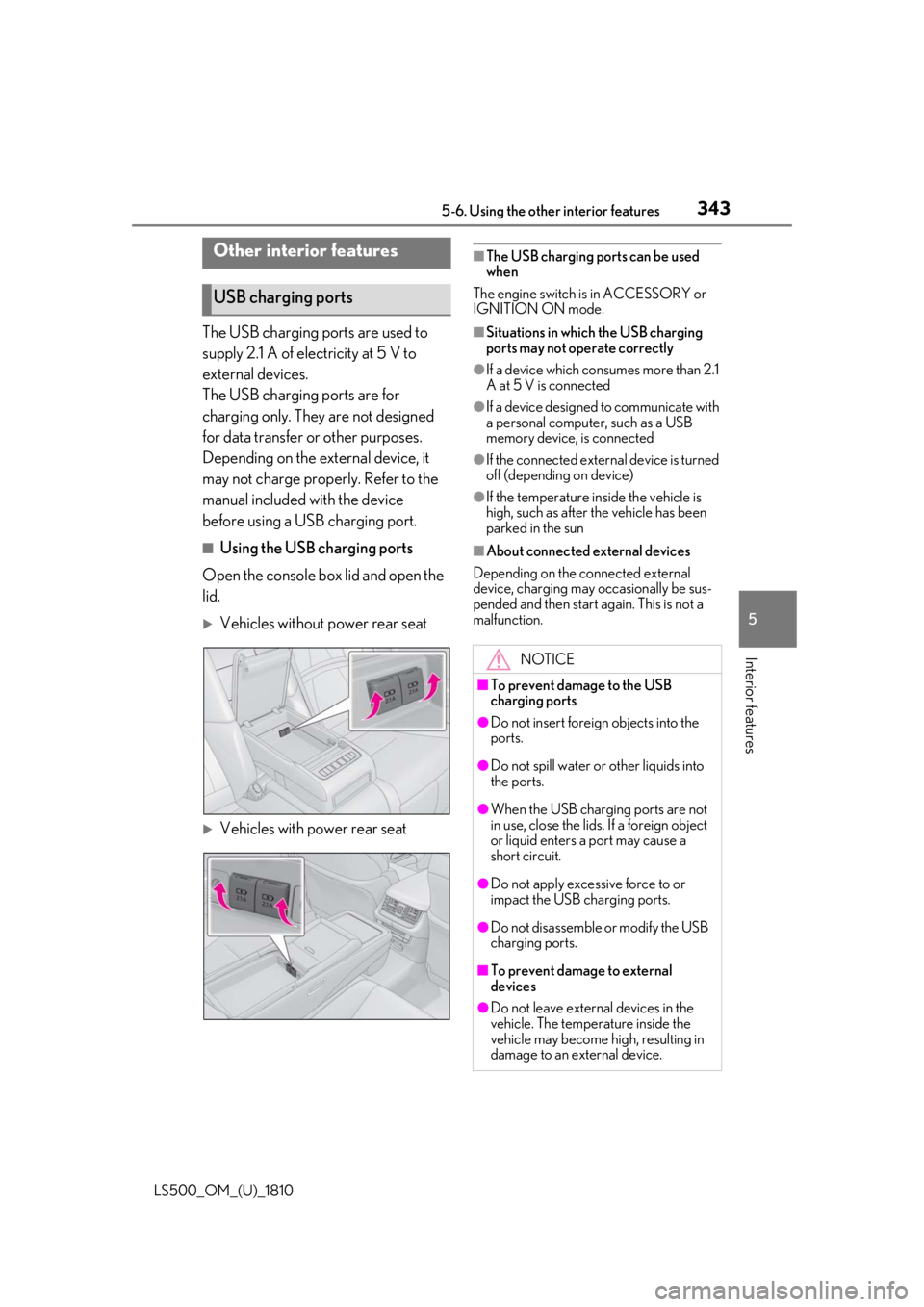
Using the USB charging ports
Open the console box lid and open the
lid.
Vehicles without power rear seat
Vehicles with power rear seat ■
The USB charging ports can be used
when
The engine switch is in ACCESSORY or
IGNITION ON mode. ■
Situations in whic h the USB charging
ports may not operate correctly ●
If a device which consumes more than 2.1
A at 5 V is connected ●
If a device designed to communicate with
a personal computer, such as a USB
memory device, is connected ●
If the connected external device is turned
off (depending on device) ●
If the temperature inside the vehicle is
high, such as after the vehicle has been
parked in the sun ■
About connected external devices
Depending on the connected external
device, charging may occasionally be sus-
pended and then start again. This is not a
malfunction.Other interior features
USB charging ports
NOTICE■
To prevent damage to the USB
charging ports ●
Do not insert foreign objects into the
ports.
●
Do not spill water or other liquids into
the ports.
●
When the USB charging ports are not
in use, close the lids. If a foreign object
or liquid enters a port may cause a
short circuit.
●
Do not apply excessive force to or
impact the USB charging ports.
●
Do not disassemble or modify the USB
charging ports.
■
To prevent damage to external
devices
●
Do not leave external devices in the
vehicle. The temperature inside the
vehicle may become high, resulting in
damage to an external device.
Page 346 of 512
346 5-6. Using the other interior features
LS500_OM_(U)_1810 ■
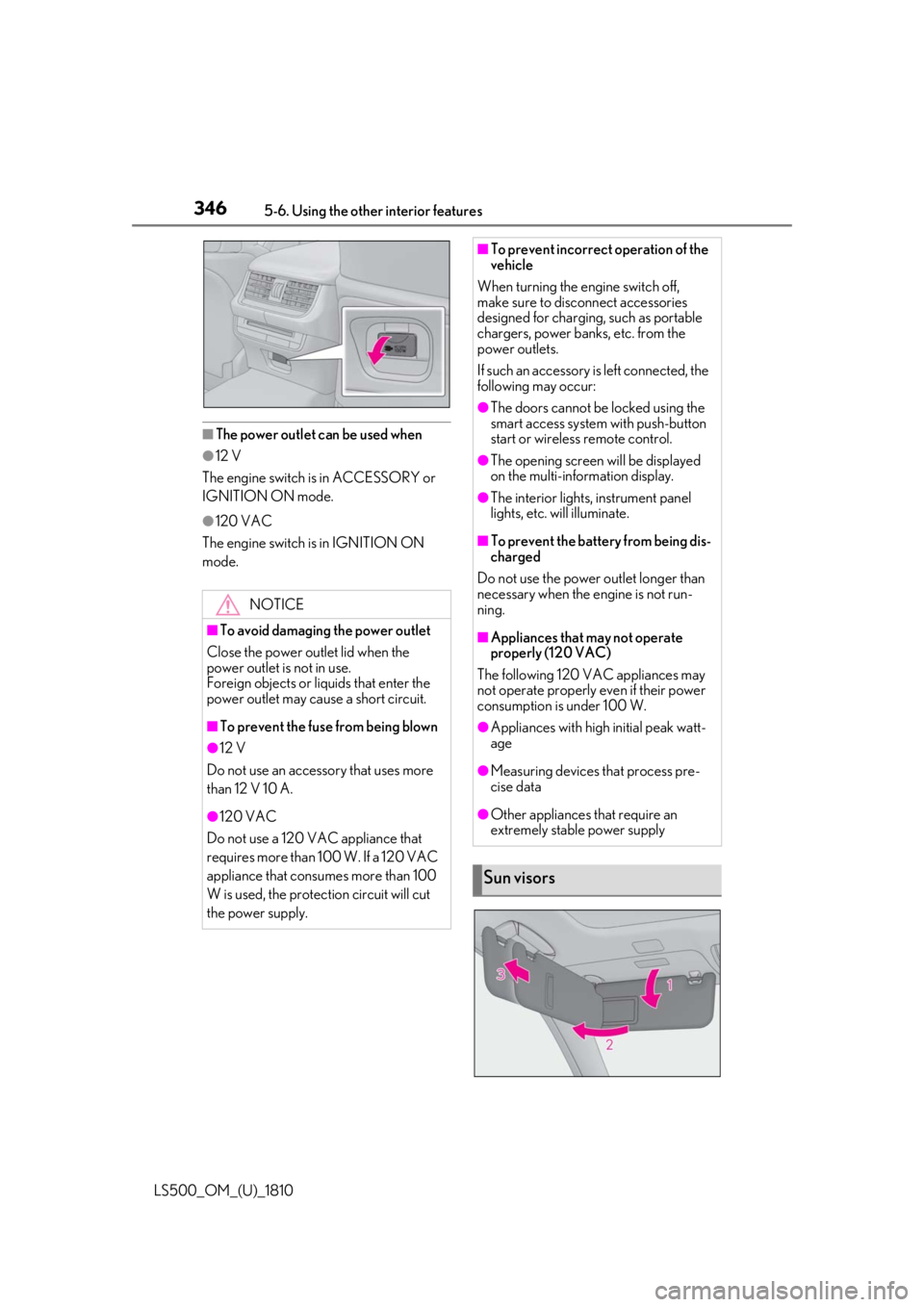
The power outlet can be used when●
12 V
The engine switch is in ACCESSORY or
IGNITION ON mode. ●
120 VAC
The engine switch is in IGNITION ON
mode.
NOTICE■
To avoid damaging the power outlet
Close the power outlet lid when the
power outlet is not in use.
Foreign objects or liquids that enter the
power outlet may cause a short circuit. ■
To prevent the fuse from being blown●
12 V
Do not use an accessory that uses more
than 12 V 10 A.
●
120 VAC
Do not use a 120 VAC appliance that
requires more than 100 W. If a 120 VAC
appliance that consumes more than 100
W is used, the protection circuit will cut
the power supply. ■
To prevent incorrect operation of the
vehicle
When turning the engine switch off,
make sure to disc onnect accessories
designed for charging , such as portable
chargers, power banks, etc. from the
power outlets.
If such an accessory is left connected, the
following may occur: ●
The doors cannot be locked using the
smart access system with push-button
start or wireless remote control. ●
The opening screen will be displayed
on the multi-information display. ●
The interior lights, instrument panel
lights, etc. will illuminate. ■
To prevent the battery from being dis-
charged
Do not use the power outlet longer than
necessary when the engine is not run-
ning. ■
Appliances that may not operate
properly (120 VAC)
The following 120 VAC appliances may
not operate properly even if their power
consumption is under 100 W. ●
Appliances with high initial peak watt-
age
●
Measuring devices that process pre-
cise data
●
Other appliances that require an
extremely stable power supply
Sun visors